


 Video Converter Ultimate
 บันทึกหน้าจอ
 ซ่อมวิดีโอ
วิธีที่สะดวกที่สุดในการแปลง MP3 เป็น M4R สำหรับอุปกรณ์ Apple
คุณเคยคิดจะเปลี่ยนเพลงโปรดของคุณให้กลายเป็นเสียงเรียกเข้าบน iPhone ไหม? มันจะเป็นไปได้หรือเปล่า? แน่นอนว่าเป็นไปได้ คุณแค่ต้องแปลงไฟล์ก่อนเท่านั้น ทำไมเราต้องแปลงไฟล์ก่อน? เพราะเราสามารถตั้งค่าให้เป็นเสียงริงโทนได้หรือ? สาเหตุหลักก็คือ หากต้องการตั้งไฟล์ใดไฟล์หนึ่งให้เป็นเสียงเรียกเข้าของเพลง ไฟล์นั้นจำเป็นต้องอยู่ในรูปแบบ M4R ดังนั้นคุณจึงต้องหาโปรแกรมแปลงไฟล์ MP3 เป็น M4R สำหรับ iTunes ที่เหมาะกับคุณ บทความนี้นำเสนอวิธีการต่าง ๆ ในการแปลงไฟล์ MP3 ของคุณ รวมถึงการแปลง MP3 เป็น M4Rแบบเป็นชุดด้วย เพียงอ่านเนื้อหาด้านล่างต่อไป.

ส่วนที่ 1 วิธีที่เป็นไปได้มากที่สุดในการแปลง MP3 เป็น M4R
Video Converter Ultimate เป็นเครื่องมือที่น่าเชื่อถือที่สุดที่คุณสามารถใช้เพื่อแปลง MP3 เป็น M4R ไม่ใช่แค่ไฟล์เดียว แต่ยังสามารถแปลงแบตช์จาก MP3 เป็น MP4 ได้อีกด้วย เป็นตัวแปลงที่สามารถผลิตวิดีโอ HD และเสียงแบบไม่สูญเสียข้อมูลได้ อันที่จริง เหมาะและแนะนำให้แปลงไฟล์โดยไม่สูญเสียคุณภาพดั้งเดิม ความเร็วเร็วกว่าตัวแปลงทั่วไป 30 เท่า นอกจากนี้ หากคุณกำลังแปลงเพลย์ลิสต์เพื่อบันทึกในโทรศัพท์ของคุณ เครื่องมือนี้สามารถทำงานให้คุณได้ ได้อย่างง่ายดายและไม่มีเหงื่อ ในขณะเดียวกันนี่คือคุณสมบัติอื่นๆ ที่คุณสามารถเพลิดเพลินได้ นอกเหนือจากการแปลงไฟล์เสียง นอกจากนี้ยังมีการเขียนคำแนะนำทีละขั้นตอนไว้ด้านล่างเพื่อใช้อ้างอิงหากคุณตัดสินใจใช้
◆ แก้ไขข้อมูลเมตา
◆ การเร่งความเร็ว GPU ความเร็วสูง
◆ การสนับสนุนทางเทคนิคแบบเรียลไทม์
◆ รองรับการบีบอัดวิดีโอ
ขั้นตอนที่ 1. หากต้องการใช้งาน ให้ดาวน์โหลดแอปได้โดยคลิกปุ่มดาวน์โหลดด้านล่าง เมื่อดาวน์โหลดแอปลงบน Windows หรือ Mac ของคุณแล้ว ให้เปิดโปรแกรมขึ้นมา.
ดาวน์โหลดฟรีสำหรับ Windows 7 หรือใหม่กว่าดาวน์โหลดอย่างปลอดภัย
ดาวน์โหลดฟรีสำหรับ MacOS 10.7 หรือใหม่กว่าดาวน์โหลดอย่างปลอดภัย
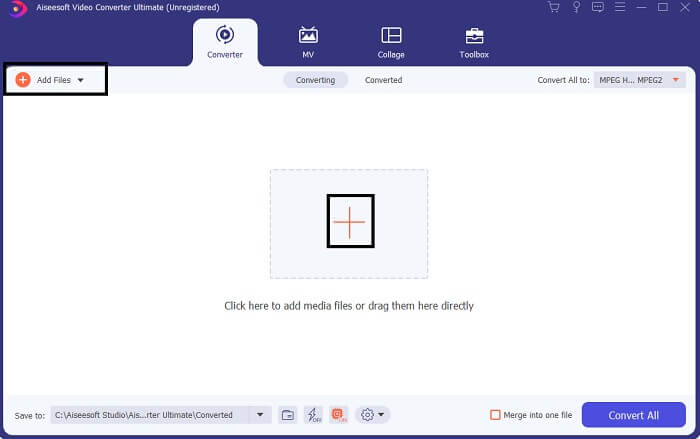
ขั้นตอนที่ 2. จากหน้าหลักของเครื่องมือ คุณจะเห็นตัวเลือกอัปโหลดไฟล์อยู่สองแบบ คุณสามารถคลิกไอคอนเครื่องหมายบวกตรงกึ่งกลางหน้าจอ หรือคลิกปุ่มAdd Filesที่มุมบนซ้าย เลือกไฟล์ที่ต้องการแล้วอัปโหลด.
ขั้นตอนที่ 3. เพื่อให้ได้รูปแบบไฟล์ตามที่คุณต้องการ ให้เปลี่ยนฟอร์แมตโดยคลิกเมนูแบบดรอปดาวน์ที่อยู่มุมขวาบนของอินเทอร์เฟซ.
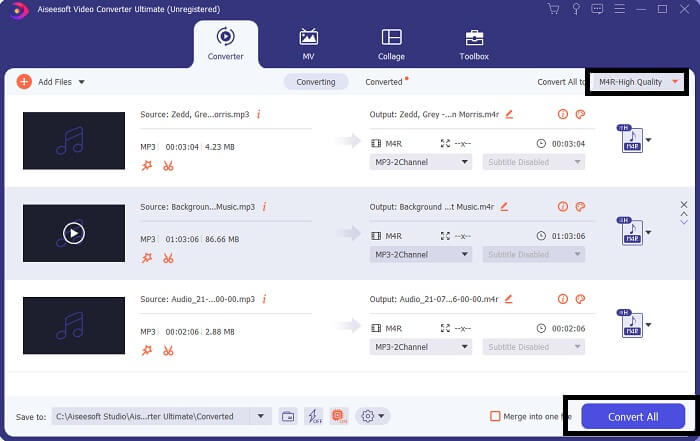
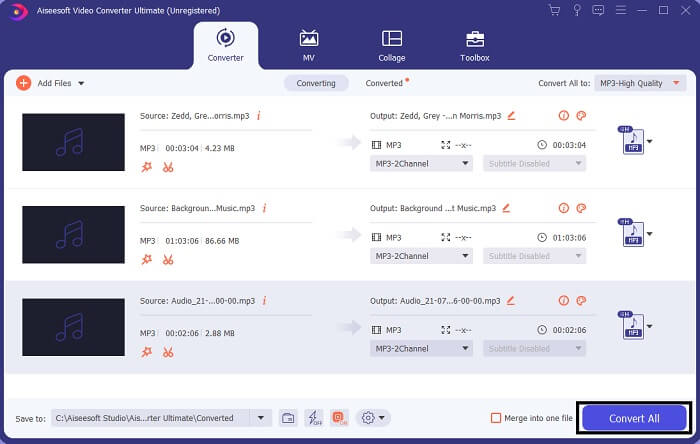
ขั้นตอนที่ 4. จากนั้นคลิกปุ่มConvert Allที่มุมขวาล่างของหน้าต่างหลัก แล้วรอจนกว่าไฟล์จะถูกแปลงเสร็จ.
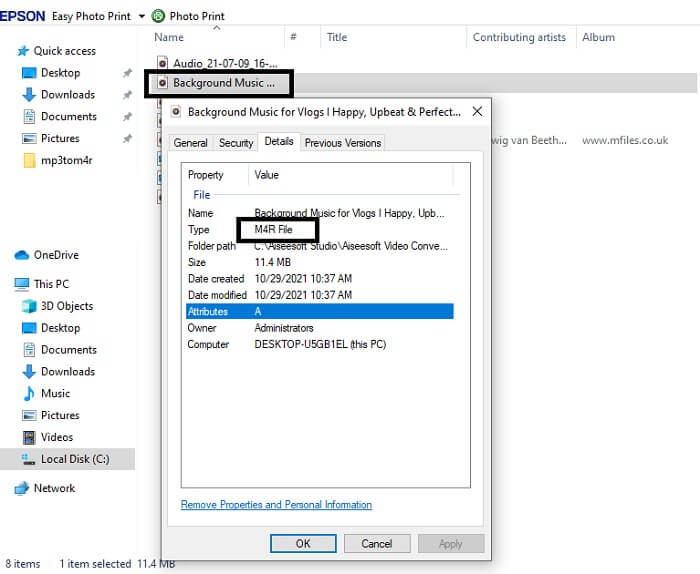
ขั้นตอนที่ 5. เมื่อเสร็จแล้ว ให้เปิดโฟลเดอร์ที่บันทึกไฟล์เสียงออกมา แล้วถ่ายโอนไปยัง iPhone ของคุณ คุณอาจใช้โปรแกรมหรือแอปถ่ายโอนข้อมูลช่วยได้ สามารถค้นหาคำแนะนำได้จากอินเทอร์เน็ต เพียงค้นหา แล้วทำตามขั้นตอนเพื่อตั้งค่าให้เป็นเสียงเรียกเข้าบน iPhone ของคุณ.
ส่วนที่ 2 เครื่องมือที่ดีที่สุดในการแปลง MP3 เป็น M4R ออนไลน์
ตัวแปลงเสียงออนไลน์ฟรี FVC
เครื่องมือระดับพรีเมียมสำหรับการแปลงไฟล์นั้นดี แต่บางครั้งก็สู้เครื่องมือที่ใช้งานได้สะดวกจริง ๆ ไม่ได้ เพื่อให้ตรงกับความต้องการของคุณ FVC จึงได้สร้างเวอร์ชันฟรีของโปรแกรมขึ้นมา FVC Free Audio Converter เป็นเครื่องมือแปลงไฟล์เสียงฟรีที่คุณสามารถใช้ได้ทุกที่ทุกเวลา เพียงมีอินเทอร์เน็ตและเบราว์เซอร์ที่รองรับ เครื่องมือนี้เป็นตัวแปลง MP3 เป็น M4R สำหรับเสียงเรียกเข้า iPhoneที่สามารถสร้างไฟล์เสียงคุณภาพสูงแบบไม่สูญเสียคุณภาพได้ ผลลัพธ์ที่ได้เป็นที่น่าพอใจโดยไม่ต้องเสียค่าใช้จ่าย ไม่เพียงเท่านั้น คุณรู้หรือไม่ว่าเครื่องมือนี้ยังรองรับการแปลงไฟล์เป็นชุดด้วย? ใช่ คุณทำได้! นอกจากนี้ยังมีฟีเจอร์เด่นอื่น ๆ ที่คุณจะได้รับเมื่อใช้งาน ในอีกด้านหนึ่ง ยังมีคู่มือการใช้งานเขียนไว้เพื่อความสะดวกของคุณด้วย.
◆ ไฟล์ที่แปลงแล้วมีคุณภาพใกล้เคียงกับต้นฉบับ
◆ 100% ฟรีและปลอดภัยในการใช้งาน
◆ ไม่จำกัดขนาดเมื่อแปลง
◆ รองรับการแปลงแบทช์
ขั้นตอนที่ 1. ในการเข้าใช้เครื่องมือนี้ ให้ไปที่เว็บไซต์ทางการของ FVC Free Audio Converter.
ขั้นตอนที่ 2. จากนั้นคลิก Add Files to Convert หากคุณเป็นผู้ใช้ครั้งแรก จะต้องอนุญาตการเข้าถึงโดยคลิก Open FVC Launcher แล้วจะมีหน้าต่างปรากฏขึ้นบนหน้าจอ เพื่อให้คุณเลือกไฟล์ที่ต้องการแปลง.
ดาวน์โหลดเวอร์ชันเดสก์ท็อปเพื่อแปลงไฟล์แบบเป็นชุดได้.
ขั้นตอนที่ 3. หลังจากอัปโหลดไฟล์แล้ว จะมีหน้าต่างอีกบานเด้งขึ้นมา ที่ด้านล่างให้เปลี่ยนรูปแบบไฟล์ผลลัพธ์โดยเลือกที่ M4R.
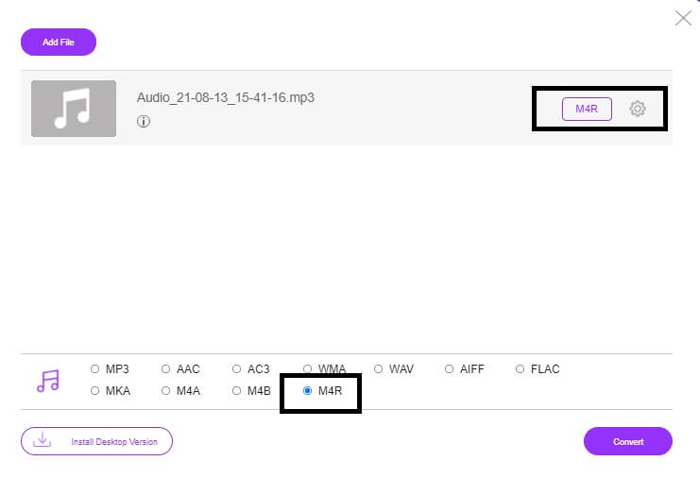
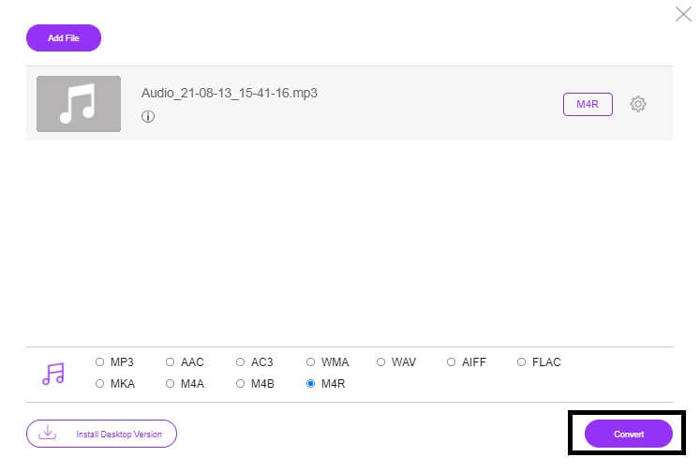
ขั้นตอนที่ 4. จากนั้นคลิกปุ่ม Convert เพื่อเริ่มกระบวนการแปลงไฟล์.
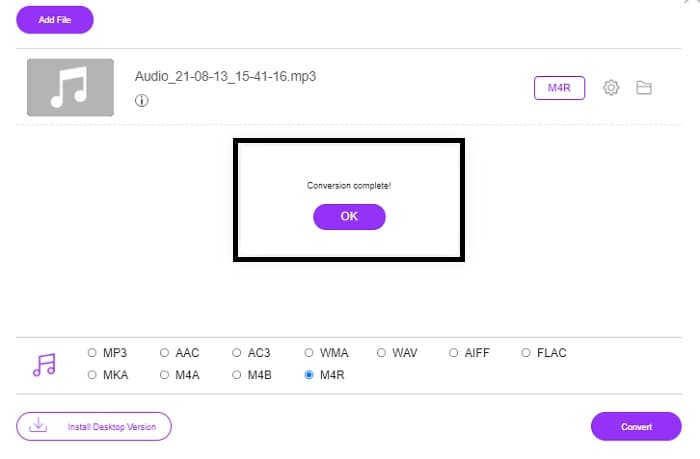
ขั้นตอนที่ 5. จากนั้นเลือกโฟลเดอร์ที่คุณต้องการบันทึกไฟล์ แล้วไฟล์จะถูกบันทึกโดยอัตโนมัติ จากนั้นให้ถ่ายโอนไปยัง iPhone ของคุณ โปรดทราบว่าคุณสามารถแปลงไฟล์แบบเป็นชุดได้ ดังนั้นอย่าจำกัดตัวเองเพียงไฟล์เดียว.
ที่เกี่ยวข้อง:
M4ROnline โดย File Converter
เรียบง่ายแต่เชื่อถือได้ นี่คือคำบอกเล่าจากผู้ใช้เกี่ยวกับเครื่องมือออนไลน์ตัวนี้ โดยค่าเริ่มต้นแล้ว เครื่องมือนี้ถูกออกแบบมาเพื่อแปลงไฟล์ Mp3 เป็น M4R โดยเฉพาะ ตามชื่อของมันเลยว่านี่คือหน้าที่หลักของเครื่องมือนี้ เครื่องมือรองรับการทำงานบนเว็บเบราว์เซอร์หลายตัว คุณจึงไม่ต้องดาวน์โหลดหรือต้องซื้อโปรแกรม หากคุณเข้าไปที่เว็บไซต์ คุณจะสังเกตเห็นถึงความเรียบง่ายของหน้าตาเครื่องมือ อินเทอร์เฟซใช้งานง่ายมาก เพียงคลิกปุ่มBrowseเพื่อเริ่มขั้นตอนการอัปโหลดและแปลงไฟล์ หากคุณอยากลองใช้ แนะนำให้เข้าไปที่เว็บไซต์ทางการแล้วลองด้วยตัวคุณเอง ดังนั้น เครื่องมือนี้จึงเป็นอีกหนึ่งตัวเลือกที่ดี คุณยังสามารถดูขั้นตอนการใช้งานด้านล่างเพื่อทำความเข้าใจวิธีใช้เครื่องมือได้.
ขั้นตอนที่ 1. อย่างแรกที่คุณต้องทำคือไปที่หน้าอย่างเป็นทางการของ M4R Online แล้วคลิกBrowse.
ขั้นตอนที่ 2. เลือกไฟล์จากโฟลเดอร์ของคุณแล้วคลิกปุ่มUpload File.
ขั้นตอนที่ 3. เมื่อเห็นข้อความว่าเสร็จสมบูรณ์แล้ว ให้คลิกที่ไฟล์เพื่อดาวน์โหลด.
Online-convert.com
นี่เป็นเครื่องมือที่ให้บริการมาระยะหนึ่งแล้ว จึงพอจะกล่าวได้ว่าผู้ใช้จำนวนมากพบว่าเครื่องมือออนไลน์นี้มีประโยชน์อย่างมากสำหรับการแปลงไฟล์ของพวกเขา ไม่อย่างนั้นก็คงจะไม่เปิดให้ใช้มาจนถึงทุกวันนี้ หากเข้าไปที่หน้าแรกของเว็บไซต์ คุณจะเห็นเครื่องมือทั้งหมดที่มีให้ใช้งาน ตั้งแต่ตัวแปลงไฟล์เสียง ตัวแปลงวิดีโอ ตัวแปลงรูปภาพ ตัวแปลงเอกสาร ไปจนถึงตัวแปลง Ebook ทุกอย่างถูกรวมไว้ในหน้าเดียว การรวบรวมไว้เช่นนี้ช่วยให้ผู้ใช้ค้นหาเครื่องมือที่ต้องการได้ง่ายขึ้น ดังนั้นจึงสมควรถูกบรรจุอยู่ในรายชื่อโปรแกรมแปลง MP3 เป็น M4R สำหรับ iTunesนี้ด้วย ด้านล่างคือวิธีการใช้งานเครื่องมือเพื่อเป็นแนวทางให้คุณ.
ขั้นตอนที่ 1. เข้าไปยังเว็บไซต์หลักของเครื่องมือแล้วเลือกAudio Converter.
ขั้นตอนที่ 2. คลิกเมนูDrop down แล้วเลือกฟอร์แมตของไฟล์ผลลัพธ์ จากนั้นคลิก GO.
ขั้นตอนที่ 3. จะมีหน้าต่างใหม่ปรากฏขึ้น จากนั้นคลิกปุ่มChoose Filesและอัปโหลดไฟล์ เพื่อเริ่มการแปลงให้คลิกStart Conversion เมื่อไฟล์พร้อมแล้ว ไฟล์จะถูกดาวน์โหลดลงคอมพิวเตอร์ของคุณโดยอัตโนมัติ.
MP3 เทียบกับ M4R
รูปแบบ MP3 เปิดตัวในปี 1993 โดยกลุ่มผู้เชี่ยวชาญด้านภาพเคลื่อนไหว (MPEG) เป็นมาตรฐานสำหรับการจัดเก็บเพลงเนื่องจากสามารถบีบอัดเสียงให้มีขนาดเล็กกว่ารูปแบบอื่นที่ไม่มีการบีบอัด ทุกวันนี้ยังคงใช้กันอย่างแพร่หลาย โดยเฉพาะการจำหน่ายเสียงออนไลน์
ไฟล์ M4R ใช้สำหรับบันทึกเสียงเรียกเข้า iPhone แบบกำหนดเองที่สร้างด้วย Apple iTunes โดยปกติ คุณสามารถดูรูปแบบนี้เมื่อถ่ายโอนเสียงเรียกเข้าจากคอมพิวเตอร์ไปยังอุปกรณ์ iOS ไฟล์ M4R ที่สร้างด้วย iTunes มักจะมีการคุ้มครองลิขสิทธิ์
ส่วนที่ 3 คำถามที่พบบ่อยเกี่ยวกับการแปลง MP3 เป็น M4R
M4R คืออะไร?
เป็นนามสกุลไฟล์ที่สร้างโดย Apple โดยเฉพาะและใช้เป็นริงโทนสำหรับ iPhone และอุปกรณ์ Apple อื่นๆ อย่างเคร่งครัด สิ่งนี้ดีพอ ๆ กับ M4A และ MP4 เมื่อพูดถึงคุณภาพ
มีตัวแปลง MP3 เป็น M4R นอกเหนือจาก iTunes หรือไม่
มีแน่นอนครับ. คุณสามารถเลือกจากเครื่องมือด้านบนหรือพิจารณาใช้ Windows Media Player ได้โดยการริป หากคุณไม่ต้องการทำตามขั้นตอนทั้งหมด คุณสามารถใช้เครื่องมือฟรีที่มีออนไลน์ได้ พวกเขาแปลงไฟล์เสียงให้อยู่ในรูปแบบที่คุณต้องการโดยตรง แทนที่จะต้องผ่านกระบวนการริปที่ใช้เวลานาน
เหตุใดฉันจึงต้องแปลงไฟล์จาก MP3 เป็น M4R เพื่อใช้เป็นเสียงเรียกเข้า
มันเป็นสิ่งจำเป็น ในการพิจารณาให้ไฟล์เป็นเสียงเรียกเข้า ไฟล์นั้นจะต้องเป็นไฟล์ตามค่าเริ่มต้นในรูปแบบ M4R จึงจะเล่นเป็นเสียงเรียกเข้าของคุณได้
สรุป
ทั้งหมดนี้ คุณวางใจได้กับเครื่องมือที่ระบุไว้ข้างต้นอย่างแน่นอน คุณเพียงแค่ต้องเข้าถึงเครื่องมือที่จะเป็นประโยชน์สำหรับคุณขึ้นอยู่กับความต้องการของคุณ หากคุณเป็นนักเรียนและพลเมืองทั่วไปที่ต้องการแปลงและต้องการแปลง MP3 เป็น M4R บน Mac ฟรีหรืออุปกรณ์ใดก็ตามที่คุณใช้ คุณสามารถดูเครื่องมือฟรีได้ สำหรับการใช้งานระดับมืออาชีพ ขอแนะนำให้ใช้ Video Converter Ultimate คุณสามารถกลับไปที่หน้านี้ได้ทุกเมื่อหากต้องการทราบข้อมูลเพิ่มเติมเกี่ยวกับเครื่องมือในการแปลง
-
 [ฟรี & ออนไลน์] 3 วิธีในการแปลง MP3 เป็น MP4 ด้วย Image
 วิธีแปลง MP3 เป็น MP4 คุณภาพสูง? โพสต์นี้แสดง 3 วิธีที่มีประสิทธิภาพและฟรีในการเปลี่ยน MP3 เป็น MP4 ด้วยรูปภาพบน Windows และ Mac
-
 ค้นหาวิธีการแปลง MP3 เป็นรูปแบบ WAV
 คุณต้องการทราบวิธีการแปลง MP3 เป็น WAV หรือไม่? พิจารณาว่าเครื่องมือใดให้การแปลงคุณภาพดีที่สุดที่คุณจะได้รับ
-
 แนวทางในการแปลง M4A เป็น WAV [PC และ Mac]
 เรียนรู้เพิ่มเติมเกี่ยวกับวิธีการแปลง M4A เป็น WAV ด้วยขั้นตอนโดยละเอียดและเครื่องมือต่างๆ ที่คุณสามารถเลือกได้

