


 Video Converter Ultimate
 บันทึกหน้าจอ
 ซ่อมวิดีโอ
 ดาวน์โหลดอย่างปลอดภัย
การตรวจสอบเชิงลึกของตัวแปลง WAV เป็น MP3 เพื่อการค้นพบตัวแปลงที่ดีที่สุด
ในยุคดิจิตอลปัจจุบัน ไฟล์เสียงมีบทบาทสำคัญในชีวิตของเราในด้านต่างๆ ตั้งแต่ความบันเทิงไปจนถึงการใช้งานระดับมืออาชีพ อย่างไรก็ตาม มีรูปแบบเสียงที่แตกต่างกัน ซึ่งแต่ละรูปแบบมีลักษณะและวัตถุประสงค์เฉพาะของตนเอง สถานการณ์ทั่วไปอย่างหนึ่งที่ผู้ใช้หลายคนพบคือความจำเป็นในการแปลงไฟล์เสียงจากรูปแบบ WAV เป็น MP3 ในโพสต์บทวิจารณ์นี้ เราจะสำรวจเหตุผลเบื้องหลังข้อกำหนดการแปลงนี้และเจาะลึกการตรวจสอบตัวแปลง WAV เป็น MP3 ที่ดีที่สุด

ส่วนที่ 1. ตัวแปลง WAV เป็น MP3 สำหรับผู้ใช้เดสก์ท็อปและผู้ใช้ออนไลน์
1. Video Converter Ultimate
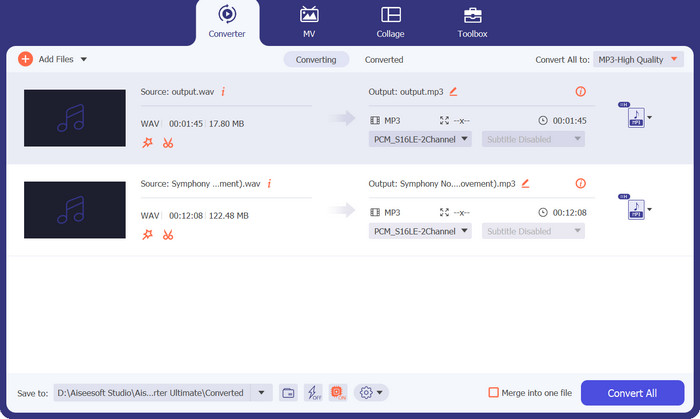
เมื่อพูดถึงการแปลงไฟล์ WAV ให้เป็นรูปแบบ MP3 ซอฟต์แวร์ที่โดดเด่นด้วยประสิทธิภาพและความหลากหลายในการใช้งานคือ Video Converter Ultimate ซึ่งได้รับการพัฒนามาเพื่อมอบประสบการณ์การแปลงไฟล์ที่ราบรื่นและมีประสิทธิภาพ Video Converter Ultimate จึงโดดเด่นในฐานะเครื่องมือมัลติมีเดียแบบออลอินวัน ที่ทำได้มากกว่าชื่อของมันเสียอีก.
คุณภาพการแปลงที่ไม่มีใครเทียบทำให้มั่นใจได้ว่าคุณภาพเสียงของไฟล์ที่แปลงของคุณยังคงบริสุทธิ์ ด้วยการใช้อัลกอริทึมและตัวแปลงสัญญาณขั้นสูง ซอฟต์แวร์นี้จะทำการแปลงเสียงคุณภาพสูง รักษาความสมบูรณ์ดั้งเดิมของไฟล์ WAV ของคุณในขณะที่ให้ไฟล์ MP3 ที่ให้เสียงดีพอๆ กัน
ดาวน์โหลดฟรีสำหรับ Windows 7 ขึ้นไปดาวน์โหลดอย่างปลอดภัย
ดาวน์โหลดฟรีสำหรับ MacOS 10.7 หรือใหม่กว่าดาวน์โหลดอย่างปลอดภัย
แพลตฟอร์ม: Video Converter Ultimate สามารถใช้งานได้ทั้งบน Windows และ macOS โดยรองรับระบบปฏิบัติการ Windows หลายเวอร์ชัน นอกจากนี้ยังใช้งานร่วมกับ macOS ได้หลายเวอร์ชัน รวมถึง macOS Big Sur, Catalina, Mojave, High Sierra และเวอร์ชันก่อนหน้า ความสามารถในการทำงานข้ามแพลตฟอร์มนี้ช่วยให้ผู้ใช้ทั้ง Windows และ macOS สามารถใช้ประโยชน์จากฟีเจอร์และข้อดีต่าง ๆ ของ Video Converter Ultimate สำหรับการแปลงไฟล์ WAV เป็น MP3 ได้อย่างเต็มที่.
แนะนำสำหรับ: ไม่ว่าคุณต้องการเพิ่มประสิทธิภาพการใช้พื้นที่จัดเก็บข้อมูล เพิ่มความเข้ากันได้ของไฟล์ หรือทำให้การกระจายไฟล์เสียงเป็นไปอย่างราบรื่น Video Converter Ultimate มอบคุณภาพการแปลงที่ยอดเยี่ยม การรองรับรูปแบบไฟล์ที่หลากหลาย และฟีเจอร์ที่ใช้งานง่ายเพื่อตอบโจทย์ความต้องการของคุณได้อย่างมีประสิทธิภาพ แนะนำสำหรับผู้ใช้หลากหลายกลุ่ม ไม่ว่าจะเป็นผู้ที่ชื่นชอบสื่อบันเทิง มืออาชีพด้านดนตรี และคอนเทนต์ครีเอเตอร์ที่ต้องการโซลูชันซอฟต์แวร์ที่เชื่อถือได้และยืดหยุ่นสำหรับการแปลงไฟล์ WAV เป็น MP3.
ข้อดี
- การแปลงเป็นชุดและการประมวลผลความเร็วสูง
- อินเทอร์เฟซที่ใช้งานง่าย
- การสนับสนุนรูปแบบที่กว้างขวาง
- คุณภาพการแปลงที่ไม่ตรงกัน
- รวมคุณสมบัติที่เป็นประโยชน์มากมาย
จุดด้อย
- อาจต้องใช้ข้อกำหนดฮาร์ดแวร์ขั้นต่ำบางอย่าง
- เป็นซอฟต์แวร์ที่ต้องชำระเงิน
2. โปรแกรมแปลงไฟล์เสียง Freemake
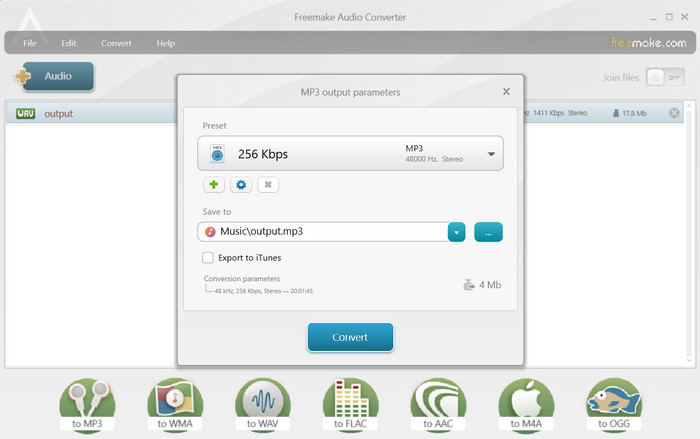
Freemake Audio Converter เป็นซอฟต์แวร์เดสก์ท็อปอเนกประสงค์ฟรีที่แปลง WAV เป็น MP3 และรูปแบบเสียงอื่น ๆ มันมาพร้อมกับอินเทอร์เฟซที่ใช้งานง่ายและช่วยให้ผู้ใช้สามารถแปลงไฟล์หลาย ๆ ไฟล์ได้ในเวลาเดียวกัน ตัวแปลงนี้ยังให้คุณเลือกตัวเลือกเอาต์พุต เช่น บิตเรต อัตราตัวอย่าง และช่องสัญญาณเสียงเพื่อให้มั่นใจในคุณภาพเสียงระดับสูง ในที่สุดคุณสามารถดาวน์โหลดตัวแปลง WAV เป็น MP3 นี้ได้ฟรี
แพลตฟอร์ม: Freemake Audio Converter รองรับการใช้งานบนระบบปฏิบัติการ Windows เท่านั้น น่าเสียดายที่ Freemake Audio Converter ไม่มีให้ใช้บน macOS หรือ Linux ดังนั้นผู้ใช้ Windows จึงสามารถใช้ฟีเจอร์ต่าง ๆ ของ Freemake Audio Converter สำหรับความต้องการด้านการแปลงไฟล์เสียงได้ ในขณะที่ผู้ใช้ระบบปฏิบัติการอื่นอาจต้องมองหาโซลูชันซอฟต์แวร์ทางเลือกแทน.
แนะนำสำหรับ: Freemake Audio Converter เหมาะสำหรับผู้ที่มองหาซอฟต์แวร์ฟรีและใช้งานง่ายในการแปลงไฟล์เสียง รวมถึงการแปลงจาก WAV เป็น MP3 ตัวโปรแกรมเป็นตัวเลือกที่ดีสำหรับผู้ใช้ทั่วไป ผู้ที่ใช้เป็นงานอดิเรก และผู้ที่ให้ความสำคัญกับความเรียบง่ายและสะดวกต่อการใช้งาน.
ข้อดี
- ตัวเลือกการปรับแต่งที่จำเป็น
- รูปแบบการป้อนข้อมูลที่หลากหลาย
- โปรแกรมนี้สามารถใช้ได้ฟรี
จุดด้อย
- รูปแบบเอาต์พุตที่จำกัด
- มันขาดคุณสมบัติขั้นสูง
3. แปลงเสียงออนไลน์ฟรี
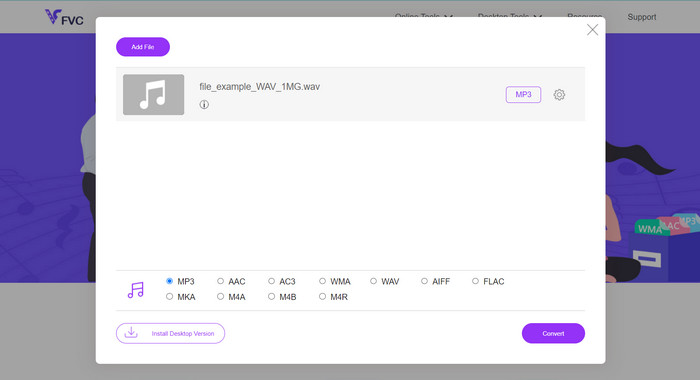
คุณกำลังมองหาวิธีที่ราบรื่นและมีประสิทธิภาพในการแปลงไฟล์ WAV ของคุณให้เป็นรูปแบบ MP3 อยู่หรือไม่? ไม่ต้องมองหาที่อื่นแล้ว! Free Audio Converter Online เป็นเครื่องมือออนไลน์ที่ยืดหยุ่นและทรงพลัง ซึ่งทำให้กระบวนการแปลงทั้งหมดง่ายขึ้นด้วยอินเทอร์เฟซที่ใช้งานง่ายและการทำงานที่ไม่ยุ่งยาก บอกลาการติดตั้งซอฟต์แวร์ที่ซับซ้อน แล้วมาสวัสดีกับการแปลงไฟล์ WAV เป็น MP3 ที่ง่ายดายแทน.
หมดยุคของการดาวน์โหลดและติดตั้งซอฟต์แวร์บนคอมพิวเตอร์ของคุณ ด้วย Free Audio Converter Online คุณสามารถแปลงไฟล์ WAV เป็นรูปแบบ MP3 ได้อย่างง่ายดายจากเว็บเบราว์เซอร์ของคุณ เครื่องมือออนไลน์ที่สะดวกนี้ช่วยให้คุณแปลงไฟล์เสียงได้ทุกที่ทุกเวลา โดยไม่ต้องใช้ซอฟต์แวร์หรือพื้นที่เก็บข้อมูลเพิ่มเติม
แพลตฟอร์ม: ด้วยความเป็นแพลตฟอร์มอิสระ Free Audio Converter Online ช่วยให้ผู้ใช้บนระบบปฏิบัติการและอุปกรณ์ที่แตกต่างกันสามารถใช้ความสามารถในการแปลงไฟล์ WAV เป็น MP3 ได้โดยไม่มีข้อจำกัด สามารถเข้าถึงได้บน Windows, macOS และ Linux ทุกรุ่น ผ่านเว็บเบราว์เซอร์ ทำให้ใช้งานได้อย่างสะดวกสบายไม่ว่าจะอยู่ที่ใด.
แนะนำสำหรับ: Free Audio Converter Online เหมาะสำหรับผู้ที่ต้องการทางออกที่รวดเร็วและสะดวกในการแปลงไฟล์ WAV เป็น MP3 โดยไม่จำเป็นต้องติดตั้งซอฟต์แวร์เพิ่มเติม เหมาะอย่างยิ่งสำหรับผู้ใช้ที่ให้ความสำคัญกับความเรียบง่ายและการใช้งานที่สะดวก รวมถึงผู้ที่อาจใช้อุปกรณ์หรือระบบปฏิบัติการที่แตกต่างกัน.
ข้อดี
- การแปลงอย่างง่ายดายเพียงปลายนิ้วสัมผัส
- มีรูปแบบเสียงที่รองรับมากมาย
- นิยามใหม่ของความเร็วและความน่าเชื่อถือ
จุดด้อย
- พึ่งพาความพร้อมใช้งานของเซิร์ฟเวอร์
4. ซัมซาร์
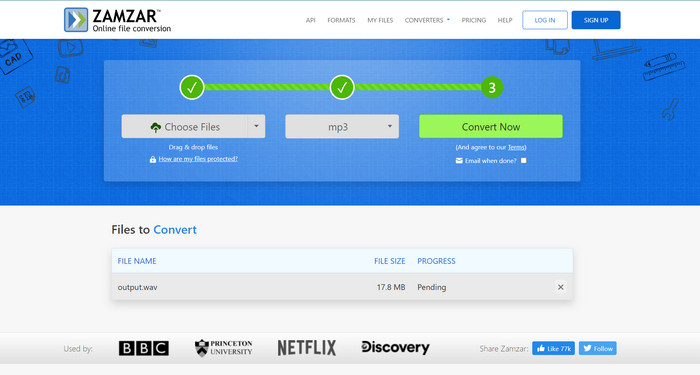
Zamzar เป็นอีกหนึ่งแพลตฟอร์มการแปลงออนไลน์ที่ได้รับความนิยมซึ่งนำเสนอการแปลงรูปแบบไฟล์ที่หลากหลาย รวมถึง WAV เป็น MP3 รองรับการอัพโหลดไฟล์จากคอมพิวเตอร์ของคุณหรือป้อนลิงค์ URL สำหรับไฟล์ออนไลน์ Zamzar รับประกันการจัดการไฟล์ที่ปลอดภัยและส่งไฟล์ที่แปลงแล้วไปยังที่อยู่อีเมลของคุณโดยตรง เป็นตัวแปลง WAV เป็น MP3 ที่เชื่อถือได้ทางออนไลน์สำหรับการแปลงเป็นครั้งคราวในขณะเดินทาง
แพลตฟอร์ม: Zamzar สามารถใช้งานได้บน Windows, macOS, Linux และแพลตฟอร์มมือถือ ทำให้ผู้ใช้บนระบบปฏิบัติการที่หลากหลายสามารถเข้าถึงและใช้บริการแปลงไฟล์ของ Zamzar ได้.
แนะนำสำหรับ: Zamzar เหมาะอย่างยิ่งสำหรับผู้ใช้ที่ให้ความสำคัญกับความสะดวกสบายของการแปลงไฟล์ผ่านเว็บ และต้องการความยืดหยุ่นในการแปลงไฟล์ข้ามแพลตฟอร์มและระบบปฏิบัติการต่าง ๆ โดยไม่จำเป็นต้องติดตั้งซอฟต์แวร์.
ข้อดี
- ทำงานได้อย่างราบรื่นบน Windows, macOS, Linux และแพลตฟอร์มมือถือ
- รูปแบบที่รองรับที่หลากหลาย
- จะส่งการแจ้งเตือนทางอีเมลเมื่อการแปลงไฟล์เสร็จสิ้น
จุดด้อย
- มันขึ้นอยู่กับการเชื่อมต่ออินเทอร์เน็ตที่เสถียร
- คำนึงถึงความเป็นส่วนตัวและความปลอดภัย
ส่วนที่ 2. ตัวแปลง WAV เป็น MP3 สำหรับผู้ใช้มือถือ
1. ตัวแปลงสื่อ
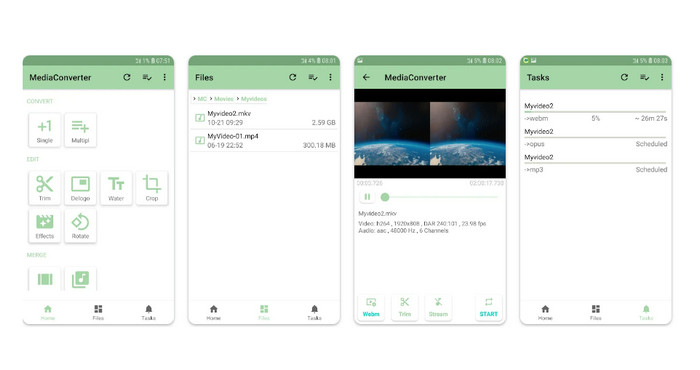
Media Converter เป็นแอพ Android ที่มีคุณลักษณะหลากหลายซึ่งรองรับการแปลงเสียงและวิดีโอต่าง ๆ รวมถึง WAV เป็น MP3 ด้วยอินเทอร์เฟซที่เรียบง่ายและใช้งานง่าย ช่วยให้คุณปรับแต่งการตั้งค่าเอาต์พุตและนำเสนอความสามารถในการแปลงเป็นชุด Media Converter ยังมีตัวเลือกในการตัดแต่งไฟล์เสียงและรองรับการแปลงไฟล์ที่จัดเก็บไว้ในบริการคลาวด์
แพลตฟอร์ม: Media Converter เป็นแอปบนอุปกรณ์พกพาที่ออกแบบมาสำหรับอุปกรณ์ Android ทำให้รองรับทั้งสมาร์ทโฟนและแท็บเล็ต Android ผู้ใช้จึงสามารถแปลงไฟล์เสียงและวิดีโอได้โดยตรงบนอุปกรณ์ Android โดยไม่จำเป็นต้องใช้คอมพิวเตอร์หรือบริการออนไลน์แยกต่างหาก.
แนะนำสำหรับ: Media Converter เหมาะสำหรับผู้ใช้ Android ที่ต้องการแอปบนมือถือที่เชื่อถือได้และใช้งานได้หลากหลายสำหรับการแปลงไฟล์เสียงและวิดีโอ เหมาะสำหรับผู้ที่มักต้องแปลงไฟล์มีเดียระหว่างการเดินทาง เช่น คอนเทนต์ครีเอเตอร์ นักดนตรี และผู้ใช้ที่ทำงานกับไฟล์เสียงและวิดีโอต่างรูปแบบอยู่บ่อยครั้ง.
ข้อดี
- รองรับรูปแบบเสียงและวิดีโอที่หลากหลาย
- มันมีส่วนต่อประสานที่ใช้งานง่าย
- มีตัวเลือกการปรับแต่งที่หลากหลาย
จุดด้อย
- การสนับสนุนแพลตฟอร์มที่จำกัด
- ข้อ จำกัด ขนาดไฟล์
2. โปรแกรมแปลงไฟล์
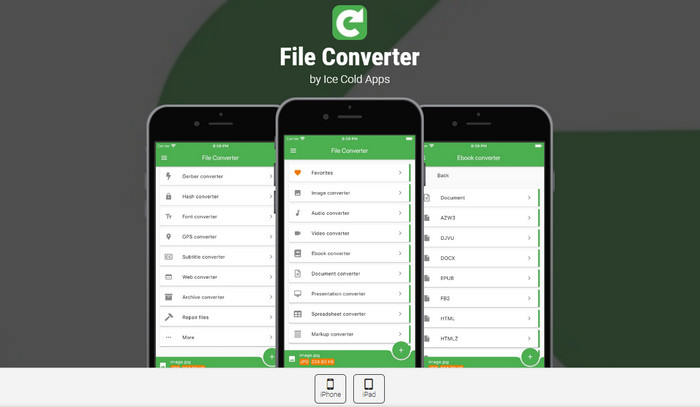
File Converter ยังเป็นแอพ iOS ที่ยอดเยี่ยมในการแปลง WAV เป็น MP3 ช่วยให้สามารถแปลงไฟล์เสียง รวมทั้ง WAV เป็น MP3 ได้อย่างง่ายดาย รองรับรูปแบบที่หลากหลายและมีตัวเลือกในการปรับคุณภาพเอาต์พุต บิตเรต และข้อมูลเมตา แอพนี้ยังทำงานร่วมกับแพลตฟอร์มที่เก็บข้อมูลบนคลาวด์ ทำให้คุณสามารถแปลงไฟล์ได้โดยตรงจากบริการต่างๆ เช่น iCloud, Dropbox และ Google Drive
แพลตฟอร์ม: แอปมือถือ The File Converter รองรับอุปกรณ์ iOS รวมถึง iPhone และ iPad โดยออกแบบมาเฉพาะสำหรับแพลตฟอร์ม iOS และสามารถดาวน์โหลดและติดตั้งได้จาก App Store ความเข้ากันได้นี้ช่วยให้ผู้ใช้ iOS สามารถแปลงไฟล์เสียงและวิดีโอได้โดยตรงบนอุปกรณ์พกพาของตนผ่านแอป File Converter.
แนะนำสำหรับ: File Converter เหมาะสำหรับผู้ใช้ iOS ที่ต้องการแอปมือถือที่ใช้งานง่ายและรองรับการแปลงไฟล์เสียงและวิดีโอได้หลากหลาย เหมาะสำหรับผู้ที่ทำงานกับไฟล์มีเดียบ่อย ๆ บน iPhone หรือ iPad และต้องการความยืดหยุ่นในการแปลงไฟล์ได้ทุกที่ทุกเวลา.
ข้อดี
- แปลงไฟล์โดยตรงบนอุปกรณ์ iOS
- ปรับการตั้งค่าวิดีโอและเสียง
- เพิ่มประสิทธิภาพบน iPhone และ iPad
จุดด้อย
- ไม่รวมระบบปฏิบัติการอื่นๆ เช่น Android
- การซื้อในแอป
อ่านเพิ่มเติม:
FLAC vs. MP3: รูปแบบไฟล์เสียงใดคือที่สุด
ตัวแปลง WAV เป็น MP4 ที่ดีที่สุดเพื่อแปลงจากเสียงไปเป็นวิดีโอ
ส่วนที่ 3 การเปรียบเทียบโปรแกรมข้างต้น
นี่คือแผนภูมิเปรียบเทียบที่เน้นด้านต่างๆ ของ Video Converter Ultimate, Freemake Audio Converter, Free Audio Converter Online, Zamzar, Media Converter และ File Converter เป็นตัวแปลง WAV เป็น MP3:
| Video Converter Ultimate | โปรแกรมแปลงไฟล์เสียง Freemake | ตัวแปลงเสียงออนไลน์ฟรี | Zamzar | ตัวแปลงสื่อ | โปรแกรมแปลงไฟล์ | |
| รองรับรูปแบบ | ช่วงกว้าง | ถูก จำกัด | ถูก จำกัด | ช่วงกว้าง | ช่วงกว้าง | ช่วงกว้าง |
| การแปลงแบทช์ | ใช่ | ใช่ | ใช่ | ใช่ | ใช่ | ใช่ |
| ตัวเลือกการปรับแต่ง | กว้างขวาง | ขั้นพื้นฐาน | ขั้นพื้นฐาน | ขั้นพื้นฐาน | ถูก จำกัด | ถูก จำกัด |
| ความเร็วในการแปลง | เร็ว | เฉลี่ย | เฉลี่ย | เฉลี่ย | เร็ว | เฉลี่ย |
| ข้อ จำกัด ขนาดไฟล์ | ไม่มี | ไม่มี | ไม่มี | แตกต่างกันไป | ไม่มี | ไม่มี |
ส่วนที่ 4 คำถามที่พบบ่อยเกี่ยวกับตัวแปลง WAV เป็น MP3
การแปลง WAV เป็น MP3 ถูกกฎหมายหรือไม่
การแปลง WAV เป็น MP3 สำหรับการใช้งานส่วนตัวนั้นถูกกฎหมาย อย่างไรก็ตาม การแชร์เนื้อหาที่มีลิขสิทธิ์โดยไม่ได้รับอนุญาตถือเป็นสิ่งผิดกฎหมาย
ฉันสามารถปรับแต่งการตั้งค่าเสียงระหว่างกระบวนการแปลงได้หรือไม่?
ได้ ตัวแปลงหลายตัวให้คุณปรับแต่งการตั้งค่า เช่น บิตเรต อัตราตัวอย่าง และช่องสัญญาณเสียง เพื่อปรับคุณภาพของไฟล์ MP3 ที่แปลงแล้ว
ฉันสามารถแปลงไฟล์ WAV เป็น MP3 บนอุปกรณ์พกพาของฉันได้หรือไม่?
ใช่ มีแอพมือถือ เช่น Media Converter และ File Converter ที่ให้คุณแปลง WAV เป็น MP3 ได้โดยตรงบนอุปกรณ์ Android หรือ iOS ของคุณ
ฉันสามารถแปลงไฟล์ WAV เป็น MP3 ด้วยบิตเรตผันแปรได้หรือไม่
ได้ ตัวแปลงบางตัวอนุญาตให้คุณเลือกบิตเรตผันแปร (VBR) ระหว่างกระบวนการแปลง ซึ่งจะปรับบิตเรตแบบไดนามิกตามความซับซ้อนของเสียง
ฉันสามารถแปลงไฟล์ WAV เป็น MP3 โดยใช้เครื่องมือบรรทัดคำสั่งได้หรือไม่
ใช่ มีเครื่องมือบรรทัดคำสั่งให้ใช้งาน เช่น FFmpeg และ LAME ที่ให้คุณแปลงไฟล์ WAV เป็น MP3 โดยใช้คำสั่งและพารามิเตอร์เฉพาะ
สรุป
การแปลงไฟล์ WAV เป็น MP3 เป็นกระบวนการที่พบได้บ่อยและสำคัญด้วยหลายเหตุผล ไม่ว่าจะเป็นการลดขนาดไฟล์ เพิ่มความเข้ากันได้ หรือทำให้การกระจายไฟล์เสียงมีประสิทธิภาพมากขึ้น เมื่อต้องมองหา ตัวแปลงไฟล์ WAV เป็น MP3 ควรพิจารณาปัจจัยต่าง ๆ เช่น ความเข้ากันได้กับแพลตฟอร์ม การรองรับรูปแบบไฟล์ ตัวเลือกในการปรับแต่ง และประสบการณ์การใช้งาน เพื่อเลือกตัวแปลงที่เหมาะสมที่สุดกับความต้องการของคุณ ด้วยเครื่องมือเหล่านี้ คุณสามารถแปลงไฟล์ WAV เป็นรูปแบบ MP3 ได้อย่างง่ายดาย และเปิดใช้ความยืดหยุ่นและความสะดวกสบายของรูปแบบเสียงที่ได้รับความนิยมอย่างแพร่หลายนี้.
-
 ดาวน์โหลดเครื่องเล่น MP3 – 10 เครื่องเล่นเพลง MP3 ฟรีที่ดีที่สุดในปี 2025
 เครื่องเล่นเพลง MP3 ที่ดีที่สุดคืออะไร? ฉันจะใส่เพลงลงในเครื่องเล่น MP3 ได้อย่างไร? จะดาวน์โหลดเครื่องเล่นเพลง MP3 ได้อย่างไร? โพสต์นี้ให้รายละเอียดเกี่ยวกับเครื่องเล่น MP3 ฟรีที่ดีที่สุด 10 รายการสำหรับ Windows PC และ Mac
-
 บทแนะนำแบบลงมือปฏิบัติเกี่ยวกับวิธีการแปลงวิดีโอเป็นรูปแบบ MP3
 มีปัญหาในการแปลงวิดีโอเป็น MP3 หรือไม่? จากนั้น คุณต้องพึ่งพาบทความนี้ในขณะที่เราตรวจสอบว่าตัวแปลงใดให้การแปลงที่ดีที่สุด
-
 3 ตัวแก้ไขข้อมูลเมตา WAV ที่ดีที่สุดบน Windows/Mac/Online
 ต้องการมีตัวแก้ไขข้อมูลเมตา WAV บน Windows หรือไม่? แม็ก? ออนไลน์? หากเป็นเช่นนั้น โปรดอ่านบทความนี้ต่อไปในขณะที่เราตรวจสอบตัวแก้ไขเมตาที่ดีที่สุดสำหรับ WAV
