


 Video Converter Ultimate
 บันทึกหน้าจอ
 ซ่อมวิดีโอ
 ดาวน์โหลดอย่างปลอดภัย
วิธีแปลงไฟล์ MPEG เป็น MP4 [รวมถึงวิธีการฟรีและออนไลน์]
MPEG หรือ Moving Picture Experts Group เป็นรูปแบบมาตรฐานการบีบอัดข้อมูลมัลติมีเดียที่ช่วยให้ผู้ใช้สามารถจัดเก็บ ส่ง และสตรีมเสียงและวิดีโอได้อย่างมีประสิทธิภาพ นอกจากนี้ยังใช้เทคโนโลยีการบีบอัดข้อมูลขั้นสูงที่ช่วยลดขนาดไฟล์โดยยังคงรักษาคุณภาพไว้
ในทางกลับกัน MP4 เป็นรูปแบบวิดีโอที่ขึ้นชื่อด้านความยืดหยุ่นและความเข้ากันได้ เมื่อเทียบกับ MPEG แล้ว รูปแบบนี้มีความอเนกประสงค์มากกว่า เพราะรองรับทั้งวิดีโอและเสียง ซับไตเติล รูปภาพ และข้อมูลเมทาดาทา นอกจากนี้ยังให้ประสิทธิภาพการบีบอัดที่ดีกว่า ด้วยเหตุนี้ การแปลงMPEG เป็น MP4จึงกลายเป็นสิ่งจำเป็น หากต้องการเรียนรู้วิธีทำ ลองอ่านบทความนี้ให้จบ แล้วคุณจะพบกับ 5 วิธีง่าย ๆ ในการแปลงไฟล์ MPEG ของคุณเป็น MP4.

ส่วนที่ 1 วิธีการแปลงวิดีโอ MPEG เป็น MP4 [แปลงเป็นชุด]
หนึ่งในวิธีที่ดีที่สุดในการแปลงวิดีโอ MPEG เป็น MP4 คือการใช้ Video Converter Ultimate ที่ FVC คัดสรรมาให้ เครื่องมือแปลงวิดีโอแบบครบฟังก์ชันนี้ช่วยให้ผู้ใช้แปลงไฟล์วิดีโอไปเป็นรูปแบบเอาต์พุตต่าง ๆ ที่ต้องการได้อย่างรวดเร็ว โดยรองรับรูปแบบอินพุตและเอาต์พุตรวมกันมากกว่า 1,000 รูปแบบ นอกจากนี้ หากคุณมีไฟล์วิดีโอ MPEG หลายไฟล์ที่ต้องแปลง เครื่องมือนี้ยังให้คุณแปลงทั้งหมดพร้อมกันได้ด้วยฟีเจอร์การบีบอัดแบบชุด (batch).
วิธีแปลงวิดีโอ MPEG เป็น MP4 แบบชุดมีดังนี้:
ขั้นตอนที่ 1 ก่อนอื่นให้ดาวน์โหลดและติดตั้ง Video Converter Ultimate ที่คัดสรรโดย FVC ลงบนคอมพิวเตอร์ของคุณ.
ดาวน์โหลดฟรีสำหรับ Windows 7 ขึ้นไปดาวน์โหลดอย่างปลอดภัย
ดาวน์โหลดฟรีสำหรับ MacOS 10.7 ขึ้นไปดาวน์โหลดอย่างปลอดภัย
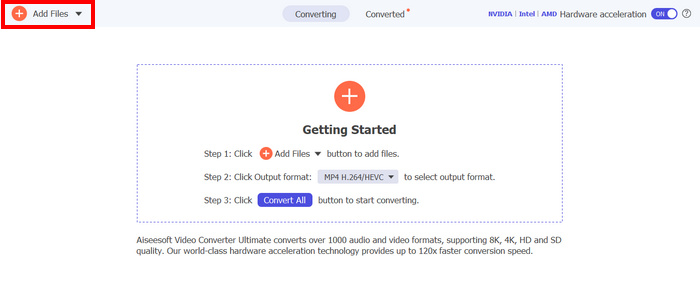
ขั้นตอนที่ 2 จากนั้นเพื่อเพิ่มไฟล์ MPEG ที่คุณต้องการบีบอัดเป็น MP4 แบบชุด ให้คลิกปุ่ม Add Files.
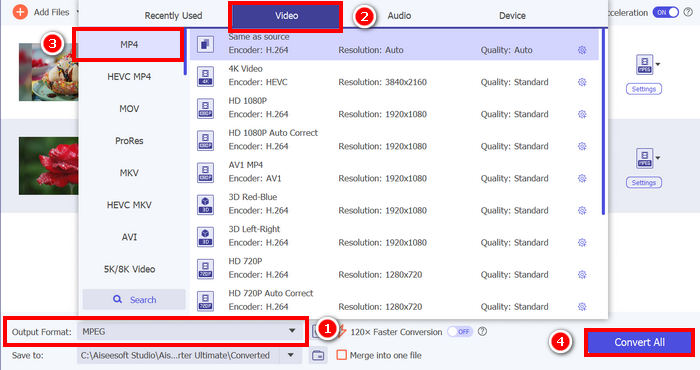
ขั้นตอนที่ 3 สุดท้าย ที่ส่วน Output Format ด้านล่าง ให้คลิกเข้าไปแล้วไปที่แท็บ Video จากนั้นเลือก MP4 จากรายชื่อ เมื่อเลือกแล้ว ให้คลิกปุ่ม Convert All เพื่อบีบอัดวิดีโอ MPEG เป็น MP4 แบบชุด.
FVC เลือก Video Converter Ultimate เพื่อแปลงวิดีโอ MPEG เป็น MP4 ได้อย่างรวดเร็ว เพียง 2-3 ขั้นตอน อินเทอร์เฟซใช้งานง่ายและใช้งานง่ายมาก ด้วยเทคโนโลยีการเข้ารหัสขั้นสูงของเครื่องมือนี้ ผู้ใช้จึงมั่นใจได้ว่าไฟล์ MPEG ที่แปลงแล้วจะคงคุณภาพสูง พร้อมกับการบีบอัดข้อมูลที่เหมาะสมที่สุด
ส่วนที่ 2. แปลง MPEG เป็น MP4 [ฟรี]
หากคุณกำลังสงสัยว่ามีเครื่องมือแปลงไฟล์ฟรีที่สามารถใช้แปลงวิดีโอ MPEG เป็น MP4 ได้หรือไม่ คุณคิดถูกแล้ว! เครื่องมือแปลงวิดีโอฟรีเหล่านี้จะช่วยให้คุณแปลงไฟล์วิดีโอเป็นรูปแบบวิดีโอที่คุณเลือกได้ อย่างไรก็ตาม สิ่งสำคัญที่ต้องทราบคือ เนื่องจากเครื่องมือเหล่านี้ใช้งานได้ฟรี จึงมีสิ่งที่ต้องพิจารณาเมื่อใช้งาน เครื่องมือแปลงไฟล์ MPEG เป็น MP4 ฟรีมีดังนี้:
เปลี่ยน MPEG เป็น MP4 โดยใช้ VLC Media Player
ฉันเชื่อว่าคุณคงคุ้นเคยกับ VLC Media Player เป็นอย่างดี เพราะมันถูกใช้อย่างแพร่หลายเป็นโปรแกรมเล่นมีเดียบนอุปกรณ์หลากหลายประเภท แต่คุณรู้หรือไม่ว่าโปรแกรมนี้ยังสามารถแปลงวิดีโอ MPEG เป็น MP4 ได้ด้วย? คำตอบคือได้ VLC ยังมีประโยชน์ในการแปลงไฟล์วิดีโอเป็นรูปแบบวิดีโอต่าง ๆ เช่น MP4, AVI, MKV และอื่น ๆ อีกมากมาย เป็นตัวเลือกฟรีและใช้งานง่ายสำหรับการแปลงวิดีโอพื้นฐาน แม้จะขาดฟีเจอร์ขั้นสูงที่พบในโปรแกรมแปลงวิดีโอเฉพาะทาง.
วิธีแปลงวิดีโอ MPEG เป็น MP4 ด้วย VLC Media Player มีดังนี้:
ขั้นตอนที่ 1 อันดับแรก คุณต้องดาวน์โหลดและติดตั้งโปรแกรม VLC Media Player บนคอมพิวเตอร์ของคุณก่อน.
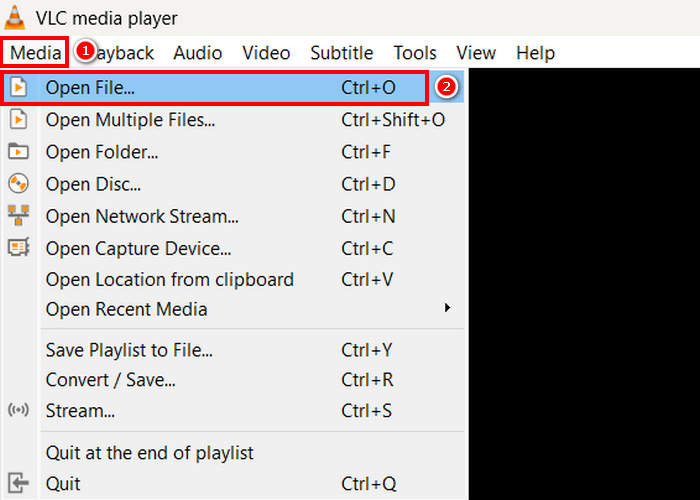
ขั้นตอนที่ 2 จากนั้นไปที่แท็บ Media และด้านล่างให้คลิก Open File จากนั้นนำเข้าไฟล์วิดีโอ MPEG ที่คุณต้องการแปลงเป็น MP4.
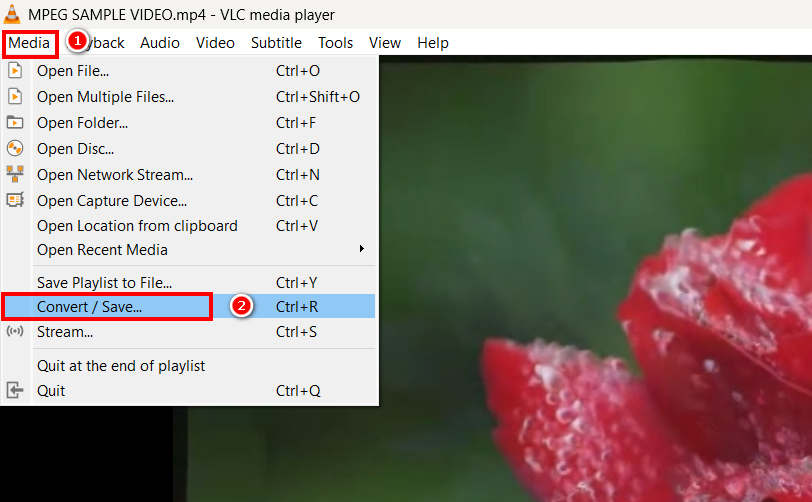
ขั้นตอนที่ 3 หลังจากนั้น ให้กลับไปที่แท็บ Media อีกครั้ง และคราวนี้เลือก Convert/ Save ด้านล่าง.
ขั้นตอนที่ 4 ตอนนี้ให้คลิกที่ Profile แล้วเลือก MP4 เป็นรูปแบบเอาต์พุตของคุณ เมื่อเลือกแล้ว ให้คลิกปุ่ม Start ด้านล่างเพื่อเริ่มแปลงวิดีโอ MPEG เป็น MP4.
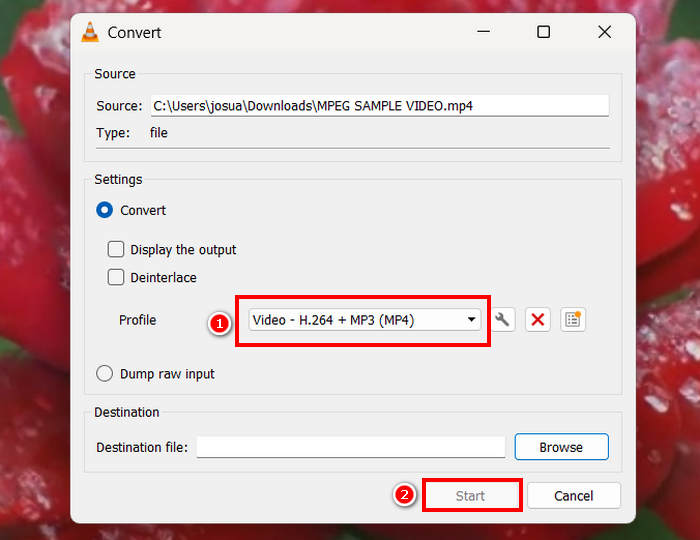
VLC Media Player สามารถแปลงวิดีโอ MPEG เป็น MP4 ได้ฟรี แต่ต่างจากเครื่องมือแปลงวิดีโอเฉพาะทาง VLC ขาดตัวเลือกการเข้ารหัสขั้นสูง การแปลงไฟล์เป็นชุด และฟีเจอร์ที่จำเป็นอื่นๆ นอกจากนี้ การรองรับรูปแบบไฟล์ยังมีจำกัด ทำให้ประสิทธิภาพลดลง เหมาะสำหรับผู้ใช้ที่ต้องการการประมวลผลที่รวดเร็วขึ้นและการปรับแต่งเพิ่มเติม
แปลง MPEG เป็น MP4 ด้วย HandBrake
อีกหนึ่งเครื่องมือที่คุณสามารถใช้แปลงไฟล์ MPEG เป็น MP4 ได้ฟรีคือ HandBrake ซึ่งเป็นเครื่องมือแปลงไฟล์วิดีโอแบบโอเพนซอร์สที่ช่วยให้ผู้ใช้สามารถริปไฟล์ DVD ได้ อย่างไรก็ตาม HandBrake ยังสามารถใช้แปลงไฟล์ MPEG เป็นรูปแบบไฟล์อย่าง MP4 ได้อย่างมีประสิทธิภาพอีกด้วย
วิธีแปลงวิดีโอ MPEG เป็น MP4 ด้วย HandBrake มีดังนี้:
ขั้นตอนที่ 1 ก่อนอื่น ให้ดาวน์โหลดและติดตั้ง HandBrake บนคอมพิวเตอร์ของคุณ.
ขั้นตอนที่ 2 ตอนนี้ให้เปิดโปรแกรมบนคอมพิวเตอร์ของคุณ แล้วคลิก Open Video File ที่มุมซ้ายเพื่อเพิ่มไฟล์วิดีโอ MPEG ที่คุณต้องการแปลงเป็นรูปแบบ MP4.
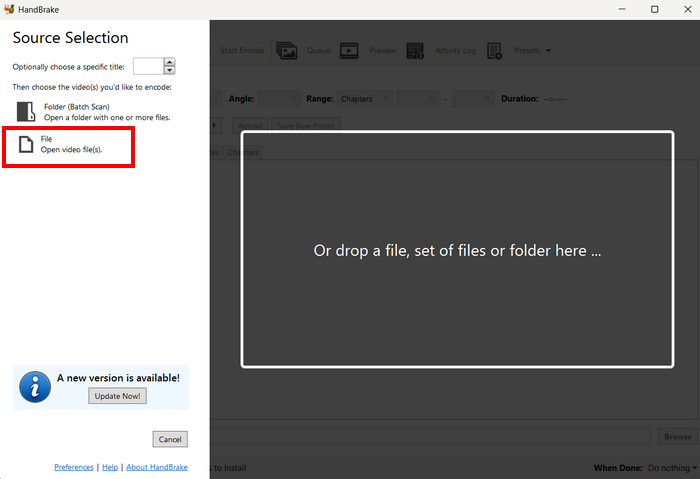
ขั้นตอนที่ 3 หลังจากนั้น ให้คลิกที่ Format แล้วเลือก MP4.
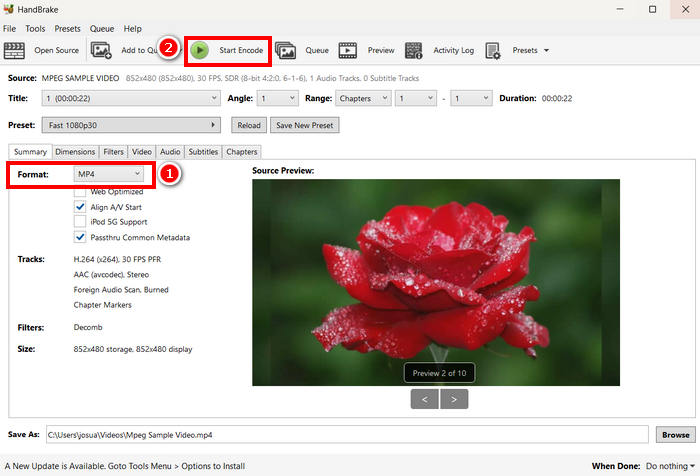
ขั้นตอนที่ 4 เมื่อจัดการเสร็จแล้ว ให้คลิกปุ่ม Start Encode เพื่อเริ่มแปลงวิดีโอ MPEG ของคุณเป็น MP4.
HandBrake เป็นหนึ่งในโปรแกรมแปลงวิดีโอฟรีที่ดีที่สุดซึ่งใช้แปลงวิดีโอ MPEG เป็น MP4 ได้ อย่างไรก็ตาม โปรแกรมนี้รองรับรูปแบบเอาต์พุตเพียง 3 รูปแบบ ซึ่งอาจรู้สึกว่าจำกัดในแง่ของตัวเลือกฟอร์แมต HandBrake รองรับเพียง MP4, MKV และ WebM ซึ่งอาจไม่เหมาะหากคุณต้องการรูปแบบอื่นเพิ่มเติม.
ส่วนที่ 3 วิธีการเปลี่ยน MPEG เป็น MP4 ออนไลน์
อีกวิธีที่สมบูรณ์แบบในการแปลงไฟล์ MPEG เป็น MP4 คือการทำออนไลน์ มีเครื่องมือแปลงวิดีโอออนไลน์ที่ให้ผู้ใช้สามารถแปลงวิดีโอ MPEG ผ่านทางออนไลน์ได้ เมื่อเทียบกับแอปพลิเคชันซอฟต์แวร์แล้ว ตัวแปลงออนไลน์ใช้งานง่ายกว่าเพราะไม่ต้องติดตั้ง อย่างไรก็ตาม อาจมีข้อจำกัดเรื่องขนาดไฟล์และต้องใช้การเชื่อมต่ออินเทอร์เน็ตที่เสถียรเมื่อใช้งาน
แปลงไฟล์ MPEG เป็น MP4 ออนไลน์โดยใช้โปรแกรมแปลงวิดีโอออนไลน์ฟรี FVC
FVC Free Video Converter Online เป็นเครื่องมือแปลงไฟล์มัลติมีเดียออนไลน์ฟรี เหมาะมากสำหรับผู้ที่ต้องการแปลง MPEG เป็น MP4 เพราะรองรับรูปแบบวิดีโอต่าง ๆ เช่น MP4, FLV, MKV, MOV, M4V และอื่น ๆ อีกมากมาย นอกจากนี้ เครื่องมือนี้ยังรองรับการแปลงแบบชุด ช่วยให้ผู้ใช้แปลงไฟล์วิดีโอหลายไฟล์พร้อมกันได้.
วิธีแปลง MPEG เป็น MP4 ด้วย FVC Free Video Converter Online:
ขั้นตอนที่ 1 บนเบราว์เซอร์ Chrome ให้พิมพ์และค้นหา FVC Free Video Converter Online.
ขั้นตอนที่ 2 เมื่อคุณเข้าสู่หน้าเว็บของเครื่องมือแล้ว ให้คลิกปุ่ม Add Files to Convert เพื่อเพิ่มไฟล์ MPEG ที่คุณต้องการแปลงเป็น MP4.
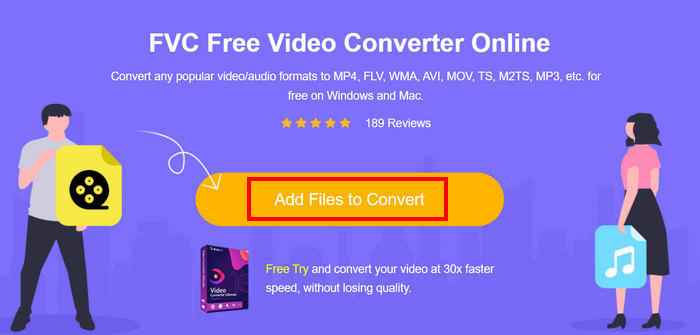
ขั้นตอนที่ 3 หลังจากนั้น ให้เลือก MP4 เป็นรูปแบบเอาต์พุตของคุณ แล้วคลิก Convert เมื่อจัดการเสร็จ.
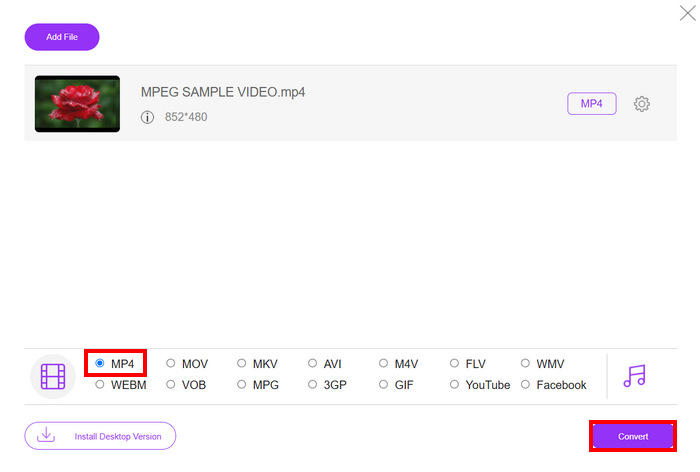
ด้วย FVC Free Video Converter Online คุณสามารถแปลงวิดีโอ MPEG เป็น MP4 ได้อย่างง่ายดาย โดยไม่ต้องยุ่งยากกับการติดตั้งซอฟต์แวร์แอปพลิเคชัน นอกจากนี้ ยังรองรับไฟล์วิดีโอหลากหลายรูปแบบ รวมถึง MPEG และ MP4 ใช้งานง่ายมาก เหมาะสำหรับผู้เริ่มต้น
แปลง MPEG เป็น MP4 โดยใช้ Cloud Convert
ในทางกลับกัน Cloud Convert เป็นอีกหนึ่งเครื่องมือออนไลน์ที่เชื่อถือได้สำหรับการแปลงไฟล์ MPEG เป็น MP4 รองรับไฟล์มีเดียหลากหลายรูปแบบ และช่วยให้ผู้ใช้สามารถแปลงไฟล์วิดีโอ MPEG ได้อย่างง่ายดาย
อย่างไรก็ตาม เครื่องมือนี้ไม่สามารถใช้งานได้ฟรีทั้งหมด เนื่องจากแพ็กเกจฟรีมีข้อจำกัดบางประการ คุณสามารถแปลงไฟล์วิดีโอได้สูงสุด 25 ไฟล์ต่อวัน แต่แต่ละไฟล์ต้องมีขนาดไม่เกิน 1GB นอกจากนี้ สามารถแปลงไฟล์ได้พร้อมกันเพียง 5 ไฟล์เท่านั้น หากคุณมีไฟล์ MPEG หลายไฟล์ที่ต้องการแปลง Cloud Convert ก็ยังเป็นตัวเลือกที่ดีที่ควรลองใช้
วิธีแปลง MPEG เป็น MP4 ด้วย Cloud Convert:
ขั้นตอนที่ 1 ก่อนอื่น คุณต้องไปที่เว็บไซต์ทางการของ Cloud Convert.
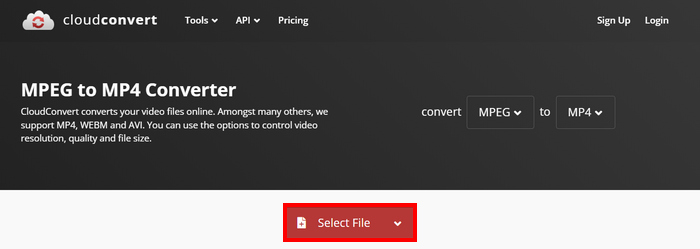
ขั้นตอนที่ 2 เมื่อคุณอยู่บนเว็บไซต์อย่างเป็นทางการของเครื่องมือแล้ว ให้คลิกปุ่ม Select File เพื่อเพิ่มวิดีโอ MPEG ที่คุณต้องการแปลงเป็น MP4.
ขั้นตอนที่ 3 จากนั้น ที่ตัวเลือก Format ด้านล่าง ให้เลือก MP4 เมื่อเลือกเสร็จแล้ว ให้คลิกปุ่ม Convert.
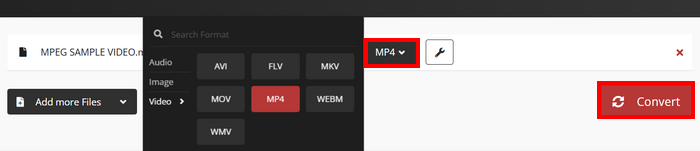
ด้วย Cloud Convert ผู้ใช้ที่ต้องการแปลงวิดีโอ MPEG เป็น MP4 สามารถทำได้อย่างง่ายดาย อย่างไรก็ตาม คุณไม่สามารถใช้เครื่องมือนี้ได้ฟรีทั้งหมด หากคุณต้องการแปลงไฟล์ได้ไม่จำกัดจำนวนหรือรองรับไฟล์ขนาดใหญ่ คุณอาจต้องอัปเกรดเป็นแพ็กเกจแบบชำระเงิน ซึ่งมีค่าใช้จ่ายสูง
ส่วนที่ 4 คำถามที่พบบ่อยเกี่ยวกับการแปลง MPEG เป็น MP4
ฉันสามารถแปลง MPEG เป็น MP4 โดยไม่สูญเสียคุณภาพได้หรือไม่?
ใช่ คุณสามารถแปลงไฟล์ MPEG เป็น MP4 โดยไม่สูญเสียคุณภาพได้โดยใช้โปรแกรมแปลงไฟล์วิดีโอคุณภาพสูง เช่น FVC Video Converter Ultimate หรือ HandBrake เครื่องมือเหล่านี้ช่วยให้คุณปรับการตั้งค่าการเข้ารหัสเพื่อรักษาคุณภาพต้นฉบับไว้ได้
MPEG เหมือนกับ MP4 หรือไม่?
ไม่ แม้ว่าทั้งสองจะเป็นรูปแบบวิดีโอ แต่ MPEG หมายถึงกลุ่มมาตรฐานการบีบอัด เช่น MPEG-1, MPEG-2 และ MPEG-4 ในขณะที่ MP4 เป็นรูปแบบคอนเทนเนอร์ที่สามารถเก็บวิดีโอ เสียง และคำบรรยายได้
ฉันสามารถแปลงไฟล์ MPEG หลายไฟล์เป็น MP4 แบบเป็นกลุ่มได้หรือไม่
ใช่ คุณสามารถแปลงวิดีโอ MPEG เป็น MP4 แบบเป็นกลุ่มได้ ทำได้โดยใช้โปรแกรม Video Converter Ultimate ที่ FVC คัดสรรมาให้ เพราะรองรับการแปลงไฟล์วิดีโอหลายรูปแบบเป็นชุด
สรุป
การแปลง MPEG เป็น MP4 ยังคงถูกใช้อย่างแพร่หลายด้วยเหตุผลหลายประการ และตอนนี้เมื่อคุณรู้แล้วว่าจะแปลงMPEG เป็น MP4ด้วยวิธีต่าง ๆ ได้อย่างไร ต่อไปคือการเลือกวิธีที่เหมาะกับคุณที่สุด ดังนั้น จะรออะไรอยู่ เลือกเครื่องมือที่ดีที่สุดสำหรับคุณ แล้วเริ่มแปลงไฟล์ MPEG ของคุณเป็น MP4 ได้เลย.
-
 วิธีบีบอัดไฟล์ MPEG-4 ออนไลน์ - ไม่ต้องดาวน์โหลดไม่มีลายน้ำ
 มีพื้นที่เก็บไฟล์ไม่เพียงพอที่จะเก็บไฟล์ MPEG-4 ทั้งหมดของคุณหรือไม่? ต่อไปนี้เป็นวิธีแก้ปัญหาบางส่วนที่สามารถช่วยคุณทำให้ไฟล์วิดีโอมีขนาดเล็กลง
-
 เครื่องเล่น MPG/MPEG ที่ดีที่สุด 4 อันดับสำหรับ Windows/Mac/Android/iPhone [2025]
 ต้องการเล่นไฟล์ MPG หรือ MPEG ที่คุณชื่นชอบได้อย่างราบรื่นหรือไม่? บทความนี้จะกล่าวถึงเครื่องเล่น MPG/MPEG 4 อันดับแรกสำหรับคอมพิวเตอร์และโทรศัพท์มือถือ
-
 4 ตัวเลือกที่ดีที่สุดในการแปลงไฟล์ MPEG เป็นรูปแบบ AVI [ออนไลน์และออฟไลน์]
 คุณมีช่วงเวลาที่ยากลำบากในการมองหาตัวแปลงสำหรับ MPEG หรือไม่? จากนั้นลองอ่านบทความนี้ในขณะที่เราเรียนรู้วิธีเปลี่ยนรูปแบบ MPEG เป็น AVI ด้วยขั้นตอนโดยละเอียด
