


 Video Converter Ultimate
 บันทึกหน้าจอ
 ซ่อมวิดีโอ
ค้นพบวิธีการเล่นไฟล์ MKV บน PS4
ไม่เพียงแค่ Xbox One S เท่านั้นที่รองรับการเล่นภาพยนตร์ ตอนนี้ PS4 ก็พยายามตามเทรนด์เช่นกัน โดยการใช้สาย USB และผ่าน DLNA ทำให้ PS4 สามารถเล่นไฟล์ MKV, MP4, AVI และอีกมากมายได้ ซึ่งหมายความว่า MKV เป็นหนึ่งในไฟล์ที่คุณสามารถเล่นได้ หากต้องการดูรายการรูปแบบไฟล์ที่รองรับทั้งหมด โปรดไปที่เว็บไซต์ทางการของ PS4 อีกอย่างคือ คุณคงไม่อ่านมาถึงตรงนี้ถ้าคุณไม่ได้สนใจจะเล่นไฟล์ MKV บน PS4 ดังนั้นอ่านต่อไป เมื่อคุณไปทีละขั้นตอน คุณจะได้เรียนรู้วิธีต่าง ๆ ในการเล่น MKV บน PS4.

ส่วนที่ 1. ไฟล์ MKV ทั้งหมดสามารถเล่นบน PS4 ได้หรือไม่?
ฉันสามารถเล่นไฟล์ MKV บน PS4 ได้หรือไม่? แน่นอนคุณสามารถ รูปแบบไฟล์ MKV รองรับ PS4 แต่ไฟล์ MKV ทั้งหมดไม่สามารถเล่นได้อย่างเหมาะสม คุณอาจประสบกับความล้มเหลวในการเล่น เนื่องจากคุณต้องมีคุณสมบัติตรงตามมาตรฐานที่กำหนดโดย PS4 ส่วนใหญ่รองรับ H.264/MPEG-4 AVC ใช้กฎเดียวกันหากคุณจะเล่นไฟล์ MKV จากไดรฟ์ USB ในขณะเดียวกันสำหรับไฟล์เสียง MP3, AAC LC, AC-3 ได้รับการสนับสนุน รูปแบบเหล่านี้ส่วนใหญ่เป็นรูปแบบ Dolby Digital หากคุณคิดว่าคุณมีคุณสมบัติตรงตามมาตรฐานแล้ว คุณสามารถดำเนินการตามขั้นตอนในการเล่น MKV บน PS4 ได้โดยตรง
ขั้นตอนที่ 1. ดาวน์โหลดและติดตั้ง DivX Media Server แล้วเปิดโปรแกรมเล่น จากนั้นเปิดการแชร์บนคอมพิวเตอร์ของคุณ.
ขั้นตอนที่ 2. อัปโหลดหรือเพิ่มไฟล์ MKV ไปยังเซิร์ฟเวอร์.
ขั้นตอนที่ 3. ก่อนจะไปขั้นตอนต่อไป ให้แน่ใจว่าคอมพิวเตอร์และ PS4 เชื่อมต่ออยู่ในเครือข่าย Wi‑Fi เดียวกัน จากนั้นดาวน์โหลดและติดตั้ง DivX media player บน PS4 ของคุณ หลังจากนั้นเปิดแอปเครื่องเล่นสื่อของ PS4 แล้วเลือก DivX media server จากรายชื่ออุปกรณ์ที่ปรากฏ.
ขั้นตอนที่ 4. สุดท้าย ให้มองหาเมนู Video แล้วติ๊กเลือกวิดีโอที่คุณต้องการเล่น จากนั้นเริ่มสตรีมมิงได้เลย.
ส่วนที่ 2 คำแนะนำทีละขั้นตอนเกี่ยวกับวิธีการเล่น MKV บน PS4 จาก USB
ในขณะเดียวกัน หากคุณใช้ที่จัดเก็บข้อมูล USB ตรวจสอบให้แน่ใจว่าฟอร์แมต FAT หรือ exFAT ไม่เช่นนั้นจะตรวจไม่พบ หากคุณคิดว่าคุณพร้อมและเข้ากันได้กับแฟลชไดรฟ์ โปรดดูคำแนะนำทีละขั้นตอนด้านล่าง
ขั้นตอนที่ 1. เปิด PS4 แล้วเสียบ USB เข้าไป ไปที่ เมนู หลัก จากนั้นเลือก วิดีโอ (Video) แล้วค้นหาชื่อไดรฟ์ USB ของคุณ.
ขั้นตอนที่ 2. เมื่อคุณเห็นรายชื่อไฟล์แล้ว ให้คลิก Display All เพื่อดูรายชื่อไฟล์ทั้งหมดที่คุณบันทึกไว้ใน USB จากนั้นคัดลอกไฟล์และโอนไปยัง PS4.
ขั้นตอนที่ 3. ท้ายที่สุด ให้ตรวจสอบให้แน่ใจว่าคุณมีพื้นที่จัดเก็บข้อมูลเพียงพอสำหรับการโอนไฟล์ให้เสร็จสมบูรณ์.
ส่วนที่ 3 ทางเลือกอื่นในการเล่น MKV บน PS4 ผ่าน Plex Server
นอกจาก DivX แล้ว ยังมีโปรแกรมเล่นสื่อทางเลือกอื่นที่คุณสามารถใช้เล่นไฟล์ MKV บน PS4 ได้ นั่นคือเซิร์ฟเวอร์สตรีมมิงสื่อชื่อ Plex เซิร์ฟเวอร์สื่อนี้ช่วยให้คุณสตรีมวิดีโอคุณภาพสูง เพลง รายการทีวี และพอดแคสต์จากคอมพิวเตอร์ของคุณ แม้ว่าบางคนอาจเจอปัญหาในการเล่นไฟล์ MKV บางไฟล์ แต่คุณก็ยังสามารถใช้มันเป็นตัวเลือกสำรองได้ ในขณะเดียวกัน หากคุณต้องการใช้ Plex และเล่นไฟล์ที่ไม่รองรับจริง ๆ คุณควรพิจารณาแปลงวิดีโอเสียก่อน มีโปรแกรมแปลงไฟล์บางตัวที่สามารถเปลี่ยนไฟล์ MKV ของคุณให้เป็นรูปแบบที่ Plex รองรับได้ โดยการปรับตัวแปลงสัญญาณวิดีโอ (codec) อัตราเฟรม บิตเรต และพารามิเตอร์อื่น ๆ ก็สามารถทำได้ แล้วมีเครื่องมือที่ทำแบบนั้นได้หรือไม่? มีแน่นอน คุณสามารถลองใช้ Video Converter Ultimate ใช่แล้ว เครื่องมือนี้ทำได้ ลองใช้เพื่อแก้ปัญหานี้ดู.
ขั้นตอนที่ 1. ดาวน์โหลดและติดตั้ง Video Converter Ultimate บนพีซีของคุณ.
ดาวน์โหลดฟรีสำหรับ Windows 7 หรือใหม่กว่าดาวน์โหลดอย่างปลอดภัย
ดาวน์โหลดฟรีสำหรับ MacOS 10.7 หรือใหม่กว่าดาวน์โหลดอย่างปลอดภัย
ขั้นตอนที่ 2. เพิ่มไฟล์ที่คุณต้องการแปลง โดยคลิก Add files หรือเพียงแค่ลากและวางไฟล์ลงในหน้าต่างโปรแกรม.
ขั้นตอนที่ 3. หลังจากนั้น เลือกรูปแบบไฟล์ที่ Plex รองรับ โดยคลิกที่เมนูดรอปดาวน์ Convert to All.
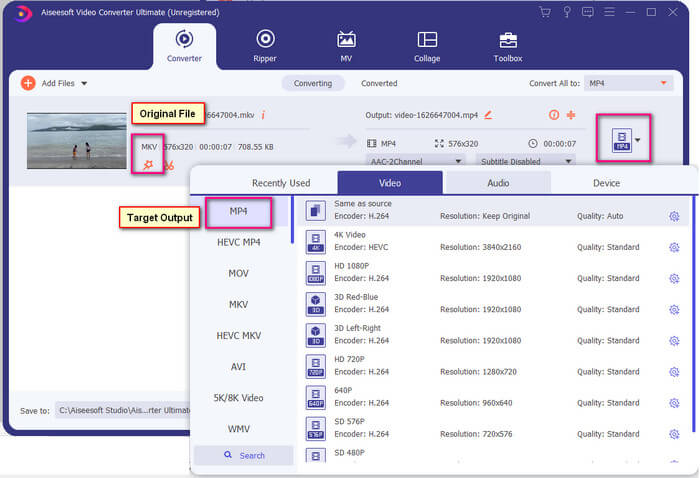
ขั้นตอนที่ 4. เมื่อตั้งค่ารูปแบบเรียบร้อยแล้ว ให้คลิกปุ่ม Convert All เพื่อเริ่มกระบวนการแปลงไฟล์ เมื่อแปลงเสร็จ โฟลเดอร์ที่บันทึกไฟล์ไว้จะเด้งขึ้นมาโดยอัตโนมัติ.
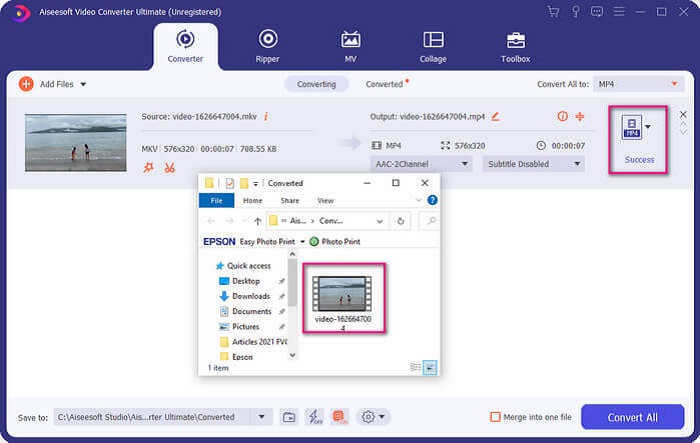
มีมากขึ้นด้วยตัวแปลงวิดีโอขั้นสูง คุณสามารถตรวจสอบรายการข้อดีและข้อเสียด้านล่างเพื่อรับทราบคุณสมบัติที่ดีอื่น ๆ ที่มีให้
● เครื่องมือนี้แปลงได้เร็วถึงสามวินาที
● มีเทคโนโลยีเร่งความเร็วที่สามารถปรับปรุงไฟล์ที่แปลง
● รองรับคุณภาพระดับ HD
● มีคุณลักษณะการแก้ไข เช่น การเพิ่มตัวกรองและเอฟเฟกต์พื้นฐาน
● คุณสามารถปรับคำบรรยายและแทร็กเสียงได้
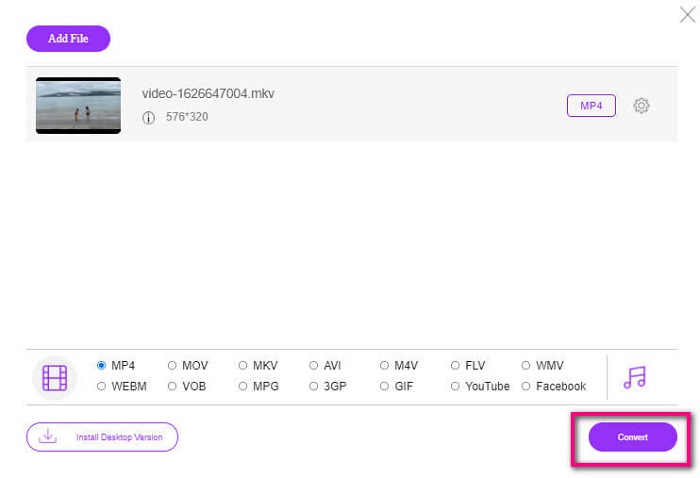
หากในกรณีที่คุณกำลังมองหาโปรแกรมแปลงไฟล์ฟรี คุณสามารถพิจารณาใช้ FVC Free Online Video Converter ได้เช่นกัน แม้มันอาจไม่ดีเท่ากับ Ultimate Video Converter แต่มันก็ยังพอใช้งานทดแทนได้ แน่นอนว่ามันสามารถแปลงไฟล์และทำให้ไฟล์นั้นเข้ากันได้กับ Plex หรือ DivX สิ่งที่คุณต้องทำคือ…
ขั้นตอนที่ 1. เปิดใช้งานเครื่องมือโดยเข้าไปที่หน้าเว็บทางการตามลิงก์ในคำอธิบาย.
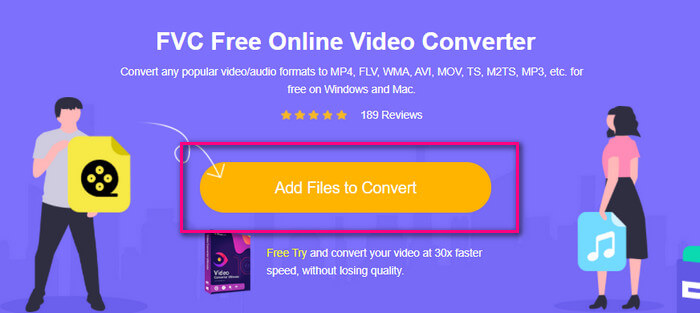
ขั้นตอนที่ 2. อัปโหลดวิดีโอโดยคลิก Add Files to Convert.
ขั้นตอนที่ 3. เปลี่ยนรูปแบบไฟล์โดยคลิกที่วงกลมด้านล่างเพื่อเลือก.
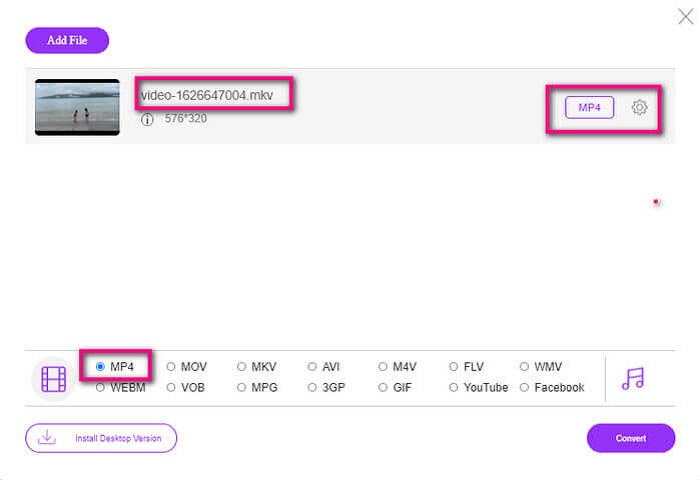
ขั้นตอนที่ 4. สุดท้ายคลิกปุ่ม Convert และเลือกตำแหน่งที่คุณต้องการบันทึกไฟล์ จากนั้นคลิก Okay คุณสามารถคลิกไอคอน Folder เพื่อดูไฟล์ที่แปลงเสร็จแล้ว.
อ่านเพิ่มเติม
เล่นไฟล์ MKV บน Windows Media Player
ส่วนที่ 4 ข้อมูลเพิ่มเติมเกี่ยวกับการเล่นไฟล์ MKV บน PS4
PS4 ราคาเท่าไหร่?
ราคาขายปลีกในตลาดอยู่ที่ 399.99 USD ในสหรัฐอเมริกา และในแคนาดาคือ 399.99 CAD ราคาอาจแตกต่างกันไปขึ้นอยู่กับราคาขายปลีกในประเทศของคุณ
มีความเป็นไปได้ที่จะเล่น CC หรือ Close Caption MKV บน PS4 หรือไม่?
มีครับ ตั้งค่าได้ในเมนู Accessibility Settings เส้นทางคือ ไปที่เมนู Settings ของ PS4 เลือก Accessibility แล้วจากนั้นเลือก Display Closed Captions จากนั้นคลิก Options เพื่อเปิดใช้งานคำบรรยายปิด.
หาก PS4 รองรับ MKV เหตุใดไฟล์ของฉันจึงไม่เล่น
ดังที่กล่าวไว้ข้างต้น คุณต้องตรวจสอบให้แน่ใจว่าไฟล์ MKV ตรงตามมาตรฐานของโปรแกรมเล่นที่คุณใช้อยู่ คุณเพียงแค่ต้องตรวจสอบข้อกำหนดของ PS4 หรือเซิร์ฟเวอร์การสตรีมสื่ออื่นๆ เซิร์ฟเวอร์สื่อส่วนใหญ่มีการจัดประเภทเพื่อเล่นไฟล์ MKV
รูปแบบใดบ้างที่รองรับโดย PS4
มีไฟล์หลายรูปแบบที่ PS4 รองรับ แต่คุณจะสังเกตได้ว่ารูปแบบส่วนใหญ่ไม่มีการบีบอัดและเก็บไฟล์ขนาดใหญ่ไว้ แม้ว่ามันจะรองรับไฟล์ที่ไม่มีการบีบอัดเช่น Mp4 ในขณะเดียวกัน นี่คือรายการรูปแบบที่เรากำลังพูดถึง: MKV, AVI, MPEG-2 PS, MPEG-2 TS, AVCHD และ XAVC และ MP4
สรุป
สรุป มีหลายวิธีที่คุณสามารถเล่นไฟล์ MKV บน PS4 ได้โดยตรงหรือโดยอ้อม สิ่งที่ระบุไว้เป็นสื่อที่ใช้บ่อยที่สุด DivX Stream Server และ Plex เป็นเพียงทางเลือกบางส่วนที่คุณสามารถใช้ได้ ขอแนะนำให้แปลงไฟล์แทนเพื่อหลีกเลี่ยงความยุ่งยากและกระบวนการที่มากเกินไป
-
 [แก้ไขแล้ว] VLC Player ไม่เล่น MKV วิธีแก้ไข
 เครื่องเล่น VLC รองรับไฟล์ MKV หรือไม่? ทำไม VLC ไม่เล่น MKV โพสต์นี้แบ่งปันเคล็ดลับที่เป็นประโยชน์ 4 ข้อสำหรับคุณในการแก้ไข VLC player จะไม่เล่นไฟล์ MKV
-
 วิธีเล่นไฟล์ MKV บน iPad 2025
 จะเล่นไฟล์ MKV บน iPad 2 ได้อย่างไร? ฉันสามารถแปลง MKV เป็น MP4 เพื่อเล่นบน iPad Pro / Air / 2 ได้หรือไม่? โพสต์นี้แชร์ 2 วิธีง่ายๆในการเล่น MKV บน iPad
-
 วิธีดาวน์โหลด MKV Codec ใน Windows Media Player เพื่อการเล่นที่ราบรื่น
 ไม่สามารถเล่นวิดีโอ MKV ใน Windows Media Player ได้? คุณสามารถดาวน์โหลดตัวแปลงสัญญาณ MKV สำหรับ Windows Media Player ได้ฟรี ตรงกันข้าม ให้แปลง MKV เพื่อให้สามารถเล่นได้ใน Windows Media Player
