


 Video Converter Ultimate
 บันทึกหน้าจอ
 ซ่อมวิดีโอ
วิธีที่ง่ายและเป็นมืออาชีพในการเล่นไฟล์ MKV บน Xbox One S
เมื่อไม่นานมานี้ Microsoft ได้เปิดตัวเครื่องเล่นเกมรุ่นใหม่ในชื่อ Xbox One S ซึ่งเป็นรุ่นเพิ่มเติมจากเครื่องเล่นเกมตระกูล Xbox ที่วางจำหน่ายมาก่อนหน้า ไม่ว่าจะเป็นเวลาในการโหลดเกมที่เร็วขึ้น การสลับเกมได้อย่างง่ายดาย และการขยายพื้นที่จัดเก็บข้อมูล ล้วนเป็นคุณสมบัติเด่นที่ได้รับการต่อยอดขึ้นมา นอกเหนือจากการปรับปรุงที่ยอดเยี่ยมเหล่านี้แล้ว ยังมีฟีเจอร์หนึ่งที่คุณอาจพบว่ามีประโยชน์มาก นั่นคือ เครื่องเล่นมีเดียในตัว ผู้ใช้ส่วนใหญ่มักใช้เล่นวิดีโอโดยตรงจากตัวเครื่อง โดยเฉพาะอย่างยิ่งเมื่อมีแอปสตรีมมิ่งวิดีโอและภาพยนตร์ให้ใช้งานได้บน Xbox One S ด้วย ดังนั้น หลายคนจึงสนใจว่าจะแก้ปัญหาอย่างไรเมื่ออยากเล่นไฟล์ MKV บน Xbox One S จากไดรฟ์ภายนอกหรือจากแหล่งวิดีโอที่เชื่อมต่ออยู่ ด้วยเหตุนี้ เราจึงได้รวบรวมวิธีแก้ไขปัญหาที่คุณสามารถลองใช้ได้เผื่อในกรณีที่วิดีโอที่คุณต้องการเล่นไม่รองรับบนเครื่องของคุณ.

ส่วนที่ 1 4 วิธีในการแปลง MKV เป็น Xbox One รองรับรูปแบบและตัวแปลงสัญญาณ
ในบรรดารูปแบบที่ครอบคลุมโดยเครื่องมือ MKV น่าเสียดายที่เป็นหนึ่งในรูปแบบที่ Xbox One ไม่รองรับ รูปแบบที่รองรับ ได้แก่ เสียง 3GP, วิดีโอ 3GP, 3GP2, AAC, ADTS, GIF แบบเคลื่อนไหว, .asf, AVI DivX, DV, AVI, AVI ไม่บีบอัด, AVI Xvid, BMP, JPEG, GIF, H.264 AVCHD, M -JPEG, MKV, MOV, MP3, MPEG-PS, MPEG-2, MPEG-2 HD, MPEG-2 TS, H.264/MPEG-4 AVC, MPEG, SP, PNG, TIFF, WAV, WMA, WMA Lossless , MA Pro, WMA Voice, WMV และ WMV HD ดังนั้นจึงแนะนำให้แปลงไฟล์เป็นรูปแบบที่รองรับของ Xbox One Player คุณไม่ต้องกังวล เราได้แสดงรายการตัวแปลงบางส่วนที่คุณสามารถใช้ได้
ฟรี Way-FVC ตัวแปลงวิดีโอออนไลน์ฟรี
วิธีแรกที่จะแนะนำคือ FVC Free Online Video Converter ซึ่งเป็นโปรแกรมแปลงไฟล์แบบออนไลน์ที่ให้ใช้งานได้ฟรี คุณสามารถแปลงไฟล์ได้เสร็จสิ้นใน 3 ขั้นตอนง่าย ๆ และใช้เวลาเพียงประมาณ 3 วินาทีเท่านั้นหากทุกอย่างพร้อม กระบวนการแปลงไฟล์จะเป็นไปอย่างราบรื่นตราบใดที่การเชื่อมต่ออินเทอร์เน็ตของคุณมีความเสถียร รูปแบบไฟล์ที่รองรับมีทั้ง MP4, FLV, MKV, MOV, M4V, MTS, TS, M2TS, WMV, ASF, VOB, MP3, AAC และอื่น ๆ อีกมากมาย นอกจากนี้คุณยังสามารถปรับแต่งวิดีโอได้ด้วยการแก้ไขและขัดเกลาวิดีโอของคุณเอง ค่าบางส่วนที่สามารถปรับเปลี่ยนได้ เช่น บิตเรต อัตราเฟรม และยังสามารถดาวน์โหลดไฟล์แบบไม่สูญเสียคุณภาพได้ด้วย หากต้องการดูว่าตัวเครื่องมือนี้มีประโยชน์อย่างไร โปรดทำตามคำแนะนำด้านล่าง.
ขั้นตอนที่ 1 หากต้องการใช้งาน ให้เข้าไปที่เว็บไซต์ทางการของ FVC Free Online Video Converter โดยคลิกลิงก์ที่ให้ไว้.
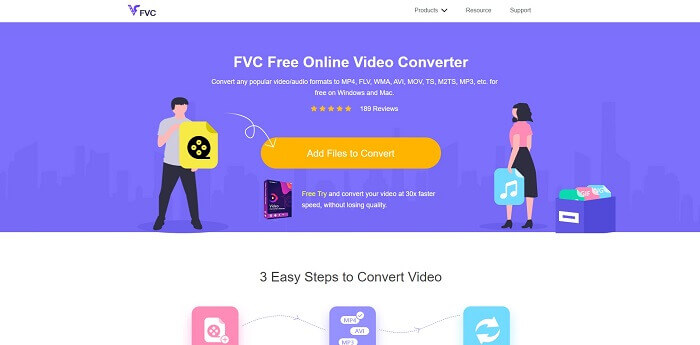
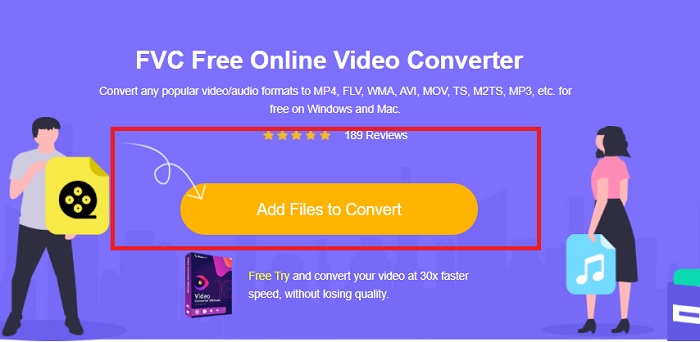
ขั้นตอนที่ 2 เมื่อเข้าสู่หน้าเว็บแล้ว ให้คลิกที่ Add Files to Convert จากนั้นค้นหาไฟล์ที่คุณต้องการแปลง แล้วคลิก Open.
ขั้นตอนที่ 3 วิดีโอจะถูกอัปโหลดเข้าสู่เครื่องมือ จากนั้นเปลี่ยนรูปแบบไฟล์วิดีโอเป็น MP4 โดยคลิกเลือกวงกลมที่อยู่ข้าง MP4 จากตัวเลือกที่มี.
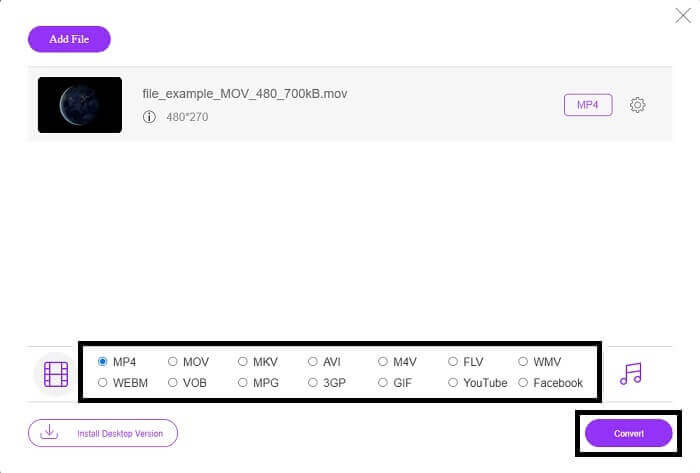
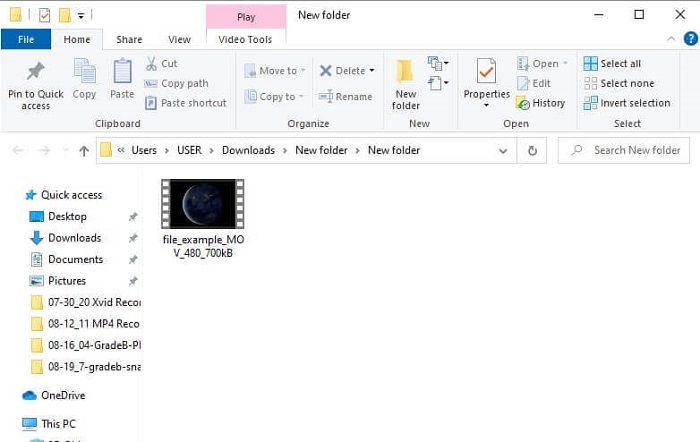
ขั้นตอนที่ 4 จากนั้นคลิก Convert แล้วเลือกโฟลเดอร์ปลายทางที่ต้องการบันทึกไฟล์ รอจนกระทั่งไฟล์แปลงเสร็จ เมื่อเสร็จแล้วจะมีหน้าต่างโฟลเดอร์เด้งขึ้นมาแสดงตำแหน่งที่บันทึกวิดีโอไว้ ให้คลิกที่ไฟล์วิดีโอเพื่อดูตัวอย่างไฟล์ที่แปลงเสร็จแล้ว.
วิธีแบบมืออาชีพ - Video Converter Ultimate
หากต้องการจัดการแปลงไฟล์วิดีโออย่างมืออาชีพ แนะนำให้ใช้ Video Converter Ultimate จาก Aiseesoft ซึ่งเป็นเครื่องมือแบบครบชุดที่สามารถใช้งานได้ทั้งบนคอมพิวเตอร์ Mac และ Windows ไม่ต้องกังวลหากไฟล์วิดีโอรูปแบบต่าง ๆ ไม่สามารถเล่นบน Xbox One S ของคุณได้ เพราะ Video Converter Ultimate สามารถจัดการให้คุณได้ เครื่องมือนี้ใช้เทคโนโลยีการเข้ารหัสวิดีโอระดับสูงเพื่อให้ได้คุณภาพที่ดีที่สุด อีกทั้งยังมีฟังก์ชันปรับปรุงคุณภาพวิดีโอให้ดีขึ้นได้ ที่สำคัญคือรองรับไฟล์ได้หลากหลายรูปแบบมากกว่าซอฟต์แวร์ฟรีทั่วไป จุดเด่นอีกอย่างคือคุณภาพของวิดีโอ คุณสามารถแปลงวิดีโอเป็นคุณภาพระดับ 4K และขั้นต่ำอยู่ที่ 1080p การแปลงไฟล์ MKV ด้วย Video Converter Ultimate จึงถือว่าง่ายดายมาก.
ขั้นตอนที่ 1 ดาวน์โหลดโปรแกรมลงบนเดสก์ท็อปของคุณและติดตั้งให้เรียบร้อย.
ดาวน์โหลดฟรีสำหรับ Windows 7 หรือใหม่กว่าดาวน์โหลดอย่างปลอดภัย
ดาวน์โหลดฟรีสำหรับ MacOS 10.7 หรือใหม่กว่าดาวน์โหลดอย่างปลอดภัย
ขั้นตอนที่ 2 จากนั้นอัปโหลดไฟล์ด้วยการคลิกปุ่ม Add Files หรือจะลากแล้วปล่อยไฟล์ลงบนหน้าต่างหลักของโปรแกรมก็ได้.
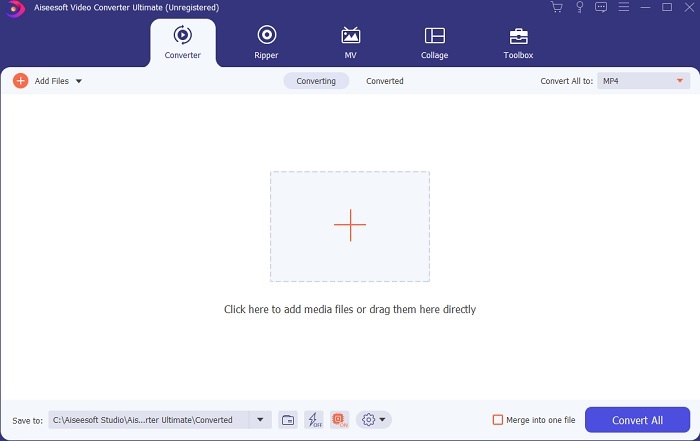
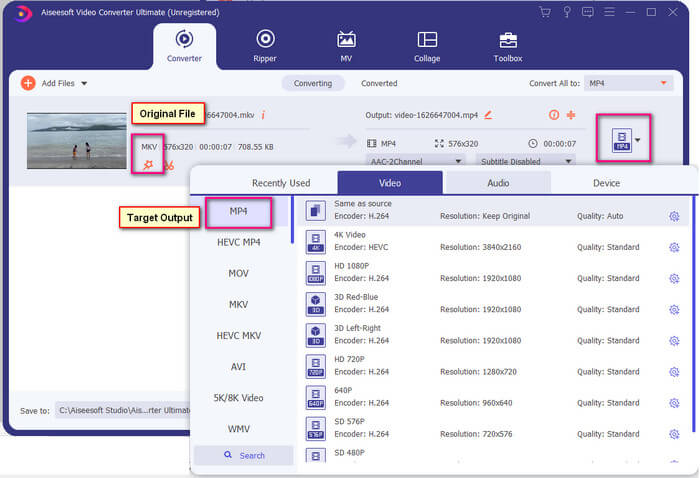
ขั้นตอนที่ 3 ตอนนี้ให้เปลี่ยนรูปแบบไฟล์โดยคลิกที่ตัวเลือกซึ่งระบุเป็น MP4 ที่มุมขวาบนของหน้าต่างโปรแกรม.
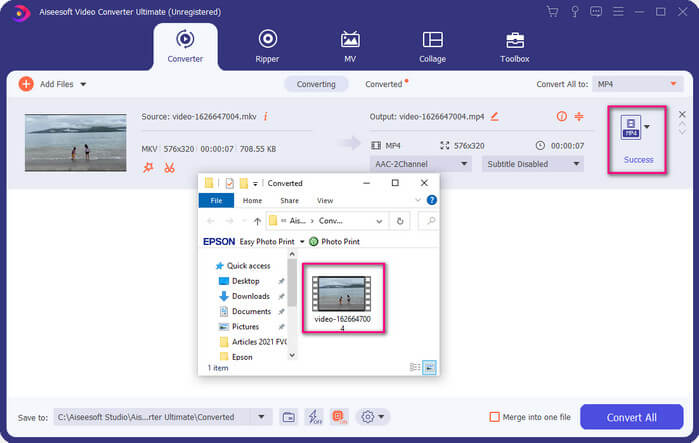
ขั้นตอนที่ 4 สุดท้ายให้คลิกปุ่ม Convert เพื่อเรนเดอร์ไฟล์ เมื่อเรนเดอร์เสร็จแล้ว โฟลเดอร์ที่เก็บไฟล์จะถูกเปิดขึ้นมาโดยอัตโนมัติ.
ส่วนที่ 2 วิธีการสตรีมและเล่นไฟล์ MKV บน Xbox One
ในทางเทคนิค คุณไม่สามารถเล่นวิดีโอ MKV บน Xbox One ได้ เนื่องจากตัวเล่นในตัวไม่รองรับ ดังนั้นก่อนจะเล่น คุณต้องแปลงวิดีโอก่อน อ้างถึงวิธีแก้ปัญหาด้านบนในการแปลงไฟล์ก่อนเล่น ในขณะเดียวกัน ต่อไปนี้คือวิธีการเล่นวิดีโอบน Xbox One หลายวิธี
วิธีเล่นไฟล์ MKV บน Xbox One ผ่าน USB Flash Drive
Xbox One S รองรับสามพอร์ตสำหรับ USB อย่างไรก็ตาม มีข้อกำหนดสำหรับไดรฟ์ USB เพื่อเล่นบน Xbox One S ไดรฟ์จะต้องอยู่ใน FAT16, FAT32, NTFS หรือ exFAT เพื่อให้คุณทราบว่าไดรฟ์ USB ใช้งานได้หรือไม่ ให้ลองเปิดบน Mac หรือ Windows PC ของคุณ ถ้ามันใช้งานได้ โอกาสที่ Xbox จะอ่านมันจะมีสูง หลังจากยืนยันแล้ว คุณสามารถคัดลอกไฟล์บนพีซีและบันทึกลงในไดรฟ์ของคุณได้ ดีดออกและเสียบเข้ากับพอร์ตใดพอร์ตหนึ่งจากด้านหน้าหรือด้านหลังของคอนโซล มีสองตัวที่ด้านหลังและหนึ่งด้านหน้า เมื่อเสียบปลั๊กแล้ว คุณจะเห็นไดรฟ์ของคุณปรากฏขึ้นเป็นหนึ่งในตัวเลือก จากนั้นเปิดเครื่องเล่นสื่อและเริ่มเล่น
วิธีเล่นไฟล์ MKV บน Xbox One โดย Casting
ใน Windows 10 มีฟีเจอร์พื้นฐานที่ช่วยให้คุณสามารถส่งภาพหน้าจอจากอุปกรณ์ไปยังตัวรับสัญญาณที่รองรับได้ เช่น Xbox One S ฟีเจอร์นี้เปรียบได้กับคำสั่ง Play To บน Xbox กระบวนการนี้อาศัยการทำงานผ่าน DLNA นั่นหมายความว่าคุณจำเป็นต้องมีการเชื่อมต่อ Wi‑Fi เพื่อใช้งาน ขั้นตอนคือ ให้ไปที่เมนู Settings บน Xbox ของคุณ เลือก Preferences แล้วคลิก Game DVR จากนั้นเปิดใช้งาน Allow Play to Streaming เพื่ออนุญาตให้สตรีมได้ หลังจากนั้นให้ไปที่คอมพิวเตอร์ Windows แล้วคลิก Cast to Device ถัดไปให้คลิกขวาที่ไฟล์วิดีโอที่คุณต้องการเล่นแล้วเลือก XboxOne วิดีโอก็จะเริ่มเล่นบนเครื่อง Xbox.
ที่เกี่ยวข้อง
● วิธีแปลงไฟล์ FLV เป็นไฟล์สำหรับ Xbox
ส่วนที่ 3 คำถามที่พบบ่อยเกี่ยวกับการเล่นไฟล์ MKV บน Xbox One
ความผิดพลาดใน Xbox One S จะแก้ไขได้อย่างไร?
ขั้นแรกให้ลองรีสตาร์ทเครื่อง โดยใช้คอนโทรลเลอร์กดปุ่ม Xbox ค้างไว้ แล้วเลือก Turn console off หรือ Restart Console หากยังไม่หาย ให้ลองปิดเครื่องที่ตัวกล่องโดยตรง หากทุกวิธีที่กล่าวมายังใช้ไม่ได้ คุณสามารถทำการรีเซ็ตเครื่องแบบเต็มระบบ (master reset) ได้.
ฉันสามารถเล่นโดยใช้ Xbox One S โดยไม่ใช้อินเทอร์เน็ตได้หรือไม่
ในการตั้งค่าครั้งแรก คุณต้องเชื่อมต่ออินเทอร์เน็ต หลังจากตั้งค่าแล้ว คุณสามารถออฟไลน์และใช้งานได้ เพียงให้แน่ใจว่าคุณตั้งค่าก่อนจึงจะสามารถใช้งานออฟไลน์ได้ ขณะออฟไลน์ นี่คือสิ่งที่คุณสามารถทำได้ ดูทีวี เล่นเกม บันทึกคลิปหรือจับภาพหน้าจอ และรับรางวัลพิเศษแต่มีข้อจำกัด
ข้อเสียเปรียบของซีรี่ส์ Xbox One S คืออะไร
แม้จะมีคุณสมบัติที่ยอดเยี่ยมทั้งหมดที่นำเสนอโดยเกมคอนโซล แต่มีสิ่งหนึ่งที่คุณจะพบได้อย่างแน่นอนในอุปกรณ์มัลติทาสกิ้งดังกล่าว อาจมองหาดิสก์ไดรฟ์ น่าเสียดายที่ไม่รองรับ ซึ่งหมายความว่าการใช้เกมอื่นๆ ที่คุณมีกับคอนโซลเก่าจะไม่ทำงานที่นี่
สรุป
แม้ว่าจะไม่มีวิธีโดยตรงในการเล่นไฟล์ MKV บน Xbox One โดยตรง แต่คุณสามารถแปลงวิดีโอได้ตลอดเวลาโดยเพิ่มรายการตัวแปลงด้านบนให้ใหญ่ที่สุด ทุกรูปแบบรองรับรูปแบบทั้งหมดที่คุณสามารถใช้เครื่องเล่นสื่อของ Xbox One S ได้ หากคุณต้องการทราบวิธีแก้ไขปัญหาบางอย่างเกี่ยวกับ Xbox One S คุณสามารถอ่านคำถามที่พบบ่อยในรายการได้
-
 วิธีแปลงไฟล์ MKV เพื่อเล่นบน PS3 อย่างราบรื่น [แก้ไขแล้ว]
 ต้องการเล่นวิดีโอ MKV บน PS3 ของคุณหรือไม่? อย่างไรก็ตาม PS3 ไม่สามารถเล่นไฟล์ MKV ได้โดยตรง บทความนี้จะแสดงวิธีการแปลงวิดีโอ MKV เป็นรูปแบบวิดีโอที่รองรับ PS3 เพื่อเล่นบน PS3 โดยไม่ต้องยุ่งยาก
-
 ทางเลือก Windows Media Player ที่ดีที่สุด 5 อันดับแรกสำหรับมือถือ Android
 เนื่องจากคุณไม่สามารถดาวน์โหลด Windows Media Player สำหรับ Android ได้ คุณควรอ่านบทความนี้และเรียนรู้เกี่ยวกับ 5 ทางเลือกที่ดีที่สุดสำหรับ Windows Media Player
-
 เครื่องเล่นวิดีโอที่ดีที่สุด 5 อันดับแรกสำหรับ iPhone ที่คุณไม่ควรพลาดในปี 2025
 หากต้องการเล่นวิดีโอในทุกรูปแบบและมีประสบการณ์การรับชมที่ดีขึ้นบน iPhone ของคุณ คุณควรอ่านบทความนี้และเรียนรู้เกี่ยวกับเครื่องเล่นวิดีโอ 5 รายการที่ดีที่สุดสำหรับ iPhone 12/11/X/8/7/6
