


 Video Converter Ultimate
 บันทึกหน้าจอ
 ซ่อมวิดีโอ
 ดาวน์โหลดอย่างปลอดภัย
เหตุใดวิดีโอ Twitter จึงไม่มีเสียง มาแก้ไขปัญหานี้กัน
Twitter เป็นหนึ่งในแพลตฟอร์มเครือข่ายสังคมออนไลน์ที่มีชื่อเสียงมากที่สุดในปัจจุบัน แพลตฟอร์มนี้ทำหน้าที่เป็นศูนย์กลางให้ผู้คนติดตามข่าวสารประจำวันและสื่อสารกันผ่านการทวีต อย่างไรก็ตาม ปัญหาที่พบบ่อยคือเมื่อพยายามดูวิดีโอแล้วเกิดปัญหาวิดีโอ Twitter ไม่มีเสียงขึ้นมา เช่นเดียวกัน เมื่อคลิกดูรูปภาพหรือ GIF ก็อาจเกิดปัญหาโหลดไม่ขึ้น การสะดุดเหล่านี้สร้างความรำคาญได้มาก และมักเกิดซ้ำ ๆ บนแพลตฟอร์มที่มีผู้ใช้จำนวนมาก เพื่อตอบสนองต่อปัญหานี้ เราจึงนำเสนอคู่มือฉบับสมบูรณ์ที่จะช่วยคุณแก้ไขปัญหาเมื่อวิดีโอ Twitter ไม่เล่นเสียงได้อย่างมีประสิทธิภาพ.

ส่วนที่ 1 เหตุใดวิดีโอจึงไม่มีเสียงบน Twitter
วิดีโอบน Twitter อาจขาดเสียงเนื่องจากสาเหตุหลายประการ มักเกิดจากปัญหาทางเทคนิคหรือการตั้งค่าที่เกี่ยวข้องกับผู้ใช้ ดังนั้นส่วนนี้จะช่วยคุณระบุสาเหตุและรับข้อมูลที่ดีเกี่ยวกับวิธีแก้ปัญหาที่ดีที่สุดในภายหลัง
เหตุผลที่ 1. ปัญหาแอป Twitter หรือเบราว์เซอร์
ปัญหาด้านเสียงในวิดีโอ Twitter อาจเกิดจากปัญหาภายในเบราว์เซอร์หรือแอปพลิเคชัน Twitter ที่ใช้งานอยู่ การมีซอฟต์แวร์เวอร์ชันที่ล้าสมัยหรือเข้ากันไม่ได้อาจทำให้การเล่นเสียงหยุดชะงักได้
เหตุผลที่ 2. ปัญหาเครือข่าย
ประสิทธิภาพของเครือข่ายมีบทบาทสำคัญในการมีอิทธิพลต่อประสบการณ์การเล่นวิดีโอ Twitter หากไม่มีเสียง คุณภาพเครือข่ายไม่เพียงพออาจส่งผลให้การเล่นวิดีโอผิดเพี้ยน ซึ่งไม่เพียงส่งผลต่อภาพเท่านั้น แต่ยังส่งผลต่อการได้ยินของเนื้อหาด้วย
เหตุผลที่ 3 วิดีโอเสียหายพร้อมไฟล์เสียง
ถัดไปคือความเสียหายที่เป็นไปได้ของไฟล์ เมื่อไฟล์วิดีโอเสียหาย อาจทำให้ข้อมูลเสียงภายในวิดีโอสูญหายได้ สิ่งนี้ส่งผลต่อประสบการณ์การเล่นโดยรวมของเนื้อหาวิดีโอ
เหตุผลที่ 4. วิดีโอและเสียงไม่ซิงค์กัน
นอกจากไฟล์วิดีโอเสียหายแล้ว อีกสาเหตุหนึ่งที่ทำให้วิดีโอไม่มีเสียงคือปัญหาความคลาดเคลื่อนของจังหวะเวลา ปัญหานี้มักเกิดจากการบันทึกหรือการตัดต่อวิดีโอที่ไม่ถูกต้อง ส่งผลให้เกิดความไม่สอดคล้องกันอย่างเห็นได้ชัดระหว่างภาพและเสียง ภาพกับเสียงไม่ตรงกันเป็นเรื่องที่พบได้บ่อย และจะสังเกตได้เมื่อการประสานเวลาของสองสื่อนี้ถูกรบกวน.
เหตุผลที่ 5. แคชบน Twitter
ต่อไปนี้คือคุกกี้และแคช การขาดประสบการณ์ด้านเสียงกับวิดีโอ Twitter นี้อาจเป็นผลมาจากความขัดแย้งที่อาจเกิดขึ้นจากคุกกี้หรือแคชที่จัดเก็บโดยเบราว์เซอร์หรือแอปพลิเคชัน Twitter
ส่วนที่ 2 วิธีแก้ไขไม่มีเสียงในวิดีโอ Twitter
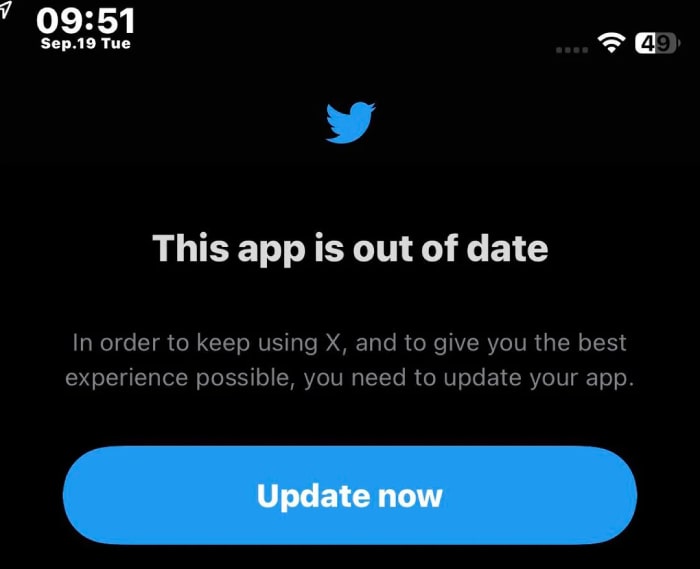
โซลูชันที่ 1. อัปเดตแอป Twitter
ตรวจสอบให้แน่ใจว่ามีการอัพเดตเป็นประจำบนแอพ Twitter นี่เป็นสิ่งสำคัญเมื่อประสบปัญหาด้านเสียงขณะเล่นวิดีโอ Twitter ซึ่งอาจเกิดจากข้อขัดแย้งหรือส่วนขยายที่ส่งผลต่อการเล่นเสียงภายในเบราว์เซอร์หรือแอปของคุณ แก้ไขปัญหาข้อขัดแย้งที่อาจเกิดขึ้นเหล่านี้และตรวจสอบว่าทั้งเบราว์เซอร์และแอปของคุณทำงานบนเวอร์ชันล่าสุด ดังนั้น คุณจึงสามารถจัดการและแก้ไขปัญหาความเข้ากันได้ที่อาจเกิดขึ้นได้อย่างมีประสิทธิภาพหากคุณอัปเดตแอปหรือซอฟต์แวร์ให้ทันสมัยอยู่เสมอ สิ่งนี้จะไม่เพียงเพิ่มประสิทธิภาพของระบบโดยรวม แต่ยังมีบทบาทสำคัญในการรักษาประสบการณ์การเล่นเสียงที่ราบรื่น โดยเฉพาะอย่างยิ่งเมื่อเข้าถึงเนื้อหามัลติมีเดีย
โซลูชันที่ 2. มีเครือข่ายอินเทอร์เน็ตที่แข็งแกร่ง
ตรวจสอบความน่าเชื่อถือของการเชื่อมต่ออินเทอร์เน็ตของคุณทุกครั้งที่คุณเข้าถึงวิดีโอบน Twitter เครือข่ายที่แข็งแกร่งสามารถหลีกเลี่ยงปัญหาเสียงที่อาจเกิดขึ้นกับเนื้อหาวิดีโอของคุณได้ อย่างไรก็ตาม สิ่งสำคัญคือต้องตรวจสอบการทดสอบความเร็วเสมอและพักเราเตอร์ตามความจำเป็น
โซลูชันที่ 3 แก้ไขไฟล์ที่เสียหาย
วิธีที่ดีที่สุดในการซ่อมไฟล์วิดีโอที่เสียหายคือการใช้เครื่องมือซ่อมแซมอย่าง Video Repair ที่ถูกคัดสรรโดย FVC ซอฟต์แวร์นี้สามารถจัดการกับปัญหาการเล่นวิดีโอหลากหลายรูปแบบ รวมถึงปัญหาวิดีโอ Twitter ไม่มีเสียงได้ด้วย นอกจากนี้ยังแสดงให้เห็นถึงความยืดหยุ่นด้วยความสามารถในการซ่อมวิดีโอความละเอียดสูง แม้กระทั่งวิดีโอที่มีความละเอียดสูงถึง 16K โดยยังคงคุณภาพของวิดีโอที่ซ่อมแล้วให้ใกล้เคียงต้นฉบับมากที่สุด ทำให้ FVC Video Repair เป็นเครื่องมือที่ขาดไม่ได้ ไม่เพียงสำหรับแก้ไขปัญหาการเล่นวิดีโอทั่วไปเท่านั้น แต่ยังรองรับแหล่งวิดีโอได้หลากหลายและคงคุณภาพวิดีโอให้ดีที่สุดระหว่างกระบวนการซ่อม ดังนั้นจึงเป็นตัวช่วยที่ดีมากหากคุณกำลังมองหาเครื่องมือกู้คืนความทรงจำอันมีค่าหรือคอนเทนต์สำคัญจากปัญหาไฟล์วิดีโอเสียหาย แล้วจะซ่อมวิดีโอที่เสียหายด้วย FVC ได้อย่างไร ดูขั้นตอนด้านล่าง.
ดาวน์โหลดฟรีสำหรับ Windows 7 หรือใหม่กว่าดาวน์โหลดอย่างปลอดภัย
ดาวน์โหลดฟรีสำหรับ macOS 10.7 หรือใหม่กว่าดาวน์โหลดอย่างปลอดภัย
ขั้นตอนที่ 1 เปิดใช้งานซอฟต์แวร์หลังจากติดตั้งเสร็จสิ้น.
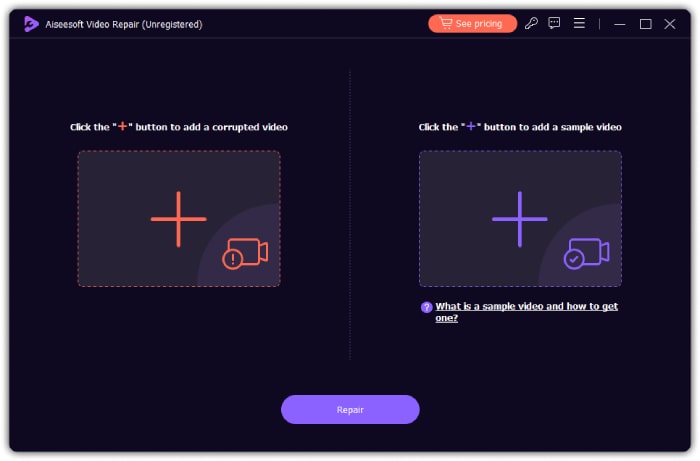
ขั้นตอนที่ 2 คลิกปุ่ม เพิ่ม สีแดงเพื่ออัปโหลดวิดีโอที่เสียหาย และปุ่ม เพิ่ม สีน้ำเงินเพื่ออัปโหลดวิดีโอตัวอย่าง.
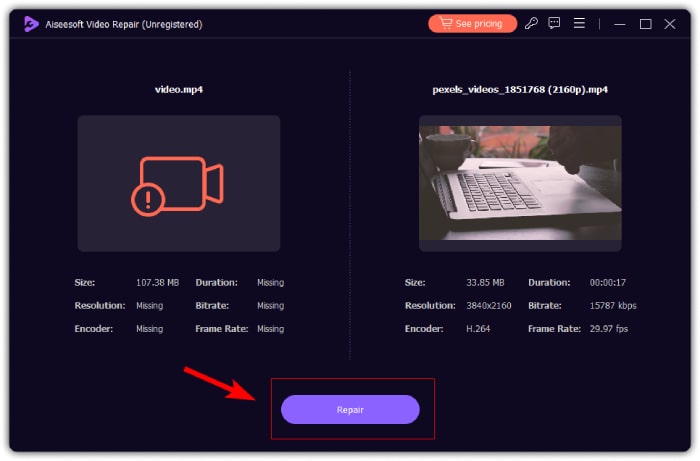
ขั้นตอนที่ 3 เมื่ออัปโหลดแล้ว ให้คลิกปุ่ม ซ่อมแซม เพื่อเริ่มกระบวนการซ่อม หลังจากเสร็จสิ้น เครื่องมือจะเปิดโอกาสให้คุณซ่อมวิดีโออื่น ส่งออกไฟล์ที่ซ่อมแล้ว และพรีวิววิดีโอได้.
โซลูชันที่ 4 ให้วิดีโอและเสียงซิงโครไนซ์
สำหรับวิดีโอของคุณที่ภาพกับเสียงไม่สอดคล้องกัน ฟีเจอร์ Sync Audio ของ Video Converter Ultimate ถือเป็นเครื่องมือที่ดีที่สุดในการใช้งาน เครื่องมือนี้ช่วยให้ง่ายต่อการปรับให้เสียงและภาพตรงกันอย่างลงตัว นอกจากนี้ยังช่วยให้คุณยกระดับคอนเทนต์ด้วยการปรับจังหวะเวลาเสียงอย่างละเอียด ให้ผลงานออกมาดูเนี๊ยบและเป็นมืออาชีพ โชคดีที่เครื่องมือนี้มีขั้นตอนการใช้งานที่ง่ายมาก ดังที่ระบุไว้ด้านล่าง.
ดาวน์โหลดฟรีสำหรับ Windows 7 หรือใหม่กว่าดาวน์โหลดอย่างปลอดภัย
ดาวน์โหลดฟรีสำหรับ MacOS 10.7 หรือใหม่กว่าดาวน์โหลดอย่างปลอดภัย
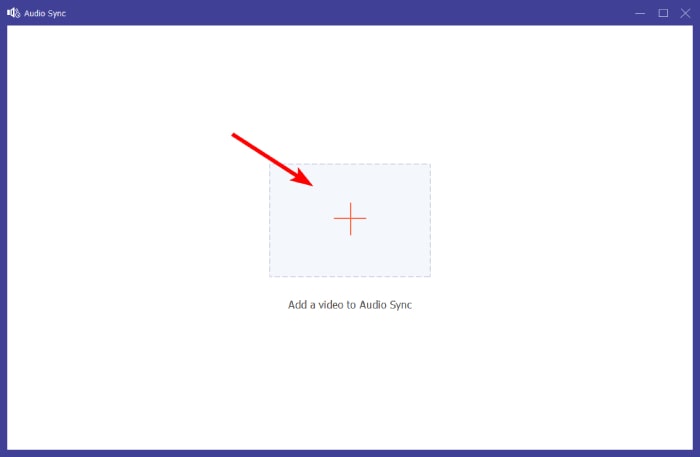
ขั้นตอนที่ 1 เปิดซอฟต์แวร์บนคอมพิวเตอร์ จากนั้นไปที่เมนูแท็บ กล่องเครื่องมือ (Toolbox) เลื่อนลงมาจนพบเครื่องมือ Sync Audio แล้วคลิก.
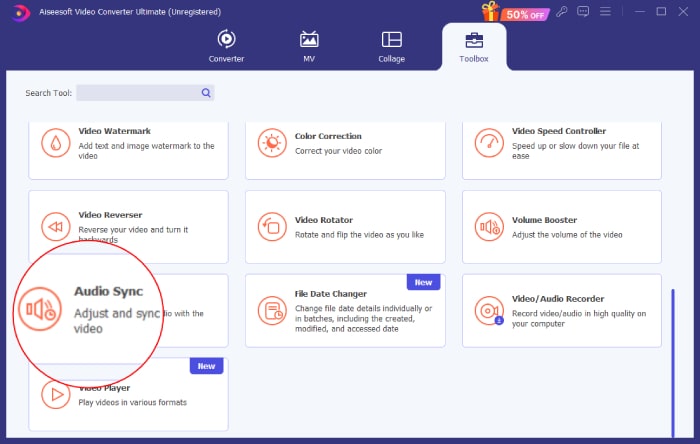
ขั้นตอนที่ 2 คลิกปุ่ม บวก ในหน้าต่างถัดไปเพื่ออัปโหลดวิดีโอ Twitter ที่ไม่มีเสียง.
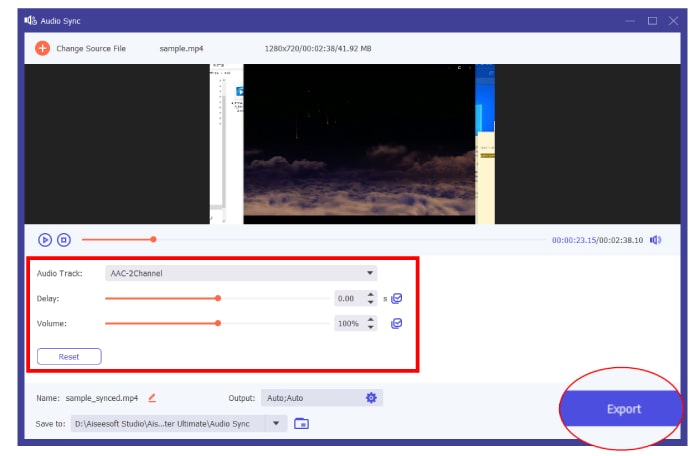
ขั้นตอนที่ 3 จากนั้นเริ่มปรับค่าพรีเซ็ตต่าง ๆ เพื่อให้ได้ความกลมกลืนของภาพและเสียงที่ดีที่สุด แล้วคลิกปุ่ม ส่งออก (Export) เมื่อเสร็จสิ้น.
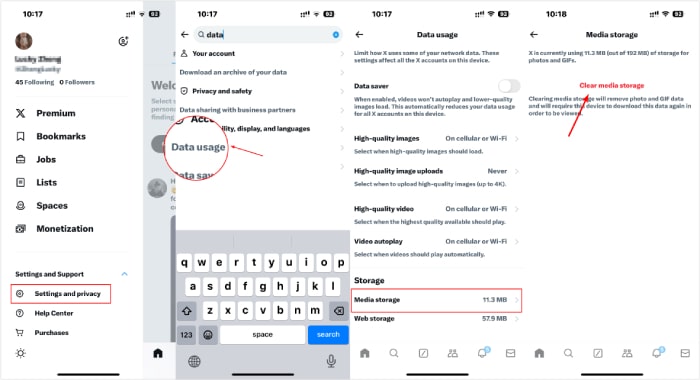
โซลูชันที่ 5. ล้างแคช
สุดท้ายหาเวลาล้างแคชของแอป หากต้องการลบคุกกี้ ให้ไปที่การตั้งค่าเบราว์เซอร์ของคุณและค้นหาคุกกี้เฉพาะที่คุณต้องการลบ เมื่อคุณล้างคุกกี้สำเร็จแล้ว ให้ตรวจสอบว่าเสียงของวิดีโอ Twitter ของคุณทำงานบนอุปกรณ์ของคุณหรือไม่
ส่วนที่ 3 คำถามที่พบบ่อยเกี่ยวกับวิดีโอ Twitter
ทำไมวิดีโอบน Twitter ถึงไม่มีเสียง?
วิดีโอบน Twitter อาจไม่มีเสียงเนื่องจากปัจจัยบางประการ เช่น ปัญหาแอพ ปัญหาเครือข่าย ปัญหาไฟล์วิดีโอ และอื่นๆ
เหตุใดวิดีโอ Twitter จึงไม่เล่น
สาเหตุทั่วไปประการหนึ่งที่ทำให้วิดีโอไม่เล่นบน Twitter คือการเชื่อมต่ออินเทอร์เน็ตที่ไม่ดี
ฉันสามารถปิดเสียงวิดีโอบน Twitter ได้หรือไม่
ใช่ คุณสามารถปิดเสียงวิดีโอบน Twitter ได้ ในการดำเนินการดังกล่าว เพียงแตะไอคอนลำโพงที่มุมขวาล่างของวิดีโอเพื่อปิดหรือเปิดเสียง
สรุป
โดยสรุป หากคุณพบปัญหาวิดีโอ Twitter ไม่มีเสียง ปัจจัยที่ควรพิจารณามีหลายอย่าง เพื่อช่วยให้คุณระบุและเลือกวิธีแก้ไขที่เหมาะสมที่สุด หากคุณสงสัยว่าไฟล์วิดีโอคือสาเหตุของปัญหา คุณสามารถซ่อมแซมได้ด้วย FVC Video Repair และ FVC Video Converter Ultimate.
-
 วิธีใช้ FFmpeg เพื่อแก้ไขวิดีโอที่เสียหาย | คู่มือปี 2025
 เรียนรู้วิธีใช้ FFmpeg เพื่อแก้ไขวิดีโอที่เสียหายได้อย่างง่ายดาย และค้นพบคุณสมบัติหลัก ข้อดีและข้อเสียทั้งหมด และความแตกต่างจากเครื่องมือซ่อมแซมวิดีโออื่นๆ
-
 5 วิธีในการซ่อมแซมไฟล์ MOV ที่เสียหาย
 ค้นพบโซลูชันที่มีประสิทธิภาพสำหรับการซ่อมแซม MOV เรียนรู้วิธีการซ่อมแซมไฟล์ MOV ที่เสียหายของคุณอย่างง่ายดาย เพื่อให้แน่ใจว่าการสตรีมวิดีโอจะไม่หยุดชะงักและปลอดภัย
-
 3 วิธีในการปรับขนาดรูปภาพสำหรับ Twitter โดยไม่สูญเสียคุณภาพ
 ในการปรับขนาดรูปภาพสำหรับ Twitter คุณจะต้องมีตัวปรับขนาดรูปภาพอยู่ในมือ ไม่มี? จากนั้นเลือกในรายการ
