


 Video Converter Ultimate
 บันทึกหน้าจอ
 ซ่อมวิดีโอ
 ดาวน์โหลดอย่างปลอดภัย
ซ่อมแซมวิดีโอที่เสียหายออนไลน์ได้ฟรีและง่ายดาย
คุณเคยรู้สึกหงุดหงิดเวลาจะเปิดวิดีโอแล้วไฟล์เสียหรือเล่นไม่ได้ไหม? จากนั้นคุณก็อยากจะซ่อมให้หายเดี๋ยวนั้นเลยด้วยวิธีออนไลน์ฟรี แต่ก็ลังเลเรื่องประสิทธิภาพและไม่รู้ว่าจะใช้ตัวไหน ไม่ต้องกังวลไป เพราะบทความนี้ได้รวบรวมทุกอย่างไว้ให้แล้ว! คุณสามารถสำรวจวิธีที่ดีที่สุดในการซ่อมวิดีโอที่เสียและเป็นพิกเซลแบบออนไลน์ฟรีได้จากด้านล่าง ดังนั้นโดยไม่เสียเวลา มาเริ่มสำรวจกันเพื่อเริ่มซ่อมวิดีโอที่มีปัญหาเหล่านี้กันเถอะ.

ตอนที่ 1. คุณสามารถซ่อมแซมวิดีโอที่เสียหายทางออนไลน์ได้จริงหรือไม่?
ด้วยเทคโนโลยีในปัจจุบัน การซ่อมแซมวิดีโอที่เสียหายทางกายภาพจึงเป็นไปได้ทางออนไลน์ ดังนั้น หากไฟล์วิดีโอของคุณเสียหายเนื่องจากขาดข้อมูลหรือข้อผิดพลาดในการเข้ารหัส เครื่องมือออนไลน์บางตัวอ้างว่าสามารถแก้ไขปัญหาได้ อย่างไรก็ตาม อัตราความสำเร็จในการแก้ไขวิดีโอที่เสียหายทางออนไลน์นั้นอาจแตกต่างกันได้ และควรใช้ความระมัดระวังเมื่อใช้เครื่องมือเหล่านี้ ดังนั้น จึงเป็นสิ่งสำคัญที่จะต้องทราบว่าหากวิดีโอของคุณเสียหายทางกายภาพ มีปัญหากับสื่อจัดเก็บข้อมูลเอง หรือโครงสร้างไฟล์เสียหายอย่างรุนแรง เครื่องมือออนไลน์อาจไม่มีประสิทธิภาพร้อยเปอร์เซ็นต์ แต่ถึงกระนั้น สาขาเทคโนโลยีของเราก็ยังคงพัฒนาอยู่เสมอ และอาจยังมีบริการหรือเครื่องมือใหม่ๆ เกิดขึ้น ทำให้คุณมีความหวังสำหรับโซลูชันที่ดีกว่าในอนาคตอันใกล้นี้
ในทางกลับกัน มีเครื่องมือที่มีอยู่แล้วซึ่งแสดงถึงประสิทธิภาพที่สูงกว่าเครื่องมืออื่น ซึ่งโชคดีที่สามารถนำเสนอได้ในข้อมูลด้านล่างนี้
ส่วนที่ 2 เครื่องมือออนไลน์ที่ดีที่สุดสำหรับการแก้ไขวิดีโอที่เสียหาย
1. ตัวแปลงออนไลน์
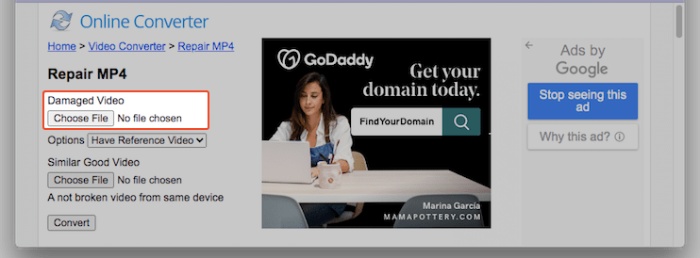
อันดับแรก เพื่อสาธิตความสามารถในการซ่อมวิดีโอกระตุกแบบออนไลน์ จะต้องใช้ Online Converter ตัวนี้ เครื่องมือซ่อมวิดีโอ MP4 ออนไลน์นี้ถูกออกแบบมาเพื่อแก้ไขข้อผิดพลาดพื้นฐานในไฟล์วิดีโอได้โดยตรงผ่านเบราว์เซอร์ของคุณ ช่วยจัดการปัญหาอย่างการเล่นสะดุดหรือไฟล์เสียหายได้อย่างมีประสิทธิภาพ นอกจากนี้บริการซ่อมวิดีโอออนไลน์ฟรีนี้ยังดึงข้อมูลสำคัญจากวิดีโอที่เสียหายออกมา พร้อมทั้งรองรับการซ่อมวิดีโอรูปแบบ MP4, MOV, 3GP และ M4V โดยกำหนดรูปแบบไฟล์ส่งออกเป็น MP4 อย่างไรก็ตาม ไม่สามารถเปิดไฟล์วิดีโอที่มีการเข้ารหัสหรือป้องกันด้วยรหัสผ่านได้ ทั้งนี้ เพื่อให้ได้ผลลัพธ์ที่ดีที่สุด แนะนำให้ใช้อ้างอิงวิดีโอตัวอย่างที่เล่นได้ตามปกติและบันทึกจากอุปกรณ์เดียวกับวิดีโอที่เสีย เช่น โทรศัพท์หรือกล้องตัวเดียวกัน.
วิธีแก้ไขวิดีโอที่มีพิกเซลแตกแบบออนไลน์ฟรีด้วย Online Convert
ขั้นตอนที่ 1. ไปที่เครื่องมือ Repair MP4 บนเว็บไซต์ จากนั้นคลิกปุ่ม Choose File เพื่ออัปโหลดวิดีโอ.
ขั้นตอนที่ 2. เลือกปลายทางสำหรับไฟล์ที่ส่งออก แล้วกดปุ่ม Repair.
ขั้นตอนที่ 3. เมื่อกระบวนการเสร็จสิ้น ให้ดาวน์โหลดวิดีโอที่ซ่อมแล้ว.
2. กู้คืนสื่อ
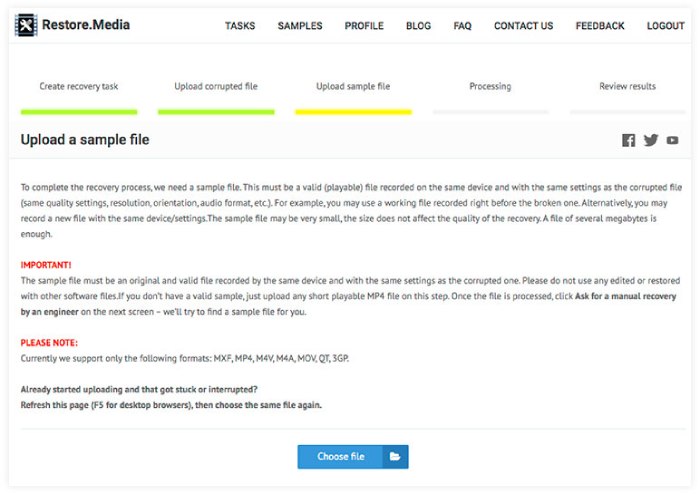
โปรแกรม Restore.media เป็นอีกหนึ่งโปรแกรมออนไลน์ที่น่าเชื่อถือสำหรับแก้ไขปัญหาวิดีโอของคุณได้ฟรี โปรแกรมนี้จะซ่อมแซมไฟล์เสียงที่เสียหายได้อย่างง่ายดายโดยสมัครบัญชีฟรี ไม่จำเป็นต้องดาวน์โหลดหรือติดตั้งโปรแกรมใดๆ กระบวนการซ่อมแซมวิดีโอออนไลน์สามารถดำเนินการได้อย่างราบรื่นผ่านเว็บเบราว์เซอร์ของคุณ นอกจากนี้ โปรแกรมนี้ยังมีความสามารถในการซ่อมแซมไฟล์เสียงที่บันทึกไว้ในอุปกรณ์เกือบทุกประเภท ในระหว่างนี้ โปรแกรมยังรองรับรูปแบบไฟล์ต่างๆ เช่น MP4, MOV, M4A, 3GP, MXF, INSV และอื่นๆ อีกมากมาย อย่างไรก็ตาม เครื่องมือออนไลน์นี้จะให้คุณดูตัวอย่างไฟล์ที่กู้คืนมาในความละเอียดที่ต่ำกว่าได้ฟรีเท่านั้น เมื่อได้รับการอนุมัติแล้ว คุณสามารถชำระเงินเพื่อกู้คืนคุณภาพและความละเอียดเริ่มต้นของไฟล์ได้
วิธีแก้ไขวิดีโอ MP4 ออนไลน์ด้วย Restore.media
ขั้นตอนที่ 1. สมัครบัญชีฟรี แล้วคลิกปุ่ม Get Started.
ขั้นตอนที่ 2. เมื่อตั้งค่าเสร็จแล้ว ให้คลิกปุ่ม Choose File และอัปโหลดวิดีโอที่เป็นเม็ดหรือเสียหาย จากนั้นให้อัปโหลดวิดีโอตัวอย่างตามไปด้วย.
ขั้นตอนที่ 3. เครื่องมือจะกู้คืนวิดีโอที่เสียให้โดยอัตโนมัติเมื่อกระบวนการเสร็จสมบูรณ์.
3.แก้ไข VIDEO
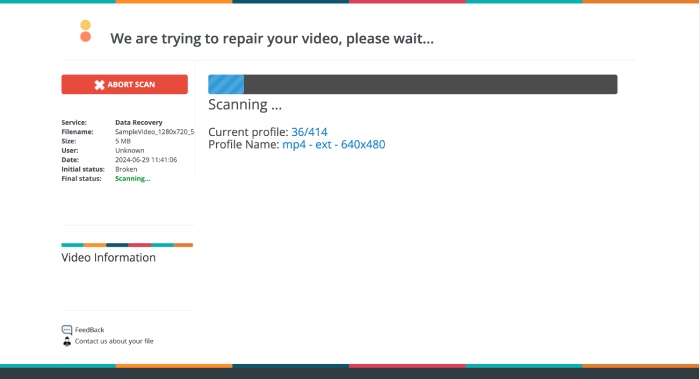
วิดีโอของคุณเปิดไม่ได้หรือเปล่า? นี่คือ Fix.VIDEO โปรแกรมนี้มอบโซลูชันที่ราบรื่นสำหรับการซ่อมวิดีโอที่เสียหรือชำรุด รวมถึงไฟล์วิดีโอที่ถูกตัดขาด ไฟล์เสียหาย และไฟล์ที่ชำรุด นอกจากนี้ แม้ไฟล์วิดีโอของคุณจะเสีย ถูกตัด ทรุดโทรม หรือเล่นไม่ได้ก็ตาม เครื่องมือ Fix.VIDEO นี้ก็สามารถกู้คืนได้อย่างง่ายดาย กระบวนการซ่อมจะทำแบบออนไลน์ผ่านเบราว์เซอร์ที่คุณใช้งานอยู่ สะดวกสบายเป็นอย่างยิ่ง ภายในไม่กี่นาทีไฟล์วิดีโอที่ซ่อมแล้วจะพร้อมให้ดาวน์โหลด และเครื่องมือก็จะตัดขั้นตอนการดาวน์โหลดหรือลงทะเบียนที่ไม่จำเป็นออกจากกระบวนการทั้งหมด อีกทั้งเครื่องมือออนไลน์นี้ยังให้คุณทำงานกับวิดีโอได้ไม่จำกัดจำนวน อย่างไรก็ตาม คุณอาจสังเกตได้ว่าหน้าตาอินเทอร์เฟซจะแตกต่างจากเครื่องมืออื่นเล็กน้อย.
วิธีแก้ไขวิดีโอหยาบทางออนไลน์ด้วย FIX.VIDEO
ขั้นตอนที่ 1. บนหน้าอินเทอร์เฟซหลักของเว็บไซต์ ให้อัปโหลดวิดีโอที่เป็นเม็ดหรือเสียหายโดยใช้ปุ่ม Upload Your Broken Video.
ขั้นตอนที่ 2. จากนั้นรอจนกว่ากระบวนการจะเสร็จสมบูรณ์.
ขั้นตอนที่ 3. เมื่อกระบวนการซ่อมเสร็จแล้ว ให้คลิกปุ่ม Download Full Video เท่านั้น.
ส่วนที่ 3 โบนัส: ซ่อมแซมวิดีโอที่เสียหายแบบออฟไลน์อย่างมีประสิทธิภาพ
เครื่องมือออนไลน์นั้นดี แต่ถ้าคุณต้องการวิธีที่มีประสิทธิภาพมากกว่าในการแก้ไขวิดีโอของคุณ ให้ใช้โซลูชันออฟไลน์ เช่น การซ่อมแซมวิดีโอที่แนะนำโดย FVC เช่นเดียวกับเครื่องมือออนไลน์ FVC Video Repair มีกระบวนการที่รวดเร็วที่สุดสำหรับการอัปโหลด การซ่อมแซม และการส่งออก ตรงกันข้ามกับเครื่องมือบนเว็บ FVC มาพร้อมกับเทคโนโลยีล้ำสมัยในการแก้ไขวิดีโอที่ล่าช้าทางออนไลน์ รับประกันว่าความทรงจำอันล้ำค่าหรือความพยายามในอาชีพของคุณจะดูน่าประทับใจไม่แพ้วิดีโออ้างอิง ปกป้องทุกรายละเอียดและความคมชัดเพื่อเพิ่มความเพลิดเพลินหรือการนำเสนอของคุณ ยิ่งไปกว่านั้น ยังใช้การกู้คืนวิดีโออันมหัศจรรย์ภายในหนึ่งนาทีหลังจากกระบวนการ นี่คือวิธีการ
ขั้นตอนที่ 1. ติดตั้งเครื่องมือซ่อมวิดีโอบนคอมพิวเตอร์ของคุณโดยคลิกปุ่ม Free Download ด้านล่าง จากนั้นเปิดโปรแกรม.
ดาวน์โหลดฟรีสำหรับ Windows 7 หรือใหม่กว่าดาวน์โหลดอย่างปลอดภัย
ดาวน์โหลดฟรีสำหรับ MacOS 10.7 หรือใหม่กว่าดาวน์โหลดอย่างปลอดภัย
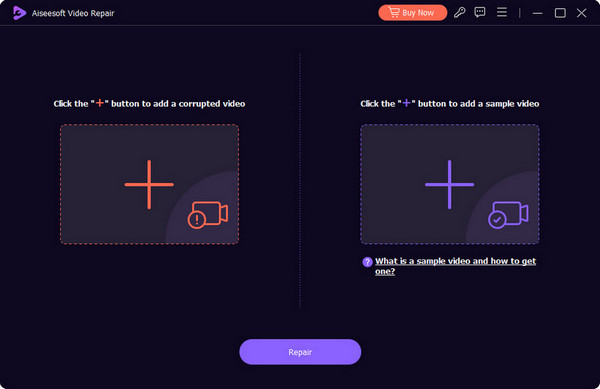
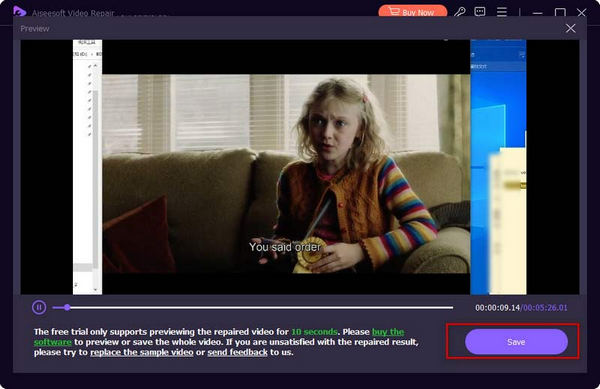
ขั้นตอนที่ 2. ต่อไปให้อัปโหลดวิดีโอตัวอย่างโดยใช้ปุ่มสีน้ำเงิน Add และอัปโหลดวิดีโอที่เสียโดยใช้ปุ่มสีแดง เมื่อโหลดเสร็จแล้วให้คลิกปุ่ม Repair.
ขั้นตอนที่ 3. หลังจากผ่านไปไม่กี่วินาที คุณก็สามารถกดปุ่ม Save เพื่อส่งออกวิดีโอที่ซ่อมแล้วได้ทันที.
ส่วนที่ 4. คำถามที่พบบ่อยเกี่ยวกับการซ่อมแซมวิดีโอออนไลน์
ทำไมฉันถึงดูวีดีโอออนไลน์ไม่ได้?
สาเหตุที่เป็นไปได้ที่คุณไม่สามารถดูวิดีโอออนไลน์ได้คือ ไฟล์วิดีโอเสียหาย การเชื่อมต่ออินเทอร์เน็ตที่ช้า และปัญหากับเบราว์เซอร์
ฉันต้องเปิดเบราว์เซอร์ไว้ขณะซ่อมแซมหรือไม่?
ขึ้นอยู่กับเครื่องมือซ่อมแซมที่คุณใช้ เครื่องมือบางอย่างอาจต้องเปิดเบราว์เซอร์ ในขณะที่เครื่องมืออื่นๆ สามารถทำงานเบื้องหลังได้
การใช้เครื่องมือซ่อมแซมวิดีโอออนไลน์ปลอดภัยหรือไม่?
โดยทั่วไป การใช้เครื่องมือซ่อมแซมออนไลน์ถือเป็นเรื่องปลอดภัย อย่างไรก็ตาม วิธีนี้ใช้ได้เฉพาะเมื่อคุณเลือกใช้เครื่องมือที่มีชื่อเสียงและระมัดระวังในการอัปโหลดวิดีโอที่ละเอียดอ่อนหรือเป็นส่วนตัว
สรุป
บทความนี้ได้นำเสนอเครื่องมือออนไลน์หลายตัวสำหรับซ่อมวิดีโอที่เสียแบบออนไลน์ฟรี นอกจากนี้ยังแนะนำโปรแกรมเดสก์ท็อปทรงพลังอย่าง FVC Video Repair ซึ่งออกแบบมาสำหรับการซ่อมวิดีโอโดยเฉพาะ ช่วยให้คุณซ่อมแซมวิดีโอที่เสียหายได้โดยตรงบนคอมพิวเตอร์ของคุณ.
-
 วิดีโอหน้าจอดำคืออะไร และฉันควรแก้ไขอย่างไร
 คุณสงสัยหรือไม่ว่าทำไมหน้าจอของคุณถึงเป็นสีดำเมื่อสตรีมมิ่งวิดีโอ? ไม่ต้องกังวลอีกต่อไป เพราะในบทความนี้ เราจะช่วยคุณแก้ไขปัญหาวิดีโอจอดำ
-
 วิธีแก้ไขรหัสข้อผิดพลาดวิดีโอ 224003: คู่มือการแก้ไขขั้นสุดท้ายของคุณ
 เรียนรู้วิธีการแก้ปัญหาไม่สามารถเล่นวิดีโอนี้ได้ รหัสข้อผิดพลาด 224003 และแก้ไขปัญหาเพื่อประสบการณ์ผู้ใช้ที่ราบรื่น กลับมาสู่เส้นทางเดิมพร้อมกับคำแนะนำของเรา!
-
 วิธีแก้ไข Canable to Play Video Error 5 ได้อย่างง่ายดาย
 คุณเคยประสบปัญหาในการเล่นวิดีโอที่คุณดาวน์โหลดมาแต่ถูกรบกวนด้วยข้อความแสดงข้อผิดพลาด 5 ที่ไม่สามารถเล่นวิดีโอได้หรือไม่ นี่คือทุกสิ่งที่คุณจำเป็นต้องรู้
