


 Video Converter Ultimate
 บันทึกหน้าจอ
 ซ่อมวิดีโอ
วิธีป้องกันการทุจริตวิดีโอ: ดูเครื่องมือที่ดีที่สุด
ความเสียหายของวิดีโอถือเป็นความท้าทายที่พบบ่อยในขอบเขตของการสร้างเนื้อหาดิจิทัล และเป็นสิ่งสำคัญสำหรับผู้ใช้ทุกคนที่จะต้องมีความรู้ที่จำเป็นในการป้องกันหรือแก้ไขปัญหาดังกล่าว ด้วยลักษณะที่ซับซ้อนของการทำงานกับเนื้อหาดิจิทัล การเผชิญกับความเสียหายของวิดีโอจึงเป็นสิ่งที่หลีกเลี่ยงไม่ได้ อย่างไรก็ตาม การทำความเข้าใจมาตรการป้องกันและการมีความสามารถในการแก้ไขปัญหาดังกล่าวได้กลายเป็นทักษะพื้นฐานสำหรับผู้ใช้ในโดเมนต่างๆ
นอกจากนี้ การลงทุนกับเครื่องมือซ่อมแซมวิดีโอที่มีประสิทธิภาพสูงสามารถเปลี่ยนเกมได้อย่างแท้จริงในการเรียนรู้วิธีป้องกันไฟล์วิดีโอเสียหาย นั่นจึงเป็นเหตุผลที่บทความนี้ถูกจัดทำขึ้นเพื่อช่วยแนะนำคุณในการค้นหาเครื่องมือที่ดีที่สุด และพาคุณไปสู่ระดับใหม่ของความคิดสร้างสรรค์ในโลกของการสร้างสรรค์ดิจิทัล การอ่านบทความนี้ต่อไปจะช่วยให้คุณเข้าใจการเพิ่มขึ้นของปัญหาไฟล์วิดีโอเสียหาย สาเหตุ วิธีป้องกัน และเครื่องมือที่เหมาะสมในการจัดการ เมื่อผสานแนวทางการป้องกันเข้ากับเครื่องมือที่เหมาะสม คุณจะสามารถเพิ่มความปลอดภัยให้ไฟล์วิดีโอของคุณจากความเสียหายได้อย่างมีนัยสำคัญ.

ส่วนที่ 1 การทุจริตวิดีโอคืออะไร
ความเสียหายของวิดีโอเป็นปรากฏการณ์ที่ความสมบูรณ์ของโครงสร้างของไฟล์วิดีโอถูกทำลาย ทำให้เกิดการบิดเบือนที่เห็นได้ชัดเจนทั้งในองค์ประกอบภาพและการได้ยิน ความเสียหายนี้สามารถแสดงออกมาได้หลายวิธี รวมถึงภาพแตก ความไม่สอดคล้องกันของเสียง และการหยุดชะงักในขั้นตอนการเล่นโดยรวม ความสมบูรณ์ที่ถูกบุกรุกมักเกิดจากปัญหาระหว่างการถ่ายโอนไฟล์ การจัดเก็บทำงานผิดปกติ ปัญหาตัวแปลงสัญญาณ หรือความเข้ากันไม่ได้ของซอฟต์แวร์
สาเหตุที่เป็นไปได้ของวิดีโอเสียหาย:
◆ ปัญหาการถ่ายโอนไฟล์: การถ่ายโอนที่ถูกขัดจังหวะหรือไม่สมบูรณ์อาจทำให้ไฟล์วิดีโอเสียหายได้.
◆ ปัญหาโค้เดก: ความไม่รองรับหรือปัญหาที่เกิดจากโค้เดกวิดีโออาจทำให้ไฟล์เสียหายระหว่างการเล่น.
◆ ความขัดข้องของอุปกรณ์จัดเก็บข้อมูล: อุปกรณ์จัดเก็บข้อมูลที่มีปัญหาหรือเซกเตอร์เสียในฮาร์ดไดรฟ์อาจทำให้ไฟล์วิดีโอเสียหาย.
◆ ซอฟต์แวร์ไม่รองรับกัน: การใช้ซอฟต์แวร์ตัดต่อวิดีโอที่ไม่รองรับหรือเวอร์ชันล้าสมัยอาจทำให้ไฟล์เสียหายระหว่างกระบวนการตัดต่อ.
อาการเสียหายของวิดีโอ:
◆ ภาพแตกเป็นบล็อก (Pixelation): พิกเซลในเฟรมวิดีโอมีสีเพี้ยนหรือผิดรูป.
◆ เสียงเพี้ยน: การเล่นเสียงไม่สม่ำเสมอหรือเสียงบิดเบี้ยวฟังไม่ชัด.
◆ วิดีโอค้างหรือข้ามเฟรม: วิดีโออาจค้างหรือข้ามเฟรมระหว่างการเล่น.
ท้ายที่สุดแล้ว ไฟล์วิดีโอเสียหายถือเป็นความเสี่ยงสำคัญ อาจทำให้คุณภาพเนื้อหาลดลงและทำให้ข้อมูลสำคัญภายในไฟล์สูญหาย ซึ่งอาจนำไปสู่ปัญหาวิดีโอไม่ยอมเล่น ดังนั้นควรทำความเข้าใจสาเหตุที่แท้จริงให้ดีก่อนลงมือซ่อมแซม เพราะวิธีที่ไม่ถูกต้องอาจทำให้ไฟล์วิดีโอที่เสียหายอยู่แล้วแย่ลงกว่าเดิม.
ส่วนที่ 2 วิธีการป้องกันการทุจริตวิดีโอ
จะทำอย่างไรเพื่อหลีกเลี่ยงความเสียหายของวิดีโอ? เพื่อป้องกันไม่ให้ไฟล์วิดีโอเสียหาย เราต้องเข้าใจความรู้พื้นฐานเกี่ยวกับการดูแลไฟล์วิดีโอ เพื่อปกป้องไฟล์วิดีโอของคุณจากความเสียหาย ให้ปฏิบัติตามมาตรการป้องกันเหล่านี้:
◆ ให้การถ่ายโอนข้อมูลมีความเสถียร: ใช้วิธีการถ่ายโอนข้อมูลที่เชื่อถือได้และมีความเร็วสูง เพื่อลดโอกาสในการถูกขัดจังหวะ.
◆ สำรองข้อมูลเป็นประจำ: เก็บสำรองไฟล์วิดีโอไว้ในอุปกรณ์จัดเก็บข้อมูลอื่นเพิ่มเติม.
◆ ใช้โค้เดกที่รองรับกัน: ตรวจสอบให้แน่ใจว่าไฟล์วิดีโอและโค้เดกที่ใช้เข้ารหัส/ถอดรหัสรองรับกัน.
◆ อัปเดตซอฟต์แวร์: รักษาโปรแกรมตัดต่อและโปรแกรมเล่นวิดีโอให้เป็นเวอร์ชันล่าสุดเพื่อหลีกเลี่ยงปัญหาความไม่รองรับ.
◆ หลีกเลี่ยงการปิดเครื่องกะทันหัน: ป้องกันไม่ให้คอมพิวเตอร์หรือกล้องถูกปิดกะทันหันระหว่างการบันทึกหรือการตัดต่อวิดีโอ เพราะอาจทำให้ไฟล์เสียหายได้.
◆ ใช้อุปกรณ์จัดเก็บคุณภาพดี: เลือกใช้อุปกรณ์จัดเก็บข้อมูลที่มีคุณภาพและเชื่อถือได้ เพื่อลดความเสี่ยงการเสียหายของข้อมูลจากปัญหาฮาร์ดแวร์.
◆ สแกนหาโปรแกรมอันตราย: สแกนคอมพิวเตอร์เป็นระยะเพื่อป้องกันกิจกรรมที่เป็นอันตรายซึ่งอาจทำให้ไฟล์วิดีโอเสียหายได้.
ความรู้พื้นฐานที่ระบุไว้ข้างต้นเป็นข้อมูลสำคัญที่ต้องเข้าใจและคำนึงถึงเมื่อทำงานกับไฟล์ดิจิทัล ในกรณีนี้ เช่น ไฟล์วิดีโอ เมื่อทราบข้อมูลข้างต้น คุณจะสามารถประหยัดเวลาในการแก้ไขไฟล์วิดีโอของคุณในภายหลังเมื่อประสบปัญหาดังกล่าว
ส่วนที่ 3 เครื่องมือที่ดีที่สุดสำหรับการซ่อมแซมวิดีโอที่เสียหาย
ซ่อมวิดีโอ FVC
การซ่อมแซมไฟล์วิดีโอเสียหายสามารถทำได้ไม่ซับซ้อนและใช้เวลาไม่นาน เครื่องมือและซอฟต์แวร์ก็พัฒนาขึ้นเรื่อย ๆ ทำให้งานซ่อมแซมมีความทันสมัยและยุ่งยากน้อยลง FVC Video Repair ออกแบบมาเพื่อตอบโจทย์ผู้ใช้ในระดับมืออาชีพ มาพร้อมอินเทอร์เฟซที่ใช้งานง่าย เน้นความปลอดภัยและความน่าเชื่อถือ โดยมีฐานผู้ใช้จำนวนมากทั่วโลกเป็นเครื่องยืนยัน.
ขั้นตอนที่ 1. ติดตั้ง Video Repair เวอร์ชันฟรีบนเดสก์ท็อปของคุณแล้วเปิดโปรแกรม.
ดาวน์โหลดฟรีสำหรับ Windows 7 หรือใหม่กว่าดาวน์โหลดอย่างปลอดภัย
ดาวน์โหลดฟรีสำหรับ macOS 10.7 หรือใหม่กว่าดาวน์โหลดอย่างปลอดภัย
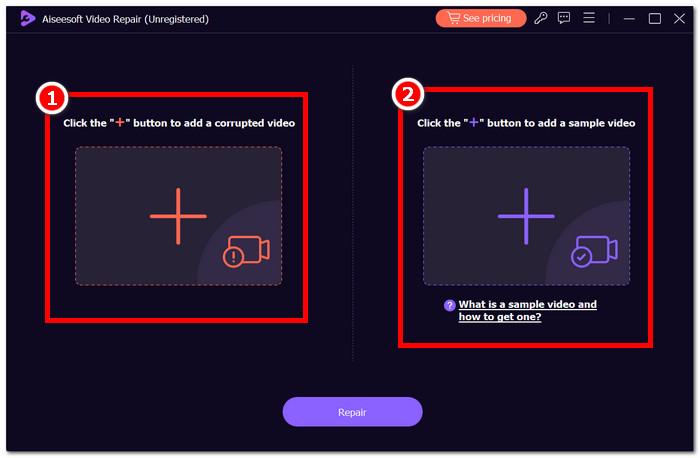
ขั้นตอนที่ 2. เมื่อเปิดโปรแกรมและเข้าสู่หน้าหลักแล้ว คุณสามารถเพิ่มไฟล์ MP4 ที่เสียหายได้โดยคลิกสัญลักษณ์ + สีแดงบนหน้าต่างโปรแกรม และสามารถเพิ่มวิดีโอตัวอย่างได้โดยคลิกปุ่ม + สีม่วง.
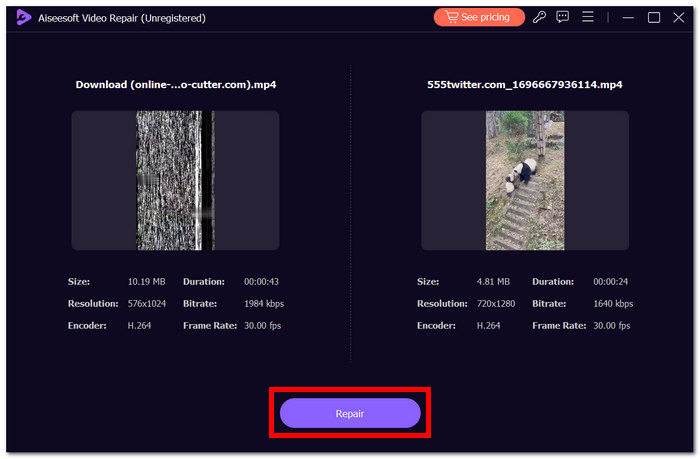
ขั้นตอนที่ 3. คลิกปุ่ม Repair เพื่อเริ่มซ่อมแซมหลังจากอัปโหลดไฟล์วิดีโอที่เสียหายและวิดีโอตัวอย่างเรียบร้อยแล้ว.
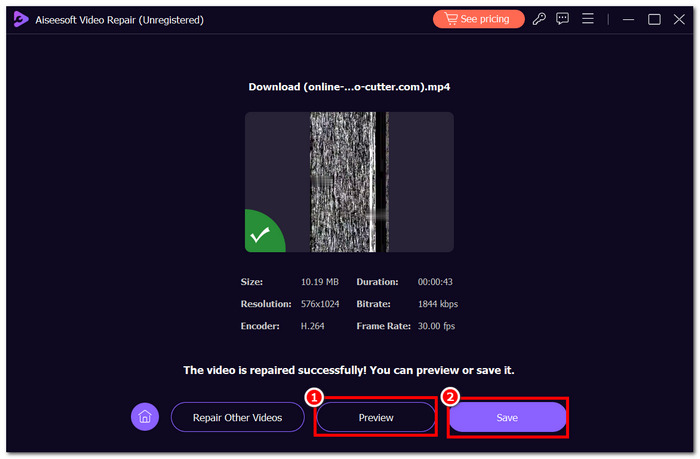
ขั้นตอนที่ 4. คลิก Preview เพื่อดูผลลัพธ์ก่อนบันทึกลงในเดสก์ท็อปของคุณ จากนั้นคลิกปุ่ม Save เมื่อคุณพอใจกับตัวอย่างที่แสดง.
คุณสามารถสำรวจคุณลักษณะต่างๆ ได้อย่างอิสระและเลือกที่จะอัปเกรดเป็นเวอร์ชันขั้นสูงเพิ่มเติมตามความสะดวกของคุณ โดยเน้นย้ำถึงความมุ่งมั่นในการเคารพตัวเลือกของผู้ใช้ สัมผัสประสบการณ์ความสามารถในการซ่อมแซมวิดีโอระดับสูงสุดอย่างอิสระด้วยการทดลองใช้ซอฟต์แวร์วันนี้ ซึ่งไม่จำเป็นต้องได้รับความช่วยเหลือจากภายนอก
ส่วนที่ 4 คำถามที่พบบ่อยเกี่ยวกับการป้องกันการทุจริตของวิดีโอ
คุณสามารถแก้ไขวิดีโอ MP4 ที่เสียหายบน iPhone ได้หรือไม่
ใช่ สามารถซ่อมแซมไฟล์วิดีโอ MP4 ที่เสียหาย บน iPhone ได้ โดยใช้แอปซ่อมแซมวิดีโอเฉพาะทางที่มีให้ดาวน์โหลดบน App Store เครื่องมือเหล่านี้มักจะสามารถวิเคราะห์และซ่อมแซมไฟล์วิดีโอที่เสียหายให้กลับมาเล่นได้อีกครั้ง.
เครื่องเล่นวิดีโอที่ดีที่สุดสำหรับไฟล์ที่เสียหายคืออะไร?
มีผู้เล่นมากมาย แต่ VLC Media Player มักถูกมองว่าเป็นหนึ่งในเครื่องเล่นวิดีโอที่ดีที่สุดสำหรับไฟล์ที่เสียหาย มีความสามารถในการจัดการข้อผิดพลาดที่แข็งแกร่งและสามารถเล่นไฟล์วิดีโอที่เสียหายได้บางส่วน มอบทางเลือกที่เชื่อถือได้สำหรับผู้ใช้ในการจัดการกับเนื้อหามัลติมีเดียที่เสียหาย
ไฟล์ที่เสียหายมีมัลแวร์หรือไม่?
ไม่ ไฟล์ที่เสียหายไม่จำเป็นต้องเป็นมัลแวร์ แม้ว่ามัลแวร์บางตัวอาจทำให้ไฟล์เสียหายโดยเป็นส่วนหนึ่งของกิจกรรม แต่ไฟล์เสียหายอาจเกิดขึ้นได้จากหลายสาเหตุที่ไม่เกี่ยวข้องกับเจตนาร้าย การใช้ซอฟต์แวร์ป้องกันไวรัสเพื่อความปลอดภัยของไฟล์ของคุณเป็นสิ่งสำคัญและป้องกันการติดมัลแวร์ที่อาจเกิดขึ้น
การสำรองข้อมูลเป็นประจำช่วยป้องกันความเสียหายของวิดีโอได้อย่างไร
การสำรองข้อมูลเป็นประจำมีส่วนสำคัญในการป้องกันความเสียหายของวิดีโอโดยจัดให้มีเครือข่ายความปลอดภัยในกรณีที่ข้อมูลสูญหายโดยไม่คาดคิด หากไฟล์วิดีโอเสียหาย การสำรองข้อมูลล่าสุดจะทำให้คุณสามารถกู้คืนไฟล์ไปยังสถานะดั้งเดิมได้ ซึ่งช่วยลดผลกระทบจากความเสียหายที่อาจเกิดขึ้นได้
การถ่ายโอนข้อมูลที่เสถียรสามารถป้องกันความเสียหายของวิดีโอได้หรือไม่
ใช่ การถ่ายโอนข้อมูลที่เสถียรมีบทบาทสำคัญในการป้องกันความเสียหายของวิดีโอ การใช้วิธีการถ่ายโอนข้อมูลความเร็วสูงที่เชื่อถือได้ช่วยหลีกเลี่ยงการหยุดชะงักระหว่างการถ่ายโอนไฟล์ ซึ่งช่วยลดความเสี่ยงที่จะเกิดความเสียหาย การถ่ายโอนข้อมูลที่สม่ำเสมอและเสถียรมีส่วนช่วยให้ไฟล์วิดีโอโดยรวมมีความสมบูรณ์โดยการป้องกันข้อมูลสูญหายหรือเสียหายในระหว่างกระบวนการถ่ายโอน
สรุป
สรุปแล้ว การปกป้องไฟล์วิดีโอจากความเสียหายเป็นสิ่งสำคัญอย่างยิ่งในการรักษาคุณภาพของคอนเทนต์ดิจิทัลของคุณ การใช้มาตรการป้องกันล่วงหน้า เช่น ทำให้การถ่ายโอนข้อมูลมีเสถียรภาพ สำรองข้อมูลเป็นประจำ และรักษาความเข้ากันได้ของโค้เดก จะช่วยลดความเสี่ยงที่ไฟล์วิดีโอจะเสียหายได้อย่างมาก นอกจากนี้ การใช้เครื่องมือเฉพาะทางอย่าง FVC Video Repair ร่วมกับแนวทางที่ดี เช่น การจัดการไฟล์อย่างเป็นระบบ จะช่วยสร้างกลยุทธ์ที่รอบด้านในการป้องกันและรับมือกับไฟล์วิดีโอเสียหาย เมื่อคุณใส่ใจและลงมือปฏิบัติตามมาตรการเหล่านี้ ก็จะสามารถใช้งานไฟล์วิดีโอได้อย่างราบรื่น พร้อมลดโอกาสการสูญหายหรือความเสียหายของข้อมูลให้น้อยที่สุด.
-
 การซ่อมแซมวิดีโอฟรี 7 อันดับแรก: กู้คืนวิดีโอที่เสียหายของคุณ
 ค้นพบการซ่อมแซมวิดีโอออนไลน์ฟรี 7 รายการที่ดีที่สุดเพื่อแก้ไขไฟล์วิดีโอที่เสียหายหรือเสียหาย ฟื้นความทรงจำอันมีค่าของคุณด้วยเครื่องมือซ่อมแซมวิดีโอยอดนิยมเหล่านี้
-
 วิธีแก้ไขวิดีโอแบบพิกเซล: สาเหตุอะไรและจะแก้ไขได้อย่างไร
 อย่าปล่อยให้พิกเซลมาทำลายวิดีโอของคุณ ค้นพบวิธีทำให้วิดีโอมีพิกเซลน้อยลงด้วยกลยุทธ์จากผู้เชี่ยวชาญของเรา ยกระดับวิดีโอของคุณเพื่อคุณภาพพิกเซลที่สมบูรณ์แบบ
-
 วิธีแก้ไขวิดีโอพร่ามัว: วิดีโอที่คมชัดรออยู่
 จะทำให้วิดีโอเบลอๆ ชัดเจนได้อย่างไร? อย่าปล่อยให้วิดีโอที่เบลอทำให้เนื้อหาของคุณดูน่าเบื่อ ค้นหาโซลูชันสำหรับการรับชมที่คมชัดเพื่อให้ได้ภาพที่ดูเป็นมืออาชีพ
