


 Video Converter Ultimate
 บันทึกหน้าจอ
 ซ่อมวิดีโอ
 ดาวน์โหลดอย่างปลอดภัย
สาเหตุทั่วไปและวิธีแก้ไขสำหรับวิดีโอบน Facebook ที่ไม่เล่น
ในโลกโซเชียลมีเดียที่เคลื่อนไหวตลอดเวลา Facebook ถือเป็นหนึ่งในแพลตฟอร์มวิดีโอที่ทรงพลังที่สุดสำหรับการเล่น แชร์ และรับชมคอนเทนต์วิดีโอ อย่างไรก็ตาม เช่นเดียวกับแพลตฟอร์มอื่น ๆ การเล่นวิดีโอบน Facebook อาจติดขัดได้เป็นบางครั้ง จนทำให้คุณรู้สึกหงุดหงิด หนึ่งในปัญหาที่ถูกพูดถึงมากที่สุดเกี่ยวกับวิดีโอ Facebook เล่นไม่ได้ในปัจจุบันก็คือ การไม่สามารถเล่นวิดีโอได้เลย โชคดีที่บทความนี้จะมาอธิบายสาเหตุทั่วไปที่ทำให้เกิดข้อผิดพลาดในการเล่นวิดีโอของ Facebook พร้อมทั้งรวบรวมวิธีแก้ไขแบบใช้งานได้จริง เพื่อช่วยให้คุณกลับมารับชมได้อย่างลื่นไหล ดังนั้นโดยไม่ต้องรอช้า มาเริ่มทำความเข้าใจสิ่งใหม่ ๆ จากเนื้อหาด้านล่างกันเลย.

ตอนที่ 1. ปัจจัยที่ส่งผลต่อการเล่นวิดีโอบน Facebook
มีปัจจัยหลายประการที่ทำให้วิดีโอไม่สามารถเล่นบน Facebook ได้ ก่อนที่จะแนะนำวิธีแก้ไขปัญหานี้ ให้ส่วนนี้ของบทความอธิบายปัจจัยสำคัญที่ทำให้วิดีโอไม่สามารถเล่นได้ ซึ่งคุณต้องคำนึงถึง
ปัจจัยที่ 1 การเชื่อมต่ออินเทอร์เน็ตไม่ดี
การเชื่อมต่ออินเทอร์เน็ตที่ไม่ดีเป็นสาเหตุทั่วไปที่ทำให้วิดีโอบนแพลตฟอร์ม Facebook ไม่สามารถเล่นได้อย่างราบรื่น เมื่อการเชื่อมต่ออินเทอร์เน็ตของคุณช้า ไม่ดี หรือไม่เสถียร วิดีโอที่คุณต้องการเปิดอาจโหลดหรือบัฟเฟอร์ได้ยาก ส่งผลให้การเล่นหยุดชะงัก ด้วยเหตุนี้ คุณอาจประสบปัญหาเวลาในการโหลดนาน วิดีโอหยุดบ่อยครั้ง และไม่สามารถเล่นไฟล์วิดีโอได้เลย นอกจากนี้ คุณภาพของสตรีมวิดีโอจะขึ้นอยู่กับการเชื่อมต่ออินเทอร์เน็ตที่เสถียรและสม่ำเสมอ เนื่องจากการเชื่อมต่อที่ไม่ดีอาจขัดขวางการส่งเนื้อหาวิดีโอบนแพลตฟอร์มได้อย่างมาก
ปัจจัยที่ 2. แคช Facebook
วิดีโอจะไม่สามารถเล่นบน Facebook ได้เนื่องจากปัญหาแคช แคชของ Facebook อาจเป็นสาเหตุที่ทำให้ไม่สามารถเล่นวิดีโอจากฟีด รีล หรือสตอรี่ได้อย่างราบรื่น เมื่อคุณเข้าถึง Facebook ระบบจะใช้ระบบแคชเพื่อจัดเก็บเนื้อหาที่โหลดไว้ก่อนหน้านี้ชั่วคราว ซึ่งเป็นกลไกที่มุ่งหวังที่จะปรับปรุงประสบการณ์ผู้ใช้ของคุณโดยลดเวลาในการโหลดเมื่อคุณเยี่ยมชมเพจอีกครั้ง อย่างไรก็ตาม หากข้อมูลแคชของ Facebook ของคุณล้าสมัยหรือเสียหาย อาจขัดขวางการโหลดและการเล่นวิดีโอในเวลาที่เหมาะสม ดังนั้น ในฐานะผู้ใช้ คุณอาจพบปัญหา เช่น วิดีโอไม่สามารถเล่นหรือโหลดได้อย่างถูกต้อง การล้างแคชมักจะช่วยแก้ปัญหาเหล่านี้ได้ด้วยการบังคับให้ Facebook จับและโหลดข้อมูลล่าสุดเพื่อให้ประสบการณ์ใช้งานราบรื่นยิ่งขึ้น
ปัจจัยที่ 3 การเปิดตัว Facebook ที่ไม่ประสบความสำเร็จ
การเปิดตัวแอป Facebook ที่ไม่ประสบความสำเร็จอาจส่งผลให้เกิดปัญหาวิดีโอไม่เล่นได้ ซึ่งสาเหตุก็คือโค้ดและฟังก์ชันการทำงานของแอป Facebook อาจมีข้อบกพร่องและขัดข้อง หากการเปิดตัว Facebook ได้รับผลกระทบจากการทดสอบที่ไม่เพียงพอหรือปัญหาทางเทคนิค อาจส่งผลให้ประสบการณ์การใช้งานของผู้ใช้ไม่ดี ผู้ใช้อาจประสบปัญหาในการโหลดและเล่นวิดีโอ นอกจากนี้ ปัญหาการเล่นวิดีโออาจต้องได้รับการเอาใจใส่ในรายละเอียดอย่างพิถีพิถัน การเปิดตัวแอปที่มีข้อบกพร่องอาจนำไปสู่ปัญหาการบัฟเฟอร์ ปัญหาความเข้ากันได้ หรือความไม่เสถียรโดยรวม การเปิดตัวแอป Facebook ที่ไม่ประสบความสำเร็จอาจแสดงประสิทธิภาพด้านต่างๆ ของแพลตฟอร์ม ซึ่งอาจทำให้ฟังก์ชันการเล่นวิดีโอหยุดชะงักได้
ปัจจัยที่ 4 พื้นที่เก็บข้อมูลอุปกรณ์ไม่เพียงพอ
เหตุผลอีกประการหนึ่งที่คุณไม่สามารถเล่นวิดีโอบน Facebook ได้ก็คือพื้นที่จัดเก็บในอุปกรณ์ไม่เพียงพอ ซึ่งเป็นปัจจัยที่ขัดขวางการทำงานที่เหมาะสมของการเล่นวิดีโอบนแพลตฟอร์ม โดยขัดขวางความสามารถของแอปในการแคชและเล่นวิดีโออย่างราบรื่น เมื่ออุปกรณ์ของคุณมีพื้นที่จัดเก็บไม่เพียงพอ อุปกรณ์จะทำงานช้าลง ทำให้ไม่สามารถจัดสรรทรัพยากรที่จำเป็นสำหรับการเล่นวิดีโอได้ ส่งผลให้เกิดปัญหาการบัฟเฟอร์ การหยุดชะงัก หรือไม่สามารถเล่นวิดีโอบนแพลตฟอร์ม Facebook ได้ เมื่อเปรียบเทียบกันแล้ว แอปจะต้องอาศัยพื้นที่จัดเก็บที่มีในอุปกรณ์เพื่อบันทึกข้อมูลชั่วคราว เช่น บัฟเฟอร์วิดีโอและไฟล์ ซึ่งจำเป็นสำหรับประสบการณ์การรับชมที่ราบรื่น ดังนั้น หากไม่มีพื้นที่จัดเก็บที่เพียงพอ อุปกรณ์ของคุณอาจประสบปัญหาในการโหลดและเล่นเนื้อหาวิดีโอดังกล่าวอย่างมีประสิทธิภาพ ทำให้คุณรู้สึกหงุดหงิดเมื่อพบปัญหาในการเล่นขณะพยายามเพลิดเพลินกับเนื้อหาบน Facebook
ปัจจัยที่ 5 วิดีโอเสียหาย
ท้ายที่สุด อย่ามองข้ามความเป็นไปได้ที่วิดีโอบน Facebook อาจเป็นไฟล์วิดีโอที่เสียหายจนไม่สามารถเล่นได้ ไฟล์วิดีโอที่เสียหายถือเป็นปัจจัยสำคัญที่ทำให้การเล่นวิดีโอบน Facebook ไม่มีประสิทธิภาพ เมื่อไฟล์วิดีโอเสีย โครงสร้างข้อมูลภายในจะถูกทำลายหรือถูกเปลี่ยนแปลงไปในลักษณะที่ทำให้ไม่สามารถแสดงผลได้อย่างถูกต้อง ในบริบทของ Facebook วิดีโอที่เสียหายอาจไม่สามารถผ่านขั้นตอนการประมวลผลและถอดรหัสตามที่ระบบต้องการ ส่งผลให้เกิดปัญหาการเล่นสำหรับผู้ใช้ ความเสียหายนี้อาจเกิดขึ้นระหว่างการแปลงไฟล์ ขั้นตอนการอัปโหลด หรือขณะจัดเก็บไฟล์วิดีโอ ซึ่งไปรบกวนกระบวนการส่งต่อและแสดงผลวิดีโออย่างราบรื่น ด้วยเหตุนี้ ผู้ใช้อาจประสบปัญหาในการเล่นวิดีโอบน Facebook เพราะไฟล์ที่เสียหายไม่สามารถถูกประมวลผลได้อย่างถูกต้องโดยโครงสร้างระบบของโปรแกรมเล่นวิดีโอ.
ส่วนที่ 2. วิธีแก้ไขปัญหาวิดีโอ Facebook ไม่เล่น
วิธีแก้ปัญหาที่ 1. เชื่อมต่อกับเครือข่ายของคุณอีกครั้ง
ปัญหานี้อาจเกิดจากการเชื่อมต่ออินเทอร์เน็ตที่ไม่เสถียร โปรดตรวจสอบการเชื่อมต่ออินเทอร์เน็ตของคุณ ลองรีบูตเราเตอร์หรือโมเด็มของคุณดู หากคุณใช้ Wi-Fi ให้ลองทดสอบความเร็วโดยใช้เครื่องมือทดสอบความเร็วที่เชื่อถือได้ มิฉะนั้น ให้เปลี่ยนไปใช้เครือข่ายที่เสถียรกว่า จากนั้นลองเล่นวิดีโอบน Facebook อีกครั้ง
วิธีแก้ปัญหาที่ 2 ติดตั้งใหม่หรืออัปเดตแพลตฟอร์ม
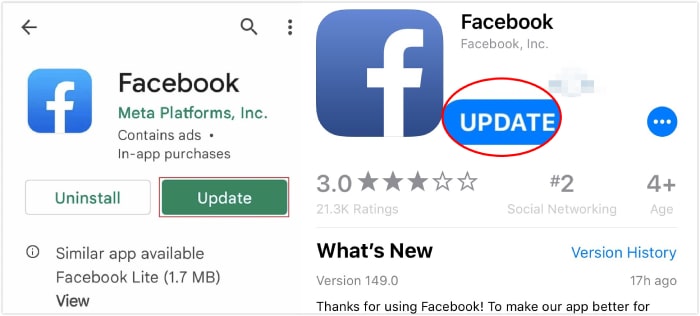
ผู้ใช้ควรอัปเดตแอปพลิเคชัน Facebook ทันทีเมื่อมีการเปิดตัวเวอร์ชันใหม่ แอปได้รับการอัปเดตเพื่อแก้ไขข้อบกพร่องและข้อผิดพลาด การอัปเดตเหล่านี้จะช่วยปรับปรุงประสบการณ์ผู้ใช้ของคุณ นอกจากนี้ แอป Facebook ยังมุ่งมั่นที่จะเพิ่มความพึงพอใจของผู้ใช้อย่างต่อเนื่อง หากต้องการอัปเดต ให้ไปที่ App Store หรือ Play Store ค้นหาแอป Facebook และค้นหาปุ่มอัปเดต หากมี
โซลูชันที่ 3 เพิ่มพื้นที่จัดเก็บและแคชของคุณ
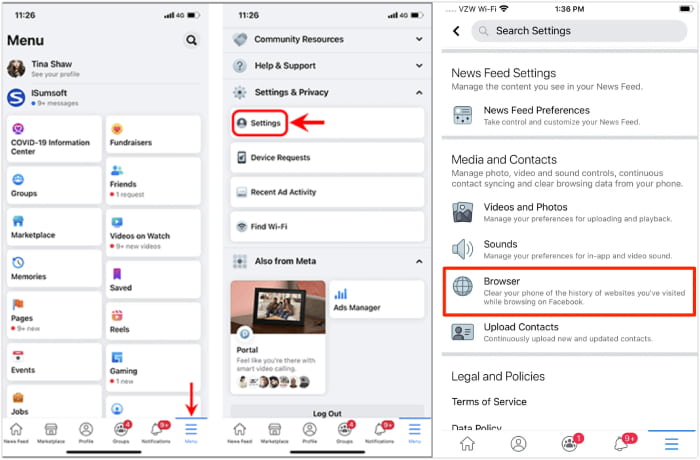
การเพิ่มพื้นที่จัดเก็บและล้างแคชของคอมพิวเตอร์หรืออุปกรณ์พกพาอาจช่วยแก้ปัญหาที่ Facebook ไม่เล่นวิดีโอได้ โดยค้นหาไฟล์มัลติมีเดียและแอปที่คุณไม่ต้องการบนอุปกรณ์ของคุณแล้วลบหรือถอนการติดตั้ง หากต้องการล้างแคช ให้ทำตามขั้นตอนต่อไปนี้
บนอุปกรณ์มือถือ:
• ไปที่แอปการตั้งค่า (Settings) แล้วเลือก แอป > การจัดการแอป (Apps>App Management).
• แตะที่แอป Facebook ของคุณ แล้วแตะตัวเลือก การใช้พื้นที่จัดเก็บ (Storage Usage).
• จากนั้น ในหน้าถัดไป ให้แตะปุ่ม ล้างแคช (Clear Cache).
บนคอมพิวเตอร์:
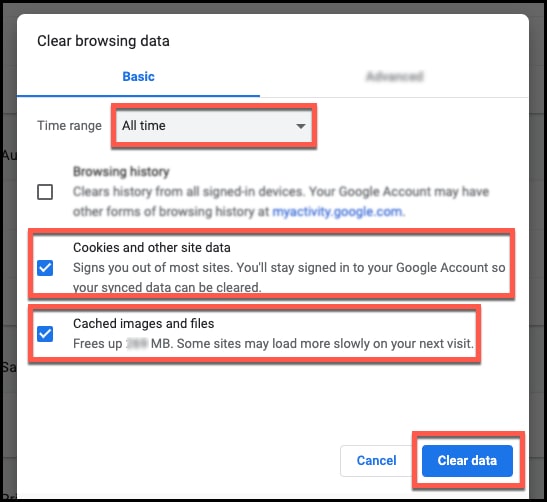
• บนเบราว์เซอร์ของคุณไปที่การตั้งค่า
• จากนั้นไปที่แผง ความเป็นส่วนตัวและความปลอดภัย (Privacy and Security).
• มองหาส่วน ล้างข้อมูลการท่องเว็บ (Clear Browsing Data) แล้วคลิกปุ่ม ล้างข้อมูล (Clear Data).
วิธีแก้ปัญหาที่ 4. ซ่อมแซมวิดีโอที่เสียหาย
การซ่อมแซมไฟล์วิดีโอที่เสียหายเป็นสิ่งสำคัญอย่างยิ่งในการแก้ปัญหาวิดีโอเล่นไม่ได้บน Facebook เพื่อจัดการปัญหานี้อย่างมีประสิทธิภาพ ขอแนะนำให้ใช้เครื่องมือ Video Repair เป็นทางเลือกหลัก ซอฟต์แวร์นี้ถูกออกแบบมาเพื่อซ่อมแซมไฟล์วิดีโอที่เสียหาย เพื่อให้มั่นใจว่าคุณภาพของวิดีโออยู่ในเกณฑ์ดีเมื่อนำไปอัปโหลดขึ้น YouTube FVC Video Repair ใช้อัลกอริทึมขั้นสูงในการวิเคราะห์และกู้คืนโครงสร้างวิดีโอ แก้ไขปัญหาต่าง ๆ เช่น ไฟล์เสียหาย ไฟล์ไม่สมบูรณ์ การเล่นสะดุด ภาพแตกเป็นพิกเซล และปัญหาเสียง เครื่องมือนี้เหมาะอย่างยิ่งสำหรับผู้ที่ชื่นชอบการทำวิดีโอ เพราะสามารถซ่อมไฟล์วิดีโอที่เสียหายให้เรียบร้อยก่อนอัปโหลดได้ มอบวิธีแก้ไขที่เชื่อถือได้เพื่อยกระดับประสบการณ์การรับชมให้กับผู้ติดตาม มาพร้อมเทคโนโลยีที่ทรงพลัง ทำให้การซ่อมแซมทั้งรวดเร็วและมีประสิทธิภาพ ดังนั้นด้วยการใช้ซอฟต์แวร์นี้ คุณไม่เพียงแต่จะแก้ปัญหาวิดีโอเล่นไม่ได้เท่านั้น แต่ยังสามารถกู้คืนความสมบูรณ์ของไฟล์วิดีโอ ช่วยให้การนำเสนอผ่านวิดีโอดูราบรื่นและเป็นมืออาชีพมากยิ่งขึ้น ต่อไปนี้คือขั้นตอนการใช้ FVC Video Repair.
ดาวน์โหลดฟรีสำหรับ Windows 7 หรือใหม่กว่าดาวน์โหลดอย่างปลอดภัย
ดาวน์โหลดฟรีสำหรับ MacOS 10.7 หรือใหม่กว่าดาวน์โหลดอย่างปลอดภัย
ขั้นตอนที่ 1 เปิดโปรแกรมซ่อมวิดีโอ แล้วคลิกปุ่ม แดง Add ที่เห็นบนหน้าจอเพื่ออัปโหลดวิดีโอที่คุณต้องการซ่อมแซม จากนั้นอัปโหลดวิดีโอตัวอย่างโดยการคลิกปุ่ม น้ำเงิน Add.
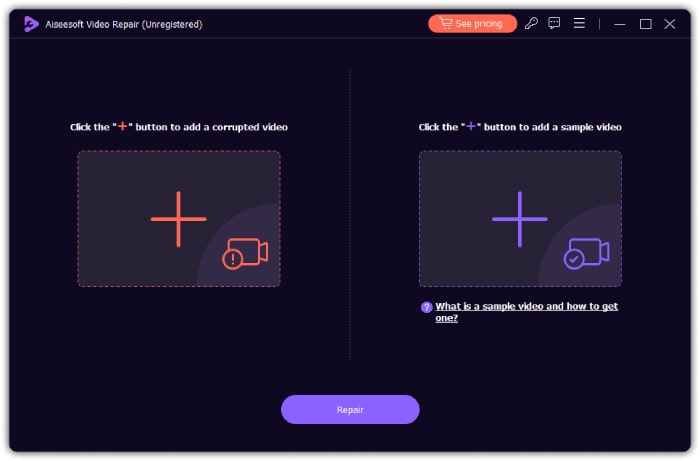
ขั้นตอนที่ 2 เมื่อตรวจสอบว่าคลิปวิดีโอพร้อมแล้ว ให้คลิกปุ่ม Repair.
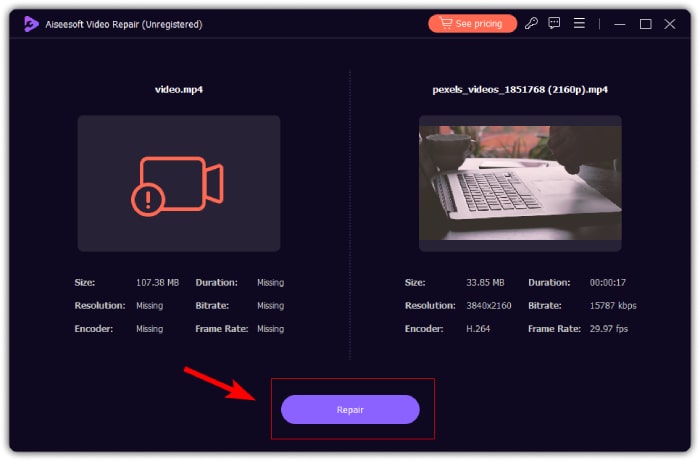
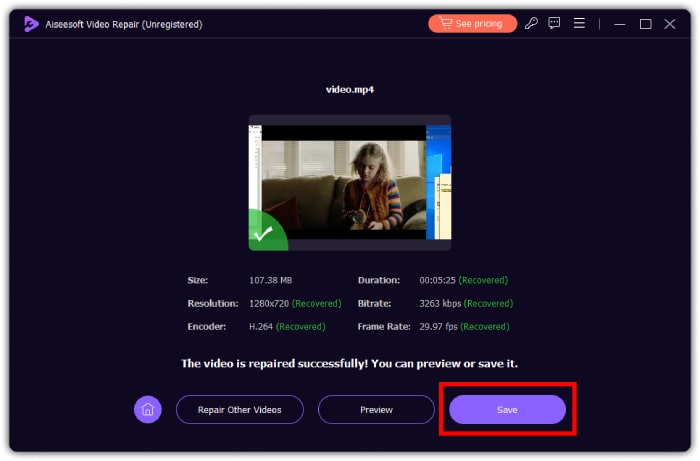
ขั้นตอนที่ 3 หลังจากกระบวนการซ่อมแซมอย่างรวดเร็วเสร็จสิ้น ให้คลิกปุ่ม Save, Preview หรือ Repair Other Videos ตามวัตถุประสงค์การใช้งานของคุณ.
ส่วนที่ 3 คำถามที่พบบ่อยเกี่ยวกับปัญหาบัฟเฟอร์วิดีโอบน Facebook
ทำไมวิดีโอ Facebook ถึงบัฟเฟอร์อยู่เรื่อย?
สาเหตุที่เป็นไปได้ของปัญหานี้รวมถึงการเชื่อมต่ออินเทอร์เน็ตที่ช้า นอกจากนี้ยังอาจเกิดจากปริมาณการใช้งานบน Facebook ที่หนาแน่น หรือปัญหาจากตัวอุปกรณ์หรือเบราว์เซอร์เองที่ทำให้เกิดการบัฟเฟอร์วิดีโอ.
ดาวน์โหลดวิดีโอ Facebook ได้อย่างไร?
ขอแนะนำให้ใช้เว็บไซต์บุคคลที่สามหรือส่วนขยายเบราว์เซอร์ที่ออกแบบมาเพื่อดาวน์โหลดวิดีโอ Facebook
ฉันจะทำให้ Facebook เล่นวิดีโออัตโนมัติได้อย่างไร?
หากต้องการเล่นวิดีโอโดยอัตโนมัติ คุณต้องไปที่การตั้งค่า Facebook จากนั้นคลิกที่ การตั้งค่าและความเป็นส่วนตัว จากนั้นเลือก การตั้งค่า > สื่อและผู้ติดต่อ > เล่นอัตโนมัติ จากนั้นเลือก การเชื่อมต่อข้อมูลมือถือและ Wi-Fi หรือ การเชื่อมต่อ Wi-Fi เท่านั้น เลือกตามความต้องการของคุณ
สรุป
ทั้งหมดนี้คือสาเหตุและแนวทางแก้ปัญหาวิดีโอ Facebook เล่นไม่ได้ หวังว่าคุณจะแชร์บทความนี้ให้เพื่อน ๆ ที่กำลังเผชิญปัญหาเดียวกัน และหากคุณกำลังรำคาญกับไฟล์วิดีโอที่เสียหายของตัวเอง ให้จัดการซ่อมแซมด้วย FVC Video Repair.
-
 แก้ไขข้อผิดพลาด 0xc00d36c4 ด้วย 3 วิธีการพิสูจน์แล้ว [2024]
 พบรหัสข้อผิดพลาดวิดีโอ 0xc00d36c4 ขณะเล่นวิดีโอหรือไม่ ปฏิบัติตามคำแนะนำของเราสำหรับขั้นตอนที่รวดเร็วในการแก้ไขปัญหาและเพลิดเพลินกับการเล่นวิดีโออย่างต่อเนื่อง
-
 วิธีแก้ไขรหัสข้อผิดพลาด 102630 อย่างรวดเร็วและด้วยตนเอง
 อย่าปล่อยให้รหัสข้อผิดพลาด 102630 มาทำลายประสบการณ์การรับชมของคุณ! เรียนรู้วิธีแก้ไขด้วยคำแนะนำที่เป็นประโยชน์ของเรา ปฏิบัติตามคำแนะนำที่ครอบคลุมเหล่านี้เพื่อการแก้ไขอย่างรวดเร็ว
-
 แก้ไขข้อผิดพลาดวิดีโอ 0xc00d36e5 อย่างรวดเร็วและมีประสิทธิภาพ
 กำลังดิ้นรนกับข้อผิดพลาด 0xc00d36e5 ขณะพยายามเล่นวิดีโอใช่ไหม เรียนรู้วิธีที่เรียบง่ายแต่มีประสิทธิภาพในการแก้ไขข้อผิดพลาดนี้เพื่อประสบการณ์การเล่นวิดีโอที่ราบรื่น
