


 Video Converter Ultimate
 บันทึกหน้าจอ
 ซ่อมวิดีโอ
 ดาวน์โหลดอย่างปลอดภัย
การแนะนำรูปแบบ NTSC และรูปแบบ NTSC เทียบกับ PAL อย่างเต็มรูปแบบ
ดีวีดียังคงเป็นสื่อวิดีโอที่ยอดเยี่ยม มีความเสถียรสูงและมีพื้นที่จัดเก็บเพียงพอสำหรับบันทึกภาพยนตร์ยาวเรื่องหนึ่งหรือซีรีส์ทั้งชุดในความละเอียดสูงสุด สตูดิโอภาพยนตร์และแอนิเมชันจำนวนมากเลือกใช้ดีวีดีเป็นสื่อจัดเก็บเพื่อความสะดวกในการจัดจำหน่าย เมื่อเราใช้งานดีวีดี เราอาจคิดว่าดีวีดีทุกแผ่นเหมือนกัน ต่างกันเพียงข้อมูลข้างในเท่านั้น ทว่าในความเป็นจริงแล้วดีวีดีมีหลายรูปแบบ โดยแต่ละแบบมีพื้นที่จัดเก็บและเทคโนโลยีป้องกันที่ต่างกันไป ดังนั้นคุณอาจพบว่าเมื่อคุณซื้อดีวีดีแบบ NTSC จากประเทศหรือภูมิภาคหนึ่ง แต่พอนำไปเปิดในอีกประเทศหรือภูมิภาคหนึ่ง เนื้อหาบนแผ่นกลับเล่นไม่ได้ตามปกติ เหตุใดจึงเป็นเช่นนี้? เกี่ยวข้องกับรูปแบบ NTSC หรือไม่? เพื่อไขข้อสงสัย เราจะอธิบายอย่างละเอียดในบทความนี้ว่า NTSC คืออะไร และมีผลกระทบต่อเราอย่างไร นอกจาก NTSC แล้วยังมีมาตรฐานที่ใช้กันทั่วไปอีกรูปแบบหนึ่งคือ PAL ที่นี่คุณจะได้เห็นความแตกต่างระหว่างสองมาตรฐานนี้ และเรียนรู้วิธีริปดีวีดี NTSC จากเนื้อหาของเราไปด้วย.

ส่วนที่ 1 รูปแบบ NTSC คืออะไร
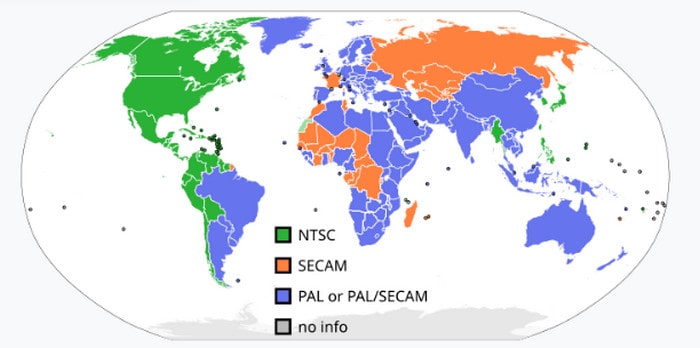
NSTC ไม่ใช่แนวคิดเดียวกันกับรูปแบบดิจิทัลทั่วไป เป็นระบบการเข้ารหัสสีที่ใช้กันทั่วไปในปัจจุบัน ซึ่งใช้ในพื้นที่ต่างๆ เช่น อเมริกาเหนือ ญี่ปุ่น และอเมริกาใต้ส่วนใหญ่สำหรับการออกอากาศโทรทัศน์ ระบบนี้ถูกสร้างขึ้นในยุคที่โทรทัศน์สีค่อยๆ เข้ามาแทนที่โทรทัศน์ขาวดำ บริษัทอเมริกันได้ทดลองใช้ตัวแปลงสัญญาณหลายแบบเพื่อให้การรับชมภาพสีที่บ้านง่ายขึ้น อย่างไรก็ตาม ตัวแปลงสัญญาณเหล่านี้ยังคงขัดแย้งกันและไม่เข้ากันได้กับละครขาวดำ เพื่อแก้ปัญหานี้ คณะกรรมการระบบโทรทัศน์แห่งชาติ (National Television System Committee) จึงได้ออกคำสั่งให้มีการเผยแพร่การเข้ารหัสแบบใหม่ที่สามารถใช้งานได้กับโทรทัศน์จำนวนมากที่สุดเท่าที่จะเป็นไปได้ นั่นคือเหตุผลที่เราเรียกระบบการเข้ารหัสนี้ว่า NTSC
ปัจจุบันเราสามารถพบเห็น DVD รูปแบบ NTSC ในตลาด DVD ได้ ซึ่งหมายถึงภาพยนตร์ที่เข้ารหัส MPEG-2 ซึ่งจัดเก็บอยู่ในแผ่นดิสก์ออปติคัล อัตราเฟรมของ DVD ประเภทนี้โดยทั่วไปอยู่ที่ 30 เฟรมต่อวินาที และความละเอียด 720 x 480 ภูมิภาคหลักที่จำหน่าย DVD รูปแบบ NTSC ได้แก่ สหรัฐอเมริกา ญี่ปุ่น แคนาดา เกาหลีใต้ เม็กซิโก และอื่นๆ DVD ประเภทนี้จะมีข้อจำกัดเกี่ยวกับรหัสภูมิภาคที่แตกต่างกัน นอกจากรูปแบบ NTSC แล้ว ยังมี DVD รูปแบบอื่นวางจำหน่ายเป็นครั้งคราว นั่นคือ PAL แม้ว่าคอมพิวเตอร์ทุกเครื่องสามารถเล่นแผ่น NTSC และ PAL ได้ แต่เครื่องเล่น DVD แต่ละเครื่องก็รองรับทั้งสองรูปแบบนี้ ในส่วนถัดไป เราจะแนะนำความแตกต่างสองประการนี้และอธิบายวิธีการเลือกระหว่างสองรูปแบบนี้
ส่วนที่ 2. NTSC เทียบกับ PAL
PAL คืออะไร
ก่อนที่เราจะเริ่มทำความเข้าใจ NTSC กับ PAL เรามาทำความเข้าใจความหมายของ PAL กันก่อน PAL เป็นระบบรหัสสีที่ใช้กันอย่างแพร่หลายในยุโรป โอเชียเนีย เอเชีย บางส่วนของอเมริกาใต้ และส่วนใหญ่ของแอฟริกา PAL ได้รับการพัฒนาขึ้นในช่วงปลายทศวรรษ 1950 เพื่อแก้ไขข้อบกพร่องที่บางครั้งเกิดขึ้นกับ NTSC แม้จะมีความเข้ากันได้อย่างกว้างขวาง แต่ความคมชัดของโทรทัศน์ NTSC อาจลดลงเมื่อเราเผชิญกับสภาพอากาศเลวร้าย ภูมิประเทศพิเศษ หรืออาคารขนาดใหญ่ที่ปิดกั้นสัญญาณ ในทางกลับกัน รูปแบบ PAL สามารถหลีกเลี่ยงข้อผิดพลาดดังกล่าวได้โดยการสลับสัญญาณทุกๆ สองบรรทัด
NTSC เทียบกับ PAL
• คุณภาพ
ปัจจัยที่ส่งผลกระทบโดยตรงต่อคุณภาพของภาพมากที่สุดคือความละเอียด ปัจจุบันความละเอียดวิดีโอในรูปแบบ NTSC อยู่ที่ 525 เส้น ขณะที่ระบบ PAL มีความละเอียด 625 เส้น ระบบ PAL สามารถส่งสัญญาณภาพได้ 50 ฟิลด์ต่อวินาที คิดเป็น 25 เฟรมต่อวินาที ซึ่งหมายความว่าระบบ PAL สามารถถ่ายทอดข้อมูลภาพได้ครบถ้วนกว่า และคุณภาพของภาพในรูปแบบ PAL จึงสูงกว่า
• การเข้ารหัสสี
เครื่องรับ NTSC รองรับการปรับเฉดสีด้วยตนเองโดยผู้ใช้ และเนื่องจากมีความอิ่มตัวของสีสูง จึงอาจเกิดการเพี้ยนของสีได้ ระบบ PAL จะขจัดข้อผิดพลาดของความคลาดเคลื่อนของสีและจัดการเฉดสีของภาพโดยอัตโนมัติ
• จำนวนเฟรมต่อวินาที (FPS)
อัตราเฟรมต่อวินาที (FPS) ของระบบ NTSC แรกสุดอยู่ที่ 30 อย่างไรก็ตาม ด้วยการถือกำเนิดของโทรทัศน์สี โทรทัศน์ขาวดำบางรุ่นจึงไม่สามารถใช้งานร่วมกับเนื้อหานี้ได้ นักพัฒนาจึงได้เพิ่มสัญญาณสีพิเศษลงในระบบ NTSC เพื่อให้สามารถแสดงเนื้อหาสีได้อย่างถูกต้อง ส่งผลให้อัตราเฟรมต่อวินาที (FPS) ของระบบ NTSC ลดลงเหลือ 29.97 ในขณะที่ระบบ PAL มีอัตราเฟรมต่อวินาทีอยู่ที่ 25
หากคุณไม่แน่ใจว่าจะเลือกรูปแบบแผ่นดิสก์ NSTC หรือ PAL อย่างไร ลองดูคำแนะนำของเรา เราคิดว่าผู้ใช้ส่วนใหญ่น่าจะคุ้นเคยกับ NTSC มากกว่า เนื่องจากทั้งเครื่องเล่น DVD ทั่วไปและเครื่องเล่น PAL สามารถอ่านเนื้อหาจาก DVD ในรูปแบบ NTSC ได้ เครื่องเล่น NTSC จึงมักไม่สามารถเล่น DVD PAL ได้
ส่วนที่ 3 วิธีการริพ NTSC DVD
เราได้เรียนรู้ความแตกต่างระหว่างฟอร์แมต NTSC และ PAL แล้ว เพื่อให้สะดวกต่อการรับชมเนื้อหา DVD ได้ทุกที่ทุกเวลา คุณสามารถริปวิดีโอจากแผ่นแล้วบันทึกลงในอุปกรณ์ของคุณโดยตรง วิธีนี้จะช่วยให้คุณเพลิดเพลินกับภาพยนตร์คุณภาพสูงได้แม้จะไม่มีเครื่องเล่น DVD หรือไดรฟ์ออปติคัลก็ตาม.
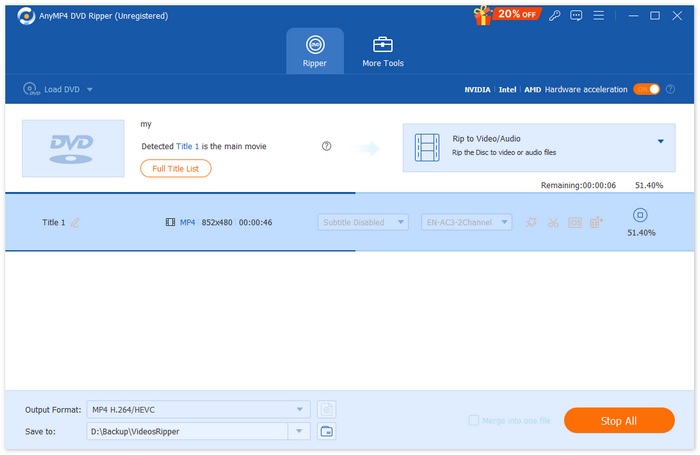
มีโปรแกรมริป DVD อยู่มากมาย แต่เราแนะนำ AnyMP4 DVD Ripper นอกจากการริปแผ่นแล้ว ยังสามารถแปลง DVD เป็นรูปแบบวิดีโอยอดนิยม รวมวิดีโอหลายไฟล์ให้เป็นไฟล์เดียว ครอปหรือตัดความยาววิดีโอ และปรับความละเอียด บิตเรต หรือการตั้งค่าวิดีโออื่น ๆ เพื่อให้ได้คุณภาพที่ดียิ่งขึ้น.
วิธีริปวิดีโอ DVD ด้วย AnyMP4 DVD Ripper:
ขั้นตอนที่ 1. ดาวน์โหลดและติดตั้งซอฟต์แวร์บนคอมพิวเตอร์ของคุณ แล้วใส่แผ่น DVD ที่คุณต้องการริป.
ดาวน์โหลดฟรีสำหรับ Windows 7 ขึ้นไปดาวน์โหลดอย่างปลอดภัย
ดาวน์โหลดฟรีสำหรับ MacOS 10.7 ขึ้นไปดาวน์โหลดอย่างปลอดภัย
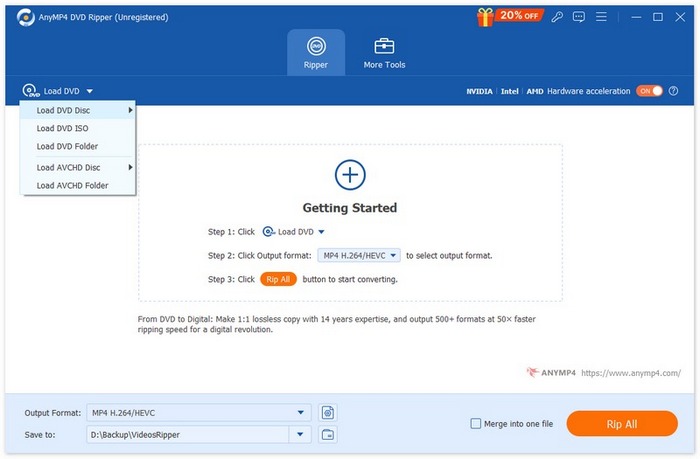
ขั้นตอนที่ 2. คลิก “Load DVD” แล้วเลือก DVD Disc, DVD Folder หรืออิมเมจ ISO โปรแกรมจะวิเคราะห์เนื้อหาให้อัตโนมัติ.
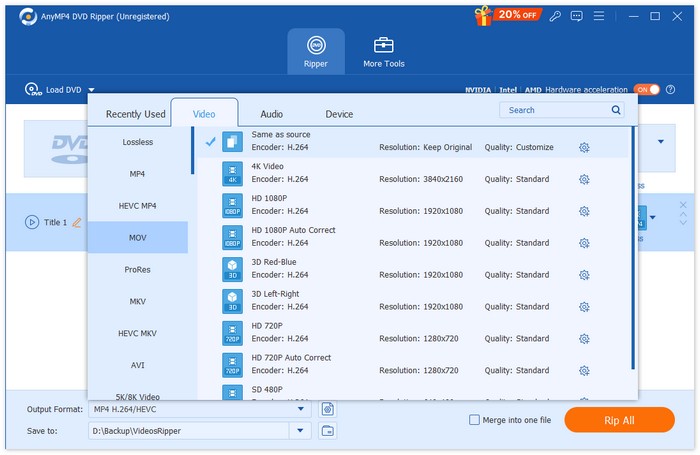
ขั้นตอนที่ 3. จากเมนูแบบเลื่อนลง “Output Format” ให้เลือกรูปแบบดิจิทยอดนิยม เช่น MP4, MOV, AVI หรือ MKV ที่ใช้งานได้กับอุปกรณ์ของคุณ.
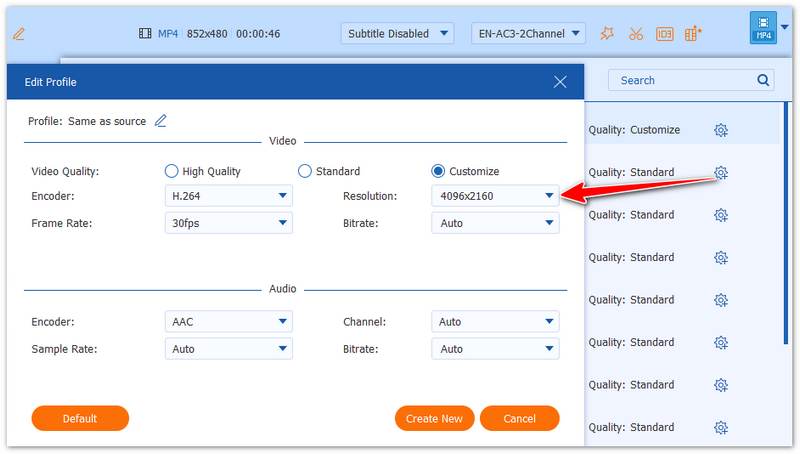
ขั้นตอนที่ 4. คลิก “Edit” หรือ “Custom Profile” เพื่อรวมวิดีโอ เข้าตัดต่อคลิป ปรับความละเอียด หรือแม้แต่ใส่ลายน้ำและเอฟเฟกต์ 3D.
ขั้นตอนที่ 5. เลือกโฟลเดอร์ปลายทางแล้วคลิก “Rip All” เพื่อเริ่มต้น เมื่อเสร็จสิ้น เนื้อหา DVD ของคุณจะถูกบันทึกเป็นไฟล์วิดิโอมาตรฐานพร้อมสำหรับการเล่นบนอุปกรณ์ใดก็ได้.
ส่วนที่ 4 คำถามที่พบบ่อยของรูปแบบ NTSC
ฉันสามารถเล่น NTSC บนเครื่องเล่น DVD ของฉันได้หรือไม่?
แน่นอนครับ เครื่องเล่นดีวีดีรุ่นใหม่ๆ เกือบทั้งหมดรองรับรูปแบบ NTSC คุณจึงสามารถรับชมได้อย่างปลอดภัยบนคอมพิวเตอร์หรือทีวี
เหตุใดเครื่องเล่นดีวีดีของฉันจึงเล่นได้เฉพาะดีวีดีบางแผ่นเท่านั้น
ดีวีดีบางแผ่นอาจมีรหัสภูมิภาค ซึ่งจำกัดไม่ให้เล่นบนเครื่องเล่นในภูมิภาคอื่น ตัวอย่างเช่น ถ้าคุณซื้อดีวีดี NTSC จากญี่ปุ่น เครื่องเล่นดีวีดีในสหราชอาณาจักร DVD player อาจไม่สามารถอ่านเนื้อหาบนแผ่นนั้นได้.
คอมพิวเตอร์ Windows มีเครื่องเล่นดีวีดีฟรีหรือไม่?
มีโปรแกรมเล่นดีวีดีฟรีมากมายสำหรับคอมพิวเตอร์ Windows หากคุณไม่ต้องการติดตั้งโปรแกรมเพิ่ม คุณสามารถเล่นดีวีดีผ่าน Windows Media Player ได้ นอกจากนี้ VLC Media Player ก็เป็นอีกหนึ่งทางเลือก.
สรุป
เนื้อหาของเราอธิบายว่าNTSC คืออะไร และแตกต่างจากฟอร์แมต PAL อย่างไร ปัจจุบันเมื่อผู้คนพูดถึงฟอร์แมต DVD มักจะหมายถึง DVD แบบ NTSC ซึ่งรองรับกับอุปกรณ์หลากหลายกว่าและเล่นได้กับเครื่องเล่นส่วนใหญ่ หากคุณต้องการริปวิดีโอจากแผ่นเพื่อสำรองข้อมูลหรือให้เล่นได้สะดวกขึ้น เราขอแนะนำ AnyMP4 DVD Ripper ซึ่งเป็นเครื่องมือที่เชื่อถือได้สำหรับแปลง DVD เป็นไฟล์ดิจิทยอดนิยม เพื่อการจัดเก็บที่ปลอดภัยและการเล่นที่ลื่นไหลบนอุปกรณ์ทุกชนิด.
ดาวน์โหลดฟรีสำหรับ Windows 7 ขึ้นไปดาวน์โหลดอย่างปลอดภัย
ดาวน์โหลดฟรีสำหรับ MacOS 10.7 ขึ้นไปดาวน์โหลดอย่างปลอดภัย
-
 เครื่องเล่นดีวีดีสำหรับ iPad: วิธีการเล่นวิดีโอดีวีดีบน iPad Air/Mini/Pro
 เมื่อคุณต้องการเล่น DVD บน iPad Pro คุณจะพบว่าไม่มีอินเทอร์เฟซที่สามารถเชื่อมต่อเครื่องเล่น DVD ภายนอกกับ iPad ของคุณได้ คุณสามารถเรียนรู้วิธีริปหรือแปลงดีวีดีเป็นรูปแบบที่รองรับได้จากบทความนี้
-
 Wii / Wii U สามารถเล่น DVD โดยไม่มี Homebrew ได้หรือไม่? 2 โซลูชั่นสำหรับคุณ
 เมื่อคุณใส่แผ่น DVD ลงใน Wii คุณจะพบว่า Wii ไม่สามารถอ่านและเล่น DVD ได้เนื่องจากการล็อกระดับภูมิภาค ในบทความนี้ คุณจะได้เรียนรู้วิธีเล่น DVD บน Wii/Wii U อย่างง่ายดายโดยไม่ต้องแฮ็ค Homebrew
-
 วิธีแก้ไข Windows Media Player ที่ไม่สามารถเล่นแผ่น DVD ได้: 3 วิธี
 Windows Media Player ไม่สามารถเล่นแผ่น DVD ได้ใช่หรือไม่ ไม่สำคัญว่าอุปกรณ์ของคุณจะใช้ Windows 7,8 หรือ 10 คุณสามารถหาทางแก้ไขได้ นี่คือเครื่องเล่นที่ดีที่สุด
