


 Video Converter Ultimate
 บันทึกหน้าจอ
 ซ่อมวิดีโอ
 ดาวน์โหลดอย่างปลอดภัย
เครื่องบันทึกเสียง MP2 ที่ดีที่สุดพร้อมขั้นตอนและเคล็ดลับที่เชื่อถือได้สำหรับพีซีและ Mac
MP2 เป็นไฟล์เสียงแบบบีบอัดชนิดสูญเสียข้อมูลอีกประเภทหนึ่ง แม้ว่าไฟล์เสียงแบบ MP3 จะเป็นที่นิยมมากกว่าไฟล์เสียงรูปแบบอื่น ๆ แต่มาตรฐานหลักก็ยังคงเป็น MP2 อยู่ดี เนื่องจากมันเป็นรูปแบบไฟล์เสียงมาตรฐาน จึงมีโอกาสที่จะเกิดการสูญหายของข้อมูลบ้าง อย่างไรก็ตาม การถ่ายโอนข้อมูลผ่านอินเทอร์เน็ตจะไม่เป็นปัญหาสำหรับคุณ ในบางกรณี ผู้ใช้มักสับสนว่าจะเลือกโปรแกรมอัดเสียง MP2 ที่ดีที่สุดตัวไหนให้ตรงตามความต้องการ ในกรณีนี้ รายการด้านล่างได้เตรียมขั้นตอนและข้อมูลอย่างละเอียดที่คุณอาจอยากลองใช้ อ่านต่อไปเพื่อทำความรู้จักโปรแกรมอัดเสียงต่าง ๆ ที่สามารถบันทึกไฟล์ในรูปแบบ MP2 ได้.

ส่วนที่ 1 บันทึก MP2 ที่ดีที่สุดสำหรับ Windows และ Mac
FVC เครื่องบันทึกเสียงฟรี
หนึ่งในโปรแกรมอัดเสียงออนไลน์ที่ดีที่สุดอาจช่วยคุณได้ FVC Free Audio Recorder ตามชื่อของมันเลย นี่คือเครื่องมือออนไลน์ฟรีที่มีผู้ใช้จำนวนมาก หากการเชื่อมต่ออินเทอร์เน็ตไม่ใช่ปัญหาสำหรับคุณ คุณก็สามารถพึ่งพา โปรแกรมอัดเสียง MP2 จากเทป VHS ออนไลน์ตัวนี้เพื่อให้ได้ไฟล์เสียงคุณภาพดี นอกจากนี้ เครื่องมือนี้พัฒนาโดย FVC จึงปลอดมัลแวร์แบบ 100% คุณจึงใช้งานได้อย่างสบายใจ นอกจากนี้ ด้านล่างคือรายการขั้นตอนการใช้งาน โปรดทำตามอย่างละเอียด.
ขั้นตอนที่ 1 คลิก ลิงก์นี้ เพื่อไปยังหน้าเว็บไซต์.
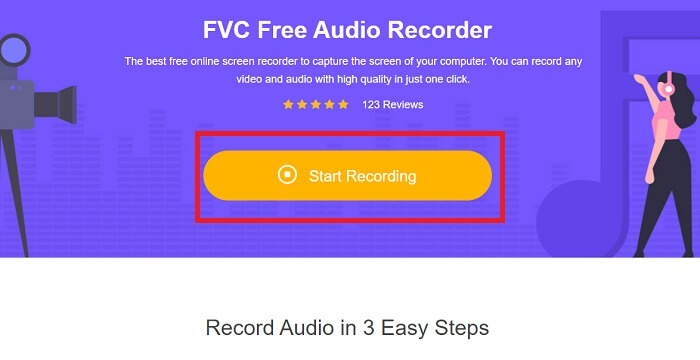
ขั้นตอนที่ 2 คลิก Start Recording เพื่อเปิดโปรแกรมอัดเสียง.
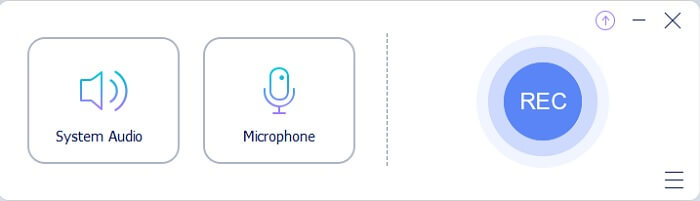
ขั้นตอนที่ 3 ทูลบาร์ลอยจะปรากฏบนหน้าจอของคุณในลักษณะนี้.
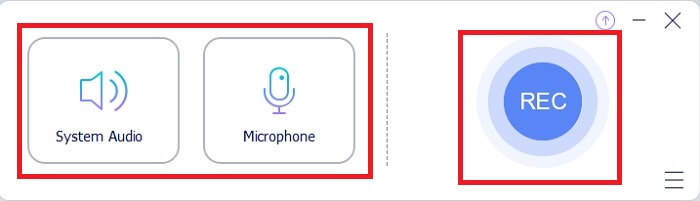
ขั้นตอนที่ 4 คลิก System Sound และ Microphone เพื่อเปิดเสียงระบบและเสียงไมโครโฟน หากตั้งค่าเรียบร้อยแล้ว ให้คลิกปุ่มกลม REC เพื่อเริ่มอัดเสียง.
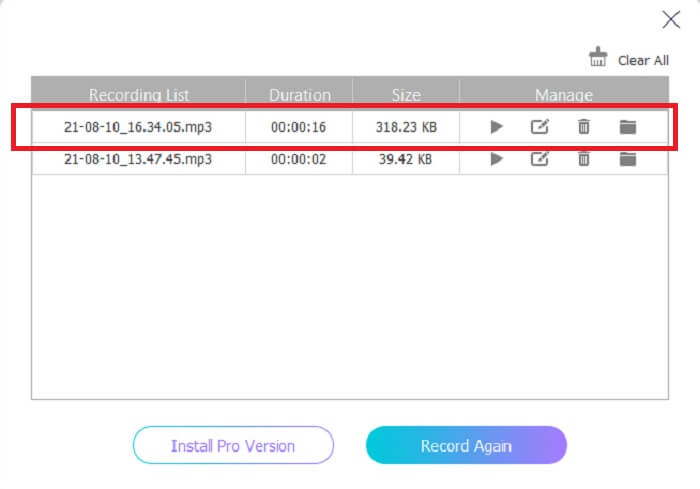
ขั้นตอนที่ 5 เมื่ออัดเสียงเสร็จแล้ว ให้คลิกปุ่มรูปสี่เหลี่ยมคล้ายลูกบาศก์เพื่อหยุดการอัด ระบบจะบันทึกไฟล์ลงคอมพิวเตอร์ของคุณโดยอัตโนมัติ จากนั้นก็สามารถเปิดฟังได้เลย.
ส่วนที่ 2 เครื่องบันทึก MP2 แบบขยายและใช้งานง่ายเพื่อบันทึกเสียง MP2
1. เครื่องบันทึกหน้าจอ FVC
ถ้าเครื่องมือออนไลน์ด้านบนทำให้คุณประทับใจ นี่คือโปรแกรมที่จะทำให้คุณรู้สึกว่ามันยอดเยี่ยมยิ่งกว่า ต่างจากโปรแกรมอัดเสียงออนไลน์ FVC Screen Recorder เป็นเครื่องมืออเนกประสงค์ที่ไม่จำกัดจินตนาการของคุณ ช่วยยกระดับการอัดเสียงของคุณให้เหนือกว่าเครื่องมืออื่น ๆ หากคุณยังสงสัยว่าเครื่องมือนี้จะเป็นโปรแกรมอัดเสียง MP2คู่ใจของคุณได้หรือไม่ ก็ต้องบอกว่าให้คุณเป็นคนพิสูจน์เอง โดยไม่ต้องเสียเวลาอีกต่อไป มาดูกันว่าเหตุใดเครื่องมือนี้จึงอาจเป็นสิ่งที่คุณกำลังมองหาอยู่ โปรดอ่านและทำตามขั้นตอนด้านล่างอย่างตั้งใจ.
ขั้นตอนที่ 1 ดาวน์โหลดโปรแกรมลงบน PC หรือ Mac ของคุณ ติดตั้งโปรแกรมลงบนเดสก์ท็อป ปรับแต่งเมนูPreferences และเมื่อทุกอย่างเรียบร้อยแล้ว ให้คลิก Finish เพื่อเปิดโปรแกรม.
ดาวน์โหลดฟรีสำหรับ Windows 7 ขึ้นไปดาวน์โหลดอย่างปลอดภัย
ดาวน์โหลดฟรีสำหรับ MacOS 10.7 ขึ้นไปดาวน์โหลดอย่างปลอดภัย
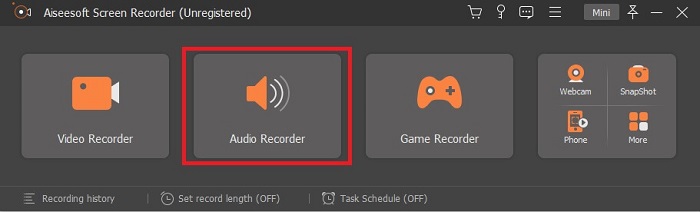
ขั้นตอนที่ 2 โปรแกรมจะเปิดขึ้นโดยอัตโนมัติ ทูลบาร์ในลักษณะนี้จะแสดงบนหน้าจอของคุณ คลิก Audio Recorder เพื่อเข้าสู่โหมดอัดเสียง.
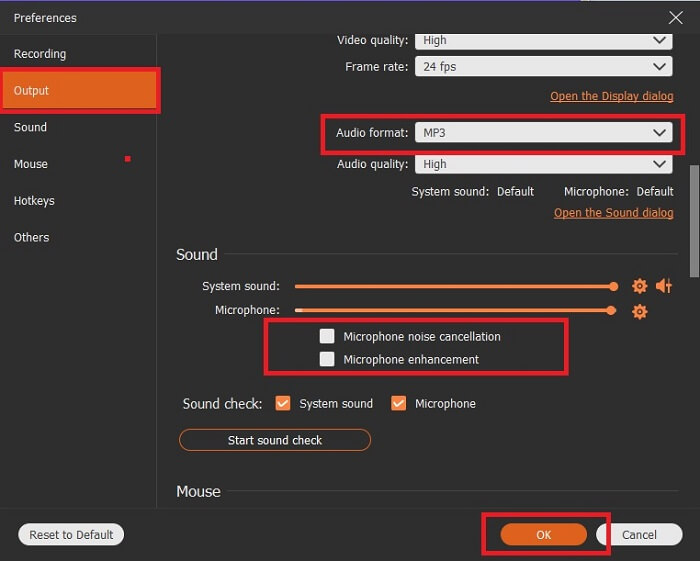
ขั้นตอนที่ 3 มองหาไอคอนรูปเฟืองแล้วคลิก ปรับค่าในส่วน Output ตามที่คุณต้องการ จากนั้นคลิก OK เพื่อบันทึกการตั้งค่า.
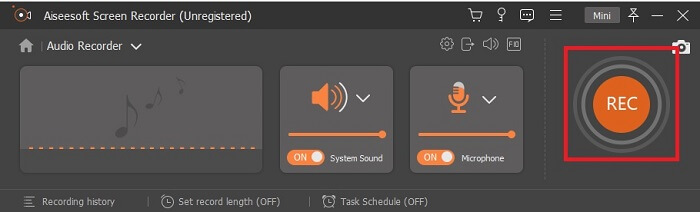
ขั้นตอนที่ 4 ตรวจสอบให้แน่ใจว่าได้เปิดSystem Sound และ Microphone ก่อนเริ่มอัดเสียง หากเรียบร้อยแล้วให้คลิกปุ่มรูปดิสก์เพื่อเริ่มอัดเสียง.
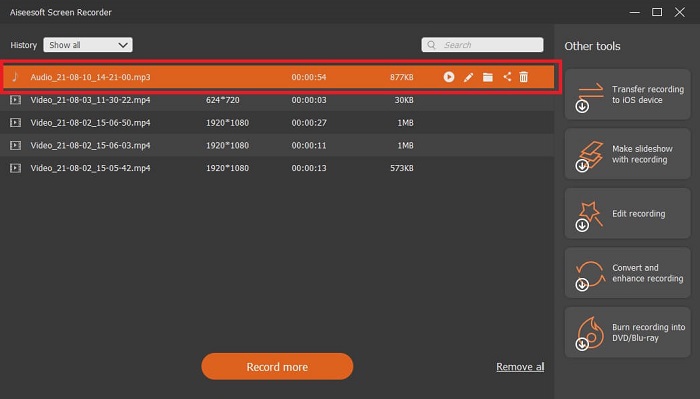
ขั้นตอนที่ 5 เมื่อต้องการหยุดอัดเสียง ให้คลิกปุ่มรูปสี่เหลี่ยมเพื่อจบการอัด จากนั้นให้Saveไฟล์และคลิก Next เพื่อสร้างไฟล์บันทึกเสียง หากต้องการฟังซ้ำ ให้คลิกปุ่มรูปเส้นขนานเพื่อเช็กไฟล์ที่คุณเพิ่งอัด โดยไฟล์บนสุดจะเป็นไฟล์ล่าสุด ส่วนไฟล์ล่างสุดจะเป็นไฟล์เก่าที่สุด.
2. เสียง Boo
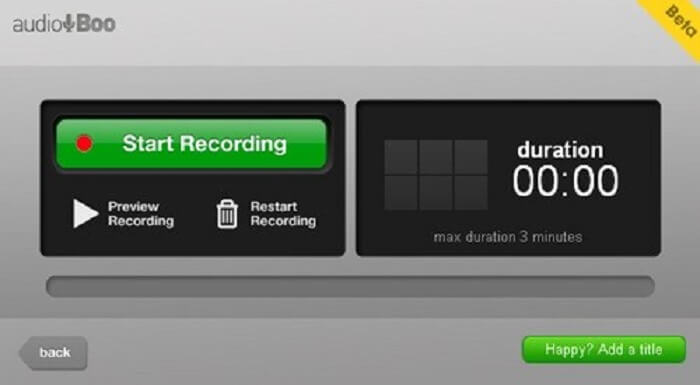
อีกหนึ่งเครื่องมือสำหรับการอัดเสียงสั้น ๆ คือ Audio Boo ซึ่งอนุญาตให้ผู้ใช้บันทึกเสียงแบบสั้น ๆ ได้ เช่น ร้องเพลงส่งให้คนที่คุณรัก ไดอารี่เสียง บันทึกเตือนความจำสั้น ๆ และอื่น ๆ อีกมากมาย แต่เนื่องจากมีข้อจำกัดด้านระยะเวลา คุณจึงไม่สามารถบันทึกบทสนทนายาว ๆ หรือการแจมดนตรียาว ๆ ได้ หากสงสัยว่าบันทึกได้ยาวแค่ไหน คำตอบคือสูงสุด 3 นาทีเท่านั้น.
3. Adobe Audition
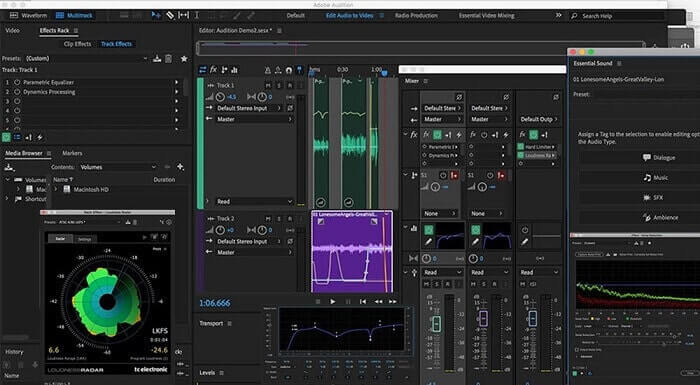
เครื่องมือที่ช่วยให้ผู้ใช้สามารถบันทึกการบันทึกที่มีคุณภาพ นอกจากนี้ยังรองรับโดย Adobe ดังนั้นคาดหวังผลลัพธ์ที่มีคุณภาพดีที่จะผลิต นี้เป็นที่นิยมใช้กันมากที่สุดโดยผู้ผลิตเพลง, นักร้อง, ผู้เรียบเรียงเพลงและเช่นนี้ นี่คือเครื่องบันทึกที่เป็นอุตสาหกรรมมากขึ้น ผู้ใช้ใหม่จะใช้เครื่องบันทึก Mp2 ประเภทนี้ค่อนข้างล้นหลาม แต่ให้คุณภาพที่ดีเหมือนกับเครื่องบันทึก MP2 อื่นๆ
อ่านเพิ่มเติม
โปรแกรมอัดเสียง WAV ที่ดีที่สุด
โปรแกรมอัดวิดีโอ WMV ที่ดีที่สุด
ส่วนที่ 3 แผนภูมิเปรียบเทียบ
| คุณสมบัติเครื่องมือ/s | FVC เครื่องบันทึกเสียงฟรี | เครื่องบันทึกเสียง FVC (พรีเมียม) | เสียง Boo | Adobe Audition |
| บันทึกเสียง | ใช่ | ใช่ | ใช่ | ใช่ |
| ตัดเสียงรบกวน | ไม่ | ใช่ | ไม่ | ใช่ |
| การเพิ่มประสิทธิภาพไมโครโฟน | ไม่ | ใช่ | ไม่ | ใช่ |
| เครื่องมือแก้ไข | ไม่ | ใช่ | ไม่ | ใช่ |
| โปรแกรมที่มีอยู่/s | รองรับทุกโปรแกรม | รองรับทุกโปรแกรม | iPhone, iPod touch และ iPad | Windows 7, Windows 8.1 หรือ Windows 10 OS X Yosemite, OS X El Capitan หรือ macOS Sierra |
| รูปแบบที่มีจำหน่าย | MP3 และ MP2 | MP3, MP2, WMA, AAC, M4A, FLAC, OGG, AMR, Opus และอีกมากมาย | MP3 | AC3, M4A, MAT, VOX, W64, WAV และอีกมากมาย |
| ราคาของเครื่องมือ (ถ้าจ่ายได้) | เครื่องมือออนไลน์ฟรี | เป็นเวลา 1 เดือน: $25.00 หนึ่งปี: $31.20 สำหรับใบอนุญาตตลอดชีพ: $55.20 | เครื่องมือดาวน์โหลดฟรี | $27.62/โมเมนต์ ต่อปี $315.61/ปี ต่อปี $41.43/แผนรายเดือน |
ส่วนที่ 4. คำถามที่พบบ่อยเกี่ยวกับ MP2 Recorder
ฉันสามารถแปลง MP2 เป็นรูปแบบอื่นได้หรือไม่?
คุณสามารถทำได้โดยใช้ MP2 Converter ออนไลน์ตัวนี้ และคุณอาจอยากลองใช้ตัวแปลงขั้นสูงนี้เพื่อให้ได้คุณภาพไฟล์ที่ดียิ่งขึ้น.
ส.ส.ตัวไหนดี? 1, 2, 3 หรือ 4?
รูปแบบไฟล์ MP เหล่านี้เป็นคอนเทนเนอร์ทั้งหมดสำหรับเสียง วิดีโอ และข้อความ แต่ความแตกต่างที่สำคัญระหว่างพวกเขาคือสิ่งที่มีอยู่ MP1 เป็นคนแรกที่ทำรูปแบบเทปคาสเซ็ตต์ MP2 รองรับ 1 ถึง 2 ช่องสัญญาณและเป็นมาตรฐานสำหรับการเล่นสถานีวิทยุและโทรทัศน์ระบบดิจิตอล MP3 เป็นรูปแบบที่ใช้บ่อยที่สุดในการบันทึกเสียงหรือรูปแบบเสียง MP4 มีรูปแบบเสียง วิดีโอ และข้อความ
ฉันต้องการเล่นวิดีโอแต่เครื่องเล่นสื่อไม่รองรับรูปแบบนี้ ฉันควรทำอย่างไร?
คุณสามารถใช้โปรแกรมเล่นมีเดียตัวนี้ได้ เพราะรองรับไฟล์หลากหลายรูปแบบเกือบทุกประเภทที่คุณรู้จัก.
สรุป
ท้ายที่สุด เราก็ได้รู้จักเครื่องมือที่แตกต่างกันบนอินเทอร์เน็ตผ่านบทความนี้ หากคุณยังตัดสินใจไม่ได้ว่าเครื่องมือใดเหมาะกับคุณที่สุด เคล็ดลับเหล่านี้อาจช่วยให้คุณเลือกได้ง่ายขึ้น เครื่องมืออัดเสียงที่ดีควรใช้งานง่าย เชื่อถือได้ รองรับหลายแพลตฟอร์มเผื่อคุณเปลี่ยนอุปกรณ์ในอนาคต จะได้ไม่กระทบกับการอัดเสียง ใช้งานได้ยาวนาน อัปเดตสม่ำเสมอ ราคาเหมาะสม และที่สำคัญที่สุดคือต้องปลอดมัลแวร์ หากคำตอบในใจคุณคือ FVC Screen Recorder แสดงว่าคุณคิดถูกแล้ว เพราะเครื่องมือนี้ไม่จำกัดการใช้งานของคุณ ใช้งานไม่ยาก และราคาไม่แพง ดังนั้นจึงไม่จำเป็นต้องมองหาโปรแกรมอื่น หากโปรแกรมนี้ทำได้ดีกว่าตัวเลือกอื่น ๆ อยู่แล้ว.
-
 เครื่องบันทึกหน้าจอ WebM ที่ดีที่สุด 5 อันดับแรกสำหรับ Windows/Mac
 เรียนรู้เพิ่มเติมเกี่ยวกับไฟล์ส่วนขยาย WebM โดยการอ่านบทความและค้นพบแอปตัวบันทึกหน้าจอ WebM ที่คุณสามารถใช้เพื่อคัดกรองวิดีโอ WebM
-
 4 เครื่องบันทึกวิดีโอ SWF ที่ดีที่สุดที่เข้าถึงได้ทางออนไลน์สำหรับฟีดความคิดเห็นฟรี
 คุณเคยได้ยินเกี่ยวกับไฟล์ SWF หรือไม่ เรียนรู้เพิ่มเติมเกี่ยวกับรูปแบบไฟล์นี้และค้นพบวิธีบันทึกไฟล์ SWF โดยใช้เครื่องมือออนไลน์ฟรี
-
 เครื่องบันทึกวิดีโอ MTV ที่ไม่มีใครเทียบได้กับคอมพิวเตอร์ Mac/Windows ฟีดความคิดเห็น
 บทความนี้จะช่วยให้คุณเรียนรู้เกี่ยวกับรูปแบบไฟล์ MTV และรายการเครื่องบันทึกวิดีโอ MTV ที่คุณสามารถใช้เพื่อบันทึกหน้าจอคอมพิวเตอร์ได้อย่างง่ายดาย
