


 Video Converter Ultimate
 บันทึกหน้าจอ
 ซ่อมวิดีโอ
 ดาวน์โหลดอย่างปลอดภัย
FLAC กับ MP3: บทนำและการเปรียบเทียบรูปแบบเสียง
การถกเถียงระหว่างไฟล์รูปแบบ FLAC vs. MP3 ดำเนินมาหลายปีแล้ว แม้ว่า MP3 จะเป็นหนึ่งในรูปแบบไฟล์เสียงที่เก่าแก่และใช้งานกันอย่างแพร่หลายที่สุด แต่ FLAC ก็ได้รับความนิยมมากขึ้นในหมู่นักฟังเพลงระดับออดิโอไฟล์ เนื่องจากเป็นการบีบอัดเสียงแบบไม่สูญเสียข้อมูล แล้วรูปแบบไหนดีกว่ากัน? ในคู่มือนี้ เราจะมาดูความแตกต่างระหว่าง FLAC และ MP3 อย่างละเอียด ทั้งในด้านคุณภาพเสียง ขนาดไฟล์ ความสามารถในการรองรับอุปกรณ์ต่าง ๆ และอื่น ๆ เพื่อช่วยให้คุณตัดสินใจเลือกรูปแบบไฟล์ที่เหมาะสำหรับคลังเพลงของคุณ.

ส่วนที่ 1 FLAC กับ MP3: บทนำของรูปแบบเสียง
เกร็ดเกี่ยวกับ MP3
MP3 เป็นรูปแบบยอดนิยมสำหรับไฟล์เสียงดิจิทัลซึ่งใช้กันอย่างแพร่หลายตั้งแต่เปิดตัวในปี 1990 ใช้รูปแบบการบีบอัดแบบสูญเสียเพื่อลดขนาดของไฟล์เสียงโดยยังคงคุณภาพเสียงที่ดีไว้ ไฟล์ MP3 สามารถแชร์ ดาวน์โหลด และเล่นบนอุปกรณ์ต่างๆ ได้อย่างง่ายดาย ทำให้เป็นทางเลือกที่สะดวกสำหรับผู้ที่ชื่นชอบเพลงดิจิตอล คำถามคือ FLAC ดีกว่า MP3 หรือไม่ มาดูกันโดยการอ่านคำอธิบายของ FLAC
เกร็ดเกี่ยวกับ FLAC
FLAC (Free Lossless Audio Codec) เป็นรูปแบบไฟล์เสียงคุณภาพสูงที่ใช้การบีบอัดแบบไม่สูญเสียข้อมูลเพื่อรักษาข้อมูลเสียงต้นฉบับโดยไม่สูญเสียคุณภาพ ซึ่งหมายความว่าไฟล์ FLAC มีขนาดใหญ่กว่าไฟล์ MP3 มาก แต่ยังคงรักษาระดับความเที่ยงตรงของเสียงเช่นเดียวกับต้นฉบับต้นฉบับ
ส่วนที่ 2 อุปกรณ์/แพลตฟอร์มที่รองรับ FLAC และ MP3
ตอนนี้ให้เราดูการเปรียบเทียบ MP3 กับ FLAC เพื่อดูว่าพวกเขาทำงานอย่างไรเกี่ยวกับแพลตฟอร์มหรืออุปกรณ์ที่รองรับ
MP3 เป็นรูปแบบไฟล์เสียงที่ได้รับการสนับสนุนอย่างกว้างขวางซึ่งสามารถเล่นได้บนแพลตฟอร์มต่างๆ รวมถึง:
◆ คอมพิวเตอร์ที่ใช้ระบบปฏิบัติการ Windows, macOS และ Linux
◆ เครื่องเล่นสื่อแบบพกพา เช่น iPod และอุปกรณ์ เครื่องเล่น MP3 อื่น ๆ.
◆ สมาร์ทโฟนและแท็บเล็ตที่ใช้ iOS, Android และระบบปฏิบัติการมือถืออื่นๆ
◆ เครื่องเสียงติดรถยนต์พร้อม USB หรืออินพุตเสริม
◆ ระบบโฮมเธียเตอร์และเครื่องรับสเตอริโอพร้อม USB หรือการเชื่อมต่อเครือข่าย
◆ บริการสตรีมเพลง เช่น Spotify และ Apple Music มักใช้ MP3 เป็นรูปแบบเริ่มต้นสำหรับการสตรีมและดาวน์โหลดเพลง
FLAC ไม่รองรับอย่างแพร่หลายเท่า MP3 แต่ก็ยังสามารถเล่นได้บนแพลตฟอร์มที่หลากหลาย รวมถึง:
◆ คอมพิวเตอร์ที่ใช้ระบบปฏิบัติการ Windows, macOS และ Linux
◆ เครื่องเล่นมีเดียพกพาบางรุ่น เช่น Astell&Kern AK Jr และ PonoPlayer
◆ สมาร์ทโฟนและแท็บเล็ตบางรุ่นที่ใช้ Android และระบบปฏิบัติการมือถืออื่นๆ
◆ เครื่องเสียงรถยนต์และระบบโฮมเธียเตอร์บางรุ่นที่มีการเชื่อมต่อ USB หรือเครือข่าย
◆ บริการสตรีมเพลงบางอย่าง เช่น Tidal ซึ่งเสนอตัวเลือกการสตรีมและการดาวน์โหลด FLAC ที่มีความแม่นยำสูง
ส่วนที่ 3 FLAC ดีกว่า MP3 หรือไม่
ในครั้งนี้ ให้เราแสดงรายการความแตกต่างระหว่าง FLAC และ MP3 โดยการเปรียบเทียบรูปแบบเสียงเหล่านี้อย่างละเอียด
นี่คือการเปรียบเทียบอย่างครอบคลุมของ FLAC และ MP3 ตามปัจจัยต่างๆ:
คุณภาพเสียง: FLAC ให้คุณภาพเสียงที่ดีกว่า MP3 เพราะเป็นรูปแบบไฟล์แบบไม่สูญเสียข้อมูล (lossless) ที่เก็บรักษาข้อมูลเสียงในต้นฉบับไว้ครบถ้วน ในทางตรงกันข้าม MP3 เป็นรูปแบบไฟล์แบบสูญเสียข้อมูล (lossy) ที่ตัดทอนข้อมูลเสียงบางส่วนระหว่างการบีบอัด ซึ่งอาจทำให้คุณภาพเสียงลดลงได้.
ขนาดไฟล์: ไฟล์ MP3 มีขนาดเล็กกว่าไฟล์ FLAC มาก เนื่องจาก MP3 ใช้การบีบอัดแบบสูญเสียข้อมูลเพื่อลดขนาดไฟล์ ทำให้ MP3 เป็นตัวเลือกที่ใช้งานได้สะดวกกว่าสำหรับผู้ที่มีพื้นที่จัดเก็บจำกัด หรือจำเป็นต้องแชร์หรือดาวน์โหลดไฟล์เพลงผ่านอินเทอร์เน็ตอย่างรวดเร็ว.
ความเข้ากันได้: MP3 สามารถใช้งานร่วมกับอุปกรณ์และซอฟต์แวร์ได้อย่างกว้างขวาง ไม่ว่าจะเป็นคอมพิวเตอร์ตั้งโต๊ะและแล็ปท็อป เครื่องเล่นสื่อแบบพกพา สมาร์ทโฟน เครื่องเสียงในรถยนต์ และบริการสตรีมมิงเพลง ในขณะที่ FLAC อาจไม่รองรับกับอุปกรณ์และซอฟต์แวร์บางประเภท เนื่องจากมีขนาดไฟล์ใหญ่กว่าและใช้การบีบอัดแบบไม่สูญเสียข้อมูล.
บิตเรต: ไฟล์ MP3 สามารถเข้ารหัสด้วยบิตเรตที่ต่ำลงเพื่อช่วยลดขนาดไฟล์ได้มากขึ้น แต่ก็จะส่งผลให้คุณภาพเสียงลดลงด้วย ในทางกลับกัน ไฟล์ FLAC จะคงบิตเรตให้ใกล้เคียงกับแหล่งเสียงต้นฉบับอยู่เสมอ.
การตัดต่อ: FLAC เป็นตัวเลือกที่ดีกว่าสำหรับการตัดต่อเสียง เนื่องจากให้ความเที่ยงตรงของเสียงในระดับสูงกว่า และไม่ก่อให้เกิดอาร์ติแฟกต์จากการบีบอัดเพิ่มเติม ไฟล์ MP3 ในทางกลับกัน อาจก่อให้เกิดอาร์ติแฟกต์จากการบีบอัดเพิ่มขึ้นระหว่างการตัดต่อ เนื่องจากเป็นรูปแบบการบีบอัดแบบสูญเสียข้อมูล.
ราคา: ทั้ง FLAC และ MP3 เป็นรูปแบบไฟล์ที่ใช้งานได้ฟรีและเป็นโอเพนซอร์ส ดังนั้นจึงไม่มีค่าใช้จ่ายในการใช้งานรูปแบบใดรูปแบบหนึ่ง.
ส่วนที่ 4 แปลง FLAC เป็น MP3 หรือ MP3 เป็น FLAC
ตอนนี้เราเสร็จสิ้นกระบวนการเปรียบเทียบ FLAC เป็น MP3 แล้ว ให้เราไปยังกระบวนการแปลง MP3 เป็น FLAC หรือในทางกลับกัน
Video Converter Ultimate เป็นซอฟต์แวร์ทรงพลังที่ช่วยให้คุณแปลงไฟล์เสียงและวิดีโอจากรูปแบบหนึ่งไปเป็นอีกรูปแบบได้อย่างง่ายดาย หนึ่งในหลาย ๆ รูปแบบที่ FVC Video Converter Ultimate รองรับคือ FLAC ซึ่งเป็นรูปแบบเสียงคุณภาพสูงแบบไม่สูญเสียข้อมูลที่มักนิยมใช้ในหมู่นักฟังเพลงระดับออดิโอไฟล์และผู้หลงใหลในเสียงเพลง คุณสามารถแปลงไฟล์ FLAC ให้เป็น MP3 ได้อย่างรวดเร็วและง่ายดาย ช่วยประหยัดพื้นที่บนอุปกรณ์ของคุณและทำให้เพลงของคุณแชร์ต่อได้สะดวกขึ้น Video Converter Ultimate มาพร้อมส่วนติดต่อผู้ใช้ที่ใช้งานง่ายและตัวเลือกการปรับแต่งหลากหลาย จึงเป็นเครื่องมือที่สะดวกและเป็นประโยชน์สำหรับทุกคนที่ต้องการแปลงไฟล์เสียงและวิดีโอ.
ในการแปลงไฟล์เสียงระหว่างรูปแบบ FLAC และ MP3 โดยใช้เครื่องมือนี้ คุณต้องทำตามขั้นตอนง่ายๆ ไม่กี่ขั้นตอน
ขั้นตอนที่ 1. ขั้นแรก ให้ดาวน์โหลดและติดตั้งโปรแกรมลงในคอมพิวเตอร์ของคุณโดยคลิกปุ่ม ดาวน์โหลดฟรี ปุ่มใดปุ่มหนึ่ง แล้วทำตามตัวช่วยติดตั้ง จากนั้นเปิดโปรแกรมเพื่อเข้าสู่ส่วนติดต่อผู้ใช้ที่ใช้งานง่าย.
ดาวน์โหลดฟรีสำหรับ Windows 7 ขึ้นไปดาวน์โหลดอย่างปลอดภัย
ดาวน์โหลดฟรีสำหรับ MacOS 10.7 ขึ้นไปดาวน์โหลดอย่างปลอดภัย
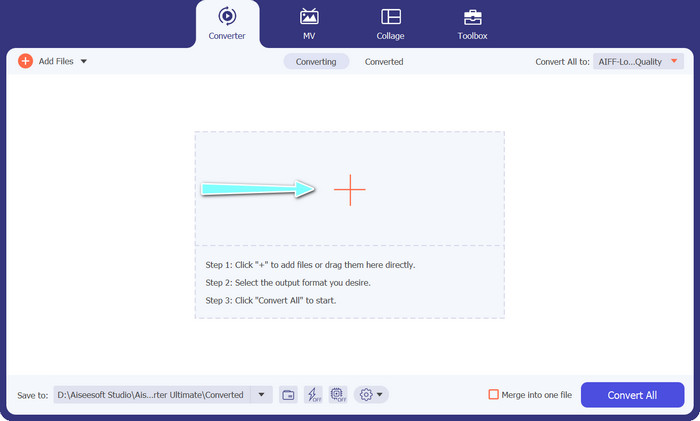
ขั้นตอนที่ 2. จากนั้น เพิ่มไฟล์เสียงที่คุณต้องการแปลงด้วยการคลิกปุ่มสัญลักษณ์เครื่องหมาย บวก จากหน้าหลักของโปรแกรม เมื่อเพิ่มแล้ว คุณจะเห็นรูปตัวอย่างของแต่ละไฟล์บนหน้าจอโปรแกรม.
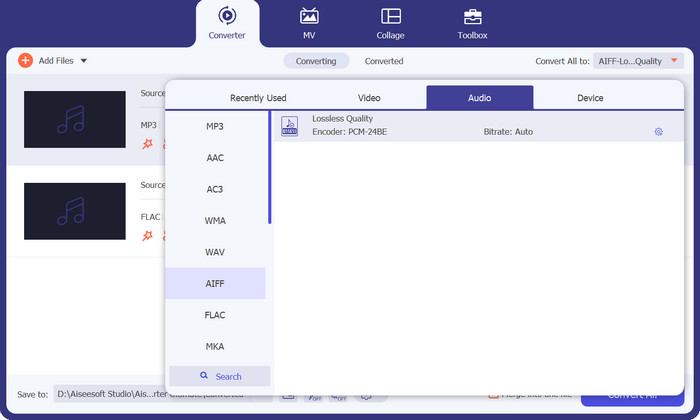
ขั้นตอนที่ 3. กำหนดรูปแบบเอาต์พุตโดยเลือกแท็บ Audio จากเมนู Profile ที่ด้านขวาบนของเครื่องมือ แล้วเลือกรูปแบบ MP3 หรือ FLAC ตามทิศทางการแปลงที่คุณต้องการ.
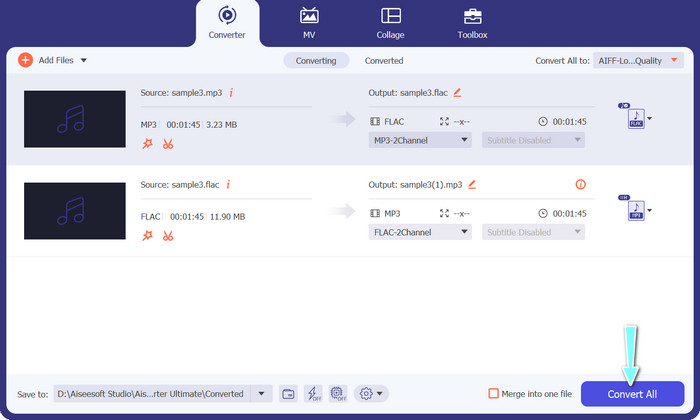
ขั้นตอนที่ 4. กำหนดโฟลเดอร์ปลายทางที่คุณต้องการบันทึกไฟล์ที่แปลงแล้วโดยเลือกตำแหน่งที่เหมาะสมที่ด้านล่างของหน้าต่างโปรแกรม สุดท้าย คลิกปุ่ม Convert All เพื่อเริ่มกระบวนการแปลงไฟล์.
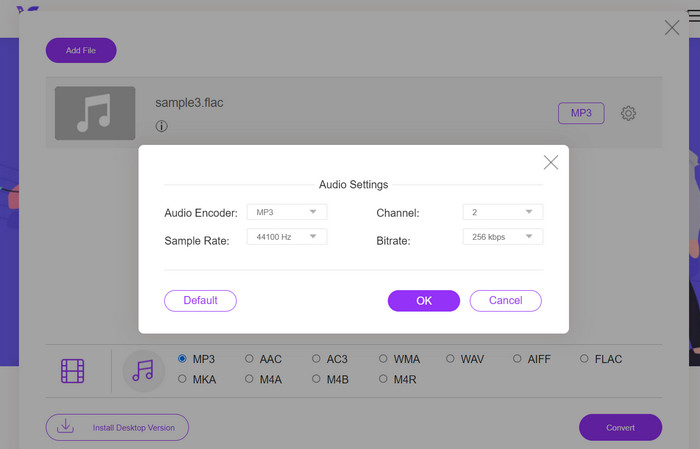
หากคุณกำลังมองหาเครื่องมือออนไลน์ฟรีสำหรับแปลงไฟล์ FLAC เป็น MP3 ให้ลองใช้ Free Video Converter Online โปรแกรมออนไลน์ที่สะดวกนี้ช่วยให้ผู้ใช้สามารถแปลงไฟล์วิดีโอและเสียงได้โดยไม่เสียค่าใช้จ่าย อีกทั้งยังสามารถปรับแต่งการตั้งค่าเอาต์พุตได้ตามต้องการ ความเร็วในการแปลงก็น่าเชื่อถือ ตราบใดที่คุณมีการเชื่อมต่ออินเทอร์เน็ต ในการเริ่มต้นใช้งาน ให้ทำตามขั้นตอนต่อไปนี้:
ขั้นตอนที่ 1. เปิดเว็บเบราว์เซอร์ที่คุณต้องการใช้งาน แล้วไปยังเว็บไซต์ Free Video Converter Online.
ขั้นตอนที่ 2. คลิกปุ่ม Add Files to Convert เพื่ออัปโหลดไฟล์ FLAC ที่คุณต้องการแปลงเป็น MP3.
ขั้นตอนที่ 3. เลือก MP3 เป็นรูปแบบเอาต์พุตจากรายการรูปแบบที่มีอยู่ใต้เมนูรูปแบบ Audio คุณยังสามารถเลือกบิตเรตหรือคุณภาพเอาต์พุตของไฟล์ MP3 ตามที่ต้องการได้ด้วย.
ขั้นตอนที่ 4. คลิกปุ่ม Convert เพื่อเริ่มกระบวนการแปลง.
ส่วนที่ 5 คำถามที่พบบ่อยเกี่ยวกับ FLAC กับ MP3
ระหว่าง FLAC แบบ 16 บิต กับ MP3 แบบ 320Kbps อย่างไหนดีกว่ากัน
ตัวเลือกระหว่าง FLAC 16 บิตและ MP3 320kbps นั้นขึ้นอยู่กับความชอบส่วนบุคคลและวัตถุประสงค์ของการใช้ไฟล์เสียง หากคุณให้ความสำคัญกับคุณภาพเสียงและมีพื้นที่จัดเก็บเพียงพอ FLAC แบบ 16 บิตอาจเป็นตัวเลือกที่ดีกว่า หากคุณต้องการขนาดไฟล์ที่เล็กลงโดยไม่สูญเสียคุณภาพเสียงมากเกินไป MP3 320kbps อาจเป็นตัวเลือกที่ดี
ไฟล์ FLAC มีขนาดใหญ่กว่าไฟล์ MP3 หรือไม่
ใช่ ไฟล์ FLAC โดยทั่วไปจะมีขนาดใหญ่กว่าไฟล์ MP3 เนื่องจากลักษณะที่ไม่สูญเสียข้อมูล
เครื่องเล่นสื่อทั้งหมดรองรับ FLAC หรือไม่
ไม่ เครื่องเล่นมีเดียบางตัวไม่รองรับ FLAC อย่างไรก็ตาม เครื่องเล่นมีเดียและซอฟต์แวร์สมัยใหม่จำนวนมากรองรับการเล่น FLAC รวมถึง VLC, Foobar2000 และ Winamp
สรุป
การเลือกใช้ระหว่าง MP3 กับ FLAC ขึ้นอยู่กับความชอบส่วนบุคคลและความต้องการเฉพาะของคุณ ดังนั้นประเด็นเรื่อง FLAC vs. MP3 จึงเป็นสิ่งสำคัญต่อการตัดสินใจของคุณ ท้ายที่สุดแล้ว การเลือกรูปแบบที่เหมาะสมจะขึ้นอยู่กับลำดับความสำคัญของคุณในด้านคุณภาพเสียง ขนาดไฟล์ และความเข้ากันได้.
-
 4 วิธีที่ดีที่สุดในการแปลง MOV เป็น MP3 บน Windows และ Mac ได้อย่างง่ายดาย
 เมื่อคุณต้องการแยกไฟล์เสียง MP3 จากไฟล์ MOV คุณสามารถเรียนรู้เพิ่มเติมเกี่ยวกับตัวแปลง MOV เป็น MP3 ที่มีประสิทธิภาพสูงสุด 4 ตัวเพื่อให้ได้ไฟล์ที่ต้องการจากบทความ
-
 ตัวแปลง MP3 ที่ดีที่สุดในการแปลงไฟล์เสียงเป็น MP3 อย่างง่ายดาย
 แปลงรูปแบบเสียงเป็น MP3 ได้อย่างง่ายดายด้วยตัวแปลง MP3 แบบออนไลน์และออฟไลน์ที่ใช้งานง่ายของเรา รับผลลัพธ์คุณภาพสูงด้วยการคลิกเพียงไม่กี่ครั้ง
-
 ตัวแก้ไขข้อมูลเมตา FLAC 3 อันดับแรกบน Mac และ Windows [อัปเดต 2023]
 คุณต้องการเปลี่ยนข้อมูลเมตา FLAC หรือไม่ ในกรณีนี้ คุณต้องอ่านบทความนี้ เนื่องจากเราให้ความรู้เพียงพอเกี่ยวกับตัวแก้ไขข้อมูลเมตา FLAC ล่าสุดจึงจะสามารถใช้ได้
