


 Video Converter Ultimate
 บันทึกหน้าจอ
 ซ่อมวิดีโอ
 ดาวน์โหลดอย่างปลอดภัย
รู้ว่า FPS คืออะไรและข้อมูลทั้งหมดที่คุณต้องรู้
เมื่อคุณได้ยินตัวย่อ FPS อาจฟังดูเป็นศัพท์เทคนิคเกินไป และคุณมักจะได้ยินคำนี้จากเหล่าเกมเมอร์ที่พูดถึงคอมพิวเตอร์ของพวกเขา หากคุณเป็นหนึ่งในคนที่ยังไม่รู้ว่า FPS คืออะไร เราจะอธิบายความหมายรวมถึงข้อมูลทุกอย่างที่คุณต้องรู้เกี่ยวกับมัน ดังนั้นโดยไม่ให้เสียเวลา มาดูกันอย่างละเอียดเกี่ยวกับFPS คืออะไร.

ส่วนที่ 1 FPS หมายถึงอะไร?
FPS ย่อมาจาก Frames Per Second ซึ่งเป็นศัพท์เทคนิคที่ใช้ในกราฟิกคอมพิวเตอร์ หากคุณถามว่า FPS ย่อมาจากอะไร อย่างไรก็ตาม ใช้ไม่ได้เฉพาะกับคอมพิวเตอร์กราฟิกเท่านั้น แต่ยังใช้กับระบบจับภาพการเคลื่อนไหวด้วย หากคุณสงสัยว่าทำไมภาพยนตร์ถึงมีกราฟิกที่สวยงามและราบรื่น นั่นเป็นเพราะเฟรมต่อวินาที FPS บางครั้งเรียกว่า "อัตราการถ่ายต่อเนื่อง" และ "อัตราการอัปเดต" นอกจากนั้น FPS คือจำนวนเฟรมในชุดรูปภาพที่ต่อเนื่องกัน และคุณรู้หรือไม่? วิดีโอที่เรากำลังดูไม่เคลื่อนไหว เป็นเพียงชุดของภาพที่เล่นในระยะที่รวดเร็ว
หากวิดีโอหรือคลิปภาพยนตร์ของคุณมี FPS สูงกว่า แสดงว่าวิดีโอของคุณราบรื่นกว่า ในทางตรงกันข้าม กราฟิกวิดีโอของคุณจะหยาบถ้าวิดีโอของคุณมี fps ต่ำ และหากคุณเป็นนักเล่นเกมมืออาชีพ คุณอาจต้องการกราฟิกที่ราบรื่นในขณะที่เล่นเกมออนไลน์ที่คุณชื่นชอบ และ FPS หรือเฟรมต่อวินาทีก็มีบทบาทสำคัญ
เราหวังว่าคำถามของคุณเกี่ยวกับ FPS ย่อมาจากอะไรได้รับคำตอบแล้ว อ่านเพิ่มเติมเพื่อทราบข้อมูลเพิ่มเติมเกี่ยวกับ FPS
ส่วนที่ 2 FPS ในสถานการณ์ต่างๆ
อัตราเฟรมมาตรฐานต่อวินาทีคือ 24 แต่ในฟิลด์วิดีโอต่างๆ มีมาตรฐาน FPS ที่แตกต่างกัน ส่วนนี้จะรู้จัก FPS ต่างๆ ที่ทุกสถานการณ์มี
FPS ในวิดีโอ Youtube
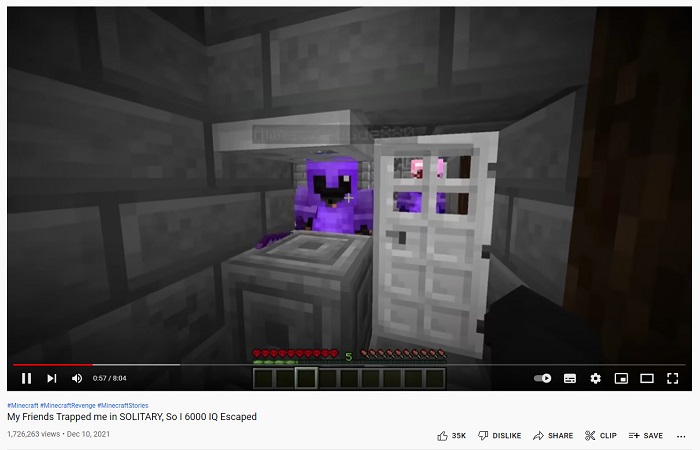
Youtube รองรับ 24-60 fps อย่างไรก็ตาม FPS ที่แนะนำสำหรับวิดีโอ youtube คือ 24 FPS แต่ในส่วนนี้ คุณจะทราบถึงความชอบที่แตกต่างกันของเนื้อหาที่แชร์มากที่สุดในวิดีโอ Youtube
◆ วิดีโอพอดแคสต์ - วิดีโอพอดแคสต์หรือรายการทอล์กโชว์ทางทีวี ส่วนใหญ่มักใช้ 30 fps เมื่อคุณรับชมคอนเทนต์ประเภทนี้บน YouTube คุณจะสังเกตได้ว่าการเคลื่อนไหวส่วนมากเป็นท่าทางมือ และไม่ได้มีการเคลื่อนไหวที่เว่อร์เกินจริงมากนัก.
◆ วิดีโอสอนแต่งหน้า - วิดีโอสอนแต่งหน้ามักใช้ 60 fps เพราะคอนเทนต์ประเภทนี้จำเป็นต้องมีภาพวิดีโอที่คมชัดและลื่นไหล เพื่อให้เห็นรายละเอียดทุกขั้นตอนของการสอน.
◆ สื่อวิดีโอการเรียนรู้ - คอนเทนต์ประเภทนี้มักใช้ 24–30 fps เพราะจะมีแอนิเมชันในระดับที่เหมาะสม และไม่มีการเคลื่อนไหวที่มากเกินไป.
◆ ไฮไลต์เกม - สำหรับวิดีโอเกมหรือไฮไลต์เกม ค่า fps ที่แนะนำคือ 60 fps คอนเทนต์ประเภทนี้ต้องใช้ 60 fps เพื่อไม่ให้วิดีโอดูสะดุดหรือกระตุก.
FPS ในเกม
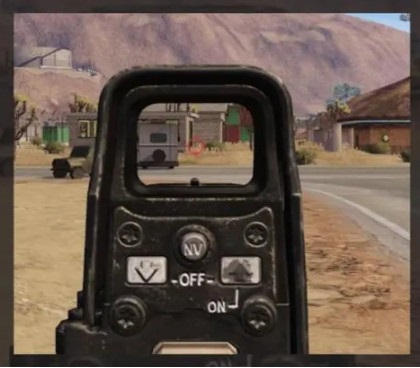
ในการเล่นเกม คุณต้องมี fps สูง แต่ขึ้นอยู่กับความจุของการ์ดจอและระบบโดยรวมของอุปกรณ์ของคุณ หากคุณกำลังเล่นเกมยิงมุมมองบุคคลที่หนึ่ง มันเป็นข้อได้เปรียบที่คุณมี fps ที่สูงกว่าเพราะคุณสามารถเล็งได้อย่างราบรื่น การเล่นเกมมักจะมี 60-240 fps อย่างไรก็ตาม จอภาพ 144 Hz สามารถแสดงได้เพียง 144 fps หรือต่ำกว่าเท่านั้น ถึงกระนั้น คุณสามารถเล่น 240 fps บนจอภาพ 144 Hz ได้ แต่ 96 fps จะสูญเปล่าเพราะจะแสดงเพียง 144 fps ดังนั้นมันจึงขึ้นอยู่กับอุปกรณ์ของระบบและความจุการ์ดกราฟิกของเกมของคุณ
FPS ในโรงภาพยนตร์

โรงภาพยนตร์หรือภาพยนตร์ที่ฉายในโรงภาพยนตร์มักจะมี 24 เฟรมต่อวินาที หากคุณดูหนังเกี่ยวกับการยิงแอ็คชั่น และกระสุนมีเอฟเฟกต์สโลว์โมชั่นในส่วนที่กระสุนกำลังจะกระทบกับศัตรู นั่นเป็นผลงานของ fps เมื่อเป็นเช่นนี้ fps มักจะลดลง จากนั้นในส่วนอื่นๆ ของภาพยนตร์ จะมีความเร็วปกติที่ภาพยนตร์มี
ส่วนที่ 3 ต้องการแก้ไขความเร็วของวิดีโอของคุณหรือไม่
FPS มีบทบาทอย่างมากในความราบรื่นของการเล่นเกมหรือวิดีโอของคุณ แต่องค์ประกอบบางอย่างก็มีบทบาทสำคัญในการมีวิดีโอการเปลี่ยนที่ราบรื่น ซึ่งก็คือความเร็วของวิดีโอของคุณ และถ้าคุณต้องการปรับความเร็วของวิดีโอ คุณสามารถใช้เครื่องมือนี้ที่เราแนะนำว่าเป็นเครื่องมือเปลี่ยนความเร็ววิดีโอที่ดีที่สุด
FVC Video Converter Ultimate เป็นซอฟต์แวร์ยอดนิยมสำหรับปรับความเร็ววิดีโอ มีหน้าตาโปรแกรมที่ใช้งานง่าย เหมาะสำหรับผู้เริ่มต้น คุณสามารถเปลี่ยนความเร็ววิดีโอได้ตามพรีเซ็ต 0.125x, 0.25x, 0.5x, 0.75x, 1.25x, 1.5x, 2x, 4x และ 8x นอกจากนี้ คุณยังสามารถเปลี่ยนค่า fps ของวิดีโอเอาต์พุตด้วยเครื่องมือขั้นเทพนี้ ซอฟต์แวร์นี้ช่วยให้คุณปรับ fps ของไฟล์วิดีโอได้ตั้งแต่ 12 fps ถึง 60 fps.
นอกจากนี้ FVC Video Converter Ultimate ยังมีคุณสมบัติการแก้ไขที่น่าทึ่ง เช่น การแก้ไขสี ตัวย้อนกลับวิดีโอ ตัวหมุนวิดีโอ ฯลฯ นอกจากนี้ยังรองรับรูปแบบไฟล์มากมาย รวมถึง MP4, WMV, FLV, MPEG, WebM, MKV, M4V และรูปแบบอื่นๆ อีกกว่า 1,000 รูปแบบ . ดังนั้น หากคุณต้องการใช้เครื่องมือนี้เพื่อเปลี่ยนความเร็วของวิดีโอและเปลี่ยน fps ของวิดีโอ ให้ทำตามขั้นตอนด้านล่าง
ขั้นตอนที่ 1. ดาวน์โหลด FVC Video Converter Ultimate โดยคลิกปุ่ม ดาวน์โหลด ด้านล่างสำหรับ Windows หรือ Mac จากนั้นทำตามขั้นตอนการติดตั้งและเปิดโปรแกรม.
ดาวน์โหลดฟรีสำหรับ Windows 7 หรือใหม่กว่าดาวน์โหลดอย่างปลอดภัย
ดาวน์โหลดฟรีสำหรับ MacOS 10.7 หรือใหม่กว่าดาวน์โหลดอย่างปลอดภัย
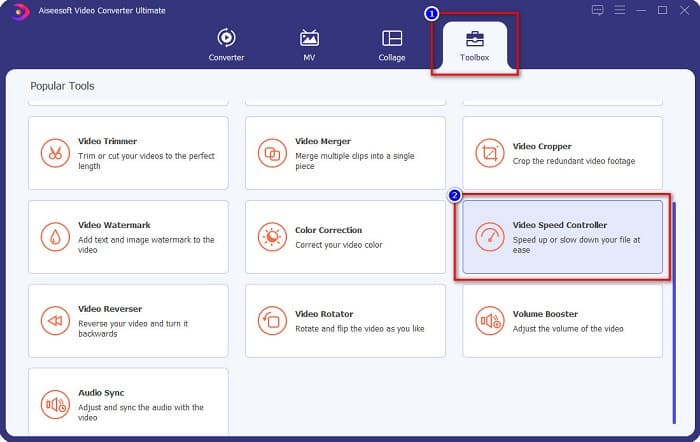
ขั้นตอนที่ 2. จากนั้นที่หน้าอินเทอร์เฟซหลักของซอฟต์แวร์ ให้เลือกตัวเลือก Toolbox แล้วคลิก Video Speed Controller.
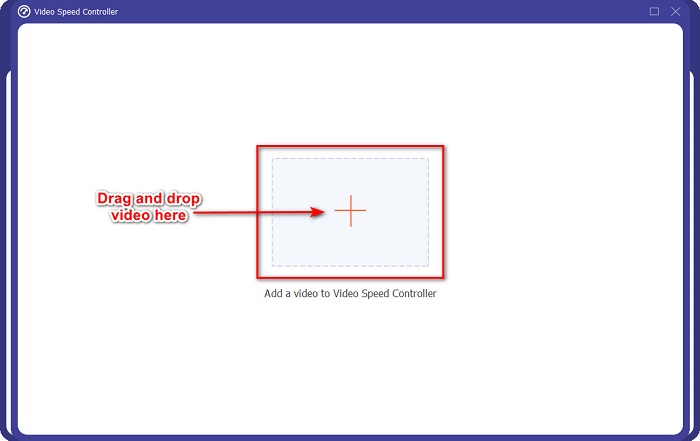
ขั้นตอนที่ 3. ต่อไปคลิกปุ่มสัญลักษณ์ + หรือลากและวางวิดีโอของคุณลงบนสัญลักษณ์ +.
ขั้นตอนที่ 4. จากนั้นเลือกพรีเซ็ตความเร็ววิดีโอที่คุณต้องการให้วิดีโอของคุณมี คุณยังสามารถดูตัวอย่างวิดีโอของคุณได้ที่ด้านบนของพรีเซ็ต.
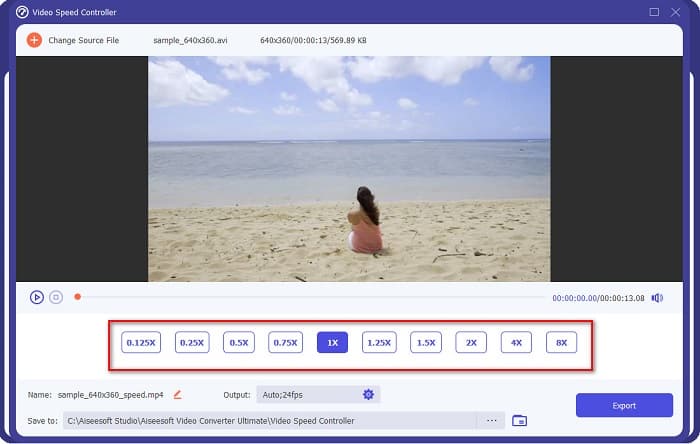
หากต้องการเปลี่ยนค่า fps ของวิดีโอเอาต์พุต ให้คลิกปุ่มรูปเฟือง ถัดจาก Output จากนั้นคลิกปุ่มดรอปดาวน์ ข้าง frame rate แล้วเลือก fps ที่คุณต้องการสำหรับเอาต์พุต จากนั้นคลิก OK เพื่อบันทึกการเปลี่ยนแปลง.
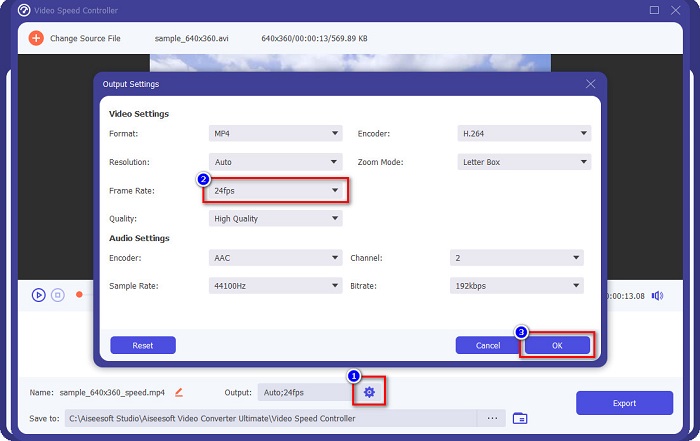
ขั้นตอนที่ 5. ขั้นตอนสุดท้าย ให้คลิกปุ่ม Export เพื่ออัปเดตการเปลี่ยนแปลงลงในวิดีโอของคุณ รอสักครู่ แล้ววิดีโอของคุณจะถูกบันทึกลงในไฟล์บนคอมพิวเตอร์โดยอัตโนมัติ.
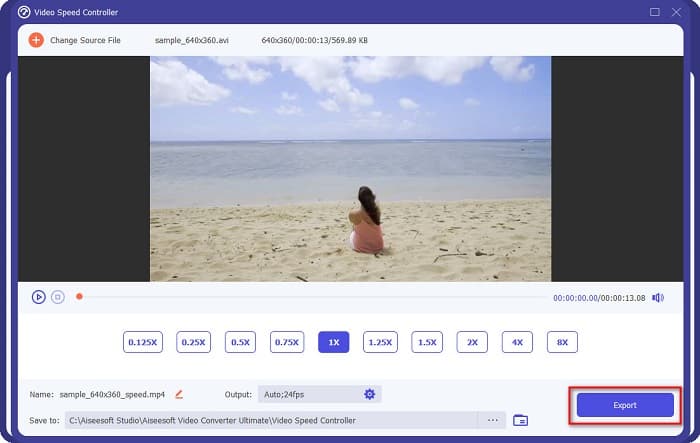
ง่ายใช่มั้ย? ทำตามขั้นตอนง่ายๆ ด้านบนนี้ คุณสามารถเปลี่ยนความเร็วและ fps ของวิดีโอได้อย่างง่ายดาย
ที่เกี่ยวข้อง:
ส่วนที่ 4. คำถามที่พบบ่อยเกี่ยวกับ FPS . คืออะไร
fps อะไรที่ตามนุษย์มองเห็นได้?
ผู้เชี่ยวชาญกล่าวว่าดวงตาของมนุษย์สามารถมองเห็นได้ระหว่าง 30 fps ถึง 60 fps และคนอื่นๆ ยังบอกด้วยว่าดวงตาของมนุษย์ไม่สามารถรับรู้ได้เกิน 60 fps
60 FPS สามารถบันทึกเกมได้อย่างราบรื่นหรือไม่?
ใช่. เนื่องจาก fps มาตรฐานสำหรับการบันทึกเกมคือ 30 fps ถึง 60 fps ดังนั้น หากคุณต้องการบันทึกเกมที่ราบรื่น ขอแนะนำให้มี 60 fps
การเปลี่ยน fps ของวิดีโอส่งผลต่อคุณภาพหรือไม่
การเปลี่ยนค่า fps ของวิดีโอไม่ได้ทำให้คุณภาพวิดีโอลดลงโดยตรง อย่างไรก็ตาม เครื่องมือเปลี่ยน fps บางตัวอาจทำให้คุณภาพเสียไปหลังจากปรับ fps แล้ว ดังนั้นหากคุณกำลังมองหาเครื่องมือที่ไม่ทำให้คุณภาพวิดีโอเสีย ให้ใช้ FVC Video Converter Ultimate.
สรุป
ตอนนี้คำถามที่ว่าคืออะไร FPS ได้รับคำตอบแล้ว ข้อมูลทั้งหมดข้างต้นเป็นข้อเท็จจริงและผ่านการค้นคว้ามาแล้ว และหากคุณต้องการเปลี่ยนความเร็วหรือค่า fps ของวิดีโอของคุณ ให้ใช้ FVC Video Converter Ultimate ซึ่งมีผู้ใช้จำนวนมากเลือกใช้ในการปรับค่า fps ของวิดีโอ.
-
 วิธีง่ายๆ ในการสร้างวิดีโอสโลว์โมชั่นใน Windows Movie Maker
 คุณต้องการใส่เอฟเฟกต์อันน่าทึ่งบนวิดีโอของคุณเพื่อเน้นย้ำหรืออย่างน้อยก็ทำให้คลิปโดดเด่นกว่าส่วนอื่นๆ ด้วยการเคลื่อนไหวช้า และคุณไม่รู้จะทำอย่างไร? อ่านบทความนี้ต่อเพื่อทราบข้อมูลเพิ่มเติม
-
 วิธีสร้างภาพช้าโดยใช้ Final Cut Pro [แก้ไขแล้ว]
 คุณจะใช้ Final Cut Pro เพื่อสร้างวิดีโอสโลว์โมชั่น แต่คุณไม่รู้ว่าจะเริ่มต้นอย่างไร อ่านบทความนี้เพื่อเรียนรู้เพิ่มเติมเกี่ยวกับ Final Cut Pro
-
 ข้อมูลสำคัญที่คุณควรรู้เกี่ยวกับ QuickTime Slow Motion
 คุณได้ลองใช้ QuickTime Media Player เพื่อเล่นวิดีโอแบบสโลว์โมชั่นแล้วหรือยัง? อ่านบทความนี้เพื่อทราบข้อมูลเพิ่มเติมเกี่ยวกับบริการที่ยอดเยี่ยมของโปรแกรมเล่นสื่อนี้
