


 Video Converter Ultimate
 บันทึกหน้าจอ
 ซ่อมวิดีโอ
สุดยอดตัวแปลงที่ดีที่สุดที่คุณสามารถใช้เพื่อแปลง 3GP เป็น AVI ออนไลน์และออฟไลน์
รูปแบบ 3GP เป็นรูปแบบที่ยืดหยุ่นซึ่งใช้ถ่ายโอนสตรีมเสียงและวิดีโอไปยังโทรศัพท์มือถือยุคที่ 3 ด้วยระบบ GSM รูปแบบนี้สอดคล้องกับการเชื่อมต่อแบบ 3G เพื่อส่งไฟล์ได้รวดเร็วขึ้น โดยมักใช้กันมากในโทรศัพท์รุ่นเก่าเพราะมีความอเนกประสงค์และส่งต่อได้อย่างรวดเร็ว อย่างไรก็ตาม ปัจจุบันไฟล์ 3GP ไม่สามารถเล่นบนโปรแกรมเล่นสื่อทั่วไปของคุณได้แล้ว เพราะรูปแบบนี้ไม่รองรับให้โปรแกรมเล่นสื่อรุ่นใหม่เข้าใจโครงสร้างของไฟล์ได้ ดังนั้นวิธีที่ดีที่สุดในการดูไฟล์ 3GP ทั้งหมดบนโทรศัพท์หรือคอมพิวเตอร์ตั้งโต๊ะของคุณคือการแปลงไฟล์ แทนที่จะค้นหาในอินเทอร์เน็ตว่าโปรแกรมแปลงไฟล์ตัวไหนดีที่สุด เราได้รวบรวมตัวแปลงไฟล์ 4 ตัวมาให้คุณเลือกใช้ เครื่องมือด้านล่างนี้เหมาะอย่างยิ่งและสามารถแปลง 3GP เป็น AVI ได้โดยไม่สูญเสียคุณภาพเลย.

ส่วนที่ 1 แปลง 3GP เป็น AVI ออฟไลน์ด้วย Ultimate Converter
FVC Video Converter Ultimate
หากคุณไม่อยากเหนื่อยกับการแปลงไฟล์ 3GP เราขอแนะนำเป็นอย่างยิ่งให้คุณใช้ FVC Video Converter Ultimate ซอฟต์แวร์ตัวนี้เป็นหนึ่งในตัวเลือกที่ดีที่สุดในการแปลงไฟล์ และสามารถแปลงไฟล์ได้อย่างรวดเร็วภายในไม่กี่วินาที นอกจากนี้ลูกค้าจำนวนมากที่เคยใช้ต่างก็มีความคิดเห็นไปในทิศทางเดียวกัน โดยสรุปแล้วพวกเขาระบุชัดเจนว่าเครื่องมือนี้ช่วยแก้ปัญหาการแปลงไฟล์ของพวกเขาได้ในพริบตาเดียว.
คำอธิบายเพิ่มเติม เครื่องมือนี้ไม่เพียงแต่เป็นเครื่องมือที่ดีที่สุดในการแปลงไฟล์เท่านั้น นอกจากนี้ยังมีคุณสมบัติขั้นสูงสุดที่คุณอยากลองใช้ ตัวอย่าง ได้แก่ ตัวแก้ไข, ตัวสร้าง GIF, ตัวเพิ่มระดับเสียง, การซิงค์เสียงและวิดีโอ, การย้อนกลับ และอื่นๆ หากคุณซื้อเครื่องมือนี้ คุณจะได้รับเครื่องมือที่กล่าวถึงทั้งหมดก่อนหน้านี้ และยังมีอีกมากมายที่รอให้คุณดำเนินการ ตอนนี้ มาลองทำตามขั้นตอนทีละขั้นตอนเพื่อแปลง 3GP เป็น AVI บน Mac และ PC โดยไม่สูญเสียคุณภาพ
ขั้นตอนที่ 1. คลิกปุ่มดาวน์โหลดและเลือกว่าคุณเป็นผู้ใช้ PC หรือ Mac จากนั้นทำการติดตั้ง.
ดาวน์โหลดฟรีสำหรับ Windows 7 หรือใหม่กว่าดาวน์โหลดอย่างปลอดภัย
ดาวน์โหลดฟรีสำหรับ MacOS 10.7 หรือใหม่กว่าดาวน์โหลดอย่างปลอดภัย
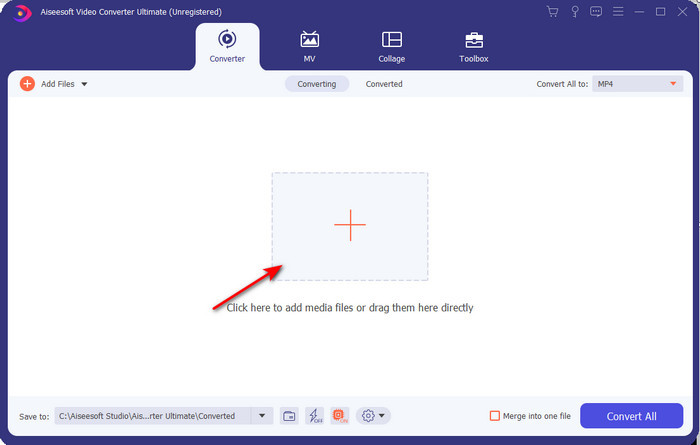
ขั้นตอนที่ 2. เปิดโปรแกรม จากนั้นคลิกสัญลักษณ์ + ตรงกลางหน้าจอ เลือกไฟล์ .3gp จากโฟลเดอร์ของคุณแล้วคลิก Open นอกจากนี้หากต้องการทำการแปลงแบบชุด (batch conversion) ก็สามารถทำได้ เพียงคลิก Add Files เพื่อเพิ่มไฟล์อื่น ๆ.
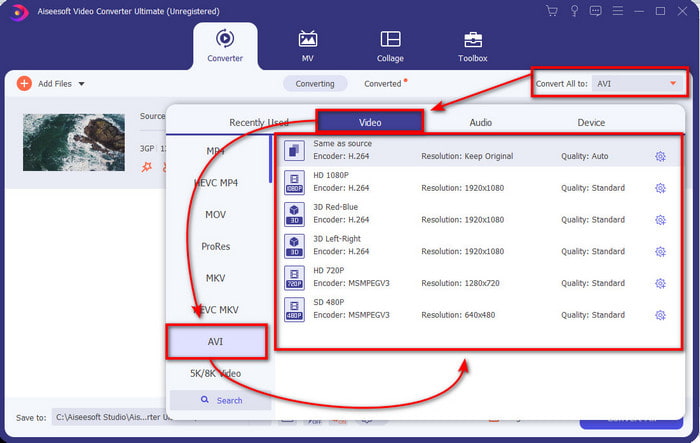
ขั้นตอนที่ 3. หากต้องการเปลี่ยนไฟล์ 3GP ให้คลิกตัวเลือก Convert All แล้วเลือกไฟล์รูปแบบ AVI ภายใต้หมวดหมู่ Video.
ขั้นตอนที่ 4. เพื่อเริ่มกระบวนการแปลงไฟล์ ให้คลิก Convert All แล้วการแปลงไฟล์ 3GP ของคุณจะเริ่มต้นขึ้น.

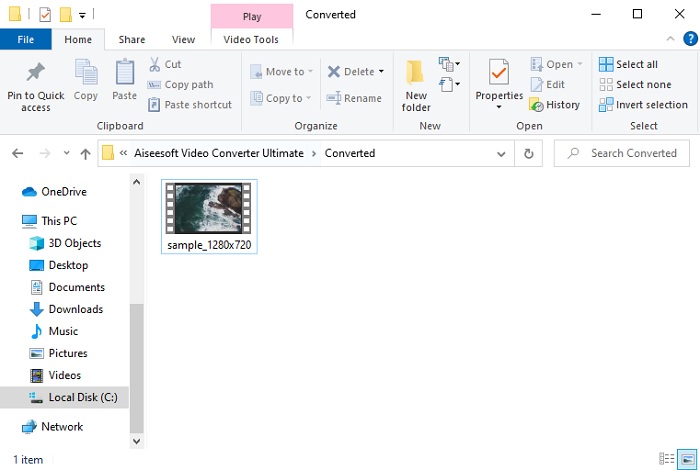
ขั้นตอนที่ 5. หลังจากแปลงไฟล์เสร็จแล้ว จะมีหน้าต่างโฟลเดอร์เด้งขึ้นมาบนหน้าจอพร้อมไฟล์ 3GP ที่ถูกแปลงแล้ว ให้คลิกไฟล์ AVI ที่เพิ่งแปลงเสร็จเพื่อรับชมและแก้ไขต่อภายหลังหากต้องการ.
ส่วนที่ 2 3 ตัวแปลงออนไลน์ที่พร้อมใช้งานเพื่อแปลง 3GP เป็น AVI
1. FVC โปรแกรมแปลงวิดีโอออนไลน์ฟรี

เราขอยืนยันว่าเครื่องมือในรายการนี้เป็นตัวแปลง 3GP เป็น AVI ออนไลน์ที่ดีที่สุด นั่นคือ FVC Free Video Converter Online ฟีเจอร์ทั้งหมดที่คุณอยากเห็นในตัวแปลงไฟล์ออนไลน์มีอยู่ที่นี่ครบถ้วน เป็นเว็บแปลงไฟล์ที่ดีที่สุดในหลาย ๆ ด้าน เช่น หากคุณต้องการตัวแปลงไฟล์ออนไลน์ที่มีประสิทธิภาพ ปลอดภัย ไม่มีโฆษณาเลย นี่คือเครื่องมือออนไลน์ที่เหมาะกับคุณ แม้ตัวเว็บจะดูดีและทำงานได้สมบูรณ์ แต่ยังรองรับรูปแบบไฟล์ในระดับปานกลางเท่านั้น ฟีเจอร์ขั้นสูงที่คุณอาจพบใน FVC Video Converter Ultimate จะไม่มีในเวอร์ชันออนไลน์นี้ แต่ข้อดีเมื่อเทียบกับเวอร์ชันซอฟต์แวร์คือ คุณสามารถใช้งานได้ฟรีโดยไม่เสียค่าใช้จ่าย เพื่อไม่ให้เสียเวลา มาดูขั้นตอนการแปลงไฟล์ของคุณเป็นรูปแบบใหม่กันเลย.
ขั้นตอนที่ 1. คลิกลิงก์นี้ link เพื่อไปยังเว็บไซต์.
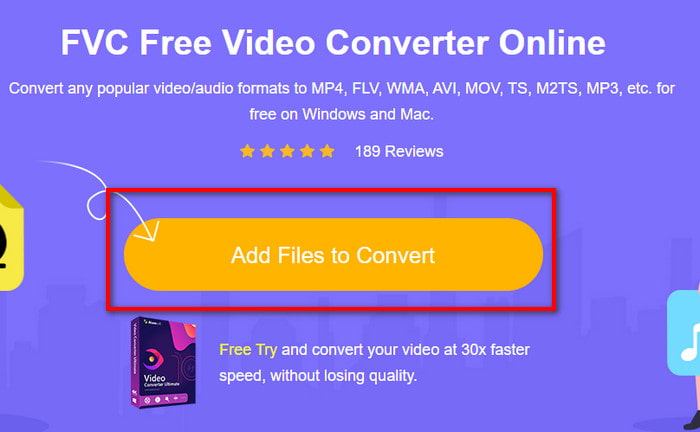
ขั้นตอนที่ 2. กด Add Files to Convert เพื่อเปิดเครื่องมือออนไลน์ จากนั้นจะมีหน้าต่างโฟลเดอร์ขึ้นมา ให้ค้นหาไฟล์ .3gp หากนี่เป็นครั้งแรกที่คุณใช้เครื่องมือนี้ คุณจะต้องดาวน์โหลด launcher โดยคลิก Add Files to Convert แล้วกดอีกครั้งเพื่อเปิด.
ขั้นตอนที่ 3. หลังจากเลือกไฟล์เสร็จแล้ว เลือกรูปแบบ AVI ในส่วนด้านล่าง.
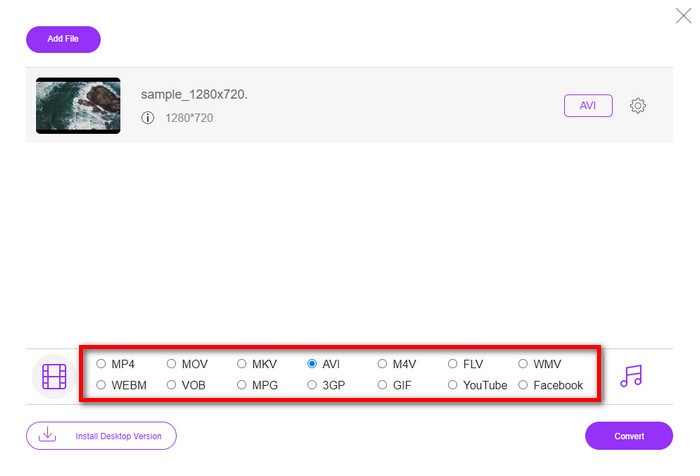
ขั้นตอนที่ 4. เมื่อพร้อมจะแปลงไฟล์แล้ว ให้คลิก Convert.
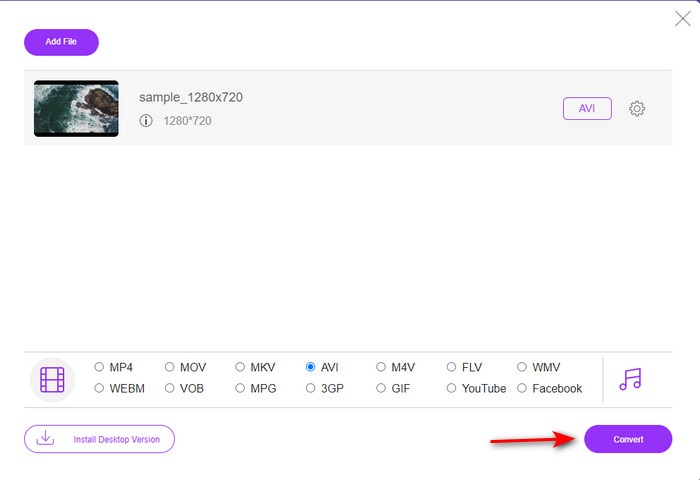
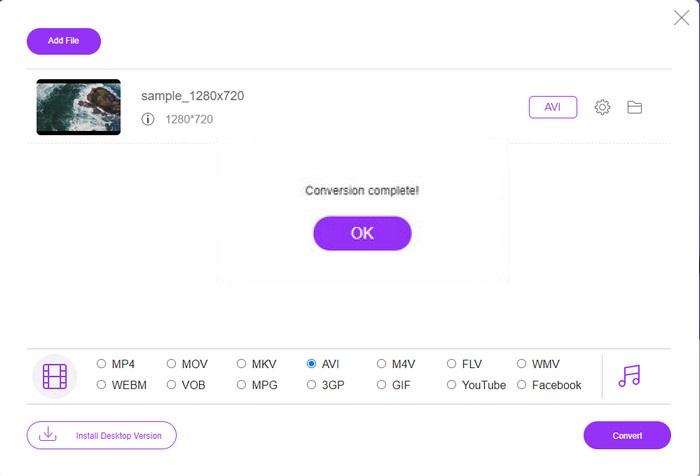
ขั้นตอนที่ 5. หลังจากแปลงไฟล์เสร็จแล้ว หน้าต่างโฟลเดอร์จะปรากฏขึ้นอีกครั้ง โดยคราวนี้จะมีไฟล์ที่คุณเพิ่งแปลงไว้.
2. Fconvert.com
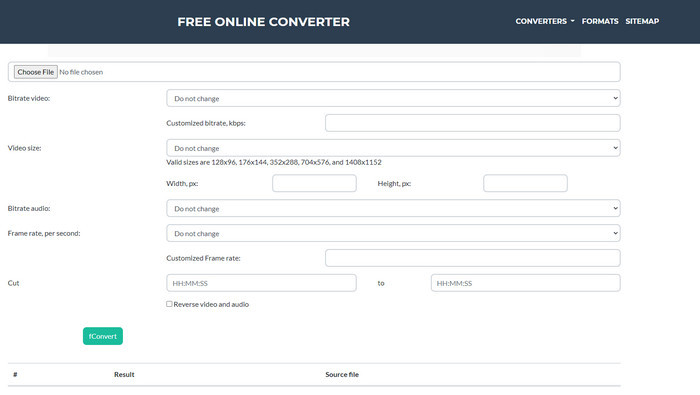
ในบรรดาเว็บแปลงไฟล์ทั้งหลาย Fconvert.com ต้องถูกจัดอยู่ในลิสต์ด้วย เพราะเป็นเว็บเครื่องมือที่ยอดเยี่ยมอีกตัวหนึ่งที่คุณสามารถใช้งานได้ฟรี เครื่องมือนี้สามารถแปลงได้แทบทุกไฟล์รูปแบบที่คุณรู้จักและอาจรวมถึงไฟล์ของคุณด้วย อย่างไรก็ตามมีปัญหาอย่างหนึ่งคือโฆษณา เพราะทุกครั้งที่คุณคลิกอะไรบนเว็บไซต์ มักจะมีโฆษณาขึ้นมาก่อนแล้วจึงไปยังสิ่งที่คุณคลิก แม้ว่าโฆษณาจะน่ารำคาญ แต่ตัวเว็บเองก็ยังดูสะอาดตาและทำงานได้ดีมากในการแปลงรูปแบบไฟล์ ดังนั้นหากคุณอยากลองสัมผัสว่าเครื่องมือนี้ดีแค่ไหน ให้ทำตามขั้นตอนด้านล่างเพื่อเรียนรู้วิธีแปลง 3GP เป็น AVI ฟรี.
ขั้นตอนที่ 1. ค้นหาเว็บไซต์หลักของเครื่องมือนี้บนเบราว์เซอร์ของคุณ.
ขั้นตอนที่ 2. คลิก AVI ใต้หมวด video จากนั้นคลิก Choose File ระบุไฟล์ .3gp แล้วเลื่อนลงด้านล่างและคลิก fConvert.
ขั้นตอนที่ 3. เลื่อนลงด้านล่าง แล้วคุณจะเห็นส่วน Result จากนั้นคลิกไฟล์เพื่อดาวน์โหลด.
3. Anyconv
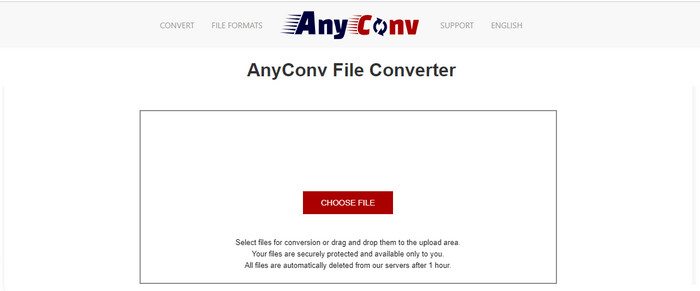
อีกหนึ่งเครื่องมือที่เชี่ยวชาญด้านการแปลงรูปแบบไฟล์คือ Anyconv เว็บเครื่องมือนี้แตกต่างจาก Fconvert.com อย่างมาก เพราะทำงานได้ดีกว่าและรวดเร็วกว่า อีกทั้งยังมีโฆษณาน้อยกว่าตัวก่อนหน้า แม้จำนวนโฆษณาจะน้อยกว่า แต่ขนาดโฆษณาจะใหญ่กว่า Fconvert.com อย่างไรก็ตามในแง่ประสิทธิภาพ เครื่องมือนี้ก็ทำได้ดีมากเช่นกัน มา thửใช้เครื่องมือนี้ดูว่าแปลง 3GP เป็น AVI ฟรีได้หรือไม่โดยไม่ต้องรอช้า.
ขั้นตอนที่ 1. เปิดเสิร์ชเอนจินของคุณและค้นหาเว็บไซต์ Anyconv.
ขั้นตอนที่ 2. กด Choose File แล้วหน้าต่างโฟลเดอร์จะเด้งขึ้นมา ใส่ไฟล์ .3gp ลงบนเว็บเครื่องมือแล้วดำเนินการต่อ หากต้องการเปลี่ยนรูปแบบไฟล์ คุณต้องคลิกปุ่ม drop-down แล้วค้นหา AVI จากนั้นคลิก Convert เพื่อเริ่มกระบวนการแปลงไฟล์.
ขั้นตอนที่ 3. รอให้กระบวนการเสร็จสิ้น จากนั้นคลิก Download AVI เพื่อดาวน์โหลดไฟล์ที่แปลงแล้ว.
ส่วนที่ 3 รูปแบบใดดีที่สุด 3GP หรือ AVI
หากคุณกำลังใช้โทรศัพท์รุ่นที่ 3 และต้องการเก็บวิดีโอคุณภาพสูง โอนให้เร็วขึ้นในโทรศัพท์รุ่นที่ 3 ดังนั้น 3GP คือรูปแบบสำหรับงาน อย่างไรก็ตาม หากคุณพยายามส่งรูปแบบ AVI ไปยังโทรศัพท์รุ่นที่ 3 ไฟล์จะไม่เปิดขึ้นเนื่องจากไม่รองรับรูปแบบนี้ แต่ในกรณีปัจจุบัน AVI ดีกว่ามาก ได้รับการสนับสนุนมากมายจากโปรแกรมเล่นสื่อและบรรณาธิการทั้งหมดเมื่อเทียบกับ 3GP แม้ว่ารูปแบบ AVI จะเป็นตัวเลือกที่ดีที่สุดในปัจจุบัน แต่ขนาดไฟล์นั้นใหญ่มากเมื่อเทียบกับ 3GP และหากคุณกำลังจะบันทึกลงในโทรศัพท์ มันจะกินพื้นที่มาก นอกจากนี้ ทั้งสองรูปแบบยังใช้งานได้ดี แต่มีจุดประสงค์และการใช้งานต่างกัน
ส่วนที่ 4. คำถามที่พบบ่อยเกี่ยวกับ 3GP และ AVI
ฉันสามารถใช้ FFmpeg เพื่อแปลง 3GP เป็น AVI ได้หรือไม่
คุณสามารถใช้ FFmpeg เพื่อแปลงไฟล์ 3GP ของคุณได้ แม้จะค่อนข้างยากแต่ก็ยังพอทำได้หากคุณใจเย็นพอ ขั้นตอนแรกคือดาวน์โหลดไฟล์ zip ของ FFmpeg ลงคอมพิวเตอร์แล้วแตกไฟล์ จากนั้นเปิด CMD เพื่อสั่งงานกับเครื่องมือนี้ จากนั้นใช้ Command Prompt ระบุตำแหน่งไฟล์ของคุณ พิมพ์คำสั่ง ffmpeg -i input.3gp -vn -ar 44100 -ac 2 -b:a 192k output.avi คัดลอกโค้ดนี้ไปวางใน CMD แล้วกด Enter เพื่อเริ่มกระบวนการแปลงไฟล์.
3GP สามารถเล่นบนโทรศัพท์รุ่นที่ 4 ได้หรือไม่?
รูปแบบนี้ถูกใช้ในโทรศัพท์ยุคที่ 3 และคุณยังสามารถเล่นวิดีโอในรูปแบบ 3GP บนโทรศัพท์ยุคที่ 4 บางรุ่นได้ แต่ไม่ใช่ทุกรุ่น เพราะอย่างที่กล่าวไปแล้ว 3GP ถูกออกแบบมาสำหรับโทรศัพท์ยุคที่ 3 ไม่ใช่บางรุ่นของยุคที่ 4 หรือคุณอาจหันไปใช้ โปรแกรมเล่น 3GP แบบมืออาชีพเพื่อเพลิดเพลินกับวิดีโอของคุณ.
รูปแบบใดดีกว่า: 3GP หรือ MP4
ในแง่คุณภาพและความรองรับรูปแบบไฟล์ MP4 จะดีกว่าอย่างเห็นได้ชัด อย่างไรก็ตามไฟล์ 3GP จะมีขนาดเล็กกว่าและเหมาะกับการใช้งานบนเครือข่าย 3G มากกว่าเพื่อการส่งไฟล์ที่รวดเร็ว หากต้องการแปลง MP4 เป็น 3GP หรือในทางกลับกัน ให้คลิกที่นี่เพื่อเรียนรู้รายละเอียดเพิ่มเติม.
สรุป
ทุกการเดินทางจะต้องจบลง และตอนนี้ คุณสามารถแปลง 3GP เป็น AVI ได้อย่างง่ายดายด้วยความช่วยเหลือของเครื่องมือที่กล่าวถึงข้างต้น ยิ่งกว่านั้น เครื่องมือทั้งหมดที่นำเสนอข้างต้น มารวม FFmpeg กันด้วย ทำงานได้ดีมาก อย่างไรก็ตาม ทางเลือกที่ดีที่สุดมักจะตกอยู่ที่ FVC Video Converter Ultimate เครื่องมือนี้เหนือกว่าผู้แปลงออนไลน์ทั้งหมดที่สามารถทำได้ในการแปลงและด้านอื่น ๆ อีกมากมาย ดังนั้นตอนนี้ หากคุณต้องการรับซอฟต์แวร์ ให้คลิกปุ่มดาวน์โหลดและทำการแปลงอย่างรวดเร็ว
-
 [ออนไลน์และฟรี] 3 วิธีในการแปลง MP4 เป็น 3GP Hassle-Free
 ต้องการแปลง MP4 เป็น 3GP ด้วยวิธีที่ง่ายและรวดเร็วหรือไม่? ที่นี่เราจะแบ่งปัน 3 ตัวแปลง MP4 เป็น 3GP เพื่อเปลี่ยน MP4 เป็น 3GP สำหรับการเล่นบนโทรศัพท์มือถือต่างๆ
-
 วิธีฟรี 3 อันดับแรกในการแปลง FLV เป็น 3GP บน Windows / Mac
 ไม่สามารถเปิดไฟล์ FLV บนสมาร์ทโฟนหรือแท็บเล็ตได้? ไม่ต้องกังวล! ที่นี่เราแบ่งปันสามวิธีในการแปลง FLV เป็น 3GP โดยไม่สูญเสียคุณภาพสำหรับการเล่นบนมือถือ
-
 ทางเลือกที่ยอดเยี่ยมในการแปลง MKV เป็นรูปแบบ AVI
 เรียนรู้วิธีการแปลงวิดีโอ MKV ด้วยขั้นตอนง่าย ๆ ที่มีให้สำหรับคุณโดยเฉพาะ คุณต้องการที่จะรู้ว่าอย่างไร? จากนั้นคลิกลิงก์นี้เพื่อเรียนรู้เพิ่มเติม
