


 Video Converter Ultimate
 บันทึกหน้าจอ
 ซ่อมวิดีโอ
 ดาวน์โหลดอย่างปลอดภัย
แนวทางที่เข้าใจง่ายในการแปลง 3GP เป็น MKV
บนโทรศัพท์ 3G จะใช้รูปแบบคอนเทนเนอร์มัลติมีเดียแบบ 3GP ซึ่งรูปแบบนี้สามารถใช้ได้กับอุปกรณ์มือถือ 2G และ 4G เช่นกัน อย่างไรก็ตาม แม้ว่าจะเป็นฟอร์แมตที่ดี แต่ 3GP ก็ยังถือเป็นฟอร์แมตวิดีโอแบบเก่าอยู่ นั่นหมายความว่าไม่สามารถใช้โปรแกรมอื่น ๆ ในการเล่นไฟล์ประเภทนี้ได้ หากคุณต้องการเล่นวิดีโอ 3GP ของคุณ จึงต้องแปลงให้เป็นหนึ่งในฟอร์แมตใหม่และได้รับความนิยมในปัจจุบัน เช่น MKV ด้วยฟอร์แมต MKV คุณสามารถอาศัยความเข้ากันได้อย่างกว้างขวาง และเล่นวิดีโอบนซอฟต์แวร์และฮาร์ดแวร์แทบทุกชนิด คุณสามารถแปลง 3GP เป็น MKV ได้อย่างง่ายดายด้วยคู่มือนี้ แล้วจะรออะไรอยู่ล่ะ? อ่านบทความนี้ให้ละเอียดได้เลย.

ตอนที่ 1: วิธีที่ยอดเยี่ยมในการแปลง 3GP เป็น MKV ออฟไลน์
คุณสามารถใช้ Video Converter Ultimate เพื่อแปลง 3GP เป็น MKV ด้วยคุณภาพสูงได้ เครื่องมือนี้สามารถแปลงไฟล์วิดีโอได้ทันทีเพราะรองรับการแปลงแบบเป็นชุด ทำให้การแปลงหลายไฟล์พร้อมกันไม่เป็นปัญหา แม้ว่าฟอร์แมต 3GP จะไม่ได้รับความนิยมในยุคปัจจุบัน แต่ Video Converter Ultimate ก็ยังรองรับฟอร์แมตนี้อยู่ นี่เป็นหนึ่งในเหตุผลที่คุณควรพึ่งพาแอปพลิเคชันออฟไลน์ตัวนี้ มันรองรับฟอร์แมตวิดีโอกว่า 100 ชนิด รวมถึง AVI, MP4, MOV, MKV, WMV, DV, MTS, VOB และอื่น ๆ ที่สำคัญ คุณสามารถใช้งานโปรแกรมแปลงไฟล์นี้ได้ไม่ว่าคุณจะเป็นผู้ใช้ระดับสูงหรือมือใหม่ เพราะมีอินเทอร์เฟซที่เข้าใจง่าย มองแล้วรู้ว่าปุ่มและตัวเลือกต่าง ๆ บนหน้าจอคืออะไร นอกจากนี้ แอปพลิเคชันแบบดาวน์โหลดนี้ยังใช้ได้ทั้งบน Mac และ Windows.
คุณสมบัติเด่น
◆ แปลงรูปแบบวิดีโอมากกว่า 100 รูปแบบ เช่น 3GP, MKV, MP4, M4V, MTS, MKV, WMV, AVI, FLV, MOV เป็นต้น
◆ มีกระบวนการแปลงเป็นชุด
◆ ตัดต่อวิดีโอโดยใช้ตัวเพิ่มคุณภาพวิดีโอ คอมเพรสเซอร์ ทริมเมอร์ ตัวหมุน ตัวย้อนกลับ และอื่นๆ
◆ สร้างภาพตัดปะด้วยฟิลเตอร์ฟรีและเทมเพลตที่พร้อมใช้งาน
◆ เครื่องมือสร้างมิวสิกวิดีโออยู่ใกล้แค่เอื้อม รวมถึงธีมฟรี
◆ แปลงรูปแบบรูปภาพ เช่น JPG, PNG, BMP และอื่นๆ
ข้อดี
- สมบูรณ์แบบสำหรับผู้ใช้ทุกคน
- ขั้นตอนการดาวน์โหลดและติดตั้งไม่ต้องการมาก
- มีอินเทอร์เฟซที่ใช้งานง่าย
- แปลงไฟล์วิดีโอได้ไม่จำกัดฟรี
- ผู้ใช้ Mac และ Windows สามารถใช้แอปพลิเคชันนี้ได้
จุดด้อย
- สำหรับคุณสมบัติพิเศษเพิ่มเติม ให้ใช้เวอร์ชันโปร
ขั้นตอนง่ายๆ ด้านล่างจะเสนอวิธีที่ดีที่สุดในการแปลง 3GP เป็น MKV โดยใช้ FVC Video Converter Ultimate
ขั้นตอนที่ 1: ก่อนอื่น ให้ดาวน์โหลด FVC Video Converter Ultimate ลงบนคอมพิวเตอร์ของคุณ คลิกปุ่ม Download ด้านล่าง จากนั้นเปิดโปรแกรมเมื่อติดตั้งเสร็จแล้ว.
ดาวน์โหลดฟรีสำหรับ Windows 7 หรือใหม่กว่าดาวน์โหลดอย่างปลอดภัย
ดาวน์โหลดฟรีสำหรับ MacOS 10.7 หรือใหม่กว่าดาวน์โหลดอย่างปลอดภัย
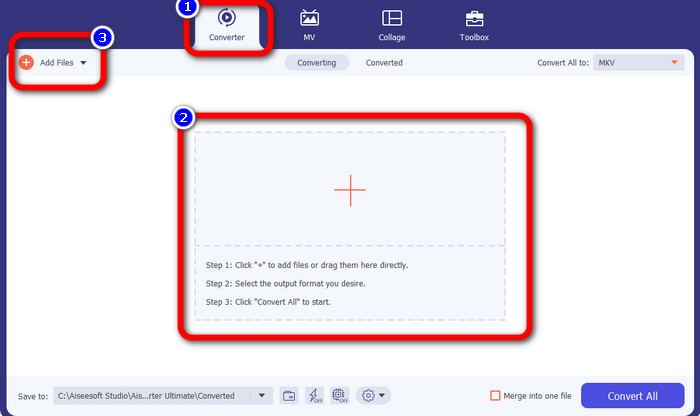
ขั้นตอนที่ 2: กดไอคอน Plus หรือปุ่ม Add Files จากแถบ Converter จากนั้นจะมีโฟลเดอร์ในคอมพิวเตอร์ของคุณเด้งขึ้นมา ให้เลือกไฟล์ 3GP ที่คุณต้องการแปลง.
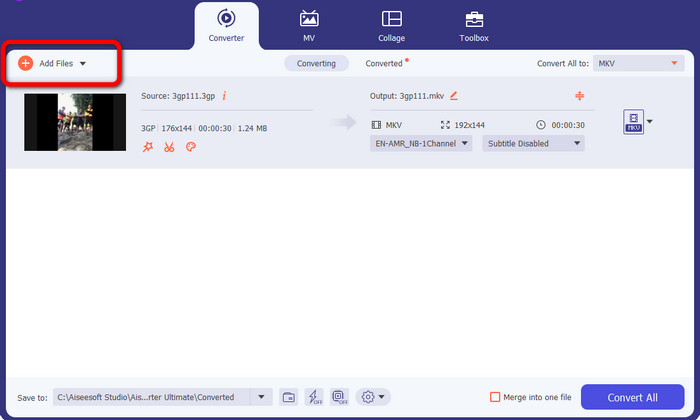
ขั้นตอนที่ 3: ต้องการเพิ่มไฟล์ 3GP อื่นอีกหรือไม่? ถ้าใช่ ให้คลิกปุ่ม Add Files.
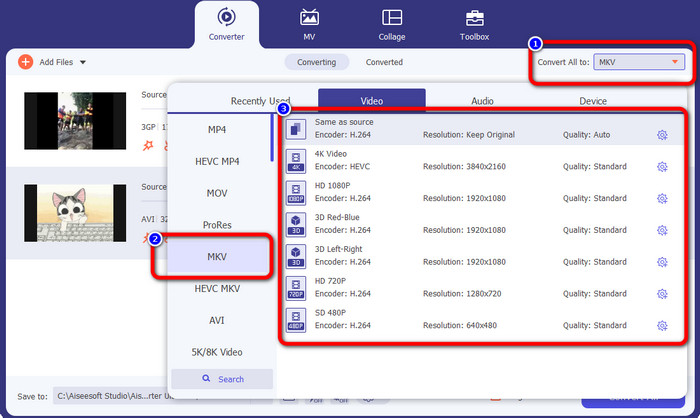
ขั้นตอนที่ 4: หากต้องการแปลงให้เป็นไฟล์ฟอร์แมต MKV ให้คลิกปุ่ม Convert All to จากนั้นเลือกฟอร์แมต MKV จากตัวเลือกรูปแบบ แล้วคลิกเลือกคุณภาพวิดีโอที่คุณต้องการ.
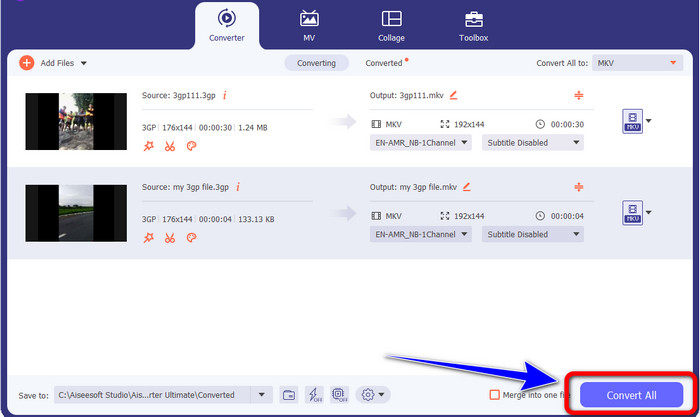
ขั้นตอนที่ 5: แปลงวิดีโอของคุณโดยคลิกปุ่ม Convert All จากนั้นบันทึกผลงานไฟล์สุดท้ายเมื่อกระบวนการแปลงเสร็จสิ้น.
ตอนที่ 2: วิธีง่ายๆ ในการแปลง 3GP เป็น MKV โดยใช้ FFmpeg
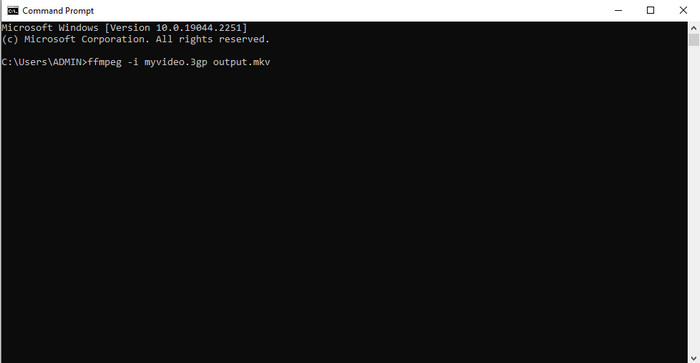
อีกวิธีคือใช้ FFmpeg เพื่อแปลง 3GP เป็น MKV เครื่องมือนี้ยังสามารถแปลงไฟล์ได้ดีอีกด้วย อย่างไรก็ตาม ไฟล์ FFmpeg มีความซับซ้อนในการใช้งาน ซึ่งไม่เหมาะสำหรับผู้เริ่มต้น มีหลายขั้นตอนในการตั้งค่าแอปพลิเคชันนี้บนคอมพิวเตอร์ของคุณก่อนที่คุณจะสามารถใช้งานได้ ตรวจสอบให้แน่ใจว่าคุณมีบทช่วยสอนให้ดูเมื่อใช้งานซอฟต์แวร์นี้
ขั้นตอนที่ 1: ดาวน์โหลดและติดตั้ง FFmpeg บนคอมพิวเตอร์ของคุณ.
ขั้นตอนที่ 2: ไปที่ Command Prompt แล้วพิมพ์ “FFmpeg -i .3gp out.mkv” จากนั้นกด Enter เท่านี้ก็เรียบร้อย คุณสามารถเล่นวิดีโอไฟล์สุดท้ายได้แล้ว นอกจากนี้ คุณยังสามารถใช้ FFmpeg ในการแก้ไขข้อมูลเมทาดาทาของไฟล์ ได้ด้วย.
ส่วนที่ 3: ทางออกที่ดีที่สุดในการแปลง 3GP เป็น MKV ออนไลน์
หากคุณต้องการแปลงไฟล์ด้วยการใช้เบราว์เซอร์ ให้ใช้ FVC Free Video Converter Online แอปพลิเคชันบนเว็บนี้สามารถแปลง 3GP เป็น MKV ได้อย่างง่ายดาย มันมีวิธีการแปลงไฟล์ที่เรียบง่าย เหมาะกับผู้ใช้ทุกคน ตามชื่อของมัน คุณสามารถใช้โปรแกรมแปลงนี้ได้ฟรี คุณยังสามารถใช้ฟีเจอร์ต่าง ๆ เช่น ปรับบิตเรตของวิดีโอและเสียง อัตราเฟรม อัตรา Sample ความละเอียด และพารามิเตอร์อื่น ๆ นอกจากนี้ นอกเหนือจากฟอร์แมต 3GP และ MKV แล้ว ยังรองรับฟอร์แมตวิดีโออื่น ๆ อีกมาก เช่น MOV, AVI, FLV, MP4, M4V, VOB และอื่น ๆ อีกทั้งยังสามารถแปลงไฟล์เสียงอย่าง WAV, AC3, AAC, FLAC, WMA ฯลฯ ได้ด้วย ทำตามขั้นตอนด้านล่างเพื่อแปลงไฟล์วิดีโอได้อย่างง่ายดาย.
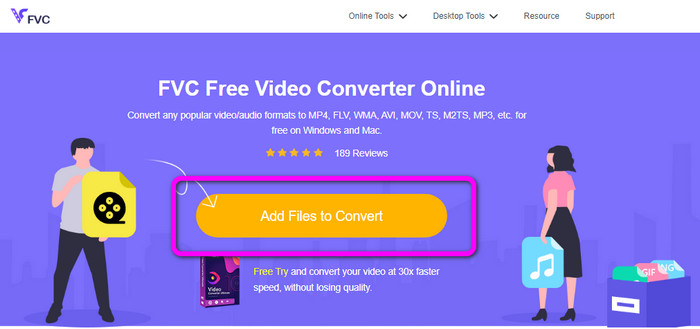
ขั้นตอนที่ 1: ไปที่เว็บไซต์ FVC Free Video Converter Online เพิ่มวิดีโอ 3GP โดยการคลิกปุ่ม Add Files to Convert.
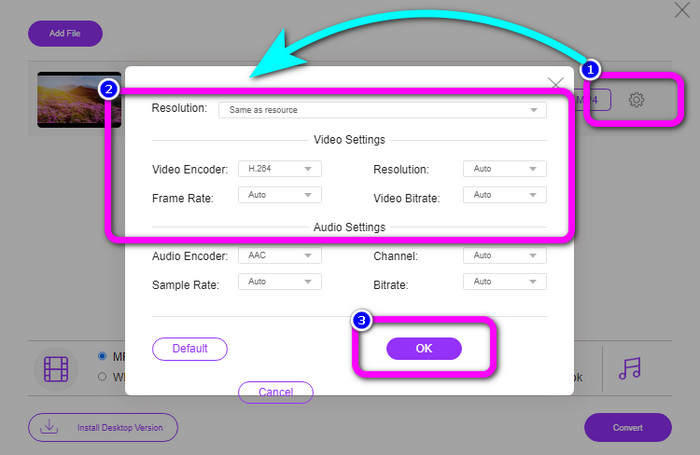
ขั้นตอนที่ 2: คุณสามารถเปลี่ยนบิตเรต อัตราเฟรม ความละเอียด และพารามิเตอร์อื่น ๆ ของวิดีโอได้โดยคลิกไอคอน Setting จากนั้นคลิก OK.
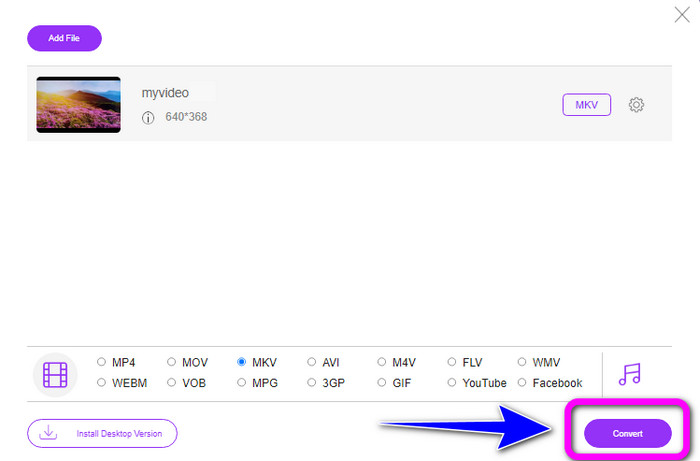
ขั้นตอนที่ 3: ที่บริเวณด้านล่างของอินเทอร์เฟซ คุณจะเห็นตัวเลือกรูปแบบไฟล์ ให้เลือกฟอร์แมต MKV แล้วคลิกปุ่ม Convert คุณยังสามารถใช้เครื่องมือออนไลน์นี้เพื่อเปลี่ยน F4V เป็น MKV ได้ด้วย.
ตอนที่ 4: 3GP เทียบกับ MKV
| ไฟล์ | 3GP | MKV |
| ส่วนขยาย | .3gp | .mkv |
| ประเภท | วิดีโอ | วิดีโอ |
| คำอธิบาย | เล่นได้บนโทรศัพท์มือถือ 3G และโทรศัพท์รุ่นอื่นๆ 3GP เป็นรูปแบบคอนเทนเนอร์มัลติมีเดียที่สร้างขึ้นโดย Third Generation Partnership Project (3GPP) ในปี 1998 3GP ถูกสร้างขึ้นครั้งแรก โทรศัพท์มือถือที่มีเครือข่าย GSM มักจะพอดีกับตัวยึดนี้ (Global System for Mobile Communications) เหมาะสำหรับโทรศัพท์มือถือเพราะใช้แบนด์วิธน้อย และใช้พื้นที่น้อยสำหรับไฟล์ที่ต้องการข้อมูลจำนวนน้อย | รูปแบบคอนเทนเนอร์มัลติมีเดียแบบโอเพ่นซอร์สที่เรียกว่า MKV Matroska อนุญาตให้มีแทร็กเสียงและคำบรรยายจำนวนมากในไฟล์เดียว เป็นประเภทไฟล์ที่เหมาะสมที่สุดสำหรับการเพิ่มเนื้อหาจำนวนมาก รวมถึงภาพยนตร์ เสียง ข้อความ และภาพถ่าย เป็นรูปแบบ RAW ที่คุณสามารถพลิกและแยกตามแทร็กข้อมูลได้ |
| พัฒนาโดย | โครงการความร่วมมือรุ่นที่สาม | สตีฟ โลมม์ |
| ประเภทไมม์ | วิดีโอ/3gpp เครื่องเสียง/3gpp | วิดีโอ/x-matroska |
| โปรแกรมที่เกี่ยวข้อง | ภาพยนตร์และทีวีของ Microsoft VLC Media Player Windows Media Player โปรแกรม QuickTime Player | KMPlayer VLC Media Player MX Player ผู้เล่น GOM PotPlayer |
ส่วนที่ 5: คำถามที่พบบ่อยเกี่ยวกับการแปลง 3GP เป็น MKV
คุณภาพของ 3GP คืออะไร?
รูปแบบไฟล์วิดีโอ 3GP มีความละเอียดของวิดีโอสองแบบ สำหรับโทรศัพท์ที่รองรับรูปแบบ 3GP ความละเอียดคือ 176X144 สำหรับโทรศัพท์ที่มีจอไวด์สกรีน PSP เครื่องเล่น MP4 และ iPod ความละเอียดคือ 320X240
ข้อดีของรูปแบบไฟล์ 3GP คืออะไร?
ขนาดของ 3GP คือประโยชน์หลัก เป็นไฟล์วิดีโอขนาดกะทัดรัดที่สร้างขึ้นเพื่อลดการใช้พื้นที่เก็บข้อมูล ขนาดกะทัดรัดใช้ข้อมูลน้อย จึงเหมาะสำหรับการดาวน์โหลดวิดีโอผ่านอุปกรณ์พกพา
3GP เป็นตัวแปลงสัญญาณหรือไม่
ใช่. ไฟล์นี้เป็นรูปแบบคอนเทนเนอร์มัลติมีเดียที่รองรับตัวแปลงสัญญาณอื่นๆ รวมถึงวิดีโอ H.263, H.264 และ MPEG-2
สรุป
เหล่านี้คือวิธีที่ยอดเยี่ยมในการแปลง 3GP เป็น MKV แต่ FFmpeg นั้นติดตั้งยากและต้องทำหลายขั้นตอน ดังนั้นหากคุณต้องการวิธีที่ไม่ยุ่งยาก ให้ใช้ Video Converter Ultimate และ FVC Free Video Converter Online นี่คือเครื่องมือที่คุณสามารถใช้ได้โดยไม่ต้องออกแรงมากนัก!
-
 WebM ถึง 3GP: วิธีที่มีประสิทธิภาพสูงสุดในการใช้เครื่องมือเหล่านี้
 คุณกำลังมองหาตัวแปลง WebM เป็น 3GP ที่โดดเด่นหรือไม่? บทความนี้จะช่วยให้คุณได้รับวิธีการที่มีประสิทธิภาพสูงสุดในการแปลง WebM เป็น 3GP
-
 เรียนรู้กระบวนการง่ายๆ ในการแปลง M4V เป็น 3GP
 ต่อไปนี้เป็นขั้นตอนที่ตรงไปตรงมาที่สุดในการแปลง M4V เป็น 3GP บนอุปกรณ์ของคุณ หากคุณเต็มใจที่จะเรียนรู้ เรามาเริ่มกันที่บทความนี้เลย
-
 เรียนรู้กระบวนการง่ายๆ ในการแปลง M4V เป็น 3GP
 บทความนี้จะแสดงเทคนิคที่ดีที่สุดที่คุณสามารถลองแปลง XviD เป็น 3GP ได้อย่างรวดเร็ว ดังนั้น โปรดติดตามและเป็นสักขีพยานในแนวทางดีๆ จากบทความนี้
