


 Video Converter Ultimate
 บันทึกหน้าจอ
 ซ่อมวิดีโอ
วิธีแปลง 3GP เป็น WMV อย่างมืออาชีพ [ออนไลน์และออฟไลน์]
3GP เป็นรูปแบบไฟล์ยอดนิยมบนมือถือที่ถ่ายโอนข้อมูลผ่านโทรศัพท์ได้โดยไม่กินแบนด์วิดท์มากและยังช่วยประหยัดพื้นที่จัดเก็บด้วย นอกจากนี้ รูปแบบนี้ยังถูกทำให้เป็นมาตรฐานสำหรับการถ่ายวิดีโอบนโทรศัพท์มือถือยุคที่ 3 แต่ไม่ต้องกังวล คุณยังสามารถเล่นวิดีโอนี้บนโทรศัพท์รุ่นที่ 2 และรุ่นที่ 4 ได้ แม้ว่าจะยอดเยี่ยมบนมือถือ แต่ก็ถูกจำกัดอยู่แค่สมาร์ตโฟนเท่านั้น ดังนั้นจึงไม่แปลกที่ไฟล์ .3gp อาจทำงานได้ไม่ดีนักบนเดสก์ท็อป อย่างไรก็ตาม คุณสามารถเรียนรู้วิธีแปลง 3GP ให้เป็นรูปแบบที่ได้รับการรองรับอย่างกว้างขวางบนเดสก์ท็อป เช่น WMV ถ้าอยากรู้วิธีแปลง 3GP เป็น WMVแบบมืออาชีพ ในกรณีนั้น มาดูรายละเอียดกันเลยโดยไม่เสียเวลา.

ส่วนที่ 1. 3GP . คืออะไร
เป็นรูปแบบ ISO ที่เก็บสตรีมสื่อเช่น H.263 หรือ H.264 สำหรับวิดีโอและ AMR หรือ AAC สำหรับเสียง เหมาะสำหรับการบีบอัดแบบสูญเสียข้อมูล นอกจากนี้ รูปแบบรุ่นที่ 3 นี้เป็นมิตรกับการจัดเก็บสำหรับการจัดเก็บข้อมูลบนไดรฟ์แบบพกพาบนโทรศัพท์ของเรา แม้แต่บน IOS แม้ว่า 3GP จะยังใช้งานได้ แต่อัตราประสิทธิภาพของรูปแบบนี้ก็เริ่มลดลง และด้วยเหตุนี้ 3GPP จึงเข้าร่วมฉากและกลายเป็นเวอร์ชันที่ดีกว่า
ส่วนที่ 2 WMV คืออะไร
เป็นรูปแบบมัลติมีเดียที่เป็นกรรมสิทธิ์ซึ่งพัฒนาโดย Windows สำหรับการสตรีมวิดีโอออนไลน์ ไม่เหมือนกับรูปแบบอื่นๆ เช่น 3GP WMV ใช้ตัวเข้ารหัสแบบหลายชั้นเพื่อทำให้ไฟล์ถูกบีบอัดมากยิ่งขึ้น เนื่องจากความสามารถในการใช้โปรแกรมเปลี่ยนไฟล์จำนวนมาก จึงสามารถแชร์วิดีโอในรูปแบบนี้ได้อย่างมีประสิทธิภาพมากขึ้น อย่างไรก็ตาม มีข้อเสียของการใช้ตัวเข้ารหัสจำนวนมาก โดยเฉพาะอย่างยิ่งในการแก้ไขและการเล่น เนื่องจากโปรแกรมเล่นสื่อและโปรแกรมแก้ไขบางโปรแกรมไม่รองรับตัวแปลงสัญญาณที่หลากหลาย แม้ว่ารูปแบบจะใช้คอมเพรสเซอร์ แต่คุณภาพของสื่อจะไม่เปลี่ยนแปลงหรือลดลง
ส่วนที่ 3 วิธีแบบมืออาชีพในการแปลง 3GP เป็น WMV ด้วย Video Converter Ultimate
คุณต้องการมีโปรแกรมแปลงไฟล์ 3GP เป็น WMV แบบมืออาชีพให้ดาวน์โหลดฟรีบนแพลตฟอร์มของคุณหรือไม่? FVC Video Converter Ultimate มอบกระบวนการแปลงไฟล์ระดับมืออาชีพโดยที่คุณไม่ต้องออกแรงมาก โปรแกรมนี้จะพาคุณไปสู่อีกระดับของการแปลงไฟล์ที่โปรแกรมแปลงออนไลน์หรือออฟไลน์อื่น ๆ ไม่สามารถให้ได้ นอกจากนี้ เครื่องมือรุ่น Ultimate ยังรองรับรูปแบบสื่อมากกว่า 200 รูปแบบให้เลือก ซึ่งหาไม่ได้ง่ายจากเครื่องมืออื่น.
ตราบใดที่คุณมีตัวแปลงนี้ ให้คาดหวังผลลัพธ์แบบมืออาชีพจากรูปแบบสื่อที่แปลงของคุณ ต้องการใช้ตัวแปลงมืออาชีพเพื่อแปลงไฟล์ 3GP ของคุณหรือไม่ หากเป็นกรณีนี้ คุณสามารถทำตามขั้นตอนด้านล่างเพื่อแปลงด้วยเครื่องมือขั้นสูงสุดได้สำเร็จ
ขั้นตอนการแปลงไฟล์ 3GP เป็น WMV ด้วย FVC Video Converter Ultimate
ขั้นตอนที่ 1. ปุ่มดาวน์โหลดจะแสดงอยู่ด้านล่าง จากนั้นเลือกตามแพลตฟอร์มที่คุณใช้ ตัวอย่างเช่น หากคุณใช้ Windows ให้คลิกปุ่มดาวน์โหลดสำหรับ Windows แต่ถ้าคุณใช้ Mac ให้คลิกอีกปุ่มหนึ่ง หลังจากดาวน์โหลดเสร็จ ให้ติดตั้งโปรแกรมแปลงไฟล์แล้วรันโปรแกรมโดยคลิก Start Now ที่สำคัญ หลังจากเปิดโปรแกรมแล้ว คุณควรทำความคุ้นเคยกับอินเทอร์เฟซก่อนที่จะไปยังขั้นตอนถัดไป.
ดาวน์โหลดฟรีสำหรับ Windows 7 หรือใหม่กว่าดาวน์โหลดอย่างปลอดภัย
ดาวน์โหลดฟรีสำหรับ MacOS 10.7 หรือใหม่กว่าดาวน์โหลดอย่างปลอดภัย
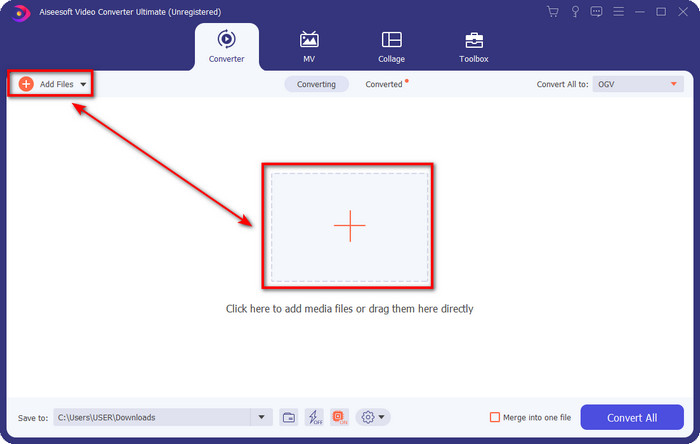
ขั้นตอนที่ 2. คุณจะเห็นปุ่ม Add Files ที่มุมซ้ายบนของอินเทอร์เฟซ ให้คลิกแล้วจะมีหน้าต่างโฟลเดอร์ปรากฏขึ้น ค้นหาไฟล์ .3gp ในไดรฟ์คอมพิวเตอร์ของคุณ จากนั้นอัปโหลดโดยกด Open.
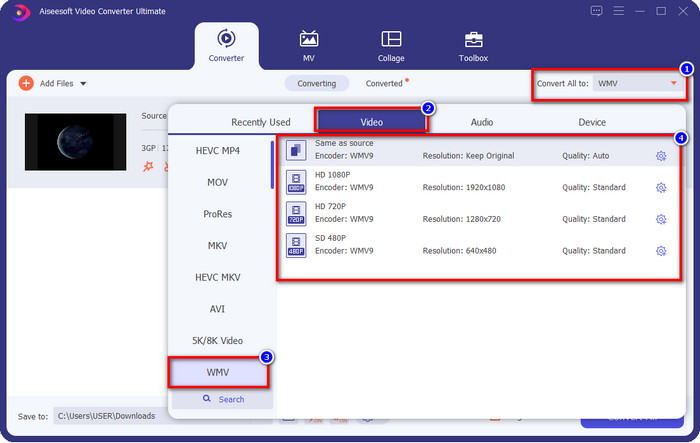
ขั้นตอนที่ 3. คลิก Convert All to เพื่อเลือกรูปแบบ WMV ที่คุณต้องการ หรือเลือก WMV เป็นไฟล์ผลลัพธ์สุดท้าย.
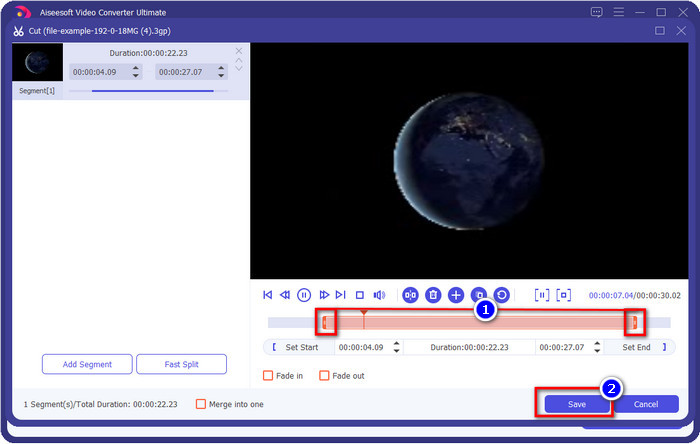
ตัวเลือกเสริม. ก่อนที่เราจะแปลงไฟล์ 3GP เป็น WMV มาพูดถึงฟีเจอร์อื่น ๆ ที่โปรแกรมนี้มีให้แบบคร่าว ๆ กันก่อน ต้องการตัดวิดีโอใช่ไหม? ไม่ใช่ปัญหา กดปุ่มกรรไกร แล้วลากแถบเลื่อนทั้งสองด้านตามที่ต้องการ จากนั้นกด Save เพื่อบันทึกการตัดต่อที่คุณทำ.
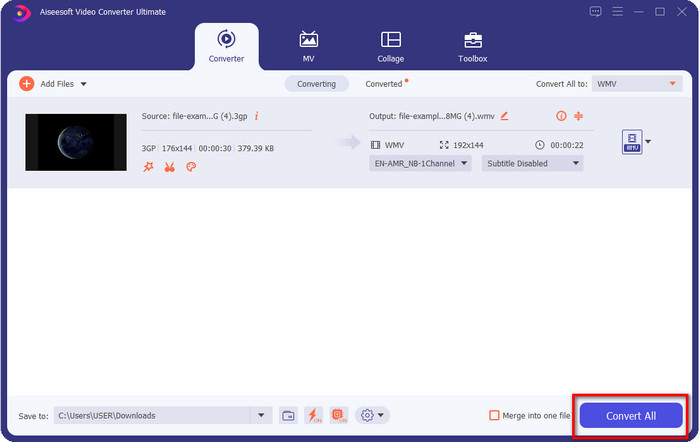
ขั้นตอนที่ 4. เริ่มต้นกระบวนการแปลงไฟล์โดยการคลิกปุ่ม Convert All การแปลงไฟล์จะเสร็จสิ้นภายในเวลาไม่นาน แล้วไฟล์ WMV จะถูกบันทึกลงในไดรฟ์คอมพิวเตอร์ของคุณ.
ส่วนที่ 4 วิธีออนไลน์ในการแปลง MXF เป็น WMV ด้วย Free Video Converter Online
อีกหนึ่งผลิตภัณฑ์ของ FVC แต่เป็นโซลูชันแบบออนไลน์ คือ FVC Free Video Converter Online ตัวแปลงไฟล์วิดีโอออนไลน์ระดับมืออาชีพนี้มีอินเทอร์เฟซที่ดูเรียบง่ายและสะอาดตากว่าเว็บคอนเวอร์เตอร์อื่น ๆ นอกจากนี้ คุณไม่จำเป็นต้องดาวน์โหลดโปรแกรมแปลงไฟล์ลงบนอุปกรณ์ก่อนใช้งาน เพียงแค่เปิดเบราว์เซอร์แล้วเข้าไปที่ตัวแปลงไฟล์ออนไลน์ก็ใช้ได้ แม้ว่าเว็บคอนเวอร์เตอร์นี้จะดี แต่ก็ยังมีความสามารถหลายอย่างที่ไม่สามารถทำได้ อย่างไรก็ตาม หากคุณต้องการแปลง 3GP เป็น WMV ออนไลน์ นี่คือทางเลือกที่เหมาะสม ให้ทำตามขั้นตอนด้านล่างเพื่อใช้เครื่องมือนี้.
ขั้นตอนการแปลง 3GP เป็น WMV ออนไลน์ฟรีด้วย FVC Free Video Converter Online
ขั้นตอนที่ 1. คลิกลิงก์นี้เพื่อเปิดตัวแปลงไฟล์ออนไลน์.
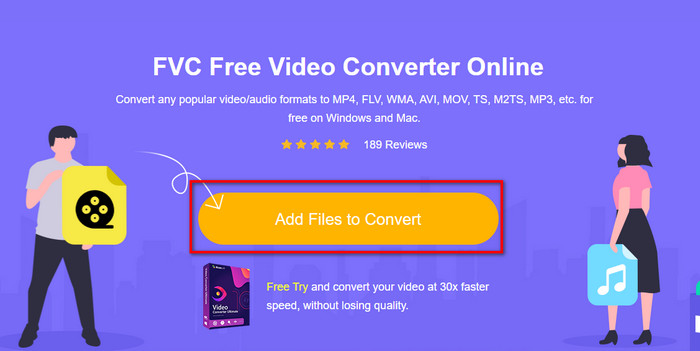
ขั้นตอนที่ 2. หลังจากคลิกลิงก์แล้ว ให้กด Add Files to Convert เพื่อเปิดตัวโปรแกรมแปลงไฟล์ หากนี่เป็นครั้งแรกที่คุณใช้โปรแกรมนี้ คุณต้องติดตั้งตัวเรียกใช้งาน (launcher) โดยคลิก Add Files to Convert แต่ไฟล์ติดตั้งจะมีขนาดไม่ใหญ่เหมือนกับเครื่องมือ Ultimate จากนั้นค้นหาไฟล์ 3gp ที่คุณต้องการแปลงแล้วกด Open.
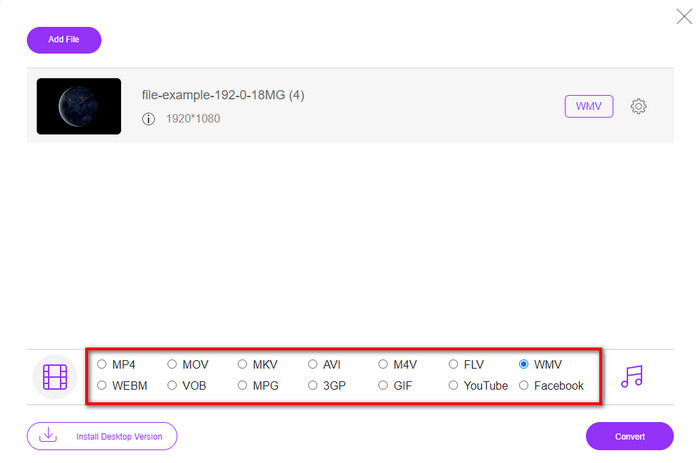
ขั้นตอนที่ 3. หลังจากอัปโหลดไฟล์ 3GP แล้ว ก็ถึงเวลาที่จะเลือกรูปแบบไฟล์ที่แสดงด้านล่าง หรือคลิก WMV.
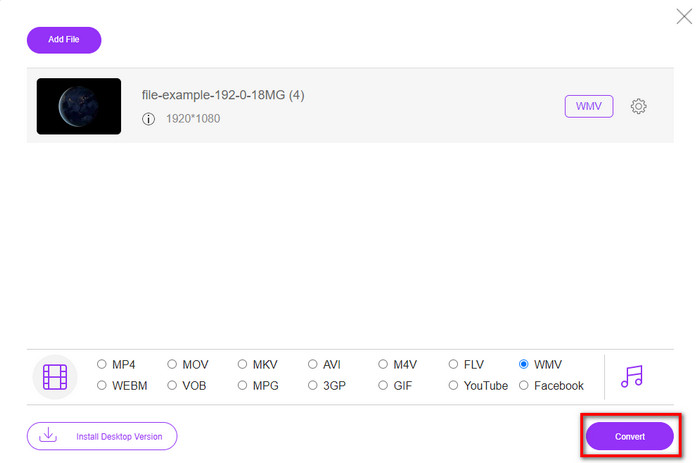
ขั้นตอนที่ 4. เลือกรูปแบบไฟล์เรียบร้อยแล้วใช่ไหม? ถ้าใช่ ให้คลิก Convert เพื่อเริ่มกระบวนการแปลงไฟล์.
ส่วนที่ 5. คำถามที่พบบ่อยเกี่ยวกับ 3GP เพื่อ WMV Conversion
เป็นความคิดที่ดีหรือไม่ที่จะใช้ตัวแปลง 3GP เป็น WMV ออนไลน์?
หากคุณไม่ต้องการดาวน์โหลดตัวแปลงบนอุปกรณ์ของคุณ ควรใช้ตัวแปลงออนไลน์ แต่อย่าลืมว่าตัวแปลงออนไลน์หรือออฟไลน์บางตัวไม่ปลอดภัยในการใช้งาน ส่วนใหญ่แล้ว พวกมันจะมีไวรัสหากคุณติดตั้งหรือไม่ทำงานอย่างมีประสิทธิภาพ แต่ถ้าคุณต้องการความมั่นใจในการแปลงไฟล์ของคุณ เราขอแนะนำให้ใช้ผลิตภัณฑ์ตัวแปลง FVC เนื่องจากไม่มีมัลแวร์ 101% และรับประกันว่ากระบวนการแปลงของคุณจะประสบความสำเร็จ
เป็นไปได้ไหมที่จะรวมวิดีโอ 3GP หลายรายการเข้าด้วยกัน?
ได้ครับ ด้วยความช่วยเหลือของเครื่องมือรวมวิดีโอของ FVC คุณสามารถรวมวิดีโอหลายไฟล์ที่เป็นรูปแบบ 3GP เข้าด้วยกันได้ ดังนั้น หากตอนนี้คุณอยากรู้วิธีการรวมวิดีโอ 3GP หลายไฟล์ของคุณ คุณควรอ่านบทความนี้เพื่อเรียนรู้วิธีทำ.
วิดีโอ 3GP มีคุณภาพดีหรือไม่?
3GP มีคุณภาพดี แต่ไม่สามารถเก็บคุณภาพความคมชัดสูงได้ ดังนั้นคาดว่าคุณภาพวิดีโอของ 3GP จะต่ำ
สรุป
สรุปแล้ว โปรแกรมแปลงไฟล์ที่รวบรวมไว้ในบทความนี้ถูกคัดเลือกมาอย่างตั้งใจตามมาตรฐานผลลัพธ์ระดับมืออาชีพ นอกจากนี้ เราได้ทดลองใช้เครื่องมือเหล่านี้จริงเพื่อให้สามารถนำเสนอและระบุข้อเท็จจริงเกี่ยวกับคุณลักษณะของมันได้อย่างถูกต้อง ยิ่งไปกว่านั้น หากคุณไม่ต้องการดาวน์โหลดโปรแกรมแปลงไฟล์ลงเดสก์ท็อปเพื่อประหยัดพื้นที่จัดเก็บ แต่ยังอยากได้ผลลัพธ์แบบมืออาชีพ เราขอแนะนำให้คุณใช้ FVC Free Video Converter Online แต่ถ้าคุณต้องการแปลงไฟล์ 3GP ของคุณอย่างมืออาชีพมากยิ่งขึ้น เราขอแนะนำอย่างยิ่งให้ใช้ FVC Video Converter Ultimate ยังไม่มั่นใจกับสิ่งที่เรานำเสนอใช่ไหม? ในกรณีนั้น คุณควรลองใช้ด้วยตัวเองเพื่อสัมผัสประสบการณ์การแปลงไฟล์ระดับมืออาชีพที่เครื่องมือนี้มอบให้ และเรียนรู้วิธีแปลง 3GP เป็น WMV.
-
 4 วิธีที่มีประสิทธิภาพที่สุดในการแปลงไฟล์ 3GP เป็นรูปแบบ AVI [2025]
 ฉันสามารถแปลงไฟล์ 3GP เป็น AVI ได้หรือไม่ คุณสามารถแปลงได้อย่างง่ายดายหากคุณลองใช้เครื่องมือเหล่านี้ในขณะที่เรารวบรวมวิธีแก้ปัญหาที่เป็นไปได้ทั้งหมดสำหรับปัญหาการแปลง 3GP เป็น AVI ของคุณ
-
 ตัวแปลง 3GP เป็น FLV ที่ดีที่สุดสำหรับใช้ในการแปลง 3GP เป็น FLV [2025]
 คุณเคยพยายามแปลง 3GP เป็น FLV แต่คุณไม่รู้ว่าจะใช้ตัวแปลงประเภทใด? อ่านบทความนี้เพื่อเรียนรู้รายละเอียดทั้งหมดเกี่ยวกับการแปลง 3GP เป็น FLV
-
 2 วิธีที่ดีที่สุดในการแปลง 3GP ที่ไม่รองรับเป็น DivX [2025]
 ผู้ใช้จำนวนมากถามถึงวิธีการแปลง 3GP เป็น DivX ตอนนี้ เรามีบทความที่จะช่วยคุณในการแปลงไฟล์ .3gp โดยไม่ยุ่งยาก
