


 Video Converter Ultimate
 บันทึกหน้าจอ
 ซ่อมวิดีโอ
 ดาวน์โหลดอย่างปลอดภัย
รายละเอียดขั้นสุดยอดของตัวแปลง AAC เป็น M4R ฟรีและจ่ายเงิน
คอลเล็กชันเพลงที่เป็นไฟล์ AAC นั้นน่าชื่นชมเพราะให้คุณภาพที่ดีในขนาดไฟล์ที่เล็ก หากคุณไม่อาจห่างจากเพลงโปรดของคุณได้และอยากจะแปลงเพลงนั้นให้เป็นเสียงเรียกเข้าบน iPhone การแปลงAAC เป็น M4Rด้วยเครื่องมือที่เชื่อถือได้คือวิธีที่ดีที่สุด หากคุณพร้อมสำหรับขั้นตอนการแปลงแล้ว ให้อ่านบทความนี้ต่อไป เราจะพาคุณไปดูรายละเอียดทีละขั้นของโปรแกรมที่ไว้ใจได้บนอุปกรณ์ของคุณ.

ส่วนที่ 1: ตารางเปรียบเทียบตัวแปลง M4R เป็น AAC
ก่อนจะแนะนำโปรแกรมที่ดีที่สุดในการแปลง m4r เป็น aac ออนไลน์และออฟไลน์ นี่คือภาพรวมของโปรแกรมที่คุณสามารถระวังได้
| เครื่องมือแปลงไฟล์ AAC เป็น M4R | ขนาดการติดตั้ง | ประเภทผู้ใช้ที่ดีที่สุด | รองรับรูปแบบสื่อ |
| Video Converter Ultimate | 23.8 ลบ | สามเณรถึงมืออาชีพ | เสียงและวิดีโอ |
| แปลงวิดีโอโปร | 37.9 ลบ | เฉลี่ยถึงมืออาชีพ | เสียงและวิดีโอ |
| ตัวแปลงเสียงออนไลน์ฟรี | ไม่มี | สามเณรถึงปานกลาง | เสียงและวิดีโอ |
| แปลงเสียงออนไลน์ | ไม่มี | สามเณรถึงปานกลาง | เสียงเท่านั้น |
ส่วนที่ 2: ออฟไลน์ที่ดีที่สุดในการแปลง M4R เป็น AAC
1. Video Converter Ultimate
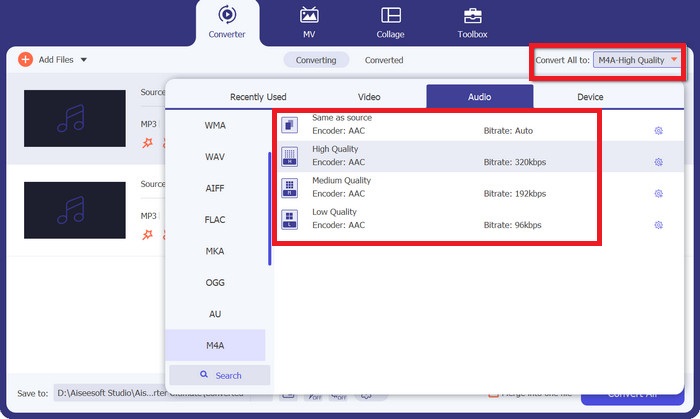
แพลตฟอร์ม: Windows และ Mac
ราคา: ไลเซนส์รายเดือน 1 เดือนมีราคาประมาณ $23.20 ส่วนไลเซนส์ตลอดอายุการใช้งานราคา $49.96.
Video Converter Ultimate เป็นโซลูชันระดับท็อปในการแปลงไฟล์เสียงและวิดีโอจำนวนมากให้เป็นอีกฟอร์แมตหนึ่ง เครื่องมือนี้เปิดให้ผู้ใช้ปรับแต่งพารามิเตอร์เอาต์พุตได้สูงสุดถึง 320 kbps ไปจนถึงคุณภาพแบบไม่สูญเสียรายละเอียด พูดอีกอย่างคือ คุณสามารถควบคุมโปรเจ็กต์ของคุณเองและตอบโจทย์ความต้องการด้านคุณภาพได้ นอกจากนี้ เครื่องมือนี้ยังช่วยให้คุณตัดต่อไฟล์เสียงให้สั้นลงและสร้างเสียงเรียกเข้าที่ไม่เหมือนใครจากไฟล์เหล่านั้นได้.
ดาวน์โหลดฟรีสำหรับ Windows 7 ขึ้นไปดาวน์โหลดอย่างปลอดภัย
ดาวน์โหลดฟรีสำหรับ MacOS 10.7 ขึ้นไปดาวน์โหลดอย่างปลอดภัย
คุณสมบัติเด่น
◆ ตัวแก้ไขวิดีโอในตัว: Video Converter Ultimate มาพร้อมฟังก์ชันตัดต่อวิดีโอที่ช่วยให้ผู้ใช้ยกระดับฟุตเทจของตนไปอีกขั้น.
◆ รองรับหลายรูปแบบไฟล์: โปรแกรมนี้ไม่เพียงรองรับฟอร์แมตมาตรฐานที่เป็นที่รู้จักกันทั่วไปเท่านั้น คุณยังสามารถแปลงไฟล์เสียงให้เป็นฟอร์แมตที่ออกแบบมาสำหรับอุปกรณ์เฉพาะอย่าง Sony, Samsung และ Apple ได้อีกด้วย.
◆ แปลงไฟล์ได้ไม่จำกัด: แม้ว่าคุณจะใช้แค่รุ่นทดลองฟรีของโปรแกรม คุณก็จะไม่เจอข้อจำกัดเรื่องจำนวนไฟล์ที่จะแปลงในแต่ละวัน.
2. โรงงานแปลงวิดีโอ Pro
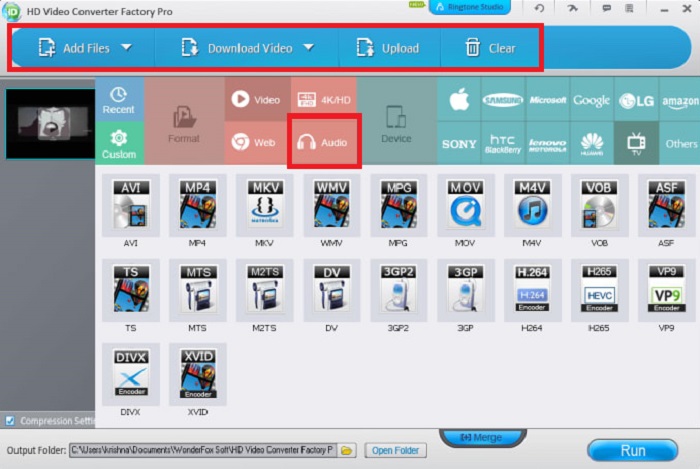
แพลตฟอร์ม: คอมพิวเตอร์ Windows และ Mac
ราคา: การสมัครใช้งาน 1 ปีมีราคาประมาณ $29.95 ส่วนไลเซนส์ตลอดอายุการใช้งานราคา $34.95
Video Converter Factory Pro เป็นโปรแกรมผู้เชี่ยวชาญสำหรับตัวแปลง AAC เป็น M4R เครื่องมือนี้มาพร้อมกับโปรแกรมแก้ไขแบบเนทีฟ ซึ่งคุณสามารถใช้เพื่อตัด รวม และบีบอัดไฟล์เสียงได้ นอกเหนือจากการแปลงรูปแบบเสียงแล้ว คุณยังสามารถใช้โปรแกรมดาวน์โหลดไฟล์เสียงโอเพ่นซอร์สจากเว็บไซต์ออนไลน์กว่า 1,000 แห่ง เพื่อให้คุณสามารถฟังและเปิดไฟล์บนอุปกรณ์ของคุณได้ตลอดเวลา นอกจากนี้ Video Converter Factory Pro ยังมี DVD Ripper ฟรีเมื่อคุณอัปเกรดตามลิขสิทธิ์ตลอดชีพ
คุณสมบัติเด่น
◆ เครื่องมือใช้งานง่าย: แม้โปรแกรมจะออกแบบมาสำหรับมืออาชีพ ผู้ใช้มือใหม่ก็ยังสามารถใช้งานโปรแกรมและแปลงไฟล์ได้ในสามขั้นตอนง่าย ๆ.
◆ ตัวแปลงอเนกประสงค์: นอกจากฟังก์ชันแปลงไฟล์และตัดต่อแล้ว เครื่องมือนี้ยังรองรับการแปลงแบบกลุ่ม การสร้างเสียงเรียกเข้า และการปรับแต่งพารามิเตอร์เสียง.
ส่วนที่ 3: เครื่องมือที่ดีที่สุดในการแปลง M4R เป็น AAC ออนไลน์
1. แปลงเสียงออนไลน์ฟรี
ราคา: ฟรี
แพลตฟอร์ม: เครื่องมือนี้ใช้งานได้ข้ามแพลตฟอร์ม ทั้งคอมพิวเตอร์ อุปกรณ์ Android และอุปกรณ์พกพา Apple.
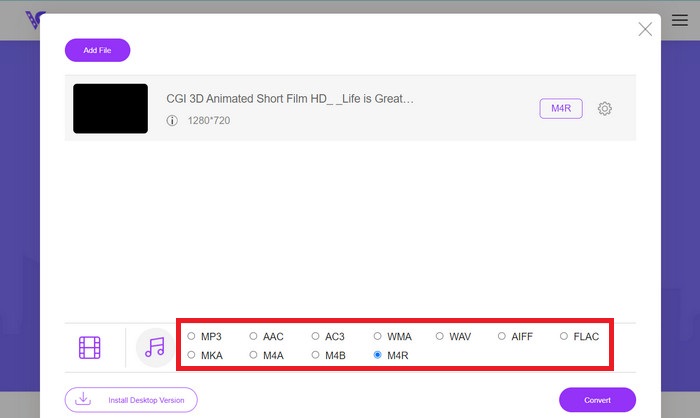
มีตัวแปลงเสียงแบบออนไลน์ที่มีประสิทธิภาพชื่อว่า Free Audio Converter Online โปรแกรมนี้ทำงานได้ดีไม่ต่างจากเครื่องมือออฟไลน์ ยกเว้นฟังก์ชันตัดต่อวิดีโอ ในแง่การแปลงไฟล์ เครื่องมือนี้ยังรองรับการแปลงแบบกลุ่ม ทำให้คุณแปลงไฟล์ AAC จำนวนมากเป็น M4R ได้อย่างง่ายดายและรวดเร็ว นอกจากนี้ Free Audio Converter Online ยังเปิดให้ผู้ใช้ปรับแต่งพารามิเตอร์เสียง เช่น บิตเรต ช่องสัญญาณ และโค้เดกได้ด้วย.
คุณสมบัติเด่น
◆ รายการฟอร์แมตเอาต์พุตหลากหลาย: เครื่องมือออนไลน์นี้ช่วยผู้ใช้แปลงไฟล์เสียงเป็นฟอร์แมตยอดนิยมอย่าง MP3, WMA, WAV, AC3, FLAC และอื่น ๆ ได้.
◆ แปลงวิดีโอเป็นเสียง: ไม่ใช่แค่แปลงจากฟอร์แมตเสียงหนึ่งไปเป็นอีกฟอร์แมตหนึ่งเท่านั้น Free Audio Converter Online ยังสามารถดึงไฟล์เสียงออกมาจากวิดีโอต้นฉบับได้ด้วย.
◆ ไม่จำกัดขนาดไฟล์: แปลงไฟล์เสียงได้มากเท่าที่คุณต้องการ ทุกเมื่อ โดยไม่ต้องกังวลเรื่องการชนเพดานขนาดการแปลงสูงสุด.
2. ตัวแปลงเสียงออนไลน์
ราคา: ฟรี
แพลตฟอร์ม: เครื่องมือนี้ใช้งานได้ข้ามแพลตฟอร์ม ทั้งคอมพิวเตอร์ อุปกรณ์ Android อุปกรณ์พกพา Apple และบนเบราว์เซอร์หรือเสิร์ชเอนจินทุกชนิด.
ข้ามขั้นตอนการติดตั้งด้วย Online Audio Converter ตามชื่อเลย เครื่องมือออนไลน์นี้สามารถรองรับไฟล์ได้ 300 รูปแบบ เช่น MP3, FLAG, OGG และ AMR นอกเหนือจาก AAC และ M4R เครื่องมือนี้ช่วยชีวิตได้เมื่อแปลงไฟล์เสียงโดยใช้โทรศัพท์ของคุณเท่านั้น นอกเหนือจากนั้น Online Audio Converter ยังให้ผู้ใช้สามารถกำหนดค่าคุณภาพของเอาต์พุตได้โดยการปรับเปลี่ยนความถี่ บิตเรต และช่องสัญญาณของไฟล์ คุณสามารถเพิ่มเอฟเฟ็กต์เสียง เช่น Fade In และเล่นย้อนกลับเพื่อเพิ่มสีสันให้กับไฟล์ของคุณได้
คุณสมบัติเด่น
◆ ปลอดภัย 100%: ในขณะที่คุณประหยัดค่าใช้จ่าย คุณยังมั่นใจได้ถึงความปลอดภัยของข้อมูลเมื่อใช้โปรแกรมนี้ เพราะมันจะลบประวัติการแปลงไฟล์ของคุณทันทีที่ออกจากโปรแกรม.
◆ รองรับการแปลงแบบกลุ่ม: แปลงไฟล์เสียงและวิดีโอจำนวนมากด้วยเครื่องมือนี้ หรือบันทึกเป็นไฟล์ ZIP เพื่อแชร์ได้รวดเร็วยิ่งขึ้น.
อ่านเพิ่มเติม:
เครื่องมือที่ดีที่สุดสำหรับแปลงไฟล์ MP3 เป็น M4R แบบแบตช์
ตัวแก้ไขเมทาดาทา AAC เฉพาะทาง 5 ตัวที่คุณควรรู้จัก [2023]
ส่วนที่ 4: คำถามที่พบบ่อยเกี่ยวกับตัวแปลง AAC เป็น M4R
M4R เหมือนกับ AAC หรือไม่
M4R และ AAC เป็นรูปแบบเสียงประเภทต่างๆ และเมื่อพูดถึงคุณภาพ ทั้งสองรูปแบบนี้มีความคล้ายคลึงกันอย่างมาก ความจริงก็คือ M4R เป็นอีกชื่อไฟล์สำหรับ AAC และได้รับการออกแบบโดยบริษัท Apple
รูปแบบ AAC เข้ากันได้กับ iPhone หรือไม่
แน่นอน ใช่แล้ว! คุณจะพบว่าไฟล์เสียงที่มีนามสกุลไฟล์ AAC นั้นใช้สำหรับเสียงเรียกเข้าของ iPhone
ฉันควรใช้ M4A หรือ M4R สำหรับเสียงเรียกเข้าบน iPhone ของฉันหรือไม่
M4A และ M4R ถูกสร้างขึ้นเพื่อแข่งขันกับไฟล์เสียงมาตรฐาน เช่น MP3 คุณสามารถเลือกทั้งสองอย่างได้เมื่อตั้งค่าเสียงเรียกเข้าสำหรับ iPhone ของคุณ นอกจากนี้ยังสามารถเล่นได้อย่างสมบูรณ์แบบบน iTunes และเครื่องเล่นสื่ออื่น ๆ
โปรแกรมแปลงไฟล์เสียงออนไลน์ฟรีปลอดภัยหรือไม่?
แน่นอน ใช่แล้ว! ตัวแปลง aac เป็น m4r ออนไลน์นี้ช่วยประหยัดข้อตกลงได้มาก ไม่ต้องมีขั้นตอนการสมัครหรือลงทะเบียนก่อนใช้งาน ในทางกลับกัน ผู้ใช้ไม่ควรคำนึงถึงการแปลงไฟล์เสียงของตนเพราะรับประกันความเป็นส่วนตัวและความปลอดภัยโดยรวม
ฉันจะแปลงไฟล์เสียง M4R ได้อย่างไร
คุณจะพบกับโซลูชั่นที่เชื่อถือได้มากมายในการแปลง AAC เป็น M4R ใน iTunes หากคุณใช้อุปกรณ์คอมพิวเตอร์ คุณจะต้องใช้โปรแกรมออฟไลน์ เช่น Video Converter Ultimate
สรุป
เปลี่ยนเสียงเรียกเข้าของคุณไปอีกระดับโดยใช้ตัวแปลง AAC เป็น M4R ด้านบน หากคุณต้องการปรับคุณภาพของไฟล์ AAC ลองใช้วิธีแก้ปัญหาแบบออฟไลน์ ในทางกลับกัน โซลูชันออนไลน์ก็เป็นตัวเลือกที่ดีเช่นกัน หากคุณมีไฟล์ Raw คุณภาพสูงที่จำเป็นต้องเปลี่ยนเป็นรูปแบบ iPhone ที่ใช้งานร่วมกันได้
-
 การแปลง MP3 เป็น AAC: วิธีปรับปรุงคุณภาพเสียงของคุณ
 แปลง AAC เป็น MP3 และ MP3 เป็น AAC ได้อย่างง่ายดาย! คู่มือบทความนี้ครอบคลุมทุกอย่างเกี่ยวกับรูปแบบเสียงยอดนิยมเหล่านี้ รวมถึงขนาดไฟล์ คุณภาพ และความเข้ากันได้
-
 M4R เป็น MP3: สุดยอดคู่มือการแปลงรูปแบบเสียง
 แปลงเสียงเรียกเข้า iPhone ของคุณอย่างง่ายดาย! แปลง M4R เป็น MP3 อย่างง่ายดายและเพลิดเพลินกับโทนเสียงที่กำหนดเองได้หลากหลายบนอุปกรณ์ใดก็ได้
-
 AAC เป็น WAV: บทวิจารณ์ที่ครอบคลุมเกี่ยวกับตัวแปลงอันดับต้น ๆ
 ปลดล็อกพลังของการแปลงเสียงด้วยตัวแปลง AAC เป็น WAV แปลงไฟล์ AAC เป็นรูปแบบ WAV คุณภาพสูง รักษาทุกความแตกต่างของเพลงของคุณ
