


 Video Converter Ultimate
 บันทึกหน้าจอ
 ซ่อมวิดีโอ
วิธีการแปลงไฟล์ AVI เป็น 3GP อย่างง่ายดาย
อุปกรณ์มือถือยุคที่สามไม่สามารถเล่นไฟล์ AVI ได้ เพราะอุปกรณ์มือถือ 3G ไม่รองรับไฟล์ชนิดนี้ หากคุณต้องการเล่นไฟล์ AVI บนมือถือ 3G ของคุณ วิธีหนึ่งคือแปลงไฟล์ AVI ให้เป็นไฟล์ 3GP โชคดีที่เราได้ค้นหาวิธีที่ดีที่สุดในการแปลงไฟล์ AVI เป็น 3GP ให้คุณได้อย่างง่ายดาย ด้วยโปรแกรมแปลงไฟล์ชั้นนำเหล่านี้.

ส่วนที่ 1 2 ตัวเลือกที่ดีที่สุดในการแปลงไฟล์ AVI ของคุณเป็น 3GP บนเดสก์ท็อป
หากคุณกำลังมองหาตัวแปลงที่คุณสามารถใช้ออฟไลน์บนเดสก์ท็อปของคุณ ตัวเลือกเหล่านี้อาจเป็นวิธีแก้ปัญหาของคุณ ส่วนนี้ของบทความนี้แสดงรายการตัวเลือก 2 อันดับแรกสำหรับการแปลงรูปแบบไฟล์ AVI เป็น 3GP
ตัวเลือกที่ 1 ใช้ FVC Video Converter Ultimate [เครื่องมือออฟไลน์]
ไม่ต้องสงสัยเลยว่า FVC Video Converter Ultimate เป็นหนึ่งในโปรแกรมแปลงไฟล์แบบออฟไลน์ที่ดีที่สุดในท้องตลาด โปรแกรมนี้รองรับรูปแบบไฟล์มากกว่า 1000+ ชนิด รวมถึง AVI, 3GP, MOV, MP4, WMV, WebM และอื่น ๆ อีกมากมาย นอกจากนี้ยังมีฟีเจอร์ที่ยอดเยี่ยมให้คุณใช้งาน เช่น ใส่เอฟเฟกต์ให้วิดีโอ บีบอัดไฟล์ และแม้แต่รวมไฟล์วิดีโอหลายไฟล์ให้เป็นไฟล์เดียว อีกด้วย ยิ่งไปกว่านั้น เครื่องมือนี้ใช้งานง่ายมากเพราะมีส่วนติดต่อผู้ใช้ที่เข้าใจไม่ยาก ทำตามขั้นตอนด้านล่างเพื่อแปลง AVI เป็น 3GP โดยใช้ FVC Video Converter Ultimate.
ขั้นตอนที่ 1. ดาวน์โหลด FVC Video Converter Ultimate บนเดสก์ท็อปของคุณโดยคลิกปุ่ม ดาวน์โหลด ด้านล่าง ทำตามขั้นตอนการติดตั้ง จากนั้นเปิดแอป.
ดาวน์โหลดฟรีสำหรับ Windows 7 หรือใหม่กว่าดาวน์โหลดอย่างปลอดภัย
ดาวน์โหลดฟรีสำหรับ MacOS 10.7 หรือใหม่กว่าดาวน์โหลดอย่างปลอดภัย
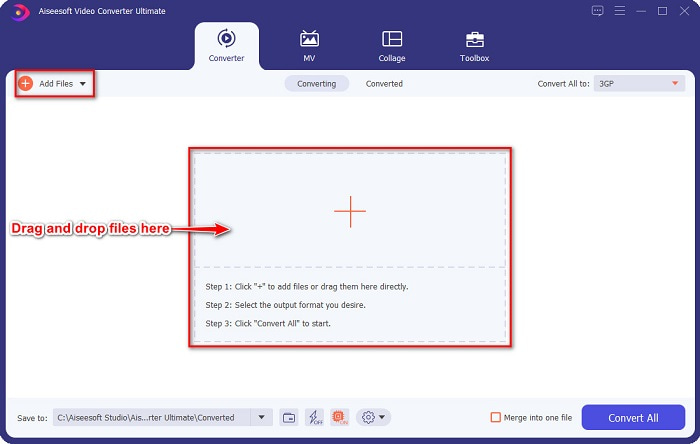
ขั้นตอนที่ 2. บนหน้าหลักของโปรแกรมแปลงไฟล์ ให้คลิกปุ่ม Add Files หรือคุณสามารถลากและวางไฟล์ AVI ของคุณไปที่ปุ่มสัญลักษณ์ + เพื่ออัปโหลดไฟล์ AVI ได้.
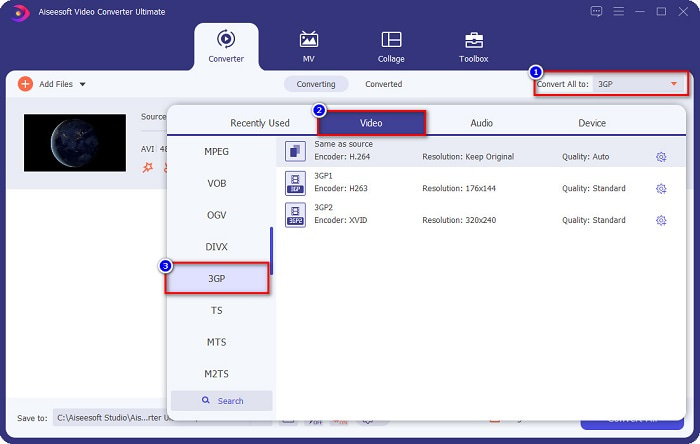
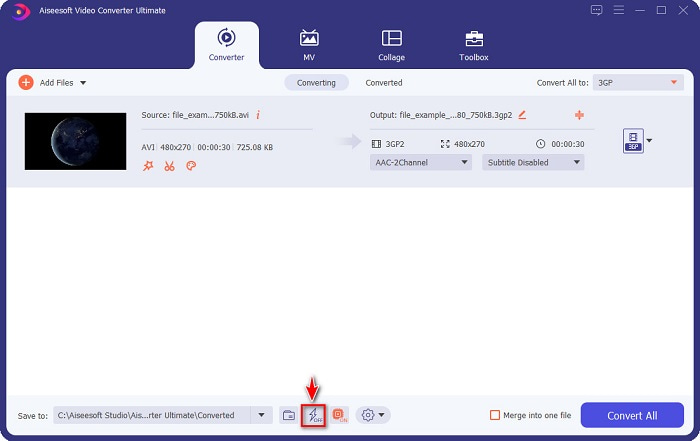
ขั้นตอนที่ 3. จากนั้นคลิกปุ่ม Convert All to เพื่อเลือกรูปแบบไฟล์ขาออกที่คุณต้องการ จากนั้นคลิกรูปแบบไฟล์ 3GP เปิดใช้งานการแปลงความเร็วสูงเป็นพิเศษได้โดยติ๊กที่ สัญลักษณ์สายฟ้า ด้านล่างอินเทอร์เฟซของซอฟต์แวร์.
ขั้นตอนที่ 4. หลังจากเลือกรูปแบบไฟล์ขาออกแล้ว ให้คลิกปุ่ม Convert All เพื่อแปลงไฟล์ AVI ของคุณเป็นไฟล์ 3GP.
Prism Video Converter Software เป็นโปรแกรมแปลงไฟล์แบบฟรีแวร์ที่รองรับรูปแบบไฟล์หลากหลาย นอกจากนี้ โปรแกรมนี้ยังใช้งานได้ง่ายมาก อย่างไรก็ตาม มันไม่ได้รองรับไฟล์ได้หลากหลายเท่าโปรแกรมแปลงไฟล์อื่น ๆ แต่ถึงอย่างนั้น หลายคนก็ยังใช้โปรแกรมนี้เพราะมีประสิทธิภาพดี.
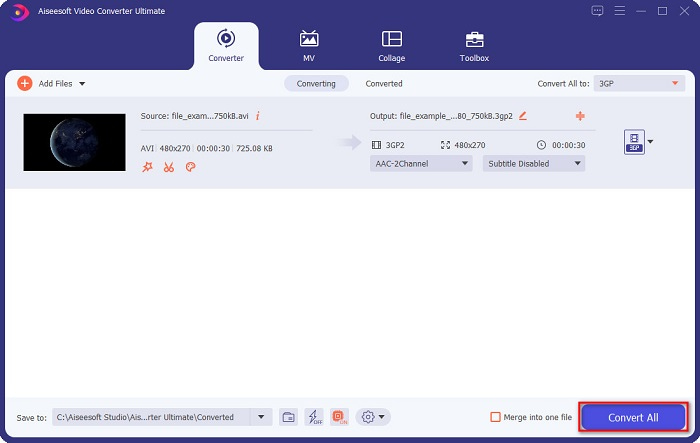
จากนั้นรอสักครู่ และโว้ว! คุณสามารถแปลง AVI เป็นไฟล์ 3GP ได้อย่างง่ายดาย
ข้อดี
- ช่วยให้คุณสามารถแก้ไข ปรับปรุง และบีบอัดไฟล์ของคุณได้
- เสนอการแปลงแบบแบตช์เพื่อรวมไฟล์หลายรูปแบบเข้าเป็นไฟล์เดียว
- สามารถแปลงไฟล์ได้รวดเร็วทันใจ
- ใช้ได้กับทุกแพลตฟอร์ม รวมถึง Windows และ Mac
จุดด้อย
- หากต้องการใช้คุณลักษณะเฉพาะ คุณต้องซื้อแอป
ตัวเลือก 2. Prism Video Converter [เครื่องมือฟรีแวร์]
ขั้นตอนที่ 1. ดาวน์โหลด Prism Video Converter จากนั้นเปิดแอป.
นี่คือขั้นตอนในการใช้ VLC Media Player เป็นตัวแปลง:
ขั้นตอนที่ 2. คลิก Add Files เพื่ออัปโหลดไฟล์ AVI บนส่วน Output Format ให้คลิกปุ่มดรอปดาวน์แล้วเลือกเป็นรูปแบบ 3GP.
ขั้นตอนที่ 3. สุดท้าย คลิก Convert เพื่อเริ่มกระบวนการแปลงไฟล์.
การใช้ตัวแปลงไฟล์ออนไลน์สะดวกกว่าโปรแกรมออฟไลน์หรือฟรีแวร์ เพราะคุณไม่จำเป็นต้องดาวน์โหลดตัวโปรแกรม และหากคุณกำลังมองหาตัวแปลงไฟล์ออนไลน์ที่ดีที่สุดบนเว็บแล้วล่ะก็ FVC Free Online Video Converter คือคำตอบสำหรับคุณ ตัวแปลงไฟล์ออนไลน์นี้สามารถแปลงไฟล์ได้หลายรูปแบบ เช่น AVI, 3GP, MP4, MOV, FLV, WMV, MKV ฯลฯ และหากคุณต้องการเปลี่ยนอัตราเฟรมของวิดีโอ เครื่องมือนี้ก็มีฟีเจอร์นั้นให้คุณเช่นกัน ยิ่งไปกว่านั้น มันยังแปลงไฟล์ได้เร็วกว่าเครื่องมือออนไลน์ตัวอื่น ๆ ส่วนใหญ่บนอินเทอร์เน็ตอีกด้วย ดังนั้นให้ทำตามขั้นตอนด้านล่างเพื่อใช้ตัวแปลงออนไลน์นี้.
ส่วนที่ 2 แปลง AVI เป็น 3GP โดยใช้ตัวแปลงออนไลน์ที่ดีที่สุด
ขั้นตอนที่ 1. พิมพ์ FVC Free Online Video Converter บนเบราว์เซอร์ของคุณ หรือคุณสามารถไปที่หน้าเว็บของพวกเขาโดยตรงได้ด้วยการคลิกลิงก์นี้.
ขั้นตอนที่ 2. คลิกปุ่ม Add Files to Convert จากนั้นไฟล์ต่าง ๆ บนคอมพิวเตอร์ของคุณจะปรากฏขึ้น เลือกไฟล์ AVI ที่คุณต้องการแปลง.
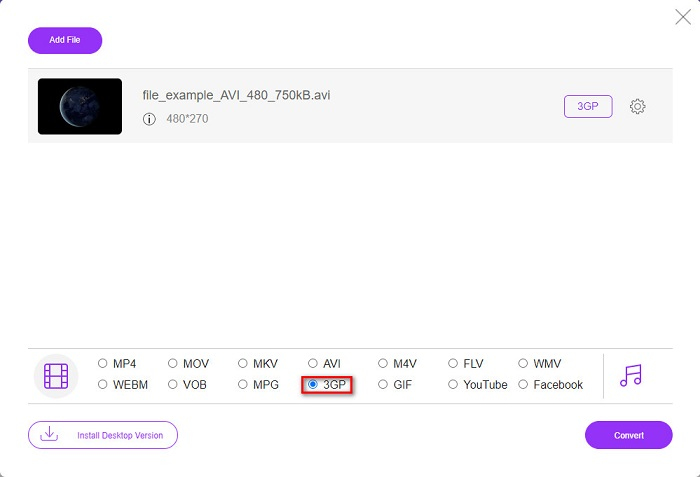
ขั้นตอนที่ 3. จากนั้น บนอินเทอร์เฟซที่สองของซอฟต์แวร์ ให้ติ๊กเลือกวงกลมของรูปแบบไฟล์ 3GP.
ดาวน์โหลดเวอร์ชันเดสก์ท็อปเพื่อแปลงไฟล์แบบเป็นชุดได้.
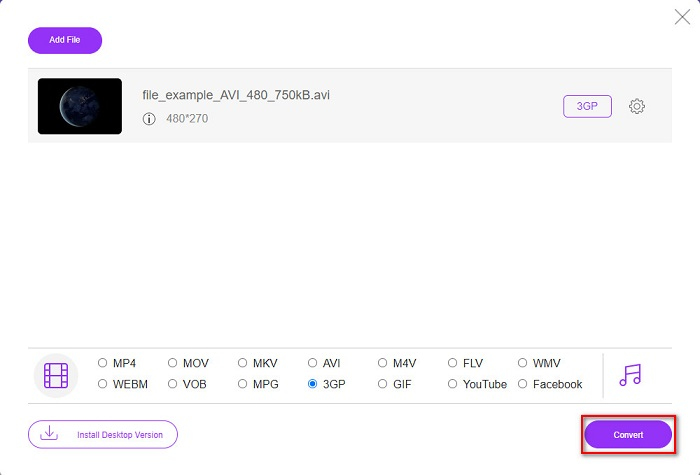
ขั้นตอนที่ 4. แล้วสุดท้าย ให้คลิกปุ่ม Convert เพื่อแปลงไฟล์ AVI ของคุณเป็นไฟล์ 3GP.
น่าเสียดายที่ไม่สามารถทำได้ เครื่องเล่นสื่อพื้นฐานของ Mac อย่าง QuickTime ไม่รองรับไฟล์ AVI อย่างไรก็ตาม คุณสามารถแปลงไฟล์ AVI ของคุณให้เป็นรูปแบบไฟล์ที่ Mac รองรับอย่าง MOV ได้ หากต้องการทราบวิธีแปลง AVI เป็น MOV อย่างง่ายดาย ให้คลิกลิงก์นี้.
ส่วนที่ 3 ความรู้เพิ่มเติมเกี่ยวกับ AVI และ 3PG
หากต้องการทราบข้อมูลเพิ่มเติมเกี่ยวกับรูปแบบทั้งสองนี้ โปรดอ่านข้อมูลด้านล่าง:
AVI หรือ Audio Video Interleave เป็นรูปแบบไฟล์ที่แพร่หลายซึ่งสร้างโดย Microsoft ไฟล์ประเภทนี้มีการบีบอัดวิดีโอต่างๆ เช่น DivX และ XviD นอกจากนี้ แพลตฟอร์มสื่อเกือบทั้งหมดสามารถเล่นไฟล์ AVI ได้ และ Windows ก็สนับสนุนอย่างกว้างขวาง เป็นที่รู้จักกันว่าเป็นมาตรฐานสำหรับการจัดเก็บภาพยนตร์และสื่อเก็บถาวร
ในทางกลับกัน รูปแบบไฟล์ 3GP ที่รองรับอุปกรณ์พกพารุ่นที่สาม ได้รับการพัฒนาโดยโครงการความร่วมมือรุ่นที่สาม (3GPP) นอกจากนี้ ไฟล์ประเภทนี้จะมีขนาดไฟล์ที่เล็กเพียงเพราะสร้างมาเพื่อแชร์กับอุปกรณ์พกพา 3G ยิ่งไปกว่านั้น รูปแบบไฟล์ทั้งสองนั้นยอดเยี่ยม แม้ว่าจะมีความแตกต่างกันก็ตาม
| AVI | VS | 3GP |
| ไม่บีบอัด | บีบอัด/ไม่บีบอัด | บีบอัด |
| มีอยู่ในอุปกรณ์เกือบทั้งหมด | ความเข้ากันได้ | พร้อมใช้งานบนอุปกรณ์เคลื่อนที่รุ่นที่สาม |
| ความละเอียดสูง | รองรับความละเอียด | ความละเอียดต่ำ |
| เล่นได้ | เล่นได้บนอุปกรณ์มือถือ 4g | เล่นไม่ได้ |
| หากคุณต้องการมีรูปแบบทั่วไปมากขึ้น ซึ่งอุปกรณ์เกือบทั้งหมดรองรับ ให้ใช้รูปแบบไฟล์นี้ | ข้อดีของการใช้รูปแบบไฟล์นี้ | หากคุณใช้อุปกรณ์พกพารุ่นที่สาม และต้องการขนาดไฟล์ที่ต่ำกว่า ให้ใช้รูปแบบไฟล์นี้ |
AVI เทียบกับ 3GP
ตามรูปแบบไฟล์การแลกเปลี่ยนทรัพยากร (RIFF) รูปแบบ AVI ถูกนำมาใช้โดย Microsoft ในปี 1992 สามารถบันทึกวิดีโอ/เสียงคุณภาพสูงได้ เนื่องจากใช้การบีบอัดน้อยกว่า แต่นั่นก็ทำให้ไฟล์ AVI มีขนาดใหญ่ขึ้นด้วย ซึ่งอาจเป็นปัญหาได้เมื่อมีเนื้อที่จำกัด
โครงการความร่วมมือรุ่นที่ 3 (3GPP) สร้างรูปแบบ 3GP/3GPP เป็นรูปแบบคอนเทนเนอร์มัลติมีเดีย มันขึ้นอยู่กับรูปแบบไฟล์สื่อ ISO เรามักใช้เพื่อบันทึกสตรีมวิดีโอ/เสียงที่ส่งระหว่างโทรศัพท์มือถือ 3G และออนไลน์
ส่วนที่ 4 คำถามที่พบบ่อยเกี่ยวกับการแปลง AVI เป็น 3GP
คุณสามารถเล่นไฟล์ AVI บน Mac ได้หรือไม่?
ได้ คุณสามารถแปลงไฟล์ AVI เป็นไฟล์ 3GP โดยไม่เสียคุณภาพได้ด้วยการใช้ FVC Video Converter Ultimate โปรแกรมแปลงไฟล์ตัวนี้สามารถแปลง AVI เป็น 3GP ได้โดยไม่สูญเสียคุณภาพ.
ฉันสามารถแปลง AVI เป็น 3PG โดยไม่สูญเสียข้อมูลได้หรือไม่
น่าเสียดายที่ไม่สามารถทำได้ ตามชื่อเรียก อุปกรณ์มือถือ 3G คืออุปกรณ์ที่สามารถเล่นไฟล์ 3GP ได้ แต่หากคุณต้องการเล่นไฟล์ 3GP บนอุปกรณ์มือถือ 4G คุณอาจต้องแปลงไฟล์ 3GP เป็น MOV หากต้องการทราบวิธีแปลงไฟล์ 3GP เป็น MOV ให้อ่านบทความได้โดยคลิกที่ลิงก์นี้.
คุณสามารถเล่นไฟล์ 3GP บนอุปกรณ์มือถือ 4G ได้หรือไม่?
เรตติ้ง: 4.4 / 5 (อิงจาก 188 โหวต).
สรุป
หากคุณกำลังมองหาวิธีแก้ปัญหาในการแปลงไฟล์ AVI เป็น 3GP เรามีบริการสำรองให้คุณ การมองหาตัวแปลงที่มีมาตรฐานสูงเป็นเรื่องยาก แต่ถ้าคุณกำลังมองหาตัวแปลงที่สุดยอด FVC Video Converter Ultimate เป็นเครื่องมือที่เหมาะสมที่สุดสำหรับคุณ ตัวแปลงนี้นำเสนอคุณสมบัติที่เป็นเอกลักษณ์และมีประโยชน์มากที่สุดสำหรับคุณโดยเฉพาะ! ดังนั้น หากคุณต้องการใช้ Converter ที่ยอดเยี่ยมที่สุด ดาวน์โหลดได้ฟรีทันที
-
 วิธีที่มีประสิทธิภาพสูงสุด 4 อันดับแรกในการแปลงรูปแบบ 3GP เป็น AVI [2021]
 ฉันสามารถแปลงไฟล์ 3GP เป็น AVI ได้หรือไม่ คุณสามารถแปลงได้อย่างง่ายดายหากคุณลองใช้เครื่องมือเหล่านี้ในขณะที่เรารวบรวมวิธีแก้ปัญหาที่เป็นไปได้ทั้งหมดสำหรับปัญหาการแปลง 3GP เป็น AVI ของคุณ
-
 สุดยอดตัวแปลง 3GP เป็น FLV เพื่อใช้ในการแปลง 3GP เป็น FLV [2022]
 คุณเคยพยายามแปลง 3GP เป็น FLV แต่คุณไม่รู้ว่าจะใช้ตัวแปลงประเภทใด? อ่านบทความนี้เพื่อเรียนรู้รายละเอียดทั้งหมดเกี่ยวกับการแปลง 3GP เป็น FLV
-
 2 วิธีที่ดีที่สุดในการแปลง 3GP เป็น DivX ที่ไม่รองรับ [2022]
 ผู้ใช้จำนวนมากถามถึงวิธีการแปลง 3GP เป็น DivX ตอนนี้ เรามีบทความที่จะช่วยคุณในการแปลงไฟล์ .3gp โดยไม่ยุ่งยาก

