


 Video Converter Ultimate
 บันทึกหน้าจอ
 ซ่อมวิดีโอ
 ดาวน์โหลดอย่างปลอดภัย
วิธีแปลง AVIF เป็น GIF อย่างง่ายดายเพื่อเพิ่มประสิทธิภาพการส่งภาพ
การแปลง AVIF เป็น GIF เป็นวิธีการพลิกเกมในการปรับปรุงประสิทธิภาพของเว็บ ในโลกดิจิทัลที่ความเข้ากันได้ของรูปภาพและความเร็วของเว็บมีความสำคัญมาก การใช้พลังของ AVIF (รูปแบบไฟล์รูปภาพ AV1) และการแปลงเป็นรูปแบบ GIF ที่ได้รับการสนับสนุนอย่างกว้างขวางสามารถสร้างความแตกต่างอย่างมากในรูปลักษณ์ของเว็บไซต์ของคุณ
ด้วยการแปลง AVIF เป็น GIF ได้อย่างราบรื่น คุณจะทำให้รูปภาพของคุณทำงานได้ดียิ่งขึ้นบนเบราว์เซอร์และอุปกรณ์ที่หลากหลายมากขึ้น ทำให้มั่นใจได้ว่าแขกผู้เข้าชมทุกคนสามารถมองเห็นได้อย่างสมบูรณ์แบบ การปรับปรุงนี้จะช่วยให้เว็บไซต์ของคุณทำงานได้เร็วขึ้น ผู้ใช้มีปฏิสัมพันธ์กับเว็บไซต์มากขึ้น และคุณจะได้รับประโยชน์จากสิ่งเหล่านี้ มาดูวิธีที่การแปลง AVIF เป็น GIF สามารถยกระดับตัวตนออนไลน์ของคุณไปสู่อีกขั้นได้อย่างเต็มรูปแบบกันเถอะ.

ส่วนที่ 1 วิธีแปลง AVIF เป็น GIF ออฟไลน์
FVC Video Converter Ultimate ต้อนรับผู้ใช้งานด้วยอินเทอร์เฟซที่ใช้งานง่ายและเป็นมิตร ทำให้กระบวนการแปลงไฟล์เป็นเรื่องไม่ซับซ้อน ด้วยเลย์เอาต์ที่เรียบง่ายและการควบคุมที่เข้าใจได้ทันที แม้แต่ผู้เริ่มต้นก็สามารถเรียนรู้ขั้นตอนการแปลงไฟล์ได้อย่างรวดเร็ว นอกจากการแปลงไฟล์ AVIF เป็น GIF แล้ว FVC Video Converter Ultimate ยังรองรับรูปแบบมัลติมีเดียหลากหลายประเภท ผู้ใช้สามารถแปลงวิดีโอ ไฟล์เสียง และรูปภาพเป็นฟอร์แมตยอดนิยมหลากหลายชนิด เพื่อให้มั่นใจถึงความเข้ากันได้กับแพลตฟอร์มและอุปกรณ์ที่หลากหลาย.
เหนือสิ่งอื่นใด ผู้ใช้สามารถเข้าถึงเครื่องมือแก้ไขที่หลากหลาย ผู้ใช้สามารถตัดแต่ง ครอบตัด เพิ่มลายน้ำ ใช้ฟิลเตอร์ และปรับพารามิเตอร์ เช่น ความสว่าง คอนทราสต์ และความอิ่มตัวของสี ตัวเลือกการแก้ไขเหล่านี้ทำให้ผู้ใช้สามารถปรับแต่งไฟล์ GIF ได้ตามความชอบและความต้องการ
ขั้นตอนที่ 1 ติดตั้งและเปิดใช้งานซอฟต์แวร์
เริ่มต้นกระบวนการโดยเลือกตัวเลือก ดาวน์โหลดฟรี เพื่อรับตัวติดตั้งโปรแกรม จากนั้นปฏิบัติตามคำแนะนำที่แสดงบนหน้าจอเพื่อติดตั้งและเปิดใช้งานซอฟต์แวร์บนคอมพิวเตอร์ของคุณ.
ดาวน์โหลดฟรีสำหรับ Windows 7 ขึ้นไปดาวน์โหลดอย่างปลอดภัย
ดาวน์โหลดฟรีสำหรับ MacOS 10.7 ขึ้นไปดาวน์โหลดอย่างปลอดภัย
ขั้นตอนที่ 2 เพิ่มไฟล์ AVIF
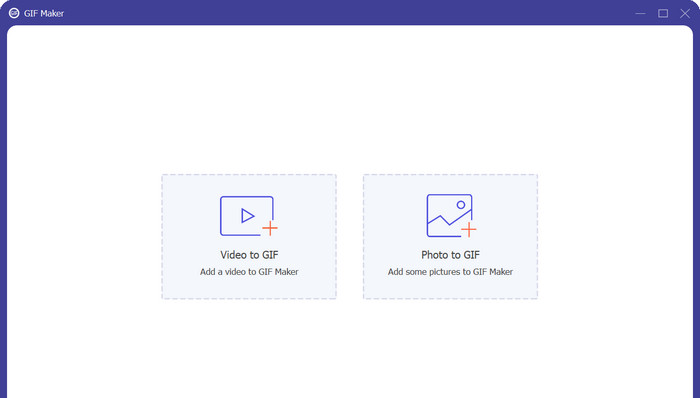
เลือก GIF Maker จากเมนู Toolbox เพื่อสร้าง GIF จากนั้นเลือกไฟล์ AVIF จากฮาร์ดไดรฟ์ของคุณก่อนคลิกปุ่ม Photo to GIF คุณสามารถเพิ่มไฟล์ AVIF ได้มากเท่าที่ต้องการในการสร้าง GIF หนึ่งไฟล์.
ขั้นตอนที่ 3 แปลง AVIF เป็น GIF
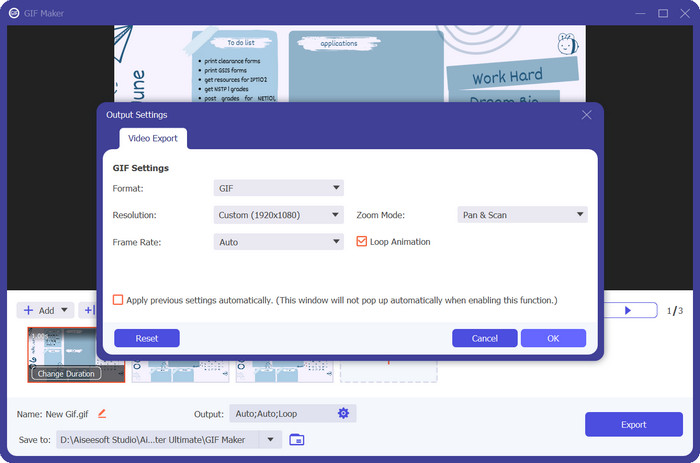
ขั้นตอนสุดท้ายของการแปลง AVIF เป็น GIF คือการกดปุ่ม Export ที่มุมขวาล่าง เพียงไม่กี่วินาที กระบวนการแปลงก็จะเสร็จสิ้น และไฟล์ GIF ก็พร้อมใช้งานทันที.
ข้อดี
- ช่วยให้สูญเสียความเที่ยงตรงของภาพน้อยที่สุดระหว่างการแปลง AVIF เป็น GIF
- ใช้ตัวเลือกการแก้ไขต่างๆ
- การตั้งค่าเอาต์พุตที่หลากหลาย
จุดด้อย
- รุ่นฟรี จำกัด
- การพึ่งพาทรัพยากรระบบ
ส่วนที่ 2 วิธีแปลง AVIF เป็น GIF ออนไลน์
Free Image Converter Online ถือเป็นโซลูชันที่น่าเชื่อถือและรวดเร็วในการแปลงไฟล์มัลติมีเดีย ช่วยให้ผู้ใช้แปลงไฟล์ AVIF และฟอร์แมตอื่น ๆ ได้อย่างง่ายดายด้วยอินเทอร์เฟซที่ใช้งานง่าย การรองรับฟอร์แมตที่หลากหลาย ความเร็วในการแปลงที่รวดเร็ว และตัวเลือกการตั้งค่าผลลัพธ์ที่ยืดหยุ่น ความสะดวกในการใช้งานแบบออนไลน์ ความสามารถในการทำงานข้ามแพลตฟอร์ม และความใส่ใจด้านความปลอดภัยยิ่งเพิ่มคุณค่าให้กับเครื่องมือนี้ Free Video Converter Online จึงเป็นโซลูชันที่เป็นประโยชน์ซึ่งตอบโจทย์ความต้องการด้านการแปลงไฟล์ที่หลากหลาย.
ในฐานะตัวแปลงออนไลน์ Free Image Converter Online ไม่จำเป็นต้องติดตั้งซอฟต์แวร์ ผู้ใช้สามารถเข้าถึงตัวแปลงได้โดยตรงผ่านเว็บเบราว์เซอร์ ทำให้เป็นโซลูชันที่สะดวกสำหรับการแปลงในขณะเดินทาง คุณสมบัตินี้ช่วยประหยัดเวลาอันมีค่าและพื้นที่เก็บข้อมูลบนอุปกรณ์ของผู้ใช้
ขั้นตอนที่ 1 ก่อนอื่นให้เตรียมไฟล์ AVIF ของคุณให้พร้อม จากนั้นไปที่เว็บไซต์ทางการของโปรแกรมผ่านเบราว์เซอร์ที่คุณต้องการใช้.
ขั้นตอนที่ 2 หลังจากนั้นคุณจะเห็นตัวเลือกการแปลงภาพ 3 แบบ จากตรงนี้ให้เลือกปุ่มตัวเลือก GIF และตั้งค่าให้เป็นฟอร์แมตเอาต์พุต.
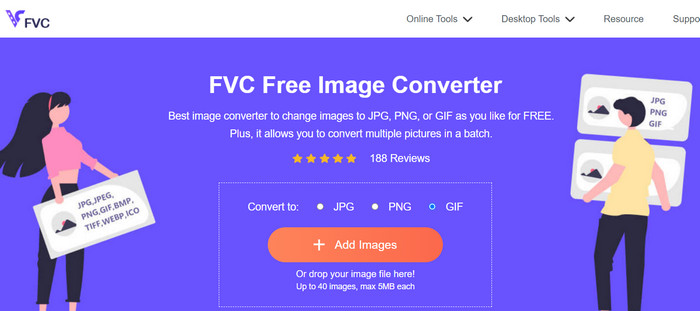
ขั้นตอนที่ 3 ต่อไปให้คลิกปุ่ม Add Image แล้วค้นหาไฟล์ AVIF จากคอมพิวเตอร์ของคุณ เมื่อพบแล้วให้คลิกปุ่ม Open ในหน้าต่าง File Explorer.
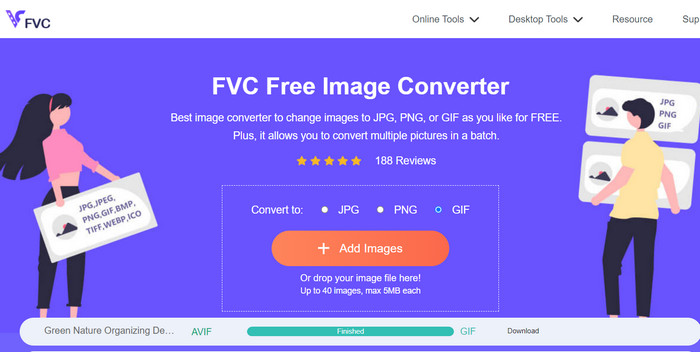
ขั้นตอนที่ 4 จากนั้นกระบวนการแปลงจะเริ่มขึ้นทันทีที่ไฟล์ถูกอัปโหลด ตอนนี้ให้คลิกปุ่ม Download เพื่อรับสำเนาไฟล์ผลลัพธ์ หรือคลิก Download All เพื่อดาวน์โหลดไฟล์ที่แปลงทั้งหมด.
ข้อดี
- ไม่จำเป็นต้องติดตั้งซอฟต์แวร์
- ให้ความสำคัญกับความปลอดภัยและความเป็นส่วนตัวของผู้ใช้
- อินเทอร์เฟซที่ใช้งานง่ายและใช้งานง่าย
จุดด้อย
- ข้อ จำกัด ขนาดไฟล์
- การพิจารณาคุณภาพของภาพ
อ่านเพิ่มเติม:
4 วิธีที่ยอดเยี่ยมในการลบลายน้ำออกจาก GIF [ออนไลน์และออฟไลน์]
วิธีแปลงไฟล์ HEIC เป็น GIF [วิธีที่ดีที่สุด]
ส่วนที่ 3 คำถามที่พบบ่อยเกี่ยวกับการแปลง AVIF และ GIF
การแปลง AVIF เป็น GIF ส่งผลต่อคุณภาพของภาพอย่างไร
การแปลง AVIF เป็น GIF อาจส่งผลให้คุณภาพของภาพลดลง เนื่องจาก GIF มีชุดสีจำกัดและความสามารถในการบีบอัดต่ำกว่าเมื่อเทียบกับ AVIF อย่างไรก็ตาม ด้วยการตั้งค่าและการปรับแต่งที่เหมาะสม ผลกระทบต่อคุณภาพของภาพจะลดลงได้อย่างน่าพอใจ
มีการพิจารณาเรื่องลิขสิทธิ์เมื่อแปลง AVIF เป็น GIF หรือ GIF เป็น AVIF หรือไม่
เมื่อแปลงรูปภาพ สิ่งสำคัญคือต้องแน่ใจว่าคุณมีสิทธิ์หรือการอนุญาตที่จำเป็นในการใช้และแปลงรูปภาพ เคารพกฎหมายลิขสิทธิ์และแปลงเฉพาะภาพที่คุณมีสิทธิ์ตามกฎหมายในการดัดแปลงหรือใช้ในรูปแบบที่ต้องการ
มีข้อจำกัดใด ๆ ในการแปลง AVIF เป็น GIF หรือ GIF เป็น AVIF หรือไม่
โปรดทราบว่าการแปลง AVIF เป็น GIF หรือ GIF เป็น AVIF อาจมีข้อจำกัดบางประการ ซึ่งอาจรวมถึงข้อจำกัดด้านขนาดไฟล์ คุณภาพของภาพอาจลดลง และความสามารถในการแปลงเป็นชุดที่จำกัด ขอแนะนำให้ตรวจสอบคุณสมบัติเฉพาะและข้อจำกัดของตัวแปลงที่คุณใช้
สรุป
การแปลง AVIF เป็น GIF เป็นทางออกด้านความเข้ากันได้และการเพิ่มประสิทธิภาพในหลากหลายสถานการณ์ ด้วยการแปลง AVIF (AV1 Image File Format) เป็น GIF (Graphics Interchange Format) ผู้ใช้สามารถรับรองการรองรับที่ครอบคลุมมากขึ้นบนแพลตฟอร์มและอุปกรณ์ต่าง ๆ ที่อาจยังไม่รองรับไฟล์ AVIF อย่างเต็มรูปแบบ ฟอร์แมต GIF ซึ่งได้รับการรองรับอย่างกว้างขวาง ช่วยให้สามารถแชร์และดูไฟล์บนเว็บได้อย่างง่ายดาย.
ยิ่งไปกว่านั้น การแปลง AVIF เป็น GIF ยังมีประโยชน์สำหรับการปรับขนาดไฟล์ให้เหมาะสมและปรับปรุงประสิทธิภาพของเว็บ ไฟล์ GIF เป็นที่รู้จักจากขนาดไฟล์ที่ค่อนข้างเล็กและรองรับภาพเคลื่อนไหว ทำให้เหมาะสำหรับเว็บแอปพลิเคชันและเนื้อหาออนไลน์ที่แบนด์วิธและเวลาในการโหลดเป็นสิ่งสำคัญ
-
 วิธีแปลงวิดีโอเป็น GIF เพื่อสร้าง GIF ที่สะดุดตา
 ค้นพบวิธีแปลงวิดีโอของคุณเป็น GIF ที่น่าสนใจอย่างง่ายดายด้วยเครื่องมือแปลงวิดีโอเป็น GIF ที่คัดสรรมาอย่างดีและกระบวนการแปลงวิดีโอเป็น GIF ที่ทำตามได้ง่าย
-
 ตัวขยาย GIF ออฟไลน์และออนไลน์ 4 อันดับแรกที่คุณไม่ควรพลาด
 โพสต์นี้เหมาะสำหรับคุณหากคุณกำลังค้นหาตัวขยาย GIF ที่ดีที่สุด เราแสดงรายการเครื่องขยาย GIF แบบออนไลน์และออฟไลน์ที่มีประสิทธิภาพสูงสุดสำหรับคอมพิวเตอร์ของคุณ
-
 คำแนะนำที่ดีที่สุดเกี่ยวกับวิธีตัด GIF เพื่อเพิ่มสีสันให้เนื้อหาของคุณ
 อย่าพลาดคำแนะนำที่ต้องอ่านนี้ เรียนรู้วิธีตัดแต่งและตัด GIF เพื่อดึงดูดความสนใจของผู้ชมด้วยเครื่องมือตัด GIF ที่ยอดเยี่ยมทางออนไลน์และออฟไลน์
