


 Video Converter Ultimate
 บันทึกหน้าจอ
 ซ่อมวิดีโอ
ทำความเข้าใจว่าตัวแปลงใดบ้างที่พร้อมใช้เพื่อแปลง DivX เป็น AVI
DivX และ AVI ไม่ได้เป็นคู่แข่งกัน แม้ว่าทั้งสองจะเกี่ยวข้องกับไฟล์วิดีโอก็ตาม แต่ก็ยังมีความแตกต่างกันอยู่มาก เช่น DivX ใช้สำหรับบีบอัดคอนเทนเนอร์ของวิดีโอที่มีความยาวให้มีขนาดเล็กลงมากที่สุดเท่าที่จะทำได้ โดยไม่ทำให้คุณภาพของวิดีโอลดลง ในทางกลับกัน AVI เป็นหนึ่งในตัวอย่างของคอนเทนเนอร์วิดีโอที่คุณสามารถใช้เก็บวิดีโอความละเอียดสูงได้ แต่มีขนาดไฟล์ที่ใหญ่กว่า ทีนี้เราได้รู้พื้นฐานคร่าว ๆ ของทั้งสองแบบแล้ว ต่อไปมาศึกษาเชิงลึกเพื่อทำความเข้าใจให้มากขึ้น และเรียนรู้วิธีแปลง DivX เป็น AVI ฟรีได้จากการอ่านบทความนี้ต่อไป.
ส่วนที่ 1 DivX กับ AVI
ดังที่กล่าวไว้ก่อนหน้านี้ DivX และ AVI ไม่ใช่คู่แข่งกันเพราะสามารถใช้ได้ทั้งในไฟล์เดียวหรืออีกไฟล์หนึ่ง นอกจากนี้ DivX ยังเป็นโปรแกรมบีบอัดไฟล์ที่พัฒนาโดย DivX, Inc. อีกด้วย คอมเพรสเซอร์นี้เป็นกรรมสิทธิ์และได้รับการกล่าวขานว่าเป็นวิดีโอเช่าดีวีดีรุ่นต่อไป แต่ตอนนี้ DivX ได้ปิดตัวลงเนื่องจากพยายามเปลี่ยนดีวีดีไม่สำเร็จ แต่ตอนนี้ คุณยังคงสามารถเข้าถึงเครื่องมือและรับชมได้ในเครื่องเล่นสื่อรุ่นเก่าบางรุ่นที่รองรับการบีบอัดที่ DivX มีให้
AVI เป็นรูปแบบไฟล์มีเดียที่ใช้บรรจุไฟล์วิดีโอและไฟล์เสียงด้วยโค้ดแตกต่างกันได้หลายแบบ รูปแบบนี้พัฒนาโดยไมโครซอฟท์เพื่อใช้เล่นสตรีมวิดีโอหรือเสียงทุกรูปแบบ ในปลายปี 1992 AVI ถูกสร้างขึ้นเพื่อยกระดับคุณภาพและความล้ำสมัยของวิดีโอและเสียงสำหรับระบบปฏิบัติการ Windows เท่านั้น แต่ทุกวันนี้คุณสามารถใช้ไฟล์ AVI บน Mac หรือ Linux ได้ รวมถึงบนโทรศัพท์ของคุณด้วย อย่างไรก็ตาม ยังมีสิ่งหนึ่งที่รูปแบบ AVI ยังพัฒนาได้ไม่ดีนัก นั่นคือเรื่องการบีบอัดและขนาดไฟล์.
DivX
◆ คอมเพรสเซอร์ใช้เพื่อทำให้ขนาดไฟล์ของคอนเทนเนอร์เล็กลงโดยไม่ต้องสัมผัสถึงคุณภาพของมัน
◆ เป็นคอมเพรสเซอร์ที่เป็นกรรมสิทธิ์ของ DivX Inc.
◆ ว่ากันว่าเป็นดีวีดีเวอร์ชั่นที่ดีกว่า แต่ล้มเหลวเพราะพยายาม
◆ เครื่องเล่นสื่อใหม่ส่วนใหญ่ในปัจจุบันไม่รองรับ DivX
AVI
◆ เป็นที่รู้จักในฐานะหนึ่งในคอนเทนเนอร์วิดีโอและเสียงที่ปฏิวัติวงการในยุคสมัยใหม่นี้
◆ รูปแบบนี้ได้รับการสนับสนุนในแพลตฟอร์มและซอฟต์แวร์ส่วนใหญ่
◆ ไม่รองรับการบีบอัดที่แน่นอนเนื่องจากไม่มีการสูญเสีย
และตอนนี้เมื่อเราทราบความแตกต่างระหว่างทั้งสองแล้ว ก็ถึงเวลาที่จะรู้จักตัวแปลง DivX เป็น AVI ออนไลน์และออฟไลน์ซึ่งคุณสามารถใช้เพื่อดูไฟล์ DivX ได้
ส่วนที่ 2 ตัวแปลงที่ดีที่สุด 4 ตัวและเรียนรู้วิธีแปลง DivX เป็น AVI
ด้านบน 1. FVC Video Converter Ultimate
หากการแปลงไฟล์ DivX เป็นปัญหาของคุณแล้วล่ะก็ FVC Video Converter Ultimate น่าจะเป็นคำตอบให้คุณได้ แตกต่างจากโปรแกรมแปลงไฟล์อื่น ๆ ซอฟต์แวร์นี้ได้รับการพัฒนามาอย่างต่อเนื่องตลอดหลายปี จนกลายเป็นหนึ่งในโปรแกรมแปลงไฟล์ที่โดดเด่น นอกจากจะเป็นหนึ่งในตัวเลือกที่ดีที่สุดแล้ว ยังมีความเร็วในการแปลงไฟล์สูงมาก เพราะขับเคลื่อนด้วยเทคโนโลยีเร่งความเร็วด้วยฮาร์ดแวร์และการแปลงไฟล์แบบรวดเร็ว อีกทั้งด้วยฟีเจอร์ในตัวที่ครบครัน จึงทำให้โปรแกรมนี้ขึ้นมาอยู่ในอันดับต้น ๆ ได้ง่าย แม้ว่าจะเป็นโปรแกรมเสียเงิน แต่คุณก็ไม่จำเป็นต้องจ่ายแพงในระหว่างการใช้งาน ดังนั้น หากคุณอยากเรียนรู้วิธีแปลง DivX เป็น AVI บน Mac หรือ PC ให้ทำตามขั้นตอนด้านล่างนี้ไปพร้อม ๆ กับเราขณะทดลองใช้จริง.
ขั้นตอนที่ 1. ก่อนอื่น ก่อนที่คุณจะใช้เครื่องมือนี้ได้ คุณต้องดาวน์โหลดลงในไดรฟ์ของคุณก่อน จากนั้นติดตั้งโปรแกรม ตั้งค่าการใช้งาน แล้วกด Start Now เพื่อดำเนินการต่อ.
ดาวน์โหลดฟรีสำหรับ Windows 7 หรือใหม่กว่าดาวน์โหลดอย่างปลอดภัย
ดาวน์โหลดฟรีสำหรับ MacOS 10.7 หรือใหม่กว่าดาวน์โหลดอย่างปลอดภัย
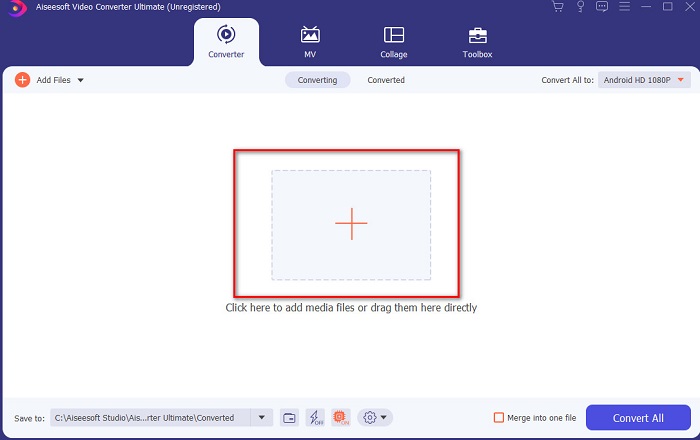
ขั้นตอนที่ 2. เปิดโปรแกรมเพื่อดำเนินการต่อ แล้วหน้าตาอินเทอร์เฟซลักษณะนี้จะปรากฏขึ้น ในส่วนตรงกลางให้คลิกปุ่ม + แล้วค้นหาไฟล์ DivX ที่คุณต้องการนำเข้า จากนั้นคลิก Open.
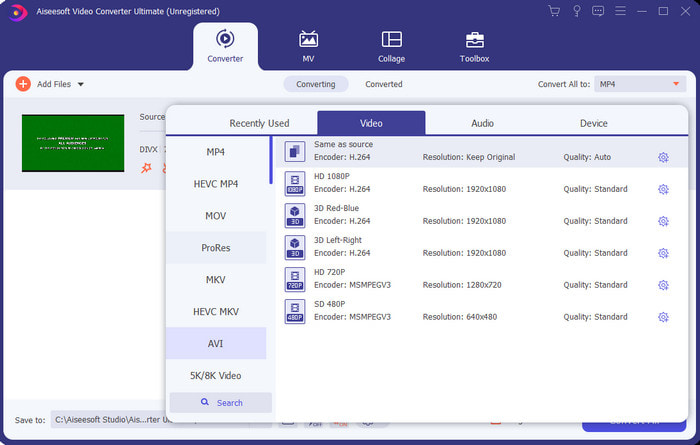
ขั้นตอนที่ 3. หากต้องการเปลี่ยนจาก DivX เป็น AVI ให้คลิก Convert All to แล้วค้นหาและเลือกฟอร์แมต AVI จากนั้นคลิก.
ขั้นตอนที่ 4. เพื่อเริ่มกระบวนการแปลงไฟล์ ให้คลิก Convert All แล้วรอจนกระบวนการเสร็จสิ้น.
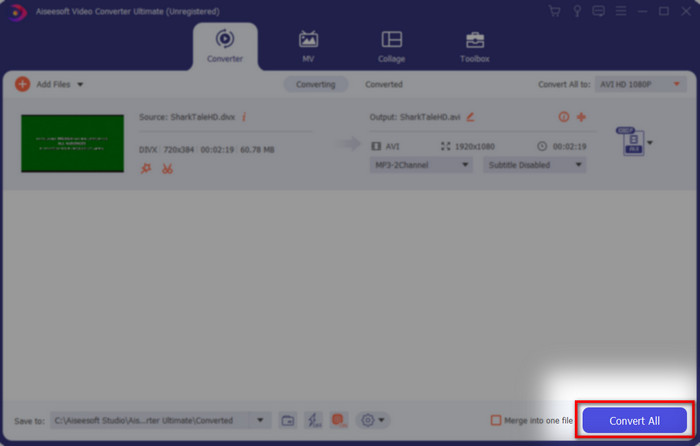
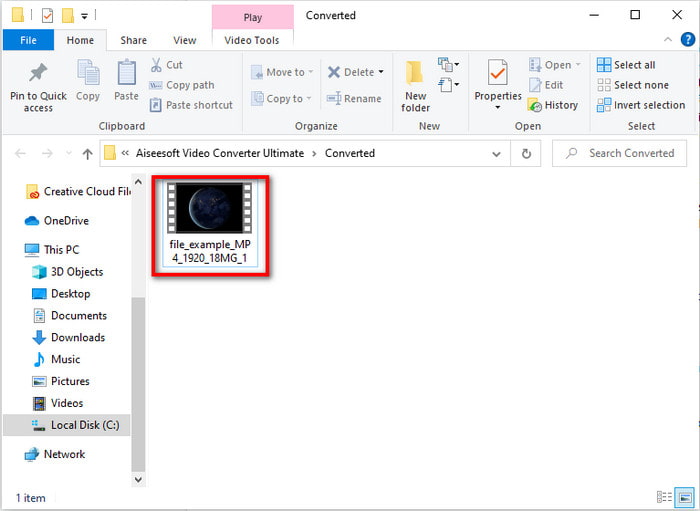
ขั้นตอนที่ 5. รอให้กระบวนการแปลงไฟล์เสร็จสิ้น เมื่อเสร็จแล้วจะมีโฟลเดอร์ปรากฏขึ้นบนหน้าจอพร้อมไฟล์ที่ถูกแปลงแล้ว ให้คลิกไฟล์เพื่อเปิดดูและเพลิดเพลินกับการรับชม.
ด้านบน 2. Freemake Video Converter
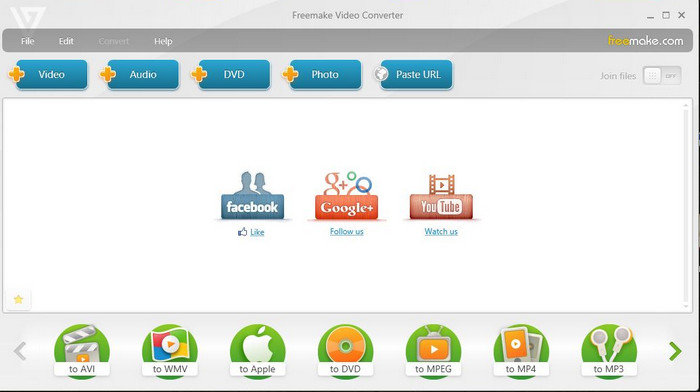
ซอฟต์แวร์แบบดาวน์โหลดอีกตัวที่คุณสามารถใช้แปลงรูปแบบไฟล์ได้คือ Freemake Video Converter เครื่องมือนี้ช่วยผู้ใช้จำนวนมากในการแปลงไฟล์มีเดียให้เป็นรูปแบบใหม่ อีกทั้งยังได้รับการยอมรับอย่างกว้างขวางว่าเป็นหนึ่งในซอฟต์แวร์ที่ดีที่สุดที่คุณสามารถดาวน์โหลดมาใช้งานและวางใจได้ แม้ว่าเครื่องมือนี้จะดี แต่ก็ยังรองรับฟอร์แมตไม่ครบถ้วน และกระบวนการแปลงไฟล์ค่อนข้างช้า เนื่องจากโปรแกรมนี้ไม่มีเทคโนโลยีเร่งความเร็วด้วยฮาร์ดแวร์เหมือนกับ FVC Video Converter Ultimate ดังนั้น หากคุณต้องการแปลง DivX เป็น AVI ฟรี นี่อาจเป็นซอฟต์แวร์ที่คุณควรเลือกใช้.
ข้อดี
- ฟรีเพื่อดาวน์โหลดซอฟต์แวร์ใด ๆ
- รูปลักษณ์ที่ชาญฉลาดนั้นเรียบง่าย
จุดด้อย
- ไม่มีการเร่งด้วยฮาร์ดแวร์
- ไม่รองรับบางรูปแบบที่นี่
ด้านบน 3. FVC ตัวแปลงวิดีโอฟรี
ถ้าคุณต้องการแปลงไฟล์มีเดียเป็นรูปแบบใหม่แต่ไม่อยากดาวน์โหลดโปรแกรมใด ๆ เลย งั้น FVC Free Video Converter ก็พร้อมจะช่วยคุณ แตกต่างจากสองเครื่องมือที่กล่าวถึงด้านบน เครื่องมือนี้สามารถเข้าใช้งานได้ผ่านเบราว์เซอร์โดยไม่ต้องดาวน์โหลดโปรแกรมหลัก แม้ว่าโปรแกรมนี้จะให้ใช้งานได้ฟรี แต่ก็ยังมีบางฟอร์แมตที่ไม่รองรับ นอกจากนี้คุณยังมีตัวเลือกฟอร์แมตสำหรับการแปลงไม่มากนัก อย่างไรก็ตาม ความเร็วในการแปลงไฟล์ถือว่าเร็วกว่าหากเปรียบเทียบกับ Freemake Video Converter ดังนั้น หากคุณอยากรู้วิธีแปลง DivX เป็น AVI ออนไลน์ ให้ทำตามขั้นตอนด้านล่าง.
ขั้นตอนที่ 1. ไปที่หน้าเว็บไซต์หลักของ FVC Free Video Converter โดยคลิกลิงก์นี้.
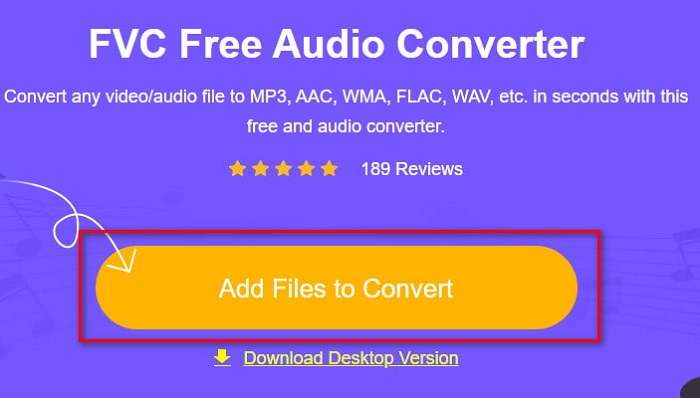
ขั้นตอนที่ 2. กดปุ่ม Add Files to Convert เพื่อดาวน์โหลดตัวเรียกใช้งาน (launcher) หากเป็นการใช้ครั้งแรก และหากติดตั้งตัวเรียกใช้งานเรียบร้อยแล้ว ให้คลิกปุ่ม Add Files to Convert อีกครั้ง แล้วค้นหาไฟล์ในโฟลเดอร์ คลิกไฟล์ แล้วกด Open.
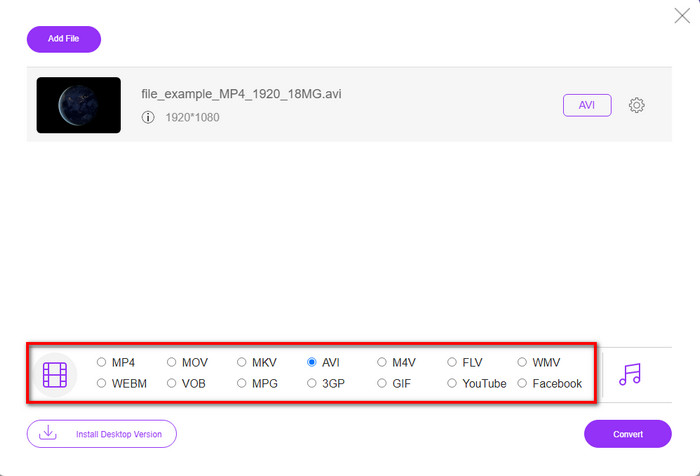
ขั้นตอนที่ 3. เลือกฟอร์แมต AVI ในตัวเลือกที่แสดงด้านล่าง หรือเลือกฟอร์แมตอื่นตามที่คุณต้องการแปลง.
ขั้นตอนที่ 4. เมื่อเลือกฟอร์แมตเสร็จแล้ว ก็ถึงเวลาเซฟลงในไดรฟ์ของคุณโดยคลิกที่ Convert.
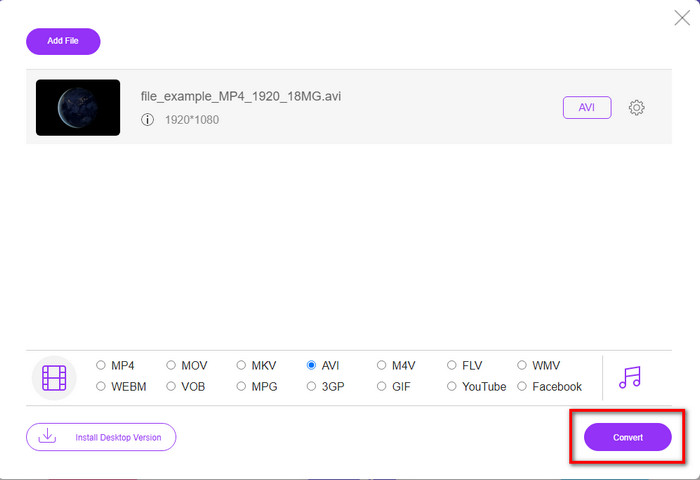
ขั้นตอนที่ 5. เมื่อกระบวนการแปลงไฟล์เริ่มทำงานแล้ว ให้รอจนกว่าโฟลเดอร์ไฟล์จะเด้งขึ้นมาบนหน้าจอ คลิกไฟล์เพื่อเปิดและรับชมไฟล์มีเดียที่ถูกแปลงแล้ว.
อันดับ 4. Online-Convert.com
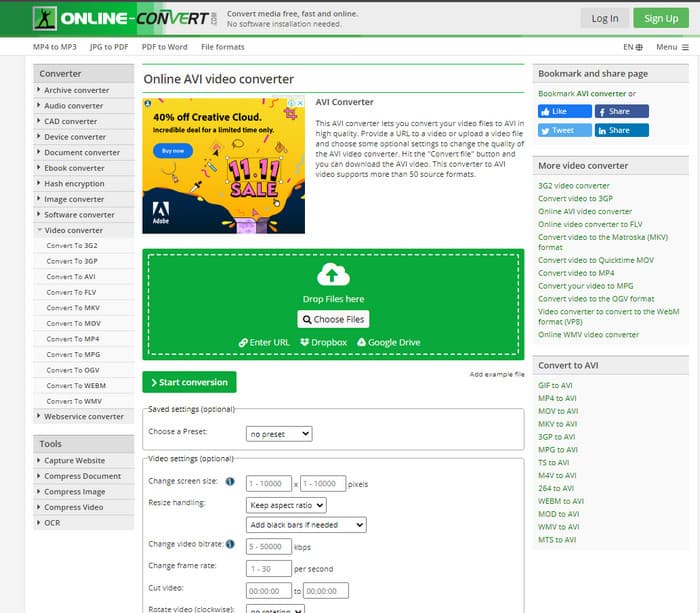
อีกหนึ่งเครื่องมือออนไลน์ที่คุณสามารถใช้แปลงไฟล์มีเดียคือ Online-Convert.com เช่นเดียวกับเครื่องมือออนไลน์บางตัว คอนเวอร์เตอร์นี้รองรับฟอร์แมตในวงจำกัด อย่างไรก็ตาม มีตัวปรับแต่งวิดีโอในตัวให้ใช้งาน แต่ค่อนข้างยากต่อการจัดการ โดยเฉพาะหากคุณไม่มีความรู้ด้านนี้ นอกจากนี้ การอัปโหลดและดาวน์โหลดไฟล์ในเว็บไซต์นี้ยังช้ามาก เมื่อเทียบกับ FVC Free Video Converter.
ข้อดี
- สามารถเข้าใช้งานบนเว็บได้ฟรี
- อินเทอร์เฟซของเครื่องมือนั้นยอดเยี่ยมและมีโฆษณาเพียงเล็กน้อยหรือไม่มีเลย
- ขั้นตอนการแปลงจะขึ้นอยู่กับการเชื่อมต่ออินเทอร์เน็ต
จุดด้อย
- ไม่สามารถเข้าถึงได้หากไม่มีอินเทอร์เน็ต
- ขั้นตอนการนำเข้าและส่งออกจะใช้เวลามากเมื่อเทียบกับเครื่องมืออื่นๆ
ส่วนที่ 3 อันไหนดีที่สุดในการแปลง DivX เป็น AVI
| คุณสมบัติ | FVC Video Converter Ultimate | Freemake Video Converter | FVC แปลงวิดีโอฟรี | Online-Convert.com |
| แปลงวิดีโอและเสียง |  | | | |
| การแปลงแบทช์ | |  | | |
| การเร่งฮาร์ดแวร์ | | | | |
| เครื่องมือตามโปรแกรม | เครื่องมือบนเดสก์ท็อป | เครื่องมือบนเดสก์ท็อป | เครื่องมือบนเว็บ | เครื่องมือบนเว็บ |
| การเชื่อมต่อเครือข่าย | ไม่จำเป็น | ไม่จำเป็น | จำเป็น | จำเป็น |
ส่วนที่ 4 คำถามที่พบบ่อยเกี่ยวกับ DivX เป็น AVI Converters
ไหนดีกว่ากัน? DivX และ XviD?
DivX เป็นตัวแปลงสัญญาณที่เป็นกรรมสิทธิ์ที่รู้จักกันดีสำหรับไฟล์คอนเทนเนอร์วิดีโอและเสียง และยังเชี่ยวชาญในการริปไฟล์บนแผ่นดิสก์ขณะบีบอัดไฟล์โดยไม่สูญเสียคุณภาพ แม้ว่า XviD จะเป็นเวอร์ชันปิดของ DivX และค่อนข้างดีกว่า DivX ค่อนข้างมาก นอกจากนี้ยังไม่มีกรรมสิทธิ์ซึ่งหมายความว่าทุกคนสามารถใช้สิ่งนี้ได้ทุกเมื่อหรือสิ่งที่คุณต้องการ
ตัวแปลงสัญญาณคืออะไร?
ตัวแปลงสัญญาณใช้เพื่อบีบอัดไฟล์และแจกจ่ายไฟล์เสียงและวิดีโอใด ๆ ได้เร็วกว่ามากภายในขนาดไฟล์ที่เล็กกว่า นอกจากนี้ยังใช้เพื่อขยายขนาดไฟล์ที่ผูกไว้กับตัวแปลงสัญญาณดังกล่าวเพื่อเปิดไฟล์บีบอัดที่คุณสร้างขึ้นโดยไม่ทำลายความน่าเชื่อถือของไฟล์
เพื่อให้ไฟล์มีขนาดเล็กลง ควรบีบอัดหรือแปลงไฟล์หรือไม่?
หากคุณต้องการรักษาคุณภาพของวิดีโอไว้แต่ทำให้ไฟล์มีขนาดเล็กลง การบีบอัดไฟล์ด้วยความช่วยเหลือจากลิงก์นี้ถือเป็นทางเลือกที่เหมาะสม แต่ถ้าคุณต้องการวิธีที่ง่ายกว่านั้น คุณควรพิจารณาแปลงวิดีโอเป็น MP4 โดยอ่านบทความนี้เพื่อทำความเข้าใจขั้นตอนการทำ.
สรุป
เมื่อมาถึงตอนท้ายของบทความนี้ ตอนนี้เราก็เข้าใจแล้วว่า DivX คืออะไร และ AVI คืออะไร นอกจากนี้ เรายังได้แนะนำเครื่องมือที่เป็นประโยชน์ 4 ตัวที่คุณสามารถใช้เล่นไฟล์ DivX ด้วยการแปลงให้เป็นรูปแบบ AVI ดังนั้น หากคุณต้องการสัมผัสประสบการณ์ความสำเร็จแบบ 100% ให้ใช้ FVC Video Converter Ultimate เพื่อรับประกันความสำเร็จ.
ดาวน์โหลดฟรีสำหรับ Windows 7 หรือใหม่กว่าดาวน์โหลดอย่างปลอดภัย
ดาวน์โหลดฟรีสำหรับ MacOS 10.7 หรือใหม่กว่าดาวน์โหลดอย่างปลอดภัย
-
 [ฟรี & ออนไลน์] 7 วิธีในการแปลง MTS เป็น AVI บน Mac/Windows Computer
 วิธีการแปลง MTS เป็น AVI ได้อย่างง่ายดาย? ในคู่มือนี้คุณจะพบ 7 วิธีที่ง่ายและฟรีในการแปลงไฟล์ MTS เป็น AVI บน Windows หรือ Mac โดยไม่สูญเสียคุณภาพ
-
 สอนการแปลงไฟล์ MP4 เป็น AVI ด้วยตัวแปลงวิดีโอฟรี 7 ตัว
 ต้องการรับวิธีการแปลงวิดีโอ AVI เป็น MP4 ฟรีหรือไม่ คุณไม่ควรพลาดบทความนี้ 7 วิธีในการแปลงไฟล์ AVI เป็น MP4 ฟรีบน Windows, Mac, iPhone, Android และทางออนไลน์
-
 3 วิธีง่ายๆในการแปลง FLV เป็น AVI บนเดสก์ท็อปและออนไลน์
 ต่อไปนี้คือสามวิธีที่จะช่วยให้คุณแปลงไฟล์วิดีโอ FLV ของคุณเป็นรูปแบบ AVI บน Windows และ Mac ได้อย่างมีประสิทธิภาพ เพื่อให้คุณรับชมได้อย่างมีคุณภาพสูง
