


 Video Converter Ultimate
 บันทึกหน้าจอ
 ซ่อมวิดีโอ
 ดาวน์โหลดอย่างปลอดภัย
แปลง GIF เป็น MKV โดยใช้วิธีการที่ตรงไปตรงมาที่สุด
GIF เป็นหนึ่งในรูปแบบไฟล์ที่พบได้บ่อยที่สุดที่คุณใช้บนอุปกรณ์ของคุณ แต่ในบางกรณีคุณอาจต้องการแปลงให้เป็นรูปแบบไฟล์วิดีโออื่น เช่น MKV อย่างไรก็ตาม การมองหาแอปพลิเคชันมาใช้มักจะยุ่งยาก ตัวแปลงไฟล์หลายตัวมีปัญหาระหว่างกระบวนการแปลง และบางแอปก็ยังต้องปรับปรุงเพิ่มเติม นอกจากนี้ การหาซอฟต์แวร์ที่รองรับไฟล์วิดีโอได้หลากหลายรูปแบบก็เป็นเรื่องท้าทาย แต่ในบทความนี้ คุณจะได้พบกับวิธีแก้ไขที่ดีที่สุด คุณจะได้เรียนรู้วิธีแปลง GIF เป็น MKV ด้วยแอปพลิเคชันที่เชื่อถือได้ ซึ่งสามารถใช้ได้ทั้งบน Windows และ Mac.

ตอนที่ 1: บทนำของ GIF และ MKV
ก่อนการแปลง คุณจะต้องเรียนรู้ข้อมูลเกี่ยวกับรูปแบบทั้งสองนี้ก่อน ดูรายละเอียดที่สำคัญในตารางด้านล่าง
| รูปแบบ | GIF | MKV |
| ชื่อ | รูปแบบการแลกเปลี่ยนกราฟิก | Matroska มัลติมีเดียคอนเทนเนอร์ |
| นามสกุลไฟล์ | .gif | .mkv |
| คำอธิบาย | รูปแบบการแลกเปลี่ยนภาพคือ GIF เป็นรูปแบบกราฟิกที่ใช้กันอย่างแพร่หลายซึ่งเก็บข้อมูลที่บีบอัดในรูปแบบที่ไม่มีคุณภาพและใช้สีไม่เกิน 256 สี CompuServe สร้างรูปแบบ GIF สำหรับแลกเปลี่ยนภาพแรสเตอร์ผ่านเครือข่ายในปี 1987 (GIF87a) รูปแบบไฟล์มีการเปลี่ยนแปลงในปี 1989 (GIF89a) เพิ่มความสามารถในการเคลื่อนไหวและความโปร่งใส GIF สามารถอัปโหลดบน Twitter และ Facebook ได้ เป็นไปไม่ได้ที่จะอัปโหลด GIF บน YouTube หรือ Instagram เนื่องจากไม่ใช่วิดีโอ ไม่สามารถเล่น GIF บนเครื่องเล่นมีเดียได้เช่นกัน รูปแบบการแลกเปลี่ยนกราฟิกเรียกว่า GIF ไม่ว่า GIF ควรออกเสียงว่า "จิฟ" หรือ "gif" โดยที่ "g" ออกเสียงเหมือน "g" ใน "goat" ได้รับการโต้แย้งอย่างถึงพริกถึงขิง นอกจากนี้ยังสามารถจัดเก็บไฟล์หลายไฟล์ในไฟล์ GIF ไฟล์เดียวได้อีกด้วย | MKV เป็นคอนเทนเนอร์โอเพ่นซอร์สที่สามารถเก็บสื่อที่มีการบีบอัดโดยใช้ตัวแปลงสัญญาณต่างๆ มีประโยชน์มากมายเหนือคอนเทนเนอร์ AVI แบบดั้งเดิม รวมถึงความสามารถในการรวมแทร็กเสียงและคำบรรยายในหลายภาษาที่สามารถเปลี่ยนได้โดยไม่ต้องหยุดเล่นชั่วคราว และค้นหาและย้อนกลับไฟล์อย่างรวดเร็ว นอกจากนี้ รูปแบบยังปรับเปลี่ยนได้ง่าย ทำให้ง่ายต่อการแยกข้อมูลเสียงและวิดีโอ |
| พัฒนาโดย | คอมพูเซิร์ฟ | มาทรอสก้า |
| ประเภท | รูปแบบไฟล์รูปภาพ | รูปแบบไฟล์วิดีโอ |
| ประเภทไมม์ | รูปภาพ/gif | วิดีโอ/x-matroska |
ตอนที่ 2: ขั้นตอนโดยละเอียดในการแปลง GIF เป็น MKV
Video Converter Ultimate เป็นโปรแกรมที่คุณต้องการ หากคุณอยากแปลงไฟล์ GIF เป็นรูปแบบไฟล์ MKV ได้อย่างรวดเร็วและง่ายดาย ด้วยความช่วยเหลือของซอฟต์แวร์นี้ คุณสามารถแปลงไฟล์ GIF โดยไม่ทำให้คุณภาพลดลง นอกจากนี้ ตัวแปลงไฟล์นี้ยังรองรับความเร็วในการแปลงระดับสูงสุดได้ถึง 30 เท่าเมื่อเทียบกับโปรแกรมอื่น ๆ คุณยังสามารถแปลงไฟล์ GIF หลายไฟล์ให้เป็นไฟล์ MKV ไฟล์เดียวได้พร้อมกัน เนื่องจากโปรแกรมนี้รองรับการแปลงแบบกลุ่ม วิธีนี้ช่วยให้มั่นใจได้ว่าการแปลงไฟล์ไปเป็นรูปแบบอื่นทำได้ง่ายและรวดเร็ว ยิ่งไปกว่านั้น Video Converter Ultimate ยังมีอินเทอร์เฟซที่ใช้งานง่าย เหมาะสำหรับผู้ใช้ทุกคน ในด้านความสะดวกในการใช้งาน ผู้ใช้ Windows และ Mac สามารถใช้โปรแกรมนี้ได้ ซึ่งตอบโจทย์การใช้งานเป็นอย่างดี.
นอกจากนี้ ยังมีฟังก์ชันอีกมากมายที่คุณสามารถพบได้ สมมติว่าคุณต้องการสร้างมิวสิควิดีโอที่น่าทึ่งเพื่อเล่นในงานเลี้ยงวันเกิด งานแต่งงาน ปาร์ตี้คริสต์มาส และอื่นๆ คุณยังสามารถพึ่งพาแอปพลิเคชันนี้ได้เนื่องจากมีเครื่องมือสร้างมิวสิกวิดีโอ ผู้สร้างนี้มีธีมฟรีเพื่อทำให้วิดีโอของคุณสร้างสรรค์และไม่เหมือนใคร คุณสมบัติอื่นที่สามารถนำเสนอได้คือเครื่องมือแก้ไขสี การใช้แถบเลื่อน เครื่องมือนี้ช่วยให้คุณปรับความสว่าง คอนทราสต์ ความอิ่มตัวของสี และเฉดสีของวิดีโอได้อย่างง่ายดาย ด้วยวิธีนี้ วิดีโอของคุณจะน่ารับชมยิ่งขึ้น มีคุณสมบัติเพิ่มเติมที่คุณสามารถสัมผัสได้ในแอปพลิเคชันที่ดาวน์โหลดได้นี้ หากต้องการค้นหาเพิ่มเติมเกี่ยวกับเครื่องมือนี้ โปรดดูรายละเอียดเพิ่มเติมด้านล่าง
คุณสมบัติเด่น
◆ แปลงรูปแบบวิดีโอได้หลากหลาย รวมถึง MP4, MKV, M4V, MOV, AVI, FLV, WMV, VOB, SWF และอื่นๆ อีกกว่า 100 รูปแบบ
◆ แปลงไฟล์จำนวนมากพร้อมกัน
◆ มีกระบวนการแปลงที่รวดเร็ว
◆ มันมีฟังก์ชั่นเพิ่มประสิทธิภาพวิดีโอเพื่อปรับปรุงวิดีโอ
ข้อดี
- มีอินเทอร์เฟซที่ใช้งานง่ายพร้อมคำแนะนำโดยละเอียด
- เหมาะสำหรับผู้เริ่มต้น
- ดาวน์โหลดฟรี
- เข้าได้ทั้งบน Windows และ Mac
- สามารถแปลงไฟล์วิดีโอ/รูปภาพได้ไม่จำกัด
จุดด้อย
- รับเวอร์ชันที่ต้องชำระเงินเพื่อสัมผัสกับคุณสมบัติที่สวยงามยิ่งขึ้น
ทำตามขั้นตอนอย่างละเอียดด้านล่างเพื่อแปลง GIF เป็น MKV ได้ทันทีด้วย Video Converter Ultimate บนคอมพิวเตอร์ Windows หรือ Mac ของคุณ.
ขั้นตอนที่ 1: หากต้องการดาวน์โหลด Video Converter Ultimate อย่างสะดวก ให้คลิกปุ่ม ดาวน์โหลด ด้านล่าง จากนั้นเปิดโปรแกรมหลังติดตั้งเสร็จ.
ดาวน์โหลดฟรีสำหรับ Windows 7 หรือใหม่กว่าดาวน์โหลดอย่างปลอดภัย
ดาวน์โหลดฟรีสำหรับ MacOS 10.7 หรือใหม่กว่าดาวน์โหลดอย่างปลอดภัย
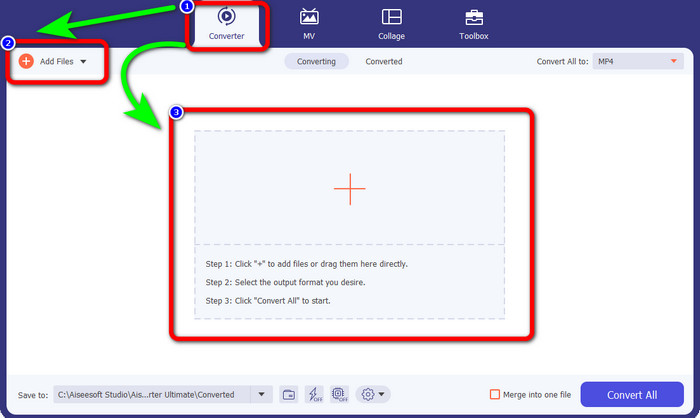
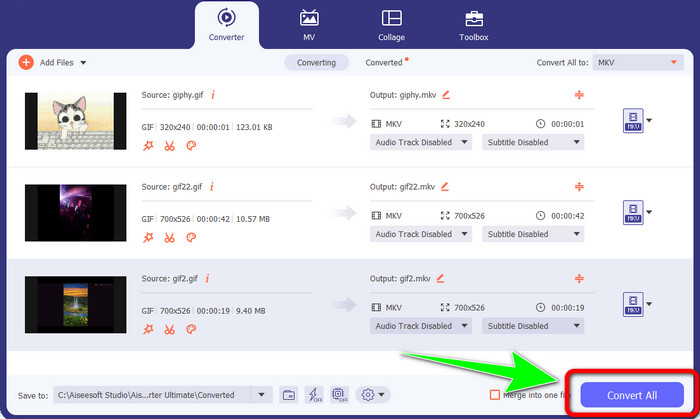
ขั้นตอนที่ 2: ไปที่แถบ Converter เมื่อหน้าต่างหลักปรากฏบนหน้าจอ จากนั้นคลิกปุ่ม Add Files เพื่อใส่ไฟล์ GIF คุณยังสามารถคลิกสัญลักษณ์ เครื่องหมายบวก (Plus) ตรงกลางอินเทอร์เฟซเพื่อเพิ่มไฟล์ได้เช่นกัน.
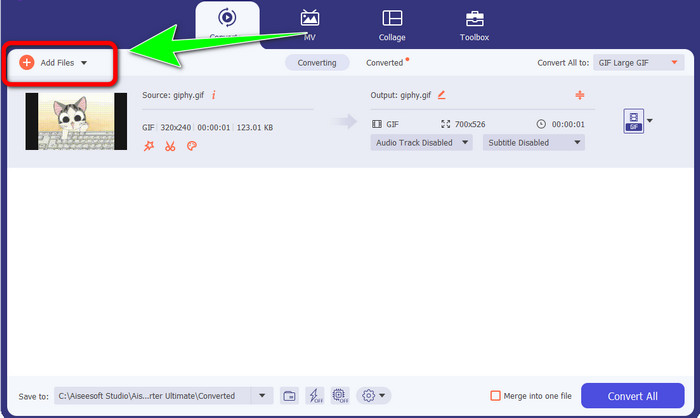
ขั้นตอนที่ 3: หากคุณต้องการแปลงไฟล์แบบเป็นชุด ให้คลิกปุ่ม Add Files เพิ่มไฟล์เข้ามา.
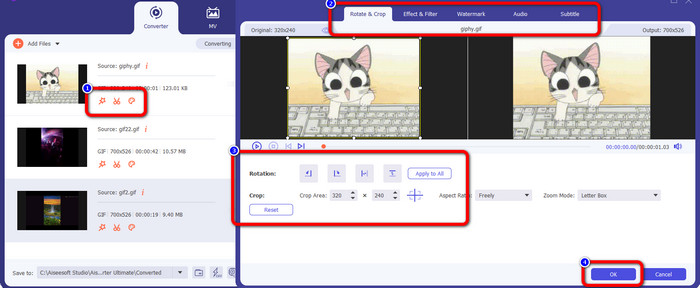
ขั้นตอนที่ 4: หากต้องการแก้ไขวิดีโอก่อนแปลง ให้คลิกไอคอนเครื่องมือ Editing เครื่องมือนี้ช่วยให้คุณใส่ฟิลเตอร์และเอฟเฟกต์ลงในวิดีโอได้ คุณยังสามารถหมุนและครอบตัดวิดีโอของคุณได้ หลังจากนั้นให้คลิกปุ่ม OK.
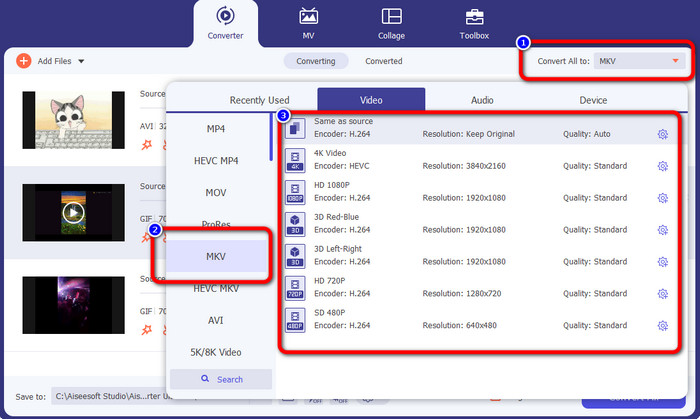
ขั้นตอนที่ 5: จากนั้นไปที่ปุ่ม Convert All to เพื่อกำหนดรูปแบบไฟล์สำหรับการแปลงทั้งหมด เลือกไฟล์ MKV จากตัวเลือกฟอร์แมต และเลือกระดับความละเอียดวิดีโอที่ต้องการตั้งแต่ 480p ไปจนถึง 4K.
ขั้นตอนที่ 6: สำหรับขั้นตอนสุดท้าย ให้คลิกปุ่ม Convert All ที่มุมล่างขวาของหน้าต่างโปรแกรม รอให้กระบวนการแปลงเสร็จสิ้น แล้วบันทึกไฟล์วิดีโอ MKV ลงบนเดสก์ท็อป ซอฟต์แวร์นี้ยังช่วยให้คุณแปลง GIF เป็น M4V ได้อีกด้วย.
ส่วนที่ 3: คำถามที่พบบ่อยเกี่ยวกับการแปลง GIF เป็น MKV
1. รูปแบบไฟล์ที่ดีที่สุดสำหรับ MKV ในการแปลงคืออะไร
รูปแบบที่ดีที่สุดที่คุณสามารถแปลงไฟล์ MKV ไปเป็นได้คือรูปแบบ MP4 ไฟล์ MP4 เป็นรูปแบบที่ได้รับความนิยมมากที่สุดในยุคปัจจุบัน ในด้านความเข้ากันได้ถือว่าดีเยี่ยม เพราะคุณสามารถเปิดไฟล์ MP4 ได้บนทุกโปรแกรมและอุปกรณ์ คลิกที่นี่เพื่อเรียนรู้วิธีแปลง MKV เป็น MP4.
2. MKV มีคุณภาพดีกว่า MP4 หรือไม่?
ใช่. แม้ว่าไฟล์ MP4 จะใช้งานได้กับทุกอุปกรณ์ แต่ไฟล์ MKV มีคุณภาพดีกว่าไฟล์ MP4 เนื่องจากมีการรองรับคุณสมบัติเพิ่มเติม แทร็กเสียงหลายแทร็ก และแทร็กคำบรรยาย ไฟล์ MKV จึงมักมีขนาดใหญ่กว่าวิดีโอ MP4 ไฟล์ MKV ยังรองรับไฟล์คำบรรยายต่างๆ ที่คุณสามารถใช้ในภาษาต่างๆ ได้
3. ข้อดีและข้อเสียของไฟล์ GIF คืออะไร?
ข้อดีของไฟล์ GIF คือขนาดไฟล์เล็ก เวลาโหลดสั้น ภาพเคลื่อนไหวเป็นไปได้ และการบีบอัดแบบไม่สูญเสียข้อมูล ข้อเสียของไฟล์นี้คือมีสีให้เลือกจำกัด ภาพจะแบนเท่านั้น และไม่เหมาะสำหรับการถ่ายภาพที่มีสีหลากหลาย
4. ทำไมบางครั้งไฟล์ MKV จึงล้าหลัง?
เหตุผลประการหนึ่งคือคอมพิวเตอร์อาจมีหน่วยความจำและพลังงาน CPU ไม่เพียงพอที่จะจัดการวิดีโอคุณภาพสูงหรือ UHD MKV รูปแบบไฟล์นี้มีขนาดไฟล์ที่ใหญ่
5. เครื่องเล่นวิดีโอใดบ้างที่สามารถรองรับไฟล์ MKV ได้?
คุณสามารถเล่นไฟล์ MKV ของคุณบน VLC Media Player, Media Player Classic, 5KPlayer, Real Player, KMPlayer, Pot Player เป็นต้น ด้วยโปรแกรมเหล่านี้ คุณสามารถเล่นไฟล์วิดีโอ MKV ของคุณได้อย่างแน่นอน
สรุป
ด้วยวิธีนี้ คุณสามารถแปลง GIF เป็น MKV ได้อย่างง่ายดายและรวดเร็ว และ Video Converter Ultimate คือทางเลือกที่เหมาะสมสำหรับโปรแกรมแปลงไฟล์แบบออฟไลน์ที่มีประสิทธิภาพ แล้วคุณจะรออะไรอยู่? ลองใช้โปรแกรมนี้และเพลิดเพลินไปกับฟีเจอร์มากมายที่คุณจะได้พบ!
-
 วิธีการแปลง TRP เป็น MKV โดยไม่สูญเสียคุณภาพ
 คุณมีปัญหาในการหาวิธีแปลง TRP เป็น MKV หรือไม่? จากนั้นคุณก็อยู่ในโพสต์ที่ถูกต้อง เราจะเสนอวิธีที่ดีที่สุดในการแปลง TRP เป็น MKV อย่างง่ายดาย
-
 โซลูชันที่ยอดเยี่ยมที่สุด 4 อันดับแรกในการแปลง MXF เป็น MKV [แก้ไขแล้ว]
 ทำความรู้จักกับสี่วิธีที่ยอดเยี่ยมเหล่านี้ในการแปลง MXF เป็น MKV ออนไลน์และออฟไลน์ได้อย่างง่ายดาย แอพที่รวมอยู่ในโพสต์นี้สามารถช่วยคุณแปลงไฟล์ได้โดยไม่ยุ่งยาก
-
 วิธีที่น่าประหลาดใจในการแปลง OGV เป็น MKV อย่างมีประสิทธิภาพและง่ายดาย
 คำแนะนำนี้จะให้ขั้นตอนที่ไม่ยุ่งยากในการแปลง OGV เป็น MKV โดยไม่สูญเสียข้อมูล ลองใช้ตัวแปลงที่น่าเชื่อถือที่สุดเหล่านี้ แล้วสัมผัสกับฟังก์ชันที่ยอดเยี่ยม
