


 Video Converter Ultimate
 บันทึกหน้าจอ
 ซ่อมวิดีโอ
 ดาวน์โหลดอย่างปลอดภัย
วิธีที่ง่ายที่สุดในการแปลงรูปแบบไฟล์ M2TS เป็น M4V
รูปแบบไฟล์จำนวนมาก เช่น M2TS กำลังได้รับการรองรับที่ไม่เพียงพอเมื่อเราเดินหน้าไปสู่อนาคต คอนเทนเนอร์ Blu-ray Audio Video ดั้งเดิมซึ่งใช้การสตรีมข้อมูลผ่านสตรีม MPEG-2 ยังคงถูกใช้ในรูปแบบนี้ อุปกรณ์บางชนิด รวมถึง iPhone, iPod และ Android ไม่สามารถอ่านโครงสร้างของรูปแบบไฟล์นี้ได้ ดังนั้นคุณจึงไม่สามารถเปิดไฟล์รูปแบบนี้บนอุปกรณ์เหล่านั้นได้ แต่หากคุณยังมีไฟล์รูปแบบนี้อยู่ แนะนำให้แปลงเป็นรูปแบบไฟล์อื่น เช่น M4V และหากคุณต้องการจะแปลงไฟล์ ลองอ่านบทความนี้ เราจะนำเสนอวิธีการที่ดีที่สุดที่คุณสามารถเรียนรู้ได้เกี่ยวกับวิธีการแปลงไฟล์ M2TS เป็น M4V.

ตอนที่ 1: วิธีแปลง M2TS เป็น M4V ฟรี
คุณไม่ต้องกังวลอีกต่อไปว่าจะจะแปลงไฟล์ M2TS อย่างไร หากคุณใช้ FVC Free M2TS Converter คุณสามารถแปลงไฟล์ M2TS ด้วยเครื่องมือฟรีนี้เป็นรูปแบบวิดีโอมาตรฐานได้หลากหลาย รวมถึง M4V, MP4 (วิดีโอ HD H.264/MPEG-4 AVC), MOV, AVI, TS, VOB, MKV, FLV, SWF, ASF, WMV, MP3, M4A, OGG, WAV, WMA, FLAC และอื่น ๆ อีกมากมาย นอกจากนี้ เครื่องมือนี้ยังรองรับการแปลงแบบเป็นชุด หมายความว่าคุณสามารถแปลงไฟล์หลายไฟล์พร้อมกันได้ทันที อีกทั้งยังมีความเร็วในการแปลงสูงเป็นพิเศษ สามารถแปลงไฟล์ได้เร็วกว่าโปรแกรมแปลงไฟล์ทั่วไปถึง 50 เท่า.
นอกจากนี้ FVC Free M2TS Converter ไม่เพียงแต่เชื่อถือได้ในการแปลงไฟล์หลายไฟล์เท่านั้น นอกจากนี้ยังมีโปรแกรมตัดต่อวิดีโอในตัว ทำให้ง่ายต่อการโหลดไฟล์ M2TS จำนวนมากพร้อมกันและรวมเป็นไฟล์เดียว นอกจากนี้ คุณสามารถเลือกธีมเฉพาะสำหรับไฟล์วิดีโอแต่ละไฟล์ เช่น วันเกิด ครอบครัว อาหาร บรรยากาศ กีฬา หรือเทศกาล เช่น ฮาโลวีน ด้วยวิธีนี้ คุณจะมั่นใจได้ว่าคุณจะได้วิดีโอที่น่าดึงดูดและยอดเยี่ยม สุดท้ายนี้ เครื่องมือนี้ใช้งานได้อย่างปลอดภัย จะช่วยป้องกันไม่ให้เสียงและภาพสูญหายในระหว่างกระบวนการแปลง
คุณสมบัติเด่น
◆ แปลงไฟล์วิดีโอต่างๆ เช่น M2TS, M4V, MP4, MOV, AVI, FLV, WMV และอื่นๆ
◆ เสนอกระบวนการแปลงความเร็วสูงเร็วกว่าความเร็วการแปลงเฉลี่ยถึง 50 เท่า
◆ แปลงไฟล์หลายไฟล์พร้อมกัน
◆ เสนอฟังก์ชั่นเพิ่มประสิทธิภาพวิดีโอเพื่อปรับปรุงวิดีโอ
◆ รวมวิดีโอหลายรายการเข้าด้วยกันเพื่อสร้างผลงานชิ้นเดียว
ทำตามขั้นตอนง่ายๆ ด้านล่างเพื่อเรียนรู้วิธีเปลี่ยนไฟล์ M2TS หลายไฟล์ให้เป็น M4V เดียวโดยใช้ FVC Free M2TS Converter
ขั้นตอนที่ 1: ดาวน์โหลด FVC Free M2TS Converter ลงในคอมพิวเตอร์ของคุณโดยคลิกปุ่ม ดาวน์โหลด ด้านล่าง จากนั้นดำเนินการติดตั้งโปรแกรมและเปิดใช้งานแอปพลิเคชัน.
ดาวน์โหลดฟรีสำหรับ Windows 7 หรือใหม่กว่าดาวน์โหลดอย่างปลอดภัย
ดาวน์โหลดฟรีสำหรับ MacOS 10.7 หรือใหม่กว่าดาวน์โหลดอย่างปลอดภัย
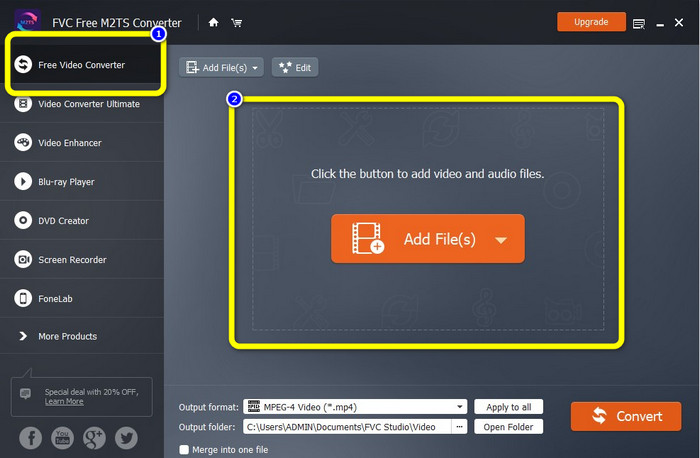
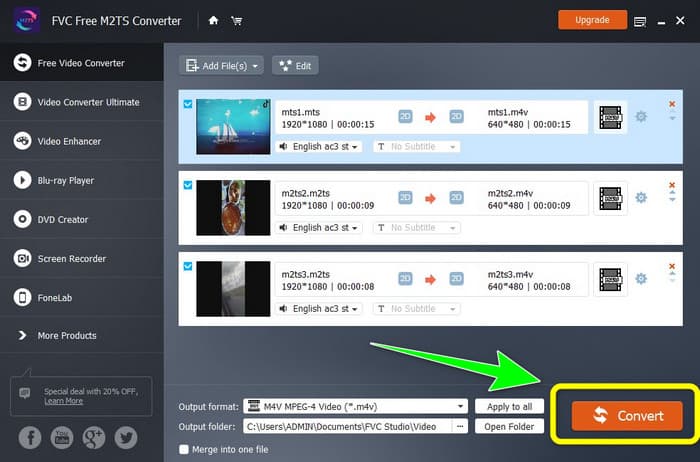
ขั้นตอนที่ 2: เลือกตัวเลือก Free Video Converter ที่ด้านซ้ายของอินเทอร์เฟซ จากนั้นคลิกปุ่ม Add File เพื่อเพิ่มไฟล์วิดีโอ M2TS ที่คุณต้องการแปลง.
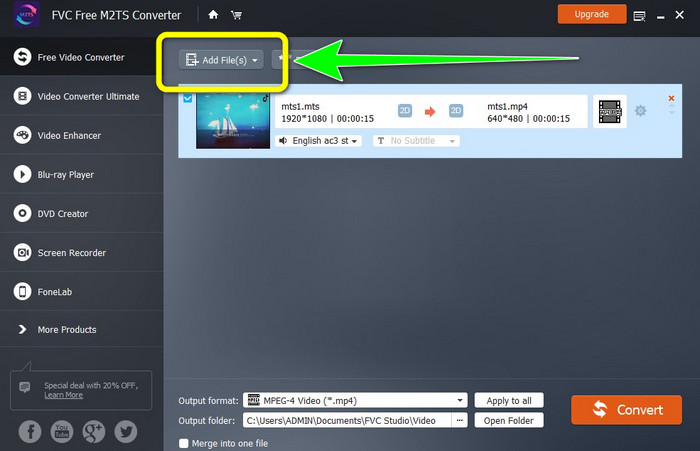
ขั้นตอนที่ 3: หากคุณต้องการเพิ่มไฟล์วิดีโอ M2TS หลายไฟล์ ให้คลิกปุ่ม Add Files.
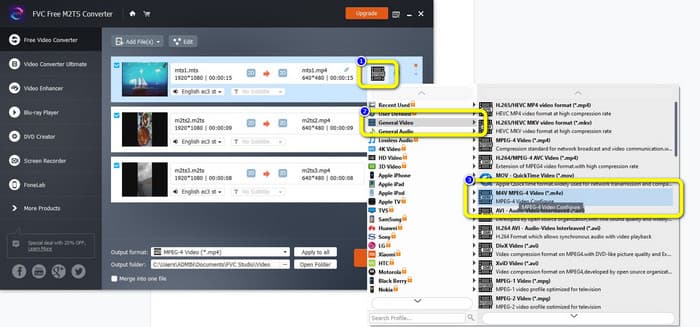
ขั้นตอนที่ 3: ไปที่สัญลักษณ์ Video ทางด้านขวาของอินเทอร์เฟซ เลือกตัวเลือก General Video แล้วเลือกประเภทไฟล์ที่คุณต้องการ คือ M4V.
ขั้นตอนที่ 4: คุณสามารถทำตามขั้นตอนเดิมเพื่อเปลี่ยนรูปแบบเอาต์พุตของไฟล์ M2TS อื่น ๆ ได้ หรือจะคลิกปุ่ม Apply to all เพื่อเปลี่ยนรูปแบบเอาต์พุตทั้งหมดให้เป็น M4V ในครั้งเดียว.
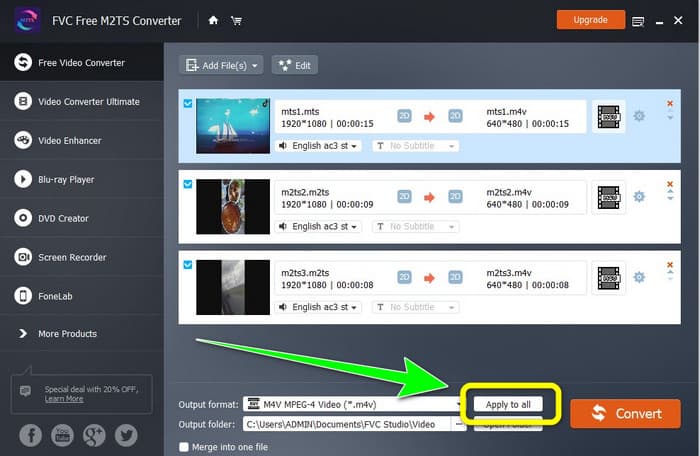
ขั้นตอนที่ 5: หลังจากเปลี่ยนไฟล์ M2TS ทั้งหมดเป็นรูปแบบไฟล์ M4V แล้ว ให้คลิกปุ่ม Convert รอให้กระบวนการแปลงเสร็จสิ้น แล้วบันทึกวิดีโอไปยังโฟลเดอร์ปลายทางที่คุณต้องการ.
ตอนที่ 2: วิธีที่ดีที่สุดในการแปลง M2TS เป็น M4V โดยไม่สูญเสียข้อมูล
หากคุณต้องการวิธีที่ยอดเยี่ยมอีกวิธีหนึ่งในการรวมไฟล์ M2TS หลายไฟล์ให้กลายเป็นไฟล์ M4V ไฟล์เดียว คุณสามารถลองใช้ Video Converter Ultimate ด้วยโปรแกรมที่ดาวน์โหลดได้ตัวนี้ คุณสามารถแปลง M2TS เป็น M4V ได้อย่างไม่สูญเสียคุณภาพ เพราะรองรับการแปลงแบบเป็นชุด นอกจากนี้ยังมีความเร็วในการแปลงสูงถึง 30 เท่าเมื่อเทียบกับโปรแกรมอื่น ๆ ทำให้คุณสามารถแปลงไฟล์ได้มากขึ้นโดยไม่เสียเวลามากไปกว่านี้ อีกทั้ง Video Converter Ultimate ยังมีอินเทอร์เฟซที่ใช้งานง่าย พร้อมขั้นตอนการแปลงที่ไม่ซับซ้อน เหมาะกับผู้ใช้ทุกระดับ.
นอกจากนี้ ตัวแปลงนี้ยังมีคุณสมบัติที่ยอดเยี่ยมอีกมากมาย หากคุณต้องการรวมวิดีโอ M2TS หลายรายการและทำให้เป็นชิ้นเดียว คุณสามารถใช้แอปพลิเคชันนี้ได้เพราะมีเครื่องมือ Video Merger ด้วยวิธีนี้ คุณสามารถรวมวิดีโอ M2TS ของคุณได้อย่างง่ายดาย นอกจากนี้ เครื่องมือนี้ยังช่วยให้คุณสร้างภาพตัดปะ โดยคุณสามารถรวมรูปภาพและวิดีโอเข้าด้วยกันได้ คุณยังสามารถใช้เทมเพลตและตัวกรองฟรีมากมาย คุณจึงสร้างคอลลาจที่สวยงามได้ มีคุณสมบัติเพิ่มเติมที่คุณสามารถเพลิดเพลินได้โดยใช้ Video Converter Ultimate
คุณสมบัติเด่น
◆ แปลงไฟล์วิดีโอได้กว่า 100 รูปแบบ รวมถึง M4V, M2TS, MP4, AVI, FLV, MKV, WMV, VOB, MOV, SWF เป็นต้น
◆ สร้างคอลลาจที่ยอดเยี่ยมด้วยฟิลเตอร์และเทมเพลตฟรี
◆ เสนอโปรแกรมสร้างมิวสิกวิดีโอ
◆ มีกล่องเครื่องมือสำหรับการตัดต่อวิดีโอ
◆ เสนอกระบวนการแปลงเป็นชุดด้วยความเร็วการแปลงที่เร็วขึ้น 30 เท่า
ใช้ขั้นตอนโดยละเอียดด้านล่างเพื่อแปลงไฟล์ M2TS หลายไฟล์พร้อมกันโดยใช้ FVC Video Converter Ultimate
ขั้นตอนที่ 1: ดาวน์โหลด Video Converter Ultimate ลงในคอมพิวเตอร์ของคุณ ในการดาวน์โหลด คุณสามารถคลิกปุ่ม ดาวน์โหลด ด้านล่าง จากนั้นเปิดแอปพลิเคชัน.
ดาวน์โหลดฟรีสำหรับ Windows 7 หรือใหม่กว่าดาวน์โหลดอย่างปลอดภัย
ดาวน์โหลดฟรีสำหรับ MacOS 10.7 หรือใหม่กว่าดาวน์โหลดอย่างปลอดภัย
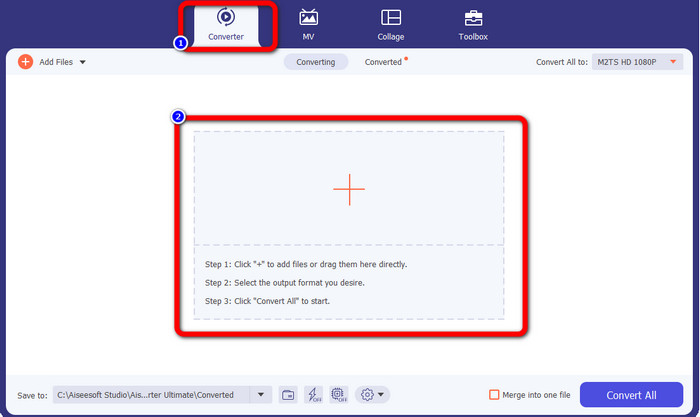
ขั้นตอนที่ 2: เลือกแท็บ Converter แล้วคลิกปุ่มสัญลักษณ์ เครื่องหมายบวก เพื่อเพิ่มไฟล์ M2TS ของคุณ.
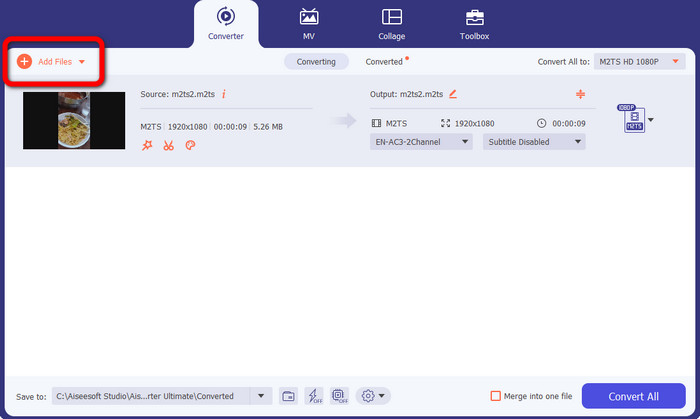
ขั้นตอนที่ 3: คลิกปุ่ม Add File ทางด้านซ้ายของอินเทอร์เฟซเพื่อเพิ่มไฟล์ M2TS เพิ่มเติม.
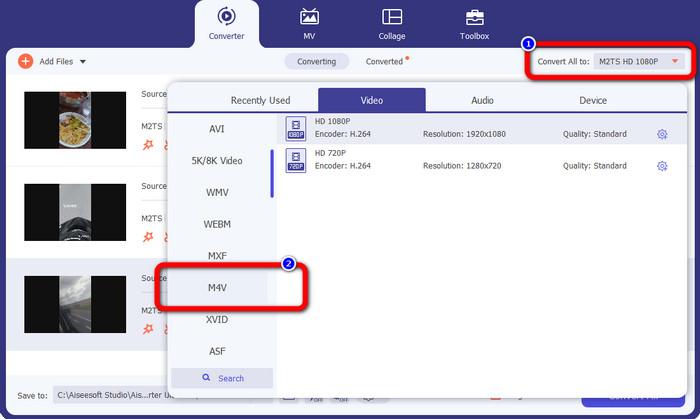
ขั้นตอนที่ 4: หากต้องการแปลงไฟล์เหล่านี้ให้เป็นไฟล์ M4V ให้คลิกปุ่ม Convert All to เพื่อดูตัวเลือกรูปแบบไฟล์ จากนั้นเลือกไฟล์รูปแบบ M4V.
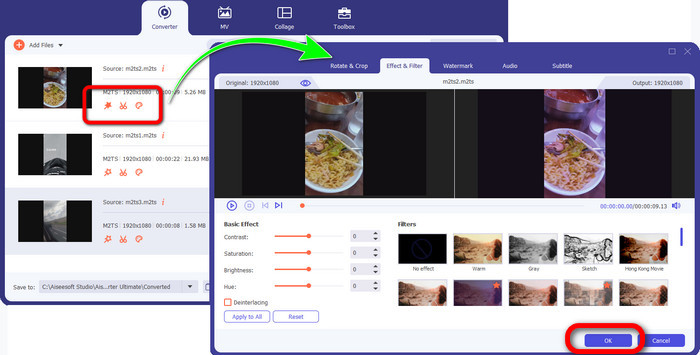
ขั้นตอนที่ 4: หากต้องการตัดต่อวิดีโอของคุณ ให้คลิกที่เครื่องมือตัดต่อเหล่านี้ คุณสามารถปรับปรุง แก้ไข เพิ่มฟิลเตอร์และเอฟเฟ็กต์ และตัดต่อวิดีโอได้ หลังจากตัดต่อวิดีโอเสร็จแล้ว ให้คลิก OK.
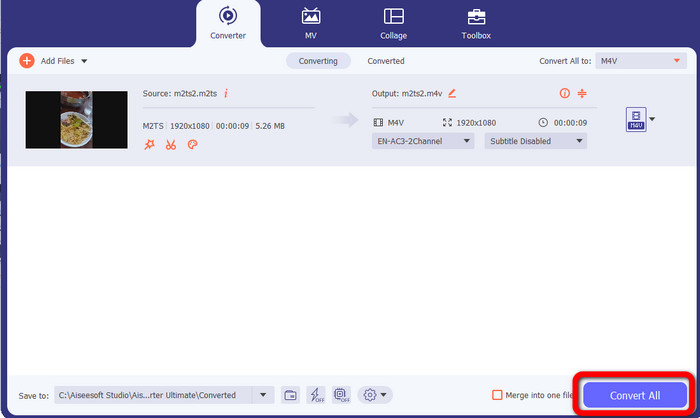
ขั้นตอนที่ 5: หลังจากตัดต่อวิดีโอเสร็จแล้ว คุณสามารถแปลงไฟล์ได้โดยคลิกปุ่ม Convert All จากนั้นบันทึกวิดีโอหลังจากกระบวนการแปลงเสร็จสมบูรณ์.
ตอนที่ 3: M2TS คืออะไร
นามสกุลไฟล์: .m2ts
รูปแบบไฟล์คอนเทนเนอร์ Blu-ray Disc Audio-Video (BDAV) MPEG-2 Transport Stream (M2TS) ใช้นามสกุลไฟล์ M2TS ใช้สำหรับเสียง วิดีโอ และสตรีมอื่นๆ หลายรายการ คอนเทนเนอร์สตรีมการขนส่ง MPEG-2 ทำหน้าที่เป็นรากฐาน ใน Blu-ray Disc และ AVCHD คอนเทนเนอร์ประเภทนี้มักใช้สำหรับวิดีโอคุณภาพสูง Blu-ray Disc Association พัฒนา M2TS โปรแกรมที่เกี่ยวข้องทั้งหมด ได้แก่ All Player, VLC Media Player, Pot Player และ MPlayer
ตอนที่ 4: M4V คืออะไร?
นามสกุลไฟล์: .m4v
Apple สร้างรูปแบบไฟล์ M4V ซึ่งเป็นรูปแบบคอนเทนเนอร์วิดีโอที่คล้ายกับมาตรฐาน MP4 ข้อแตกต่างหลักคือไฟล์ M4V สามารถป้องกันการคัดลอกได้ ใน iTunes Store นั้น Apple เข้ารหัสไฟล์วิดีโอโดยใช้รูปแบบ M4V โปรแกรมที่เกี่ยวข้องสำหรับรูปแบบนี้คือ Apple QuickTime Player, Apple iTunes, Media Player Classic, KMPlayer, Real Player, Zoom Player และ VLC Media Player
อ่านเพิ่มเติม:
วิธีแปลง M2TS เป็น AVI ด้วยโปรแกรมแปลงไฟล์ที่ดีที่สุดทั้งบนเว็บและเดสก์ท็อป
แนวทางยอดเยี่ยมในการแปลง M2TS เป็น FLV ทั้งออนไลน์และออฟไลน์
ตอนที่ 5: คำถามที่พบบ่อยเกี่ยวกับการแปลง M2TS เป็น M4V
M2TS ดีกว่า MP4 หรือไม่
เนื่องจาก M2TS ประหยัดหน่วยความจำมากกว่าและมีความละเอียดสูง จึงต้องการพื้นที่มากขึ้น MP4 ดีกว่า M2TS สำหรับการประหยัดพื้นที่จัดเก็บ
วิธีใช้เบรกมือเพื่อแปลง M2TS เป็น M4V
ดาวน์โหลด เบรกมือ. จากนั้นไปที่โอเพ่นซอร์สและเพิ่มไฟล์ M2TS จากนั้นไปที่ตัวเลือกรูปแบบแล้วเลือก M4V หลังจากนั้นให้คลิกปุ่มเริ่มเข้ารหัส
MTS เหมือนกับ M2TS หรือไม่
ในแง่ของการทำงาน ไฟล์ MTS และ M2TS จะเหมือนกัน ไฟล์ HD ทั้งสองนี้เชื่อมต่อกับรูปแบบวิดีโอ AVCHD เป็นไปได้ที่จะเปลี่ยนนามสกุลไฟล์ M2TS เป็นนามสกุลไฟล์ MTS และในทางกลับกัน
สรุป
เนื้อหาที่กล่าวมาข้างต้นช่วยให้คุณเรียนรู้เพิ่มเติมเกี่ยวกับวิธีการแปลง M2TS เป็น M4V สองโปรแกรมที่ดาวน์โหลดได้นี้เป็นโปรแกรมแปลงไฟล์ที่ดีที่สุดที่คุณสามารถใช้ได้ สามารถแปลงไฟล์ได้อย่างรวดเร็วและไม่สูญเสียคุณภาพ.
-
 วิธีการต่างๆ ในการเปลี่ยนรูปแบบไฟล์ MOV เป็น M4V
 คุณต้องการวิธีการที่มีประสิทธิภาพในการแปลงไฟล์ MOV เป็นรูปแบบ M4V หรือไม่? จากนั้นบทความนี้จะตอบสนองความต้องการของคุณ นี่คือตัวแปลงที่ดีที่สุดที่คุณสามารถใช้ได้
-
 เทคนิคที่ยอดเยี่ยมในการแปลง GIF เป็น M4V ทันที
 คำแนะนำนี้ให้กลยุทธ์ที่มีประสิทธิภาพสูงสุดในการแปลง GIF เป็น M4V นอกจากนี้ เราจะแนะนำตัวแปลงสองตัวที่ดีที่สุดที่คุณสามารถลองใช้ได้
-
 กระบวนการที่ตรงไปตรงมาเพื่อแปลง SWF เป็น M4V อย่างมีประสิทธิภาพ
 อย่าพลาดโอกาสนี้ในการเรียนรู้วิธีการที่ไม่ซับซ้อนในการแปลง SWF เป็น M4V ทางออนไลน์และใช้แอปพลิเคชันที่ดาวน์โหลดได้ อ่านโพสต์นี้เพื่อหาคำตอบ!
