


 Video Converter Ultimate
 บันทึกหน้าจอ
 ซ่อมวิดีโอ
 ดาวน์โหลดอย่างปลอดภัย
สุดยอด 7: โปรแกรมแปลงเสียง M4A เป็น WAV ที่มีประสิทธิภาพที่คุณไม่ควรพลาด
เมื่อพูดถึงเรื่องความเข้ากันได้ รูปแบบไฟล์ M4A แทบไม่สร้างปัญหาใด ๆ อย่างไรก็ตาม หากคุณพิถีพิถันมากกับเพลงที่คุณฟังหรือเสียงที่คุณบันทึก รูปแบบ M4A อาจไม่ใช่ตัวเลือกที่ดีที่สุด ดังนั้นคุณจึงสามารถใช้รูปแบบคอนเทนเนอร์แบบไม่สูญเสียคุณภาพอย่าง WAV เพื่อแก้ปัญหานี้ได้ ในการทำเช่นนั้น คุณจำเป็นต้องมีโปรแกรมที่เชื่อถือได้ เพื่อประหยัดเวลาในการค้นหาเครื่องมือ ซอฟต์แวร์แปลงไฟล์ M4A เป็น WAV โปรดอ่านบทความนี้ต่อไป เพราะเราจะคัดเลือกและแนะนำให้คุณอย่างละเอียด.

ส่วนที่ 1: ตัวแปลง M4A เป็น WAV สำหรับ Windows และ Mac
1. Video Converter Ultimate
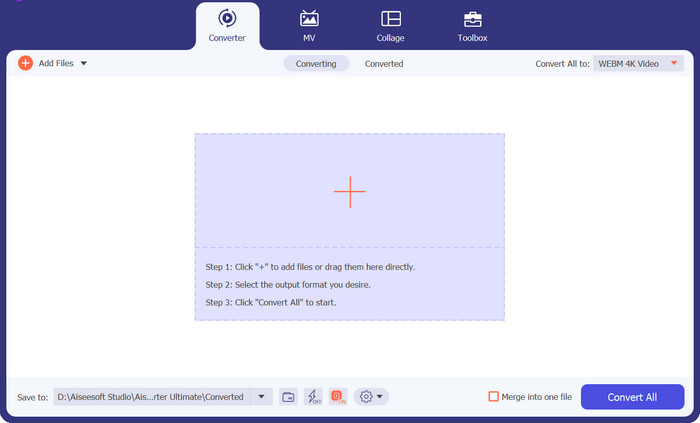
ผู้ใช้ที่แนะนำ: แพลตฟอร์มนี้เหมาะที่สุดสำหรับผู้เริ่มต้น ผู้ใช้ทั่วไป ไปจนถึงผู้ใช้ระดับมืออาชีพ.
แพลตฟอร์มที่รองรับ: อุปกรณ์ Windows และ Mac
แน่นอนว่าเราจะเริ่มจากโซลูชันขั้นสุดยอดสำหรับการแปลงไฟล์ด้วยซอฟต์แวร์ M4A เป็น WAV Video Converter Ultimate เป็นโปรแกรมแปลงไฟล์ระดับมืออาชีพที่มาพร้อมเทคโนโลยีเร่งความเร็วด้วย GPU ซึ่งหมายความว่าโปรแกรมสามารถแปลงไฟล์ได้รวดเร็วแม้ว่าคุณจะกำลังจัดการกับสื่อจำนวนมากและไฟล์ขนาดใหญ่ นอกจากนี้ยังมีชื่อเสียงในด้านฟีเจอร์การแปลงแบบกลุ่มที่ช่วยให้คุณแปลงโฟลเดอร์ไฟล์ M4A ทั้งโฟลเดอร์เป็น WAV ได้ในครั้งเดียว อีกทั้งโปรแกรมนี้ยังรองรับรูปแบบวิดีโอและเสียงมากกว่า 1,000 รูปแบบ เพื่อตอบโจทย์ความต้องการด้านการแปลงไฟล์ของคุณ.
ดาวน์โหลดฟรีสำหรับ Windows 7 ขึ้นไปดาวน์โหลดอย่างปลอดภัย
ดาวน์โหลดฟรีสำหรับ MacOS 10.7 หรือใหม่กว่าดาวน์โหลดอย่างปลอดภัย
สิ่งที่เราชอบที่สุด:
ส่วนติดต่อผู้ใช้ที่เข้าใจง่าย: เครื่องมือนี้ทำงานได้ดีแม้สำหรับผู้เริ่มต้น อินเทอร์เฟซเรียบง่ายแต่ดูทันสมัย ทำให้ใช้งานและค้นหาเมนูต่าง ๆ ได้ไม่ยาก.
กล่องเครื่องมือแบบครบครัน: Video Converter Ultimate ไม่ได้เป็นเพียงตัวเลือกที่ยอดเยี่ยมสำหรับการแปลงไฟล์ด้วยซอฟต์แวร์ M4A เป็น WAV เท่านั้น แต่ยังเหนือกว่านั้นด้วยการมอบเครื่องมือที่มีประโยชน์มากมาย เช่น ตัวสร้าง GIF เครื่องมือปรับปรุงวิดีโอ โปรแกรมรวมวิดีโอ และโปรแกรมตัดต่อวิดีโอ.
แสดงผลลัพธ์แบบเรียลไทม์: ขณะทำคลิปแฟนเมดหรือแก้ไขไฟล์ โปรแกรมจะแสดงตัวอย่างผลลัพธ์แบบเรียลไทม์ในหน้าต่างพรีวิว เพื่อให้คุณรู้ได้ทันทีว่าวิดีโอหรืองานของคุณยังต้องปรับปรุงส่วนใดเพิ่มเติม.
ข้อเสีย:
ข้อจำกัดเวอร์ชันทดลองใช้ฟรี: Video Converter Ultimate ให้คุณทดลองใช้ฟีเจอร์เด่นบางส่วนได้ฟรี หากต้องการปลดล็อกการใช้งานแบบครบทุกฟีเจอร์ คุณจำเป็นต้องสมัครสมาชิก.
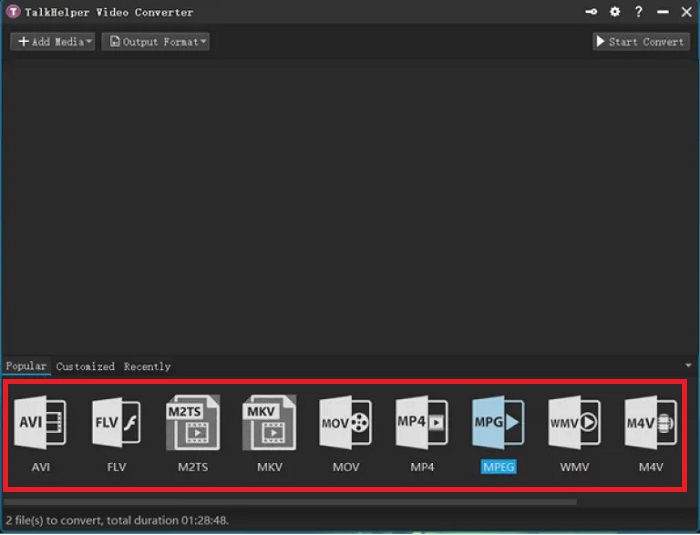
2. โปรแกรมแปลงวิดีโอ TalkHelper
ผู้ใช้ที่แนะนำ: ผู้เริ่มต้นถึงผู้ใช้ทั่วไป
แพลตฟอร์มที่รองรับ: Windows
การแปลงคุณภาพสูงเป็นเพียงข้อดีประการหนึ่งที่คุณจะได้รับจาก TalkHelper Video Converter ตัวแปลง M4A เป็น WAV ทางเลือกนี้ใช้โปรเซสเซอร์แบบมัลติคอร์เพื่อเร่งกระบวนการแปลงไฟล์ของคุณ นอกจากนี้ โปรแกรมนี้ยังมีรูปแบบวิดีโอและอุปกรณ์เฉพาะ เช่น Nokia, Xbox, Blackberry, Samsung, เกมคอนโซล และอื่นๆ อีกมากมาย
สิ่งที่เราชอบที่สุด:
ความเร็วในการแปลงสูง: TalkHelper Video Converter สามารถเร่งความเร็วการแปลงไฟล์ได้เป็นสองเท่าเมื่อเทียบกับคู่แข่ง.
การแปลงแบบกลุ่ม: เครื่องมือนี้ให้คุณแปลงไฟล์จำนวนมากพร้อมกันได้ เพียงอัปโหลดทั้งโฟลเดอร์หรือเพิ่มไฟล์ระหว่างที่กำลังแปลงอยู่ก็ได้.
ข้อเสีย:
หน้าตาโปรแกรมดูเก่า: เมื่อเทียบกับโปรแกรมอื่นที่เรารีวิวไว้ อินเทอร์เฟซของ TalkHelper Video Converter ดูเรียบและค่อนข้างล้าสมัยในแง่ของการออกแบบ.
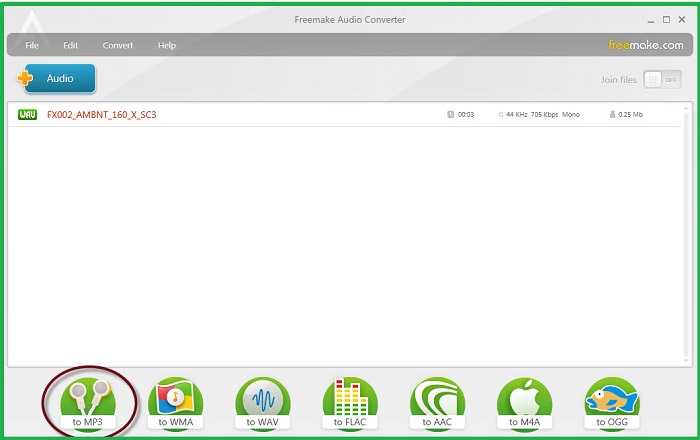
3. Freemake แปลงเสียงฟรี
ผู้ใช้ที่แนะนำ: ผู้เริ่มต้นถึงมืออาชีพ
แพลตฟอร์มที่รองรับ: อุปกรณ์ Windows
ด้วยจำนวนผู้ใช้มากกว่า 73 ล้านคนทั่วโลก นี่คือ Freemake Audio Converter ตามชื่อเลย เครื่องมือนี้ฟรีสำหรับทุกคนที่ใช้ โซลูชันตัวแปลง m4a เป็น wav ออฟไลน์นี้รับประกันการแปลงที่รวดเร็วทันใจ ด้วยการบูรณาการเทคโนโลยีเร่งความเร็ว GPU ยิ่งกว่านั้น เราชอบที่ความเข้ากันได้ของมันดำเนินไปจนถึงเวอร์ชันของ Windows Vista
สิ่งที่เราชอบที่สุด:
การแปลงเสียงคุณภาพสูง: โปรแกรมนี้เปิดโอกาสให้ผู้ใช้ปรับคุณภาพเสียงของไฟล์ผลลัพธ์ ตั้งแต่มาตรฐานไปจนถึง 320 kbps.
แชร์ผ่านอินเทอร์เน็ตได้อย่างรวดเร็ว: หลังจากแปลงไฟล์ M4A เป็น WAV แล้ว คุณสามารถบันทึกลง Google Drive หรืออัปโหลดไปยังบัญชีโซเชียลมีเดียของคุณได้ทันที.
ข้อเสีย:
รูปแบบเสียงที่จำกัด: Freemake Audio Converter แสดงรายการรูปแบบเสียงมากกว่า 50 รูปแบบเท่านั้น
ส่วนที่ 2 แปลง M4A เป็น WAV ออนไลน์
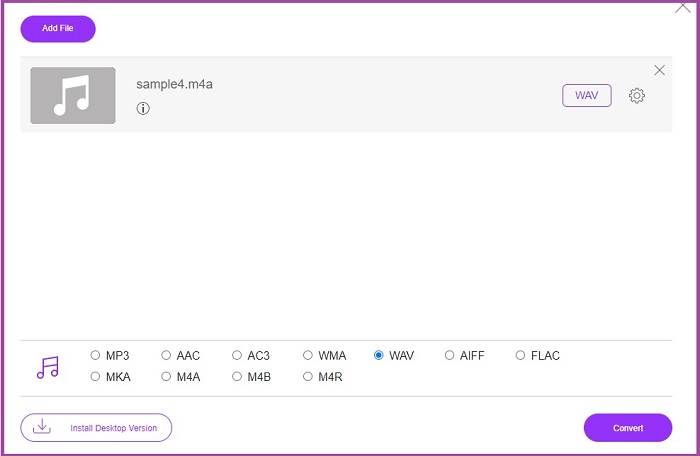
1. แปลงเสียงฟรี
ผู้ใช้ที่แนะนำ: ผู้เริ่มต้นถึงผู้ใช้ทั่วไป
แพลตฟอร์มที่รองรับ: ระบบปฏิบัติการ Windows
หากคุณกลัวว่าจะทำให้คุณภาพไฟล์เสียงลดลง ก็มีโซลูชันแบบออนไลน์ที่ถูกสร้างขึ้นมาเพื่อช่วยคุณ Free Audio Converter เปิดโอกาสให้คุณสัมผัสประสบการณ์การแปลงไฟล์ที่ยอดเยี่ยมโดยไม่มีข้อจำกัดด้านขนาดไฟล์อัปโหลด นอกจากนี้โปรแกรมแปลง M4A เป็น WAV แบบออนไลน์ฟรีนี้ยังไม่บังคับให้ผู้ใช้ต้องสมัครสมาชิกหรือลงทะเบียนใด ๆ ก่อนใช้งาน.
สิ่งที่เราชอบที่สุด:
ไม่มีลายน้ำติดไฟล์: ไม่เหมือนกับโปรแกรมออนไลน์บางตัว นับว่าเป็นเรื่องน่าประหลาดใจที่ตัวแปลงเสียงออนไลน์ตัวนี้จะไม่ใส่ลายน้ำแบรนด์ทับลงบนไฟล์สำคัญของคุณ.
การปกป้องความเป็นส่วนตัว: Free Audio Converter รับประกันว่าจะลบไฟล์ของคุณออกจากระบบหลังจากปิดโปรแกรมเมื่อการแปลงเสร็จสิ้น.
ข้อเสีย:
ต้องมีการเชื่อมต่ออินเทอร์เน็ต: คุณสามารถใช้เครื่องมือบนอุปกรณ์ใดก็ได้ แต่ควรมีการเชื่อมต่อที่เสถียร ไม่เช่นนั้นการแปลงจะไม่สำเร็จ
การแปลงเป็นชุดที่ไม่พร้อมใช้งาน: โปรแกรมสามารถแปลงไฟล์ M4A ทีละไฟล์เท่านั้น
ส่วนที่ 3 แอปแปลง M4A เป็น WAV สำหรับ Android และ iOS
1. ตัวแปลงเสียงทั้งหมด
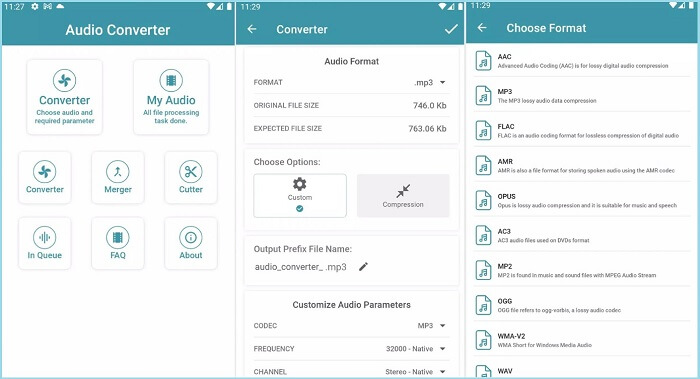
ผู้ใช้ที่แนะนำ: ผู้ใช้ระดับทั่วไป
แพลตฟอร์มที่รองรับ: Android และ iOS
All Audio Converter เผยแพร่โดย Highdea Apps Studio เป็นเครื่องมือที่เชื่อถือได้ในการแปลงไฟล์ M4A ของคุณเป็น WAV นอกเหนือจากการเป็นตัวแปลง M4A เป็น WAV ฟรีแล้ว โปรแกรมนี้ยังมีเครื่องมือในตัวอีกสามตัวอีกด้วย ด้วยการรวมเข้าด้วยกัน คุณสามารถต่อประสานไฟล์เสียงมากกว่าสองไฟล์ในไฟล์เดียวหรือตัดแต่งไฟล์โดยใช้เครื่องมือตัวตัด ในทางกลับกัน หากคุณต้องการลดขนาดไฟล์ คุณสามารถเพลิดเพลินกับโปรแกรมบีบอัดได้อย่างอิสระ
สิ่งที่เราชอบที่สุด:
เครื่องเล่นในตัว: หลังจากแปลงไฟล์เสียง M4A แล้ว คุณสามารถฟังรูปแบบไฟล์ใหม่ได้ทันทีเพียงกดปุ่มเล่นบนตัวโปรแกรม.
ข้อมูลปลอดภัย: เครื่องมือนี้ให้ความสำคัญกับการปกป้องข้อมูลของผู้ใช้โดยใช้กระบวนการเข้ารหัส.
ข้อเสีย:
ไม่มีตัวแก้ไขเมทาดาทา: ต่างจากแอปแปลงเสียงบนมือถือบางตัว โปรแกรมนี้ไม่มีตัวแก้ไขเมทาดาทาที่ให้คุณใส่รายละเอียดสำคัญของเพลงหรือไฟล์ได้.
2. โปรแกรมแก้ไขเสียงและโปรแกรมแก้ไขเพลง
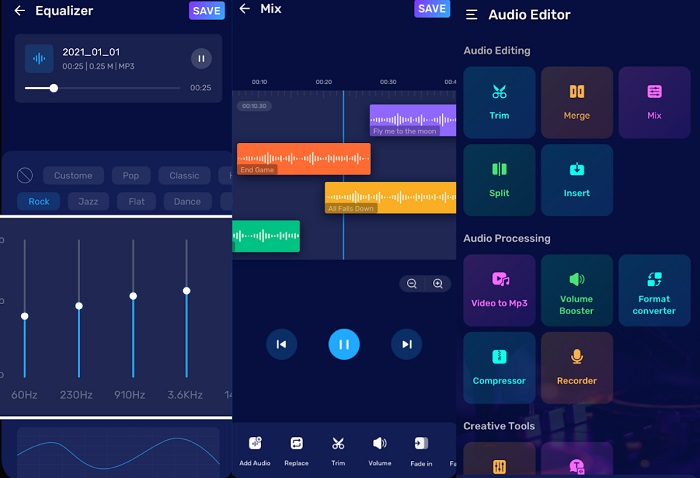
ผู้ใช้ที่แนะนำ: ผู้ใช้ระดับทั่วไปถึงมืออาชีพ
แพลตฟอร์มที่รองรับ: Android และ iOS
หากคุณกำลังมองหาสิ่งที่ดีเลิศของประสิทธิภาพ โปรแกรมแก้ไขเสียงและโปรแกรมแก้ไขเพลงไม่ต้องการการแนะนำใดๆ แอปแปลง M4A เป็น WAV นี้ไม่ใช่ตัวแปลงเสียง แต่ยังสามารถดำเนินกิจกรรมการแก้ไขเสียงขั้นสูงสำหรับทุกความต้องการของคุณ ช่วยให้คุณสามารถผสมเสียงเพื่อสร้างงานนำเสนอที่ได้รับการปรับแต่งอย่างสวยงาม นอกจากนี้ยังช่วยให้คุณบันทึกเสียงพูดและตรงไปที่โปรแกรมแก้ไขเสียงในตัวเพื่อกำจัดเสียงรบกวนที่ไม่ต้องการในพื้นหลัง
สิ่งที่เราชอบที่สุด:
ปรับแต่งพารามิเตอร์เสียงได้: ด้วยโปรแกรมนี้ คุณสามารถปรับบิตเรตของไฟล์เสียงได้ก่อนแปลงไปเป็นรูปแบบอื่น ทำให้คุณควบคุมคุณภาพผลลัพธ์ได้เอง.
ฟีเจอร์แปลงข้อความเป็นเสียง: Audio Editor และ Music Editor มีเครื่องมือสร้างสรรค์ที่ช่วยแปลงข้อความที่พิมพ์ไว้ให้กลายเป็นไฟล์เสียง ฟีเจอร์นี้จะช่วยประหยัดเวลาคุณจากการอัดเสียงพากย์เอง.
ข้อเสีย:
ค่าสมาชิกราคาแพง: หากคุณต้องการปลดล็อกเครื่องมือขั้นสูงของแอปพลิเคชัน คุณจำเป็นต้องอัปเกรดเป็นเวอร์ชันโปร.
อ่านเพิ่มเติม:
WAV Player – 5 แอปเล่นไฟล์ WAV ที่ดีที่สุดสำหรับ Android, iPhone, พีซี และ Mac
ดูวิธีการแปลง MP3 เป็นรูปแบบไฟล์ WAV
ส่วนที่ 4 เปรียบเทียบ M4A กับ WAV Converter ในตาราง
ต้องการคำแนะนำเพิ่มเติมหรือไม่? ดูภาพรวมโดยย่อของรายละเอียดอื่นๆ ที่คุณไม่ควรพลาดเกี่ยวกับตัวแปลงที่กล่าวถึงที่นี่
| ราคา | ราคา | รูปแบบที่รองรับ | |
| Video Converter Ultimate | $49.95/ ตลอดอายุการใช้งาน | เร็วขึ้น 30 เท่า | เสียงและวิดีโอ |
| ตัวแปลงวิดีโอ TalkHelper | $29.95/ ตลอดอายุการใช้งาน | เร็วขึ้น 50 เท่า | เสียงและวิดีโอ |
| Freemake โปรแกรมแปลงไฟล์เสียงฟรี | ฟรี | ปกติ | เสียงเท่านั้น |
| ตัวแปลงเสียงออนไลน์ฟรี | ฟรี | ปกติ | เสียงและวิดีโอ |
| แปลงเสียงทั้งหมด | การซื้อในแอป | ปกติ | เสียงเท่านั้น |
| โปรแกรมแก้ไขเสียงและโปรแกรมแก้ไขเพลง | การซื้อในแอป | เร็วขึ้น 30 เท่า | เสียงเท่านั้น |
ส่วนที่ 5. คำถามที่พบบ่อยเกี่ยวกับวิธีการแปลง M4A เป็น WAV
M4A ดีเท่ากับ WAV หรือไม่?
โดยทั่วไปรูปแบบ M4A มักจะมีคุณภาพต่ำกว่าเมื่อเทียบกับไฟล์ WAV เนื่องจากไฟล์ M4a ได้รับการบีบอัดแล้ว รายละเอียดบางอย่างในไฟล์ของคุณจึงลดลง ในทางกลับกัน คอนเทนเนอร์ไฟล์ WAV จะไม่ถูกบีบอัด ทำให้คุณมีเนื้อหาคุณภาพสูง
ข้อดีของการใช้ M4A คืออะไร?
ไฟล์ M4A เหมาะสำหรับการแชร์ไฟล์ผ่านอินเทอร์เน็ต ต่างจากรูปแบบที่ไม่มีการสูญเสียข้อมูลเช่น WAV ขนาด M4A มีขนาดค่อนข้างเล็ก ยิ่งไปกว่านั้น คุณจะไม่ต้องกังวลกับปัญหาในการเล่นเนื่องจาก M4A สามารถใช้งานร่วมกับเครื่องเล่นสื่อใด ๆ ได้เป็นอย่างดี
ฉันสามารถบีบอัด WAV และรักษาคุณภาพไว้ได้หรือไม่
ตราบใดที่คุณใช้ตัวแปลงแบบไม่สูญเสียข้อมูล คุณจะไม่ต้องกังวลกับการสูญเสียคุณภาพของไฟล์ WAV ในทางกลับกัน คุณสามารถแปลง WAV เป็นรูปแบบ lossless อื่นๆ เช่น FLAC ได้
รูปแบบเสียงที่ดีที่สุดคืออะไร?
ในปัจจุบัน รูปแบบ WAV ถือว่าเหนือกว่าเนื่องจากมีไดนามิกและความลึกของบิต
M4A เป็นรูปแบบคุณภาพต่ำหรือไม่
รูปแบบ M4A ค่อนข้างคล้ายกับ MP3 มาก เมื่อพูดถึงคุณภาพ ไฟล์ M4A ค่อนข้างเหมาะสมสำหรับการใช้งาน
สรุป
จากคำแนะนำสั้น ๆ นี้ ตอนนี้คุณสามารถสลับไปมาระหว่างไฟล์ M4A และ WAV ได้ทุกเมื่อที่ต้องการ ด้วย ตัวแปลงไฟล์ M4A เป็น WAV เหล่านี้ คุณมีตัวเลือกแบบไม่จำกัดในการใช้งานกับอุปกรณ์ใดก็ได้ อย่างไรก็ตาม หากคุณต้องการใช้ศักยภาพสูงสุดของงานตัดต่อเสียงทั้งหมด เราขอแนะนำอย่างยิ่งให้ใช้คอมพิวเตอร์ร่วมกับโปรแกรม Video Converter Ultimate.
-
 วิธีการแปลง M4A เป็น MP3 พร้อมตัวแปลงเสียงฟรี 4 ตัว
 ไม่สามารถเล่น M4A และต้องแปลงเป็น MP3? มีวิธีใดในการแปลง M4A เป็น MP3 ออนไลน์ฟรีหรือไม่? โพสต์นี้แชร์ 4 วิธีฟรีที่จะช่วยคุณแปลง M4A เป็น MP3 ด้วย iTunes ตัวแปลงเสียงออนไลน์และมืออาชีพ
-
 คำแนะนำในการแปลง WMA เป็น WAV เพื่อคุณภาพเสียงที่ไร้ที่ติ
 ค้นพบวิธีที่ง่ายดายในการแปลง WMA เป็น WAV และสัมผัสกับคุณภาพเสียงที่เหนือกว่า ความชัดเจนที่เพิ่มขึ้น และความสุขในการฟังที่ชวนดื่มด่ำ
-
 5 อันดับตัวแปลง FLAC เป็น M4A ที่ดีที่สุดในปี 2025 (ทุกแพลตฟอร์ม)
 ในโพสต์นี้ คุณจะเต็มไปด้วยแนวคิดใหม่ๆ เกี่ยวกับตำแหน่งที่จะเรียกใช้เพื่อแปลง FLAC เป็น M4A ทั้งแบบออนไลน์และออฟไลน์
