


 Video Converter Ultimate
 บันทึกหน้าจอ
 ซ่อมวิดีโอ
3 วิธีที่มีประสิทธิภาพในการเปลี่ยน M4V เป็น MKV บน Mac/Windows/Linux โดยไม่สูญเสียคุณภาพ
ฉันต้องเปิดวิดีโอ M4V ที่ฉันดาวน์โหลดบน iTunes มีความคิดเกี่ยวกับวิธีการแปลง M4V เป็น MKV บน Mac และใช้งานบนทีวีของฉันในภายหลังหรือไม่?
ปัญหานี้พบได้อย่างแพร่หลาย โดยเฉพาะกับวิดีโอ M4V ที่ดาวน์โหลดจาก iTunes เนื่องจากรูปแบบไฟล์นี้อยู่ภายใต้นโยบาย FairPlay ของ Apple และมีการป้องกันลิขสิทธิ์ ดังนั้นคุณจึงไม่สามารถเล่นไฟล์ .m4v บนอุปกรณ์อื่นได้ทันทีโดยไม่ต้องแปลงไฟล์ บทความนี้จะแสดงข้อมูลเกี่ยวกับโปรแกรมแปลงไฟล์ที่คุณสามารถใช้และช่วยให้คุณแปลงไฟล์ M4V ได้สำเร็จ ไม่ให้เสียเวลา ไปเรียนรู้วิธีที่มีประสิทธิภาพในการแปลงM4V เป็น MKV บน Mac หรือ Windows กันเลย.

ส่วนที่ 1 แปลง iTunes M4V เป็น MKV บน Mac และ Windows [เลือกมากที่สุด]
มีโปรแกรมแปลงไฟล์ M4V เป็น MKV ฟรี อยู่มากมายในท้องตลาดที่คุณสามารถดาวน์โหลดได้ และหนึ่งในนั้นคือ FVC Video Converter Ultimate แต่เครื่องมือระดับสูงตัวนี้ให้การแปลงไฟล์ที่มีประสิทธิภาพมากกว่าโปรแกรมอื่น ๆ ด้วยความเร็วในการแปลงที่สูง การอัปโหลดไฟล์เพื่อแปลงได้ไม่จำกัด และอินเทอร์เฟซที่ใช้งานง่าย คุณรู้สึกประทับใจกับโปรแกรมแปลงไฟล์ตัวนี้หรือไม่ หรืออยากรู้ข้อมูลเพิ่มเติมเกี่ยวกับโปรแกรมแปลงไฟล์ตัวนี้ หากเป็นเช่นนั้น ด้านล่างนี้คือคุณสมบัติเด่นที่คุณจะได้เห็นเมื่อใช้โปรแกรมนี้.

FVC Video Converter Ultimate
2,999,368+ ดาวน์โหลด- สามารถแปลง iTunes M4V หลาย ๆ ไฟล์เป็น MKV หรือเป็นรูปแบบสื่อมากกว่า 200 รูปแบบเช่น MOV, AVI, MP4 เป็นต้น
- ด้วยการแปลงที่รวดเร็วเป็นพิเศษ ขั้นตอนการแปลง M4V ของคุณในทันที
- มีฟีเจอร์การแก้ไขขั้นสูงเพื่อทำให้วิดีโอของคุณดียิ่งขึ้น
- ตั้งค่าคุณสมบัติที่น่าทึ่งในการบีบอัด ปรับขนาด ตัวสร้าง GIF ฯลฯ ใต้กล่องเครื่องมือ
ดาวน์โหลดฟรีสำหรับ Windows 7 หรือใหม่กว่าดาวน์โหลดอย่างปลอดภัย
ดาวน์โหลดฟรีสำหรับ MacOS 10.7 หรือใหม่กว่าดาวน์โหลดอย่างปลอดภัย
น่าแปลกใจไหมที่คุณลักษณะทั้งหมดเหล่านี้สามารถรวมอยู่ในเครื่องมือเดียวได้ อย่าเสียเวลาอีกต่อไปและพิจารณาว่าเครื่องมือนี้แปลง iTunes M4V เป็น MKV ของคุณเป็น MKV ได้อย่างไรโดยทำตามขั้นตอนด้านล่าง
ขั้นตอนที่ 1. ก่อนอื่น ให้ดาวน์โหลดโปรแกรมแปลงไฟล์ตัวนี้ลงในไดรฟ์ของคุณโดยคลิกปุ่มดาวน์โหลดด้านล่าง เลือกแพลตฟอร์มที่คุณกำลังใช้งานอยู่ จากนั้นทำตามขั้นตอนการติดตั้ง กด Start Now เพื่อดำเนินการต่อ อย่าลืมทำความคุ้นเคยกับอินเทอร์เฟซของเครื่องมือให้มากขึ้นเพื่อหลีกเลี่ยงการใช้งานที่ติดขัด.
ดาวน์โหลดฟรีสำหรับ Windows 7 หรือใหม่กว่าดาวน์โหลดอย่างปลอดภัย
ดาวน์โหลดฟรีสำหรับ MacOS 10.7 หรือใหม่กว่าดาวน์โหลดอย่างปลอดภัย
ขั้นตอนที่ 2. อัปโหลดไฟล์ M4V ลงบนอินเทอร์เฟซโดยคลิกปุ่ม Add Files หรือปุ่ม + หลังจากนั้นโฟลเดอร์บนคอมพิวเตอร์จะเปิดขึ้นบนหน้าจอของคุณ ให้ค้นหาไฟล์ .m4v แล้วกด Open.
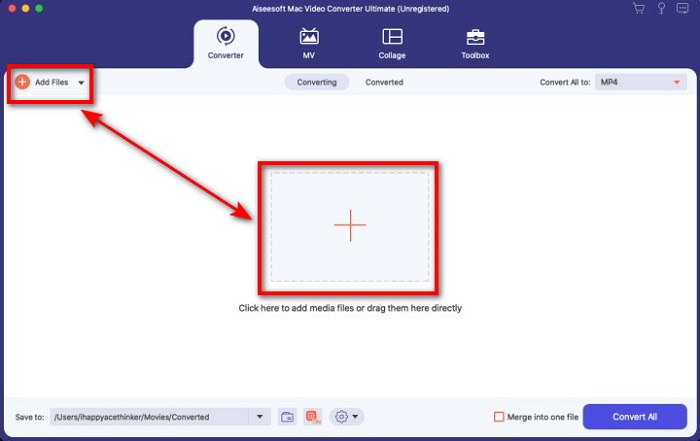
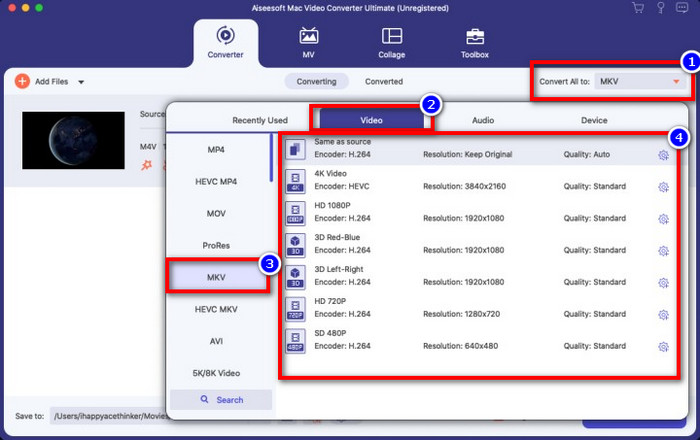
ขั้นตอนที่ 3. เลือกรูปแบบไฟล์ MKV ใต้เมนู Convert All to แล้วคลิก.
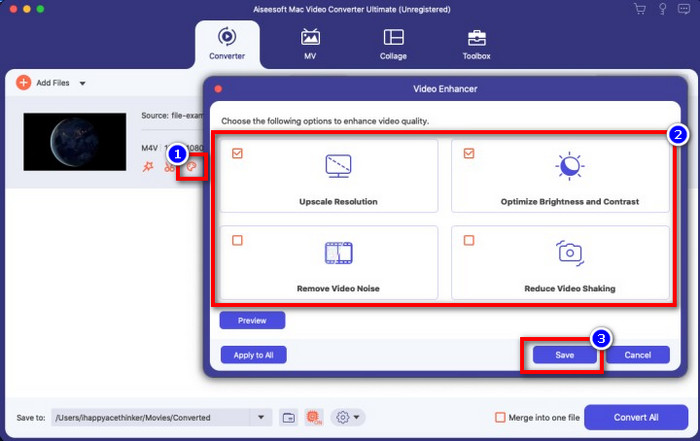
ตัวเลือกเพิ่มเติม ประสิทธิภาพของเครื่องมือนี้ต้องบอกว่าทำได้ดีมากอยู่แล้ว แต่คุณรู้หรือไม่ว่าเครื่องมือนี้ยังมีฟังก์ชันปรับแต่งคุณภาพวิดีโออีกด้วย หากคุณคลิกตัวเลือก enhance video จะมีหน้าต่างโต้ตอบแสดงขึ้นมา ให้ติ๊กที่ช่องตัวเลือกที่คุณต้องการปรับปรุงบนวิดีโอของคุณ และเพื่อใช้การตั้งค่า ให้คลิก Save.
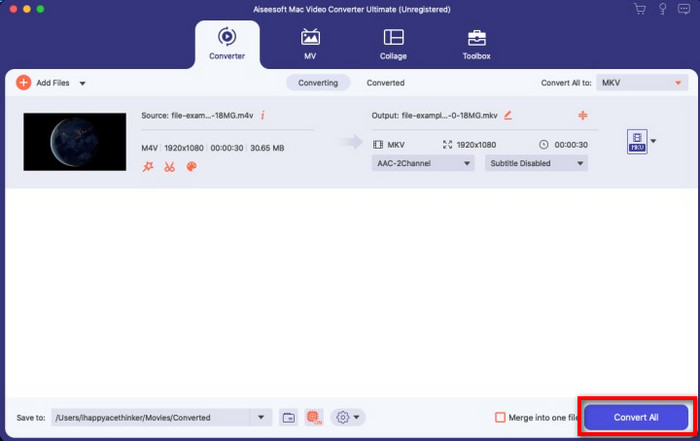
ขั้นตอนที่ 4. โดยการคลิกปุ่ม Convert All กระบวนการแปลงไฟล์จะเริ่มขึ้นภายในเวลาสั้น ๆ เพียงเท่านี้ นามสกุลไฟล์วิดีโอของคุณก็กลายเป็น .mkv แล้ว.
ส่วนที่ 2 แปลง M4V เป็น MKV ออนไลน์
ไม่อยากเสียเงินเพื่อแปลงไฟล์ M4V แต่อยากแปลง M4V เป็น MKV ออนไลน์แทนใช่ไหม หากเป็นเช่นนั้น FVC Free Video Converter Online คือโปรแกรมแปลงไฟล์ออนไลน์ที่รับประกันประสิทธิภาพการแปลงไฟล์ของคุณได้แม้ใช้งานบนเว็บ โปรแกรมนี้สามารถจัดการงานแปลงไฟล์ได้โดยที่คุณไม่ต้องซื้อหรือดาวน์โหลดโปรแกรม นอกจากนี้ยังไม่มีโฆษณาหรือการลงทะเบียนใด ๆ ในการใช้งาน แม้โปรแกรมจะแจกฟรี แต่ฟีเจอร์ที่มีจะเน้นเฉพาะการแปลงไฟล์เท่านั้น ซึ่งต่างจากโปรแกรมตัวเต็มที่มีฟีเจอร์หลากหลายและน่าทึ่งยิ่งกว่า หากคุณต้องการแปลงไฟล์ M4V ออนไลน์ ให้ใช้โปรแกรมนี้และทำตามขั้นตอนด้านล่าง.
ขั้นตอนที่ 1. กรุณาคลิกลิงก์นี้เพื่อเปิดหน้า FVC Free Video Converter Online.
ขั้นตอนที่ 2. กดตัวเลือก Add Files to Convert เพื่อเปิดและอัปโหลดไฟล์ M4V ที่คุณต้องการแปลง.
ดาวน์โหลดเวอร์ชันเดสก์ท็อปเพื่อแปลงไฟล์แบบเป็นชุดได้.
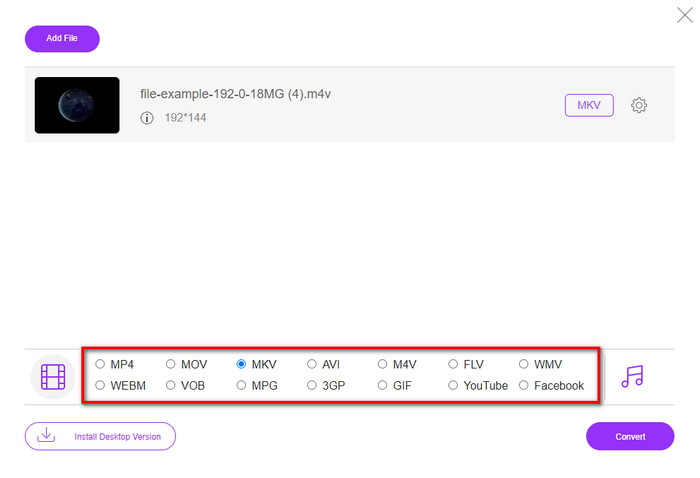
ขั้นตอนที่ 3. เลือกรูปแบบไฟล์ MKV ด้านล่าง หรือเลือกรูปแบบอื่นที่คุณต้องการ.
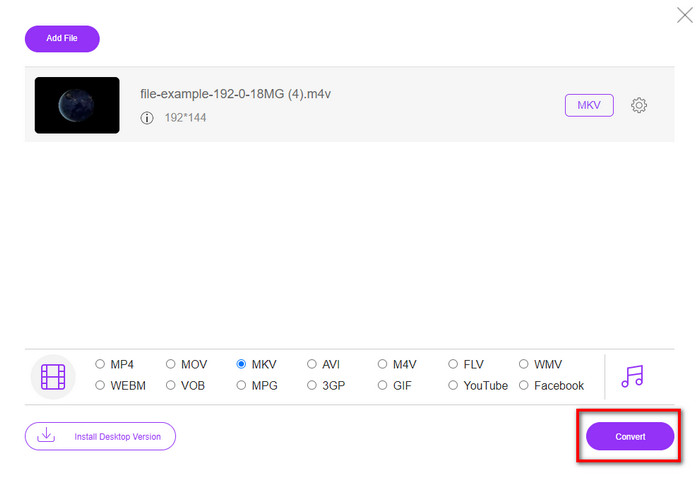
ขั้นตอนที่ 4. คลิก Convert เพื่อเริ่มกระบวนการแปลงไฟล์.
ส่วนที่ 3 แปลง M4V เป็น MKV ฟรี
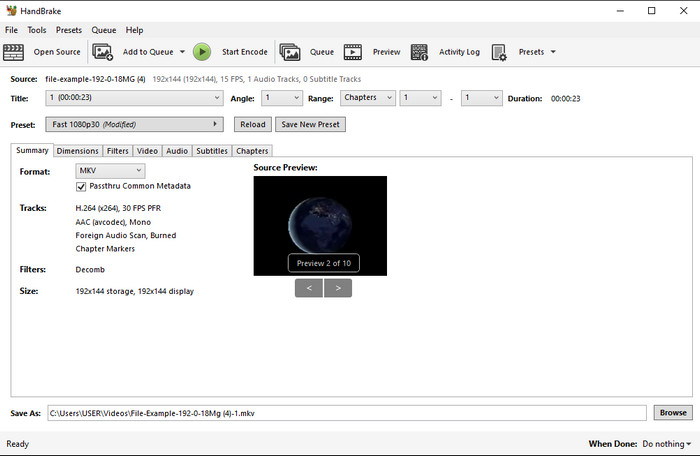
Handbrake ให้กระบวนการแปลงไฟล์ที่รวดเร็วและมีประสิทธิภาพเช่นเดียวกับโปรแกรมแปลงไฟล์อื่น ๆ ที่กล่าวถึงในบทความนี้ อย่างไรก็ตาม รูปแบบไฟล์ที่โปรแกรมนี้รองรับมีจำกัด ซึ่งหมายความว่าคุณมีตัวเลือกประเภทไฟล์ให้เลือกไม่มากนัก แต่ถ้าคุณต้องการใช้และแปลง M4V เป็น MKV ใน Handbrake ให้ทำตามขั้นตอนด้านล่างนี้.
ขั้นตอนที่ 1. ดาวน์โหลด Handbrake ลงในเดสก์ท็อปของคุณ จากนั้นอัปโหลดไฟล์ .m4v โดยการลากและวางลงบนอินเทอร์เฟซ หรือคุณสามารถคลิก File ค้นหาไฟล์จากโฟลเดอร์คอมพิวเตอร์ แล้วกด Open.
ขั้นตอนที่ 2. คลิก Format แล้วเลือก MKV.
ขั้นตอนที่ 3. คลิก Start Encode เพื่อเริ่มกระบวนการแปลงไฟล์.
ส่วนที่ 4 อะไรคือความเหมือนและความแตกต่างระหว่าง M4V และ MKV
ก่อนที่เราจะเปรียบเทียบ M4V กับ MKV เรามาดูความคล้ายคลึงกันระหว่างสองรูปแบบนี้กัน M4V และ MKV เป็นทั้งคอนเทนเนอร์สำหรับเนื้อหาสื่อและองค์ประกอบ นอกจากนี้ ทั้งสองรูปแบบยังเป็นที่รู้จักในการจัดเก็บหนึ่งในคุณภาพวิดีโอที่ดีที่สุด เช่น วิดีโอ HD หรือ 4k และยังมีขนาดใหญ่สำหรับบรรจุองค์ประกอบเช่นข้อมูลเมตา นอกจากนี้ รายละเอียดที่ตามมาด้านล่างคือข้อแตกต่างระหว่างสองรูปแบบ
M4V นั้นคล้ายกับรูปแบบ MP4 มาก อย่างไรก็ตาม รูปแบบนี้อยู่ภายใต้การป้องกันการคัดลอก DRM ซึ่งหมายความว่าคุณไม่สามารถใช้งานได้โดยอิสระ แต่ไม่ใช่ไฟล์ M4V ทั้งหมดที่มีการป้องกันของ Apple เนื่องจาก M4V ที่ดาวน์โหลดได้บางไฟล์มีใบอนุญาตที่ไม่ได้รับอนุญาต ดังนั้น ตรวจสอบให้แน่ใจว่าคุณดาวน์โหลดไฟล์ .m4v บน iTunes เพื่อหลีกเลี่ยงไวรัสที่เป็นอันตรายที่จะติดไวรัสระบบของคุณ แม้ว่ารูปแบบจะมีข้อจำกัด แต่คุณยังคงสามารถใช้รูปแบบนี้กับเครื่องเล่นสื่อหลายตัวเพื่อดูวิดีโอที่คุณดาวน์โหลดบน iTunes นอกจากนี้ หากคุณต้องการการออกแบบที่ได้รับการปกป้องบน Mac รูปแบบนี้เป็นตัวเลือกที่ดีที่สุด
ในทางตรงกันข้าม MKV มีความเฉพาะเจาะจงที่จะมีเนื้อหาสื่อและองค์ประกอบหลายอย่างในไฟล์เดียว ความสามารถนี้มีเฉพาะใน MKV เนื่องจากรูปแบบนี้ใช้งานได้ฟรี และมีความยืดหยุ่นมากกว่า M4V ยิ่งไปกว่านั้น มีหลายเหตุผลที่จะเปลี่ยน M4V เป็น MKV บน Mac หรือ Windows และหนึ่งในนั้นคือการทำให้ไฟล์วิดีโอไม่มีข้อจำกัด
M4V เทียบกับ MKV
M4V ได้รับการพัฒนาโดย Apple ซึ่งใช้ MPEG 4 เช่นกัน ไฟล์ M4V มักใช้เพื่อจัดเก็บวิดีโอที่ดาวน์โหลดจากร้าน iTunes ของ Apple เช่น มิวสิควิดีโอ รายการทีวี ฯลฯ คุณอาจพบว่าไฟล์ M4V บางไฟล์ได้รับการป้องกันการคัดลอกเนื่องจากใช้ การคุ้มครองลิขสิทธิ์ FairPlay DRM ของ Apple
รูปแบบคอนเทนเนอร์มัลติมีเดีย Matroska ซึ่งเปิดตัวในปี 2545 เป็นรูปแบบโอเพนซอร์สที่สามารถรวมแทร็กวิดีโอ เสียง รูปภาพ และคำบรรยายได้จำนวนหนึ่ง ดังนั้น คุณสามารถใช้เพื่อเก็บคลิปวิดีโอสั้น รายการทีวี และภาพยนตร์ได้อย่างง่ายดาย ค่อนข้างเป็นที่นิยมสำหรับแฟนอนิเมะ
ส่วนที่ 5. คำถามที่พบบ่อยเกี่ยวกับการแปลง M4V เป็น MKV
ไหนดีกว่าสำหรับการแก้ไข M4V หรือ MOV
ทั้งสองรูปแบบไฟล์นี้เป็นหนึ่งในรูปแบบของ Apple ดังนั้นคุณจะสังเกตได้ว่าแทบไม่มีความแตกต่างอย่างมีนัยสำคัญระหว่าง M4V และ MOV อย่างไรก็ตาม MOV เหมาะกับการตัดต่อมากกว่า เนื่องจากมักใช้จัดเก็บลำดับการเล่นวิดีโอที่เหมาะกับงานตัดต่อระดับมืออาชีพ คุณอาจคิดว่าควรแปลงไฟล์ M4V ของคุณเป็น MOV เพื่อใช้ในการตัดต่อ หากเป็นเช่นนั้น ให้คลิกลิงก์นี้เพื่อดูข้อมูลเพิ่มเติมเกี่ยวกับการแปลง M4V เป็น MOV พร้อมคำอธิบายอย่างละเอียด.
M4V และ MP4 เหมือนกันหรือไม่
M4V และ MP4 มีความเหมือนกันมากในแง่ของโครงสร้างและคุณภาพของวิดีโอ แต่เนื่องจากการป้องกันของ Apple Plays M4V จึงมีขอบเขตการรองรับเพียงเล็กน้อย และคุณไม่สามารถเล่นวิดีโอหรือแก้ไขในส่วนขยาย .m4v ได้
มีเดียเพลเยอร์ใดบ้างที่รองรับ M4V?
มีโปรแกรมเล่นสื่อไม่มากนักที่รองรับไฟล์รูปแบบนี้เพราะมีการป้องกัน DRM ดังนั้นหากคุณกำลังมองหาโปรแกรมเล่นไฟล์ MKV คุณอาจต้องใช้เวลาในการค้นหาและทดสอบหลายตัว ซึ่งค่อนข้างเสียเวลา แต่ถ้าคุณอ่านบทความนี้ คุณสามารถดาวน์โหลดหรือใช้โปรแกรมเล่นสื่อ MKV ที่ดีที่สุด 5 อันดับ ซึ่งรองรับทุกแพลตฟอร์มได้ทันที.
สรุป
ทั้งสามเครื่องมือที่นำเสนอในบทความนี้จะช่วยให้คุณแปลงไฟล์ได้อย่างมีประสิทธิภาพตามที่คุณต้องการ เพียงทำตามขั้นตอนที่ให้ไว้ แม้โปรแกรมแปลงไฟล์เหล่านี้จะมีหลายอย่างที่คล้ายกัน แต่ก็ยังมีความแตกต่างกันอยู่มาก หากคุณอ่านรายละเอียดด้านบนแล้ว คุณจะเข้าใจเกี่ยวกับทั้งสามเครื่องมือได้มากขึ้น หากคุณต้องการการแปลงไฟล์ที่ยอดเยี่ยมในครั้งเดียวและยังคงได้ประสิทธิภาพสูงสุดในการแปลงไฟล์ เราขอแนะนำ FVC Video Converter Ultimate ฟังดูเหลือเชื่อใช่ไหม แน่นอนว่าดีจริง ดังนั้นดาวน์โหลดลงเดสก์ท็อปของคุณเพื่อทดลองใช้งานด้วยตัวเอง.
-
 M4V เป็น MP3 Converter - 4 วิธีที่ดีที่สุดในการแยก MP3 จากไฟล์ M4V
 เมื่อคุณต้องการแยกเสียง MP3 จากวิดีโอ M4V อย่างง่ายดายคุณสามารถเรียนรู้เพิ่มเติมเกี่ยวกับตัวแปลง M4V เป็น MP3 ที่ดีที่สุด 4 ตัวเพื่อรับไฟล์เสียงที่ต้องการจากบทความ
-
 [คำแนะนำ] วิธีแปลงวิดีโอ M4V เป็น GIF แบบเคลื่อนไหวบน Windows/Mac
 หากคุณต้องการสร้างไฟล์ GIF แบบเคลื่อนไหวจากวิดีโอ M4V ที่คุณชื่นชอบ คุณสามารถเรียนรู้เกี่ยวกับ 2 วิธีที่ง่ายและมีประสิทธิภาพในการแปลงวิดีโอ M4V เป็น GIF ด้วยการตั้งค่าแบบกำหนดเอง
-
 3 โปรแกรมแปลงวิดีโอที่ใช้ในการแปลง iTunes M4V เป็น AVI บน Mac
 ไม่มีความคิดเกี่ยวกับวิธีการแปลง MKV เป็นรูปแบบ AVI? ขณะที่เราอ่านบทความนี้ต่อไป เราจะรู้จักเครื่องมือ 3 อย่างที่สามารถช่วยคุณแปลงรูปแบบไฟล์นี้ได้

