


 Video Converter Ultimate
 บันทึกหน้าจอ
 ซ่อมวิดีโอ
 ดาวน์โหลดอย่างปลอดภัย
สุดยอดตัวแปลง MKV เป็น WAV: บทวิจารณ์และคำแนะนำที่เป็นกลาง
ไม่ว่าคุณจะเป็นนักฟังเพลง ผู้คลั่งไคล้มัลติมีเดีย หรือมืออาชีพในธุรกิจเครื่องเสียง การรู้วิธีแปลงไฟล์ MKV (Matroska Video) เป็น WAV (Waveform Audio File Format) ไฟล์ต่างๆ จะทำให้คุณเข้าถึงโลกใบใหม่ เสียง ในคู่มือนี้ เราจะอธิบายขั้นตอนการแปลง ดูว่าเหตุใด WAV จึงเป็นตัวเลือกที่ดีในรูปแบบสุดท้าย และพูดคุยเกี่ยวกับข้อดีและสิ่งที่ควรคำนึงถึง
เมื่ออ่านจนจบ คุณจะรู้ทุกสิ่งที่จำเป็นต้องรู้เพื่อใช้ตัดสินใจได้อย่างชาญฉลาดและยกระดับประสบการณ์การฟังของคุณ เตรียมออกเดินทางสู่โลกดนตรีดิจิทัลที่ไร้พรมแดน และให้ความสำคัญกับคุณภาพเป็นหลัก มาดูกันว่าเราจะแปลง MKV เป็น WAVได้อย่างไร และค้นหาศักยภาพที่แท้จริงของไฟล์เสียงของคุณกันเถอะ.

ส่วนที่ 1 การเปรียบเทียบตัวแปลง MKV เป็น WAV
สำหรับภาพรวมของโปรแกรมที่เรากำลังจะตรวจสอบ นี่คือแผนภูมิเปรียบเทียบที่คุณอาจใช้เป็นข้อมูลอ้างอิง
| Video Converter Ultimate | ฟรี Video Converter Ultimate | โปรแกรมแปลงไฟล์เสียง Freemake | |
| รูปแบบที่รองรับ | หลากหลายรูปแบบ | หลากหลายรูปแบบ | หลากหลายรูปแบบ |
| การแปลงแบทช์ | ใช่ | ใช่ | ใช่ |
| ตัวเลือกการปรับแต่ง | การตั้งค่าเสียงที่กว้างขวาง | การตั้งค่าเสียงที่จำกัด | การตั้งค่าเสียงที่ปรับแต่งได้ |
| คุณภาพผลผลิต | การแปลงคุณภาพสูง | คุณภาพอาจแตกต่างกันไป | การแปลงคุณภาพสูง |
ส่วนที่ 2 สุดยอดตัวแปลง MKV เป็น WAV
1. Video Converter Ultimate
Video Converter Ultimate เป็นตัวเลือกที่เหมาะอย่างยิ่ง หากคุณต้องการแปลงไฟล์ MKV หลายไฟล์เป็นไฟล์ MOV พร้อมกัน ซอฟต์แวร์นี้คือโปรแกรมแปลง MKV ที่มีประสิทธิภาพ ช่วยให้คุณแปลงวิดีโอ MKV เป็นรูปแบบ MOV ได้อย่างง่ายดาย นอกจากจะรองรับรูปแบบไฟล์เสียงหลากหลายแล้ว เครื่องมือนี้ยังช่วยให้คุณแปลง MKV เป็นรูปแบบวิดีโอทางเลือกอื่น ๆ ได้มากมาย แม้ว่าไฟล์ MKV จะเป็นชนิดไฟล์ที่ถูกแปลงมากที่สุดด้วย Video Converter Ultimate แต่โปรแกรมนี้ก็ยังรองรับไฟล์ AVI, MP4 เป็นต้น.
คำแนะนำต่อไปนี้จะนำคุณเข้าสู่กระบวนการใช้ตัวแปลง MKV เป็น WAV นี้:
ข้อดี
- การแปลงที่รวดเร็วและมีประสิทธิภาพ
- เข้ากันได้กับระบบปฏิบัติการหลัก
- รองรับรูปแบบวิดีโอและเสียงที่หลากหลาย
จุดด้อย
- ความสามารถในการแก้ไขขั้นพื้นฐานเท่านั้นสำหรับแอปเวอร์ชันฟรี
ขั้นตอนที่ 1 เริ่มต้นโดยคลิกปุ่ม ดาวน์โหลดฟรี ด้านล่างเพื่อรับตัวติดตั้งโปรแกรม จากนั้นติดตั้งโปรแกรมลงในคอมพิวเตอร์ของคุณ.
ดาวน์โหลดฟรีสำหรับ Windows 7 ขึ้นไปดาวน์โหลดอย่างปลอดภัย
ดาวน์โหลดฟรีสำหรับ MacOS 10.7 ขึ้นไปดาวน์โหลดอย่างปลอดภัย
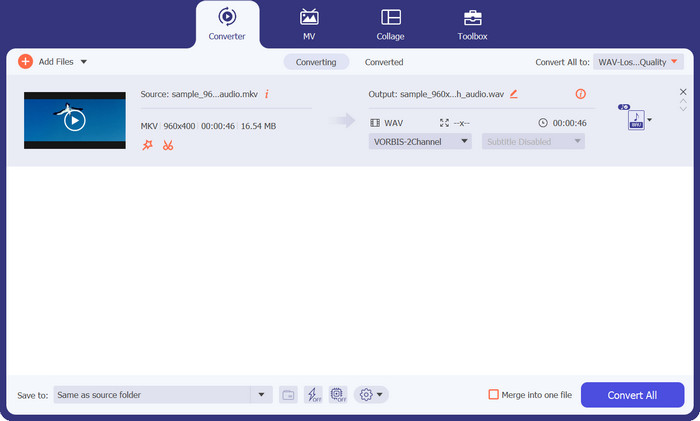
ขั้นตอนที่ 2 หลังจากเปิดใช้งานเครื่องมือแล้ว ให้อัปโหลดไฟล์เป้าหมายของคุณโดยกดปุ่มสัญลักษณ์ เครื่องหมายบวก จากแผงหลักของโปรแกรม คุณยังสามารถกดปุ่ม เพิ่มไฟล์ ที่มุมซ้ายบนเพื่ออัปโหลดไฟล์ได้อีกทางหนึ่ง.
ขั้นตอนที่ 3 จากนั้นคลิกเปิดตัวเลือก โปรไฟล์ จากตรงนี้คุณจะเห็นแท็บสำหรับการแปลง ตอนนี้ให้เลือกแท็บ เสียง และเลือก WAV เป็นรูปแบบเอาต์พุต หากต้องการ คุณสามารถแก้ไขพารามิเตอร์ต่าง ๆ ให้ตรงกับความต้องการได้.
ขั้นตอนที่ 4 สุดท้ายให้คลิกปุ่ม แปลงทั้งหมด ที่มุมล่างขวาเพื่อเริ่มกระบวนการแปลง จากนั้นรอจนกว่ากระบวนการจะเสร็จสมบูรณ์.
2. โปรแกรมแปลงวิดีโอออนไลน์ฟรี
นี่เป็นโปรแกรมออนไลน์ที่ช่วยให้ผู้ใช้แปลงไฟล์ MKV เป็นไฟล์ WAV ได้โดยไม่ต้องเสียค่าใช้จ่าย กระบวนการแปลงวิดีโอด้วย Free Video Converter Online รวดเร็วมาก ยิ่งไปกว่านั้น ยังไม่มีการจำกัดจำนวนวิดีโอที่คุณจะแปลงได้ โปรแกรมนี้รองรับการแปลงไฟล์ MKV เป็นหลายรูปแบบ เช่น MP3, WMA, WAV และอื่น ๆ อีกมากมาย ใช้งานได้กับทุกเบราว์เซอร์โดยไม่ต้องมีสเปกฮาร์ดแวร์เฉพาะ แตกต่างจากซอฟต์แวร์แปลง MKV เป็น WAV.
ข้อดี
- ตัวแปลงไฟล์ MKV เป็น WAV ออนไลน์ฟรี
- ไม่จำเป็นต้องติดตั้งซอฟต์แวร์
- เข้ากันได้กับหลายระบบปฏิบัติการ
จุดด้อย
- ขึ้นอยู่กับการเข้าถึงอินเทอร์เน็ตอย่างต่อเนื่อง
คุณอาจเห็นคำแนะนำต่อไปนี้เพื่อใช้โปรแกรมแปลงไฟล์ MKV เป็น WAV ฟรี:
ขั้นตอนที่ 1 บนเบราว์เซอร์ที่คุณชื่นชอบ ให้ไปที่เว็บไซต์ทางการของ Free Video Converter Online โดยคลิกลิงก์ของโปรแกรม จากนั้นคุณจะเข้าสู่หน้าแรก.
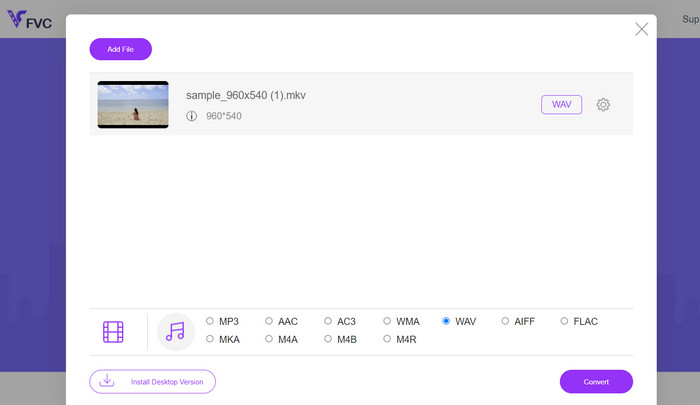
ขั้นตอนที่ 2 ตอนนี้ให้กดปุ่ม เพิ่มไฟล์ เพื่อแปลง จากอินเทอร์เฟซหลัก แล้วเลือกไฟล์ MKV ที่คุณต้องการแปลงเป็น WAV จากนั้นโปรแกรมจะแสดงไฟล์ที่อัปโหลด.
ขั้นตอนที่ 3 คราวนี้ให้เลือกรูปแบบเอาต์พุต ในส่วนรูปแบบ เสียง ให้เลือกปุ่มตัวเลือกสำหรับ WAV และแก้ไขพารามิเตอร์ต่าง ๆ จากนั้นคลิกปุ่ม แปลง เพื่อเริ่มแปลง MKV เป็น WAV.
3. โปรแกรมแปลงไฟล์เสียง Freemake
Freemake Audio Converter มอบโซลูชันที่มีประสิทธิภาพสำหรับการแปลงไฟล์ MKV ของคุณเป็นเสียง WAV คุณภาพสูง คุณสามารถเพิ่มไฟล์ MKV ของคุณลงในโปรแกรมได้ง่ายๆ โดยเลือกทีละไฟล์หรือทั้งโฟลเดอร์ เมื่อโหลดไฟล์แล้ว คุณสามารถเลือก WAV เป็นรูปแบบเอาต์พุตจากตัวเลือกที่มี นอกจากนี้ยังมีตัวเลือกรูปแบบเอาต์พุตอื่น ๆ อีกด้วย เพื่อให้มั่นใจว่าเข้ากันได้กับอุปกรณ์และเครื่องเล่นมีเดียที่หลากหลาย
ข้อดี
- แยกแทร็กเสียงจากไฟล์วิดีโอ
- แปลงไฟล์หลายไฟล์พร้อมกัน
- ปรับแต่งการตั้งค่าเอาต์พุต
จุดด้อย
- ใช้ได้กับระบบปฏิบัติการ Windows เท่านั้น
- คุณสมบัติขั้นสูงที่จำกัด
ขั้นตอนที่ 1 หากต้องการแปลง MKV เป็น WAV ให้ติดตั้งโปรแกรมและเปิดใช้งานบนคอมพิวเตอร์ของคุณ.
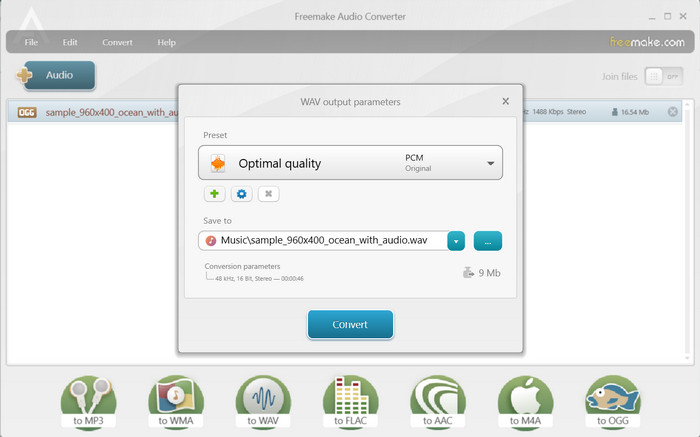
ขั้นตอนที่ 2 จากนั้นคลิกปุ่ม เสียง เพื่ออัปโหลดไฟล์ และตรวจสอบให้แน่ใจว่าได้โหลดไฟล์ MKV ที่มีไฟล์เสียงอยู่ภายใน.
ขั้นตอนที่ 3 ตอนนี้ให้เลือกตัวเลือกเป็น WAV ที่ด้านล่างของอินเทอร์เฟซเพื่อกำหนดให้เป็นรูปแบบเอาต์พุต สุดท้ายให้กดปุ่ม แปลง จากหน้าต่างที่ปรากฏขึ้น.
อ่านเพิ่มเติม:
ตัวแปลงยอดนิยมสำหรับแปลง ASF เป็น GIF มีมขำ ๆ
วิธีที่ง่ายกว่าสำหรับเร่งความเร็ววิดีโอรูปแบบ MP4 [ออฟไลน์ & ออนไลน์]
ส่วนที่ 3 คำถามที่พบบ่อยเกี่ยวกับตัวแปลง MKV เป็น WAV
มีข้อจำกัดใด ๆ ในการแปลง MKV เป็น WAV หรือไม่
ข้อจำกัดบางประการที่ต้องพิจารณาเมื่อแปลง MKV เป็น WAV รวมถึงขนาดไฟล์ เวลาในการแปลง และความสามารถของซอฟต์แวร์หรือเครื่องมือการแปลง ไฟล์ MKV ขนาดใหญ่อาจใช้เวลาในการแปลงนานกว่า และเครื่องมือแปลงบางอย่างอาจมีข้อจำกัดเกี่ยวกับขนาดไฟล์หรือระยะเวลา
มีทางเลือกอื่นนอกเหนือจาก WAV สำหรับการแยกเสียง MKV หรือไม่
ใช่ มีรูปแบบเสียงอื่นให้พิจารณาสำหรับการแยกเสียง MKV ขึ้นอยู่กับความต้องการเฉพาะของคุณ ทางเลือกทั่วไปบางอย่าง ได้แก่ MP3, FLAC, AAC และ OGG
ฉันสามารถแปลง MKV เป็น WAV โดยไม่สูญเสียคุณภาพเสียงได้หรือไม่?
คุณภาพเสียงของไฟล์ WAV ที่แปลงแล้วขึ้นอยู่กับปัจจัยต่างๆ รวมถึงแหล่งเสียงต้นฉบับและการตั้งค่าที่ใช้ระหว่างกระบวนการแปลง การแปลงจากรูปแบบเสียงที่สูญหาย (เช่น เสียงภายในไฟล์ MKV) เป็นรูปแบบที่ไม่สูญเสียข้อมูล (เช่น WAV) โดยทั่วไปจะรักษาคุณภาพเสียงต้นฉบับไว้
สรุป
ด้วยความเข้าใจกระบวนการและการใช้เครื่องมือแปลงที่เชื่อถือได้ คุณจะสามารถแปลง MKV เป็น WAVได้อย่างมีประสิทธิภาพ และมีความยืดหยุ่นมากขึ้นในการจัดการคอนเทนต์เสียงจากไฟล์ MKV ของคุณ.
-
 ทางเลือกที่ยอดเยี่ยมในการแปลง MKV เป็นรูปแบบ AVI
 เรียนรู้วิธีการแปลงวิดีโอ MKV ด้วยขั้นตอนง่าย ๆ ที่มีให้สำหรับคุณโดยเฉพาะ คุณต้องการที่จะรู้ว่าอย่างไร? จากนั้นคลิกลิงก์นี้เพื่อเรียนรู้เพิ่มเติม
-
 วิธีที่ดีที่สุดในการแก้ไขข้อมูลเมตา MKV อย่างมืออาชีพ [ง่าย]
 ไม่รู้ว่าจะแก้ไขข้อมูลเมตาของ MKV ได้อย่างไร? ผู้ใช้บางคนพบว่าการแก้ไขแท็กใน MKV เป็นเรื่องยาก หากคุณเป็นหนึ่งในนั้น โปรดอ่านบทความนี้
-
 วิธีแปลง FLAC และ WAV อย่างง่ายดาย (ฟรี & จ่ายเงิน)
 คุณต้องการเปลี่ยน FLAC เป็น WAV แต่ต้องการความช่วยเหลือเมื่อรู้ว่าจะเริ่มต้นอย่างไร ป้ายบอกทางนี้จะสอนวิธีทำอย่างรวดเร็วและง่ายดาย
