


 Video Converter Ultimate
 บันทึกหน้าจอ
 ซ่อมวิดีโอ
ตัวแปลง MKV เป็น WMV ฟรีที่ดีที่สุดที่สามารถแปลงไฟล์ของคุณได้อย่างรวดเร็ว
MKV (Matroska) เป็นรูปแบบคอนเทนเนอร์มาตรฐานที่รองรับไฟล์วิดีโอและเสียงได้อย่างหลากหลาย แม้ว่าจะเป็นรูปแบบไฟล์ที่ใช้กันอย่างแพร่หลาย แต่คุณยังจำเป็นต้องแปลงให้เป็นรูปแบบไฟล์วิดีโอที่ได้รับการรองรับอย่างกว้างขวาง เช่น WMV ดังนั้นหากคุณกำลังมองหาโปรแกรมแปลงไฟล์ MKV เป็น WMV ฟรี บทความนี้เหมาะสำหรับคุณ.

ส่วนที่ 1 ทำไมคุณต้องแปลง MKV เป็น WMV
MKV (Matroska) สามารถเก็บไฟล์วิดีทัศน์และมัลติมีเดียจำนวนมากได้ เพราะเป็นคอนเทนเนอร์มาตรฐานที่ใช้งานได้ฟรี แม้จะเป็นรูปแบบไฟล์ที่พบได้ทั่วไป แต่ก็ยังไม่ใช่มาตรฐานในอุตสาหกรรม ทำให้โปรแกรมเล่นสื่อบางตัวอาจไม่รองรับไฟล์ประเภทนี้ ในทางกลับกัน WMV หรือ Windows Media Video เป็นรูปแบบไฟล์ที่โปรแกรมเล่นสื่อจำนวนมากบนอุปกรณ์หลากหลายชนิดรองรับอย่างกว้างขวาง นอกจากนี้ยังเป็นโค้เดกที่ใช้บีบอัดขนาดไฟล์ ทำให้เป็นหนึ่งในรูปแบบไฟล์ที่ใช้บ่อยและเหมาะสมที่สุดสำหรับโปรแกรมเล่นสื่อหลายตัว.
ส่วนที่ 2 แปลง MKV เป็น WMV โดยใช้ Lightning-Speed Converter
ไม่ต้องสงสัยเลยว่า FVC Video Converter Ultimate เป็นเครื่องมือที่ดีที่สุดสำหรับคุณในการแปลงไฟล์ MKV เป็น WMV ตัวแปลงฟรีและเร็วมากนี้ช่วยให้คุณแปลง MKV เป็น WMV โดยไม่สูญเสียคุณภาพ ตัวแปลงนี้ยังมีคุณสมบัติที่น่าประทับใจที่ช่วยให้คุณสามารถแก้ไข ปรับปรุง และแม้แต่รวมไฟล์หลายๆ ไฟล์เข้าเป็นไฟล์เดียวได้ นอกจากนี้ยังช่วยให้คุณสามารถแปลงรูปแบบไฟล์ต่างๆ เช่น MKV เป็น WMV, MP4, M4V, AVI, MOV และอื่นๆ

FVC Video Converter Ultimate
5,689,200+ ดาวน์โหลด- รองรับการแปลงเป็นชุดเพื่อแปลงหลายไฟล์พร้อมกัน
- มีคุณสมบัติที่ช่วยให้คุณแปลงไฟล์ MKV ของคุณได้อย่างรวดเร็ว
- รองรับมากกว่า 200+ รวมถึง MKV, WMV, MP4, AVI, MPG, MOV, VOB และอื่นๆ
- พร้อมใช้งานในแพลตฟอร์มต่างๆ เช่น Windows และ Mac
ดาวน์โหลดฟรีสำหรับ Windows 7 หรือใหม่กว่าดาวน์โหลดอย่างปลอดภัย
ดาวน์โหลดฟรีสำหรับ MacOS 10.7 หรือใหม่กว่าดาวน์โหลดอย่างปลอดภัย
วิธีแปลงไฟล์ของคุณด้วย FVC Video Converter Ultimate
ขั้นตอนที่ 1 ให้ติดตั้ง FVC Video Converter Ultimate โดยคลิกปุ่ม Download ด้านล่าง จากนั้นทำตามขั้นตอนการติดตั้งและเปิดแอป.
ดาวน์โหลดฟรีสำหรับ Windows 7 หรือใหม่กว่าดาวน์โหลดอย่างปลอดภัย
ดาวน์โหลดฟรีสำหรับ MacOS 10.7 หรือใหม่กว่าดาวน์โหลดอย่างปลอดภัย
ขั้นตอนที่ 2 หลังจากเปิดโปรแกรมแล้ว ให้คลิก Add Files หรือปุ่ม + เพื่ออัปโหลดไฟล์เข้าในคิว จากนั้นคุณก็สามารถเริ่มกระบวนการแปลงไฟล์ได้.
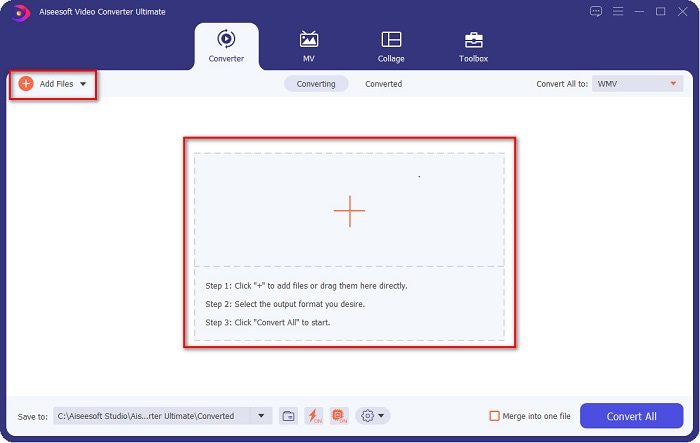
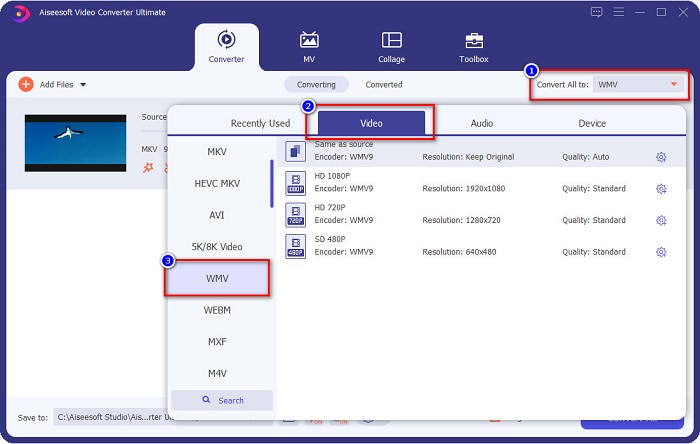
ขั้นตอนที่ 3 ต่อไปให้คลิกปุ่ม Convert All to ซึ่งอยู่มุมขวาบนของหน้าต่างโปรแกรม จากนั้นจะมีรายการรูปแบบไฟล์ปรากฏขึ้น ให้เลือกไฟล์ WMV.
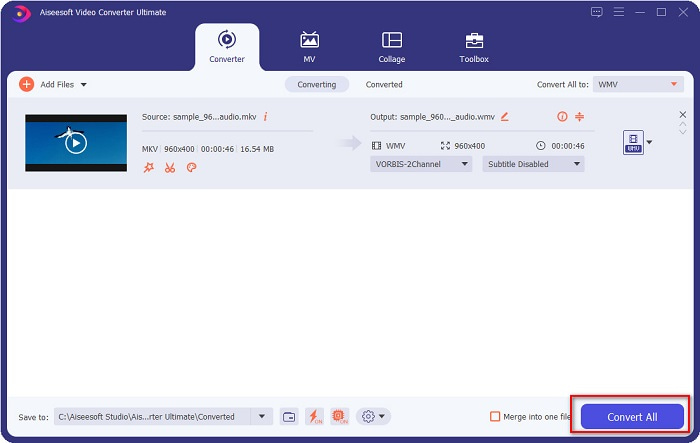
ขั้นตอนที่ 4 หลังจากเลือกรูปแบบไฟล์ที่ต้องการแล้ว ให้คลิกปุ่ม Convert All เพื่อแปลงไฟล์ MKV ของคุณเป็นรูปแบบไฟล์ WMV แล้วรอสักครู่ ไม่นานไฟล์ WMV ของคุณก็จะพร้อมใช้งาน
โดยทำตามขั้นตอนง่าย ๆ เหล่านี้ในการใช้ FVC Video Converter Ultimate คุณสามารถแปลง MKV เป็น WMV converter ได้อย่างรวดเร็ว
ส่วนที่ 3 แปลง MKV เป็น WMV โดยใช้ VLC Media Player Converter
อีกวิธีหนึ่งที่คุณสามารถแปลงไฟล์ MKV เป็นไฟล์ WMV คือการใช้ตัวแปลงฟรีแวร์ VLC Media Player ไม่ได้เป็นเพียงเครื่องเล่นวิดีโอเท่านั้น มันยังสามารถแปลงไฟล์เช่น MKV เป็น WMV, WebM, MP4 เป็นต้น อย่างไรก็ตาม อินเทอร์เฟซของมันค่อนข้างเข้าใจยาก อย่างไรก็ตาม ผู้ใช้หลายคนใช้ตัวแปลงนี้
คำแนะนำโดยย่อเกี่ยวกับวิธีใช้ VLC Media Player Converter:
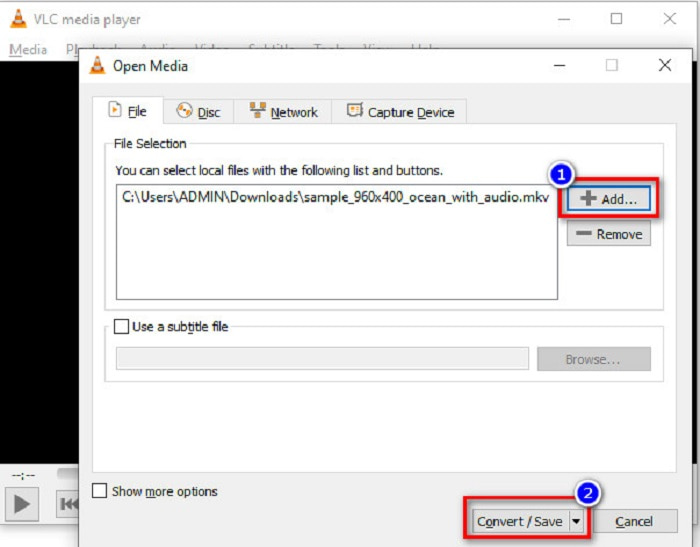
ขั้นตอนที่ 1 เปิดโปรแกรม VLC Media Player หรือหากยังไม่ได้ดาวน์โหลดลงคอมพิวเตอร์ ให้ค้นหา VLC Media Player แล้วทำตามขั้นตอนการติดตั้ง จากนั้นที่มุมซ้ายบนของหน้าจอให้คลิกเมนู Media แล้วคลิกปุ่ม Convert/Save.
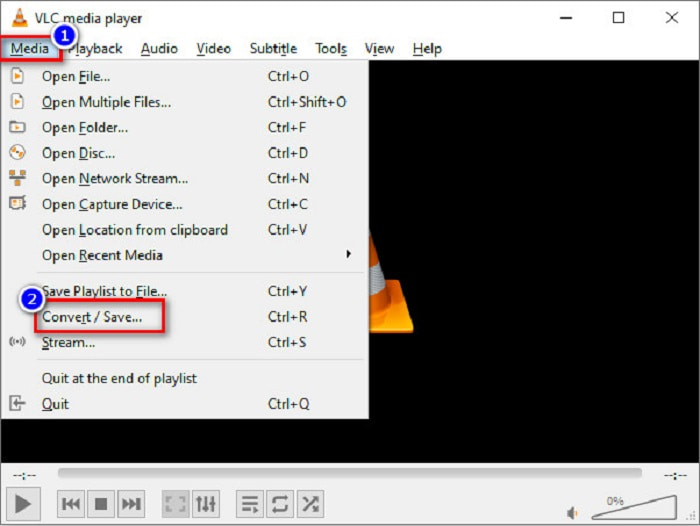
ขั้นตอนที่ 2 หลังจากคลิกปุ่ม Convert/Save จะมีหน้าต่างใหม่ปรากฏขึ้นซึ่งคุณจะเห็นรายชื่อไฟล์ในเครื่องที่อัปโหลดไว้ หากต้องการอัปโหลดไฟล์ ให้คลิกปุ่ม + Add เพื่ออัปโหลดไฟล์ MKV ของคุณ จากนั้นกดปุ่ม Convert/Save ด้านล่างเพื่อไปยังขั้นตอนถัดไป.
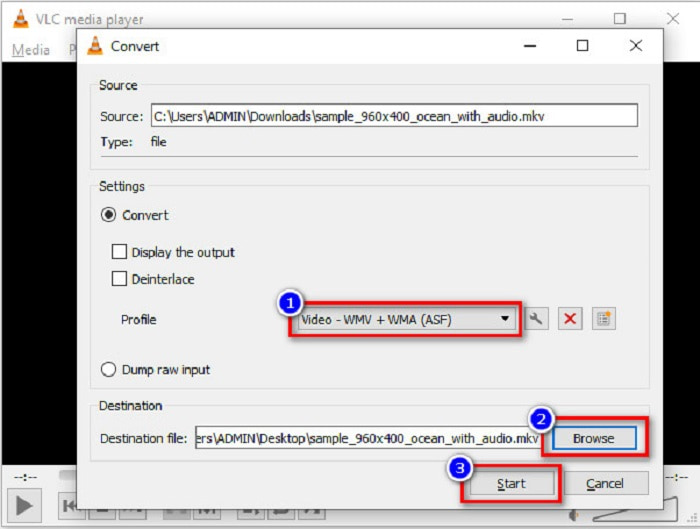
ขั้นตอนที่ 3 ขั้นตอนสุดท้าย ให้เลือกไฟล์ WMV เป็นรูปแบบไฟล์ของคุณ แล้วคลิกปุ่ม Browse เพื่อเลือกโฟลเดอร์ปลายทางสำหรับบันทึกไฟล์เมื่อการแปลงเสร็จสิ้น และสุดท้ายให้กดปุ่ม Start เพื่อเริ่มการแปลงไฟล์ MKV ของคุณเป็นไฟล์ WMV.
ส่วนที่ 4 แปลง MKV เป็น WMV โดยใช้ตัวแปลงออนไลน์ฟรี
FVC Free Video Converter Online เป็นตัวแปลงไฟล์ MKV เป็น WMV ออนไลน์ฟรี ที่ช่วยให้คุณสามารถแปลงไฟล์เสียงและวิดีโอได้หลากหลายรูปแบบ รวมถึง MKV เป็น WMV, AVI, MPG, MOV, MP4, MP3 และอื่น ๆ เครื่องมือนี้ยังมีฟีเจอร์ให้คุณปรับบิตเรตวิดีโอ อัตราเฟรม และแม้กระทั่งความละเอียดของไฟล์ได้ แม้ว่าจะเป็นตัวแปลงไฟล์ออนไลน์ที่ยอดเยี่ยม แต่คุณอาจพบว่าการแปลงไฟล์ล่าช้าได้หากอินเทอร์เน็ตของคุณช้า เนื่องจากเป็นบริการที่ต้องพึ่งพาการเชื่อมต่ออินเทอร์เน็ต อย่างไรก็ตาม โดยรวมแล้วยังมีประสิทธิภาพที่ดีเยี่ยมและถูกยกให้เป็นหนึ่งในตัวเลือกที่ดีที่สุดจากผู้ใช้จำนวนมาก.
ต่อไปนี้คือขั้นตอนการแปลงไฟล์ MKV ของคุณเป็น WMV ด้วย FVC Free Video Converter Online
ขั้นตอนที่ 1 บนเบราว์เซอร์ของคุณ ให้ค้นหา FVC Free Video Converter Online เพื่อเข้าสู่เว็บไซต์ของพวกเขา.
ขั้นตอนที่ 2 หลังจากเข้าเว็บไซต์แล้ว ให้คลิกปุ่ม Add Files to Convert และเปิดใช้งาน จากนั้นหน้าต่างไฟล์ในคอมพิวเตอร์ของคุณจะปรากฏขึ้น ให้เลือกไฟล์ MKV ของคุณ.
ดาวน์โหลดเวอร์ชันเดสก์ท็อปเพื่อแปลงไฟล์แบบเป็นชุดได้.
ขั้นตอนที่ 3 คุณจะเห็นรายการรูปแบบไฟล์ที่ด้านล่างในหน้าต่างส่วนที่สองของโปรแกรม ให้ติ๊กเลือกวงกลมข้างไฟล์ WMV.
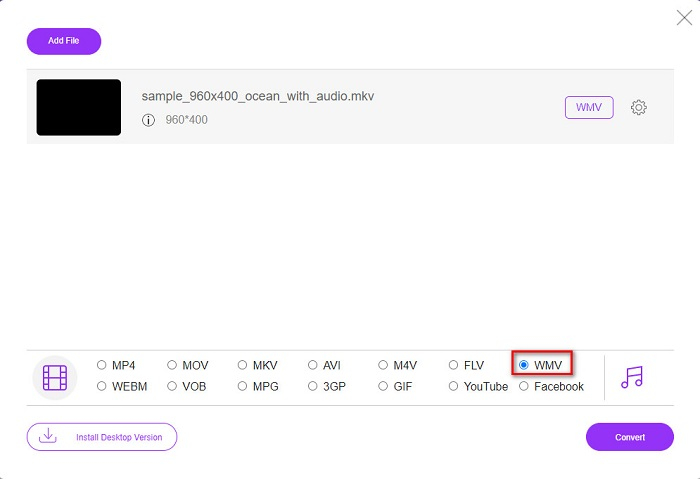
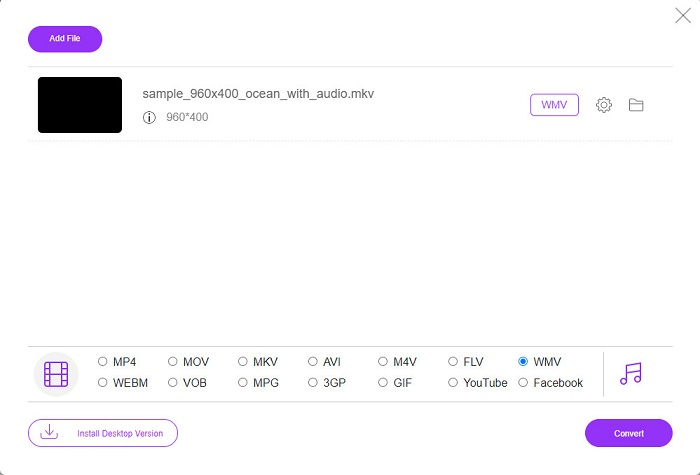
ขั้นตอนที่ 4 ขั้นตอนสุดท้าย ให้คลิกปุ่ม Convert ที่มุมขวาล่างของหน้าต่างโปรแกรม จากนั้นไฟล์ MKV ของคุณจะเริ่มกระบวนการแปลง.
MKV เทียบกับ WMV
รูปแบบคอนเทนเนอร์มัลติมีเดีย Matroska ซึ่งเปิดตัวในปี 2545 เป็นรูปแบบโอเพนซอร์สที่สามารถรวมแทร็กวิดีโอ เสียง รูปภาพ และคำบรรยายได้จำนวนหนึ่ง ดังนั้น คุณสามารถใช้เพื่อเก็บคลิปวิดีโอสั้น รายการทีวี และภาพยนตร์ได้อย่างง่ายดาย ค่อนข้างเป็นที่นิยมสำหรับแฟนอนิเมะ
ผลิตโดย Microsoft WMV เป็นหนึ่งในรูปแบบวิดีโอที่พบบ่อยที่สุดในยุค 2000 สามารถดูได้ทางเว็บและเล่นโดยโปรแกรมเล่นสื่อต่างๆ บน Windows และยังเป็นรูปแบบไฟล์วิดีโอเริ่มต้นของ Windows Media Player แต่รูปแบบอื่นๆ กลับถูกยึดครองไปเมื่อเร็วๆ นี้
ส่วนที่ 5. คำถามที่พบบ่อยเกี่ยวกับการแปลง MKV เป็น WMV
คุณสามารถเปลี่ยน MKV เป็น WMV โดยไม่สูญเสียคุณภาพไฟล์ของคุณหรือไม่?
อย่างแน่นอน. ด้วยการใช้ FVC Video Converter Ultimate คุณสามารถแปลงไฟล์ MKV เป็น WMV โดยไม่สูญเสียคุณภาพของไฟล์
รูปแบบไฟล์ที่ดีที่สุดในการแปลงไฟล์ MKV ของคุณคืออะไร?
ตามที่กล่าวมาแล้ว โปรแกรมเล่นสื่อบางตัวไม่รองรับรูปแบบไฟล์นี้ ดังนั้นคุณจึงต้องแปลงเป็นรูปแบบไฟล์ที่โปรแกรมเล่นสื่อส่วนใหญ่รองรับอย่างกว้างขวาง หนึ่งในนั้นคือรูปแบบ MP4 หากต้องการทราบข้อมูลเพิ่มเติมเกี่ยวกับหัวข้อนี้ โปรดอ่านบทความนี้ [ออนไลน์ & ฟรี] ฉันจะแปลง MKV เป็น MP4 บน Windows/Mac ได้อย่างไร.
Windows Media Player สามารถเล่นไฟล์ MKV ได้หรือไม่?
Windows Media Player ไม่รองรับไฟล์รูปแบบ MKV ดังนั้นเมื่อคุณพยายามเล่นไฟล์ MKV ใน Windows Media Player โปรแกรมจะเล่นได้เพียงเสียงเท่านั้น อ่านต่อที่ โปรแกรมเล่น MKV ที่ดีที่สุด เพื่อค้นหาตัวเลือกที่คุณต้องการ.
สรุป
มีหลายวิธีในการแปลงไฟล์ MKV เป็น WMV ตัวแปลงที่นำเสนอข้างต้นมีคุณสมบัติที่แตกต่างกันซึ่งทำให้แตกต่างจากที่อื่น
ในบรรดาตัวแปลงไฟล์ MKV เป็น WMV ที่ดีที่สุดที่กล่าวมาทั้งหมด เราขอแนะนำให้ใช้ FVC Video Converter Ultimate เพราะตัวแปลงนี้ใช้งานได้อย่างมีประสิทธิภาพและง่ายดาย นอกจากนี้ยังมีฟีเจอร์พิเศษที่ช่วยให้คุณปรับปรุงไฟล์ของคุณได้ หากคุณยังไม่แน่ใจ ลองดาวน์โหลดมาติดตั้งตอนนี้เพื่อสัมผัสประสบการณ์โปรแกรมแปลงไฟล์ความเร็วสูงตัวนี้ด้วยตัวคุณเอง.
-
 MKV เป็น MOV - วิธีการแปลง MKV เป็น MOV
 ฉันจะแปลง MKV เป็น MOV บน Mac ได้อย่างไร iMovie สามารถอ่าน MKV ได้หรือไม่ รูปแบบ MOV หมายถึงอะไร? โพสต์นี้บอกวิธีง่ายๆ 2 วิธีในการช่วยคุณแปลง MKV เป็น MOV ด้วยตัวแปลงวิดีโอออนไลน์และแบบมืออาชีพฟรี
-
 วิธีแปลงวิดีโอ MKV เป็น GIF แบบเคลื่อนไหวโดยไม่ต้องใช้ Photoshop/FFmpeg
 หลังจากดาวน์โหลดและดูภาพยนตร์ MKV บนคอมพิวเตอร์ของคุณแล้ว คุณอาจต้องการแบ่งปันช่วงเวลาที่ยอดเยี่ยมกับเพื่อน ๆ หรือบนอินเทอร์เน็ตในรูปแบบ GIF ในบทความนี้ คุณสามารถเรียนรู้เกี่ยวกับ 2 วิธีที่ง่ายที่สุดในการแปลง MKV เป็น GIF
-
 เคล็ดลับและคำแนะนำเกี่ยวกับวิธีการแปลงไฟล์ MKV เป็น MP3 [2021]
 มีปัญหาในการเลือกตัวแปลงที่เหมาะสมสำหรับ MKV เป็น MP3 หรือไม่? จากนั้นอ่านโพสต์นี้ต่อไปในขณะที่เรานำเสนอวิธีแก้ไขปัญหาที่แตกต่างกันในปัญหาเดียว

