


 Video Converter Ultimate
 บันทึกหน้าจอ
 ซ่อมวิดีโอ
 ดาวน์โหลดอย่างปลอดภัย
วิธีแปลง MPG เป็น 3GP โดยใช้ตัวแปลงยอดนิยม
คุณกำลังมองหาวิธีแปลงไฟล์ MPG ของคุณให้เป็นไฟล์ 3GP บน Windows และ Mac อยู่หรือไม่? ไม่ต้องกังวลอีกต่อไป เพราะเรามีวิธีแก้ไขให้คุณแล้ว บทความนี้จะแนะนำให้คุณรู้วิธีแปลงไฟล์ MPG เป็นไฟล์ 3GP ได้อย่างง่ายดาย และยังมีลิงก์ให้ดาวน์โหลดโปรแกรมแปลง MPG เป็น 3GP ฟรี ทั้งแบบออนไลน์และออฟไลน์อีกด้วย ดังนั้นเพียงนั่งพักผ่อนให้สบาย แล้วอ่านบทความนี้ให้จบ คุณจะได้ความรู้อีกมากมายแน่นอน.

ส่วนที่ 1 ทำไมต้องแปลง MPG เป็น 3GP File Format
สมมุติว่าคุณต้องการเล่นไฟล์ MPG บนอุปกรณ์มือถือรุ่นที่สามของคุณ อย่างไรก็ตาม อุปกรณ์พกพารุ่นที่สามไม่รองรับรูปแบบไฟล์ MPG ดังนั้น สำหรับคุณที่จะเล่นไฟล์ MPG บนอุปกรณ์ 3G คุณต้องแปลงไฟล์ให้อยู่ในรูปแบบไฟล์ที่อุปกรณ์ 3G รองรับ ในกรณีนั้น คุณต้องแปลงไฟล์ MPG ของคุณเป็นรูปแบบไฟล์ 3GP
ส่วนที่ 2 แปลงไฟล์ MPG เป็น 3GP ของคุณได้อย่างง่ายดายโดยใช้ FVC Video Converter Ultimate
FVC Video Converter Ultimate เป็นหนึ่งในตัวแปลงออฟไลน์ที่มีประสิทธิภาพสูงสุดที่คุณสามารถหาได้บนเว็บ ตัวแปลงนี้มีอยู่ในแพลตฟอร์มข้ามสื่อทั้งหมด รวมทั้ง Windows และ Mac นอกจากนี้ยังรองรับรูปแบบมากกว่า 1,000+ เช่น MPG, 3GP, AVI, MP4, MOV, WMA, MP3 และอีกมากมาย นอกจากนี้ หากคุณกำลังมองหาตัวแปลงที่สามารถทำการแปลงเป็นชุดได้ เครื่องมือนี้เหมาะสำหรับคุณเพราะตัวแปลงนี้สามารถรวมรูปแบบไฟล์หลาย ๆ ไฟล์เข้าเป็นไฟล์เดียวได้ อ่านคำอธิบายด้านล่างเพื่อเรียนรู้เพิ่มเติมเกี่ยวกับสิ่งที่ตัวแปลงนี้สามารถทำได้

FVC Video Converter Ultimate
5,689,200+ ดาวน์โหลด- พร้อมใช้งานบนแพลตฟอร์มสื่อที่รู้จักทั้งหมด รวมทั้ง Windows และ Mac
- มันมีคุณสมบัติที่น่าทึ่งให้ลอง เช่น แก้ไข ปรับปรุง และบีบอัดไฟล์ของคุณ
- มีเครื่องสร้าง GIF และ 3D ที่สามารถสร้างผลงานระดับมืออาชีพได้
- มีกระบวนการแปลงที่รวดเร็วเป็นพิเศษเพื่อแปลงไฟล์ของคุณอย่างรวดเร็วในที่สุด
- รองรับรูปแบบไฟล์เกือบทั้งหมด รวมถึง MPG, 3GP, MOV, AVI, MP4, TS, M4V เป็นต้น
ดาวน์โหลดฟรีสำหรับ Windows 7 หรือใหม่กว่าดาวน์โหลดอย่างปลอดภัย
ดาวน์โหลดฟรีสำหรับ MacOS 10.7 หรือใหม่กว่าดาวน์โหลดอย่างปลอดภัย
ต่อไปนี้คือขั้นตอนการแปลง MPG เป็น 3GP โดยใช้ FVC Video Converter Ultimate:
ขั้นตอนที่ 1. ก่อนอื่นให้ดาวน์โหลดตัวโปรแกรมแปลงไฟล์โดยคลิกปุ่ม Download ด้านล่างสำหรับ Windows หรือ Mac.
ดาวน์โหลดฟรีสำหรับ Windows 7 หรือใหม่กว่าดาวน์โหลดอย่างปลอดภัย
ดาวน์โหลดฟรีสำหรับ MacOS 10.7 หรือใหม่กว่าดาวน์โหลดอย่างปลอดภัย
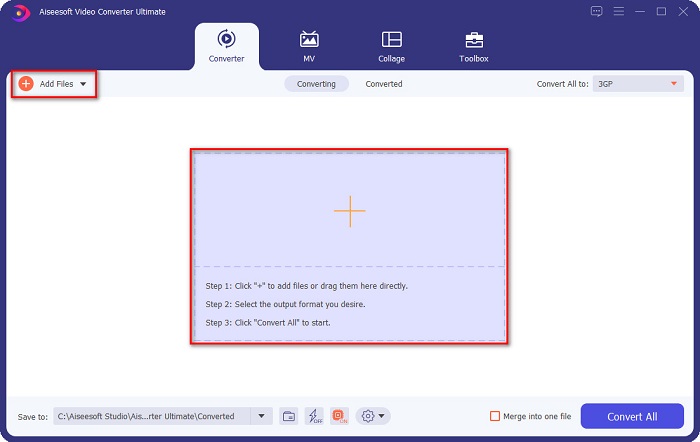
ขั้นตอนที่ 2. บนหน้าจออินเทอร์เฟซแรก ให้คลิกปุ่ม Add Files หรือปุ่มสัญลักษณ์ + เพื่ออัปโหลดไฟล์ MPG ของคุณเข้าไปในคิว.
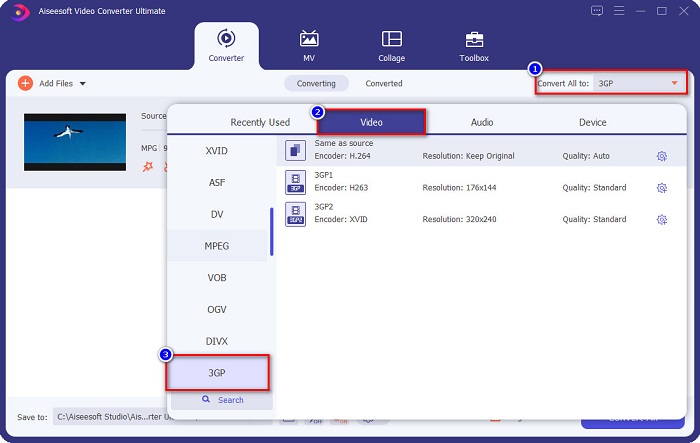
ขั้นตอนที่ 3. หลังจากอัปโหลดไฟล์เรียบร้อยแล้ว ให้คลิกปุ่ม Convert All to และเลือกไฟล์ 3GP เป็นรูปแบบเอาต์พุต.
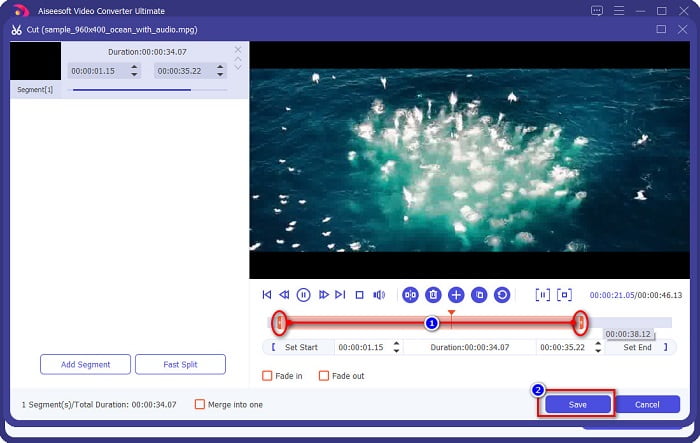
ตัวเลือกเสริม หากคุณต้องการตัดความยาวของไฟล์วิดีโอ ให้คลิกปุ่มรูป กรรไกร จากนั้นปรับตัวควบคุม จุดเริ่มเล่นและจุดหยุดเล่น ให้ได้ความยาววิดีโอตามที่ต้องการ แล้วคลิก Save แต่ถ้าคุณไม่ต้องการตัดต่อวิดีโอ ให้ข้ามไปขั้นตอนถัดไปได้เลย.
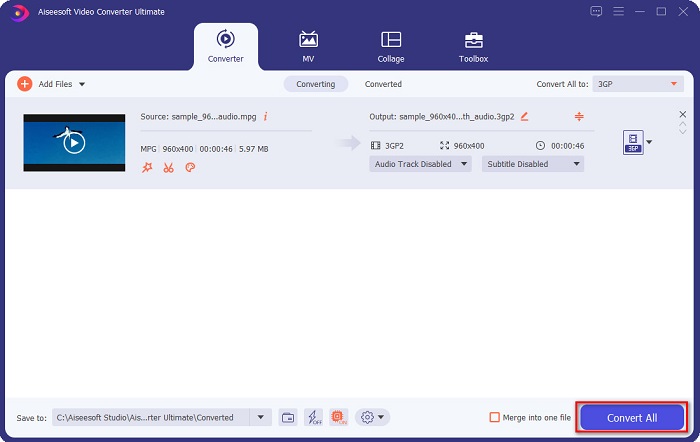
ขั้นตอนที่ 4. ขั้นตอนสุดท้าย ให้คลิกปุ่ม Convert All เพื่อแปลงไฟล์ MPG ของคุณเป็นไฟล์รูปแบบ 3GP รอสักครู่แล้วเสร็จ! ไฟล์ MPG ของคุณได้ถูกแปลงเป็นไฟล์ 3GP เรียบร้อยแล้ว.
ส่วนที่ 3 ตัวแปลง MPG เป็น 3GP ที่ยอดเยี่ยมออนไลน์ที่คุณต้องลอง
เมื่อพูดถึงการแปลง เครื่องมือออนไลน์จะสะดวกกว่าเพราะคุณไม่จำเป็นต้องดาวน์โหลดอะไรเลย และหากคุณกำลังมองหาตัวแปลงออนไลน์ที่สามารถแปลง MPG เป็น 3GP ออนไลน์และสามารถเข้าถึงได้ เรามีทางออกที่ดีที่สุดสำหรับคุณ
FVC แปลงวิดีโอออนไลน์ฟรี
FVC Free Online Video Converter เป็นโปรแกรมแปลงไฟล์ออนไลน์ที่สามารถแปลง MPG เป็นไฟล์ 3GP ได้ ตัวโปรแกรมนี้ช่วยให้คุณแปลงไฟล์ได้หลายรูปแบบ เช่น MPG, 3GP, FLV, WMA, WMV, MP4 และอื่น ๆ อีกมากมาย นอกจากนี้ยังมีหน้าตาโปรแกรมที่ใช้งานง่าย เหมาะอย่างยิ่งสำหรับผู้เริ่มต้น อีกทั้งยังโดดเด่นกว่าโปรแกรมออนไลน์ตัวอื่นเพราะไม่มีโฆษณารบกวนมากวนใจคุณ.
ทำตามขั้นตอนง่าย ๆ ด้านล่างเพื่อแปลงโดยใช้ FVC Free Online Video Converter
ขั้นตอนที่ 1. ค้นหา FVC Free Online Video Converter ในเว็บเบราว์เซอร์ของคุณ หรือคลิกที่ลิงก์นี้เพื่อไปยังหน้าเว็บของพวกเขาโดยตรง.
ขั้นตอนที่ 2. จากนั้นคลิกปุ่ม Add Files บนหน้าจออินเทอร์เฟซแรกของโปรแกรม แล้วจะมีหน้าต่างไฟล์บนคอมพิวเตอร์แสดงขึ้นมา ให้คุณเลือกไฟล์ MPG ที่ต้องการแปลง.
ดาวน์โหลดเวอร์ชันเดสก์ท็อปเพื่อแปลงไฟล์แบบเป็นชุดได้.
ขั้นตอนที่ 3. หลังจากอัปโหลดไฟล์ MPG ของคุณแล้ว ให้เลือกไฟล์รูปแบบเอาต์พุตที่ต้องการที่บริเวณด้านล่างของอินเทอร์เฟซที่สองของโปรแกรม จากนั้นคลิกเลือกไฟล์รูปแบบ 3GP.
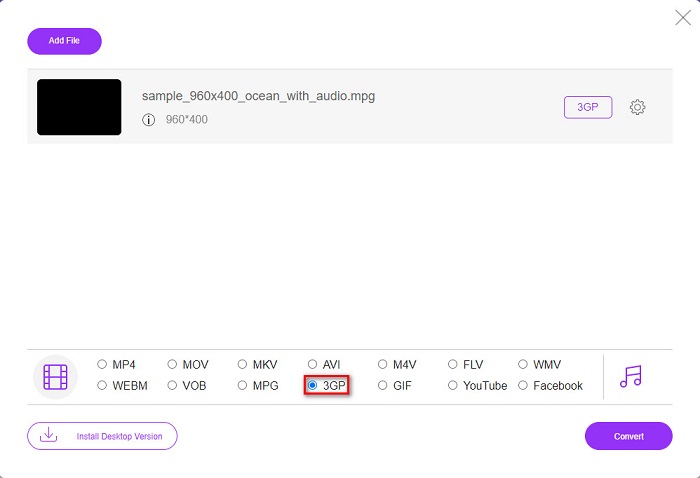
หากคุณต้องการเปลี่ยนความละเอียดวิดีโอของไฟล์ ให้คลิกปุ่มรูป เฟือง ซึ่งคุณสามารถปรับความละเอียดวิดีโอ บิตเรตของวิดีโอและเสียง และค่าอื่น ๆ ได้ แต่ถ้าคุณไม่ต้องการปรับแต่ง ให้ข้ามไปขั้นตอนถัดไป.
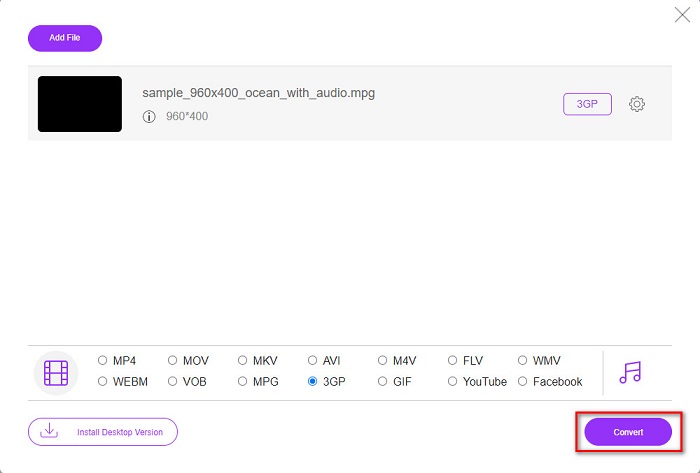
ขั้นตอนที่ 4. เพื่อเริ่มแปลงไฟล์ MPG เป็น 3GP ให้คลิกปุ่ม Convert.
DocsPal
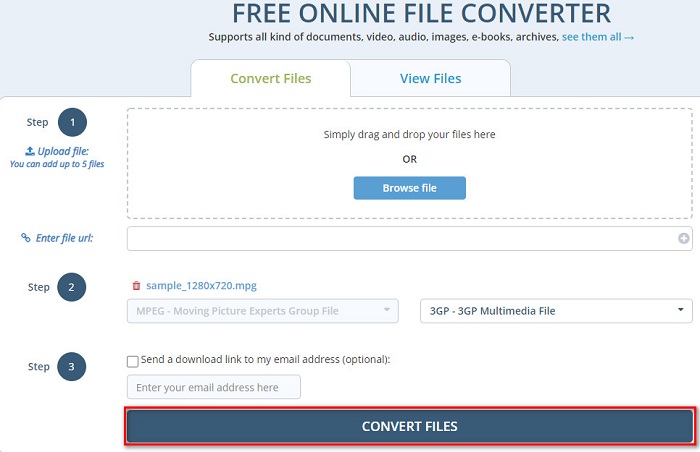
อีกหนึ่งโปรแกรมแปลงไฟล์ที่น่าลองคือ DocsPal นี่คือโปรแกรมแปลงไฟล์ออนไลน์ฟรีที่สามารถแปลงไฟล์รูปแบบยอดนิยมได้เกือบทั้งหมด และยังใช้งานง่ายสำหรับผู้เริ่มต้นเพราะมีอินเทอร์เฟซที่เรียบง่าย อย่างไรก็ตาม เครื่องมือนี้ต้องพึ่งพาอินเทอร์เน็ตเป็นหลัก ดังนั้นคุณอาจประสบปัญหาการแปลงไฟล์ล่าช้าหากความเร็วอินเทอร์เน็ตของคุณช้า.
ขั้นตอนการแปลง MPG เป็น 3GP ด้วย DocsPal:
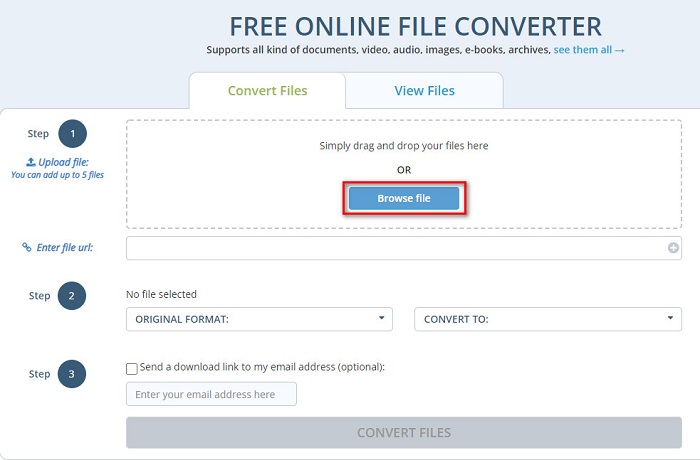
ขั้นตอนที่ 1. ค้นหา DocsPal บนเบราว์เซอร์ จากนั้นคุณจะถูกนำไปยังหน้าเว็บของพวกเขา บนอินเทอร์เฟซแรกของโปรแกรม ให้คลิกปุ่ม Browse Files แล้วเลือกไฟล์ MPG ของคุณเพื่ออัปโหลด.
ขั้นตอนที่ 2. คลิกปุ่ม drop-down เพื่อเลือกรูปแบบไฟล์เอาต์พุตของคุณ.
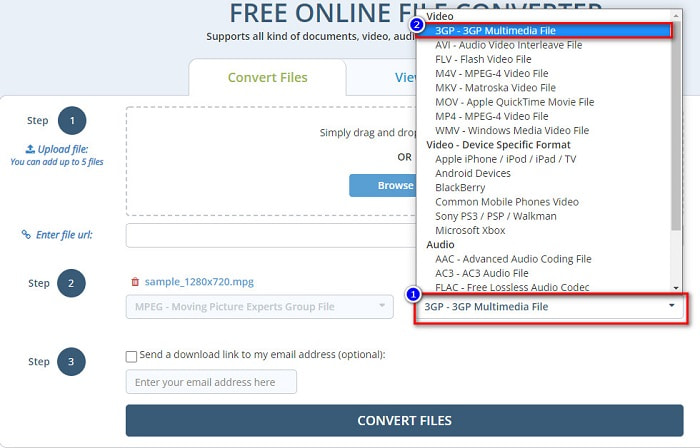
ขั้นตอนที่ 3. สุดท้ายให้คลิกปุ่ม Convert Files เพื่อแปลงไฟล์ MPG ของคุณเป็นไฟล์รูปแบบ 3GP.
การใช้ตัวแปลงที่ใช้งานง่ายเหล่านี้สามารถแปลง MPG เป็นรูปแบบไฟล์ 3GP ได้อย่างสะดวก ดังนั้นสิ่งที่คุณรอ? ทดลองใช้ฟรีทันที!
ส่วนที่ 4 ความรู้เพิ่มเติมเกี่ยวกับ MPG และ 3GP
รูปแบบไฟล์ MPG เป็นรูปแบบไฟล์ทั่วไปรูปแบบหนึ่งที่เผยแพร่บนอินเทอร์เน็ต หลายคนใช้เพราะช่วยให้คุณสตรีมและดาวน์โหลดได้เร็วกว่ารูปแบบอื่น ใช้คอมเพรสเซอร์ MPEG-1 และ MPEG-2 เพื่อสตรีมและดาวน์โหลดอย่างรวดเร็ว นอกจากนี้ยังสามารถจัดเก็บวิดีโอ เสียง และข้อมูลเมตาไว้ในไฟล์เดียว โปรแกรมเล่นสื่อเกือบทั้งหมดสามารถเล่นไฟล์ประเภทนี้ได้
ในทางกลับกัน ไฟล์ 3GP เป็นรูปแบบไฟล์ที่อุปกรณ์รุ่นที่สามรองรับ ประกอบด้วยตัวแปลงสัญญาณ H.263 และ H.264 ที่ทำขึ้นสำหรับการบีบอัดข้อมูลแบบสูญเสียข้อมูล นอกจากนี้ ไฟล์ประเภทนี้ยังมีขนาดไฟล์ที่เล็กกว่ารูปแบบไฟล์อื่นๆ
MPG เทียบกับ 3GP
จัดทำโดยกลุ่มผู้เชี่ยวชาญด้านภาพเคลื่อนไหว (MPEG) MPG เป็นรูปแบบวิดีโอดิจิทัลทั่วไปสำหรับจัดเก็บข้อมูลวิดีโอ เสียง และข้อมูลเมตา มีประโยชน์มากเมื่อสร้างภาพยนตร์เพื่อแชร์บนอินเทอร์เน็ต ไฟล์เหล่านั้นใน MPG มักจะมีการบีบอัดวิดีโอ/เสียง MPEG-1 หรือ MPEG-2
โครงการความร่วมมือรุ่นที่ 3 (3GPP) สร้างรูปแบบ 3GP/3GPP เป็นรูปแบบคอนเทนเนอร์มัลติมีเดีย มันขึ้นอยู่กับรูปแบบไฟล์สื่อ ISO เรามักใช้เพื่อบันทึกสตรีมวิดีโอ/เสียงที่ส่งระหว่างโทรศัพท์มือถือ 3G และออนไลน์
ส่วนที่ 5. คำถามที่พบบ่อยเกี่ยวกับการแปลง MPG เป็น 3GP
คุณสามารถบีบอัดไฟล์ MPG ได้หรือไม่?
แน่นอน มีเครื่องมือมากมายที่ช่วยให้คุณบีบอัดไฟล์ MPG ได้ อ่านบทความนี้เพื่อดูตัวเลือกโปรแกรมบีบอัดที่ดีที่สุดทั้ง 8 ตัวที่ควรใช้.
การแปลง MPG เป็น 3GP ทำลายคุณภาพวิดีโอหรือไม่
ไม่ การแปลงไฟล์ MPG เป็นไฟล์ 3GP จะไม่ทำลายคุณภาพวิดีโอของคุณ อย่างไรก็ตาม คุณอาจมีขนาดไฟล์ที่เล็กกว่าเมื่อแปลงเป็นไฟล์ 3GP
เครื่องเล่น QuickTime รองรับ MPG หรือไม่
ใช่. เครื่องเล่น QuickTime รองรับรูปแบบไฟล์ MPG ดังนั้น คุณจึงสามารถเล่นไฟล์ MPG บนโปรแกรมเล่น QuickTime ได้โดยไม่ต้องใช้เครื่องมืออื่น
สรุป
บทความนี้แสดงให้คุณเห็นวิธีที่ดีที่สุดในการแปลง MPG เป็น 3GP ฟรี ตอนนี้ขึ้นอยู่กับคุณแล้วว่าจะใช้ตัวแปลงใด แต่ถ้าคุณต้องการแปลงด้วยความเร็วสูงสุดและมีคุณสมบัติพิเศษในการใช้งาน FVC Video Converter Ultimate เป็นเครื่องมือที่เหมาะสำหรับคุณ ยังคงมีข้อสงสัยเกี่ยวกับเรื่องนี้? ลองใช้เลย สนุกกับการใช้คุณสมบัติพิเศษและไม่เหมือนใคร
-
 วิธีแปลง MPG เป็น FLV โดยไม่สูญเสียคุณภาพ [พิสูจน์แล้ว]
 คุณต้องชมภาพยนตร์เรื่องโปรดด้วยเครื่องเล่นสื่อนี้ แต่ไม่รองรับ MPG ลองแปลงไฟล์ MPG ของคุณเป็น FLV โดยใช้ตัวแปลงเหล่านี้ในบทความนี้
-
 2 สุดยอดตัวแปลง MPG เพื่อแปลง MPG เป็น WMV ฟรี
 คุณต้องการแปลง MPG เป็น WMV ฟรีหรือไม่? ในกรณีนั้น คุณโชคดีเพราะเราพบว่ามีสองเครื่องมือที่คุณสามารถใช้เพื่อแปลงไฟล์ MPG ของคุณ
-
 3 วิธีที่ดีที่สุดในการแปลง MPG เป็น MP4 . อย่างรวดเร็ว
 ต้องการแปลงรูปแบบไฟล์ MPG เป็น MP4 หรือไม่? ในบทความนี้ เราจะแสดงรายการตัวแปลง MPG ที่ดีที่สุดและเร็วที่สุดสำหรับคุณ!

