


 Video Converter Ultimate
 บันทึกหน้าจอ
 ซ่อมวิดีโอ
รายละเอียดที่คุณต้องรู้แจ้งในการแปลง MPG เป็น AVI
โดยทั่วไปแล้ว ไฟล์ MPG เป็นไฟล์วิดีโอมาตรฐานประเภทหนึ่งที่ใช้รูปแบบวิดีโอดิจิทัลซึ่งได้รับการทำให้เป็นมาตรฐานโดยกลุ่มผู้เชี่ยวชาญภาพเคลื่อนไหว (Moving Picture Experts Group: MPEG) ภายในไฟล์เดียวจะบรรจุทั้งวิดีโอ เสียง และเมทาดาทาที่ถูกจัดเรียงสลับกัน การใช้ไฟล์ MPG เพื่อสร้างภาพยนตร์ที่เผยแพร่ผ่านอินเทอร์เน็ตถือเป็นเรื่องปกติ อย่างไรก็ตาม วิดีโอรูปแบบนี้ไม่ใช่ไฟล์ที่จะแปลงได้ง่ายนัก หากคุณไม่มีความรู้หรือพื้นฐานเกี่ยวกับโปรแกรมแปลงไฟล์ที่รองรับหรือสามารถแปลง MPG เป็น AVI ได้ อ่านบทความนี้ต่อไปเพื่อทำความเข้าใจรายละเอียดและทางเลือกต่าง ๆ ที่คุณควรพิจารณาเพื่อให้การแปลงไฟล์เป็นไปตามที่คุณต้องการ.
ส่วนที่ 1 MPG และ AVI - ภาพรวม
MPEG คือรูปแบบไฟล์วิดีโอที่พัฒนาขึ้นโดยกลุ่มผู้เชี่ยวชาญภาพเคลื่อนไหว (Moving Picture Experts Group) กลุ่มเดียวกับที่พัฒนารูปแบบไฟล์อย่าง MP3 และ MP4 ทั้งนี้ขึ้นอยู่กับลักษณะการใช้งาน MPEG จะใช้การบีบอัดไฟล์แบบ MPEG-1 หรือ MPEG-2.
เพื่อบีบอัดวิดีโอดิบระดับ VHS และเพลงจากซีดีให้เหลือเพียง 1.5 เมกะบิตต่อวินาทีโดยไม่สูญเสียคุณภาพมากเกินไป จึงได้มีการสร้าง MPEG-1 ขึ้นมา ส่งผลให้มันกลายเป็นหนึ่งในรูปแบบไฟล์วิดีโอ/เสียงที่ได้รับความนิยมและรองรับกันอย่างแพร่หลายที่สุดในโลก ข้อมูลวิดีโอของ MPEG-1 มักถูกส่งที่ความเร็วประมาณ 30 เฟรมต่อวินาที โดยมีความละเอียดราว ๆ 352×240 พิกเซล.
อย่างไรก็ตาม คอมพิวเตอร์ระบบ Windows ใช้ AVI เป็นรูปแบบวิดีโอมาตรฐาน ภายในรูปแบบคอนเทนเนอร์มัลติมีเดีย เช่น DivX หรือ XviD สามารถจัดเก็บทั้งเสียงและวิดีโอโดยใช้โค้เดกหลายชนิดได้ รูปแบบวิดีโอทางเลือกหลายรูปแบบ เช่น MPEG และ MOV มักใช้การบีบอัดน้อยกว่าและใช้พื้นที่จัดเก็บมากกว่าไฟล์ AVI นอกจากนี้ยังสามารถสร้างไฟล์ AVI ที่ไม่บีบอัดได้ด้วย ซึ่งจะทำให้ขนาดไฟล์ใหญ่ขึ้นอย่างมาก — ประมาณ 2–3 GB ต่อนาทีของวิดีโอ — เนื่องจากไฟล์เป็นแบบ lossless ไฟล์แบบ lossless จะคงคุณภาพไว้ไม่ว่าเปิดหรือบันทึกซ้ำกี่ครั้งก็ตาม ข้อดีเพิ่มเติมคือสามารถเล่นได้โดยไม่จำเป็นต้องติดตั้งโค้เดกเพิ่มเติม.
ส่วนที่ 2 ซอฟต์แวร์ที่มีประสิทธิภาพที่สุดในการแปลง MPG เป็น AVI
หากคุณเคยสงสัยว่าจะสามารถแปลงไฟล์วิดีโอ MPG เป็น AVI ได้ฟรีอย่างไร ซอฟต์แวร์ใหม่และดีที่สุดตัวนี้คือสิ่งที่บทความนี้แนะนำให้คุณใช้ Video Converter Ultimate เป็นซอฟต์แวร์ให้ดาวน์โหลดฟรีที่ใช้งานได้ทั้งบน Windows และ Mac ซึ่งสามารถแปลงไฟล์ MPG ของคุณเป็น AVI ได้รวดเร็วยิ่งกว่าการแปลงไฟล์แบบออนไลน์ นอกจากสองรูปแบบวิดีโอนี้แล้ว ซอฟต์แวร์ตัวนี้ยังรองรับหลายรูปแบบอื่น ๆ ให้คุณเลือกใช้ ถือว่าดีที่สุดเพราะให้คุณภาพไฟล์วิดีโอที่ยอดเยี่ยมหากคุณใช้โปรแกรมนี้ ตอนนี้เมื่อคุณได้เห็นภาพรวมความสามารถของซอฟต์แวร์แล้ว เตรียมตัวให้พร้อมแล้วไปดูกันว่าซอฟต์แวร์นี้ทำงานอย่างไร:
ขั้นตอนที่ 1 ในการเริ่มต้น ให้คลิกปุ่ม Free Download ที่ให้ไว้ด้านล่าง เมื่อการดาวน์โหลดเสร็จสิ้น คุณสามารถเลือกติดตั้งซอฟต์แวร์บน Windows หรือ Mac ก็ได้ เมื่อติดตั้งซอฟต์แวร์ลงบนเดสก์ท็อปของคอมพิวเตอร์แล้ว คุณสามารถเริ่มใช้งานได้โดยคลิกปุ่ม Start Now.
ดาวน์โหลดฟรีสำหรับ Windows 7 หรือใหม่กว่าดาวน์โหลดอย่างปลอดภัย
ดาวน์โหลดฟรีสำหรับ MacOS 10.7 หรือใหม่กว่าดาวน์โหลดอย่างปลอดภัย
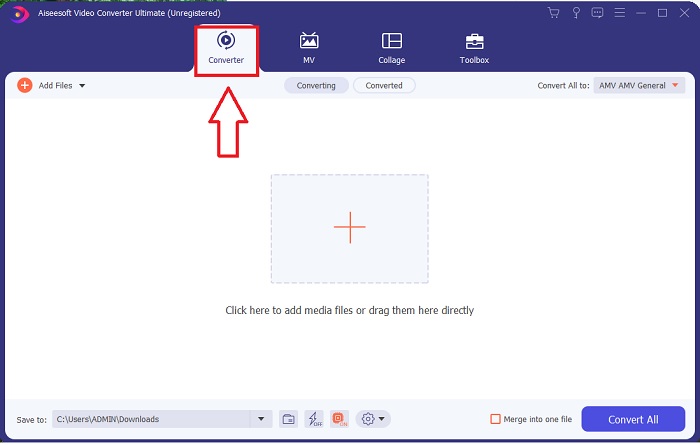
ขั้นตอนที่ 2 เปิดซอฟต์แวร์ที่คุณเพิ่งดาวน์โหลดขึ้นมา เมื่อเปิดโปรแกรมครั้งแรก คุณจะเห็นหน้าต่างที่มีอินเทอร์เฟซ Converter ซึ่งเป็นหน้าที่คุณจะเริ่มขั้นตอนการแปลงหรือเข้ารหัสวิดีโอของคุณ.
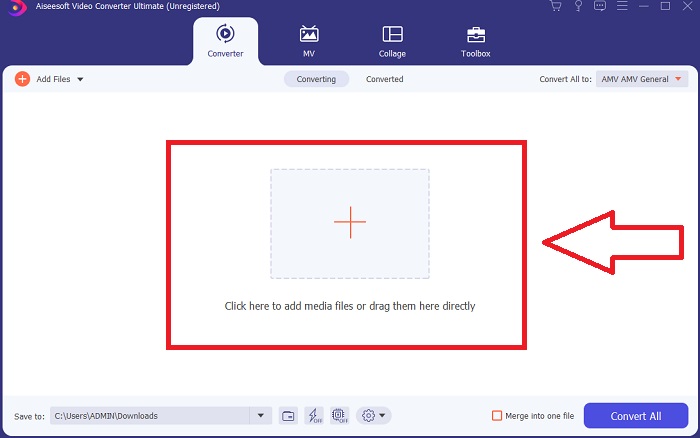
ขั้นตอนที่ 3 คุณสามารถเริ่มกระบวนการแปลงได้ด้วยการนำเข้าไฟล์ลงในโปรแกรม การแปลงวิดีโอทำได้ง่าย ๆ เพียงลากไฟล์มาวางบนสัญลักษณ์รูป เครื่องหมายบวก (Plus).
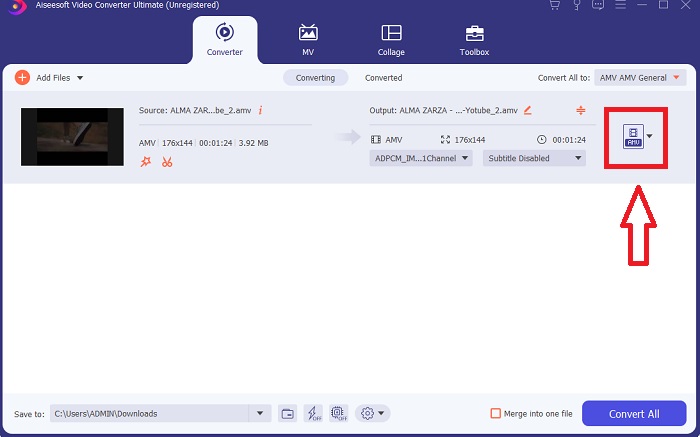
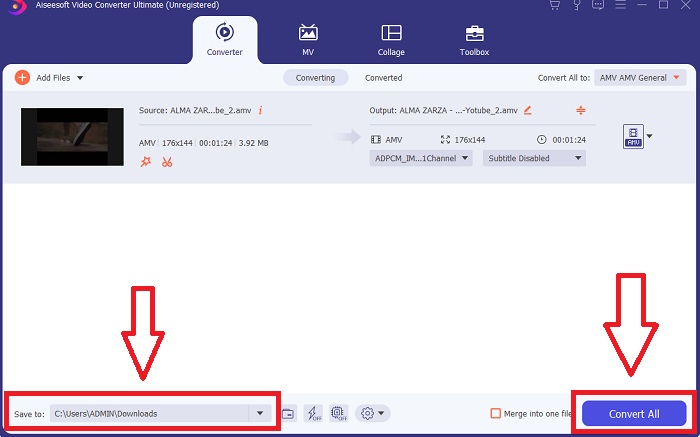
ขั้นตอนที่ 4 คลิกขวาที่รูปแบบวิดีโอแล้วเลือก Save to หรือ Save to external storage จากนั้นค้นหาและเลือกประเภทไฟล์ AVI จากเมนูแบบเลื่อนลง หลังจากเลือกประเภทไฟล์วิดีโอ AVI แล้ว คุณจะเห็นตัวเลือกการตั้งค่าคุณภาพวิดีโอจำนวนมาก หากไม่มีตัวเลือกคุณภาพวิดีโอที่ตรงกับความต้องการของคุณ คุณสามารถปรับการตั้งค่าได้เอง ไอคอนรูปเฟืองช่วยให้คุณเปลี่ยนความละเอียดเฟรมเรต และคุณภาพเสียงของวิดีโอได้ เมื่อแก้ไขเสร็จให้คลิกปุ่ม Create New เพื่อบันทึกการตั้งค่าใหม่.
ขั้นตอนที่ 5 เมื่อคุณแก้ไขวิดีโอเสร็จแล้วและพร้อมจะบันทึกลงคอมพิวเตอร์ ให้คลิก Convert All.
ส่วนที่ 3 เคล็ดลับง่ายๆ: เครื่องมือที่มีประสิทธิภาพอื่นๆ ที่คุณควรพิจารณา
วิธีที่ 1 ใช้ CloudConvert
CloudConvert เป็นโปรแกรมแปลงวิดีโอออนไลน์ ตัวแปลงออนไลน์นี้ยังรองรับ MP4, WEBM และ AVI รวมถึงรูปแบบอื่นๆ คุณสามารถเลือกคุณภาพ ความละเอียด และขนาดไฟล์ของวิดีโอได้ หากคุณกำลังคิดเกี่ยวกับวิธีการแปลง MPG เป็น AVI ในเครื่องมือออนไลน์นี้ นี่คือขั้นตอนในการใช้งาน:
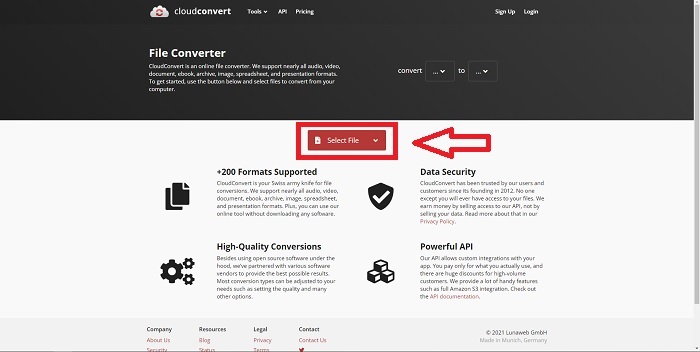
ขั้นตอนที่ 1 อัปโหลดไฟล์จากคอมพิวเตอร์ของคุณโดยการคลิก Select the File.
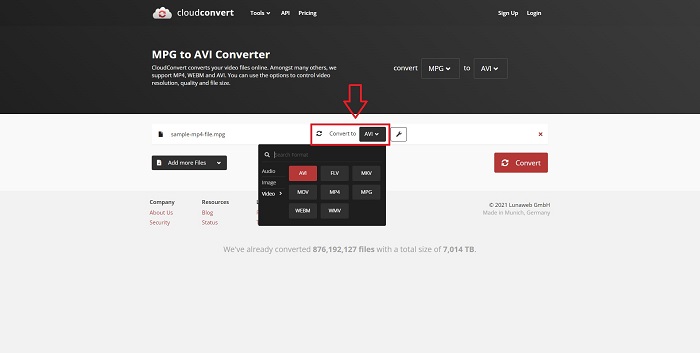
ขั้นตอนที่ 2 จากนั้นดำเนินการเลือกปลายทางที่คุณต้องการแปลงไฟล์ไป โดยการคลิกที่ส่วนรูปแบบไฟล์ซึ่งอยู่ข้างไอคอนประแจ คุณยังมีทางเลือกในการเพิ่มไฟล์อื่น ๆ เพื่อแปลงเพิ่มเติมได้ด้วย.
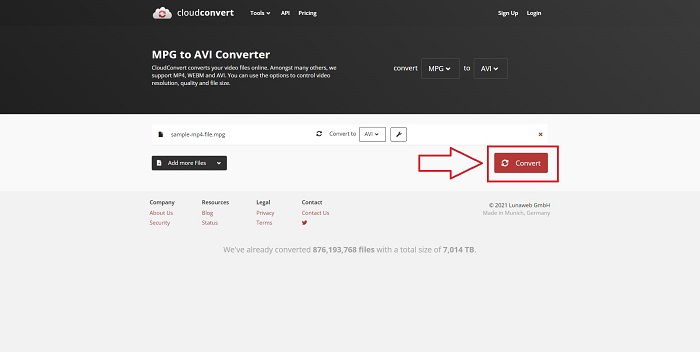
ขั้นตอนที่ 3 คลิก Convert เพื่อแปลงไฟล์ทั้งหมดที่คุณอัปโหลด.
วิธีที่ 2. ใช้Zamzar
Zamzar เป็นเครื่องมือบนเว็บสำหรับแปลงไฟล์ การแปลงสามารถทำได้ในหลากหลายรูปแบบโดยไม่จำเป็นต้องดาวน์โหลดซอฟต์แวร์ใดๆ Zamzar อาจแปลงไฟล์จากรูปแบบหนึ่งเป็นอีกรูปแบบหนึ่ง เช่น Adobe PDF เป็นเอกสาร Microsoft Word โดยการพิมพ์ URL หรืออัปโหลดไฟล์อย่างน้อยหนึ่งไฟล์ (ตราบใดที่ไฟล์ทั้งหมดอยู่ในรูปแบบเดียวกัน) เพื่อให้ได้ความรู้เกี่ยวกับเครื่องมือออนไลน์นี้ ต่อไปนี้เป็นขั้นตอนสำหรับคุณ:
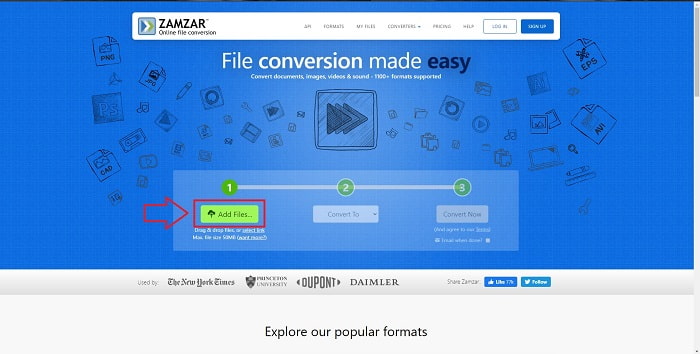
ขั้นตอนที่ 1 ค้นหา Zamzar ผ่านเสิร์ชเอนจินใดก็ได้ หลังจากคลิกเข้าสู่เว็บไซต์แล้ว คุณสามารถอัปโหลดไฟล์ผ่านหน้าอินเทอร์เฟซได้โดยการคลิก Add Files.
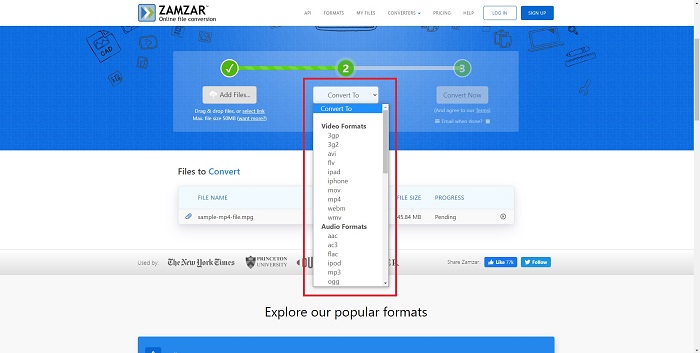
ขั้นตอนที่ 2 จากนั้นคุณสามารถเริ่มขั้นตอนการแปลงไฟล์ได้โดยการเลือกไฟล์ที่ต้องการ คลิก Convert To เพื่อดูรูปแบบไฟล์ทั้งหมดที่เครื่องมือออนไลน์นี้รองรับ.
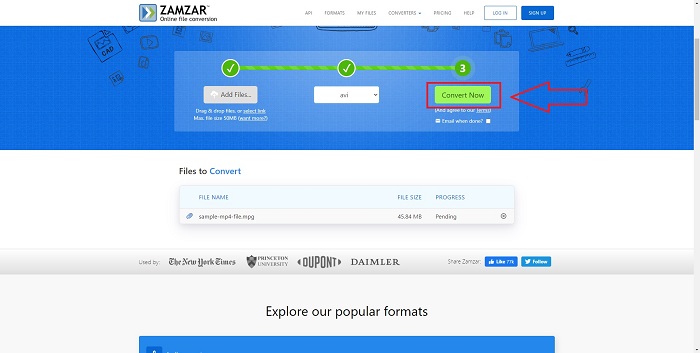
ขั้นตอนที่ 3 เพื่อเริ่มแปลงไฟล์ ให้คลิก Convert Now.
ส่วนที่ 4. คำถามที่พบบ่อยเกี่ยวกับ MPG และ AVI
AVI หรือ MPG ดีกว่ากัน?
สามารถจัดเก็บข้อมูลได้ด้วยไฟล์ AVI ในขณะที่การบันทึกวิดีโอทำได้ด้วยไฟล์ MPEG AVI นั้นเหนือกว่า MPEG เล็กน้อย; อย่างไรก็ตาม ถ้าเป็นรูปแบบที่ใช้ MPEG คุณต้องการเขียนวิดีโอดีวีดี Microsoft Windows พัฒนารูปแบบไฟล์ AVI เพื่อตอบสนองต่อรูปแบบไฟล์ MOV ของ Apple ในขณะที่กลุ่มภาพเคลื่อนไหวพัฒนารูปแบบ MPG
ข้อดีและข้อเสียของ AVI คืออะไร?
เมื่อเทียบกับรูปแบบไฟล์อื่น ไฟล์ AVI อาจมีขนาดใหญ่มากหากไม่บีบอัด คุณต้องยอมสละพื้นที่ดิสก์บางส่วนเพื่อแลกกับประโยชน์ของไฟล์ AVI เนื่องจากคุณจะไม่สามารถจัดเก็บไฟล์ได้มากเท่าที่คุณต้องการ หากคุณบีบอัดไฟล์ AVI ทางออนไลน์เกินจุดหนึ่ง คุณภาพของวิดีโอจะลดลงตามไปด้วย
AVI หรือ MPG ขนาดเล็กกว่ากัน
เมื่อใช้งานผ่านอินเทอร์เน็ต ไฟล์ขนาดใหญ่จะใช้เวลาในการดาวน์โหลดนาน จึงมีเหตุผลที่จะเข้ารหัสวิดีโอให้มีขนาดไฟล์เล็กลง แม้จะทำให้คุณภาพลดลงเล็กน้อยก็ตาม ในด้านการเล่นไฟล์ AVI ยังเป็นที่นิยมมากกว่า MPG เพราะเครื่องเล่นแบบตั้งโต๊ะส่วนใหญ่รองรับไฟล์ AVI มากกว่าไฟล์ MPG หากคุณต้องการเล่นไฟล์ MPG บนคอมพิวเตอร์ของคุณ คลิก ที่นี่ เพื่อเรียนรู้เพิ่มเติม.
สรุป
เพื่อสรุปทุกสิ่งที่เราได้กล่าวถึง Video Converter Ultimate คือโปรแกรมแปลงไฟล์ที่ดีที่สุดที่คุณควรพิจารณาใช้เหนือกว่าตัวแปลงไฟล์ MPG เป็น AVI ออนไลน์ทั้งหมดที่กล่าวถึงข้างต้น ซอฟต์แวร์นี้ให้ดาวน์โหลดฟรี และมีความเร็วในการแปลงไฟล์สูงกว่าตัวแปลงไฟล์ออนไลน์ นอกจากนี้ยังรองรับรูปแบบไฟล์จำนวนมากและให้คุณภาพวิดีโอที่ยอดเยี่ยม ยิ่งไปกว่านั้น แทบไม่มีเหตุผลใดที่คุณจะไม่เลือกใช้ซอฟต์แวร์นี้.
-
 วิธีการแปลงไฟล์ MPEG เป็น MP4 ฟรีบน Windows, Mac, Online
 อ่านและรับ 3 วิธีฟรีในการแปลงไฟล์ MPEG เป็น MP4 บนคอมพิวเตอร์ของคุณ คุณสามารถใช้ตัวแปลงวิดีโอออนไลน์และเดสก์ท็อปเพื่อเปลี่ยนรูปแบบ MPEG เป็น MP4 ได้อย่างง่ายดาย
-
 [2025] เครื่องมือที่ดีที่สุดและวิธีง่ายๆ ในการแปลง MPEG เป็น MP3
 บทความนี้กล่าวถึงวิธีการแปลงวิดีโอ MPEG ของคุณเป็น MP3 เป็นหลักโดยใช้เครื่องมือที่น่าเชื่อถือที่สุดในรายการ
-
 4 วิธีที่มีประสิทธิภาพในการแปลง MOV เป็น AVI บนพีซีและ Mac [2025]
 คุณต้องการที่จะรู้ว่าอะไรคือตัวแปลง MOV เป็น AVI ที่ดีที่สุดบนเว็บ? และเหตุใด FVC Ultimate Video Converter จึงเหมาะสำหรับคุณ
