


 Video Converter Ultimate
 บันทึกหน้าจอ
 ซ่อมวิดีโอ
 ดาวน์โหลดอย่างปลอดภัย
วิธีที่ยอดเยี่ยมที่สุดในการแปลง MPG เป็น M4V อย่างรวดเร็ว
คุณกำลังมองหาวิธีที่ดีที่สุดในการแปลงไฟล์ MPG เป็น M4V บน Mac และ Windows อย่างรวดเร็วอยู่หรือไม่? ไม่ต้องกังวลอีกต่อไป เพราะเราจะนำเสนอวิธีที่ดีที่สุดในการแปลงไฟล์ให้คุณ นอกจากนี้ เรายังจะแนะนำวิธีการแปลง MPG เป็น M4V ออนไลน์ให้ด้วย เพื่อให้คุณเข้าใจทั้งการแปลงไฟล์แบบออนไลน์และออฟไลน์ สิ่งที่คุณต้องทำมีเพียงเอนกายพักผ่อน แล้วอ่านบทความที่ให้ความกระจ่างนี้ให้จบเท่านั้น.

ส่วนที่ 1: วิธีที่มีประสิทธิภาพในการแปลง MPG เป็น M4V โดยใช้ Mac
ทุกวันนี้ ผู้ใช้ Mac บางคนประสบปัญหาในการแปลงไฟล์ MPG เป็น M4V เนื่องจากไม่ทราบว่าจะใช้แอปพลิเคชันใดได้บ้าง หากคุณเป็นสมาชิกของผู้ใช้เหล่านั้นด้วย ตัวแปลงที่ดีที่สุดที่คุณสามารถใช้ได้คือ Video Converter Ultimate คุณสามารถใช้งานเครื่องมือที่ยอดเยี่ยมนี้บน Mac ของคุณได้อย่างง่ายดายเพราะมีอินเทอร์เฟซที่ใช้งานง่าย นอกจากรูปแบบไฟล์ MPG และ M4V แล้ว คุณยังสามารถแปลงไฟล์วิดีโออื่นๆ ได้อีกด้วย เช่น MP4, MOV, AVI, FLV, MKV, WMV, DIVX และอื่นๆ นอกจากนี้ หากคุณต้องการแปลงไฟล์ MPG หลายไฟล์เป็น M4V ไฟล์เดียว ก็สามารถทำได้เช่นกัน ตัวแปลงนี้มีกระบวนการแปลงเป็นชุดซึ่งคุณสามารถแปลงไฟล์ MPG ได้หลายไฟล์พร้อมกัน นอกจากนี้ ตัวแปลงนี้ไม่สามารถเข้าถึงได้เฉพาะผู้ใช้ Mac เท่านั้น ผู้ใช้ Windows ยังสามารถใช้ตัวแปลงนี้ซึ่งทำให้ผู้ใช้ทุกคนสะดวกยิ่งขึ้น
นอกจากการแปลงวิดีโอแล้ว คุณยังสามารถแปลงไฟล์รูปภาพต่างๆ เครื่องมือนี้รองรับรูปภาพหลายรูปแบบ เช่น BMP, JPG, PNG, WEBP และอื่นๆ นอกจากนี้ แม้ว่าจะเป็นแอปพลิเคชั่นตัวแปลง แต่ก็ยังมีหลายสิ่งที่สามารถทำได้ หากวิดีโอ MPG ของคุณช้าเกินไปและคุณต้องการเพิ่มความเร็ว คุณสามารถทำได้ด้วยเครื่องมือนี้ ช่วยให้คุณปรับความเร็วของวิดีโอได้ตั้งแต่ 0.125x, 0.25x, 0.5x, 0.75x, 1x, 1.25x, 1.5, 2x, 4x ถึง 8x เร็วกว่าความเร็วเฉลี่ยของวิดีโอของคุณ ด้วยวิธีนี้ คุณสามารถปรับความเร็ววิดีโอของคุณได้อย่างง่ายดาย คุณสมบัติอื่นที่คุณสามารถเพลิดเพลินกับเครื่องมือนี้คือเครื่องมือเพิ่มคุณภาพวิดีโอ เครื่องมือนี้ช่วยให้คุณเพิ่มความละเอียดของวิดีโอ คุณยังสามารถปรับความสว่างและคอนทราสต์ของวิดีโอของคุณให้เหมาะสม คุณยังสามารถลดการสั่นของวิดีโอได้อีกด้วย สุดท้ายนี้ คุณสามารถลบสัญญาณรบกวนออกจากวิดีโอของคุณได้อย่างง่ายดาย ด้วยคำแนะนำของซอฟต์แวร์นี้ คุณสามารถเล่นวิดีโอของคุณได้ดีขึ้นและน่าพึงพอใจมากขึ้นในการรับชม ดูคุณสมบัติเพิ่มเติมด้านล่าง
คุณสมบัติเด่น
◆ แปลงไฟล์วิดีโอมากกว่า 100 ไฟล์ รวมถึง M4V, MPG, MP4, AVI, MOV, FLV, MKV, WMV, OGV, VOB, 3GP, SWF เป็นต้น
◆ แปลงไฟล์หลายไฟล์พร้อมกัน
◆ สามารถแปลงไฟล์ได้เร็วกว่าความเร็วการแปลงเฉลี่ย 30 เท่า
◆ เสนอเครื่องสร้างภาพตัดปะ
◆ สามารถสร้างมิวสิกวิดีโอ
◆ แปลงไฟล์รูปภาพ เช่น JPG, PNG, TIF, BMP และอื่นๆ
◆ มีเครื่องมือแก้ไข เช่น ตัวควบคุมความเร็ววิดีโอ ตัวเพิ่มประสิทธิภาพวิดีโอ คอมเพรสเซอร์ ทริมเมอร์ ครอป และอื่นๆ
ใช้คำแนะนำง่ายๆ ด้านล่างเพื่อแปลง MPG เป็น M4V บน Mac โดยใช้ FVC Video Converter Ultimate
ขั้นตอนที่ 1: คลิกปุ่มดาวน์โหลดเวอร์ชันสำหรับ Mac ด้านล่างเพื่อดาวน์โหลด Video Converter Ultimate ลงใน Mac ของคุณ หลังจากนั้นดำเนินการติดตั้งและเปิดใช้งานโปรแกรม.
ดาวน์โหลดฟรีสำหรับ Windows 7 หรือใหม่กว่าดาวน์โหลดอย่างปลอดภัย
ดาวน์โหลดฟรีสำหรับ MacOS 10.7 หรือใหม่กว่าดาวน์โหลดอย่างปลอดภัย
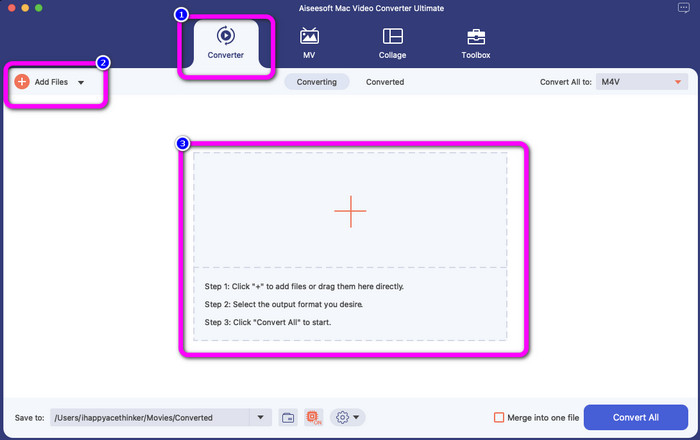
ขั้นตอนที่ 2: เลือกแถบเมนู Converter เมื่อหน้าอินเทอร์เฟซหลักปรากฏบนหน้าจอของคุณแล้ว จากนั้นจะมี 3 วิธีในการใส่ไฟล์วิดีโอ MPG ได้แก่ คลิกปุ่ม Add File ไอคอนเครื่องหมายบวก หรือเพียงแค่ลากไฟล์ลงในกล่อง.
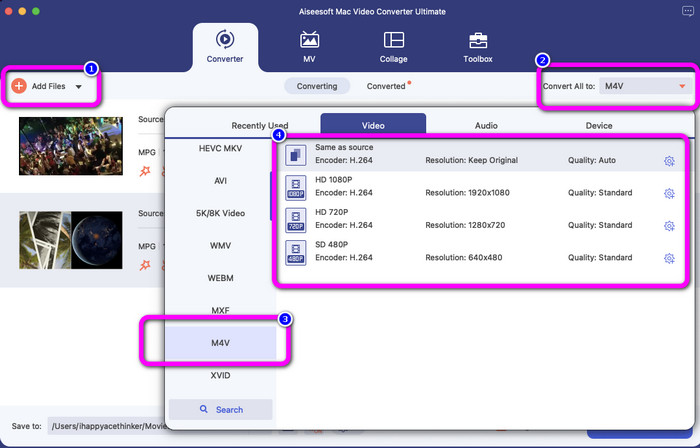
ขั้นตอนที่ 3: คลิกปุ่ม Add Files เพื่อแปลงไฟล์ MPG เพิ่มเติม จากนั้นหากต้องการแปลงให้เป็นไฟล์ M4V ให้เลือกปุ่ม Convert All to ดูตัวเลือกฟอร์แมต เลือกฟอร์แมต M4V แล้วเลือกความละเอียดวิดีโอที่คุณต้องการตั้งแต่ 480p ถึง 1080p.
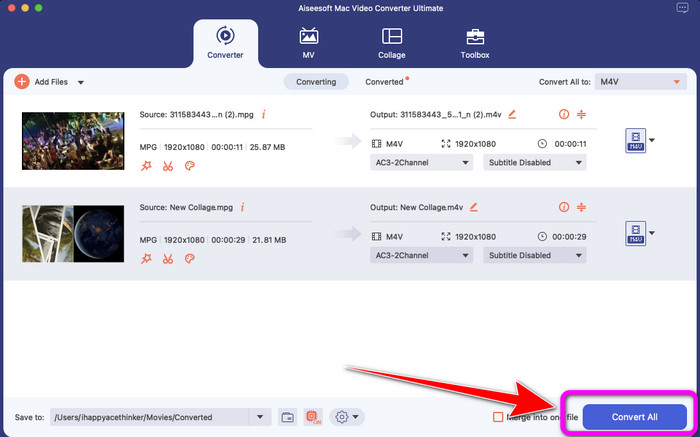
ขั้นตอนที่ 4: เมื่อแปลงไฟล์ทั้งหมดเป็นฟอร์แมต M4V เรียบร้อยแล้ว ให้คลิกปุ่ม Convert All กระบวนการแปลงจะเริ่มต้นขึ้น หลังจากนั้นให้บันทึกวิดีโอของคุณ หากคุณต้องการแปลง ไฟล์ MXF เป็น M4V คุณก็สามารถใช้ซอฟต์แวร์นี้ได้เช่นกัน.
ส่วนที่ 2: วิธีแปลง MPG เป็น M4V ออนไลน์ฟรี
หากคุณต้องการแปลง MPG เป็น M4V ออนไลน์ฟรี ให้ใช้ FVC Free Video Converter คุณสามารถใช้เครื่องมือฟรีนี้ได้บนเบราว์เซอร์ทุกตัว เช่น Mozilla Firefox, Google Chrome, Safari, Microsoft Edge และอื่น ๆ คุณสามารถแปลงไฟล์ MPG เป็นฟอร์แมต M4V ได้อย่างง่ายดายในไม่กี่คลิก เพราะมีอินเทอร์เฟซที่เรียบง่าย ทุกคนเข้าใจได้ไม่ยาก เครื่องมือออนไลน์นี้รองรับฟอร์แมตมากมาย เช่น WMA, MP4, FLV, AVI, MOV, TS และอื่น ๆ อีกทั้งตัวแปลงนี้ยังให้คุณแปลงไฟล์จำนวนมากได้ในครั้งเดียว.
นอกจากนี้ ในระหว่างกระบวนการแปลง คุณสามารถแก้ไขและเปลี่ยนแปลงบิตเรต อัตราเฟรม และความละเอียดของวิดีโอของคุณได้โดยไปที่การตั้งค่าวิดีโอ คุณยังสามารถเปลี่ยนบิตเรตและอัตราแซมเพิลของเสียงได้อีกด้วย ด้วยคุณสมบัติที่ยอดเยี่ยมเหล่านี้ คุณสามารถมั่นใจได้ว่าวิดีโอของคุณจะพัฒนาขึ้น นอกจากนี้ จะไม่มีการเพิ่มลายน้ำลงในวิดีโอของคุณหลังจากแปลงวิดีโอแล้ว ซึ่งดีมาก โดยเฉพาะอย่างยิ่งหากคุณไม่ต้องการเห็นองค์ประกอบที่รบกวนสายตาจากรูปภาพของคุณ
คุณสมบัติเด่น
◆ แปลงไฟล์วิดีโอ เช่น MPG, M4V, MP4, MOV, AVI, FLV, MKV และอื่นๆ
◆เสนอกระบวนการแปลงเป็นชุด
◆ แก้ไขบิตเรต อัตราเฟรม และความละเอียดของวิดีโอ
◆ แปลงรูปแบบไฟล์เสียง เช่น MP3, AAC, AC3, WAV, FLAC เป็นต้น
◆ เปลี่ยนอัตราบิตและอัตราตัวอย่างของเสียง
ทำตามคำแนะนำง่ายๆ ด้านล่างเพื่อแปลง MPG เป็น M4V โดยใช้ FVC Free Video Converter Ultimate
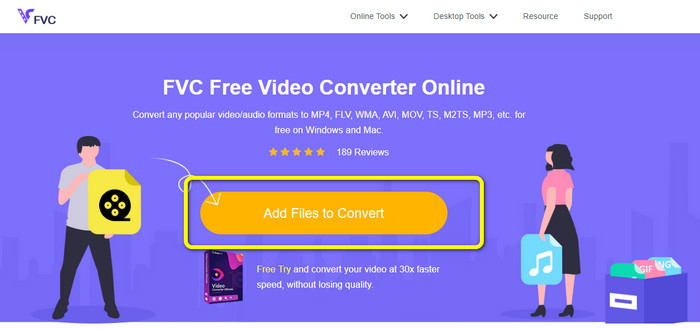
ขั้นตอนที่ 1: อัปโหลดไฟล์ MPG ที่คุณต้องการแปลงโดยคลิกปุ่ม Add Files to Convert.
ขั้นตอนที่ 2: เลือกปุ่ม Add File เพื่อเพิ่มไฟล์อื่นที่คุณต้องการแปลง จากนั้นคลิกไอคอน Setting ปรับการตั้งค่าตามที่คุณต้องการ แล้วคลิก OK.
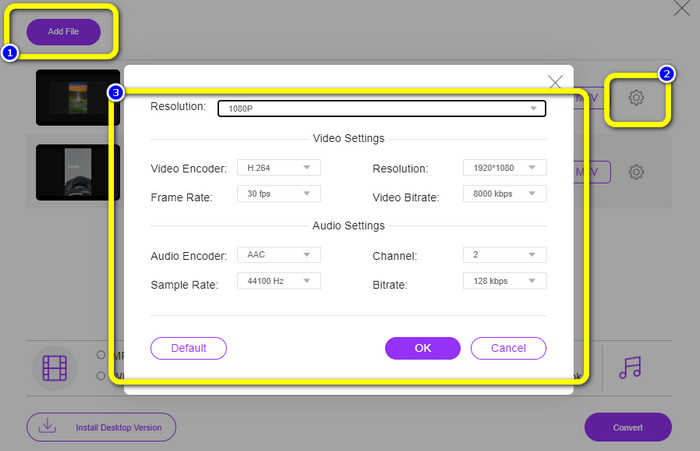
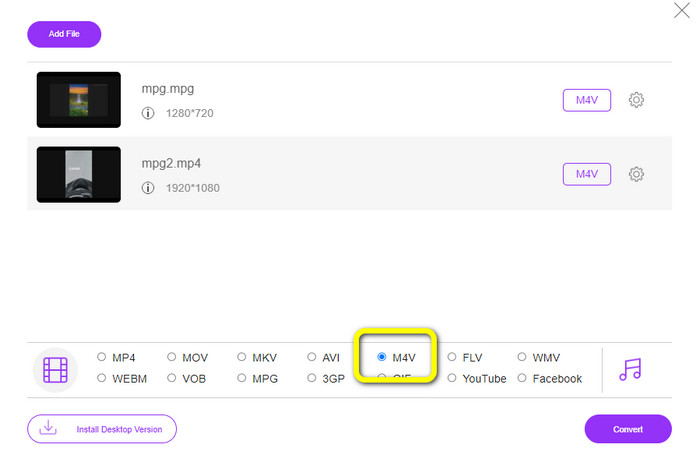
ขั้นตอนที่ 3: จากนั้นดูตัวเลือกฟอร์แมตที่ส่วนล่างของอินเทอร์เฟซ แล้วเลือกฟอร์แมตไฟล์ M4V.
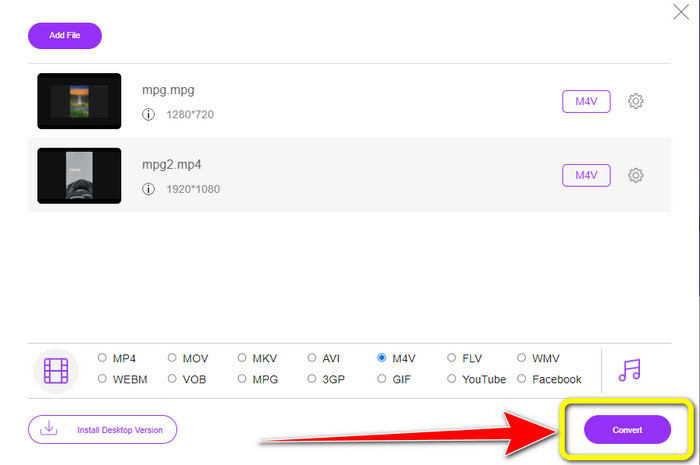
ขั้นตอนที่ 4: เมื่อเลือก M4V เป็นฟอร์แมตไฟล์ที่คุณต้องการเรียบร้อยแล้ว ให้คลิกปุ่ม Convert เลือกตำแหน่งจัดเก็บไฟล์ตามต้องการ แล้วรอให้กระบวนการแปลงเสร็จสิ้น คุณยังสามารถใช้ตัวแปลงนี้ในการเปลี่ยนไฟล์ OGV เป็น M4V ได้ด้วย.
ตอนที่ 3: อันไหนดีที่สุด?
ตัวแปลงทั้งสองที่กล่าวมาข้างต้นถือเป็นตัวแปลงไฟล์ที่ยอดเยี่ยมซึ่งคุณสามารถใช้งานได้ทั้งแบบออฟไลน์และออนไลน์ หากคุณต้องการแปลงไฟล์ MPG เป็น M4V ด้วยเครื่องมือออนไลน์ คุณสามารถใช้ FVC Free Video Converter เครื่องมือนี้รองรับการแปลงแบบเป็นชุด ช่วยให้คุณแปลงไฟล์หลายไฟล์ได้พร้อมกัน อีกด้านหนึ่ง หากคุณต้องการแปลงไฟล์ด้วยโปรแกรมที่ต้องดาวน์โหลด คุณสามารถใช้ Video Converter Ultimate เครื่องมือออฟไลน์นี้ใช้งานได้ทั้งบน Mac และ Windows จึงเหมาะสำหรับผู้ใช้ทุกกลุ่ม.
ตอนที่ 4: MPG กับ M4V
| MPG | M4V | |
| นามสกุลไฟล์ | .mpg | .m4v |
| คำอธิบาย | รูปแบบไฟล์ MPG เป็นไฟล์ของกลุ่มผู้เชี่ยวชาญด้านภาพเคลื่อนไหว เป็นการเผยแพร่ทางออนไลน์ทั่วไปเนื่องจากสามารถดาวน์โหลดและสตรีมได้เร็วกว่ารูปแบบวิดีโออื่น ๆ | Apple สร้างรูปแบบไฟล์ M4V คอนเทนเนอร์วิดีโอนี้เกือบจะคล้ายกับรูปแบบไฟล์ MP4 ข้อแตกต่างหลักเพียงอย่างเดียวระหว่างสองรูปแบบคือรูปแบบ M4V ได้รับการป้องกันด้วยการป้องกันการคัดลอก DRM |
| นักพัฒนา | ISO, ไออีซี | บริษัท แอปเปิ้ล. |
| โปรแกรมที่เกี่ยวข้อง | VLC Media Player วิดีโอแลน Windows Media Player | โปรแกรมเล่น Apple QuickTime VLC Media Player แอปเปิ้ลไอทูนส์ |
ส่วนที่ 5: คำถามที่พบบ่อยเกี่ยวกับการแปลง MPG เป็น M4V
1. รูปแบบใดดีกว่า MPG หรือ MP4
ในด้านคุณภาพ รูปแบบไฟล์ MP4 สามารถให้คุณภาพที่ดีกว่ารูปแบบ MPG เป็นเพราะ MP4 รองรับตัวแปลงสัญญาณวิดีโอเช่น H.265 มากขึ้น
2. เหตุใดไฟล์ MPG จึงมีขนาดใหญ่
มีขนาดใหญ่เนื่องจาก MPG เชื่อมโยงกับ MPEG2 เป็นรูปแบบการบีบอัดแบบเก่าที่ต้องใช้พลังการประมวลผลเพียงเล็กน้อยในการเข้ารหัสและยังคงสร้างไฟล์ขนาดใหญ่
3. เครื่องเล่นใดดีที่สุดสำหรับไฟล์ MPG?
VLC Media Player
Apple QuickTime Player
Media Player Lite
PotPlayer
FX Player
Video LAN
สรุป
แม้ว่าการแปลงไฟล์ MPG เป็น M4V จะดูเป็นเรื่องยาก แต่ด้วยวิธีที่มีประสิทธิภาพเหล่านี้และการใช้ตัวแปลงคุณภาพดี การแปลงไฟล์จึงกลายเป็นเรื่องง่าย หากคุณต้องการแปลงไฟล์ได้อย่างสะดวก ใช้ตัวแปลงทั้งสองชนิดที่กล่าวถึงข้างต้นได้เลย.
-
 4 วิธีในการแปลง MPG เป็น MKV โดยใช้ตัวแปลงออนไลน์/ออฟไลน์
 คุณกำลังมองหาตัวแปลงที่ใช้งานง่ายซึ่งสามารถแปลงไฟล์ MPG เป็น MKV ได้หรือไม่? บทความนี้แสดงวิธีที่ดีที่สุดและง่ายที่สุดในการแปลงไฟล์ MPG เป็น MKV อย่างรวดเร็ว
-
 3 วิธีในการแปลง MPG เป็น 3GP บน Windows และ Mac [ฟรี]
 หากคุณกำลังมองหาวิธีแปลง MPG เป็น 3GP โปรดอ่านบทความนี้เพื่อทราบวิธีที่ดีที่สุดในการแปลง MPG เป็น 3GP บน Windows และ Mac
-
 วิธีแปลง MPG เป็น DivX โดยไม่สูญเสียคุณภาพ
 คุณกำลังมองหาแอปพลิเคชันที่ปราศจากปัญหาซึ่งคุณสามารถใช้แปลงไฟล์ MPG เป็น DivX ได้หรือไม่? บทความนี้จะให้วิธีการต่างๆ ที่มีประสิทธิภาพที่คุณต้องลอง
