


 Video Converter Ultimate
 บันทึกหน้าจอ
 ซ่อมวิดีโอ
 ดาวน์โหลดอย่างปลอดภัย
คำแนะนำง่ายๆ ในการแปลง OGV เป็น MKV
คุณอยากรู้วิธีแปลงไฟล์ OGV เป็น MKV แล้วเปิดด้วยโปรแกรมเล่นสื่ออื่นหรือไม่? งั้นคุณถือว่าโชคดี เพราะบทความนี้จะแนะนำแอปพลิเคชันยอดเยี่ยมพร้อมขั้นตอนพื้นฐานในการแปลงไฟล์หลากหลายรูปแบบให้คุณ อีกทั้งคุณไม่ต้องกังวลเพราะเครื่องมือเหล่านี้คุ้มค่าน่าใช้งาน และจะไม่ทำให้คุณผิดหวัง ดังนั้นควรไปต่อยังเนื้อหาหลักเลย เพราะเราไม่อยากให้คุณต้องรอนาน มาค้นพบวิธีการเหล่านี้และอ่านบทความนี้ให้จบกันเลยตอนนี้ทันที.

ส่วนที่ 1: ข้อมูลเกี่ยวกับรูปแบบ OGV และ MKV
ก่อนที่จะแปลงไฟล์ OGV เป็นรูปแบบ MKV ก่อนอื่นเรามาให้ข้อมูลที่มีค่ากันก่อน
OGV คืออะไร?
Ogg Vorbis (OGV) เป็นรูปแบบคอนเทนเนอร์มัลติมีเดียแบบโอเพ่นซอร์สและไม่มีการจดสิทธิบัตรฟรี เป็นของตระกูลรูปแบบและตัวแปลงสัญญาณ Ogg ซึ่งมูลนิธิ Xiph.Org ที่ไม่แสวงหาผลกำไรสร้างขึ้นเพื่อรับตัวแปลงสัญญาณที่จดสิทธิบัตร OGV สามารถกำหนดทิศทางข้อความมัลติเพล็กซ์ (TDM) (คำบรรยาย) และข้อมูลเมตาได้ นอกจากนี้ยังสนับสนุนการสตรีมสำหรับการบีบอัดแบบสูญเสียและไม่สูญเสีย
MKV คืออะไร?
MKV เป็นคอนเทนเนอร์โอเพ่นซอร์สที่สามารถเก็บสื่อที่มีการบีบอัดโดยใช้ตัวแปลงสัญญาณต่างๆ มีประโยชน์มากมายเหนือคอนเทนเนอร์ AVI แบบดั้งเดิม รวมถึงความสามารถในการรวมแทร็กเสียงและคำบรรยายในหลายภาษาที่สามารถเปลี่ยนได้โดยไม่ต้องหยุดเล่นชั่วคราว และค้นหาและย้อนกลับไฟล์อย่างรวดเร็ว นอกจากนี้ รูปแบบยังปรับเปลี่ยนได้ง่าย ทำให้ง่ายต่อการแยกข้อมูลเสียงและวิดีโอ
ตอนที่ 2: วิธีแปลง OGV เป็น MKV โดยไม่สูญเสียข้อมูล
หากคุณเข้ามาเพื่อเรียนรู้วิธีแปลง OGV เป็น MKV แบบไม่เสียคุณภาพ คุณมาถูกที่แล้ว โปรแกรมแปลงไฟล์แบบดาวน์โหลดที่ดีที่สุดตัวหนึ่งที่คุณหาได้คือ Video Converter Ultimate นี่เป็นหนึ่งในโปรแกรมแปลงไฟล์ที่เชื่อถือได้มากที่สุดบนคอมพิวเตอร์ Windows และ Mac ของคุณ นอกจากนี้เครื่องมือนี้ยังรองรับมากกว่า 100 รูปแบบไฟล์ เช่น FLV, MP4, M4V, MOV, SWF, AVI, MTS และอื่น ๆ อีกมากมาย และไม่ได้จำกัดแค่การแปลงวิดีโอเท่านั้น คุณยังสามารถแปลงรูปภาพได้ที่นี่ เพราะรองรับ JPG, PNG, GIF, WEBP เป็นต้น จุดเด่นคือ คุณสามารถแปลงไฟล์ได้เร็วขึ้นถึง 30 เท่า เมื่อเทียบกับเครื่องมืออื่นที่มีความเร็วการแปลงปกติ อีกทั้งยังรองรับการแปลงแบบเป็นชุด ซึ่งหมายความว่าคุณสามารถเพิ่มไฟล์วิดีโอหลายไฟล์แล้วแปลงทั้งหมดได้ในครั้งเดียว.
นอกจากนี้ ยังมีอีกหลายสิ่งที่คุณสามารถทำได้ในไฟล์ OGV ของคุณ หากคุณต้องการปรับขนาดวิดีโอของคุณเนื่องจากขนาดไฟล์ใหญ่เกินไป คุณสามารถใช้แอปพลิเคชันนี้ได้เนื่องจากมีคุณสมบัติ Video Compressor ซึ่งคุณสามารถเปลี่ยนขนาดวิดีโอของคุณได้ มีคุณสมบัติเพิ่มเติมที่คุณสามารถเพลิดเพลินกับการปรับปรุงไฟล์ OGV ก่อนหรือหลังการแปลงเป็นรูปแบบ MKV
คุณสมบัติเด่น
◆ แปลงรูปแบบวิดีโอ เช่น MP4, M4V, AVI, FLV และอื่นๆ อีกกว่า 1,000 รายการ
◆ จัดเตรียมธีมต่างๆ สำหรับสร้างมิวสิกวิดีโอ
◆ สร้างภาพปะติดได้
◆ สามารถรวมเสียงและวิดีโอเข้าด้วยกัน
◆ เสนอคุณสมบัติต่างๆ เพื่อปรับปรุงวิดีโอ เช่น ตัวเพิ่มประสิทธิภาพวิดีโอ ตัวลบลายน้ำ ตัวควบคุมความเร็ววิดีโอ เป็นต้น
◆ อนุญาตให้เปลี่ยนความเร็วของวิดีโอ
ข้อดี
- มีอินเทอร์เฟซที่เข้าใจได้ซึ่งเหมาะสำหรับผู้เริ่มต้น
- กระบวนการแปลงเร็วขึ้น 30 เท่า
- มีการแปลงแบทช์
- แปลงไฟล์โดยไม่สูญเสียคุณภาพ
จุดด้อย
- คุณต้องได้รับรุ่น Pro เพื่อสัมผัสกับคุณสมบัติพิเศษ
หากต้องการแปลงรูปแบบไฟล์ OGV เป็น MKV โดยใช้ Video Converter Ultimate ให้ทำตามคำแนะนำโดยละเอียดด้านล่าง
ขั้นตอนที่ 1: ดาวน์โหลด Video Converter Ultimate บน Mac และ Windows ของคุณ จากนั้นเปิดโปรแกรมหลังติดตั้งเสร็จสิ้น.
ดาวน์โหลดฟรีสำหรับ Windows 7 หรือใหม่กว่าดาวน์โหลดอย่างปลอดภัย
ดาวน์โหลดฟรีสำหรับ MacOS 10.7 หรือใหม่กว่าดาวน์โหลดอย่างปลอดภัย
ขั้นตอนที่ 2: หลังจากเปิดโปรแกรมแล้ว ให้เลือกแท็บ Converter มี 2 วิธีในการเพิ่มไฟล์ OGV คุณสามารถคลิกปุ่ม Add Files หรือคลิกสัญลักษณ์ เครื่องหมายบวก.
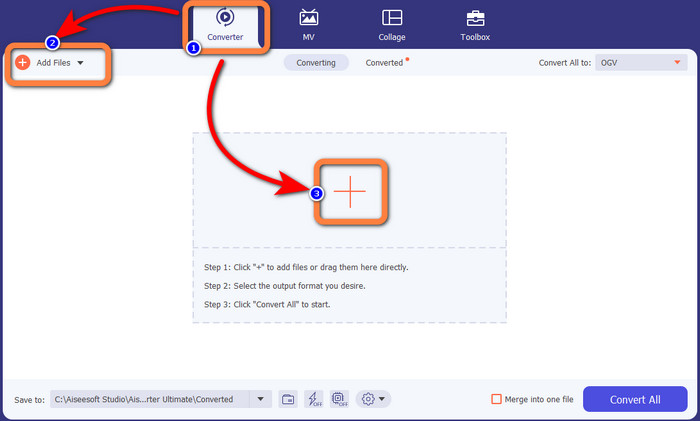
ขั้นตอนที่ 3: ไปที่ตัวเลือกฟอร์แมตโดยคลิกไอคอนดรอปดาวน์ถัดจาก Convert All to จากนั้นเลือกฟอร์แมตไฟล์ MKV สำหรับขั้นตอนถัดไป.

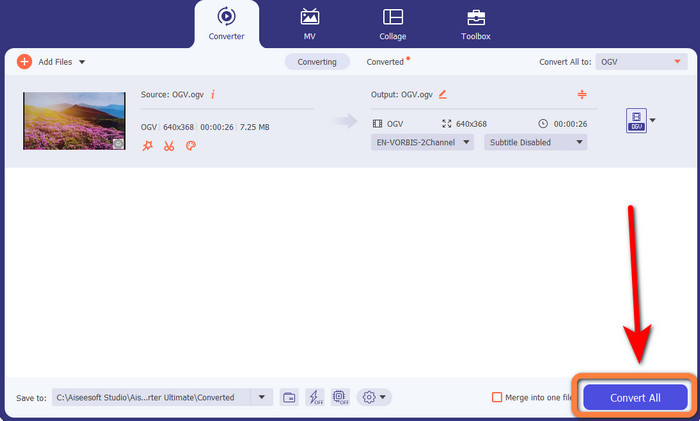
ขั้นตอนที่ 4: ขั้นตอนสุดท้ายคือแปลงไฟล์ของคุณโดยคลิกปุ่ม Convert All จากนั้นคุณก็สามารถบันทึกวิดีโอของคุณเป็นไฟล์ MKV ได้.
ส่วนที่ 3: โซลูชันออนไลน์อย่างง่ายในการแปลง OGV เป็น MKV
ใช้โปรแกรมช่วยแปลง
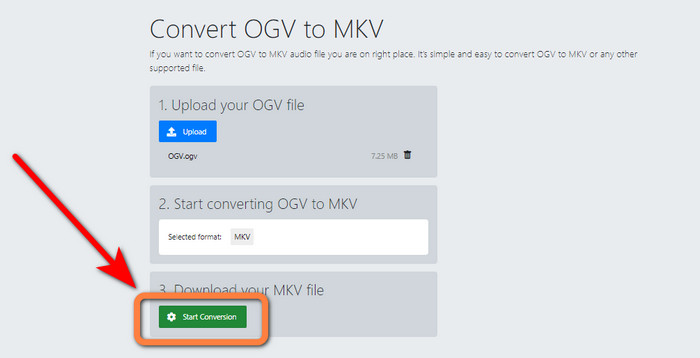
หากคุณประทับใจกับ Video Converter Ultimate แล้ว มั่นใจได้เลยว่าคุณจะรู้สึกพอใจเมื่อใช้ Converthelper เช่นกัน เครื่องมือออนไลน์นี้ช่วยให้คุณแปลง OGV เป็น MKV ได้อย่างง่ายดายและมีประสิทธิภาพ อีกทั้งยังรองรับไฟล์หลากหลายประเภท เช่น WMA, FLV, AVI, MP4, 3GP และอื่น ๆ นอกจากนี้ยังมีวิธีการแปลงไฟล์ที่ค่อนข้างพื้นฐาน ทำให้ผู้เริ่มต้นก็สามารถใช้งานได้โดยไม่ยุ่งยาก อีกทั้งตัวแปลงวิดีโอฟรีนี้ยังสามารถแปลงวิดีโอของคุณโดยไม่ทำให้คุณภาพลดลง ทำให้คุณมั่นใจได้ว่าวิดีโอจะยังคงมีคุณภาพเหมือนเดิม อย่างไรก็ตาม บางครั้ง Converthelper อาจทำงานได้ไม่ดีนัก โดยเฉพาะอย่างยิ่งเมื่อคุณใช้งานผ่านอินเทอร์เน็ตที่ช้า อีกทั้งกระบวนการแปลงยังค่อนข้างช้า ซึ่งกินเวลาของผู้ใช้ ลองใช้ซอฟต์แวร์นี้เพื่อแปลงไฟล์ OGV ของคุณเป็น MKV ดู.
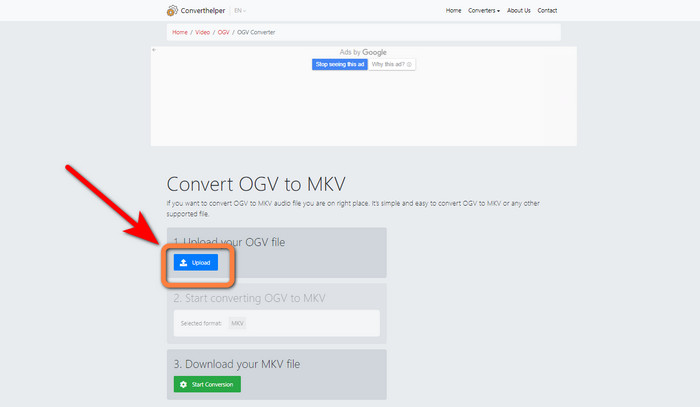
ขั้นตอนที่ 1: คุณต้องเข้าไปที่เว็บไซต์ Converthelper จากนั้นคลิกปุ่ม Upload แล้วนำเข้าไฟล์ OGV.
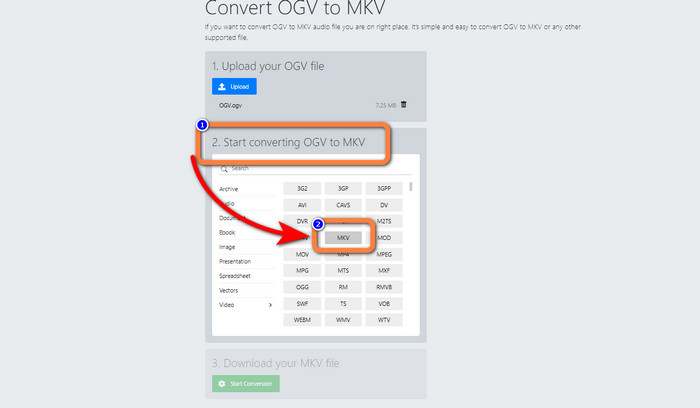
ขั้นตอนที่ 2: ไปยังหัวข้อหมายเลข 2 เลือกฟอร์แมตไฟล์ MKV จากตัวเลือกฟอร์แมต.
ขั้นตอนที่ 3: สำหรับขั้นตอนสุดท้าย ให้คลิกปุ่ม Start Conversion แล้วรอจนกระบวนการแปลงเสร็จ เครื่องมือนี้ยังช่วยให้คุณแปลง OGV เป็น FLV ได้อีกด้วย.
ใช้แปลงฟรี
FreeConvert ช่วยให้คุณแปลง OGV เป็น MKV ได้ทันที และคุณยังสามารถใช้เครื่องมือนี้เพื่อแปลงไฟล์รูปแบบอื่น ๆ เช่น MP4, WMV, AVI, WEBM, 3GP, MOV เป็นต้น นอกจากนี้ยังมีขั้นตอนการแปลงไฟล์ที่ง่าย เหมาะสำหรับผู้เริ่มต้น นอกเหนือจากการแปลงแล้ว FreeConvert ยังสามารถบีบอัดวิดีโอ รูปภาพ เสียง เอกสาร และอื่น ๆ ได้อีกด้วย นอกจากนี้คุณยังสามารถตัดต่อวิดีโอด้วยเครื่องมือแก้ไขของมัน เช่น ตัวครอปวิดีโอและตัวตัดวิดีโอ อย่างไรก็ตาม ในส่วนของการแปลงไฟล์ FreeConvert รองรับขนาดไฟล์สูงสุดเพียง 1GB เท่านั้น ทำให้คุณสามารถแปลงไฟล์ได้อย่างจำกัด หากต้องการเพิ่มขนาดไฟล์สูงสุด คุณจำเป็นต้องซื้อแพ็กเกจสมาชิก อีกทั้งยังเป็นแอปพลิเคชันบนเว็บ ดังนั้นจึงจำเป็นต้องใช้อินเทอร์เน็ตเสมอ ทำตามขั้นตอนด้านล่างเพื่อแปลง OGV เป็น MKV.
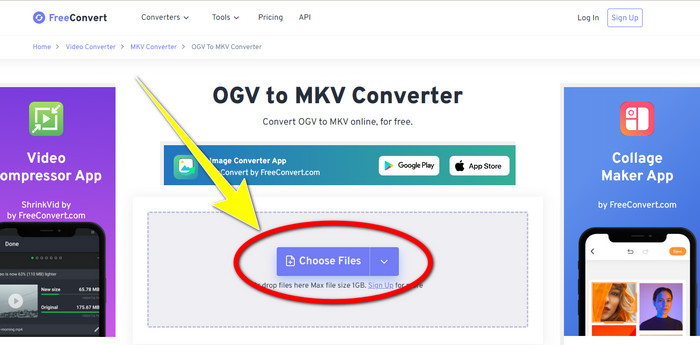
ขั้นตอนที่ 1: ไปที่เว็บไซต์ของ FreeConvert คลิกปุ่ม Choose File เพื่อเพิ่มไฟล์ OGV.
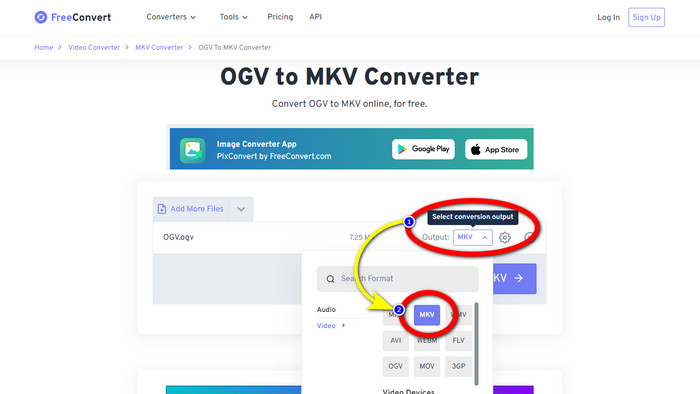
ขั้นตอนที่ 2: ขั้นตอนต่อไปคือไปที่ปุ่ม Output คลิกเพื่อดูตัวเลือกฟอร์แมต และเลือกฟอร์แมตไฟล์ MKV.
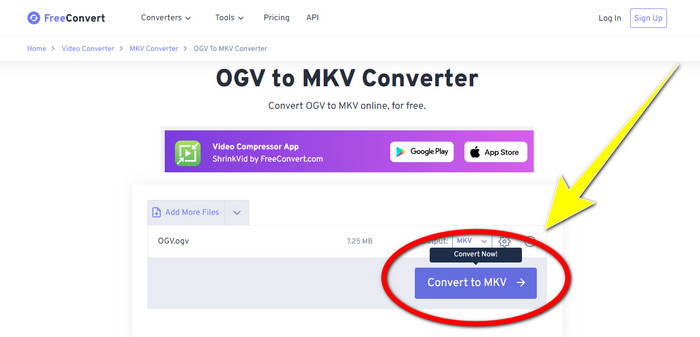
ขั้นตอนที่ 3: หลังจากเลือกฟอร์แมตไฟล์ MKV แล้ว ให้คลิกปุ่ม Convert to MKV จากนั้นกระบวนการแปลงจะเริ่มต้นและบันทึกวิดีโอสุดท้ายของคุณ.
ส่วนที่ 4: คำถามที่พบบ่อยเกี่ยวกับการแปลง OGV เป็น MKV
1. ฉันสามารถใช้ FFmpeg เพื่อแปลง OGV เป็น MKV ได้หรือไม่
แน่นอนว่าทำได้ ให้ดาวน์โหลด FFmpeg ซึ่งเป็นเครื่องมือแบบคำสั่ง (command-based) ที่สามารถแปลงไฟล์วิดีโอหลากหลายรูปแบบ รวมถึง OGV, MKV, MOV, MP4, AVI และอื่น ๆ.
2. MKV เป็นรูปแบบทั่วไปหรือไม่?
อุปกรณ์ปัจจุบันส่วนใหญ่เข้ากันได้กับรูปแบบนี้ แทร็กเสียงและคำบรรยายจำนวนมากสามารถจัดเก็บไว้ในไฟล์เดียวโดยใช้รูปแบบ MKV หรือ Matroska Video เป็นที่ชื่นชอบอย่างมากในการเก็บรักษาภาพยนตร์ ขนาดไฟล์ค่อนข้างเล็กและวิดีโอคุณภาพสูง
3. OGV เป็น OGG หรือไม่
ไม่ OGG เป็นรูปแบบโอเพ่นซอร์สที่ใช้โดยคอนเทนเนอร์ OGV หนึ่งในวัตถุประสงค์หลักของการพัฒนา OGG คือการปราศจากข้อจำกัดด้านสิทธิบัตรซอฟต์แวร์ สตรีมวิดีโอที่มีหรือไม่มีเสียงที่ถูกบีบอัดด้วยวิธี Opus, Vorbis, Theora หรือ Speex จะถูกจัดเก็บโดยใช้นามสกุลไฟล์ OGV
สรุป
การใช้เครื่องมือออนไลน์เพื่อ แปลง OGV เป็น MKV นั้นมีประสิทธิภาพ แต่คุณไม่อาจมองข้ามข้อเท็จจริงที่ว่าโฆษณาน่ารำคาญมักจะเด้งขึ้นมาเสมอระหว่างการแปลงไฟล์ ดังนั้นหากคุณต้องการแปลงไฟล์โดยไม่ถูกรบกวนจากโฆษณา คุณสามารถใช้ Video Converter Ultimate ได้.
-
 โซลูชันที่ยอดเยี่ยมที่สุด 4 อันดับแรกในการแปลง MXF เป็น MKV [แก้ไขแล้ว]
 ทำความรู้จักกับสี่วิธีที่ยอดเยี่ยมเหล่านี้ในการแปลง MXF เป็น MKV ออนไลน์และออฟไลน์ได้อย่างง่ายดาย แอพที่รวมอยู่ในโพสต์นี้สามารถช่วยคุณแปลงไฟล์ได้โดยไม่ยุ่งยาก
-
 4 วิธีในการแปลง MPG เป็น MKV โดยใช้ตัวแปลงออนไลน์/ออฟไลน์
 คุณกำลังมองหาตัวแปลงที่ใช้งานง่ายที่สามารถแปลงไฟล์ MPG เป็น MKV ได้หรือไม่? บทความนี้แสดงวิธีที่ดีที่สุดและง่ายที่สุดในการแปลงไฟล์ MPG เป็น MKV อย่างรวดเร็ว
-
 วิธีที่ง่ายที่สุดในการแปลง MOV เป็น MKV ฟรีบน Mac
 คุณต้องการแปลง MOV เป็น MKV ฟรีบน Mac หรือไม่? อ่านบทความนี้เพื่อทราบวิธีที่ง่ายและง่ายที่สุดในการแปลงไฟล์ MOV เป็น MKV
