


 Video Converter Ultimate
 บันทึกหน้าจอ
 ซ่อมวิดีโอ
วิธีการแปลง RMVB เป็น MKV อย่างง่ายดายโดยใช้ตัวแปลงที่ดีที่สุด
หากคุณเป็นหนึ่งในคนที่กำลังมองหาวิธีแปลงไฟล์ RMVB ของคุณเป็น MKV คุณอาจต้องการอ่านบทความนี้ให้จบ บทความนี้จะแสดงวิธีแปลงไฟล์ RMVB เป็น MKV ด้วยตัวแปลงคุณภาพดีและใช้งานได้ฟรีที่ใช้ไม่ยาก เชิญคุณนั่งสบาย ๆ แล้วผ่อนคลาย ขณะที่เราแนะนำวิธีที่ดีที่สุดในการแปลง RMVB เป็น MKV ทั้งแบบออนไลน์และออฟไลน์ให้คุณ.

ส่วนที่ 1. ไฟล์ RMVB และ MKV คืออะไร
RealMedia Variable Bitrate (RMVB) เป็นรูปแบบไฟล์วิดีโอ Real Media ไฟล์ประเภทนี้ถูกบีบอัดโดยใช้บิตเรต ไฟล์ประเภทนี้สร้างขึ้นสำหรับโปรแกรมเล่นสื่อที่ผลิตโดย RealMedia นอกจากนี้ รูปแบบนี้เป็นที่นิยมสำหรับภาพยนตร์อนิเมะและภาพยนตร์เอเชีย เนื่องจากมีขนาดไฟล์ที่เล็กกว่ารูปแบบไฟล์อื่นๆ นอกจากนี้ยังมีบิตเรตที่ต่ำกว่า ซึ่งส่งผลต่อปริมาณข้อมูลที่ถ่ายโอนไปยังเสียง ในทางกลับกัน ไฟล์ MKV หรือ Matroska สามารถจัดเก็บแทร็กเสียง วิดีโอ และคำบรรยายได้ คอนเทนเนอร์ไฟล์นี้ยังพิสูจน์ได้ในอนาคต ซึ่งหมายความว่าได้รับการออกแบบมาเพื่อไม่ให้ล้าสมัยในอนาคต
ส่วนที่ 2 วิธีการแปลง RMVB เป็น MKV โดยใช้ FVC Video Converter Ultimate
FVC Video Converter Ultimate เป็นตัวแปลงออฟไลน์ที่ให้คุณแปลงรูปแบบไฟล์มากกว่า 1,000 รูปแบบที่มีอยู่บนเว็บ เช่น RMVB เป็น MKV, WMV, MP4, AVI, FLV, M4V และอื่นๆ ตัวแปลงนี้ยังสามารถแปลงด้วยความเร็วสูง มีคุณลักษณะเฉพาะที่ช่วยให้คุณสามารถแก้ไขไฟล์และแปลงไฟล์หลายไฟล์เป็นชุดเดียวได้ นอกจากนี้ยังมีคุณสมบัติในการสร้าง GIF หรือทำให้ไฟล์วิดีโอของคุณเป็นแบบ 3 มิติ
ข้อดี
- เสนอการแปลงเป็นชุดเพื่อรวมหลายไฟล์เป็นไฟล์เดียว
- มี GUI ที่ใช้งานง่ายซึ่งจะไม่ทำให้คุณใช้งานลำบาก
- มีคุณสมบัติที่สามารถสร้าง GIF และวิดีโอ 3 มิติได้
- ใช้งานได้ฟรีบน Windows และ Mac
จุดด้อย
- หากต้องการใช้คุณสมบัติพิเศษ คุณต้องซื้อแอป
ดังนั้น หากคุณพอใจกับสิ่งที่ตัวแปลงนี้สามารถทำได้ ให้ทำตามขั้นตอนเพื่อแปลงไฟล์ RMVB เป็น MKV ได้อย่างง่ายดาย
ขั้นตอนที่ 1. หากต้องการใช้ FVC Video Converter Ultimate ให้คลิกปุ่ม ดาวน์โหลด ด้านล่าง จากนั้นทำตามขั้นตอนการติดตั้งและเปิดโปรแกรม.
ดาวน์โหลดฟรีสำหรับ Windows 7 หรือใหม่กว่าดาวน์โหลดอย่างปลอดภัย
ดาวน์โหลดฟรีสำหรับ MacOS 10.7 หรือใหม่กว่าดาวน์โหลดอย่างปลอดภัย
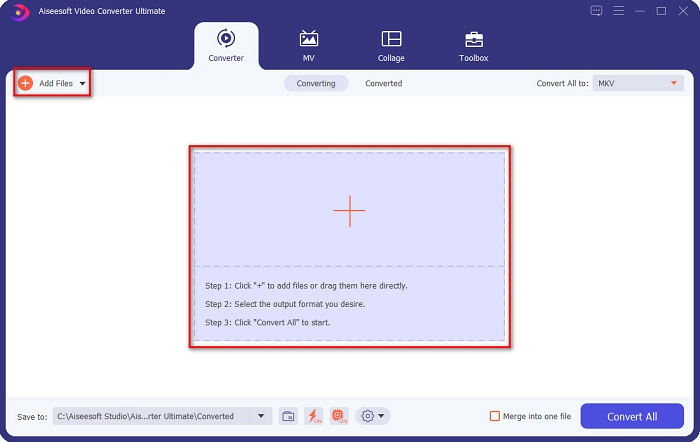
ขั้นตอนที่ 2. จากนั้นให้คลิกปุ่ม Add Files หรือปุ่มสัญลักษณ์ + เพื่ออัปโหลดไฟล์ของคุณในหน้าอินเทอร์เฟซแรกของซอฟต์แวร์ ไฟล์ในคอมพิวเตอร์ของคุณจะแสดงขึ้นมา ให้คุณเลือกไฟล์ RMVB จากนั้นไฟล์จะถูกอัปโหลดเข้าในคิว.
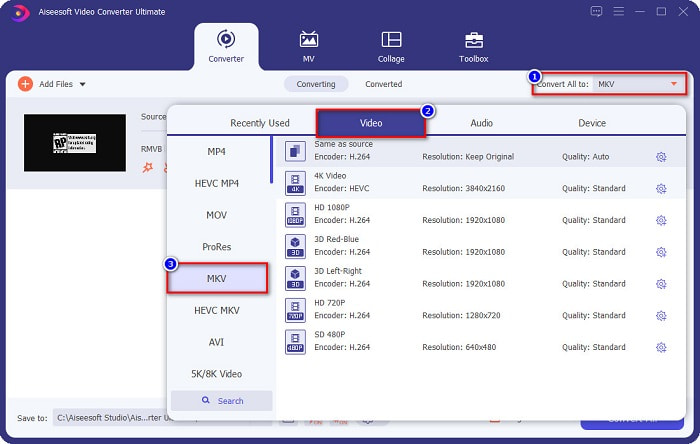
ขั้นตอนที่ 3. หลังจากอัปโหลดไฟล์ RMVB แล้ว ให้คลิกปุ่ม Convert All to เพื่อเลือกรูปแบบไฟล์เอาต์พุต ในกรณีนี้ให้เลือกไฟล์ MKV.
ขั้นตอนที่ 4. ขั้นตอนสุดท้ายให้คลิกปุ่ม Convert All ที่มุมขวาล่างของอินเทอร์เฟซซอฟต์แวร์ การแปลงไฟล์จาก RMVB เป็น MKV จะเริ่มต้นขึ้น เพียงรอสักครู่ก็เรียบร้อย
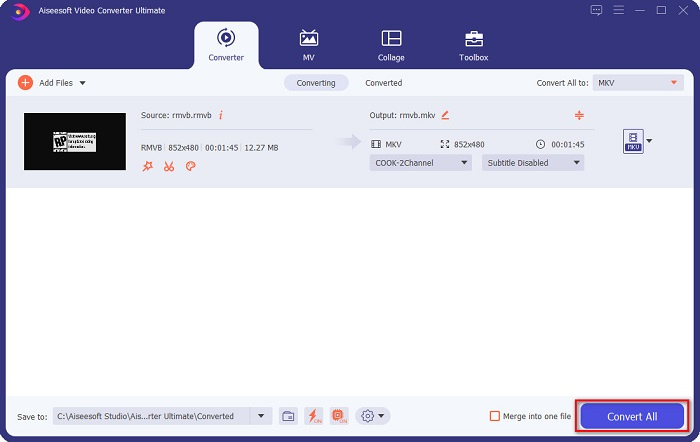
ง่ายใช่มั้ย? คุณสามารถแปลงไฟล์ RMVB เป็น MKV ได้อย่างง่ายดายโดยทำตามขั้นตอนง่ายๆ เหล่านี้
ส่วนที่ 3 2 ตัวแปลง RMVB เป็น MKV ออนไลน์ที่ดีที่สุดที่คุณต้องลอง
ความสะดวกสบายของตัวแปลงออนไลน์นั้นดีกว่าตัวแปลงออฟไลน์อย่างแน่นอน และถ้าคุณต้องการตัวแปลงที่สะดวก อ่านขั้นตอนด้านล่างเกี่ยวกับวิธีแปลงไฟล์ RMVB เป็น MKV ฟรีและออนไลน์
FVC แปลงวิดีโอออนไลน์ฟรี
FVC Free Online Video Converter เป็นตัวแปลงไฟล์ออนไลน์ที่มีส่วนติดต่อผู้ใช้ (GUI) ที่ใช้งานง่าย เป็นประโยชน์อย่างมากสำหรับมือใหม่เพราะจะไม่สับสนกับหน้าตาของโปรแกรม ตัวแปลงนี้ยังรองรับหลายรูปแบบไฟล์ รวมถึง RMVB เป็น MKV, MOV, MP4, WMV, AVI และอื่น ๆ อย่างไรก็ตาม เนื่องจากตัวแปลงนี้เป็นแบบเว็บเบส คุณอาจพบว่าการแปลงไฟล์ค่อนข้างช้า ถึงอย่างนั้นผู้ใช้จำนวนมากก็ยังเลือกใช้ตัวแปลงนี้และจัดให้เป็นหนึ่งในตัวแปลง RMVB เป็น MKV ที่ดีที่สุด.
ขั้นตอนในการแปลงไฟล์ RMVB เป็นไฟล์ MKV โดยใช้ FVC Free Online Converter:
ขั้นตอนที่ 1. อันดับแรก ให้ค้นหา FVC Free Online Converter ในเบราว์เซอร์ของคุณหรือคลิกลิงก์นี้ เมื่อเข้าสู่หน้าเว็บของพวกเขาแล้ว ให้เปิดใช้งานโปรแกรม.
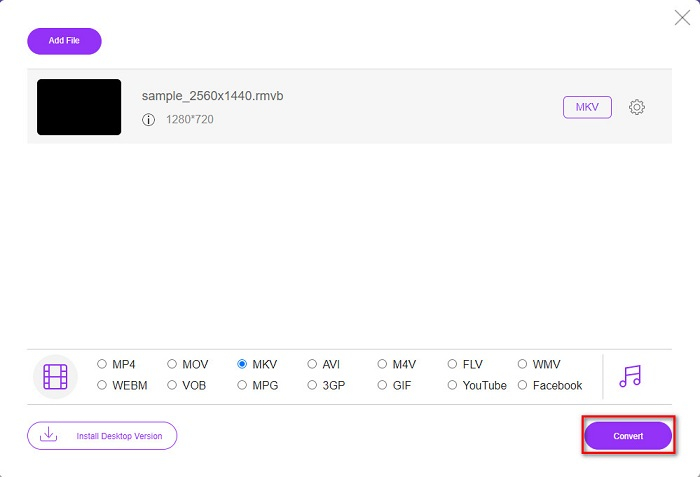
ขั้นตอนที่ 2. จากนั้นคลิก Add Files to Convert แล้วไฟล์ในคอมพิวเตอร์ของคุณจะแสดงขึ้นมา ให้เลือกไฟล์ RMVB เพื่ออัปโหลด.
ดาวน์โหลดเวอร์ชันเดสก์ท็อปเพื่อแปลงไฟล์แบบเป็นชุดได้.
ขั้นตอนที่ 3. หลังจากคุณเลือกไฟล์ RMVB แล้ว ให้เลือกรูปแบบไฟล์ที่ต้องการจากส่วนด้านล่างของอินเทอร์เฟซซอฟต์แวร์ แล้วคลิกไฟล์ MKV.
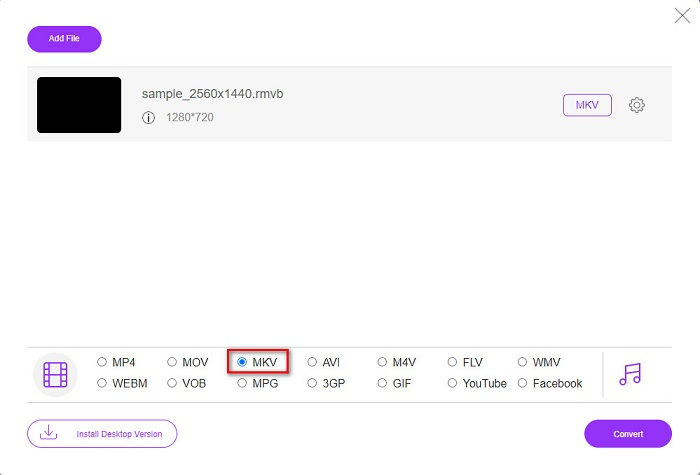
ขั้นตอนที่ 4. สุดท้าย เมื่อคุณพร้อมที่จะแปลงไฟล์ RMVB เป็น MKV แล้ว ให้คลิกปุ่ม Convert จากนั้นกระบวนการแปลงไฟล์จะเริ่มต้น.
ตัวแปลงวิดีโอ
Video Converter เป็นตัวแปลงอื่นที่สามารถแปลง RMVB ของคุณเป็น MKV ได้ฟรีและออนไลน์ ตัวแปลงออนไลน์นี้สามารถเปลี่ยนรูปแบบไฟล์ได้อย่างง่ายดาย นอกจากนี้ยังรองรับไฟล์ได้หลายรูปแบบและใช้งานง่าย อย่างไรก็ตาม มันมีโฆษณาที่รบกวนจิตใจมากมายที่อาจทำให้เสียสมาธิเกินไปสำหรับคุณ อย่างไรก็ตาม เครื่องมือนี้ยังคงคุ้มค่าที่จะลองใช้เพราะสะดวก
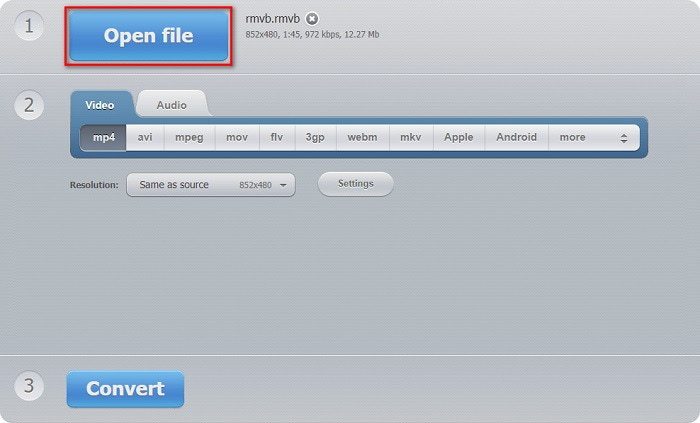
ขั้นตอนที่ 1. ค้นหา Video Converter ในเบราว์เซอร์ของคุณ แล้วคลิกปุ่ม Open File จากนั้นไฟล์ในคอมพิวเตอร์ของคุณจะแสดงขึ้นมา เลือกไฟล์ RMVB แล้วรอให้ไฟล์อัปโหลด.
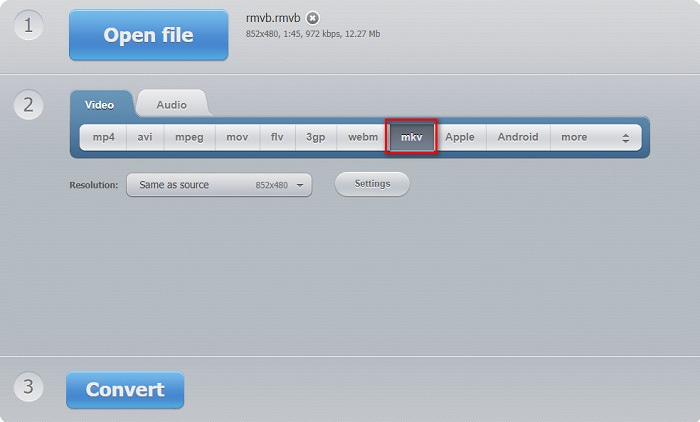
ขั้นตอนที่ 2. หลังจากนั้น บนหน้าอินเทอร์เฟซหลักของซอฟต์แวร์ ให้เลือกรูปแบบไฟล์เอาต์พุตที่คุณต้องการ คลิก MKV แล้วไปยังขั้นตอนถัดไป.
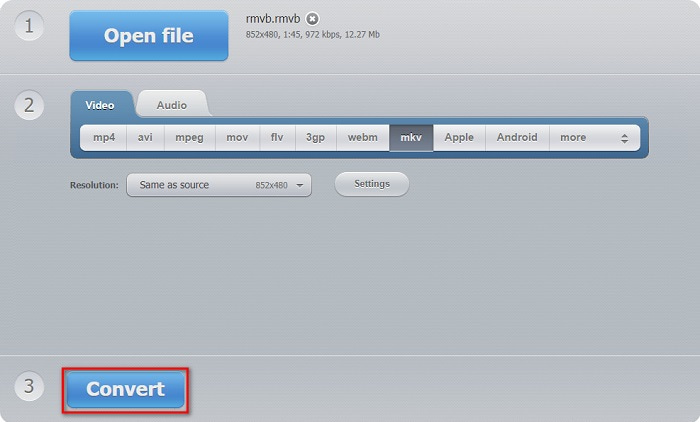
ขั้นตอนที่ 3. ขั้นตอนสุดท้าย ให้คลิกปุ่ม Convert ที่ด้านล่างอินเทอร์เฟซของซอฟต์แวร์ จากนั้นไฟล์ RMVB เป็น MKV ของคุณจะเริ่มกระบวนการแปลง.
ตัวแปลง 365
Converter 365 เป็นตัวแปลงไฟล์ออนไลน์ฟรีที่ช่วยให้คุณแปลงไฟล์ RMVB เป็น MKV ได้อย่างง่ายดาย อีกทั้งยังใช้งานง่ายเพราะมี GUI ที่เป็นมิตรต่อผู้ใช้ อย่างไรก็ตาม ไฟล์ของคุณอาจเสียหายได้หากการเชื่อมต่ออินเทอร์เน็ตของคุณขัดข้องระหว่างการแปลง.
ขั้นตอนที่ 1. คลิกปุ่ม Add Files เพื่ออัปโหลดไฟล์ RMVB ของคุณ.

ขั้นตอนที่ 2. จากนั้นคลิกปุ่ม drop-down ถัดจาก Convert to เพื่อเลือกรูปแบบเอาต์พุตที่คุณต้องการ.
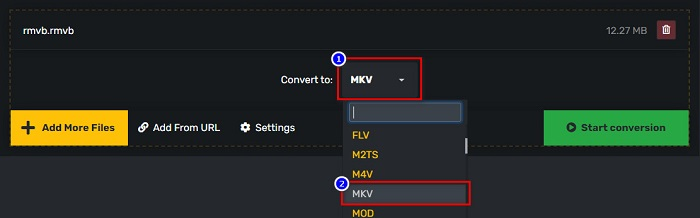
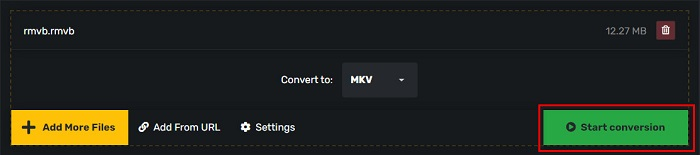
ขั้นตอนที่ 3. และสุดท้าย คลิกปุ่ม Start Conversion เพื่อเริ่มการแปลงไฟล์.
RMVB เทียบกับ MKV
RMVB ซึ่งเป็นรูปแบบใหม่ของรูปแบบ Real Media มาตรฐาน (.RM) คือรูปแบบไฟล์วิดีโอ Real Media ที่บีบอัดโดยใช้บิตเรตแบบแปรผัน เป็นรูปแบบยอดนิยมสำหรับภาพยนตร์และอนิเมะในเอเชีย ไฟล์ RMVB มีขนาดเล็กกว่าและมีบิตเรตต่ำกว่า แต่คุณภาพดีกว่า
รูปแบบคอนเทนเนอร์มัลติมีเดีย Matroska ซึ่งเปิดตัวในปี 2545 เป็นรูปแบบโอเพนซอร์สที่สามารถรวมแทร็กวิดีโอ เสียง รูปภาพ และคำบรรยายได้จำนวนหนึ่ง ดังนั้น คุณสามารถใช้เพื่อเก็บคลิปวิดีโอสั้น รายการทีวี และภาพยนตร์ได้อย่างง่ายดาย ค่อนข้างเป็นที่นิยมสำหรับแฟนอนิเมะ
ส่วนที่ 4 คำถามที่พบบ่อยเกี่ยวกับการแปลง RMVB เป็น MKV
คุณสามารถแปลง RMVB เป็น AVI ได้หรือไม่
แน่นอนว่าคุณสามารถแปลงไฟล์ RMVB เป็นไฟล์ AVI ได้โดยใช้โปรแกรมแปลงไฟล์ FVC Video Converter Ultimate รองรับการแปลงไฟล์จาก RMVB เป็น AVI นอกจากนี้ หากคุณต้องการทราบรายละเอียดเพิ่มเติมเกี่ยวกับวิธีแปลง RMVB เป็น AVI ให้คลิกลิงก์นี้.
Mac สามารถเล่นไฟล์ RMVB ได้หรือไม่
ไม่ รองรับไฟล์ RMVB บน Mac ไม่ได้ อย่างไรก็ตาม คุณสามารถใช้โปรแกรมของบุคคลที่สามเพื่อเล่นไฟล์นี้บน Mac ได้ หรือคุณอาจแปลงไฟล์ RMVB ให้เป็นรูปแบบที่ Mac รองรับ เช่น MOV หากต้องการข้อมูลเพิ่มเติมเกี่ยวกับการแปลง RMVB เป็น MOV โปรดอ่านบทความนี้ การแปลง RMVB เป็น MOV: ขั้นตอนง่าย ๆ ทั้งแบบออฟไลน์และออนไลน์.
เครื่องเล่นสื่อใดบ้างที่สามารถเล่นไฟล์ RMVB ได้
ไฟล์ RMVB นั้นไม่ได้รับความนิยมมากนักเนื่องจากเครื่องเล่นสื่อจำนวนมากไม่รองรับไฟล์ประเภทนี้ อย่างไรก็ตาม โปรแกรมเล่นสื่อบางตัวสามารถเล่นไฟล์ประเภทนี้ได้ รวมถึง RealNetworks Real Player (Windows), VLC Media Player และเครื่องเล่น Blu-ray Aiseesoft
สรุป
โดยสรุปแล้ว ตัวแปลงไฟล์ RMVB เป็น MKV ทั้งแบบออฟไลน์และออนไลน์ที่นำเสนอไปข้างต้น ล้วนใช้งานง่ายและน่าลอง คุณอาจพบตัวแปลงอื่น ๆ ที่คล้ายกันได้บนอินเทอร์เน็ตเช่นกัน อย่างไรก็ตาม หากคุณต้องการโปรแกรมแปลงไฟล์ฟรีที่มีฟีเจอร์โดดเด่นและรองรับการแปลงไฟล์ได้มากกว่า 1000+ รูปแบบ FVC Video Converter Ultimate อาจเป็นเครื่องมือที่เหมาะสำหรับคุณ ยังไม่มั่นใจใช่ไหม ลองใช้ดูตอนนี้และดาวน์โหลดได้ฟรี.
-
 คำแนะนำเกี่ยวกับวิธีการแปลง RMVB เป็น MP4 บน Windows / Mac (3 วิธีฟรี)
 ต้องการแปลง RMVB เป็น MP4 เพื่อให้เล่นง่ายบนคอมพิวเตอร์หรือโทรศัพท์มือถือของคุณหรือไม่? คุณจะพบวิธีง่ายๆ ในการแปลงไฟล์ RMVB เป็น MP4 ในคู่มือนี้
-
 แอพ RMVB เป็น FLV Converter ฟรี 4 อันดับแรกบนเดสก์ท็อปหรือออนไลน์
 บทความนี้จะบอกคุณถึงซอฟต์แวร์ตัวแปลง RMVB เป็น FLV และเว็บแอปที่ดีที่สุดที่สามารถแปลงไฟล์ RMVB (RealMedia Variable Bitrate) เป็นวิดีโอ FLV
-
 ตัวแปลง 2 อันดับแรกออนไลน์และออฟไลน์เพื่อแปลง RMVB เป็น WMV
 กำลังมองหาวิธีที่เร็วและง่ายที่สุดในการแปลงไฟล์ RMVB เป็น WMV หรือไม่? อ่านบทความนี้และเรียนรู้ข้อมูลโดยละเอียดเกี่ยวกับการแปลง

