


 Video Converter Ultimate
 บันทึกหน้าจอ
 ซ่อมวิดีโอ
ตัวแปลงออนไลน์และออฟไลน์ที่ดีที่สุดในการแปลงไฟล์ SWF เป็น MKV
ไฟล์ SWF เป็นรูปแบบสำหรับ Adobe Flash ที่มีวิดีโอและแอนิเมชันแบบเวกเตอร์ และไฟล์ประเภทนี้โดยทั่วไปไม่สามารถรองรับสตรีมคำบรรยายย่อยหลากหลายแบบได้ หลายคนจึงกำลังมองหารูปแบบไฟล์ที่สามารถจัดการสตรีมคำบรรยายย่อยและแทร็กเสียงหลายภาษาได้ ดังนั้น หากคุณเป็นหนึ่งในคนที่กำลังมองหาวิธีแปลง SWF เป็น MKV เราขอแนะนำตัวแปลงไฟล์ที่ดีที่สุดสำหรับคุณ!

ส่วนที่ 1 แปลง SWF เป็น MKV ออฟไลน์โดยใช้ FVC Video Converter Ultimate
FVC Video Converter Ultimate เป็นเครื่องมือออฟไลน์ฟรีที่ช่วยให้คุณแปลงรูปแบบไฟล์ได้หลากหลาย เช่น SWF เป็น MKV, MP4, WMV, MOV, AVI, FLV และอื่น ๆ อีกมากมาย โปรแกรมแปลงไฟล์นี้มีฟีเจอร์ที่ยอดเยี่ยมหลายอย่างที่ช่วยให้คุณปรับปรุงไฟล์ของคุณได้ คุณสามารถตัดต่อ เพิ่มเอฟเฟ็กต์ ใส่ลายน้ำ และเพิ่มคำบรรยายลงในวิดีโอได้ ที่ยอดเยี่ยมกว่านั้นคือคุณยังสามารถแปลงไฟล์ SWF ได้ครั้งละหลายไฟล์ (batch convert) นอกจากนี้ยังรองรับการแปลงความเร็วสูงพิเศษที่ช่วยให้คุณแปลงไฟล์ได้ในไม่กี่วินาที ขั้นตอนด้านล่างนี้จะช่วยให้คุณแปลงไฟล์ SWF เป็น MKV ได้อย่างแน่นอน.
ขั้นตอนที่ 1 ขั้นแรกให้ดาวน์โหลดโปรแกรมแปลงไฟล์โดยคลิกปุ่ม ดาวน์โหลด ด้านล่างสำหรับ Windows หรือ Mac จากนั้นหลังดาวน์โหลดเสร็จให้เปิดแอปพลิเคชันเพื่อเริ่มกระบวนการ.
ดาวน์โหลดฟรีสำหรับ Windows 7 หรือใหม่กว่าดาวน์โหลดอย่างปลอดภัย
ดาวน์โหลดฟรีสำหรับ MacOS 10.7 หรือใหม่กว่าดาวน์โหลดอย่างปลอดภัย
ขั้นตอนที่ 2 หลังจากเปิดโปรแกรมแปลงไฟล์แล้ว ให้คลิกปุ่ม เพิ่มไฟล์ หรือปุ่มสัญลักษณ์ + เพื่ออัปโหลดไฟล์ SWF ของคุณในหน้าต่างแรกของโปรแกรม.
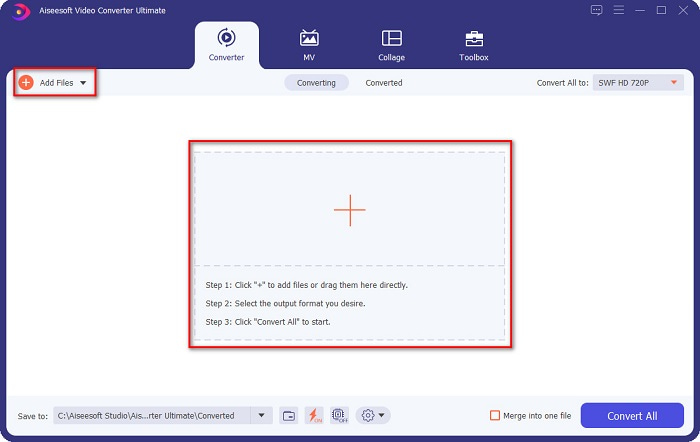
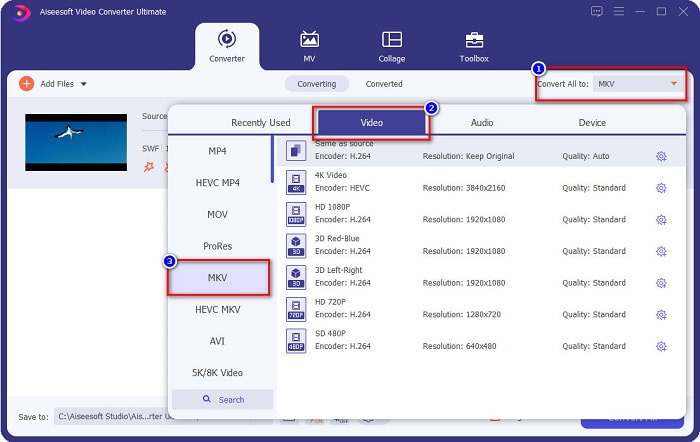
ขั้นตอนที่ 3 จากนั้นคลิกปุ่ม แปลงทั้งหมดเป็น หลังจากคลิกปุ่ม แปลงทั้งหมดเป็น รายการรูปแบบไฟล์จะปรากฏขึ้น แล้วเลือกไฟล์รูปแบบ MKV.
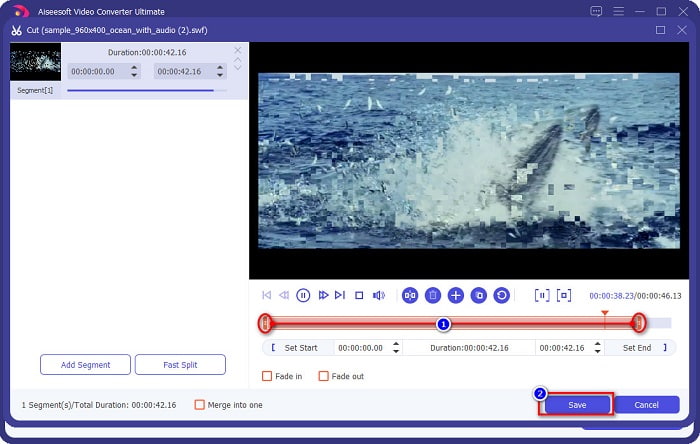
ไม่บังคับ หากคุณต้องการตัดความยาวไฟล์ ให้คลิกปุ่มรูป กรรไกร คุณสามารถตัดความยาวได้โดยปรับหัวเล่น (play head) ไปยังช่วงเวลาที่คุณต้องการ จากนั้นคลิกปุ่ม บันทึก เพื่อบันทึกการเปลี่ยนแปลง.
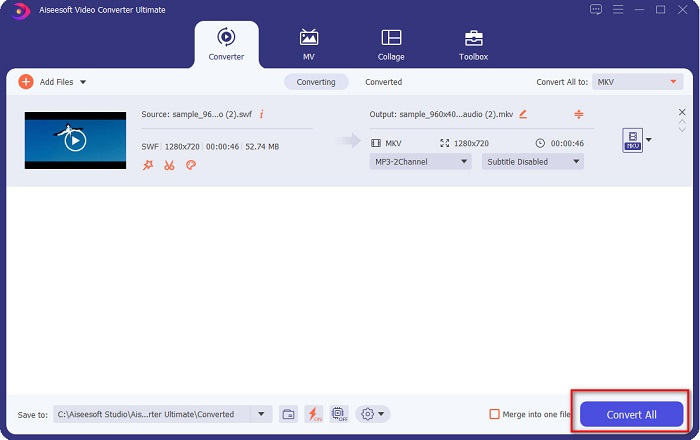
ขั้นตอนที่ 4 ขั้นตอนสุดท้ายให้คลิกปุ่ม แปลงทั้งหมด เพื่อแปลงไฟล์ SWF ของคุณเป็นไฟล์ MKV แล้วก็เสร็จเรียบร้อย! หลังจากไม่กี่วินาทีไฟล์ของคุณก็พร้อมใช้งาน.
ส่วนที่ 2 แปลง SWF เป็น MKV ออนไลน์โดยใช้ตัวแปลงออนไลน์ฟรี
ปฏิเสธไม่ได้ว่าการแปลงไฟล์โดยใช้เครื่องมือออนไลน์จะสะดวกกว่าเพราะคุณไม่จำเป็นต้องดาวน์โหลดอะไรเลย ดังนั้นเราจึงนำเสนอเครื่องมือออนไลน์ฟรีที่ดีที่สุดตัวหนึ่งในปัจจุบัน
FVC แปลงวิดีโอออนไลน์ฟรี
ขั้นตอนการแปลงไฟล์โดยใช้ FVC Free Online Video Converter:
ขั้นตอนที่ 1 หากต้องการใช้โปรแกรมแปลงไฟล์นี้ ให้ค้นหา FVC Free Online Video Converter หรือคลิกลิงก์นี้ link แล้วคุณจะถูกนำไปยังเว็บไซต์ของเขา.
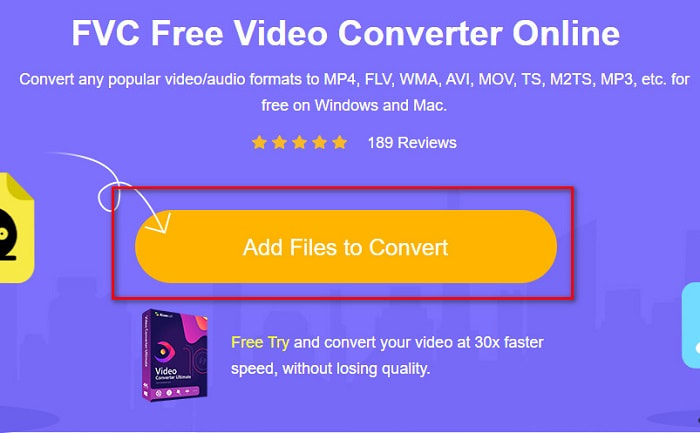
ขั้นตอนที่ 2 หลังจากเข้าสู่เว็บไซต์แล้ว ให้คลิก Add Files to Convert จากนั้นเปิดตัวโปรแกรมแปลงไฟล์ แล้วเลือกไฟล์ SWF ของคุณเมื่อหน้าต่างไฟล์คอมพิวเตอร์ปรากฏขึ้น.
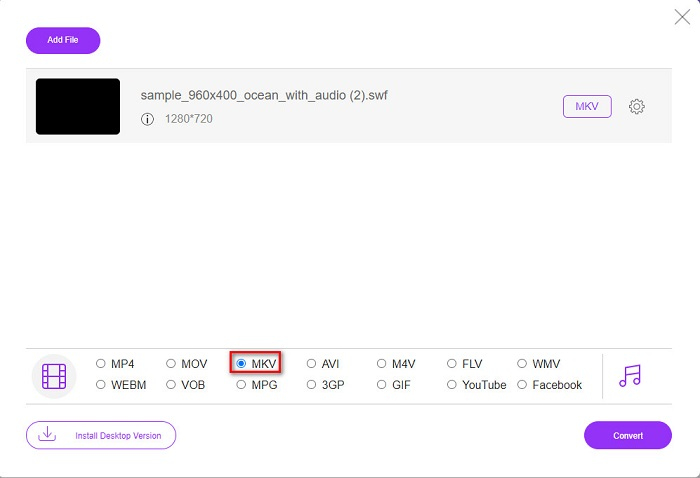
ขั้นตอนที่ 3 รูปแบบไฟล์ที่ใช้ได้จะปรากฏรายการอยู่ด้านล่างในหน้าต่างที่สองของโปรแกรม ให้คลิกไฟล์ MKV จากนั้นไปยังขั้นตอนถัดไป.
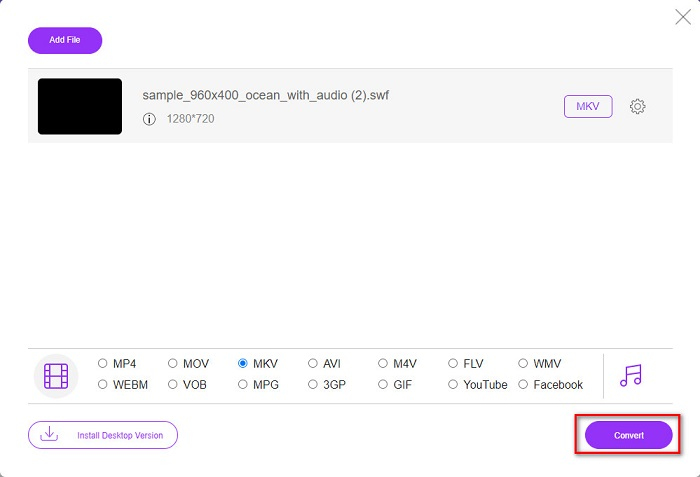
ขั้นตอนที่ 4 เพื่อเสร็จสิ้น ให้คลิกปุ่ม Convert เพื่อเริ่มการแปลง จากนั้นรอให้การแปลงเสร็จสมบูรณ์.
Aconvert.com
ตัวแปลงไฟล์ออนไลน์ฟรีอีกตัวหนึ่งที่คุณควรลองคือ Aconvert.com เครื่องมือนี้สามารถแปลงไฟล์หลากหลายประเภทผ่านทางออนไลน์ได้ ใช้งานง่ายและให้คุณแปลงไฟล์ได้อย่างรวดเร็วขึ้นอยู่กับความเร็วอินเทอร์เน็ตของคุณ เนื่องจากโปรแกรมแปลงไฟล์นี้เป็นเครื่องมือออนไลน์ คุณอาจพบกับการแปลงที่ช้าลงและมีโฆษณาที่รบกวนบ้าง แต่อย่างไรก็ตาม เครื่องมือนี้ช่วยให้คุณแปลง SWF เป็น MKV ได้อย่างสะดวก.
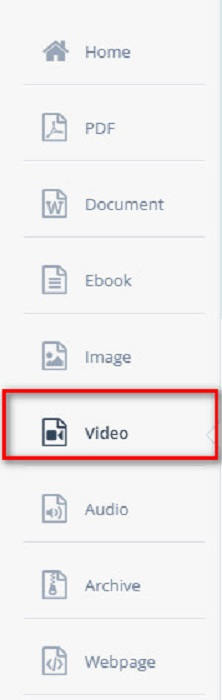
ขั้นตอนที่ 1 บนเบราว์เซอร์ของคุณให้ค้นหา Aconvert.com จากนั้นคลิกแถบ Video ที่ด้านซ้ายของหน้าต่างโปรแกรม.
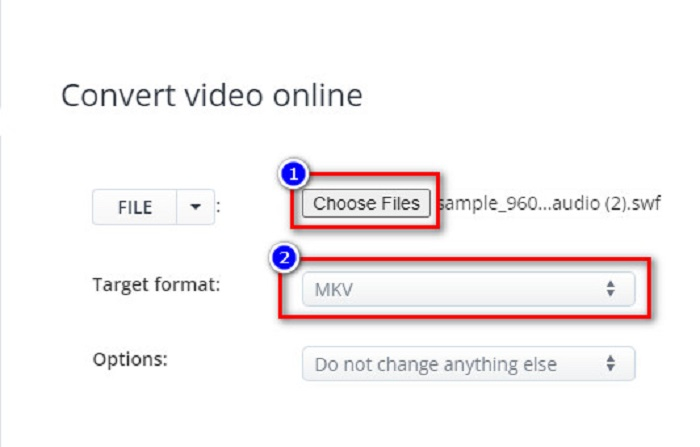
ขั้นตอนที่ 2 จากนั้นคลิกปุ่ม Choose Files และเลือกไฟล์ SWF ของคุณ แล้วที่ Target Format ให้คลิกเลือกไฟล์ MKV.
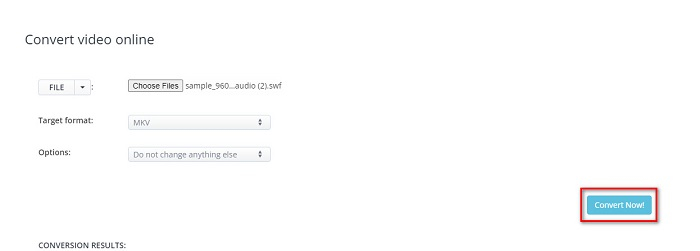
ขั้นตอนที่ 3 ขั้นตอนสุดท้ายให้คลิกปุ่ม Convert Now! เพื่อเริ่มการแปลงไฟล์ SWF ของคุณเป็น MKV.
FreeConvert.com
FreeConvert.com เป็นโปรแกรมแปลงไฟล์ออนไลน์ที่ใช้แปลงไฟล์ SWF ของคุณเป็นรูปแบบไฟล์ MKV ใช้งานง่าย อย่างไรก็ตาม บนเว็บไซต์มีโฆษณารบกวนเป็นจำนวนมาก แต่ถึงอย่างนั้น ตัวแปลงไฟล์นี้ก็รองรับรูปแบบไฟล์ต่าง ๆ มากมายบนเว็บ.
ขั้นตอนที่ 1 ค้นหา FreeConvert.com บนเบราว์เซอร์ของคุณเพื่อเข้าสู่เว็บไซต์ จากนั้นคลิกปุ่ม Choose Files หน้าต่างไฟล์บนคอมพิวเตอร์ของคุณจะปรากฏขึ้น แล้วเลือกไฟล์ SWF ของคุณ.

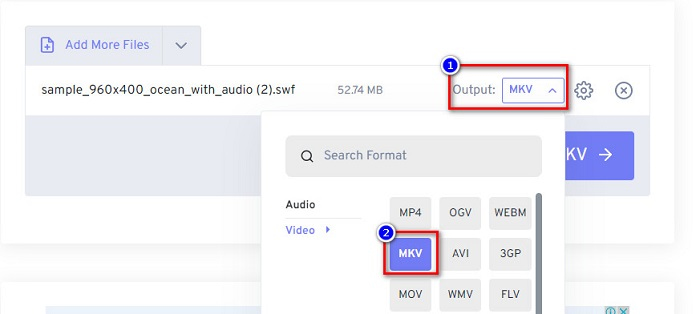
ขั้นตอนที่ 2 คลิกปุ่ม drop-down ถัดจากคำว่า Output เพื่อเลือกผลลัพธ์การแปลงของคุณ ให้คลิก MKV เป็นรูปแบบไฟล์ผลลัพธ์.
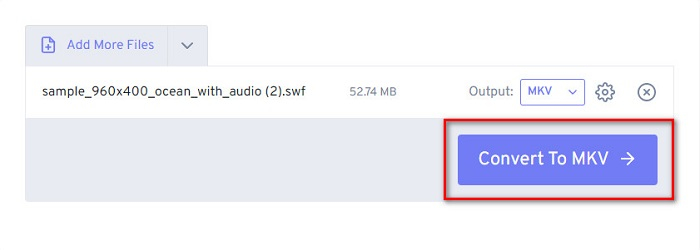
ขั้นตอนที่ 3 จากนั้นคลิกปุ่ม Convert to MKV เพื่อเริ่มแปลงไฟล์ของคุณ.
ส่วนที่ 3 ขยายความรู้ SWF และ MKV
ไฟล์ SWF หรือ Shock Wave เป็นรูปแบบไฟล์ Adobe Flash Macromedia พัฒนามัน แต่ต่อมาเป็นของ Adobe รูปแบบไฟล์นี้มักใช้ผ่านเน็ต แต่คุณสามารถเปิดได้โดยเปิดใช้งาน adobe flash ในเบราว์เซอร์ของคุณ ไฟล์ SWF ไม่ใช่แค่วิดีโอแต่ยังมีแอนิเมชั่นแบบเวกเตอร์ด้วย นอกจากนี้ รูปแบบไฟล์ประเภทนี้ยังได้บีบอัดไฟล์เสียง วิดีโอ และแอนิเมชั่น เพื่อให้พร้อมใช้งานบนเว็บ
ในการเปรียบเทียบ ไฟล์ MKV หรือ Matroska เป็นรูปแบบไฟล์ที่รองรับโดยตัวแปลงสัญญาณเสียงและวิดีโอต่างๆ มักใช้ในการจัดเก็บคลิปวิดีโอสั้นและภาพยนตร์ แม้ว่าขนาดไฟล์ของ MKV จะใหญ่กว่า แต่ไฟล์ MKV ก็เป็นไฟล์ที่รองรับการใช้งานในอนาคต ซึ่งหมายความว่าไฟล์ประเภทนี้ได้รับการออกแบบมาให้ไม่ล้าสมัย
ส่วนที่ 4 คำถามที่พบบ่อยเกี่ยวกับการแปลง SWF เป็น MKV
คุณสามารถแปลง SWF เป็น MKV โดยไม่สูญเสียข้อมูลได้หรือไม่?
ใช่. คุณสามารถแปลงไฟล์ SWF เป็นไฟล์ MKV ได้โดยไม่สูญเสียคุณภาพ ตัวแปลงบางตัวสามารถเปลี่ยน SWF เป็น MKV โดยไม่สูญเสียข้อมูล เช่น FVC Video Converter Ultimate ตัวแปลงนี้สามารถแปลงไฟล์ได้โดยไม่กระทบต่อคุณภาพ
คุณสามารถเล่น SWF บน Windows ได้หรือไม่?
ใช่คุณสามารถ. อย่างไรก็ตาม คุณยังต้องดาวน์โหลดโปรแกรมเล่นแฟลชที่ซ่อนอยู่สำหรับ adobe เนื่องจาก adobe flash กำลังจะเลิกใช้
Windows Media Player รองรับไฟล์ SWF หรือไม่
ไม่สามารถทำได้ Windows Media Player ไม่รองรับไฟล์ SWF อย่างไรก็ตาม คุณจำเป็นต้องมีตัวแปลงรหัส .swf (swf codec) เพื่อเล่นไฟล์ใน Windows Media Player หรือวิธีที่ง่ายที่สุดคือแปลงไฟล์ SWF ของคุณเป็นไฟล์อย่างเช่น MP4 ซึ่งได้รับการรองรับอย่างกว้างขวางจากโปรแกรมเล่นสื่อหลาย ๆ ตัว หากต้องการข้อมูลเพิ่มเติมเกี่ยวกับการแปลง SWF เป็น MP4 โปรดอ่านบทความนี้ SWF to MP4: Free Convert SWF to MP4 Online and PC.
สรุป
บทความนี้ได้แสดงวิธีแปลง SWF เป็น MKV โดยใช้โปรแกรมแปลงไฟล์แบบออฟไลน์และออนไลน์ที่แนะนำไว้ข้างต้นแล้ว แม้ว่าเครื่องมือออนไลน์จะสะดวกต่อการใช้งานมากกว่า แต่คุณอาจเจอปัญหาการแปลงที่ช้าได้ นอกจากนี้ FVC Video Converter Ultimate ยังมีฟีเจอร์มากมายที่เป็นประโยชน์ต่อไฟล์ของคุณและต่อกระบวนการแปลงไฟล์ของคุณ—ยังลังเลอยู่หรือไม่? ดาวน์โหลดเลยตอนนี้ แล้วสัมผัสกับฟีเจอร์พิเศษที่โปรแกรมแปลงไฟล์ตัวนี้มอบให้คุณ!
-
 [ฟรี & ง่าย] เครื่องมือพิเศษเพื่อใช้ในการแปลง SWF เป็น MOV
 คุณได้ลองแปลง SWF เป็น MOV แล้วเพราะคุณไม่สามารถแก้ไขวิดีโอได้หรือไม่ ใครควรตำหนิความไม่เข้ากันของโปรแกรมตัดต่อวิดีโอของคุณ อ่านต่อสำหรับโซลูชันของคุณ
-
 4 ตัวแปลงที่ซ่อนอยู่ใช้เพื่อแปลง SWF เป็น FLV ออนไลน์และออฟไลน์ฟรี
 ต้องการทราบข้อมูลเพิ่มเติมเกี่ยวกับตัวแปลงที่ซ่อนอยู่ซึ่งคุณสามารถใช้แปลงไฟล์ .swf เป็น .flv ได้หรือไม่ หากเป็นกรณีนี้ คุณต้องอ่านบทความนี้เพื่อให้มีแนวคิดที่จะทำ
-
 เครื่องมือที่มีประโยชน์ที่สุดในการแปลง SWF เป็น WMV (ออนไลน์และออฟไลน์)
 คุณมีปัญหาในการหาผู้เล่นสำหรับไฟล์ SWF ของคุณหรือไม่? คุณไม่ต้องกังวลเพราะคุณสามารถแปลงเป็นรูปแบบ WMV เพื่อประสบการณ์การรับชมวิดีโอที่ดียิ่งขึ้น อ่านบทความนี้เพื่อทราบข้อมูลเพิ่มเติมเกี่ยวกับกระบวนการแปลงนี้
