


 Video Converter Ultimate
 บันทึกหน้าจอ
 ซ่อมวิดีโอ
 ดาวน์โหลดอย่างปลอดภัย
3 วิธีง่ายๆ ในการแปลง TRP เป็น MKV
คุณกำลังลำบากกับไฟล์ TRP อยู่หรือเปล่า เพราะไม่สามารถเล่นบนโปรแกรมเล่นสื่อหรือโปรแกรมอื่น ๆ ได้? หากคุณเป็นหนึ่งในผู้ใช้ที่พบปัญหาแบบนี้ ขอแนะนำอย่างยิ่งให้คุณอ่านบทความนี้ คุณสามารถแปลงไฟล์ TRP ให้เป็น MKV ได้ เพราะโปรแกรมส่วนใหญ่รองรับไฟล์รูปแบบ MKV บทความนี้จะแสดงวิธีการง่าย ๆ ในการแปลงไฟล์ TRP เป็น MKV ทั้งบน Windows, Mac และแบบออนไลน์ รออะไรอยู่ล่ะ อย่าเสียเวลา เริ่มอ่านบทความนี้ได้เลย!

ส่วนที่ 1: คำจำกัดความของ TRP และ MKV
TRP คืออะไร?
ไฟล์ TRP เป็นไฟล์สื่อความคมชัดสูง (HD) ที่เข้ารหัสด้วยรูปแบบ MPEG-2 part 1 transport มักใช้ในระบบกระจายสัญญาณวิดีโอดิจิทัล นอกจากนี้ยังใช้สำหรับสตรีมเสียง การซิงโครไนซ์สัญญาณออก และมัลติเพล็กซ์วิดีโอดิจิทัล อีกทั้งยังมีฟีเจอร์ที่ยอดเยี่ยมสำหรับการแก้ไขข้อผิดพลาด ไฟล์ TRP ยังมีข้อมูลเสียงแบบ AC3 และวิดีโอแบบ H.264 อยู่ภายใน สามารถเล่นได้ด้วยโปรแกรมเล่นวิดีโอหลายชนิด.
MKV คืออะไร?
MKV หรือ Matroska เป็นไฟล์ตระกร้าสื่อ (multimedia container) ที่สามารถจัดเก็บไฟล์เสียง ซับไตเติล และวิดีโอหลาย ๆ แทร็กไว้ในไฟล์เดียว MKV ยังแตกต่างจากมาตรฐานมัลติมีเดียอื่น ๆ อย่าง MP4 และ AVI เพราะเป็นโอเพ่นซอร์ส และสามารถปรับแต่งได้โดยผู้ที่ใช้ซอฟต์แวร์แบบโอเพ่นซอร์ส นอกจากนี้ รูปแบบไฟล์ MKV ยังถูกใช้งานอย่างแพร่หลายสำหรับวิดีโอความละเอียดสูง (HD) และการสตรีมวิดีโอออนไลน์.
ตอนที่ 2: วิธีที่ง่ายที่สุดในการแปลง TRP เป็น MKV ออฟไลน์
การใช้ Video Converter Ultimate
คุณต้องดาวน์โหลดและใช้ Video Converter Ultimate เพื่อแปลง TRP เป็น MKV โดยไม่สูญเสียข้อมูล เมื่อใช้แอปพลิเคชันนี้ คุณสามารถแปลงไฟล์วิดีโอรูปแบบใดก็ได้ที่คุณต้องการ รวมถึง TRP และ MKV คุณสามารถแปลงไฟล์วิดีโอได้หลายไฟล์ในกระบวนการเดียว เนื่องจากเครื่องมือนี้มีฟังก์ชันการแปลงเป็นชุด นอกจากนี้ยังมีกระบวนการแปลงที่เร็วขึ้น 30 เท่า คุณจึงไม่ต้องเสียเวลามากขึ้นในการแปลงไฟล์ต่างๆ แอปพลิเคชั่นนี้รองรับหลายรูปแบบนอกเหนือจาก TRP และ MKV เช่น วิดีโอ 5K/8K, ProRes, DV, ASF, M4V, MXF, MP4, MOV และอื่นๆ ส่วนที่ดีที่สุดคือคุณสามารถใช้แอปพลิเคชันนี้กับ Windows และ Mac ซึ่งเป็นข่าวดีสำหรับผู้ใช้ทุกคน นอกจากนี้ หากคุณต้องการเปลี่ยนความเร็วของวิดีโอ คุณสามารถใช้ฟังก์ชัน Video Speed Controller ได้ คุณสามารถลดความเร็ววิดีโอของคุณได้ตั้งแต่ 0.125x และเพิ่มความเร็วให้เร็วกว่าความเร็วเดิมถึง 8 เท่า นอกจากนี้ หากคุณต้องการครอบตัดวิดีโอ คุณสามารถทำได้ เครื่องมือนี้ยังมีฟังก์ชั่นครอบตัดวิดีโอ
หากต้องการทราบข้อมูลเพิ่มเติมเกี่ยวกับซอฟต์แวร์ที่ยอดเยี่ยมนี้ คุณต้องดาวน์โหลดและลองใช้ด้วยตัวเอง
คุณสมบัติ:
◆ แปลงไฟล์ได้หลายรูปแบบ
◆ สามารถสร้างภาพตัดปะที่สร้างสรรค์ได้
◆ มีโปรแกรมสร้างมิวสิกวิดีโอ
◆ มีกล่องเครื่องมือสำหรับปรับปรุงวิดีโอ
ข้อดี
- เร็วกว่าตัวแปลงซอฟต์แวร์อื่นๆ ถึง 30 เท่า
- มีส่วนติดต่อผู้ใช้ที่เป็นมิตรซึ่งเหมาะสำหรับผู้ใช้ที่ไม่ใช่มืออาชีพ
- มีคุณสมบัติที่แตกต่างนอกเหนือจากการแปลง
- ใช้ได้ทั้งบน Windows และ Mac
- แปลงไฟล์รูปแบบต่าง ๆ เช่น FLV, MP4, MOV, WBM, GIF, AMV เป็นต้น
- สามารถเปลี่ยนรายละเอียดวันที่ทีละรายการหรือเป็นชุดได้
จุดด้อย
- ซื้อการสมัครสมาชิกเพื่อใช้คุณสมบัติขั้นสูงเพิ่มเติม
หากคุณต้องการแปลง TRP เป็น MKV ให้ทำตามขั้นตอนง่าย ๆ ด้านล่างนี้
ขั้นตอนที่ 1: บน Windows หรือ Mac ของคุณ ให้ดาวน์โหลดโปรแกรม Video Converter Ultimate โดยคลิกปุ่ม ดาวน์โหลด ด้านล่าง จากนั้นเปิดโปรแกรมหลังจากดาวน์โหลดและติดตั้งเรียบร้อยแล้ว.
ดาวน์โหลดฟรีสำหรับ Windows 7 หรือใหม่กว่าดาวน์โหลดอย่างปลอดภัย
ดาวน์โหลดฟรีสำหรับ MacOS 10.7 หรือใหม่กว่าดาวน์โหลดอย่างปลอดภัย
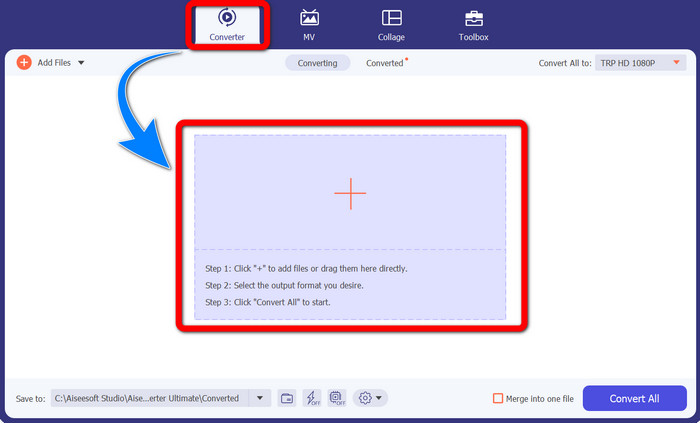
ขั้นตอนที่ 2: เมื่อลันช์โปรแกรม Video Converter Ultimate แล้ว ให้เลือกแท็บ Converter จากนั้นคลิกสัญลักษณ์ + เพื่อเพิ่มวิดีโอรูปแบบ TRP ของคุณเข้าไป.
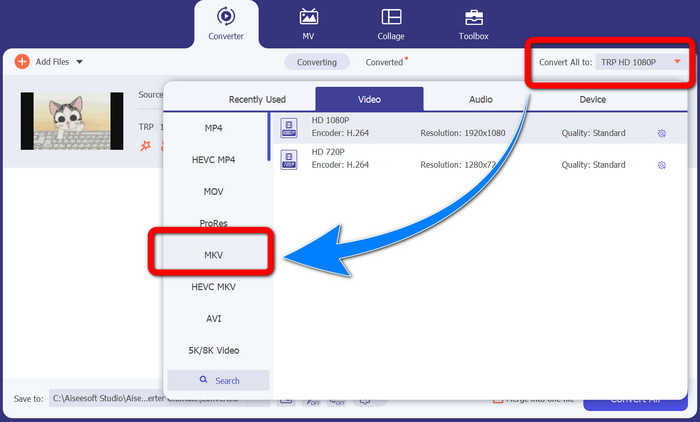
ขั้นตอนที่ 3: หลังจากเพิ่มวิดีโอของคุณแล้ว ให้คลิกไอคอน Convert all to จากนั้นค้นหารูปแบบ MKV จากตัวเลือกฟอร์แมตและคลิกเลือก.
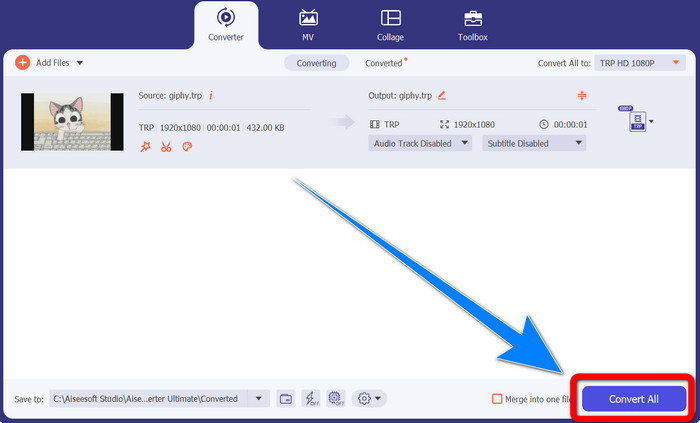
ขั้นตอนที่ 4: จากนั้นคลิกปุ่ม Convert All เพื่อแปลงไฟล์ TRP ของคุณเป็นรูปแบบ MKV.
ใช้ Prism Video Converter
Prism เป็นอีกหนึ่งโปรแกรมที่คุณสามารถดาวน์โหลดได้บน Windows และ Mac โปรแกรมนี้สามารถช่วยคุณแปลงไฟล์ TRP เป็น MKV ได้อย่างง่ายดาย นอกจากนี้ยังรองรับไฟล์ได้หลากหลายรูปแบบ เช่น AMV, MP4, DVD, VOB, MOV, DIVX, AVI, 3GP และอื่น ๆ อย่างไรก็ตาม โปรแกรมนี้ค่อนข้างทำงานช้าเมื่อใช้บน Windows หรือ Mac และกระบวนการแปลงไฟล์ใช้เวลาพอสมควร อีกทั้งยังมีอินเทอร์เฟซที่ซับซ้อน อาจทำให้ผู้เริ่มต้นสับสนได้ ดังนั้นคุณอาจต้องหาคู่มือการใช้งานหรือขอความช่วยเหลือจากผู้ใช้ระดับสูง หากคุณต้องการดาวน์โหลดและใช้โปรแกรมนี้ ให้ทำตามขั้นตอนง่าย ๆ ด้านล่าง.
ขั้นตอนที่ 1: ดาวน์โหลด Prism Video Converter บน Mac หรือ Windows ของคุณ.
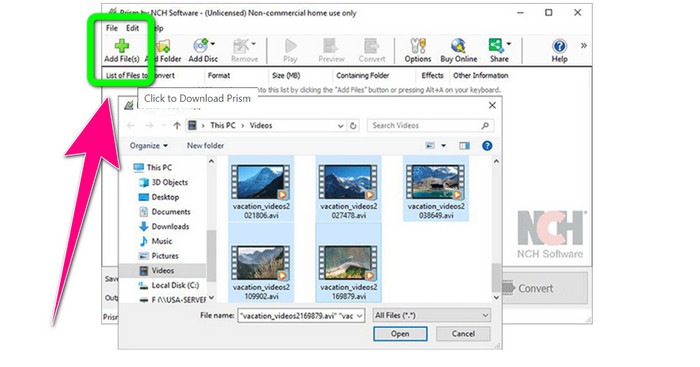
ขั้นตอนที่ 2: คลิกปุ่มสีเขียว Add Files แล้วเพิ่มไฟล์ TRP ของคุณเข้าไป.
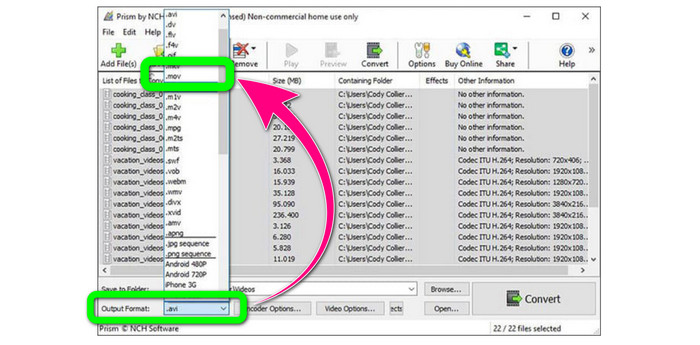
ขั้นตอนที่ 3: ตั้งค่ารูปแบบไฟล์ขาออก (output format) โดยคลิกเลือกไฟล์ MKV จากตัวเลือกฟอร์แมต.
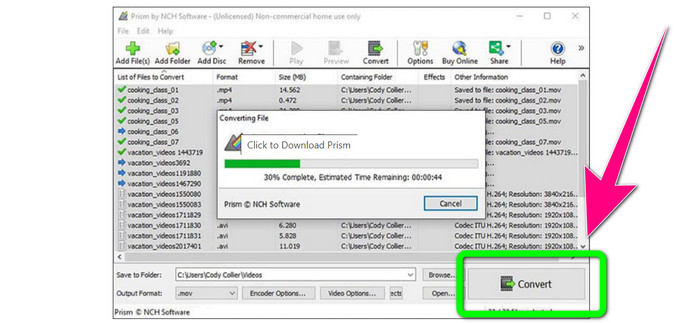
ขั้นตอนที่ 4: สุดท้าย ให้คลิกปุ่ม Convert เพื่อแปลงไฟล์ TRP ของคุณให้เป็นรูปแบบ MKV.
ส่วนที่ 3: แอปพลิเคชันออนไลน์เพื่อแปลง TRP เป็น MKV
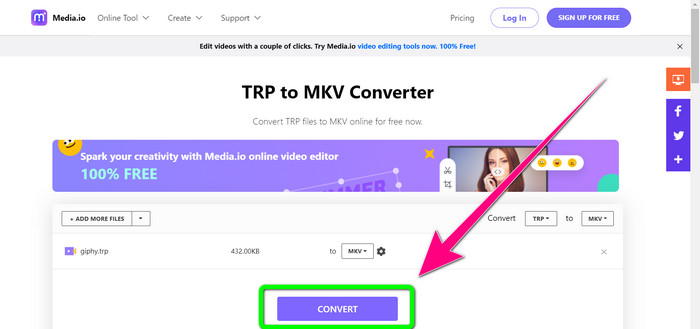
คุณสนใจที่จะแปลง TRP เป็น MKV แบบออนไลน์หรือไม่? ถ้าใช่ คุณสามารถใช้ Media.io ได้ ด้วยความช่วยเหลือของโปรแกรมออนไลน์นี้ คุณสามารถแปลง TRP เป็น MKV ได้ นอกจากนี้ยังรองรับฟอร์แมตอื่น ๆ อีกมากมาย เช่น MP4, AVI, WMV, MOV, FLV, DIVX, XVID, 3GP เป็นต้น อีกทั้งยังเป็นตัวแปลงไฟล์เสียงและรูปภาพด้วย.
นอกจากนี้ยังสามารถตัดต่อวิดีโอได้อีกด้วย คุณสามารถครอบตัด ตัดแต่ง รวม วนซ้ำวิดีโอ และอื่นๆ อย่างไรก็ตาม เมื่อมาถึงขั้นตอนการแปลงจะช้า คุณต้องรออีกเล็กน้อยเพื่อดำเนินการให้เสร็จสิ้น นอกจากนี้ยังมีโฆษณารบกวนที่แสดงบนหน้าจอ นอกจากนี้ยังต้องการการเชื่อมต่ออินเทอร์เน็ตที่รวดเร็วเพื่อให้ทำงานได้ดี หากคุณต้องการแปลง TRP เป็น MKV โดยใช้ Media.io ให้ทำตามขั้นตอนด้านล่าง
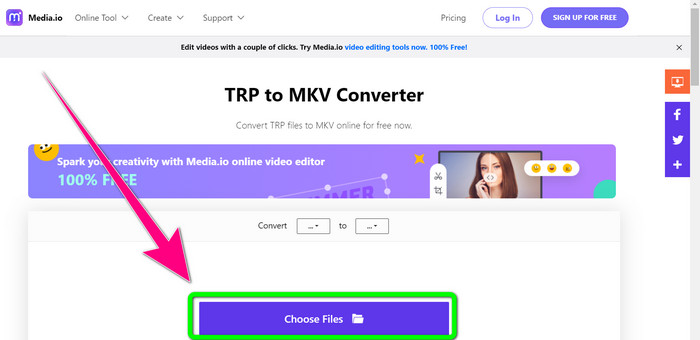
ขั้นตอนที่ 1: ไปที่เว็บไซต์ของ Media.io จากนั้นคลิกปุ่ม Choose Files เพื่อเพิ่มวิดีโอของคุณที่เป็นไฟล์ TRP.
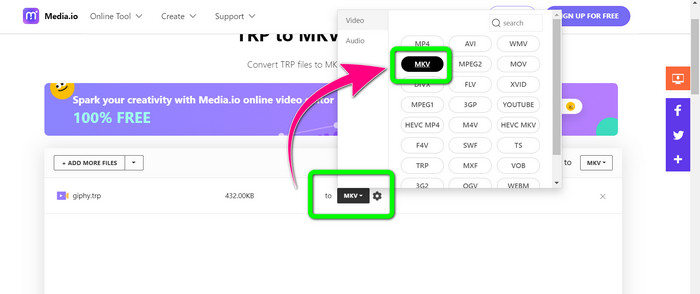
ขั้นตอนที่ 2: หลังจากเพิ่มวิดีโอแล้ว ให้ไปที่ตัวเลือกฟอร์แมต ค้นหาไฟล์ MKV แล้วเลือก.
ขั้นตอนที่ 3: ขั้นตอนสุดท้ายคือคลิกปุ่ม Convert รอให้กระบวนการแปลงเสร็จสิ้น แล้วบันทึกวิดีโอของคุณเป็นไฟล์รูปแบบ MKV.
อ่านเพิ่มเติม
ขั้นตอนที่ดีที่สุดเกี่ยวกับวิธีการแปลง AMV เป็น MKV ฟรี
แปลงไฟล์ MTV เป็น MKV ได้ง่าย ๆ ด้วยโปรแกรมตัวเด็ดเหล่านี้
ส่วนที่ 4: คำถามที่พบบ่อยเกี่ยวกับการแปลง TRP เป็น MKV
ทำไมทีวีของฉันไม่รองรับไฟล์ MKV?
ไฟล์ MKV เป็นเพียงคอนเทนเนอร์วิดีโอที่สามารถเข้ารหัสได้ด้วยตัวแปลงสัญญาณจำนวนมาก เช่น HEVC, MPEG-4, VP9 เป็นต้น ทีวีมีความเข้ากันได้ต่ำกับตัวแปลงสัญญาณเหล่านี้ นั่นเป็นสาเหตุที่คุณไม่สามารถเล่น MKV บนทีวีของคุณได้
ไฟล์ MKV คุณภาพดีหรือไม่?
รูปแบบไฟล์ MKV เป็นที่นิยมในวิดีโอคุณภาพสูง อีกทั้งยังมีขนาดไฟล์ที่ใหญ่ขึ้น หมายความว่า MKV เป็นคอนเทนเนอร์และไม่มีผลกระทบต่อคุณภาพ
มีตัวแปลงที่รวดเร็วที่ฉันสามารถใช้บนคอมพิวเตอร์ของฉันได้หรือไม่?
แน่นอน ใช่! หากคุณกำลังมองหาโปรแกรมแปลงซอฟต์แวร์ที่รวดเร็ว Video Converter Ultimate เป็นแอปพลิเคชั่นที่ดีที่สุด คุณสามารถแปลงไฟล์ของคุณได้เร็วขึ้นและง่ายขึ้นหลายเท่า
สรุป
จากโปรแกรมและวิธีต่าง ๆ ในการแปลง TRP เป็น MKV ที่กล่าวมาทั้งหมด เราขอแนะนำอย่างยิ่งให้ใช้ Video Converter Ultimate โปรแกรมนี้สามารถแปลงไฟล์จำนวนมากได้พร้อมกันด้วยความเร็วในการแปลงที่สูงมาก แล้วจะรออะไรอยู่ ลองใช้ด้วยตัวคุณเองเพื่อค้นพบความสามารถอื่น ๆ เพิ่มเติม.
-
 2 ซอฟต์แวร์ที่น่าประทับใจที่สุดในการแปลง TRP เป็น MOV
 ไม่สามารถแปลงไฟล์ TRP เป็น MOV? จากนั้นทำตามคำแนะนำที่ให้ไว้ในบทความนี้ ในขณะที่เราเลือกเครื่องมือที่ดีที่สุดที่คุณสามารถใช้เพื่อแปลงไฟล์ TRP ของคุณ
- 2 ซอฟต์แวร์ที่น่าประทับใจที่สุดในการแปลง TRP เป็น MOV
ไม่สามารถแปลงไฟล์ TRP เป็น MOV ได้ใช่ไหม จากนั้นทำตามคำแนะนำที่ให้ไว้ในบทความนี้ ในขณะที่เราเลือกเครื่องมือที่ดีที่สุดที่คุณสามารถใช้เพื่อแปลงไฟล์ TRP ของคุณ
-
 2 ตัวแปลงมืออาชีพเพื่อแปลงรูปแบบ TRP เป็น WMV [คู่มือ]
 คุณเป็นหนึ่งในผู้ใช้ที่มีช่วงเวลาที่ยุ่งยากกับไฟล์ TRP หรือไม่? ถ้าเป็นเช่นนั้น มาอ่านบทความนี้ต่อเพื่อทราบวิธีแปลง TRP เป็น WMV และเรียนรู้เพิ่มเติม
