


 Video Converter Ultimate
 บันทึกหน้าจอ
 ซ่อมวิดีโอ
วิธีที่โดดเด่นในการแปลง VOB เป็น 3GP ได้อย่างง่ายดาย [ตัวแปลงที่ดีที่สุด]
อยากเล่นไฟล์ VOB บนเครื่องรุ่นที่สามของคุณแต่ทำไม่ได้ใช่ไหม? วิธีที่ดีที่สุดคือแปลงไฟล์ VOB ให้เป็นไฟล์ 3GP เพราะไฟล์ 3GP เป็นรูปแบบที่อุปกรณ์ 3G รองรับ ดังนั้นหากคุณกำลังมองหาวิธีที่ดีที่สุดในการถอดรหัสและแปลงไฟล์ VOB เป็น 3GP บทความนี้อาจเป็นคำตอบให้คุณ เราได้รวบรวมวิธีที่ง่ายและยอดนิยมในการแปลง VOB เป็น 3GP ไว้ให้แล้ว.

ส่วนที่ 1 วิธีการแปลงโดยใช้ FVC Video Converter Ultimate
FVC Video Converter Ultimate เป็นหนึ่งในโปรแกรมแปลงไฟล์ประสิทธิภาพสูงที่หาได้บนเว็บ โปรแกรมออฟไลน์ฟรีตัวนี้รองรับการแปลงไฟล์ได้หลากหลายรูปแบบ รวมถึง VOB, 3GP, MP4, MKV, MOV, AVI, FLV และไฟล์อื่น ๆ กว่า 1000 รูปแบบ โปรแกรมนี้ยังให้คุณตัดต่อความยาววิดีโอ และใส่เอฟเฟ็กต์ต่าง ๆ เพื่อปรับปรุงไฟล์วิดีโอได้อีกด้วย นอกจากนี้หากคุณต้องการรวมไฟล์หลายไฟล์ โปรแกรมนี้ก็รองรับการแปลงแบบเป็นชุด (batch conversion) ดังนั้นหากคุณอยากแปลง VOB เป็น 3GP แบบง่าย ๆ อ่านรายละเอียดด้านล่างต่อ แล้วดาวน์โหลดไปใช้งานฟรีได้เลย.

FVC Video Converter Ultimate
5,689,200+ ดาวน์โหลด- สามารถแปลงไฟล์ได้มากกว่า 1,000 รูปแบบบนเว็บ
- แบทช์แปลงไฟล์ได้หลายรูปแบบ
- มีกระบวนการแปลงที่รวดเร็วเป็นพิเศษและการเร่งด้วยฮาร์ดแวร์
- มีคุณสมบัติการแก้ไขขั้นสูงเพื่อตัด เพิ่มคำบรรยาย และเพิ่มลายน้ำให้กับไฟล์ของคุณ
- ใช้ได้กับทุกแพลตฟอร์มสื่อ เช่น Windows และ Mac
ดาวน์โหลดฟรีสำหรับ Windows 7 หรือใหม่กว่าดาวน์โหลดอย่างปลอดภัย
ดาวน์โหลดฟรีสำหรับ MacOS 10.7 หรือใหม่กว่าดาวน์โหลดอย่างปลอดภัย
นี่คือขั้นตอนในการแปลง VOB เป็น 3GP โดยใช้ FVC Video Converter Ultimate:
ขั้นตอนที่ 1 อันดับแรก ดาวน์โหลดแอปโดยคลิกปุ่ม ดาวน์โหลด สำหรับ Windows หรือ Mac จากนั้นทำตามขั้นตอนการติดตั้ง แล้วเปิดโปรแกรม.
ดาวน์โหลดฟรีสำหรับ Windows 7 หรือใหม่กว่าดาวน์โหลดอย่างปลอดภัย
ดาวน์โหลดฟรีสำหรับ MacOS 10.7 หรือใหม่กว่าดาวน์โหลดอย่างปลอดภัย
ขั้นตอนที่ 2 คลิกปุ่ม Add Files หรือปุ่มสัญลักษณ์ + ไฟล์ในคอมพิวเตอร์ของคุณจะแสดงขึ้นมา แล้วเลือกไฟล์ VOB เพื่ออัปโหลดเข้าคิว.
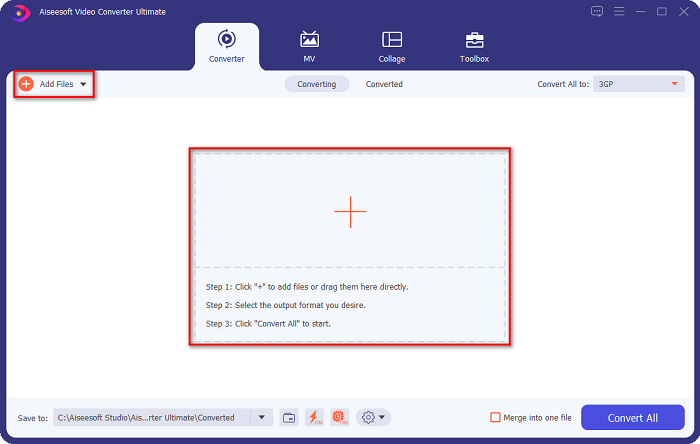
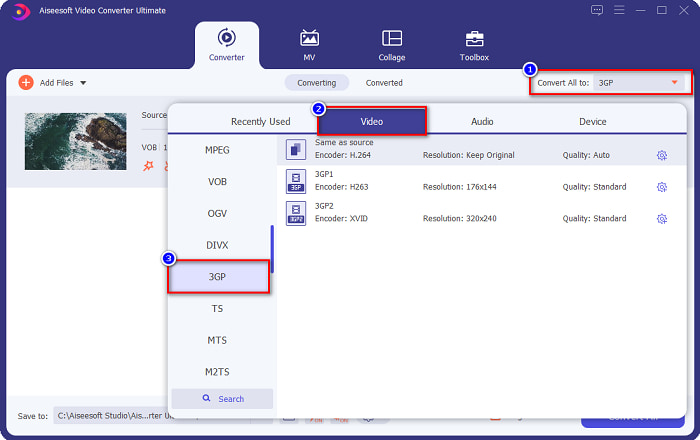
ขั้นตอนที่ 3 ในขั้นตอนที่สาม ให้คลิกปุ่ม Convert All to เพื่อเลือกรูปแบบไฟล์เอาต์พุตที่คุณต้องการ จากนั้นเลือก 3GP แล้วไปขั้นตอนถัดไป.
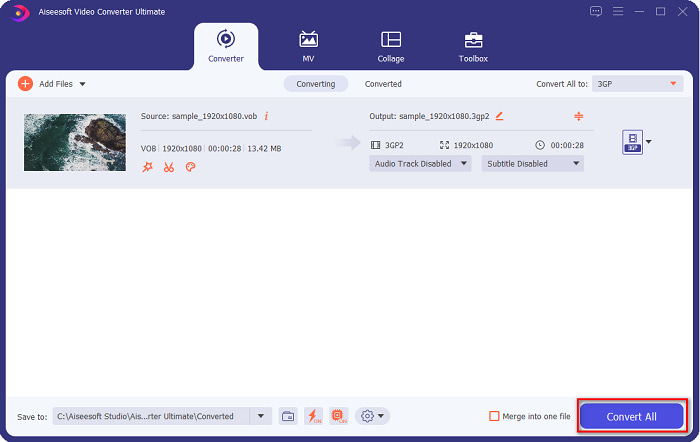
ขั้นตอนที่ 4 หลังจากเลือกไฟล์เอาต์พุตที่ต้องการแล้ว ให้คลิกปุ่ม Convert All เพื่อเริ่มการแปลง เพียงรอสักครู่ แล้วเรียบร้อย! แค่ไม่กี่ขั้นตอนง่าย ๆ คุณก็สามารถแปลงไฟล์ VOB เป็น 3GP ได้อย่างสะดวก.
ส่วนที่ 2 วิธีการแปลง VOB เป็น 3GP สำหรับออนไลน์ฟรี
หากคุณต้องการแปลงไฟล์ VOB ของคุณเป็นไฟล์ 3GP โดยไม่ต้องดาวน์โหลด คุณสามารถใช้ตัวแปลงออนไลน์ที่มีอยู่บนเว็บได้ ความสะดวกและประสิทธิภาพของการใช้ตัวแปลงออนไลน์นั้นดีอย่างไม่ต้องสงสัย ดังนั้นเราจึงให้สองวิธีในการแปลงไฟล์ VOB ของคุณเป็นรูปแบบไฟล์ 3GP
FileProInfo
FileProInfo เป็นโปรแกรมแปลงไฟล์ออนไลน์ที่มีหน้าตาโปรแกรม (GUI) ใช้งานง่าย เหมาะกับผู้เริ่มต้น รองรับเกือบทุกฟอร์แมตมาตรฐานที่มีอยู่บนอินเทอร์เน็ต อย่างไรก็ตาม เครื่องมือออนไลน์ประเภทนี้มักมีโฆษณารบกวนจำนวนมาก ถึงอย่างนั้นก็ยังมีผู้ใช้งานโปรแกรมนี้อยู่ไม่น้อย.
ขั้นตอนที่ 1 บนเบราว์เซอร์ของคุณ ให้ค้นหา FileProInfo เพื่อเข้าสู่หน้าเว็บหลัก บนหน้าหลักของซอฟต์แวร์ ให้คลิกปุ่ม Select VOB file แล้วเลือกไฟล์ VOB ที่ต้องการอัปโหลด.

ขั้นตอนที่ 2 จากนั้นเลือกชนิดไฟล์เอาต์พุตที่คุณต้องการในช่องด้านข้างคำว่า to.

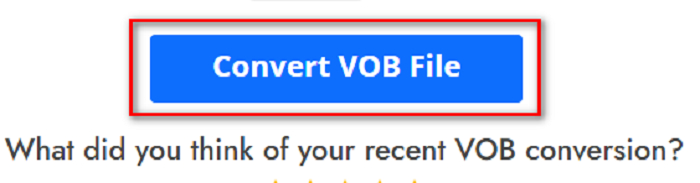
ขั้นตอนที่ 3 สุดท้ายคลิกปุ่ม Convert VOB File ที่ด้านล่างของหน้าต่างโปรแกรม แล้วรอให้การแปลงเสร็จสิ้น.
และนั่นก็คือ! คุณสามารถแปลงไฟล์ VOB เป็น 3GP ได้โดยไม่ต้องเหนื่อย
Convert365
Convert365 เป็นเว็บแปลงไฟล์ VOB เป็น 3GP ออนไลน์ ที่ให้คุณแปลงไฟล์มาตรฐานส่วนใหญ่ได้ เช่น VOB, 3GP, AVI, MOV, MP4, MPEG และอื่น ๆ อีกมากมาย และหากคุณกำลังมองหาโปรแกรมแปลงไฟล์ออนไลน์ที่สามารถปรับระดับเสียงให้สมดุลได้ เครื่องมือนี้ก็มีฟีเจอร์ดังกล่าว อย่างไรก็ตาม เนื่องจากเป็นเครื่องมือออนไลน์ คุณอาจพบว่าการแปลงไฟล์ช้าลงเพราะต้องพึ่งพาการเชื่อมต่ออินเทอร์เน็ต ต่อไปนี้คือขั้นตอนการแปลงไฟล์ VOB เป็น 3GP ด้วย Convert365.
ขั้นตอนที่ 1 ค้นหา Convert365 ในเบราว์เซอร์ของคุณ จากนั้นคลิกปุ่ม Add Files และเลือกไฟล์ VOB เมื่อหน้าต่างไฟล์ในคอมพิวเตอร์แสดงขึ้น.

ขั้นตอนที่ 2 จากนั้นที่ปุ่มดรอปดาวน์ ข้างคำว่า Convert to ให้เลือกฟอร์แมตเอาต์พุตที่คุณต้องการ แล้วคลิกเลือกไฟล์ฟอร์แมต 3GP.
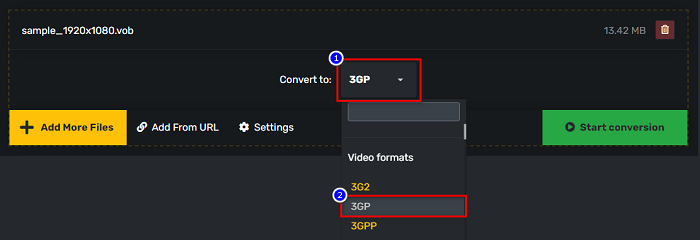
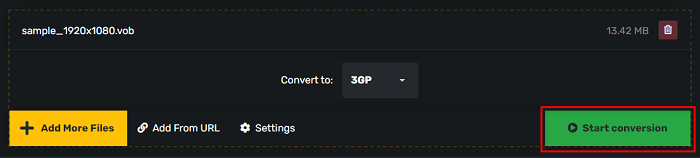
ขั้นตอนที่ 3 และสุดท้ายให้คลิกปุ่ม Start conversion ปุ่มเพื่อแปลง VOB ของคุณเป็นไฟล์ 3GP
ส่วนที่ 3 ฉันควรใช้ตัวแปลง VOB เป็น 3GP ตัวใด
เมื่อเลือกตัวแปลงที่ดีที่สุดในการแปลง VOB เป็น 3GP คุณต้องคำนึงถึงความเร็ว ไฟล์ที่รองรับ และคุณลักษณะเฉพาะของตัวแปลงเสมอ เราขอแนะนำให้ใช้เครื่องมือออฟไลน์ FVC Video Converter Ultimate ในบรรดาตัวแปลงออนไลน์และออฟไลน์ที่ดีที่สุดที่แสดงด้านบน ตัวแปลงนี้มีคุณสมบัติที่แตกต่างกันมากมายที่ตัวแปลงอื่นไม่มี เช่น ผู้สร้าง GIF ผู้สร้าง 3 มิติ ตัวลบลายน้ำ และอีกมากมาย
ยิ่งไปกว่านั้น แม้ว่ามันจะให้ผลลัพธ์ที่เหมือนมืออาชีพ แต่ก็มีอินเทอร์เฟซที่ใช้งานง่าย เพื่อที่คุณจะได้ไม่ต้องลำบากในการใช้งาน
ส่วนที่ 4 ข้อมูลเพิ่มเติมเกี่ยวกับ VOB และ 3GP
VOB หรือ Video Object เป็นรูปแบบคอนเทนเนอร์ไฟล์ที่ดีวีดีใช้ ประกอบด้วยวิดีโอ เสียง คำบรรยาย และเนื้อหาเมนู ไฟล์ประเภทนี้มีข้อจำกัดและข้อจำกัดการคัดลอกเพื่อป้องกันการคัดลอกโดยตรง ในทางตรงกันข้าม ไฟล์ 3GP เป็นรูปแบบไฟล์ที่สามารถเล่นได้บนอุปกรณ์มือถือรุ่นที่สามเท่านั้น รูปแบบไฟล์เหล่านี้พัฒนาโดย Third Generation Partnership Project (3GPP) นอกจากนี้ ไฟล์ประเภทนี้ยังมีไฟล์ขนาดเล็กเท่านั้น เมื่อเทียบกับไฟล์ VOB เนื่องจากสร้างมาเพื่อแชร์กับอุปกรณ์ 3G 3GP สามารถจัดเก็บไฟล์วิดีโอและไฟล์เสียงที่มักใช้ในโทรศัพท์ 3G
ส่วนที่ 5. คำถามที่พบบ่อยเกี่ยวกับการแปลง VOB เป็น 3GP
คุณสามารถเล่น 3GP บน macOS ได้หรือไม่?
ไฟล์ 3GP ไม่สามารถเล่นบน macOS ได้ โดยเฉพาะใน QuickTime เวอร์ชันใหม่ ๆ อย่างไรก็ตาม คุณสามารถแปลงไฟล์ 3GP ให้เป็นไฟล์ที่ macOS รองรับอย่าง MOV ได้ หากต้องการทราบข้อมูลเพิ่มเติมเกี่ยวกับการแปลงไฟล์ 3GP เป็น MOV ให้คลิกลิงก์นี้.
การแปลง VOB เป็น 3GP จะส่งผลต่อคุณภาพไฟล์ของคุณหรือไม่?
ใช่อย่างแน่นอน ขนาดไฟล์จะได้รับผลกระทบเมื่อคุณแปลง VOB เป็น 3GP เนื่องจาก 3GP มีเฉพาะไฟล์วิดีโอและไฟล์เสียง และมีขนาดไฟล์ที่เล็กกว่า ขนาดไฟล์ของไฟล์ VOB ของคุณจะเล็กลง
รูปแบบไฟล์ 3GP เป็นไฟล์ทั่วไปหรือไม่
น่าเสียดายที่ทุกวันนี้รูปแบบไฟล์ 3GP นั้นไม่ธรรมดาเพราะมีโทรศัพท์ 3G น้อยลงในทุกวันนี้ ไฟล์ทั่วไปสำหรับผู้ใช้มือถือในปัจจุบันคือรูปแบบไฟล์ MP4
สรุป
เนื่องจากเรานำเสนอตัวแปลงที่ดีที่สุดและง่ายที่สุดในการใช้เพื่อแปลง VOB เป็น MOV บน Windows และ Mac เราจึงสรุปได้ว่า FVC Video Converter Ultimate เป็นเครื่องมือที่ดีที่สุดในบรรดาเครื่องมือตัวแปลงออนไลน์และออฟไลน์ที่นำเสนอ ไม่เพียงแต่จะมีคุณสมบัติเฉพาะตัวให้ลองเท่านั้น แต่ยังมีการแปลงความเร็วสูงอีกด้วย ยังคงมีข้อสงสัยเกี่ยวกับตัวแปลงนี้ ดาวน์โหลดเดี๋ยวนี้ และลองใช้ตัวแปลง VOB เป็น 3GP ที่ดีที่สุด
-
 วิธีที่ดีที่สุดในการแปลง VOB เป็น FLV [รวมฟรีและออนไลน์]
 ต้องการแปลงไฟล์ VOB เป็นไฟล์ FLV หรือไม่? คุณสามารถทำงานให้เสร็จสมบูรณ์ได้อย่างง่ายดายด้วยตัวแปลงเดสก์ท็อปหรือออนไลน์ อ่านคู่มือนี้และเรียนรู้วิธีแปลง VOB เป็น FLV อย่างง่ายดายและรวดเร็ว
-
 3 Handy Converters พร้อมให้เปลี่ยนไฟล์ VOB เป็นรูปแบบ AVI [2021]
 มีปัญหาเพราะไฟล์ VOB ไม่รองรับการเล่น? จากนั้นให้ลองแปลงด้วย 3 วิธีที่แสดงด้านล่างพร้อมขั้นตอนโดยละเอียดเกี่ยวกับตัวแปลงแต่ละตัว
-
 วิธีการที่ยอดเยี่ยมที่จะใช้ในการแปลง VOB เป็น MOV
 การดาวน์โหลดวิดีโอออนไลน์นั้นสะดวก แต่ถ้าวิดีโออยู่ในรูปแบบ VOB และเครื่องเล่นของคุณไม่รองรับล่ะ โพสต์นี้จะสอนวิธีแปลง VOB เป็น MOV
