


 Video Converter Ultimate
 บันทึกหน้าจอ
 ซ่อมวิดีโอ
วิธีแปลง VOB เป็น MKV ฟรีด้วยตัวแปลง 3 ตัวนี้ [เครื่องมือที่ดีที่สุด]
VOB or Video Object is a file format that DVDs usually use. This file is commonly kept in the VIDEO_TS folder, which is at the root of the DVD. However, a lot of media files are now available on the internet. And the use of DVDs is not common nowadays and is not supported by many devices. Therefore, you need a file format that is supported by a lot of devices. MKV is a file format that is widely supported by numerous devices. Below are the best ways to convert VOB to MKV for free.

ส่วนที่ 1 แปลง VOB เป็น MKV โดยไม่สูญเสียข้อมูล
To convert your VOB files to MKV, you need a converter that is well suited for that job. FVC Video Converter Ultimate is a converter that is popular in the market nowadays. This converter has many special features where you can edit, enhance, compress, and do batch conversion of your VOB file. Moreover, this tool also supports ultra-fast conversion so that you can convert your VOB file to MKV real quick, without losing its quality.

FVC Video Converter Ultimate
5,689,200+ ดาวน์โหลด- มีการแปลงเป็นชุดเพื่อรวมหลายไฟล์เป็นไฟล์เดียว
- มี GUI ที่ใช้งานง่ายซึ่งเป็นมิตรกับผู้เริ่มต้น
- มีคุณสมบัติในการสร้าง GIF และสร้างวิดีโอ 3 มิติ
- ช่วยให้คุณแปลงได้อย่างรวดเร็วเนื่องจากกระบวนการแปลงที่รวดเร็วเป็นพิเศษในตัว
- พร้อมใช้งานบนแพลตฟอร์มต่างๆ รวมทั้ง Windows และ Mac
ดาวน์โหลดฟรีสำหรับ Windows 7 หรือใหม่กว่าดาวน์โหลดอย่างปลอดภัย
ดาวน์โหลดฟรีสำหรับ MacOS 10.7 หรือใหม่กว่าดาวน์โหลดอย่างปลอดภัย
นี่คือขั้นตอนในการแปลง VOB เป็น MKV โดยใช้ FVC Video Converter Ultimate:
Step 1. Download this application by clicking the Download button below for Windows or Mac. Follow the installation process, then proceed to the next step.
ดาวน์โหลดฟรีสำหรับ Windows 7 หรือใหม่กว่าดาวน์โหลดอย่างปลอดภัย
ดาวน์โหลดฟรีสำหรับ MacOS 10.7 หรือใหม่กว่าดาวน์โหลดอย่างปลอดภัย
Step 2. After downloading the converter, click the Add Files button or the + button to upload your VOB file in the queue.
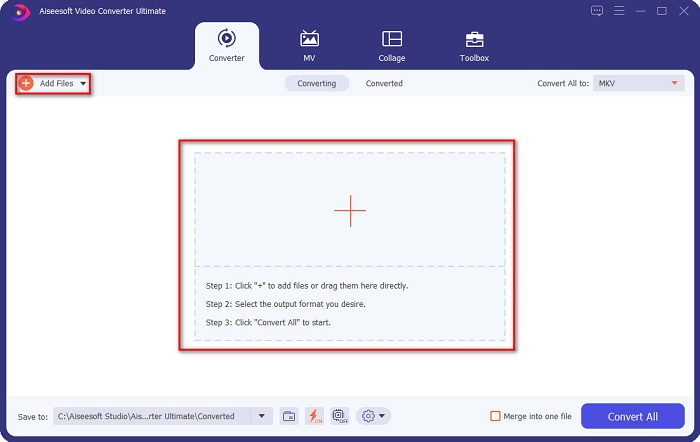
Step 3. And then click the Convert All to button located at the upper right corner of the software’s interface. A list of file formats will appear, then choose your desired file output.
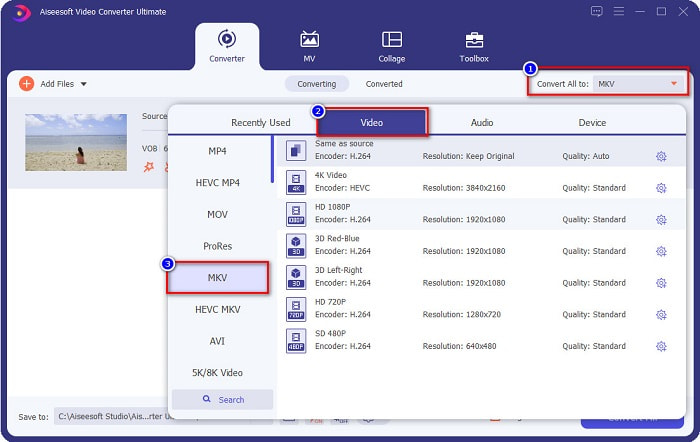
Step 4. After selecting MKV as your output file, click the Convert All button to convert your VOB to the MKV file. Then wait for a few seconds for your conversion to finish.
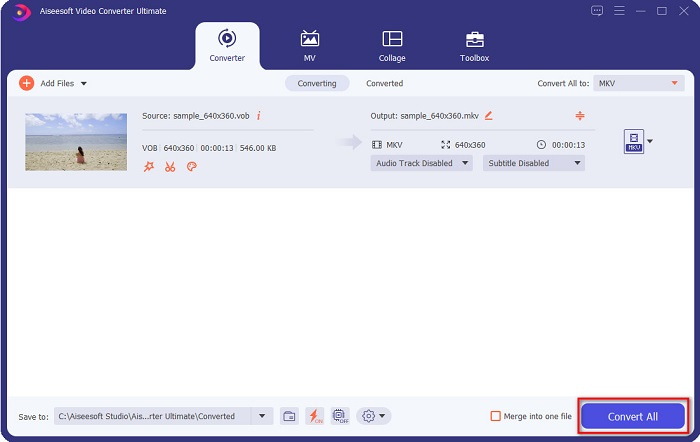
โดยทำตามขั้นตอนง่าย ๆ เหล่านี้ คุณสามารถแปลง VOB เป็น MKV โดยไม่สูญเสียข้อมูล
ส่วนที่ 2 แปลง VOB เป็น MKV โดยใช้ตัวแปลงฟรีแวร์
คุณยังสามารถแปลง VOB เป็น MKV โดยใช้ฟรีแวร์ การใช้ฟรีแวร์เป็นตัวแปลงสามารถช่วยคุณประหยัดเวลาได้มากเพราะคุณไม่จำเป็นต้องเชื่อมต่ออินเทอร์เน็ตเพื่อใช้งาน และเมื่อต้องดาวน์โหลดตัวแปลงฟรีแวร์ คุณไม่จำเป็นต้องซื้ออะไรเลย นี่คือตัวแปลงฟรีแวร์ที่ดีที่สุดสำหรับคุณที่จะลอง
VLC Media Player
เมื่อเลือกตัวแปลงฟรีแวร์ที่ดีที่สุด ปฏิเสธไม่ได้ว่า VLC Media Player จะเป็นอย่างนั้น หลายคนใช้ตัวแปลงฟรีแวร์นี้เนื่องจากสะดวกในการใช้ เครื่องเล่นสื่อนี้มีชื่อเสียงมากสำหรับผู้ใช้ Windows และพิสูจน์แล้วว่าเป็นวิธีที่ยอดเยี่ยมในการแปลงไฟล์
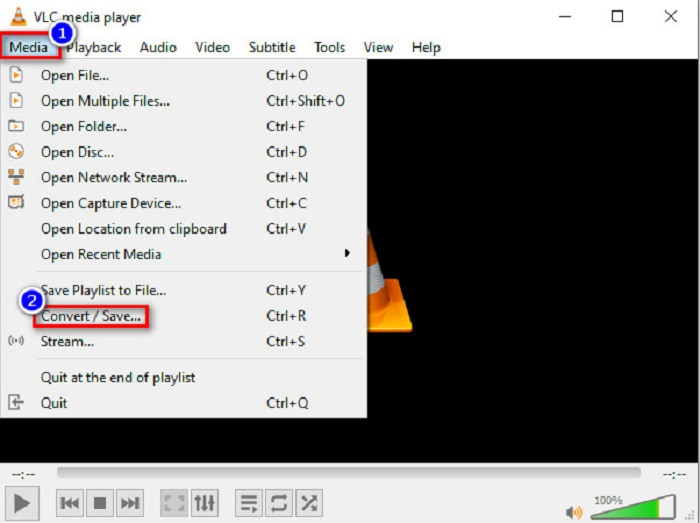
Step 1. First, if you do not have VLC Media Player on your device, download it by searching it in your browser. After downloading it, open the application. After opening the app, click the Media button, then select the Convert/Save button. Then you will be led to another interface.
Step 2. And then, click the + Add button to upload your VOB file. Then, click the Convert/Save button. Then proceed to the next step.
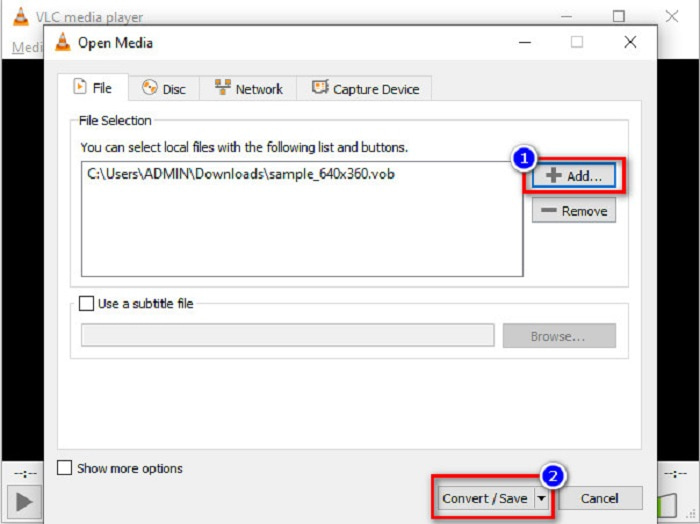
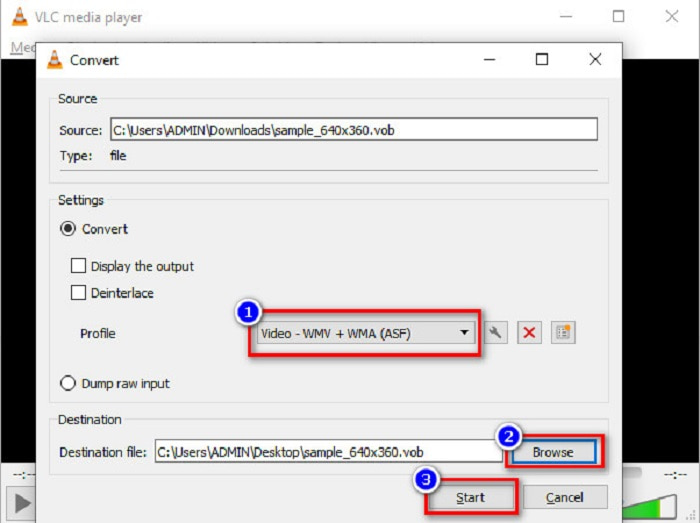
Step 3. Lastly, by clicking the drop-down button beside the Profile, select the MKV file as your output format. To choose your file destination, click the Browse button. And finally, tick the Start button to begin your conversion.
เบรกมือ
Another freeware converter that you can use to convert DVD VOB to MKV files is by using HandBrake. This converter is free when downloading. It also supports varieties of formats that are available on the web. However, its interface is complicated to understand for beginners. Still, this converter offers you distinct features that help convert your VOB file to MKV.
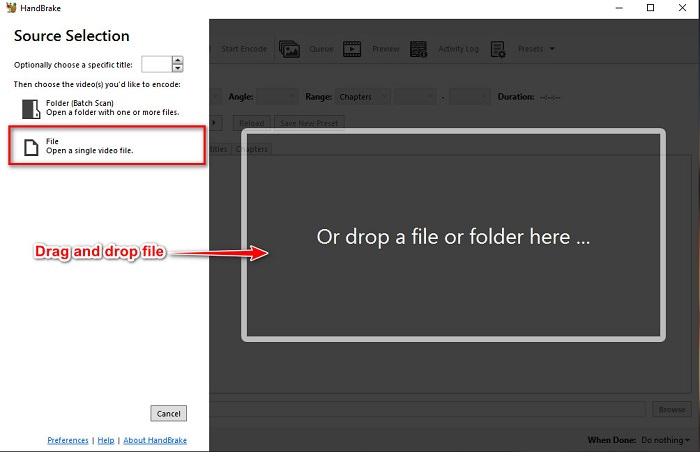
Step 1. Download the app by searching HandBrake in the browser that you use. After downloading, open the application. Then, click File, or drop your VOB file in the rectangular box in the middle of the software’s interface to upload it.
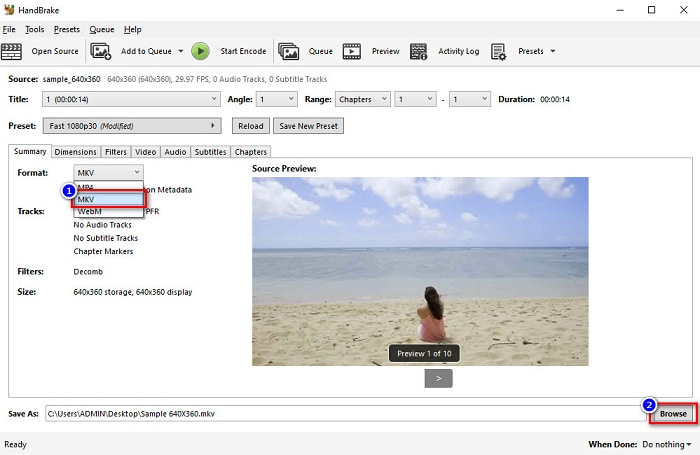
Step 2. After uploading your VOB file, choose MKV as your output file format by clicking the drop-down button beside Format. And for you to change the destination of your file on your computer files, click the Browse button.
Step 3. For the last step, click on the Start Encode button to convert your VOB to MKV using HandBrake.
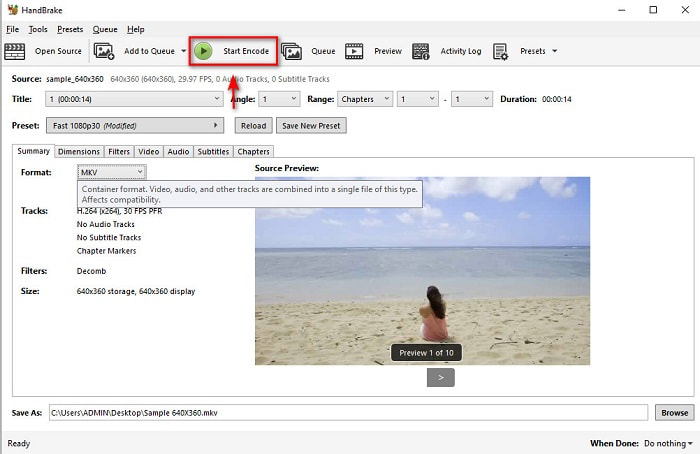
และนั่นคือวิธีที่คุณแปลง VOB เป็น MKV โดยใช้ฟรีแวร์
ส่วนที่ 3 แปลงไฟล์ VOB เป็นไฟล์ MKV โดยใช้เครื่องมือออนไลน์
Online converters are more convenient because you do not need to download anything. While there are many free online converters available on the web, Onlinefreeconvert.com is what we know as one of the best. This online converter is easy to use and free. Although you may experience slow conversion because it is web-based, many still use it for its convenience in using.
ขั้นตอนในการแปลงไฟล์ VOB เป็นไฟล์ MKV ออนไลน์:
Step 1. To convert a VOB file to MKV file format, search Onlinefreeconvert.com on your browser, then you will be directed to the converter’s website.
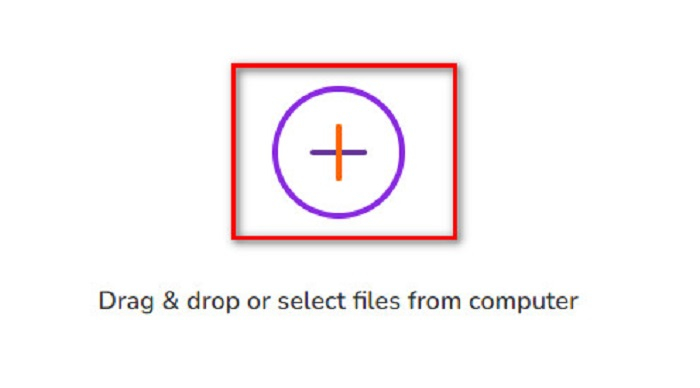
Step 2. Drag and drop your VOB file or select files from your computer by clicking the + button.
Step 3. Then beside the Output Format, click the drop-down button to select MKV as your output file format. Lastly, click the Start Now button to convert your VOB file to MKV.
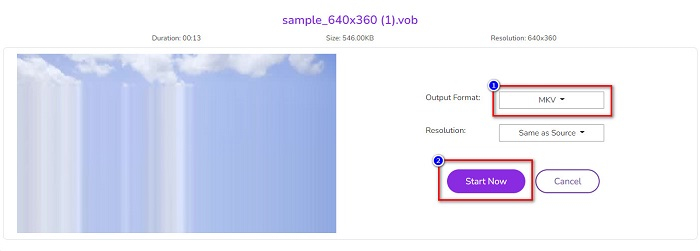
และนั่นคือวิธีที่คุณแปลง VOB เป็น MKV ออนไลน์โดยใช้ตัวแปลงออนไลน์
ส่วนที่ 4. ความรู้เพิ่มเติมเกี่ยวกับ VOB และ MKV
VOB หรือ Video Object เป็นรูปแบบไฟล์ที่เล่นวิดีโอดีวีดี ประกอบด้วยข้อมูลที่มีทั้งเสียง วิดีโอ และคำบรรยาย รูปแบบไฟล์ประเภทนี้มีการคุ้มครองลิขสิทธิ์เพื่อป้องกันการคัดลอกโดยตรง ในทางตรงกันข้าม ไฟล์ MKV หรือ Matroska เป็นรูปแบบไฟล์ที่ใช้กันทั่วไปในการจัดเก็บคลิปวิดีโอสั้นและภาพยนตร์ นอกจากนี้ยังรองรับตัวแปลงสัญญาณวิดีโอและเสียงมากมาย ยิ่งกว่านั้นมันเป็นไฟล์ที่พิสูจน์อนาคต จึงไม่ล้าสมัยในอนาคต
ส่วนที่ 5. คำถามที่พบบ่อยเกี่ยวกับการแปลง VOB เป็น MKV
ไฟล์ใดมีขนาดใหญ่กว่า VOB หรือ MKV
ไฟล์ MKV มีขนาดไฟล์ที่ใหญ่กว่าเมื่อเทียบกับ VOB แม้ว่าจะไม่แตกต่างกันมากนัก แต่ MKV นั้นใหญ่กว่าเล็กน้อย
คุณสามารถเล่นไฟล์วิดีโอ VOB บน Mac ได้หรือไม่?
macOS does not support VOB files; therefore, you cannot play it directly on Mac. However, you can use a converter to convert your VOB file to a file supported by macOS. MOV file is a file format that is widely supported by it. Moreover, read this article to know more about converting VOB to MOV.
ขนาดไฟล์จะได้รับผลกระทบเมื่อแปลง VOB เป็น MKV หรือไม่
Not necessarily. When converting VOB to MKV, the file size will not be affected, especially if you use FVC Video Converter Ultimate as your tool to convert.
สรุป
ตัวแปลงออนไลน์ ฟรีแวร์ และออฟไลน์ทั้งหมดที่นำเสนอข้างต้นแสดงประสิทธิภาพที่มีแนวโน้มดี แม้ว่าจะมีคุณลักษณะที่แตกต่างกัน แต่ก็ยังเป็นเครื่องมือที่มีประสิทธิภาพและประสิทธิผลในการแปลง VOB เป็น MKV ฟรี แต่ถ้าคุณต้องการตัวแปลงที่รวดเร็วเป็นพิเศษพร้อมฟีเจอร์ที่โดดเด่นมากมายให้ลอง FVC Video Converter Ultimate เป็นเครื่องมือที่ดีที่สุดที่เหมาะกับมัน ดังนั้น หากคุณสนใจที่จะลองใช้ตัวแปลงนี้ ดาวน์โหลดเลย!
-
 วิธีที่ดีที่สุดในการแปลง VOB เป็น FLV [รวมฟรีและออนไลน์]
 ต้องการแปลงไฟล์ VOB เป็นไฟล์ FLV หรือไม่? คุณสามารถทำงานให้เสร็จสมบูรณ์ได้อย่างง่ายดายด้วยตัวแปลงเดสก์ท็อปหรือออนไลน์ อ่านคู่มือนี้และเรียนรู้วิธีแปลง VOB เป็น FLV อย่างง่ายดายและรวดเร็ว
-
 ไฟล์ VOB คืออะไรและจะเปลี่ยนไฟล์ VOB เป็น GIF ฟรีได้อย่างไร
 คุณต้องการทราบข้อมูลเพิ่มเติมเกี่ยวกับไฟล์ VOB และวิธีแชร์หลังจากถูกริปหรือไม่? หรือทำไมคุณต้องแปลง VOB เป็น GIF จากนั้นอ่านบทความนี้อย่างละเอียด
-
 3 Handy Converters พร้อมให้เปลี่ยนไฟล์ VOB เป็นรูปแบบ AVI [2021]
 มีปัญหาเพราะไฟล์ VOB ไม่รองรับการเล่น? จากนั้นให้ลองแปลงด้วย 3 วิธีที่แสดงด้านล่างพร้อมขั้นตอนโดยละเอียดเกี่ยวกับตัวแปลงแต่ละตัว
