


 Video Converter Ultimate
 บันทึกหน้าจอ
 ซ่อมวิดีโอ
วิธีง่ายๆ ในการแปลงไฟล์ VOB เป็น WMV บน Windows และ Mac
ทุกวันนี้มีรูปแบบไฟล์มากมายเกิดขึ้นบนอินเทอร์เน็ต รูปแบบไฟล์หนึ่งที่ใช้กันอย่างแพร่หลายคือ VOB ซึ่งมักใช้ในแผ่น DVD อย่างไรก็ตาม ไฟล์ VOB ไม่ค่อยถูกใช้งานมากนักในยุคปัจจุบัน และอุปกรณ์จำนวนมากก็ไม่รองรับรูปแบบไฟล์ประเภทนี้ ดังนั้น คุณจึงควรมีไฟล์ที่รองรับอุปกรณ์ได้หลากหลายมากขึ้นอย่างไฟล์ WMV ไฟล์ WMV เป็นทรัพย์สินที่มีลิขสิทธิ์ของ Windows และได้รับการรองรับอย่างกว้างขวาง นอกจากนี้ ในบทความนี้ เราได้รวบรวมวิธีการต่าง ๆ ที่จะช่วยให้คุณแปลงไฟล์ VOB เป็นไฟล์ WMVได้อย่างง่ายดาย.

ส่วนที่ 1 แปลง VOB เป็นไฟล์ WMV บน Windows และ Mac
เนื่องจากไฟล์ VOB ไม่ค่อยสะดวกต่อการใช้งานในปัจจุบัน คุณจึงต้องใช้รูปแบบไฟล์ที่ได้รับการรองรับอย่างกว้างขวางจากอุปกรณ์หรือระบบต่าง ๆ ระบบ Windows มีการใช้ไฟล์ยอดนิยมไฟล์หนึ่งอย่างแพร่หลาย นั่นคือไฟล์ WMV ดังนั้นเราจึงขอแนะนำโปรแกรมแปลงไฟล์ขั้นสุดยอดนี้ที่สามารถแปลงไฟล์ VOB ของคุณให้เป็นไฟล์ WMV ได้อย่างง่ายดาย.
FVC Video Converter Ultimate เป็นหนึ่งในโปรแกรมแปลงไฟล์ VOB เป็น WMV ที่ดีที่สุด แอปพลิเคชันนี้เป็นตัวแปลงไฟล์ที่ให้คุณแปลงไฟล์ VOB ของคุณเป็นรูปแบบไฟล์ WMV ได้ FVC Video Converter Ultimate มีฟีเจอร์ที่น่าประทับใจ ซึ่งช่วยให้คุณตัดต่อไฟล์ ปรับแต่งให้ดีขึ้น และแม้แต่บีบอัดไฟล์ได้โดยไม่ทำลายคุณภาพของวิดีโอ นอกจากนี้ยังเหมาะสำหรับผู้เริ่มต้นใช้งาน เพราะมีอินเทอร์เฟซที่ใช้งานง่าย ทำให้คุณไม่ลำบากในการแปลงไฟล์ โปรแกรมนี้ช่วยให้คุณแปลงไฟล์ VOB เป็นไฟล์ WMV ได้ทั้งบน Windows และ Mac.
ข้อดี
- ให้คุณแปลงไฟล์ต่าง ๆ รวมถึง VOB, WMV, MP4, MOV, AVI และอื่นๆ
- คุณสามารถแก้ไข ปรับปรุง และบีบอัดวิดีโอของคุณเพื่อปรับปรุงได้อย่างน่าทึ่ง
- พร้อมใช้งานในแพลตฟอร์มเช่น Windows และ Mac
- มีอินเทอร์เฟซที่ใช้งานง่าย
จุดด้อย
- คุณต้องซื้อก่อนจึงจะสามารถใช้งานได้
ต่อไปนี้คือขั้นตอนวิธีการแปลงไฟล์ VOB เป็นไฟล์ WMVด้วย FVC Video Converter Ultimate:
ขั้นตอนที่ 1. หากต้องการดาวน์โหลดโปรแกรมแปลงไฟล์นี้ ให้คลิกปุ่มดาวน์โหลดด้านล่าง คุณจะเห็นปุ่มให้เลือกสองปุ่ม หากคุณเป็นผู้ใช้ Windows ให้คลิกปุ่ม Windows และหากคุณเป็นผู้ใช้ Mac ให้คลิกปุ่ม macOS จากนั้นทำตามขั้นตอนต่อไป แล้วจึงรันโปรแกรม.
ดาวน์โหลดฟรีสำหรับ Windows 7 หรือใหม่กว่าดาวน์โหลดอย่างปลอดภัย
ดาวน์โหลดฟรีสำหรับ MacOS 10.7 หรือใหม่กว่าดาวน์โหลดอย่างปลอดภัย
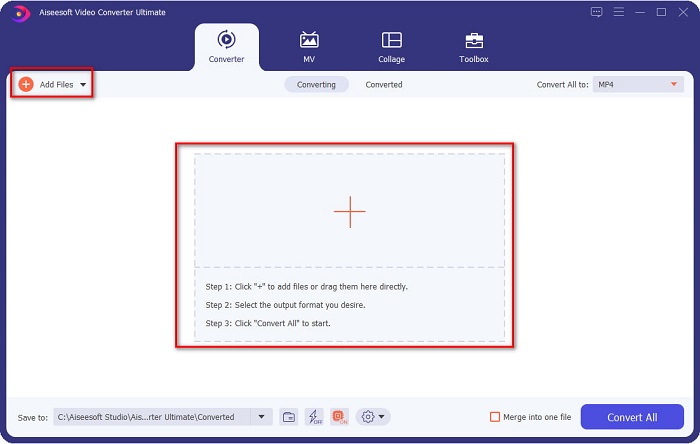
ขั้นตอนที่ 2. หลังจากเปิดโปรแกรมแล้ว ให้คลิกปุ่ม Add Files เพื่ออัปโหลดไฟล์ VOB ของคุณเข้าสู่โปรแกรมแปลงไฟล์ จากนั้นจะมีแท็บใหม่ปรากฏขึ้นเพื่อให้คุณเลือกไฟล์ VOB แล้วดำเนินการไปขั้นตอนถัดไป.
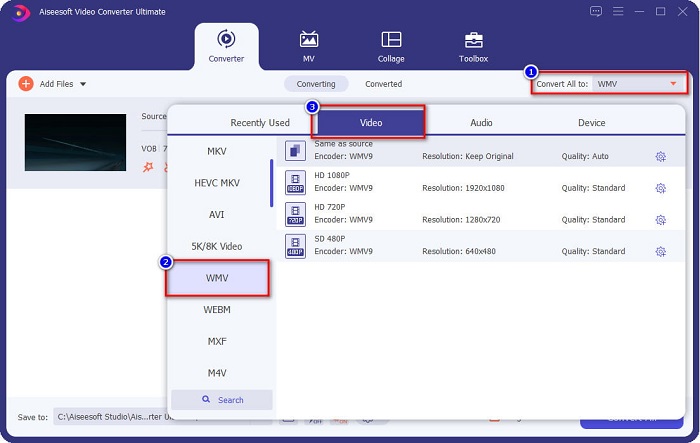
ขั้นตอนที่ 3. ในการแปลงไฟล์ VOB ของคุณเป็นไฟล์ WMV ให้คลิกปุ่ม Convert All to ที่มุมบนขวาของหน้าจอ จะมีรายชื่อรูปแบบไฟล์ปรากฏขึ้น จากนั้นเลือกไฟล์รูปแบบ WMV เพื่อแปลงไฟล์ VOB ของคุณเป็นรูปแบบไฟล์ WMV.
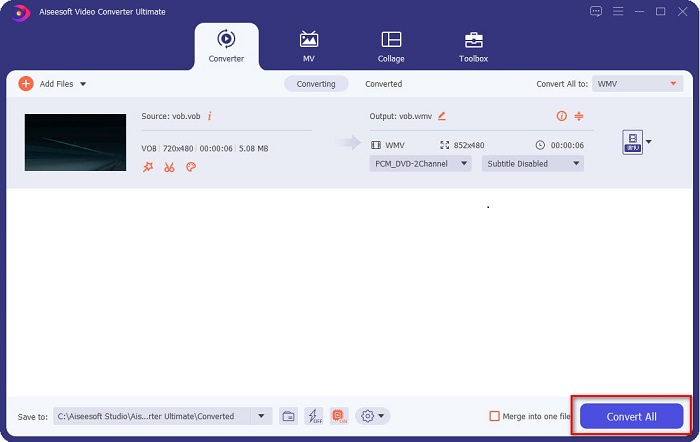
ขั้นตอนที่ 4. หลังจากเลือกไฟล์รูปแบบ WMV แล้ว ให้คลิก Convert All เพื่อแปลงไฟล์ VOB ของคุณเป็นรูปแบบไฟล์ WMV รอสักครู่ เพียงเท่านี้! เมื่อทำตามขั้นตอนง่าย ๆ เหล่านี้ ไฟล์ VOB ของคุณก็จะแปลงเป็นไฟล์ WMV เรียบร้อยแล้ว.
ส่วนที่ 2 แปลง VOB เป็น WMV โดยใช้ VOB เป็น WMV Converter ฟรีออนไลน์
สำหรับใครที่กำลังมองหาโปรแกรมแปลงไฟล์แบบฟรี ๆ เรามีตัวเลือกให้คุณ! Convertio สามารถแปลงไฟล์ VOB เป็นไฟล์ WMV ออนไลน์ได้ฟรี โปรแกรมแปลงไฟล์นี้ช่วยให้คุณแปลงไฟล์ขนาดใหญ่บนออนไลน์ได้ นอกจากนี้ยังรองรับการแปลงไฟล์วิดีโอหรือเสียงหลากหลายรูปแบบบนออนไลน์ เช่น VOB, WMV, MP4, FLV, MP3, ASF และอื่น ๆ อีกมากมาย อีกทั้งคุณไม่จำเป็นต้องดาวน์โหลดอะไรเลย เพราะนี่คือโปรแกรมแปลงไฟล์แบบออนไลน์ อย่างไรก็ตาม โปรแกรมนี้จำเป็นต้องใช้อินเทอร์เน็ต หมายความว่าความเร็วในการแปลงไฟล์จะขึ้นอยู่กับความเร็วอินเทอร์เน็ตของคุณ ถึงแม้เช่นนั้น มันก็ยังทำงานได้อย่างน่าประทับใจและมีผู้ใช้จำนวนมาก.
ต่อไปนี้คือขั้นตอนวิธีการแปลงไฟล์ VOB เป็น WMV ออนไลน์:
ขั้นตอนที่ 1. ค้นหา Convertio ในเบราว์เซอร์ของคุณเพื่อเข้าสู่หน้าเว็บไซต์ของพวกเขา.
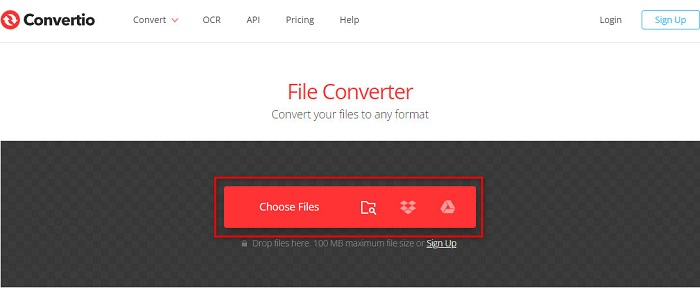
ขั้นตอนที่ 2. คลิกปุ่ม Choose Files ระบบจะพาคุณไปยังไฟล์ต่าง ๆ ในคอมพิวเตอร์ของคุณ เลือกไฟล์ VOB ของคุณ จากนั้นไฟล์จะปรากฏอยู่ในรายการ.
ขั้นตอนที่ 3. หลังจากเลือกไฟล์ VOB ของคุณแล้ว ให้คลิกปุ่มดรอปดาวน์ข้างจุดสามจุดที่เรียงกัน เพื่อเลือกรูปแบบไฟล์ที่คุณต้องการแปลงไฟล์ VOB ให้เป็น.
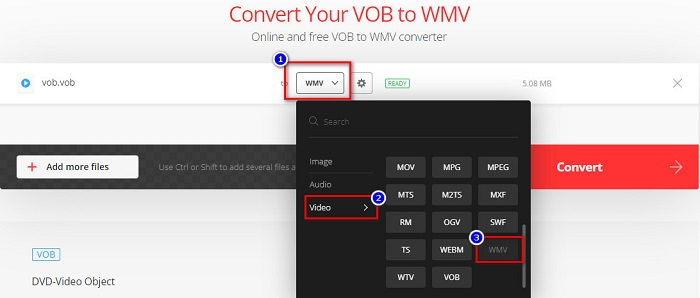
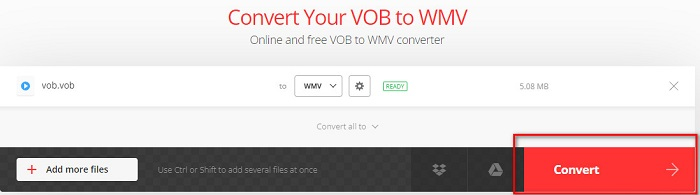
ขั้นตอนที่ 4. สุดท้ายให้คลิกปุ่ม Convert เพื่อแปลงไฟล์ VOB ของคุณเป็นรูปแบบไฟล์ WMV ความเร็วในการแปลงไฟล์จะขึ้นอยู่กับความเร็วการเชื่อมต่ออินเทอร์เน็ตของคุณ ดังนั้นอาจใช้เวลานานหน่อยเพราะเป็นโปรแกรมแปลงไฟล์ออนไลน์.
ส่วนที่ 3.ทำไมคุณต้องแปลง VOB เป็น WMV
ทำไมคุณต้องแปลงไฟล์ VOB ของคุณเป็นไฟล์ WMV อันดับแรก เราต้องแยกแยะความแตกต่างของพวกเขา
VOB หรือ Video Object คือไฟล์ที่ใช้ในแผ่น DVD ภายในไฟล์จะมีข้อมูลต่าง ๆ รวมถึงวิดีโอ เสียง และคำบรรยาย ไฟล์ VOB เช่นเดียวกับแผ่น DVD มักมีข้อจำกัดหรือระบบป้องกันการคัดลอกเพื่อไม่ให้ถูกก๊อบปี้โดยตรง นอกจากนี้ไฟล์ VOB มักถูกเข้ารหัสเพื่อป้องกันการทำสำเนา ในทางตรงกันข้าม WMV หรือ Windows Media Video ถูกพัฒนาโดย Windows เพื่อใช้สำหรับการสตรีมวิดีโอบนออนไลน์ แตกต่างจากรูปแบบ VOB ตรงที่ WMV เข้าถึงได้ง่ายกว่าเพราะสามารถใช้ตัวเข้ารหัสได้หลายชนิด ไฟล์ประเภทนี้มักทำงานบนซอฟต์แวร์ของ Windows นอกจากนี้รูปแบบไฟล์นี้ยังใช้ตัวบีบอัด จึงทำให้เมื่อตัดต่อหรือเล่นบนโปรแกรมเล่นสื่อต่าง ๆ คุณภาพของวิดีโอจะไม่ลดลงหรือเสียหาย ดังนั้นหากต้องเลือกระหว่างสองรูปแบบไฟล์นี้ เราขอแนะนำให้ใช้ไฟล์ WMV.
ส่วนที่ 4 คำถามที่พบบ่อยเกี่ยวกับการแปลง VOB เป็น WMV
ถ้าฉันแปลง VOB เป็น WMV คุณภาพจะลดลงหรือไม่?
ไม่ มีเครื่องมือแปลงไฟล์มากมาย ซึ่งเมื่อคุณแปลงไฟล์ จะไม่ลดคุณภาพของไฟล์ลง เช่นเดียวกับ FVC Video Converter Ultimate
ฉันสามารถแปลงไฟล์ VOB เป็นรูปแบบไฟล์ MP4 ได้หรือไม่
ได้ คุณสามารถแปลงไฟล์ VOB เป็นไฟล์ MP4 ได้โดยใช้เครื่องมือออนไลน์และออฟไลน์ที่เราแนะนำไว้ด้านบน คุณสามารถอ่านบทความนี้ได้ที่ VOB to MP4 – 3 Ways to Convert VOB Files to MP4 for Free in Bulk เพื่อดูข้อมูลเพิ่มเติมเกี่ยวกับการแปลงไฟล์ VOB เป็นไฟล์ MP4.
คุณสามารถเล่นไฟล์ VOB ไปยัง Windows Media Player ได้หรือไม่?
การเล่นไฟล์ประเภทนี้ใน Windows Media Player อาจเกิดปัญหาได้หากไม่รองรับตัวแปลงสัญญาณ (codec) ที่จำเป็น หรือคุณสามารถอ่านได้ที่ Best VOB Players เพื่อค้นหาโปรแกรมเล่นเพิ่มเติมสำหรับเพลิดเพลินกับไฟล์ VOB ของคุณ.
สรุป
มีวิธีการมากมายในการแปลงไฟล์ VOB ของคุณเป็นไฟล์ WMV แต่มีเพียงไม่กี่เครื่องมือเท่านั้นที่สามารถปรับปรุงคุณภาพวิดีโอของคุณได้มากขึ้น การใช้โปรแกรมแปลงไฟล์ออนไลน์จะช่วยประหยัดเวลาในการดาวน์โหลดโปรแกรม แต่ความเร็วก็ขึ้นอยู่กับการเชื่อมต่ออินเทอร์เน็ตของคุณด้วย ว่าจะใช้เวลาแปลงไฟล์นานแค่ไหน นั่นจึงเป็นเหตุผลที่เราขอแนะนำให้ใช้ FVC Video Converter Ultimate การดาวน์โหลดไม่ยุ่งยาก และยังตอบโจทย์การใช้งานของคุณได้อย่างแน่นอน.
-
 ไฟล์ VOB คืออะไรและจะเปลี่ยนไฟล์ VOB เป็น GIF ฟรีได้อย่างไร
 คุณต้องการทราบข้อมูลเพิ่มเติมเกี่ยวกับไฟล์ VOB และวิธีแชร์หลังจากถูกริปหรือไม่? หรือทำไมคุณต้องแปลง VOB เป็น GIF จากนั้นอ่านบทความนี้อย่างละเอียด
-
 3 Handy Converters พร้อมให้เปลี่ยนไฟล์ VOB เป็นรูปแบบ AVI [2021]
 มีปัญหาเพราะไฟล์ VOB ไม่รองรับการเล่น? จากนั้นให้ลองแปลงด้วย 3 วิธีที่แสดงด้านล่างพร้อมขั้นตอนโดยละเอียดเกี่ยวกับตัวแปลงแต่ละตัว
-
 วิธีการที่ยอดเยี่ยมที่จะใช้ในการแปลง VOB เป็น MOV
 การดาวน์โหลดวิดีโอออนไลน์นั้นสะดวก แต่ถ้าวิดีโออยู่ในรูปแบบ VOB และเครื่องเล่นของคุณไม่รองรับล่ะ โพสต์นี้จะสอนวิธีแปลง VOB เป็น MOV
