


 Video Converter Ultimate
 บันทึกหน้าจอ
 ซ่อมวิดีโอ
 ดาวน์โหลดอย่างปลอดภัย
วิธี 3 อันดับแรกที่คุณสามารถลองแปลง WebM เป็น 3GP
WebM รองรับโดยเกือบทุกเบราว์เซอร์ เช่น Google Chrome, Microsoft Edge, Mozilla Firefox, Opera และอื่น ๆ อย่างไรก็ตาม บางครั้งคุณอาจไม่สามารถเล่นไฟล์ WebM บนอุปกรณ์บางอย่างได้ เช่น โทรศัพท์มือถือ หากต้องการเล่นวิดีโอบนอุปกรณ์อื่น คุณจำเป็นต้องดาวน์โหลดโปรแกรมแปลงไฟล์ออนไลน์หรือออฟไลน์เพื่อแปลงไฟล์ WebM ของคุณเป็นรูปแบบอื่น โชคดีที่บทความนี้จะแนะนำวิธีที่ง่ายที่สุดบางวิธีในการแปลง WebM เป็น 3GP โดยใช้ซอฟต์แวร์ที่ผ่านการทดสอบแล้วเหล่านี้.

ส่วนที่ 1: วิธีที่มีประสิทธิภาพในการแปลง WebM เป็น 3GP บน Windows และ Mac
บทความนี้เหมาะสำหรับคุณ หากคุณต้องการตัวแปลง WebM เป็น 3GP บน Windows และ Mac โดยใช้Video Converter Ultimate ซึ่งเป็นซอฟต์แวร์ที่ดีที่สุดที่คุณสามารถใช้ได้ โปรแกรมนี้ช่วยให้คุณแปลงไฟล์ได้หลากหลาย เช่น FLV, MKV, DIVX, XVID, MT2S, MTS, M4V, AVI, MP4 และอื่น ๆ กว่า 1000 รูปแบบ นอกจากนี้คุณไม่ต้องกังวลเกี่ยวกับกระบวนการแปลงไฟล์ เพราะคุณสามารถแปลงไฟล์ได้เร็วกว่าโปรแกรมอื่นถึง 30 เท่า อีกทั้งยังสามารถดาวน์โหลดโปรแกรมที่ยอดเยี่ยมนี้ได้ฟรี.
ยิ่งไปกว่านั้น วิธีการแปลงไฟล์ของแอปพลิเคชั่นนี้ไม่ซับซ้อนเพราะมีอินเทอร์เฟซที่เป็นมิตรและวิธีการง่าย ๆ ซึ่งเหมาะสำหรับผู้ใช้ทุกคน นอกจากการแปลงแล้ว ยังมีเครื่องมืออีกมากมายที่คุณสามารถเพลิดเพลินได้ เช่น ปรับปรุงวิดีโอของคุณ สร้างมิวสิกวิดีโอ สร้างภาพปะติด เปลี่ยนขนาดไฟล์ และอื่นๆ
คุณสมบัติเด่น
◆ สมบูรณ์แบบสำหรับการสร้างภาพตัดปะ
◆ ปรับแต่งและปรับแต่ง GIF
◆ เปลี่ยนความเร็วของวิดีโอ
◆ สามารถเปลี่ยนขนาดไฟล์ของวิดีโอได้
◆ มันสามารถบีบอัดไฟล์เสียง
ข้อดี
- สมบูรณ์แบบสำหรับผู้ใช้ Windows และ Mac
- มีกระบวนการแปลงที่รวดเร็ว
- รองรับมากกว่า 1,000 รูปแบบ เช่น MP4, M4V, DIVX, FLV, MKV, 3GP, SWF เป็นต้น
- มีส่วนติดต่อผู้ใช้ที่เป็นมิตรซึ่งเหมาะสำหรับผู้เริ่มต้น
- สามารถเพิ่มและลบองค์ประกอบที่ไม่จำเป็น เช่น ลายน้ำ โลโก้ ลายเซ็น ฯลฯ ได้อย่างง่ายดาย
จุดด้อย
- ชำระเงินสำหรับรุ่นโปรเพื่อใช้คุณสมบัติที่ยอดเยี่ยมทั้งหมด
ขั้นตอนที่ 1: ดาวน์โหลดVideo Converter Ultimate บน Windows หรือ Mac ของคุณ โดยคลิกปุ่มดาวน์โหลดด้านล่าง ติดตั้งลงบนอุปกรณ์ของคุณและเปิดโปรแกรม.
ดาวน์โหลดฟรีสำหรับ Windows 7 หรือใหม่กว่าดาวน์โหลดอย่างปลอดภัย
ดาวน์โหลดฟรีสำหรับ MacOS 10.7 หรือใหม่กว่าดาวน์โหลดอย่างปลอดภัย
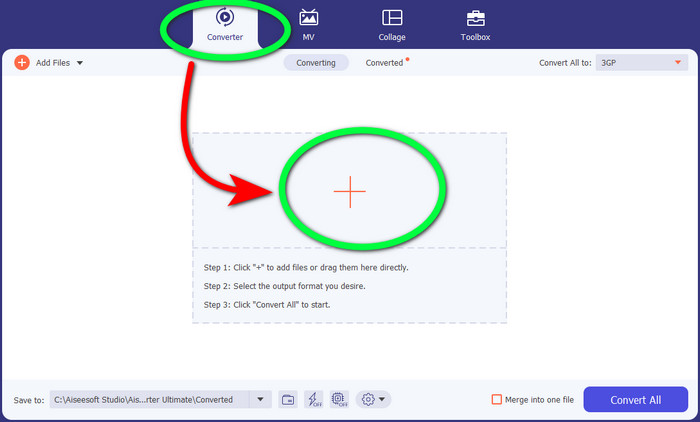
ขั้นตอนที่ 2: เมื่อคุณเห็นตัวเลือกทั้งสี่ที่ด้านบนของอินเทอร์เฟซ ให้เลือกแถบConverter แล้วคลิกสัญลักษณ์+ เพื่ออัปโหลดไฟล์วิดีโอ WebM.
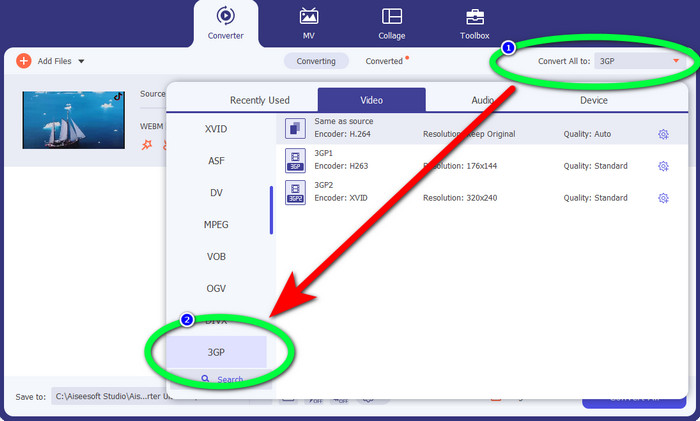
ขั้นตอนที่ 3: หลังจากอัปโหลดไฟล์วิดีโอ WebM แล้ว ให้คลิกตัวเลือกConvert all to และเลือกไฟล์ 3GP.
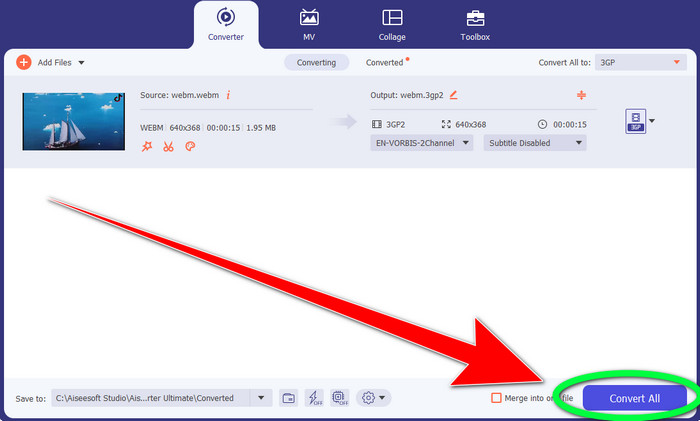
ขั้นตอนที่ 4: เมื่อคุณเปลี่ยนรูปแบบไฟล์จาก WebM เป็น 3GP เสร็จแล้ว ให้คลิกปุ่มConvert.
ตอนที่ 2: วิธีง่ายๆ ในการแปลง WebM เป็น 3GP ออนไลน์
ใช้ FVC Free Video Converter ออนไลน์
คุณต้องการใช้ตัวแปลงวิดีโอออนไลน์แบบฟรีหรือไม่? ถ้าเช่นนั้น เครื่องมือออนไลน์ที่คุณสามารถใช้ได้ฟรีคือ FVC Free Video Converter Online แอปพลิเคชันออนไลน์นี้ช่วยให้คุณแปลง WebM เป็น 3GP ได้อย่างง่ายดาย มีเพียง 3 ขั้นตอนพื้นฐานเท่านั้น จึงไม่ทำให้คุณสับสนเมื่อต้องแปลงไฟล์ต่าง ๆ นอกจากนี้ ตัวแปลงฟรีนี้ยังสามารถใช้งานได้ทั้งบน Windows และ Mac และยังรองรับการแปลงไฟล์หลากหลาย เช่น MP4, AVI, M4V, MKV, WMA, MP3 และอื่น ๆ อีกมากมาย อีกทั้งคุณยังสามารถแปลงไฟล์ได้อย่างรวดเร็วเพราะมีความเร็วในการแปลงสูง จึงไม่ต้องรอนานเพื่อแปลงไฟล์ถัดไป หากคุณสนใจที่จะแปลง WebM เป็น 3GP โดยใช้ FVC Free Video Converter Online ให้ทำตามขั้นตอนง่าย ๆ ด้านล่างนี้.
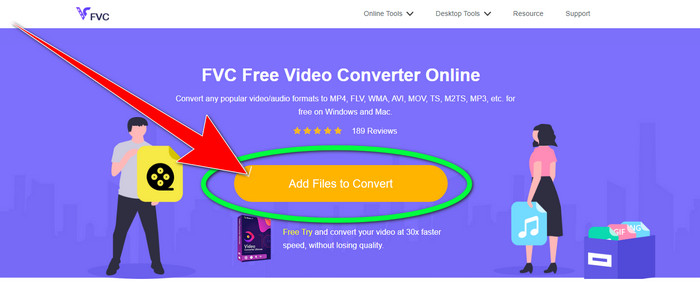
ขั้นตอนที่ 1: เข้าไปที่ FVC Free Video Converter Online คลิกปุ่มสีส้มตรงกลางเพื่อเพิ่มไฟล์วิดีโอ WebM ของคุณ.
ขั้นตอนที่ 2: จากนั้นเลือกไฟล์3GP เป็นรูปแบบที่คุณต้องการ คุณจะเห็นตัวเลือกรูปแบบไฟล์ที่ด้านล่างของอินเทอร์เฟซ.
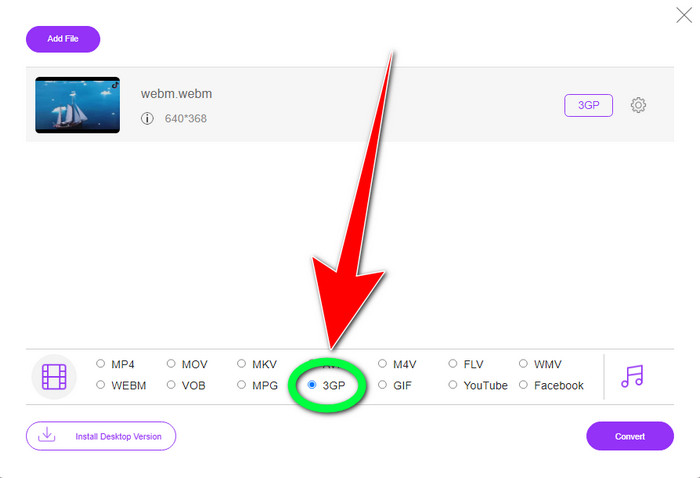
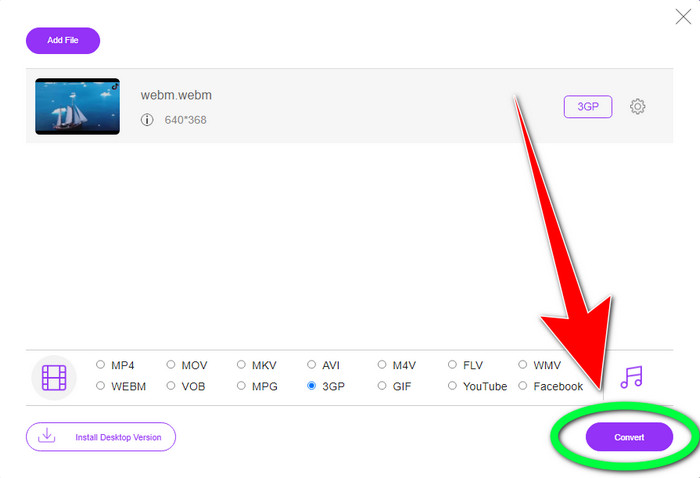
ขั้นตอนที่ 3: หลังจากคุณเลือกรูปแบบไฟล์ 3GP แล้ว คุณสามารถคลิกปุ่มConvert เพื่อบันทึกวิดีโอของคุณได้ทันที เครื่องมือนี้ยังช่วยให้คุณแปลง WebM เป็น DIVX ได้อีกด้วย.
ใช้ Convertio
หากคุณยังคงมองหาตัวแปลง WebM เป็น 3GP ทางออนไลน์อยู่ Convertio คือเครื่องมือที่คุณกำลังมองหา นอกจากนี้ยังมีขั้นตอนง่าย ๆ ในการแปลงไฟล์ของคุณ นอกจากนี้ คุณสามารถแปลงไฟล์ของคุณเป็นไฟล์วิดีโอได้ 37 รูปแบบ รวมถึง HEVC, MPG, M4V, MKV, WMV, MP4, MOV, AVI เป็นต้น Convertio ไม่ได้จำกัดเฉพาะการแปลงรูปแบบวิดีโอเท่านั้น คุณยังสามารถแปลงเสียง รูปภาพ และรูปแบบเอกสารต่างๆ
อย่างไรก็ตาม 100Mb คือขนาดไฟล์สูงสุดของแอปพลิเคชันออนไลน์นี้สำหรับการใช้เวอร์ชันฟรี คุณต้องได้รับเวอร์ชันที่ต้องชำระเงินจึงจะมีขนาดไฟล์ไม่จำกัดและเพลิดเพลินไปกับคุณลักษณะต่างๆ ได้มากขึ้น แต่การซื้อการสมัครสมาชิกนั้นมีราคาแพง หากคุณต้องการแปลงไฟล์ WebM เป็น 3GP โดยใช้ Convertio ให้ทำตามขั้นตอนด้านล่าง
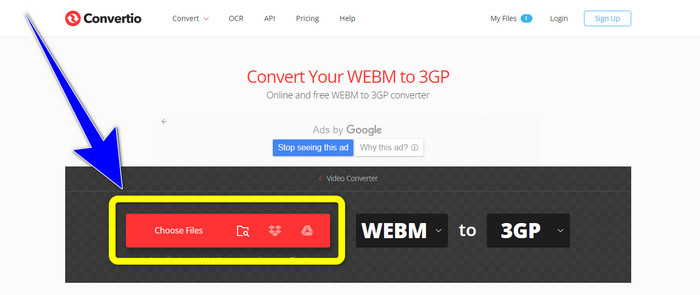
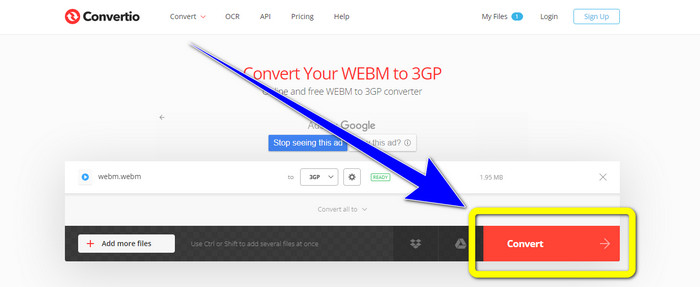
ขั้นตอนที่ 1: ไปที่เว็บไซต์Convertio แล้วกดปุ่มChoose files เพื่อเพิ่มไฟล์วิดีโอ WebM ของคุณ.
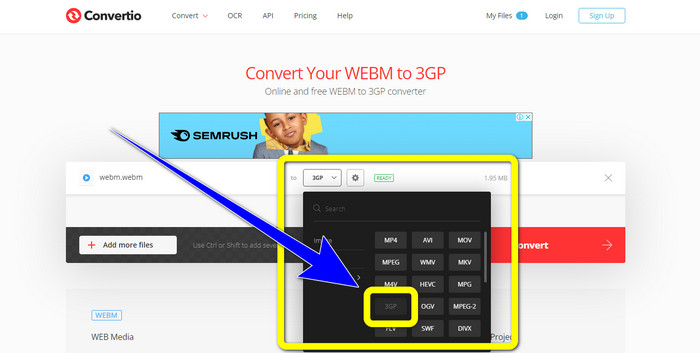
ขั้นตอนที่ 2: หลังจากคุณเพิ่มไฟล์วิดีโอ WebM ใน Convertio แล้ว ให้เลือกตัวเลือกรูปแบบไฟล์และเลือกรูปแบบไฟล์ 3GP.
ขั้นตอนที่ 3: ในขั้นตอนสุดท้าย คุณสามารถคลิกปุ่มConvert เพื่อแปลงไฟล์ของคุณ จากนั้นบันทึกไฟล์สุดท้ายลงในคอมพิวเตอร์ของคุณให้เสร็จสมบูรณ์กระบวนการแปลง คลิกที่นี่เพื่อเรียนรู้วิธีแปลง MPG เป็น 3GP.
ส่วนที่ 3: ข้อมูลเกี่ยวกับ WebM และ 3GP
เว็บ
ด้วยการบีบอัดวิดีโอแบบ VP8 และเสียงแบบ Vorbis WebM เป็นคอนเทนเนอร์สื่อแบบเปิด รูปแบบ WebM มักใช้สำหรับฝังสื่อในหน้าเว็บและรองรับโดยเบราว์เซอร์ทั้งหมด รวมถึง Opera, Mozilla Firefox และ Google Chrome โดยมีคุณภาพการเล่นวิดีโอที่ดีและคุณสมบัติการบีบอัดข้อมูลที่มีประสิทธิภาพ การฝังวิดีโอ WebM บนหน้าเว็บไซต์ทำได้อย่างราบรื่นไม่สะดุดหรือเกิดข้อผิดพลาด รูปแบบ WebM ถูกออกแบบมาเพื่อแข่งขันกับมาตรฐาน h.264 และ Google เป็นเจ้าของลิขสิทธิ์ของนามสกุลนี้.
3GP
สำหรับโทรศัพท์ที่ใช้ระบบ GSM หรือ Global System for Mobile Communications โครงการ Third Generation Partnership Project ได้สร้างคอนเทนเนอร์มัลติมีเดีย3GP ขึ้นในปี 1998 คอนเทนเนอร์นี้เหมาะอย่างยิ่งสำหรับโทรศัพท์มือถือ เพราะใช้ข้อมูล แบนด์วิดท์ และพื้นที่จัดเก็บน้อย จึงเป็นคอนเทนเนอร์ยอดนิยมสำหรับไฟล์ MMS (Multimedia Messaging Service).
ส่วนที่ 4: คำถามที่พบบ่อยเกี่ยวกับการแปลง WebM เป็น 3GP
ตัวแปลงออฟไลน์และออนไลน์ที่ดีที่สุดที่ฉันสามารถใช้เพื่อแปลง WebM เป็น 3GP คืออะไร
ต่อไปนี้คือแอปพลิเคชันที่ผ่านการทดสอบและเชื่อถือได้สำหรับการแปลง WebM เป็น 3GP และไฟล์รูปแบบอื่น ๆ
1. FVC Free Video Converter Online
2. Video Converter Ultimate
3. Convertio
4. HitPaw Video Converter
5. Online Convert Free
6. AnyMP4 Video Converter Ultimate
7. OnlineConvert
3GP เป็นรูปแบบวิดีโอที่ดีหรือไม่?
เมื่อพูดถึงโทรศัพท์เครือข่าย 3G รูปแบบ 3GP นั้นยอดเยี่ยมเพราะมันถูกสร้างขึ้นมาสำหรับอุปกรณ์โดยเฉพาะ อย่างไรก็ตาม ในแง่ของการสตรีมบนเครื่องเล่นมีเดียพกพาหรือเดสก์ท็อป มีรูปแบบที่ดีกว่า เช่น MP4 เนื่องจากสามารถรองรับวิดีโอความละเอียดสูงกว่า 3GP
ความละเอียด 3GP คืออะไร?
วิดีโอ 3GP มีสองความละเอียด ความละเอียดแรกคือ 176x144 สำหรับโทรศัพท์ทุกรุ่นที่รองรับรูปแบบ 3G ความละเอียดอื่นๆ คือ 320x240 สำหรับโทรศัพท์ที่มีจอกว้าง, PSP, เครื่องเล่น MP4 และ iPad touch
สรุป
จากบทความนี้ เราสามารถสรุปได้ว่ามีหลายวิธีในการแปลง WebM เป็น 3GP หากคุณต้องการวิธีที่ดีที่สุดในการแปลงไฟล์วิดีโอออนไลน์ ให้ใช้ FVC Free Video Converter Online และหากคุณกำลังมองหาโปรแกรมที่ดาวน์โหลดมาติดตั้งในเครื่อง ให้ใช้Video Converter Ultimate ทั้งสองตัวนี้เชื่อถือได้ในการแปลงวิดีโอหลากหลายรูปแบบ.
-
 ทางเลือกสูงสุดอันดับต้น ๆ ของ WebM เป็น FLV Converter ฟรีบนเว็บและเดสก์ท็อป
 คุณมีปัญหาเดียวกันในการเล่นไฟล์ WebM บนสมาร์ทโฟนของคุณหรือไม่? จากนั้นใช้เวลา 5 นาทีในการอ่านบทความนี้เพื่อทราบวิธีการแปลง WebM เป็น FLV
-
 ตัวแปลง WebM เป็น WMV ที่ดีที่สุด 3 อันดับแรกที่คุณต้องไม่พลาด
 กำลังมองหาวิธีแปลงไฟล์ WebM เป็นไฟล์ WMV หรือไม่? เราลองใช้ตัวแปลงที่มีชื่อเสียงในตลาดวันนี้ และเลือกตัวแปลงที่ดีที่สุดและง่ายที่สุดที่จะใช้จากพวกเขา
-
 สุดยอดตัวแปลง WebM เป็น MKV คุณต้องใช้เพื่อแปลงอย่างรวดเร็ว
 คุณกำลังมองหาวิธีแปลงไฟล์ WebM เป็น MKV หรือไม่? บทความนี้นำเสนอตัวแปลง WebM เป็น MKV ที่ดีที่สุดเพื่อให้คุณลอง
