


 Video Converter Ultimate
 บันทึกหน้าจอ
 ซ่อมวิดีโอ
 ดาวน์โหลดอย่างปลอดภัย
เปิดตัวตัวแปลง WebM เป็น WAV ที่ดีที่สุดสำหรับเสียงที่คมชัดและชัดเจน
คุณพร้อมที่จะยกระดับการได้ยินของคุณในระดับที่สูงขึ้นหรือไม่? เรามีโอกาสที่น่าตื่นเต้นรอคุณอยู่ ในวาทกรรมนี้ เราจะเจาะลึกขอบเขตของการแปลงไฟล์ WebM เป็นรูปแบบ WAV ซึ่งเป็นแนวทางที่ดีที่สุดในการเพิ่มคุณภาพของเสียงและเน้นส่วนที่ดีที่สุดของไฟล์เสียง
คู่มือนี้มีจุดมุ่งหมายเพื่อช่วยเหลือผู้ที่สนใจดนตรี พอดแคสต์ หรือการสร้างคอนเทนต์ ให้สามารถดึงศักยภาพของคอนเทนต์เสียงออกมาได้อย่างเต็มที่ เตรียมตัวให้พร้อมเพื่อสำรวจโปรแกรมแปลงไฟล์เสียงชั้นนำ เรียนรู้เคล็ดลับการใช้งานจริง และออกเดินทางสู่เสียงที่มีคุณภาพสูงและโดดเด่น มาร่วมกันเริ่มต้นเจาะลึกวิธีการแปลงไฟล์ WebM เป็น WAV กันเลย.

ส่วนที่ 1 วิธีที่ดีที่สุดในการแปลง WebM เป็น WAV ออฟไลน์
Video Converter Ultimate คือโซลูชันที่คุณวางใจได้สำหรับการแปลงไฟล์ WAV เป็น WebM อย่างราบรื่น ซอฟต์แวร์ทรงพลังตัวนี้ถูกออกแบบมาให้การแปลงไฟล์เสียงเป็นเรื่องง่าย ช่วยให้คุณแปลงไฟล์ WAV เป็นฟอร์แมต WebM ที่ได้รับความนิยมได้อย่างไม่ยุ่งยาก ด้วยฟังก์ชันการตั้งค่าที่ปรับแต่งได้ ผู้ใช้สามารถกำหนดเอาต์พุตตามความต้องการของตนเอง ไม่ว่าจะเป็นการปรับบิตเรต อัตราการสุ่มเสียง (sample rate) และช่องสัญญาณเสียง.
คุณสมบัติเด่น
◆ อัลกอริทึมการแปลงขั้นสูงของ FVC ช่วยให้มั่นใจได้ว่าการแปลงมีคุณภาพสูง จึงรักษาความเที่ยงตรงและความชัดเจนของไฟล์ WAV ของคุณ ส่งผลให้ได้สัมผัสกับคุณภาพเสียงที่บริสุทธิ์
◆ คุณสมบัติการแปลงเป็นชุดที่นำเสนอโดย FVC ช่วยให้สามารถแปลงไฟล์ WAV หลายไฟล์เป็น WebM ได้พร้อมกัน ทำให้ใช้เวลาและความพยายามอย่างมีประสิทธิภาพมากขึ้น
◆ FVC Video Converter Ultimate มีรูปแบบเสียงและวิดีโอที่หลากหลายซึ่งสามารถรองรับได้ รับประกันความสามารถในการปรับตัวและความคล่องตัวในการตอบสนองความต้องการในการแปลงของคุณ
ขั้นตอนที่ 1 เปิดใช้งานซอฟต์แวร์
ดาวน์โหลดเครื่องมือนี้โดยคลิกที่ปุ่ม ดาวน์โหลดฟรี ด้านล่าง ตรวจสอบให้แน่ใจว่าได้ดาวน์โหลดตัวติดตั้งให้ตรงกับระบบปฏิบัติการของคุณ โดยสามารถเลือกระหว่างตัวติดตั้งสำหรับ Mac และ Windows จากนั้นจึงเปิดโปรแกรมบนคอมพิวเตอร์ของคุณ.
ดาวน์โหลดฟรีสำหรับ Windows 7 ขึ้นไปดาวน์โหลดอย่างปลอดภัย
ดาวน์โหลดฟรีสำหรับ MacOS 10.7 ขึ้นไปดาวน์โหลดอย่างปลอดภัย
ขั้นตอนที่ 2 เพิ่มไฟล์ WebM
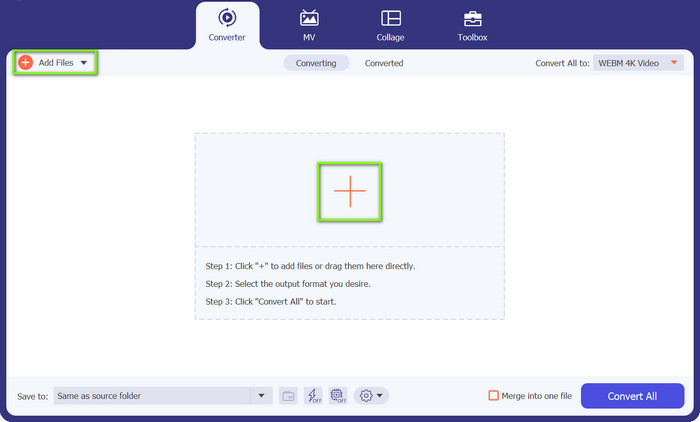
คลิกปุ่มสัญลักษณ์ เครื่องหมายบวก ที่คุณจะเห็นบนอินเทอร์เฟซหลักของโปรแกรม จากนั้นเลือกไฟล์จากคอมพิวเตอร์ที่คุณต้องการแปลง นอกจากนี้ คุณยังสามารถคลิกปุ่ม เพิ่มไฟล์ ที่มุมซ้ายบนเพื่ออัปโหลดโฟลเดอร์ที่มีไฟล์ WebM หลายไฟล์ได้.
ขั้นตอนที่ 3 ระบุรูปแบบเอาต์พุต
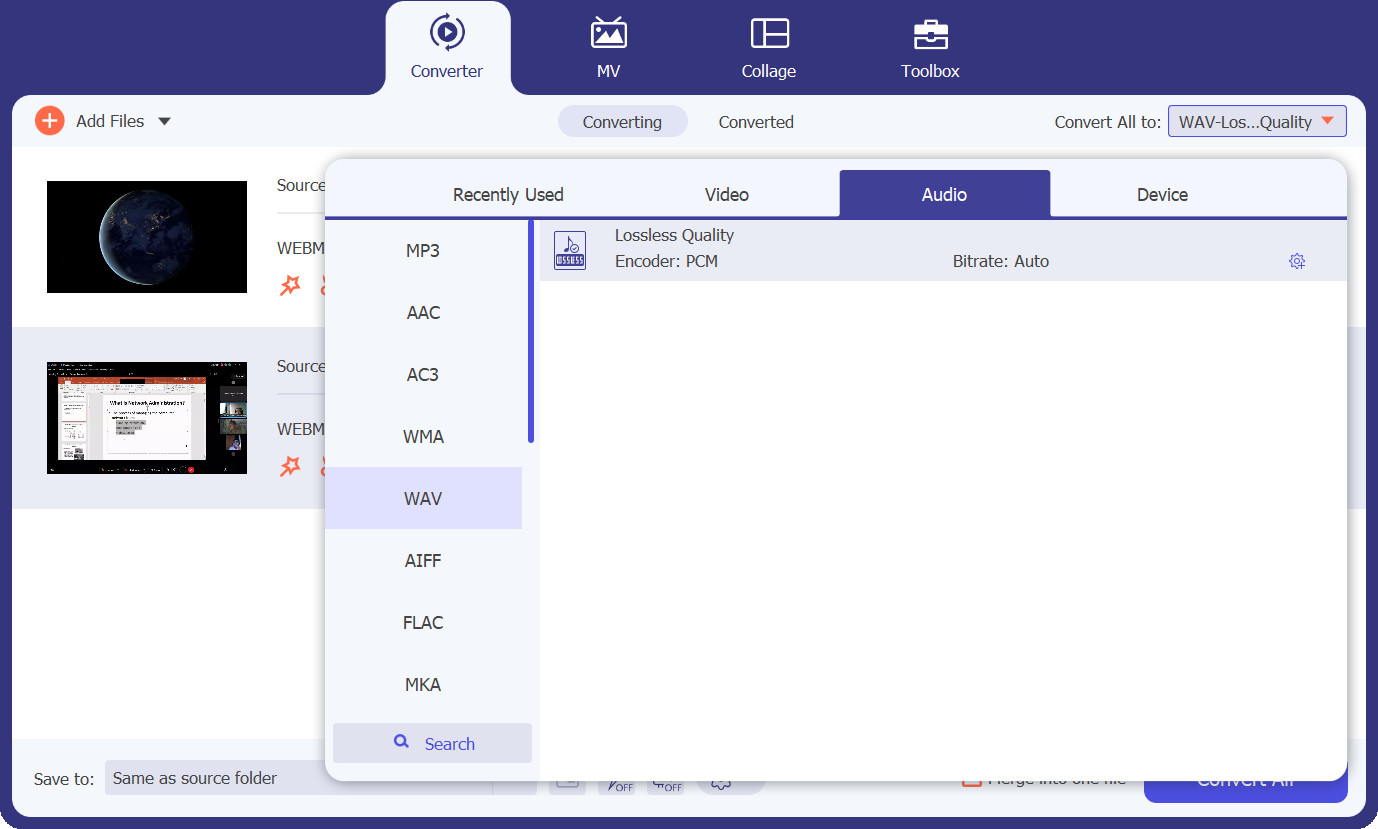
จากนั้นไปที่แท็บ โปรไฟล์ และแสดงตัวเลือกฟอร์แมตโดยคลิกปุ่มดรอปดาวน์ หลังจากนั้นคุณจะเห็นแท็บหลัก 3 แท็บสำหรับการแปลงไฟล์ เลือกแท็บ เสียง มองหาไฟล์ฟอร์แมต WAV และเลือกระดับคุณภาพที่ตรงกับความต้องการของคุณ.
ขั้นตอนที่ 4 เริ่มการแปลงไฟล์
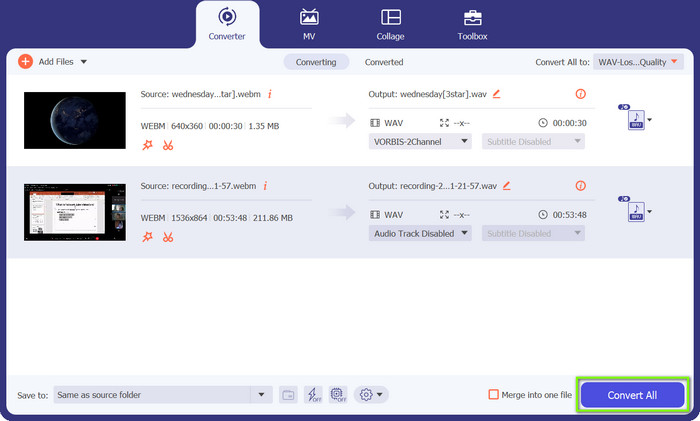
เมื่อทุกอย่างตั้งค่าเรียบร้อยแล้ว คุณสามารถเริ่มกระบวนการแปลงได้ โดยคลิกปุ่ม แปลงทั้งหมด ที่มุมล่างขวา แล้วการแปลงไฟล์จะเริ่มต้นขึ้น คุณยังสามารถใช้ขั้นตอนเดียวกันนี้เพื่อแปลงไฟล์ WAV เป็น WebM ได้เช่นกัน.
ส่วนที่ 2 วิธีที่ดีที่สุดในการแปลง WebM เป็น WAV ออนไลน์ฟรี
ในอีกทางหนึ่ง เรายังมี Free Video Converter Online ซึ่งเป็นโซลูชันแบบไม่ยุ่งยากสำหรับการแปลงไฟล์ WAV เป็น WebM ได้โดยตรงจากเว็บเบราว์เซอร์ของคุณ ด้วยโปรแกรมแปลงไฟล์ออนไลน์นี้ คุณสามารถแปลงไฟล์ WAV ให้เป็นฟอร์แมต WebM ที่ได้รับความนิยมได้อย่างรวดเร็วและง่ายดาย โดยไม่ต้องติดตั้งซอฟต์แวร์เพิ่มเติมเช่นกัน เครื่องมือนี้ยังอนุญาตให้คุณปรับแต่งพารามิเตอร์ของไฟล์เสียงหรือวิดีโอได้อีกด้วย ดูคุณสมบัติเด่นด้านล่างเพื่อเรียนรู้เพิ่มเติมเกี่ยวกับโปรแกรมแปลง WebM เป็น WAV ตัวนี้.
คุณสมบัติเด่น
◆ ตัวแปลงออนไลน์มีส่วนต่อประสานที่ใช้งานง่ายซึ่งช่วยอำนวยความสะดวกในกระบวนการแปลง ทำให้ไม่ซับซ้อนสำหรับผู้ใช้ที่มีความสามารถทางเทคนิคจำกัด
◆ รวดเร็วและมีประสิทธิภาพ: Free FVC Video Converter Online ให้การแปลงไฟล์ WAV เป็นรูปแบบ WebM อย่างมีประสิทธิภาพ ในขณะที่รักษาเอาต์พุตคุณภาพสูงและเวลาประมวลผลที่รวดเร็ว
◆ การรักษาความลับและการป้องกันไฟล์ของคุณมีความสำคัญสูงสุดและรับประกันได้ FVC Video Converter ออนไลน์รับประกันการปกป้องข้อมูลผู้ใช้ในขณะที่อยู่ระหว่างการแปลง
ขั้นตอนที่ 1 เข้าเยี่ยมชมเว็บไซต์ Free FVC Video Converter Online ผ่านเว็บเบราว์เซอร์ของคุณ.
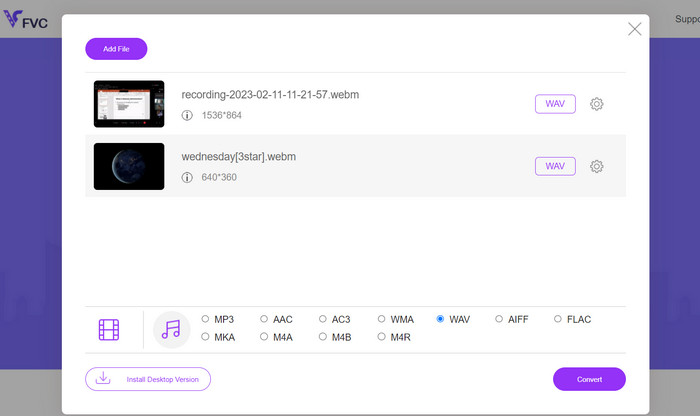
ขั้นตอนที่ 2 คลิกปุ่ม เพิ่มไฟล์ เพื่อ แปลง เพื่ออัปโหลดไฟล์ WAV จากที่เก็บข้อมูลภายในเครื่องของคุณ จากนั้นเลือก WAV เป็นฟอร์แมตเอาต์พุตที่ต้องการ หากต้องการ คุณยังสามารถปรับการตั้งค่าเพิ่มเติม เช่น บิตเรต ความละเอียด หรือคุณภาพเสียง ให้ตรงตามความต้องการได้.
ขั้นตอนที่ 3 คลิกปุ่ม แปลง เพื่อเริ่มกระบวนการแปลงไฟล์ เมื่อการแปลงเสร็จสิ้น ไฟล์เอาต์พุตจะถูกดาวน์โหลดโดยอัตโนมัติและจัดเก็บไว้ในโฟลเดอร์บนคอมพิวเตอร์ของคุณ.
ส่วนที่ 3 แปลง WebM เป็น WAV ด้วย FFmpeg
FFmpeg เป็นเครื่องมือบรรทัดคำสั่งอเนกประสงค์ที่ช่วยให้คุณแปลง WebM เป็น WAV ได้อย่างง่ายดาย ในฐานะเฟรมเวิร์กมัลติมีเดียที่ทรงพลัง FFmpeg มีชื่อเสียงในด้านความสามารถที่หลากหลาย รวมถึงการแปลงเสียงและวิดีโอ การจัดการ และการสตรีม ด้วย FFmpeg คุณสามารถใช้ประโยชน์จากอินเทอร์เฟซบรรทัดคำสั่งเพื่อทำงานต่างๆ รวมถึงการแปลงไฟล์ WebM ของคุณเป็นรูปแบบ WAV ซึ่งขึ้นชื่อเรื่องเสียงคุณภาพสูงที่ไม่มีการบีบอัด
ขั้นตอนที่ 1 ดาวน์โหลดและติดตั้ง FFmpeg บนระบบของคุณตามเอกสารประกอบอย่างเป็นทางการสำหรับระบบปฏิบัติการที่คุณใช้งานอยู่.
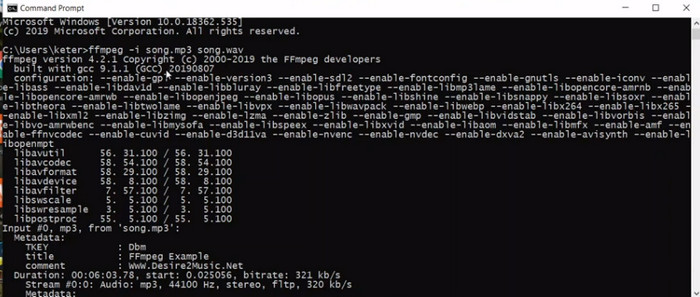
ขั้นตอนที่ 2 เปิดหน้าต่าง Command Prompt (Windows) หรือ Terminal (macOS/Linux) เพื่อเข้าสู่ส่วนติดต่อแบบบรรทัดคำสั่ง จากนั้นรันคำสั่งแปลงไฟล์ โดยใช้โครงสร้างคำสั่งต่อไปนี้เพื่อแปลงไฟล์ WebM เป็น WAV: ffmpeg -i input.webm output.wav.
ขั้นตอนที่ 3 แทนที่ input.webm ด้วยพาธและชื่อไฟล์ WebM ของคุณ และแทนที่ output.wav ด้วยชื่อไฟล์และตำแหน่งจัดเก็บที่คุณต้องการสำหรับไฟล์ WAV ที่แปลงแล้ว.
ขั้นตอนที่ 4 กดปุ่ม Enter เพื่อรันคำสั่งและเริ่มกระบวนการแปลงไฟล์จาก WebM เป็น WAV นั่นคือวิธีที่ FFmpeg ใช้ในการแปลงไฟล์ WebM เป็น WAV.
อ่านเพิ่มเติม:
ตัวแปลงไฟล์ WebM เป็น MKV ที่ดีที่สุดที่คุณควรใช้เพื่อแปลงไฟล์อย่างรวดเร็ว
วิธีแปลงไฟล์ FLAC และ WAV อย่างง่ายดาย (ทั้งแบบฟรีและเสียเงิน)
ส่วนที่ 4 การเปรียบเทียบโปรแกรมที่แนะนำ
พิจารณาความต้องการ การตั้งค่า และระดับความเชี่ยวชาญทางเทคนิคเฉพาะของคุณ เพื่อพิจารณาว่าตัวแปลงใดที่เหมาะกับความต้องการของคุณมากที่สุดผ่านตารางเปรียบเทียบด้านล่าง
| ด้าน | Video Converter Ultimate | แปลงวิดีโอออนไลน์ฟรี | FFmpeg |
| ตัวเลือกการปรับแต่ง | อนุญาตให้ปรับแต่งการตั้งค่าเอาต์พุต | ตัวเลือกการปรับแต่งที่จำกัด | ตัวเลือกการปรับแต่งที่กว้างขวาง |
| ความเร็วในการแปลง | การแปลงที่มีประสิทธิภาพและรวดเร็ว | ขึ้นอยู่กับการเชื่อมต่ออินเทอร์เน็ต | ขึ้นอยู่กับประสิทธิภาพของระบบ |
| การแปลงแบทช์ | รองรับการแปลงไฟล์เป็นชุด | รองรับการแปลงไฟล์เป็นชุด | ขึ้นอยู่กับการดำเนินการคำสั่ง |
| ความเข้ากันได้ข้ามแพลตฟอร์ม | พร้อมใช้งานสำหรับ Windows, macOS และ Linux | เข้าถึงได้บนเว็บเบราว์เซอร์ใดก็ได้ | มีให้สำหรับแพลตฟอร์มต่างๆ |
| การรักษาคุณภาพเสียง | รับประกันการแปลงเสียงคุณภาพสูง | คุณภาพอาจแตกต่างกันไปขึ้นอยู่กับการตั้งค่า | รักษาคุณภาพเสียง |
ส่วนที่ 5 คำถามที่พบบ่อยเกี่ยวกับการแปลง WebM เป็น WAV
ฉันสามารถปรับแต่งการตั้งค่าเสียงระหว่างการแปลงได้หรือไม่?
Video Converter Ultimate และ FFmpeg นำเสนอตัวเลือกการปรับแต่งมากมาย ช่วยให้คุณปรับพารามิเตอร์ต่างๆ เช่น อัตราตัวอย่าง บิตเรต ฯลฯ Free Video Converter Online อาจมีตัวเลือกการปรับแต่งที่จำกัด
การแปลง WebM เป็น WAV ใช้เวลานานเกินไปหรือไม่
เวลาในการแปลงขึ้นอยู่กับปัจจัยต่างๆ รวมถึงขนาดไฟล์ ความเร็วของคอมพิวเตอร์หรือการเชื่อมต่ออินเทอร์เน็ตของคุณ (สำหรับเครื่องมือออนไลน์) และประสิทธิภาพของตัวแปลง โดยทั่วไปแล้ว กระบวนการแปลงจะค่อนข้างรวดเร็ว
ฉันสามารถแปลง WebM เป็น WAV บนระบบปฏิบัติการใด ๆ ได้หรือไม่
ใช่ ตัวแปลงเช่น FVC Video Converter Ultimate และ FFmpeg พร้อมใช้งานสำหรับระบบปฏิบัติการหลายระบบ รวมถึง Windows, macOS และ Linux เพื่อให้แน่ใจว่าสามารถใช้งานร่วมกันได้บนแพลตฟอร์มต่างๆ
สรุป
เมื่อคุณมีโปรแกรมแปลงไฟล์ที่เหมาะสมอยู่ในมือ คุณก็สามารถแปลงไฟล์ WebM เป็น WAV ได้อย่างง่ายดาย เปิดประตูสู่คุณภาพเสียงที่ดีขึ้น ความยืดหยุ่นในการใช้งาน และความเข้ากันได้ที่กว้างขวาง เพลิดเพลินไปกับเสียงที่ใสเคลียร์และค้นพบโอกาสใหม่ ๆ จากไฟล์ที่แปลงแล้วของคุณ.
-
 ตัวแปลง WebM เป็น WMV ที่ดีที่สุด 3 อันดับแรกที่คุณต้องไม่พลาด
 กำลังมองหาวิธีแปลงไฟล์ WebM เป็นไฟล์ WMV หรือไม่? เราลองใช้ตัวแปลงที่มีชื่อเสียงในตลาดวันนี้ และเลือกตัวแปลงที่ดีที่สุดและง่ายที่สุดที่จะใช้จากพวกเขา
-
 แปลง MKV เป็น WAV ได้อย่างราบรื่นเพื่อการเล่นเสียงที่ชวนดื่มด่ำ
 ค้นพบตัวแปลง MKV เป็น WAV ที่ดีที่สุดที่ให้คุณภาพเสียงที่ยอดเยี่ยม อ่านบทวิจารณ์ที่เป็นกลางและค้นหาเครื่องมือที่สมบูรณ์แบบในการแปลงไฟล์เสียงของคุณอย่างง่ายดาย
-
 WAV Player - แอพเล่น WAV 5 อันดับแรกสำหรับ Android, iPhone, PC และ Mac
 จะเล่นไฟล์ WAV บนโทรศัพท์ Android ได้อย่างไร? เครื่องเล่นอะไรสามารถเล่น WAV ได้? โพสต์นี้แชร์ 5 เครื่องเล่น WAV ฟรีที่ดีที่สุดสำหรับ Android, iPhone, Mac และ PC
