


 Video Converter Ultimate
 บันทึกหน้าจอ
 ซ่อมวิดีโอ
 ดาวน์โหลดอย่างปลอดภัย
วิธีที่ยอดเยี่ยมในการใช้เครื่องมือขั้นสูงเพื่อแปลง XviD เป็น 3GP
ไม่สามารถเล่นไฟล์ .xvid บนโทรศัพท์มือถือของคุณได้ใช่ไหม ถ้าอย่างนั้นอาจเป็นเพราะอุปกรณ์ของคุณไม่รองรับไฟล์ประเภทนี้ หากต้องการเล่นวิดีโอบนมือถือ คุณต้องแปลงไฟล์ XviD ของคุณเป็น 3GP เมื่อพูดถึงโทรศัพท์มือถือ รูปแบบไฟล์วิดีโอที่ได้รับความนิยมมากที่สุดรูปแบบหนึ่งก็คือ 3GP บทความนี้จะให้ข้อมูลเชิงลึกเกี่ยวกับวิธีที่ดีที่สุดในการแปลง XviD เป็น 3GPอย่างรวดเร็วและง่ายดาย โดยใช้เครื่องมือที่ยอดเยี่ยมซึ่งคุณสามารถใช้ได้ทั้งบน Windows, Mac และแบบออนไลน์ มาอ่านและเรียนรู้ไปพร้อมกันให้ได้มากที่สุดกันเถอะ.

ตอนที่ 1: วิธีที่ดีที่สุดในการแปลง XviD เป็น 3GP
วิธีที่ดีที่สุดในการแปลง XviD เป็น 3GP คือการใช้Video Converter Ultimate นี่เป็นหนึ่งในโปรแกรมแปลงไฟล์ที่ยอดเยี่ยมซึ่งคุณสามารถดาวน์โหลดได้บนคอมพิวเตอร์ Windows และ Mac หากคุณมีโปรแกรมนี้ คุณไม่ต้องกังวลกับการแปลงไฟล์จำนวนมากอีกต่อไป เพราะ Video Converter Ultimate สามารถแปลงได้มากกว่า 1000+ รูปแบบ รวมถึง FLV, MKV, DIVX, XviD, 3GP, M4V, MTS, SWF, MP4 และอื่น ๆ นอกจากนี้ ยังมีความเร็วในการแปลงที่เร็วกว่าโปรแกรมอื่นถึง 30 เท่า ซึ่งเป็นประโยชน์อย่างมากต่อผู้ใช้ อีกทั้งคุณยังสามารถแปลงไฟล์หลายไฟล์ได้พร้อมกันในครั้งเดียว เพราะมีฟังก์ชันแปลงแบบกลุ่ม ทำให้ไม่จำเป็นต้องแปลงทีละไฟล์ด้วยตนเอง ยิ่งไปกว่านั้น หากคุณต้องการหมุนวิดีโอ XviD ของคุณ คุณก็สามารถใช้เครื่องมือนี้ได้เพราะมีฟังก์ชันหมุนวิดีโอ (Video Rotator) ที่ช่วยให้คุณหมุนวิดีโอได้อย่างง่ายดาย นอกจากนี้คุณยังสามารถตัดวิดีโอให้ได้ตามความยาวที่ต้องการด้วยเครื่องมือตัดวิดีโอ (Video Trimmer) ด้วยคุณสมบัติเหล่านี้ คุณจึงสามารถกล่าวได้ว่า Video Converter Ultimate เป็นเครื่องมือครบครันสำหรับการแปลงและตัดต่อวิดีโอของคุณ.
คุณสมบัติเด่น
◆ แปลงรูปแบบวิดีโอ เช่น XviD, 3GP, MP4, M4V, DIVX, FLV, AVI, SWF และอื่นๆ อีกกว่า 100 รายการ
◆ มีความสามารถในการสร้างมิวสิกวิดีโอ
◆ ช่วยสร้างภาพต่อกันได้
◆ มีเครื่องมือตัดต่อที่ยอดเยี่ยม เช่น โปรแกรมปรับปรุงวิดีโอ การแก้ไขสี ทริมเมอร์ และอื่นๆ
◆ ปรับตัวควบคุมความเร็ววิดีโอ
◆ มันสามารถเปลี่ยนขนาดไฟล์ของไฟล์ได้โดยใช้คอมเพรสเซอร์
ข้อดี
- สามารถแปลงไฟล์วิดีโอได้เร็วกว่าตัวแปลงอื่นๆ ถึง 30 เท่า
- เหมาะสำหรับผู้ใช้ที่ไม่ใช่มืออาชีพและมีอินเทอร์เฟซที่เรียบง่าย
- สามารถแปลงรูปแบบภาพระหว่าง JPG, PNG, WEBP, BMP และ TIFF
- สามารถแปลงไฟล์ได้หลายไฟล์พร้อมกัน
จุดด้อย
- รับเวอร์ชันที่ต้องชำระเงินเพื่อเพลิดเพลินไปกับฟีเจอร์ที่ยอดเยี่ยม
มาแปลงไฟล์ XviD ของคุณเป็น 3GP โดยใช้วิธีการที่เป็นประโยชน์ด้านล่าง
ขั้นตอนที่ 1: คุณต้องดาวน์โหลดVideo Converter Ultimate บน Windows หรือ Mac ของคุณโดยคลิกปุ่มดาวน์โหลดด้านล่าง ติดตั้งโปรแกรมและเปิดใช้งาน.
ดาวน์โหลดฟรีสำหรับ Windows 7 หรือใหม่กว่าดาวน์โหลดอย่างปลอดภัย
ดาวน์โหลดฟรีสำหรับ MacOS 10.7 หรือใหม่กว่าดาวน์โหลดอย่างปลอดภัย
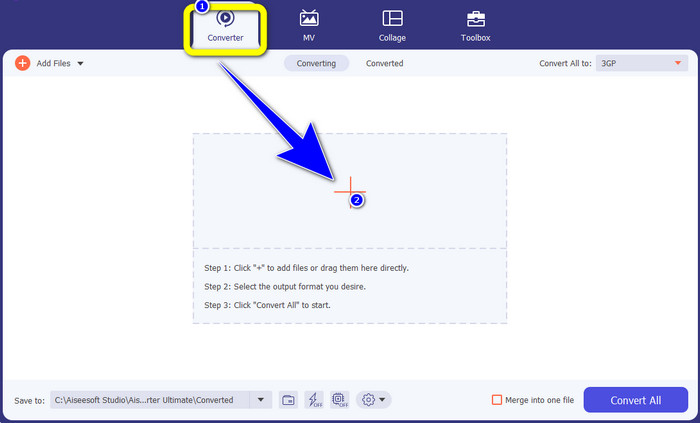
ขั้นตอนที่ 2: ที่ส่วนบนของอินเทอร์เฟซจะมีตัวเลือกอยู่ 4 ตัว คือ Converter, MV, Collage และ Toolbox เลือกแถบConverter แล้วคลิกไอคอนเครื่องหมายบวกเพื่อเพิ่มไฟล์ XviD ที่คุณต้องการแปลง.
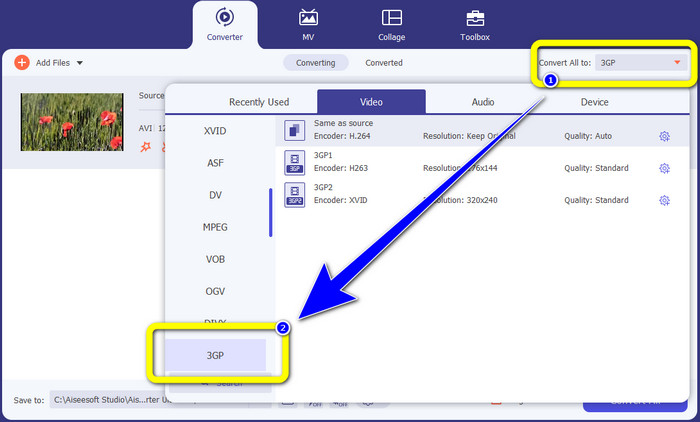
ขั้นตอนที่ 3: หลังจากเพิ่มไฟล์ XviD แล้ว ให้มองไปทางด้านขวาของอินเทอร์เฟซและคลิกปุ่มConvert all to รายการรูปแบบไฟล์จะปรากฏขึ้น จากนั้นเลือกเป็นรูปแบบไฟล์3GP.
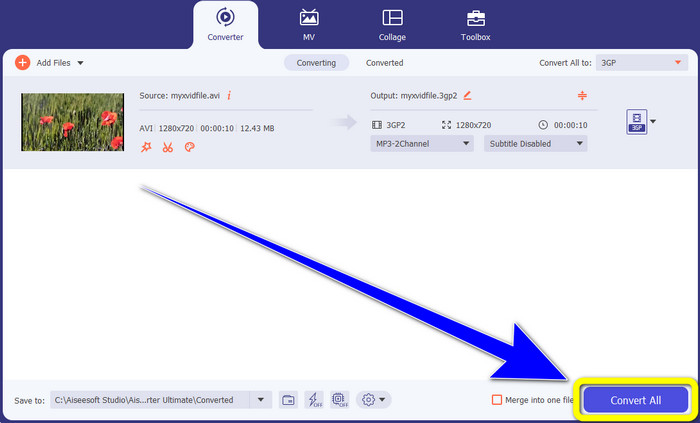
ขั้นตอนที่ 4: สำหรับขั้นตอนสุดท้าย ให้คลิกปุ่มConvert All เพื่อแปลงไฟล์ XviD ของคุณเป็น 3GP รอให้กระบวนการแปลงเสร็จสิ้นแล้วบันทึกวิดีโอของคุณ.
ส่วนที่ 2: แปลง XviD เป็น 3GP ออนไลน์
ใช้ FVC Free Video Converter ออนไลน์
นอกจากโปรแกรมแปลงไฟล์ที่ดีที่สุดที่คุณได้รู้จักจากส่วนแรกแล้ว ยังมีโปรแกรมแปลงไฟล์ออนไลน์ที่คุณสามารถใช้งานได้ฟรีอีกด้วย เครื่องมือออนไลน์ที่แนะนำคือ FVC Free Video Converter Online ซอฟต์แวร์ที่มีประโยชน์นี้ช่วยให้คุณแปลง XviD เป็น 3GP ได้อย่างง่ายดาย รองรับรูปแบบไฟล์เสียงและวิดีโอ เช่น MP4, M4V, WMV, AVI, MOV, VOB, WEBM, MP3, AAC, AC3, WMA, FLAC ฯลฯ นอกจากนี้ ตัวแปลงนี้ยังใช้งานง่าย เพราะมีเพียง 3 ขั้นตอนง่าย ๆ สำหรับการแปลงไฟล์หลากหลายประเภท ทำให้ผู้ใช้ทุกคนไม่ยุ่งยากในการใช้งานตัวแปลงออนไลน์นี้ หากคุณต้องการทราบวิธีแปลง XviD เป็น 3GP อย่างง่าย ๆ โดยใช้ FVC Free Video Converter Online มาดู 3 ขั้นตอนต่อไปนี้กัน.
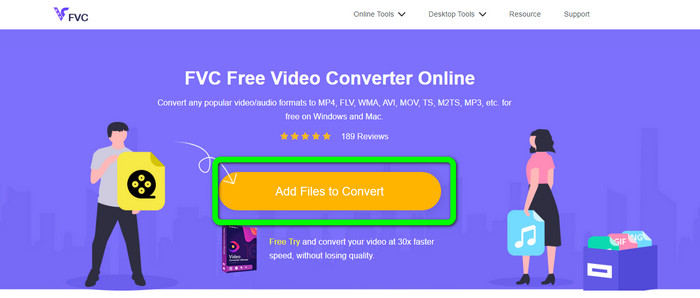
ขั้นตอนที่ 1: ไปที่เว็บไซต์ของ FVC Free Video Converter Online คลิกปุ่มAdd Files to Convert และอัปโหลดไฟล์ XviD ที่คุณต้องการแปลงเป็นรูปแบบ 3GP.
ขั้นตอนที่ 2: เมื่อคุณอัปโหลดไฟล์แล้ว คุณจะเห็นตัวเลือกรูปแบบไฟล์ที่ด้านล่างของอินเทอร์เฟซ เลือกรูปแบบไฟล์ 3GP.
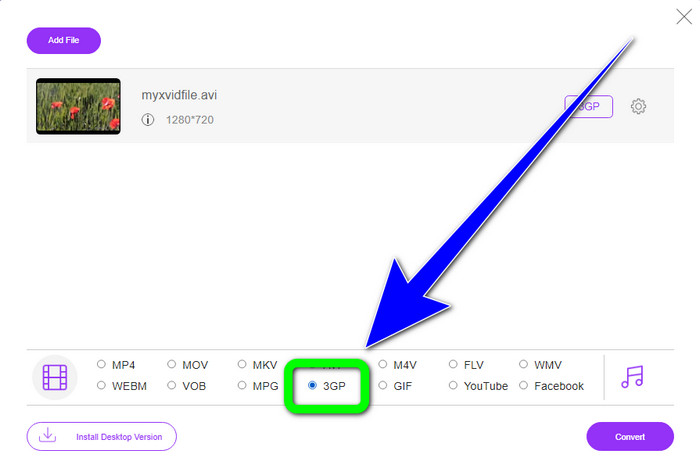
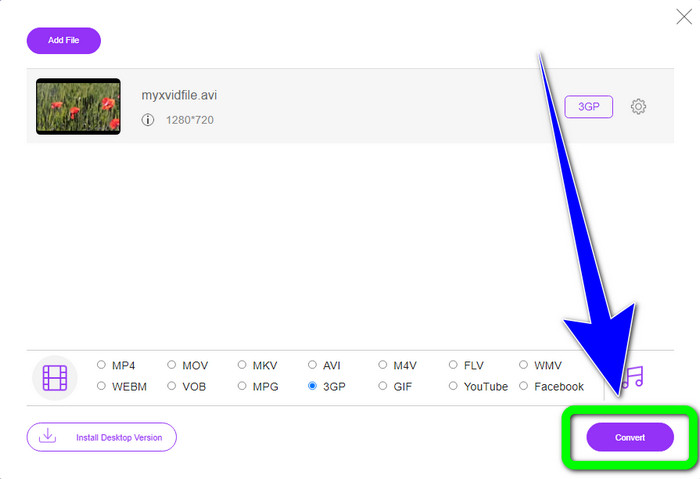
ขั้นตอนที่ 3: คุณต้องคลิกปุ่มConvert เพื่อแปลงไฟล์ XviD เป็น 3GP รอให้กระบวนการแปลงเสร็จสิ้นแล้วบันทึกไฟล์สุดท้ายลงใน Windows หรือ Mac ของคุณ.
ใช้ OnlineConvertFree.com
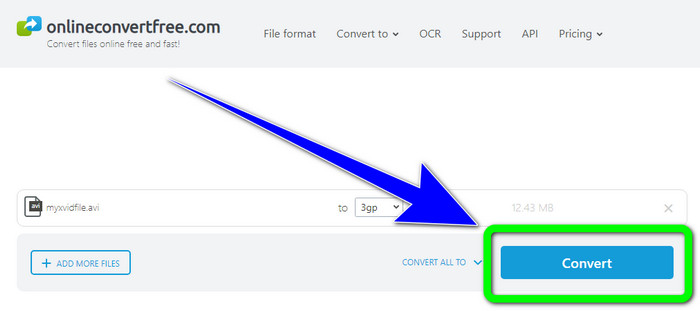
Onlineconvertfree.com เป็นอีกหนึ่งเครื่องมือออนไลน์ที่คุณสามารถใช้เพื่อแปลง XviD เป็น 3GP แอปพลิเคชันนี้ยังมีประสิทธิภาพในการแปลงไฟล์เสียง รูปภาพ เอกสาร และวิดีโอ ทำให้ใช้งานได้สะดวกสำหรับทุกคน อีกทั้งยังรองรับหลายรูปแบบ เช่น AVCHD, MT2S, MPEG, MKV, M4V, MP4, FLV, DIVX, XviD, 3GP และอื่น ๆ คุณไม่ต้องกังวลเกี่ยวกับไฟล์ของคุณ เพราะไฟล์จะถูกเก็บไว้อย่างปลอดภัยในซอฟต์แวร์นี้ และจะถูกลบโดยอัตโนมัติหลังจาก 24 ชั่วโมง คุณยังสามารถใช้เครื่องมือนี้เพื่อแปลงXviD เป็น FLV ได้อีกด้วย.
อย่างไรก็ตาม คุณต้องพิจารณาว่า Onlineconverterfree.com เป็นเครื่องมือบนเว็บ ซึ่งคุณต้องมีการเชื่อมต่ออินเทอร์เน็ตที่รวดเร็วเพื่อใช้งาน นอกจากนี้ ขีดจำกัดพื้นที่เก็บข้อมูลของซอฟต์แวร์นี้อยู่ที่ 100Mb เท่านั้น ดังนั้นคุณต้องซื้อการสมัครสมาชิกเพื่อให้ขีดจำกัดพื้นที่เก็บข้อมูลสูงขึ้น ทำตามขั้นตอนด้านล่างเพื่อแปลง XviD เป็น 3GP โดยใช้ Onlineconverter.com
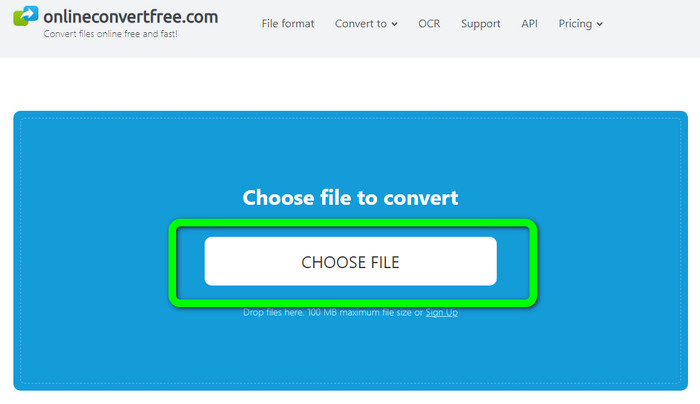
ขั้นตอนที่ 1: ไปที่เว็บไซต์ Onlinecovnerter.com คลิกปุ่มChoose File เพื่อเพิ่มไฟล์ XviD
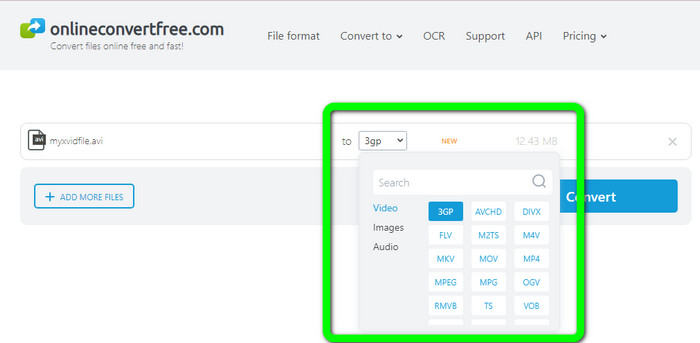
ขั้นตอนที่ 2: คลิกรูปแบบไฟล์3GP จากตัวเลือกรูปแบบ.
ขั้นตอนที่ 3: สำหรับขั้นตอนสุดท้าย ให้คลิกปุ่มConvert รอให้กระบวนการแปลงเสร็จสิ้นแล้วบันทึกผลลัพธ์สุดท้ายลงในอุปกรณ์ของคุณ คลิกที่นี่เพื่อเรียนรู้วิธีแปลงM4V เป็น 3GP.
ส่วนที่ 3: ความรู้เพิ่มเติมเกี่ยวกับ XviD
XviD คืออะไร?
ตัวแปลงสัญญาณ XviD นี้เป็นไปตามมาตรฐาน MPEG-4 แม้ว่าสีจะบิดเบี้ยว แต่ก็มีคำจำกัดความที่ยอดเยี่ยมในฉากไดนามิก เนื่องจากเป็นตัวแปลงสัญญาณแบบโอเพ่นซอร์ส บุคคลที่สนใจสามารถมีส่วนร่วมในการพัฒนา กระตุ้นให้มีการอัปเดตอย่างต่อเนื่อง ภาพยนตร์ DVD สามารถบีบอัดได้เพียงพอเพื่อให้พอดีกับซีดีในขณะที่ยังคงรักษาคุณภาพ DVD ไว้ได้ด้วยการบีบอัดที่เปิดใช้งานใน Xvid โปรแกรม Xvid บีบอัดและขยายข้อมูลวิดีโอเป็น MPEG-4 ASP นามสกุล .xvid ใช้เพื่อเก็บวิดีโอที่บีบอัด เมื่อพูดถึงไฟล์วิดีโอ Xvid เปรียบได้กับ ZIP Xvid บีบอัดวิดีโอในอัตราส่วน 200:1 หรือสูงกว่า สิ่งนี้ทำให้การส่งผ่านเครือข่ายเร็วขึ้นและการจัดเก็บดิสก์มีประสิทธิภาพมากขึ้น
ส่วนที่ 4: คำถามที่พบบ่อยเกี่ยวกับการแปลง XviD เป็น 3GP
1. ฉันควรรอนานแค่ไหนเพื่อแปลง XviD เป็น 3GP
ขั้นตอนการแปลงจะขึ้นอยู่กับตัวแปลงที่คุณใช้และขนาดไฟล์ของวิดีโอ ดาวน์โหลด Video Converter Ultimate บน Windows หรือ Mac หากคุณต้องการแปลงไฟล์ที่เร็วกว่า แอปพลิเคชั่นนี้มีความเร็วในการแปลงเร็วกว่าตัวแปลงอื่น ๆ ถึง 30 เท่า
2. มีตัวแปลงฟรีที่ฉันสามารถใช้กับพื้นที่จัดเก็บไฟล์ไม่จำกัดหรือไม่?
ได้แน่นอน! ตัวแปลงไฟล์ฟรีที่ดีที่สุดที่คุณสามารถใช้ได้คือ FVC Free Video Converter Online เครื่องมือออนไลน์นี้ช่วยให้คุณแปลงไฟล์ได้ไม่จำกัดจำนวน ดังนั้นคุณไม่ต้องกังวลเรื่องขนาดไฟล์สูงสุด.
3. Xvid หรือ 3GP ไหนดีกว่ากัน
ทั้งสองคนดีกว่า หากคุณต้องการเล่นวิดีโอบนอุปกรณ์ 3G การเล่นวิดีโอด้วยไฟล์วิดีโอ 3GP จะเหมาะสมกว่า และถ้าคุณต้องการเล่นวิดีโอของคุณบนเครื่องเล่นวิดีโอ วิดีโอที่มีไฟล์ XviD นั้นสมบูรณ์แบบ
สรุป
บทความนี้ได้นำเสนอเทคนิคที่ดีที่สุดในการแปลง XviD เป็น 3GP หากต้องการแปลงไฟล์เพิ่มเติมบน Windows และ Mac คุณสามารถดาวน์โหลด Video Converter Ultimate ได้ นอกจากนี้ หากคุณต้องการใช้โปรแกรมแปลงไฟล์ออนไลน์ฟรี คุณสามารถใช้ FVC Free Video Converter Online ได้.
-
 ค้นหาวิธีที่ดีที่สุดและง่ายในการแปลง TS เป็น 3GP
 บทความนี้จะนำเสนอตัวแปลง TS เป็น 3GP ที่ดาวน์โหลดฟรีที่คุณสามารถลองบนอุปกรณ์ของคุณได้ อ่านบทความนี้เพื่อดูรายละเอียดที่จำเป็นเพิ่มเติมที่คุณต้องการ
-
 แปลง MTS เป็น 3GP โดยใช้ Ultimate Converters เหล่านี้
 คุณต้องการกระบวนการที่ไม่ซับซ้อนในการแปลง MTS เป็น 3GP หรือไม่? ไม่ต้องกังวลอีกต่อไป! บทความนี้จะนำเสนอตัวแปลง MTS เป็น 3GP ที่คุณสามารถใช้ได้ทั้งแบบออนไลน์และออฟไลน์
-
 WebM ถึง 3GP: วิธีที่มีประสิทธิภาพสูงสุดในการใช้เครื่องมือเหล่านี้
 คุณกำลังมองหาตัวแปลง WebM เป็น 3GP ที่โดดเด่นหรือไม่? บทความนี้จะช่วยให้คุณได้รับวิธีการที่มีประสิทธิภาพสูงสุดในการแปลง WebM เป็น 3GP
