


 Video Converter Ultimate
 บันทึกหน้าจอ
 ซ่อมวิดีโอ
 ดาวน์โหลดอย่างปลอดภัย
ความสำคัญของข้อมูลเมตา 3GP และวิธีลบ แก้ไข ดูอย่างถูกต้อง
ด้วยการเพิ่มข้อมูลเมตาให้ไฟล์ 3GP เราสามารถสร้างผลลัพธ์ที่ชัดเจนในการระบุคุณลักษณะต่าง ๆ ว่าไฟล์นั้นเกี่ยวกับอะไรได้อย่างมีประสิทธิภาพ แม้ไฟล์จะถูกจัดเก็บอยู่ในโทรศัพท์ยุคที่ 3 ก็ตาม การใช้แท็กไม่ได้มีไว้แค่เพื่อจัดระเบียบไฟล์เท่านั้น คุณยังสามารถใช้แท็กเหล่านี้เพื่อช่วยจำได้ว่าไฟล์มีเดียถูกถ่ายหรือบันทึกที่ไหนหรือเมื่อใด หากคุณมีไฟล์ที่นามสกุลนี้ ไฟล์จะต้องมีข้อมูลเมตาเพื่อบันทึกข้อมูลเกี่ยวกับไฟล์นั้น ปรับแก้ ข้อมูลเมตา 3GP โดยอ่านข้อมูลที่บทความนี้รวบรวมไว้ ทุกสิ่งที่คุณจำเป็นต้องรู้มีอยู่แล้วเพื่อให้คุณสามารถลบ แก้ไข และดูแท็กในไฟล์ได้อย่างง่ายดาย.

ส่วนที่ 1 บทนำสู่ข้อมูลเมตา 3GP
ข้อมูลเมตา 3GP มักประกอบด้วยชื่อหลัก ผู้แต่ง วันที่ และเวลาในไฟล์ 3GP ทุกไฟล์ แม้ว่าข้อมูลเหล่านี้สามารถช่วยแอปพลิเคชันและจดจำได้ว่าไฟล์นั้นเกี่ยวกับอะไร แต่ก็มีบางกรณีที่คุณจะต้องเปลี่ยนแปลงหรือดูเพื่อแก้ไขข้อมูล หากคุณเป็นผู้ใช้โทรศัพท์รุ่นที่ 3 เคล็ดลับนี้จะเป็นประโยชน์สำหรับคุณในการทำความเข้าใจว่าข้อมูลเมตาในไฟล์ 3GP ของคุณมีความสำคัญเพียงใด และต่อมา คุณจะได้เรียนรู้วิธีแก้ไขหรือดูด้วยเครื่องมือขั้นสูงสุด
แต่ก่อนที่เราจะเริ่มต้น เราขอแจ้งให้คุณทราบว่าคุณสามารถเพิ่มข้อมูลเพิ่มเติมใน 3GP ของคุณเพื่อให้แม่นยำและมีความเกี่ยวข้อง สมมติว่าไม่มีข้อมูลเมตาที่คุณต้องการบนเว็บ ดังนั้นการติดแท็กอัตโนมัติอาจไม่ใช่ตัวเลือกที่ดีที่สุด โชคดีที่คุณสามารถแก้ไขข้อมูลเมตาของไฟล์ 3GP ได้ด้วยตนเองเพื่อให้แม่นยำด้วยเครื่องมือขั้นสูงสุด หากคุณต้องการทราบเทคนิคในการจัดการข้อมูลเมตาในไฟล์ 3GP ให้อ่านบทความนี้ต่อเพื่อทราบข้อมูลเพิ่มเติม
ส่วนที่ 2 โปรแกรมดูข้อมูลเมตา 3GP ที่ดีที่สุด ตัวกำจัดและแก้ไขบน Windows และ Mac
เครื่องมือดูข้อมูลเมตา 3GP ที่ดีที่สุดที่คุณสามารถใช้เพื่อช่วยอัปโหลดไฟล์ 3GP แล้วดูหรือแก้ไขข้อมูลเมตาในไฟล์เหล่านั้นได้ ก็คือ FVC Video Converter Ultimate ด้วยเครื่องมือนี้ คุณสามารถเพิ่มข้อมูลเพิ่มเติมให้ไฟล์ 3GP ของคุณได้ เช่น ปี ปกอัลบั้ม แนวเพลง และอื่น ๆ อีกมากมาย นอกจากนี้ โปรแกรมยังมีฟีเจอร์และฟังก์ชันที่มีประโยชน์ พร้อมกับหน้าตาโปรแกรมที่เป็นมืออาชีพแต่เข้าใจง่าย เพื่อช่วยให้ผู้ใช้ได้รับประสบการณ์ที่ยอดเยี่ยมในการเพิ่มแท็กให้ไฟล์ต่าง ๆ ไม่ว่าจะเป็นไฟล์วิดีโอหรือไฟล์เสียง.
เครื่องมือนี้ไม่เหมือนกับโปรแกรมแก้ไขข้อมูลเมตาอื่นๆ เครื่องมือนี้สนับสนุนคุณลักษณะการแก้ไขเพื่อทำให้วิดีโอของคุณดูดีขึ้นหรือซิงค์เสียงกับวิดีโอหากไม่ได้ซิงค์ น่าประหลาดใจที่เครื่องมือนี้รองรับคุณสมบัติและฟังก์ชันมากมายที่คุณมีได้หากคุณดาวน์โหลดซอฟต์แวร์บน Windows หรือ Mac หากคุณต้องการทราบคุณลักษณะที่สำคัญมากขึ้น เครื่องมือนี้มีให้ก่อนไปที่วิธีการดูและแก้ไขข้อมูลเมตา 3GP อ่านรายละเอียดต่อไปนี้ด้านล่าง และอย่าลืมดาวน์โหลดทันที
คุณสมบัติ:
◆ การอัปโหลดไฟล์มีเดียกลายเป็นเรื่องง่ายเนื่องจากรองรับรูปแบบมากกว่า 1,000 รูปแบบ
◆ กล่องเครื่องมืออันน่าทึ่งที่รองรับชุดคุณสมบัติและฟังก์ชั่นพร้อมใช้งาน
◆ รองรับกระบวนการที่รวดเร็วเป็นพิเศษและการเร่งด้วยฮาร์ดแวร์
◆ รองรับฟังก์ชันเพิ่มเติม เช่น MV, ภาพตัดปะ และตัวแปลง
◆ ดาวน์โหลดบน Windows หรือ Mac เพื่อรับซอฟต์แวร์ที่ดีที่สุด
ดาวน์โหลดฟรีสำหรับ Windows 7 หรือใหม่กว่าดาวน์โหลดอย่างปลอดภัย
ดาวน์โหลดฟรีสำหรับ MacOS 10.7 หรือใหม่กว่าดาวน์โหลดอย่างปลอดภัย
ส่วนที่ 3 วิธีการดู ลบ และแก้ไขข้อมูลเมตาโดยใช้ FVC Video Converter Ultimate
หากคุณคิดว่าเครื่องมือที่ดีที่สุดคือทางออกที่ดีที่สุดสำหรับปัญหาแท็ก 3GP ของคุณ เราก็มีวิธีการที่แตกต่างกันสองวิธีในการดูข้อมูลเมตาและแก้ไขโดยใช้ซอฟต์แวร์นี้ หากต้องการทราบวิธีการดำเนินการ คุณสามารถอ่านรายละเอียดที่เราได้เพิ่มไว้ด้านล่าง
วิธีดูข้อมูลเมตา 3GP ด้วยซอฟต์แวร์ขั้นสูงสุด:
ขั้นตอนที่ 1. ดาวน์โหลดตัวดูข้อมูลเมตา 3GP บน Windows และ Mac จากนั้นเปิดโปรแกรม.
ขั้นตอนที่ 2. คลิกปุ่ม + เพื่อเพิ่มไฟล์ 3GP ที่คุณต้องการดู นอกจากนี้คุณยังสามารถลากและวางไฟล์เพื่อให้อัปโหลดได้ง่ายขึ้น.
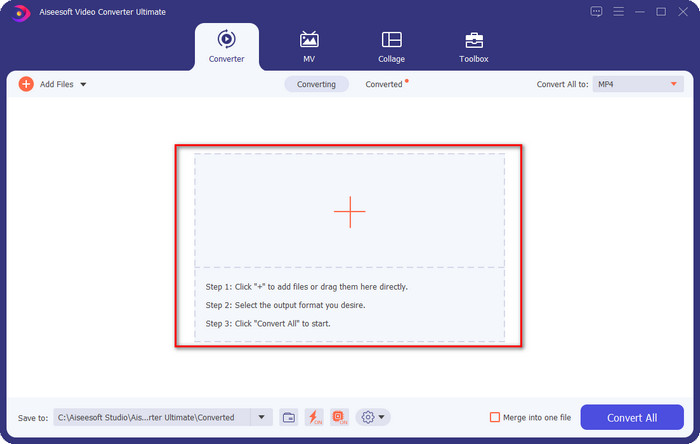
ขั้นตอนที่ 3. กดไอคอนตัว i เพื่อดูข้อมูลเมตาของไฟล์ของคุณ.
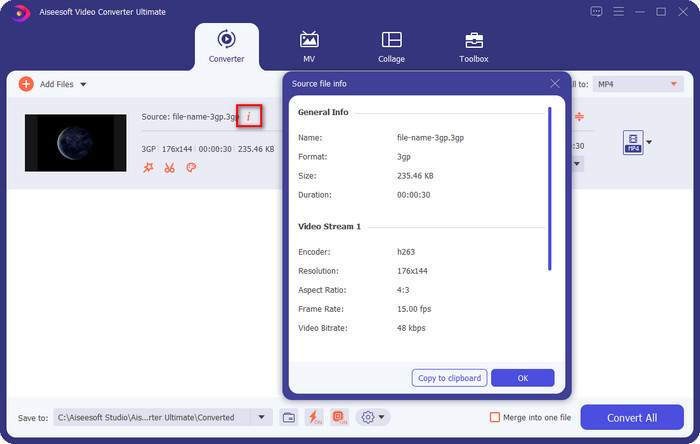
วิธีเปลี่ยนข้อมูลเมตา 3GP ด้วยตัวแก้ไขข้อมูลเมตา 3GP ที่ดีที่สุด:
ขั้นตอนที่ 1. ดาวน์โหลดซอฟต์แวร์ลงบนเดสก์ท็อปของคุณโดยคลิกปุ่มดาวน์โหลดที่แสดงไว้ด้านบน ติดตั้งให้เรียบร้อย แล้วเปิดซอฟต์แวร์.
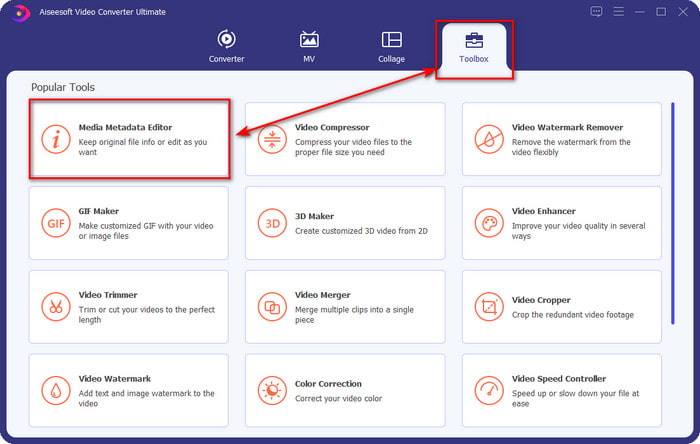
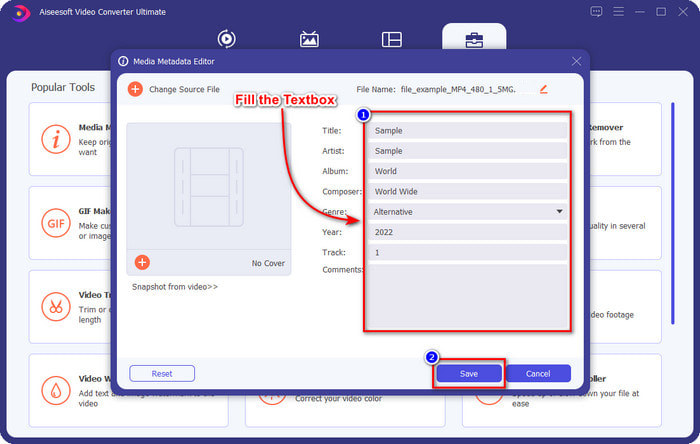
ขั้นตอนที่ 2. เปิดส่วน Toolbox จากนั้นภายใต้หมวดนี้ คุณจะเห็น Media Metadata Editor ให้คลิกเพื่อเปิดตัวแก้ไขข้อมูลเมตา.
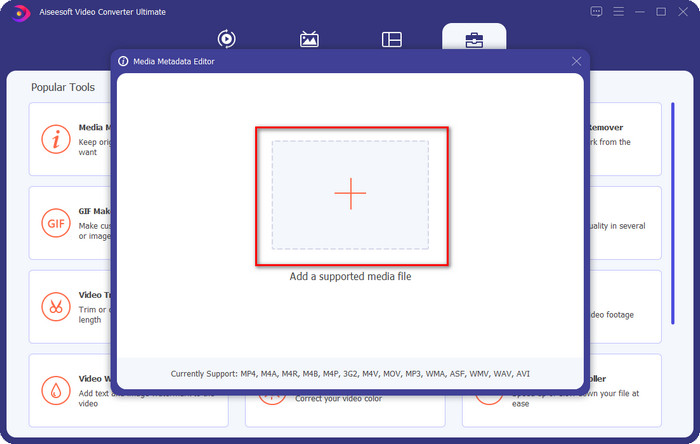
ขั้นตอนที่ 3. คลิกปุ่ม + เพื่อค้นหาไฟล์ 3GP ในโฟลเดอร์ของคุณ แล้วคลิก Open เพื่ออัปโหลดไฟล์.
ขั้นตอนที่ 4. เพิ่มข้อมูลที่คุณต้องการโดยกรอกให้ครบทุกช่องข้อความ กด Save เมื่อคุณเพิ่มข้อมูลเมตาให้ไฟล์ 3GP เสร็จแล้ว การเรียนรู้วิธีลบข้อมูลเมตา 3GP ออกจากไฟล์ของคุณด้วยความช่วยเหลือจากโปรแกรมนี้กลายเป็นเรื่องง่ายมาก.
ส่วนที่ 4 คำถามที่พบบ่อยเกี่ยวกับ 3GP Metadata Editor
ฉันจะบันทึกวิดีโอในรูปแบบ 3GP ได้อย่างไร
เครื่องบันทึกจำนวนมากรองรับ 3GP เป็นรูปแบบไฟล์สำหรับผลลัพธ์สุดท้าย แต่ไม่ใช่โปรแกรมอัดหน้าจอทุกตัวที่จะรองรับ 3GP หากคุณต้องการรู้ว่าจะบันทึกวิดีโอ 3GP คุณภาพสูงบน Windows และ Mac ได้อย่างไร หากใช่ เมื่อคุณคลิกลิงก์นี้ คุณจะถูกเปิดไปยังบทความใหม่โดยตรง ซึ่งเน้นอธิบายประเภทของโปรแกรมบันทึกหน้าจอต่าง ๆ ที่คุณสามารถใช้ได้ซึ่งรองรับรูปแบบ 3GP.
การรวมไฟล์ 3GP จะสูญเสียข้อมูลเมตาหรือไม่
ในบางกรณี ข้อมูลเมตาในไฟล์ 3GP ที่คุณรวมไว้จะสูญเสียข้อมูลไป แต่ข้อมูลบางส่วนยังคงเก็บแท็กไว้เหมือนเดิมไม่ว่าจะรวมเข้าด้วยกันหรือไม่ก็ตาม หากคุณต้องการเรียนรู้วิธีรวมไฟล์ 3GP หลายไฟล์เข้ากับข้อมูลเมตา คุณสามารถคลิกลิงก์นี้ในขณะที่เราตรวจสอบเครื่องมือต่างๆ อย่างละเอียด
ทำไมไฟล์ 3GP ของฉันถึงไม่มีแท็กแนบมาด้วย?
มีหลายสาเหตุที่ข้อมูลเมตา 3GP ไม่มีข้อมูลเมตา เหตุผลแรกคือวิดีโอในไฟล์ 3GP ไม่มีข้อมูลเมตา ปัญหานี้แก้ไขได้โดยใช้ตัวแก้ไขข้อมูลเมตาของสื่อที่รองรับการอัปโหลด 3GP ประการที่สอง หากคุณดาวน์โหลด 3GP บนเว็บ คาดว่าผู้เขียนไฟล์ดังกล่าวจะลบออกเนื่องจากจะแสดงข้อมูลสำคัญเกี่ยวกับคุณ สุดท้าย 3GP ไม่มีข้อมูลเมตาเนื่องจากรูปแบบไม่รองรับข้อมูลจำนวนมาก แม้ว่าจะเป็นรูปแบบวิดีโอมาตรฐานสำหรับโทรศัพท์รุ่นที่ 3 แต่บางรุ่นก็เป็นรุ่นที่ 2 และ 4; โทรศัพท์บางรุ่นไม่แนบข้อมูลเมตาเนื่องจากคุณไม่ได้อนุญาต แม้ว่าเราจะไม่ได้แนะนำสาเหตุทั้งหมด แต่สาเหตุทั่วไปเหล่านี้คือสาเหตุทั่วไปที่ไฟล์ 3GP ของคุณไม่มีข้อมูลเมตา หากคุณต้องการเพิ่มข้อมูลเมตาลงในไฟล์ 3GP คุณต้องอ่านและทำตามข้อมูลก่อนหน้านี้
สรุป
ข้อมูลข้างต้นทำให้เราเห็นได้ชัดว่าการเปลี่ยนแปลงข้อมูลเมตา 3GP นั้นทำได้จริง ถึงเวลาที่จะดาวน์โหลดซอฟต์แวร์เพื่อลบ เพิ่ม และดูข้อมูลเมตาได้แล้ว FVC Video Converter Ultimate จะตอบโจทย์มาตรฐานของคุณได้ดีกว่าเครื่องมืออื่น ๆ ที่ทำงานคล้ายกัน แต่มีประสิทธิภาพด้อยกว่า คุณยังสงสัยในความสามารถของเครื่องมือสุดยอดนี้อยู่หรือไม่ ถ้าอย่างนั้นมาร่วมทดลองใช้ด้วยการดาวน์โหลดซอฟต์แวร์ลงบน Windows หรือ Mac ของคุณ แล้วสนุกไปกับการใช้เครื่องมือออลอินวันตัวนี้ในการจัดการปัญหาส่วนใหญ่ที่เกี่ยวกับวิดีโอและเสียง.
-
 สุดยอดเครื่องมือแก้ไขแท็ก ID3 บน Windows/Mac/iOS/Android [พิสูจน์แล้ว]
 การแก้ไขแท็ก ID3 เป็นปัญหาสำหรับคุณหรือไม่? ถ้าใช่ บทความนี้เหมาะสำหรับคุณ อ่านรายละเอียดทั้งหมดด้านล่างเกี่ยวกับตัวแก้ไขแท็ก ID3 ที่จะใช้
-
 วิธีเปลี่ยนรายละเอียดไฟล์ใน Windows 10/11 [วิธีที่ง่ายที่สุด]
 ต้องการทราบวิธีการเปลี่ยนรายละเอียดไฟล์ใน Windows 10/11 หรือไม่? ถ้าใช่ นี่คือบทความที่คุณต้องอ่านพร้อมรายละเอียดที่สำคัญและเครื่องมือในการใช้งาน
-
 7 สุดยอดเครื่องมือแก้ไขข้อมูลเมตาสำหรับสื่อ/รูปภาพ/เอกสาร [เว็บ & ออฟไลน์]
 ต้องการทราบตัวแก้ไขข้อมูลเมตาที่ดีที่สุดหรือไม่? โชคดีที่บทความนี้มีตัวแก้ไขข้อมูลเมตาที่ดีที่สุดที่คุณสามารถใช้เพื่อเปลี่ยนแท็กในทุกไฟล์ได้อย่างง่ายดาย
