


 Video Converter Ultimate
 บันทึกหน้าจอ
 ซ่อมวิดีโอ
ตัวแก้ไขข้อมูลเมตาของหนังสือเสียงใหม่ล่าสุดพร้อมใช้งานออนไลน์และออฟไลน์
ฉันสงสัยว่าฉันสามารถเปลี่ยนข้อมูลเมตาของหนังสือเสียงเพื่อให้แท็กที่เหมาะสมได้หรือไม่ ถ้าเป็นเช่นนั้น คุณมีข้อเสนอแนะใด ๆ เกี่ยวกับสิ่งที่ฉันควรใช้? มันจะช่วยได้มากถ้าคุณให้รายชื่อของเว็บที่ใช้งานร่วมกันได้และซอฟต์แวร์ที่ดาวน์โหลดได้เพื่อใช้งาน
คุณมีคำถามเดียวกันหรือเปล่า? ถ้าอย่างนั้น คุณมาถูกที่แล้ว วันนี้เราจะแนะนำเครื่องมือออนไลน์และออฟไลน์หลากหลายแบบที่คุณสามารถใช้ในการอัปเดต แก้ไข หรือเอาข้อมูลเมทาดาทาในหนังสือเสียงของคุณออก นอกจากนี้ เรายังพิจารณาข้อกำหนดอื่น ๆ ฟีเชอร์ ความเข้ากันได้ และด้านอื่น ๆ อีกมากมาย เพื่อดูว่าเครื่องมือใดเหมาะกับความต้องการของคุณ โดยไม่ให้เสียเวลาไปมากกว่านี้ เราจะอธิบายข้อมูลทั้งหมดอย่างครบถ้วนที่คุณต้องใช้ในการตัดสินใจเลือกเครื่องมือแก้ไขแท็กหนังสือเสียงที่ดีที่สุดสำหรับคุณ.

ส่วนที่ 1 Ultimate Audiobook Metadata Editor พร้อมใช้งานบน Windows และ Mac
สมมติว่าคุณต้องการเครื่องมือที่เพียงพอต่อความต้องการของคุณในการแก้ไขหรือลบข้อมูลเมตาของหนังสือเสียงใน Windows และ Mac ในกรณีนั้น ไม่ต้องสงสัยเลยว่า FVC Video Converter Ultimate เป็นตัวเลือกที่สมบูรณ์แบบ ตัวแก้ไขแท็กนี้สามารถช่วยคุณลบล้างการเพิ่มข้อมูลเมตาในไฟล์สื่อต่างๆ รวมถึงหนังสือเสียง ด้วยตนเองได้ทุกเมื่อ ด้วยเครื่องมือนี้ คุณสามารถเพิ่มข้อมูลที่น่าประทับใจมากมายให้กับหนังสือเสียงได้ในเวลาไม่ถึงนาที
มีอะไรอีก? สมมติว่าคุณต้องการแบ่งปันหนังสือเสียงกับใครสักคน ด้วยความช่วยเหลือของเครื่องมือนี้ คุณสามารถแบ่งปันได้อย่างรวดเร็วโดยไม่ต้องกังวลว่าข้อมูลเมตาจะสูญหาย เครื่องมือนี้ไม่น่าทึ่งเหรอ? จริงๆ แล้ว เราได้เพิ่มขั้นตอนในการใช้ตัวแก้ไขแท็กหนังสือเสียงที่ดีที่สุดด้านล่างเพื่อแสดงให้คุณเห็นว่าเครื่องมือนี้มีความสามารถอะไร ทำตามขั้นตอนตามลำดับและเพลิดเพลิน
ขั้นตอนที่ 1. คลิกปุ่มดาวน์โหลดด้านล่าง เลือกระบบปฏิบัติการที่คุณใช้งานอยู่ จากนั้นคลิกไฟล์ที่คุณดาวน์โหลดมาเพื่อติดตั้งอย่างรวดเร็ว ทำตามขั้นตอนให้ครบ แล้วเปิดเครื่องมือขึ้นมาเพื่อเริ่มใช้งาน.
ดาวน์โหลดฟรีสำหรับ Windows 7 หรือใหม่กว่าดาวน์โหลดอย่างปลอดภัย
ดาวน์โหลดฟรีสำหรับ MacOS 10.7 หรือใหม่กว่าดาวน์โหลดอย่างปลอดภัย
ขั้นตอนที่ 2. แตะที่เมนู กล่องเครื่องมือ (Toolbox) จากนั้นมองหา ตัวแก้ไขเมทาดาทาสื่อ (Media Metadata Editor) แล้วคลิก.
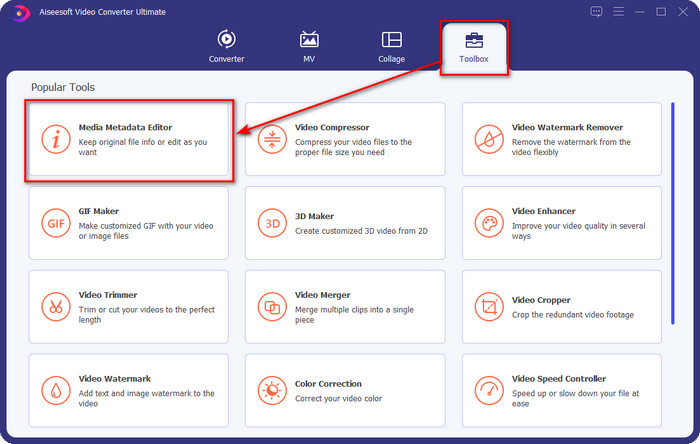
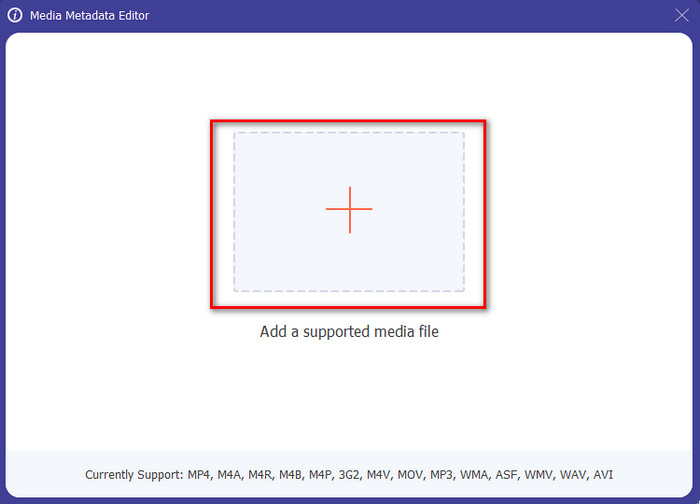
ขั้นตอนที่ 3. หลังจากคุณคลิกแล้ว จะมีหน้าต่างใหม่ปรากฏขึ้น ให้แตะปุ่ม + จากนั้นโฟลเดอร์จะปรากฏบนหน้าจอของคุณ เลือกไฟล์หนังสือเสียง แล้วกด เปิด (Open).
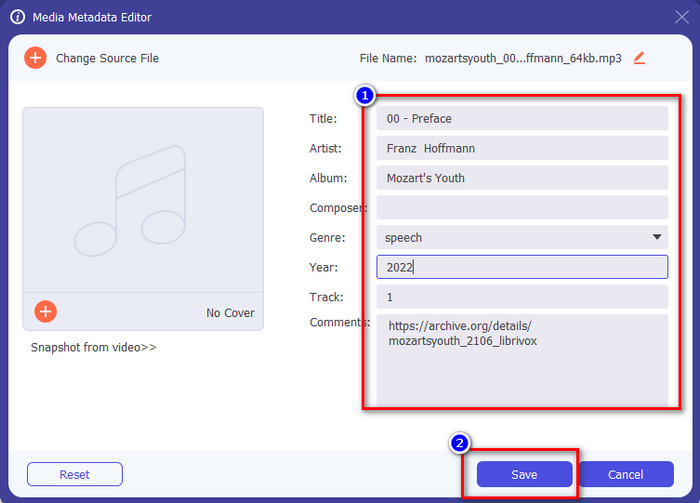
ขั้นตอนที่ 4. เมื่อเปิดไฟล์แล้ว ให้ปรับปรุงแท็กของหนังสือเสียงด้วยการแก้ไขข้อความภายในช่องข้อความ คุณยังสามารถลบข้อมูลออกได้ตามที่คุณต้องการ อย่าลืมคลิก บันทึก (Save) เพื่อบันทึกข้อมูลที่อัปเดตเมื่อคุณทำทุกอย่างเสร็จแล้ว.
ส่วนที่ 2 3 ตัวแก้ไขข้อมูลเมตาของ Audiobook ที่ดีที่สุดที่มีอยู่บนเว็บ
TagMP3.net
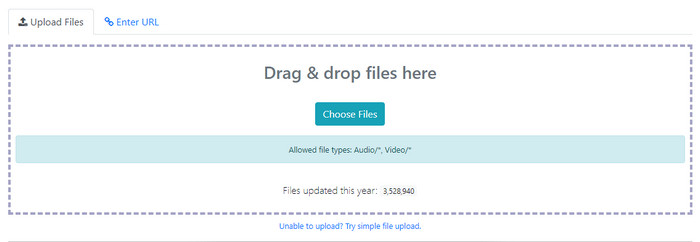
TagMP3.net เป็นเว็บไซต์ฟรีที่คุณสามารถใช้เปลี่ยนแท็ก ID3 ของหนังสือเสียงและภาพปกอัลบั้มได้อย่างง่ายดาย เป็นเครื่องมือบนเว็บพร้อมใช้งานที่คุณเข้าถึงได้ผ่านเว็บเบราว์เซอร์ที่คุณชื่นชอบทุกที่ทุกเวลาที่มีการเชื่อมต่ออินเทอร์เน็ต นอกจากนี้ ด้วยอินเทอร์เฟซที่เข้าใจง่าย ทำให้ผู้ใช้จำนวนมากเลือกใช้เว็บนี้เพื่อเพิ่มเมทาแท็กให้กับหนังสือเสียงหรือวิดีโอที่พวกเขามี แม้ว่าเว็บนี้จะสามารถแก้ไขหรือลบเมทาดาทาหรือแท็กบนไฟล์ของคุณได้ แต่ก็ยังรองรับเพียงรูปแบบไฟล์ทั่วไปสำหรับอัปโหลด และข้อมูลที่คุณเพิ่มได้ก็ไม่ได้ละเอียดเท่ากับตัวแก้ไขอื่น ๆ อีกทั้งยังมีโฆษณาจำนวนมากบนหน้าเว็บ หากคุณไม่รังเกียจที่จะเห็นโฆษณาเหล่านี้ เครื่องมือนี้ก็อาจจะตอบโจทย์คุณได้.
ข้อดี
- ฟรีในการเข้าถึงบนเว็บ
- รองรับการเพิ่มและลบแท็กได้อย่างง่ายดาย
- รองรับไฟล์เสียงและวิดีโอโดยเฉลี่ย
จุดด้อย
- โฆษณาบนอินเทอร์เฟซ
- เมตาแท็กน้อยลงที่จะแทรกหรือแก้ไข
- การอัปโหลดไฟล์ต้องใช้เวลาเพราะต้องใช้อินเทอร์เน็ต
ตัวแก้ไขแท็ก MP3 ID3
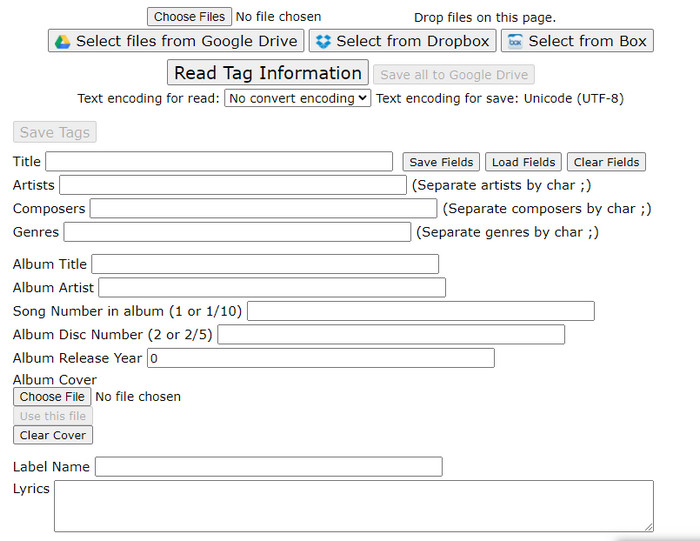
เครื่องมือแก้ไขเมทาดาทาหนังสือเสียงอีกตัวหนึ่งที่คุณสามารถใช้งานได้ฟรีบนเว็บคือ MP3 ID3 Tag Editor เครื่องมือนี้ให้ข้อมูลเกี่ยวกับไฟล์ของคุณได้มากกว่าเครื่องมือออนไลน์ตัวแรก อินเทอร์เฟซเว็บแม้จะเรียบง่าย แต่ก็มีข้อมูลหลายส่วนให้คุณเพิ่มได้ แม้ว่าเว็บแอปจะดูเรียบง่าย แต่ก็มีโฆษณาน่ารำคาญจำนวนมากบนหน้าเว็บเช่นเดียวกับ TagMP3.net การใช้เว็บนี้เพื่ออัปเดตแท็กไฟล์ของคุณจึงอาจไม่สนุกนักเพราะโฆษณา นอกจากนี้ การจัดวางฟังก์ชันต่าง ๆ ยังไม่เป็นระเบียบเหมือนโปรแกรมแก้ไขตัวอื่น ๆ ที่คุณอาจเคยใช้ ทำให้ผู้ใช้บางคนรู้สึกว่าใช้งานค่อนข้างยาก.
ข้อดี
- มีให้ใช้งานบนเว็บเบราว์เซอร์ต่างๆ เพื่อเข้าถึง
- รองรับข้อมูลเมตาและแท็กที่มีรายละเอียดมากกว่าเครื่องมือเว็บอื่นๆ
- ใช้งานได้ฟรี
จุดด้อย
- เว็บอินเตอร์เฟสค่อนข้างรก
- โฆษณาจะพร้อมใช้งานหากคุณเข้าถึงได้
Maztr – ตัวแก้ไขข้อมูลเมตา
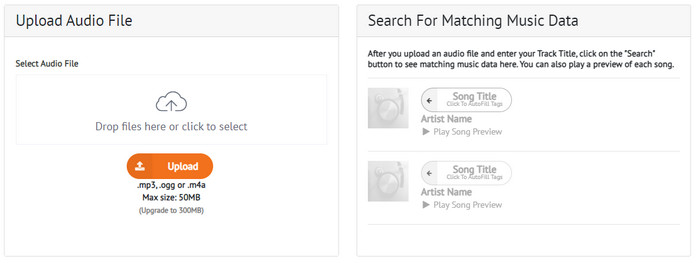
Maztr – Metadata Editor เป็นเครื่องมือแก้ไขแท็กหนังสือเสียงแบบออนไลน์ที่ใช้งานได้รวดเร็วและง่าย คุณสามารถเข้าถึงได้ฟรีบนเว็บ เครื่องมือนี้รองรับไฟล์เสียงหลักสามรูปแบบ ได้แก่ MP3, OGG และ M4A แม้เครื่องมือนี้จะรองรับได้เพียงสามรูปแบบ แต่ก็เพียงพอสำหรับการเปลี่ยนเมทาดาทาของไฟล์เสียงของคุณ นอกจากนี้ คุณสามารถอัปโหลดไฟล์เสียงได้ไม่เกิน 50MB เท่านั้น แต่หากต้องการเพิ่มขีดจำกัดเป็น 300MB คุณจำเป็นต้องสมัครสมาชิกเพื่อใช้ฟังก์ชันอื่น ๆ เพิ่มเติม.
ข้อดี
- มีเว็บ GUI ที่ดีกว่า
- มีคุณสมบัติป้อนอัตโนมัติ
- เพิ่ม แก้ไข หรือลบแท็กออกจากไฟล์เสียงบนเว็บได้อย่างง่ายดาย
จุดด้อย
- รองรับรูปแบบเสียงที่จำกัด
- คุณไม่สามารถใช้เครื่องมือเว็บนี้ได้หากต้องการเปลี่ยนข้อมูลเมตาที่มีขนาดไฟล์มากกว่า 50MB
ส่วนที่ 3 คำถามที่พบบ่อยเกี่ยวกับตัวแก้ไขแท็กหนังสือเสียง
หนังสือเสียงคืออะไร?
หนังสือเสียงเป็นคำที่ใช้กับไฟล์เสียงที่บันทึกไว้โดยอ่านออกเสียงบทของหนังสือ เป็นที่นิยมสำหรับผู้ที่ไม่มีเวลาอ่านหนังสือ หากคุณไม่ใช่แฟนของการอ่านหนังสือ เสียงอาจเหมาะกับคุณเพราะคุณไม่จำเป็นต้องอ่านหนังสือ แต่คุณจะฟังคนที่อ่านหนังสือนั้นให้คุณฟัง
เหตุใดฉันจึงต้องเปลี่ยนแท็กในหนังสือเสียง
มีเหตุผลหลายประการที่คุณต้องเปลี่ยนแท็กในหนังสือเสียงของคุณ ก่อนอื่น คุณจะต้องอัปเดตหนังสือเสียงเพื่อจัดเรียงอย่างถูกต้องตามบท ตอน หรืออะไรที่เฉพาะเจาะจง ต่อไปคือการทำความเข้าใจเนื้อหาภายในหนังสือเสียงก่อนฟัง สุดท้ายคือการอัปเดตสิ่งที่อยู่ภายในหนังสือเสียงนั้น นี่เป็นเพียงตัวอย่างเหตุผล มีเหตุผลหลายประการที่คุณต้องเปลี่ยนแท็ก แต่เราระบุสาเหตุที่พบบ่อยที่สุดสำหรับผู้ใช้
แอพที่ดีที่สุดในการบันทึกหนังสือเสียงบนโทรศัพท์คืออะไร?
หากคุณอยากลองสร้างหนังสือเสียงด้วยตัวเอง เราขอแนะนำให้คุณอ่านบทความนี้ เพราะเราอธิบายลักษณะเฉพาะของโปรแกรมบันทึกเสียงแบบต่าง ๆ ที่คุณสามารถใช้สำหรับทำหนังสือเสียงได้ ดังนั้นโดยไม่ต้องรอช้า คลิกลิงก์นี้และดู 5 แอปบันทึกเสียงบนมือถือที่แนะนำ.
สรุป
ตอนนี้เราได้แนะนำตัวแก้ไขแท็กที่คุณสามารถใช้ได้แล้ว ก็ถึงเวลาที่คุณจะเลือกว่าเครื่องมือไหนเหมาะกับคุณที่สุด แต่ละตัวมีฟีเชอร์การแก้ไขแท็กที่แตกต่างกันเพื่อตอบสนองผู้ใช้เช่นคุณ แต่คำถามก็คือ เครื่องมือไหนดีที่สุด? คำตอบก็คือ FVC Video Converter Ultimate อย่างไม่ต้องสงสัย หากเราเปรียบเทียบเครื่องมือนี้กับตัวแก้ไขแบบออนไลน์ เราจะเห็นว่าเครื่องมือนี้มอบความสามารถให้ผู้ใช้มากกว่ามาก คุณยังสามารถใช้ตัวแก้ไขเมทาดาทาหนังสือเสียงนี้บน Mac ได้ด้วย แล้วจะรออะไรอยู่? ดาวน์โหลดเลย เพื่อแก้ปัญหานี้ด้วยเครื่องมือที่ดีที่สุด!
-
 4 อันดับเครื่องมือดูข้อมูลเมตาที่ดีที่สุดทั้งออนไลน์และออฟไลน์ ['อัปเดตปี 2025]
 ฉันสามารถตรวจสอบข้อมูลเมตาของไฟล์ของฉันได้หรือไม่ ได้ ด้วยความช่วยเหลือของโพสต์นี้ เราจะแนะนำให้คุณรู้จักกับผู้ดูข้อมูลเมตาต่างๆ ที่คุณสามารถใช้ได้
-
 5 วิธีที่ง่ายที่สุดในการลบข้อมูลเมตาในไฟล์มีเดียต่างๆ
 จะลบข้อมูลเมตาได้อย่างไร ทำยากไหม? ฉันจำเป็นต้องซื้อหรือใช้เครื่องมือฟรีเพื่อลบแท็กหรือไม่ คำถามเหล่านี้ทั้งหมดมีคำตอบในบทความนี้
-
 ตัวแยกข้อมูลเมตา 5 อันดับแรกที่มีให้บริการทั้งออนไลน์และออฟไลน์ [2025]
 คุณสามารถหาตัวแยกข้อมูลเมตาได้หลายตัวในตลาด แต่วันนี้ เราเลือกตัวแยกแท็กที่เลือกมากที่สุดเพียงห้าตัวตามผู้ชม
