


 Video Converter Ultimate
 บันทึกหน้าจอ
 ซ่อมวิดีโอ
5 เครื่องมือแก้ไขแท็กวิดีโอ AVI ที่ได้รับเลือกมากที่สุดบนระบบ Windows และ Mac [ใช้งานง่าย]
แท็ก AVI สามารถช่วยให้คุณตรวจสอบได้ว่าไฟล์นั้นมีอะไรอยู่ข้างในโดยการเช็กดู อย่างไรก็ตาม ไม่ใช่ว่าแท็กทั้งหมดในไฟล์ AVI ของคุณจะถูกต้องเสมอไป ดังนั้นคุณจึงจำเป็นต้องมีเครื่องมือสำหรับแก้ไขแท็กเหล่านั้นด้วยตัวเอง แต่ตลาดของโปรแกรมแก้ไขแท็กบนเว็บนั้นกว้างมาก น่าเสียดายใช่ไหม? เราเข้าใจดีว่าการต้องมาคอยค้นหาเครื่องมือที่ใช่สำหรับคุณนั้นเป็นอย่างไร โชคดีที่เราได้คัดเลือกตัวแก้ไขเมทาดะตาที่ดีที่สุดสำหรับใช้แก้ไข เพิ่ม หรือเอาแท็กในไฟล์ AVI ของคุณออกให้แล้ว ในบทความวันนี้ เราจะทำให้แน่ใจว่าคุณจะได้เจอ โปรแกรมแก้ไขแท็กวิดีโอ AVI ที่เหมาะสมที่สุดสำหรับใช้งานบนเดสก์ท็อปของคุณ.

ส่วนที่ 1 ตัวแก้ไขแท็ก AVI 5 อันดับแรกที่พร้อมใช้งานบน Windows & Mac
Video Converter Ultimate [โปรแกรมแก้ไขข้อมูลเมตา AVI ที่ดีที่สุดสำหรับปี 2023]
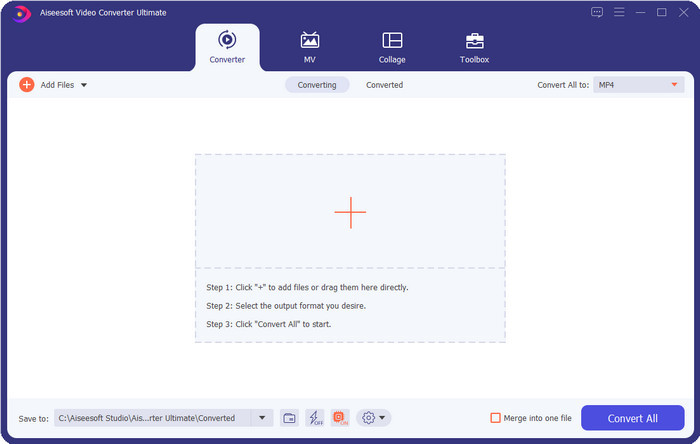
นี่คือ โปรแกรมแก้ไขแท็กวิดีโอ AVI ที่ดีที่สุดที่คุณสามารถใช้เปลี่ยนหรือเอาแท็กในไฟล์ AVI ของคุณออกได้อย่างง่ายดาย หากคุณต้องการซอฟต์แวร์ที่มีฟีเจอร์ล้ำสมัยแต่ใช้งานง่ายและน่าใช้แล้วล่ะก็ Video Converter Ultimate คือคำตอบ นอกจากนี้ คุณยังสามารถใช้ฟีเจอร์แก้ไขเมทาดะตาหลายรูปแบบในนี้เพื่อจัดระเบียบ แก้ไข หรืออัปเดตแท็กของคุณให้ถูกต้อง ก่อนที่คุณจะดาวน์โหลดและลองใช้โปรแกรมแก้ไขเดสก์ท็อปตัวอื่น เราขอแนะนำเครื่องมือนี้อย่างยิ่ง เพราะเมื่อดาวน์โหลดแล้วคุณจะได้เครื่องมือแบบออลอินวัน ต้องการรู้ไหมว่าทำไมคุณถึงควรใช้เครื่องมือนี้? เราได้ระบุ 5 เหตุผลไว้ด้านล่างให้คุณอ่านเพื่อช่วยในการตัดสินใจว่าทำไมคุณจึงควรดาวน์โหลด.

FVC Video Converter Ultimate
5,689,200+ ดาวน์โหลด- เป็นซอฟต์แวร์ที่ดีที่สุดที่คุณสามารถใช้ได้ซึ่งสนับสนุนรูปแบบต่างๆ เช่น MP4, MOV
- สำหรับกระบวนการแก้ไขข้อมูลเมตาที่รวดเร็ว เครื่องมือนี้ทำงานได้ดีมาก
- เรียนรู้การเพิ่มแท็กที่จำเป็นในไฟล์ของคุณหรือลบออกด้วยการคลิกเพียงไม่กี่ครั้ง
- รองรับแพลตฟอร์มเดสก์ท็อปทั้งหมดเช่น Windows และ Mac
ดาวน์โหลดฟรีสำหรับ Windows 7 หรือใหม่กว่าดาวน์โหลดอย่างปลอดภัย
ดาวน์โหลดฟรีสำหรับ MacOS 10.7 หรือใหม่กว่าดาวน์โหลดอย่างปลอดภัย
AVI MetaEdit
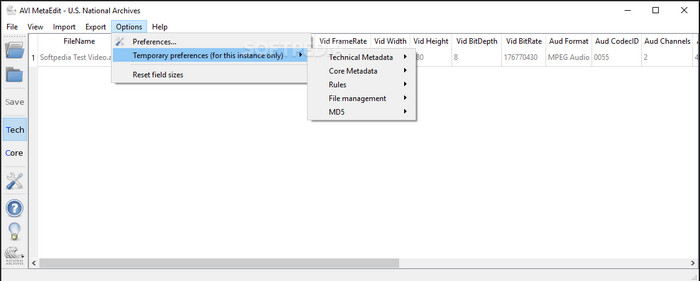
หากคุณกำลังมองหาโปรแกรมแก้ไขเมทาดะตา AVI บน Mac และ Windows แล้วล่ะก็ AVI Meta Edit อาจเป็นตัวเลือกที่เหมาะกับคุณ เครื่องมือนี้เปิดโอกาสให้ผู้ใช้แก้ไขแท็กหรือข้อมูลภายในไฟล์มีเดีย โดยเฉพาะไฟล์ AVI ด้วยโปรแกรมนี้ คุณสามารถแก้ไข Technical Metadata และ Core Metadata ของไฟล์ได้แยกจากกัน ซึ่งแต่ละส่วนก็มีข้อมูลเกี่ยวกับไฟล์ที่แตกต่างกันไป แม้ว่าเครื่องมือนี้จะมีฟีเจอร์การแก้ไขเชิงลึกให้คุณใช้งานได้ แต่ก็ยังใช้งานได้ค่อนข้างสับสนเนื่องจากมีคำย่อและคำสั่งเฉพาะอยู่ภายในโปรแกรม.
โปรแกรมตัดต่อวิดีโอ Machete
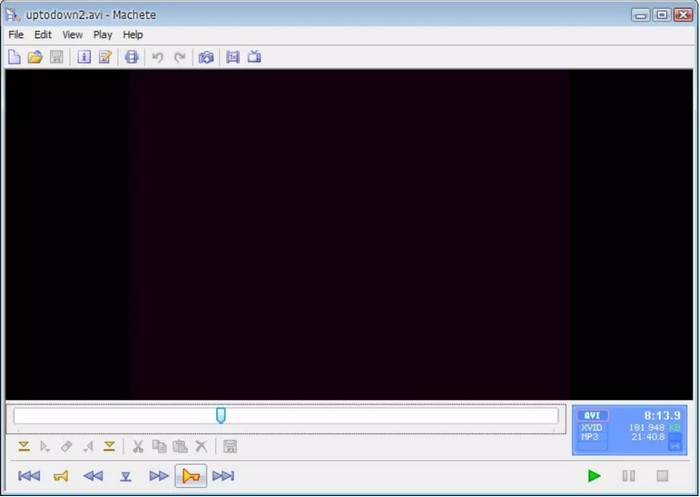
สมมติว่าคุณต้องการแก้ไขเมทาดะตา AVI บน Windows 10 คุณต้องลองใช้ Machete Video Editor Lite ด้วยโปรแกรมนี้ คุณสามารถแก้ไขแท็กในไฟล์ AVI และ WMV ได้อย่างง่ายดาย นอกจากนี้ ยังมีอินเทอร์เฟซที่เรียบง่ายซึ่งช่วยให้ผู้ใช้เข้าใจได้ว่ามีฟีเจอร์ใดบ้างในตัวโปรแกรม เพราะอินเทอร์เฟซที่เรียบง่าย ทำให้มีผู้ใช้บางส่วนมองว่าโปรแกรมนี้เป็นเพียงตัวเลือกสำรองเมื่อไม่มีตัวเลือกอื่นสำหรับแก้ไขเมทาดะตาของตน นอกจากนี้ ข้อมูลเมทาดะตาที่คุณสามารถกรอกได้ในโปรแกรมนี้ยังมีจำกัด เช่นเดียวกับรูปแบบไฟล์ที่รองรับ.
ตัวแก้ไขแท็ก abcAVI
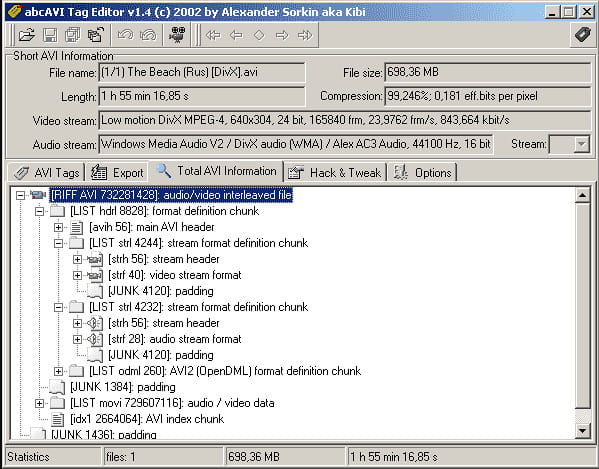
คุณสามารถดาวน์โหลดโปรแกรมแก้ไขแท็ก AVI แบบโอเพ่นซอร์สอีกตัวบน Windows ได้คือ abcAVI Tag Editor ด้วยโปรแกรมนี้ คุณสามารถปรับแต่งเมทาดะตาในไฟล์ AVI ของคุณได้อย่างง่ายดาย โดยรองรับเฉพาะรูปแบบ AVI เท่านั้น ยิ่งไปกว่านั้น คุณยังสามารถเพิ่มหรืออัปเดตแท็กที่ต้องการในไฟล์ AVI ของคุณได้เพียงไม่กี่คลิก แม้ว่าโปรแกรมนี้จะทำงานได้ดี แต่เราจะเห็นได้ว่าหน้าตา GUI นั้นแย่มาก การจัดวางต่างจากเครื่องมืออื่น ๆ อย่างเห็นได้ชัด อีกทั้งยังไม่รองรับการอัปโหลดไฟล์รูปแบบอื่น ๆ นอกจาก AVI เท่านั้น.
FFmpeg
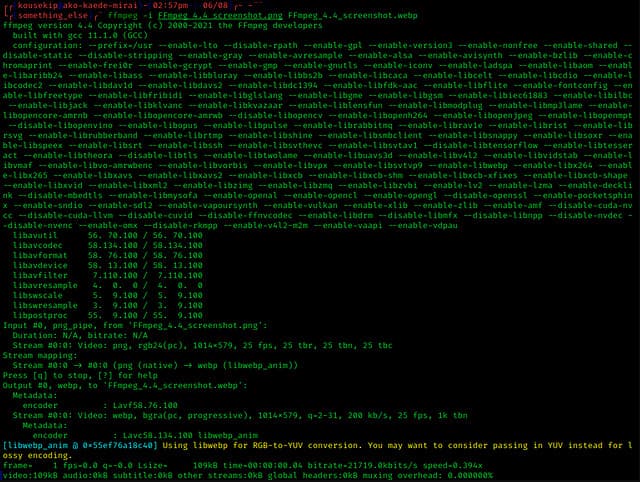
ตัวสุดท้ายในรายการคือ FFmpeg ซอฟต์แวร์แบบใช้คำสั่งที่คุณสามารถใช้แก้ไขคุณสมบัติไฟล์ AVI บน Windows และ Mac เครื่องมือนี้ถูกใช้สำหรับแปลงไฟล์ แก้ไข และเปิดไฟล์มีเดีย แต่ปัจจุบันคุณยังสามารถใช้แก้ไขเมทาดะตาของไฟล์มีเดียใด ๆ ได้อีกด้วย ต่างจากโปรแกรมอื่น ๆ เครื่องมือนี้ไม่มีปุ่มให้กดสั่งงาน แต่ใช้ภาษาคอมพิวเตอร์ (คำสั่ง) ในการทำงาน และเพื่อสื่อสารกับโปรแกรม คุณต้องเปิดหน้าต่างคำสั่ง (Command Prompt) แล้วพิมพ์โค้ดเฉพาะเพื่อทำงานแก้ไขที่คุณต้องการ มันค่อนข้างยากต่อการใช้งาน แต่ก็เป็นเครื่องมือระดับมืออาชีพที่คุณสามารถดาวน์โหลดมาติดตั้งบนคอมพิวเตอร์ได้.
ที่เกี่ยวข้อง:
ส่วนที่ 2 แผนภูมิเปรียบเทียบด้านบน 5 AVI Metadata Editor
| คุณสมบัติ | Video Converter Ultimate [โปรแกรมแก้ไขข้อมูลเมตา AVI ที่ดีที่สุดสำหรับปี 2022] | AVI MetaEdit | โปรแกรมตัดต่อวิดีโอ Machete | ตัวแก้ไขแท็ก abcAVI | FFmpeg |
| ใช้งานง่าย |  | | | |  |
| ปลอดภัยในการใช้งาน | | | | | |
| ใช้ได้ทั้ง OS | | | | | |
| อินเทอร์เฟซที่ใช้งานง่าย | | | | | |
| รูปแบบที่รองรับ | เริ่มจาก AVI, MP4, MKV, FLV, MOV และรูปแบบไฟล์อื่นๆ กว่า 1,000 รูปแบบ | AVI | AVI และ WMV | AVI | AVI, MOV, MP4, FLV และอื่นๆ |
ส่วนที่ 3 คำถามที่พบบ่อยเกี่ยวกับ AVI Metadata Editor
การใช้ AVI Metadata Editor ทางออนไลน์ปลอดภัยหรือไม่
สมมติว่าคุณมีพื้นที่ไม่เพียงพอบนเดสก์ท็อปที่คุณกำลังใช้อยู่ เราขอแนะนำให้ใช้เครื่องมือออนไลน์เพื่อทำงาน อย่างไรก็ตาม เครื่องมือบางอย่างที่คุณสามารถเข้าถึงได้บนอินเทอร์เน็ตโดยไม่เสียค่าใช้จ่ายนั้นไม่ใช่เครื่องมือที่เชื่อถือได้หรือน่าเชื่อถือ แต่ถ้าคุณต้องการใช้เครื่องมือออนไลน์ คุณต้องรักษาหลักเกณฑ์สามข้อที่เรามักมองหาในเว็บไซต์ที่เราเข้าชมเสมอ ก่อนอื่น เราขอแนะนำให้คุณดูที่ด้านบนใกล้กับแถบค้นหาของคุณ มีไอคอนแม่กุญแจ ซึ่งหมายความว่าปลอดภัยในการใช้งาน ดังนั้นหากล็อคเสีย แสดงว่าการเชื่อมต่อของคุณไม่ได้รับการปกป้อง ตรวจสอบกิจกรรมโฆษณาของโฆษณา บางครั้ง โฆษณาอาจมีมัลแวร์อยู่บนเดสก์ท็อป ทำให้ไฟล์ในไดรฟ์เสียหาย ไม่อนุญาตให้ใช้คุกกี้ บางครั้งคุกกี้เป็นวิธีที่ดีในการทราบจำนวนผู้ใช้ที่เข้าชมเว็บไซต์ แต่ตำแหน่งของคุณมักจะมองเห็นได้ด้วยคุกกี้ โปรดจำสิ่งนี้ไว้เพื่อหลีกเลี่ยงการเลือกตัวแก้ไขออนไลน์ที่ไม่ถูกต้อง
เครื่องมือใดทำงานได้ดีที่สุดในการแก้ไขแท็ก AVI
จากการวิจัยของเรา เราจะเห็นได้ว่า Video Converter Ultimate ทำงานได้ดีในทุกด้านโดยที่ไม่ต้องเหนื่อยกับการใช้งาน หากคุณต้องการข้อมูลเพิ่มเติมเกี่ยวกับตัวแก้ไข คุณสามารถอ่านข้อมูลต่อไปนี้ด้านบนเพื่อทราบข้อมูลเพิ่มเติมและดาวน์โหลด
มีข้อ จำกัด ในการเพิ่มข้อมูลเมตาบน AVI หรือไม่?
จนถึงตอนนี้ เราไม่เห็นข้อจำกัดใดๆ เกี่ยวกับข้อมูลที่คุณสามารถเพิ่มลงในไฟล์ AVI ของคุณหรือในไฟล์มีเดียใดๆ อย่างไรก็ตาม โปรแกรมแก้ไขข้อมูลเมตาบางตัวไม่สามารถแทรกข้อมูลที่คุณต้องการลงในไฟล์ได้ การเพิ่มข้อมูลเมตาใน AVI ของคุณไม่มีข้อจำกัด แต่เป็นเครื่องมือที่จำกัดข้อมูลที่คุณสามารถเพิ่มลงในไฟล์เดียวได้
สรุป
น่าทึ่งใช่ไหมที่เรามีตัวเลือกมากมายสำหรับการแก้ไขเมทาดะตาของไฟล์ AVI? แน่นอนว่าโปรแกรมแก้ไขเมทาดะตา AVI ทั้งห้าตัวที่เราระบุไว้ในบทความนี้อาจเป็นเครื่องมือที่สมบูรณ์แบบที่คุณต้องใช้เพื่อแก้ไขแท็กหรือเมทาดะตาของไฟล์ AVI ของคุณ แม้ว่าเราจะยกตัวเลือกมา 5 ตัว แต่เราก็สามารถบอกได้ไม่ยากว่าเครื่องมือใดมีความได้เปรียบในการแก้ไขเมทาดะตา AVI ของคุณ ซึ่งก็คือ Video Converter Ultimate ด้วยโปรแกรมแก้ไขนี้ คุณสามารถทำได้มากกว่าการแก้ไข เพิ่ม หรือเอาเมทาดะตาในไฟล์ AVI ออก ต้องการรู้ไหมว่าคุณยังทำอะไรได้อีกบ้าง? ถ้าอย่างนั้นให้คลิกปุ่มดาวน์โหลดแล้วลองดูด้วยตัวคุณเอง.
-
 5 วิธีที่ง่ายที่สุดในการลบข้อมูลเมตาในไฟล์มีเดียต่างๆ
 จะลบข้อมูลเมตาได้อย่างไร ทำยากไหม? ฉันจำเป็นต้องซื้อหรือใช้เครื่องมือฟรีเพื่อลบแท็กหรือไม่ คำถามเหล่านี้ทั้งหมดมีคำตอบในบทความนี้
-
 ตัวแยกข้อมูลเมตา 5 อันดับแรกที่มีให้บริการทั้งออนไลน์และออฟไลน์ [2025]
 คุณสามารถหาตัวแยกข้อมูลเมตาได้หลายตัวในตลาด แต่วันนี้ เราเลือกตัวแยกแท็กที่เลือกมากที่สุดเพียงห้าตัวตามผู้ชม
-
 5 อันดับโปรแกรมแก้ไขเมตาข้อมูลวิดีโอยอดนิยมสำหรับปี 2025 [บทวิจารณ์ที่ไม่ลำเอียง]
 คุณต้องการดูข้อมูลเมตาของวิดีโอของคุณหรือไม่? หากเป็นเช่นนั้น โปรดอ่านรายละเอียดด้านล่างเพื่อทำความเข้าใจหัวข้อนี้อย่างเต็มที่และทราบว่าเครื่องมือใดเหมาะกับคุณที่สุด
