


 Video Converter Ultimate
 บันทึกหน้าจอ
 ซ่อมวิดีโอ
 ดาวน์โหลดอย่างปลอดภัย
บีบอัด 3GP - นี่คือสุดยอดคำแนะนำในการลดไฟล์ 3GP ในกระบวนการแบทช์
3GP มีชื่อเสียงในด้านขนาดไฟล์ที่เล็กและความคล่องตัวที่แข็งแกร่ง เมื่อคุณต้องการเพิ่มพื้นที่ในโทรศัพท์ Blackberry ของคุณการสำรองข้อมูลและลดไฟล์ 3GP เป็นวิธีที่มีประสิทธิภาพมากที่สุด แน่นอนคุณสามารถบีบอัดวิดีโอ 3GP ออนไลน์ได้ฟรีเพื่อลดขนาดวิดีโอ เมื่อคุณต้องการลดขนาด 3GP หรือแม้แต่จัดการวิดีโอคุณสามารถเลือกคอมเพรสเซอร์ 3GP ระดับมืออาชีพได้จากบทความ

ส่วนที่ 1: วิธีการบีบอัดวิดีโอ 3GP แบบออนไลน์ฟรี
วิธีที่ดีที่สุดในการบีบอัดวิดีโอ 3GP หลายไฟล์แบบออนไลน์ควรทำอย่างไร? เครื่องมือบีบอัดวิดีโอออนไลน์ส่วนใหญ่มักจะให้คุณลดขนาดได้เพียงวิดีโอเดียวเท่านั้น Free Video Compressor คือโปรแกรมบีบอัดวิดีโอ 3GP ที่ตอบโจทย์ เพราะสามารถย่อขนาดวิดีโอจำนวนมากได้ภายในไม่กี่คลิก รองรับการปรับค่าพารามิเตอร์ของวิดีโอ เช่น ความละเอียด บิตเรต เป็นต้น.
- 1. บีบอัดวิดีโอ 3GP หลายรายการทางออนไลน์ด้วยขั้นตอนง่ายๆ
- 2. ปรับแต่งความละเอียดของวิดีโอบิตเรตขนาดวิดีโอและอื่น ๆ
- 3. ใช้งานง่ายโดยไม่มีลายน้ำเพิ่มลงในไฟล์วิดีโอของคุณ
- 4. แบทช์บีบอัด 3GP ด้วยความเร็วที่เร็วกว่าเครื่องมืออื่น ๆ 30 เท่า
ขั้นตอนที่ 1: หลังจากคุณถ่ายโอนวิดีโอ 3GP จากสมาร์ตโฟนเรียบร้อยแล้ว ให้ไปที่ตัวบีบอัด 3GP ออนไลน์ฟรี จากนั้นคลิกปุ่ม Add Files to Compress เพื่อเพิ่มไฟล์ 3GP ที่คุณต้องการย่อขนาด.

ขั้นตอนที่ 2: จากนั้นคุณสามารถปรับความละเอียด บิตเรต และพารามิเตอร์อื่น ๆ ได้ ตามต้องการ จากนั้นพรีวิวขนาดไฟล์วิดีโอ 3GP แล้วคลิกปุ่ม Compress เพื่อบีบอัดวิดีโอ 3GP ออนไลน์.

ขั้นตอนที่ 3: เมื่อดาวน์โหลดไฟล์ 3GP เสร็จแล้ว คุณสามารถคลิกปุ่ม Change Source File เพื่อเปลี่ยนไปบีบอัดไฟล์ 3GP อื่นได้ทันที โดยไม่มีการจำกัดจำนวนไฟล์วิดีโอ 3GP สามารถดู โปรแกรมเล่นไฟล์ 3GP อื่น ๆ ได้ที่นี่.
ส่วนที่ 2: วิธีการบีบอัดไฟล์ 3GP แบบมืออาชีพในแบทช์
หากคุณต้องการบีบอัดวิดีโอ 3GP หลายไฟล์พร้อมกัน หรือแม้แต่ตัดแบ่งวิดีโอให้มีขนาดเล็กลง Video Converter Ultimate เป็นโปรแกรมบีบอัด 3GP แบบมัลติฟังก์ชันที่ไม่เพียงลดขนาดไฟล์วิดีโอ 3GP เท่านั้น แต่ยังสามารถตัดแบ่งและครอบวิดีโอ 3GP ได้อีกด้วย นอกจากนี้ยังสามารถแปลงวิดีโอ 3GP เป็น MP4 และรูปแบบวิดีโออื่น ๆ ได้.
- 1. บีบอัดวิดีโอ 3GP หลายรายการพร้อมกันภายในคลิกเดียว
- 2. เลือกจุดเริ่มต้นและจุดสิ้นสุดเพื่อตัดไฟล์ 3GP ที่ต้องการ
- 3. ย่อวิดีโอ 3GP ด้วยบิตเรตรูปแบบวิดีโอความละเอียด ฯลฯ
- 4. แปลง 3GP เป็น MP4 และรูปแบบวิดีโออื่น ๆ ให้มีขนาดเล็กลง
ดาวน์โหลดฟรีสำหรับ Windows 7 หรือใหม่กว่าดาวน์โหลดอย่างปลอดภัย
ดาวน์โหลดฟรีสำหรับ MacOS 10.7 หรือใหม่กว่าดาวน์โหลดอย่างปลอดภัย
เมื่อคุณติดตั้ง Video Converter Ultimate แล้วคุณสามารถเปิดโปรแกรมบนคอมพิวเตอร์ของคุณได้ มี 3 วิธีในการบีบอัดวิดีโอ 3GP เพียงตรวจสอบขั้นตอนโดยละเอียดด้านล่าง
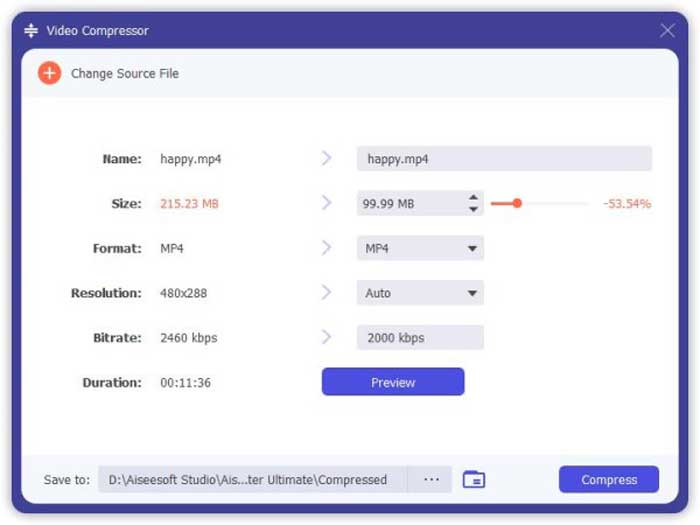
1: บีบอัดไฟล์ 3GP จาก Toolbox
ไปที่เมนู Toolbox ในอินเทอร์เฟซของโปรแกรม จากนั้นเลือกตัวเลือก Video Compressor เพื่อย่อขนาดไฟล์ 3GP คุณสามารถปรับแต่งตัวแปลงสัญญาณวิดีโอ (codec) บิตเรต ความละเอียด และการตั้งค่าอื่น ๆ ได้ จากนั้นพรีวิวขนาดไฟล์วิดีโอก่อนทำการบีบอัดไฟล์ 3GP.
2: บีบอัด 3GP ในกระบวนการแบทช์
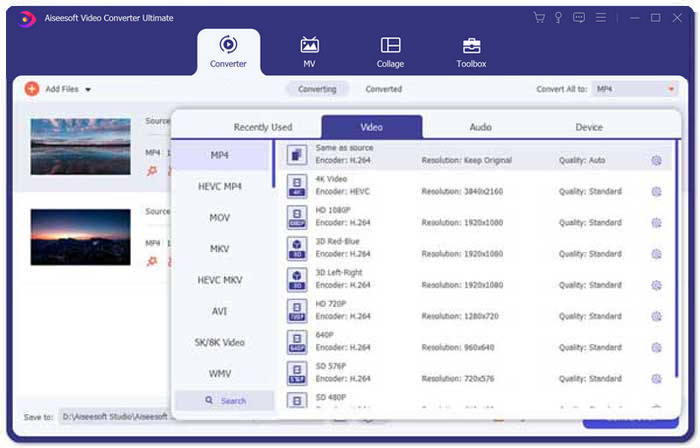
ไปที่เมนู Converter แล้วเลือก Add Files เพื่อนำเข้าวิดีโอ 3GP เข้าโปรแกรม จากนั้นเลือก MP4 เป็นรูปแบบไฟล์เอาต์พุตที่คอลัมน์ Convert All to: นอกจากนี้คุณยังสามารถปรับบิตเรตวิดีโอ ตัวแปลงสัญญาณวิดีโอ และค่าอื่น ๆ เพื่อช่วยลดขนาดไฟล์ 3GP ได้.
3. ตัดส่วนวิดีโอ 3GP ที่ต้องการ
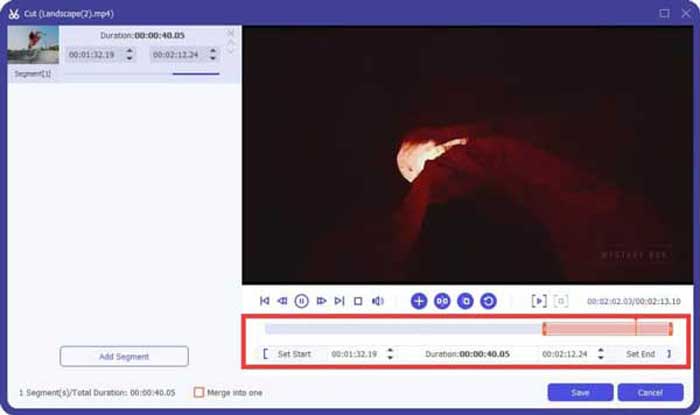
เมื่อคุณต้องการตัดเฉพาะช่วงที่ต้องการเท่านั้น ให้คลิกไอคอนรูป กรรไกร (Scissor) เพื่อแบ่งวิดีโอ 3GP เพียงเลือกจุดเริ่มต้นและจุดสิ้นสุดเพื่อย่อขนาดไฟล์ 3GP หลังจากนั้นคลิกปุ่ม Convert All เพื่อแยกส่วนวิดีโอ 3GP ที่คุณต้องการออกมา.
ส่วนที่ 3: คำถามที่พบบ่อยเกี่ยวกับวิธีการบีบอัดวิดีโอ 3GP
1. รูปแบบวิดีโอ 3GP คืออะไร?
3GP เป็นที่รู้จักกันในชื่อ 3rd Generation Partnership Project Group ในฐานะที่เป็นที่เก็บไฟล์มัลติมีเดีย 3GP มีเป้าหมายเพื่อประหยัดพื้นที่การใช้ข้อมูลและแบนด์วิดท์ หากคุณถ่ายวิดีโอบนสมาร์ทโฟนบ่อยๆคุณต้องบีบอัดไฟล์ 3GP
2. ฉันควรบีบอัด 3GP เป็น MP4 หรือไม่?
เมื่อเทียบกับ 3GP แล้ว MP4 เป็นรูปแบบไฟล์ที่ได้รับความนิยมและยืดหยุ่นกว่ามาก คุณสามารถเลือกบีบอัด 3GP เป็น MP4 ได้หากคุณไม่สามารถเปิดหรือเล่น 3GP บนอุปกรณ์ของคุณได้ เพียงเพิ่มวิดีโอ 3GP ลงในตัวแปลงวิดีโอใด ๆ คุณสามารถแปลงรูปแบบ 3GP เป็น MP4 ได้ภายในไม่กี่คลิก
3. มีเครื่องบีบอัดวิดีโอ 3GP สำหรับ BlackBerry หรือไม่?
ใช่. คุณสามารถค้นหาโปรแกรมตัดต่อวิดีโอ 3GP หรือโปรแกรมบีบอัดวิดีโอ 3GP สำหรับ BlackBerry แน่นอนคุณยังสามารถใช้ Google Drive และเครื่องบีบอัดวิดีโอ 3GP ออนไลน์เพื่อลดและย่อขนาดวิดีโอ 3GP ตามความต้องการของคุณ
สรุป
บทความนี้แบ่งปันวิธีการบีบอัดวิดีโอ 3GP ที่มีประสิทธิภาพสองวิธี หากคุณต้องการบีบอัด 3GP ออนไลน์ฟรี FVC Online Video Compressor น่าจะเป็นตัวเลือกที่เหมาะสม เมื่อคุณต้องการลดไฟล์ 3GP ภายในกระบวนการแบทช์ Video Converter Ultimate ควรเป็นตัวเลือกแรกของคุณเสมอ
-
 3 วิธีในการบีบอัดและแปลงไฟล์วิดีโอขนาดใหญ่สำหรับ WhatsApp
 จากบทความนี้คุณจะได้รับ 3 วิธีง่ายๆในการบีบอัดวิดีโอออนไลน์สำหรับ WhatsApp ทำไมคุณไม่สามารถส่งวิดีโอบน WhatsApp ได้? คุณสามารถแก้ไขข้อ จำกัด ขนาดวิดีโอ WhatsApp ได้อย่างไร เพียงแค่อ่านและตรวจสอบ
-
 บทแนะนำการบีบอัด GIF และลดขนาดไฟล์ด้วยคุณภาพสูง
 นี่คือ 2 วิธีง่ายๆในการบีบอัด GIF บนคอมพิวเตอร์หรือโทรศัพท์มือถือของคุณ คุณสามารถใช้ FVC Free Online Video Compressor และ Photoshop ลดขนาดไฟล์ GIF ในแง่มุมต่างๆ
-
 3 วิธีในการแปลง MP4 เป็น 3GP ไม่ยุ่งยาก
 ต้องการแปลง MP4 เป็น 3GP ด้วยวิธีที่ง่ายและรวดเร็วหรือไม่? ที่นี่เราจะแบ่งปัน 3 ตัวแปลง MP4 เป็น 3GP เพื่อเปลี่ยน MP4 เป็น 3GP สำหรับการเล่นบนโทรศัพท์มือถือต่างๆ
