


 Video Converter Ultimate
 บันทึกหน้าจอ
 ซ่อมวิดีโอ
 ดาวน์โหลดอย่างปลอดภัย
สุดยอดคู่มือการบีบอัดไฟล์ ASF ออนไลน์อย่างมีประสิทธิภาพ
ASF เป็นคำย่อของ Advanced Streaming Format เป็นที่ทราบกันดีว่ามีอัตราการบีบอัดที่สูงและคุณภาพของวิดีโอที่ดี ดังนั้นไฟล์ ASF จึงมีข้อได้เปรียบอย่างมากในการส่งสตรีมวิดีโอ ดังนั้นคำถามจึงมาที่นี่: จะบีบอัดไฟล์วิดีโอ ASF ได้อย่างไร? หากต้องการทราบคำถามนี้คุณสามารถอ่านบทความนี้อย่างละเอียด หลังจากนั้นคุณจะรู้วิธีบีบอัดไฟล์ ASF ของคุณได้ดีขึ้นอย่างง่ายดาย

ส่วนที่ 1: วิธีการบีบอัดไฟล์ ASF ออนไลน์ฟรี
ในการบีบอัดไฟล์ ASF เป้าหมายของคุณ ตัวเลือกแรกควรเป็น Free Video Compressor เสมอ ในฐานะเครื่องมือบีบอัดฟรี มันสามารถช่วยคุณบีบอัดไฟล์วิดีโอ ASF ได้โดยไม่สูญเสียคุณภาพ หากคุณมีไฟล์ ASF มากกว่าหนึ่งไฟล์ ก็ยังรองรับการบีบอัดแบบเป็นชุดได้ นอกจากนี้ยังสามารถปกป้องความเป็นส่วนตัวของคุณเพื่อป้องกันการรั่วไหลของข้อมูล อินเทอร์เฟซใช้งานง่ายและดูสะอาดตา สะดวกสำหรับผู้ใช้ทุกคน.
- 1. บีบอัดวิดีโอ 4K ในขณะที่รักษาคุณภาพที่น่าทึ่ง
- 2. Batch บีบอัด ASF ด้วยความเร็วที่เร็วกว่าโปรแกรมอื่น 30 เท่า
- 3. จะไม่มีลายน้ำเหลือหลังจากการบีบอัด
- 4. เครื่องมือฟรีนี้ใช้งานง่ายเมื่อคุณบีบอัดไฟล์ ASF
ขั้นตอนที่ 1: ไปที่หน้าอินเทอร์เฟซหลัก
หากต้องการบีบอัดไฟล์ ASF ตามที่คุณต้องการ ก่อนอื่นคุณควรไปที่เว็บไซต์ทางการของ Free Video Compressor จากนั้นคลิกปุ่ม Add Files to Compress.

ขั้นตอนที่ 2: เพิ่มไฟล์วิดีโอ ASF ของคุณ
รอสักครู่เพื่อติดตั้งตัวเรียกใช้งานสำหรับการบีบอัด ASF หลังจากนั้นคุณสามารถเลือกและเพิ่มไฟล์ ASF เป้าหมายของคุณในหน้าต่างป๊อปอัป
ขั้นตอนที่ 3: ปรับแต่งเอฟเฟกต์การบีบอัด
ก่อนบีบอัดไฟล์ ASF คุณสามารถปรับความละเอียดวิดีโอ อัตราเฟรม บิตเรต รูปแบบเอาต์พุต และอื่น ๆ จากนั้นคลิกปุ่ม Compress เพื่อเริ่มบีบอัดไฟล์ ASF ของคุณ คุณยังสามารถบีบอัดไฟล์ ASF ได้มากกว่าหนึ่งไฟล์ในครั้งเดียว.

ส่วนที่ 2: วิธีการบีบอัดไฟล์ ASF ฟรีสำหรับพีซี
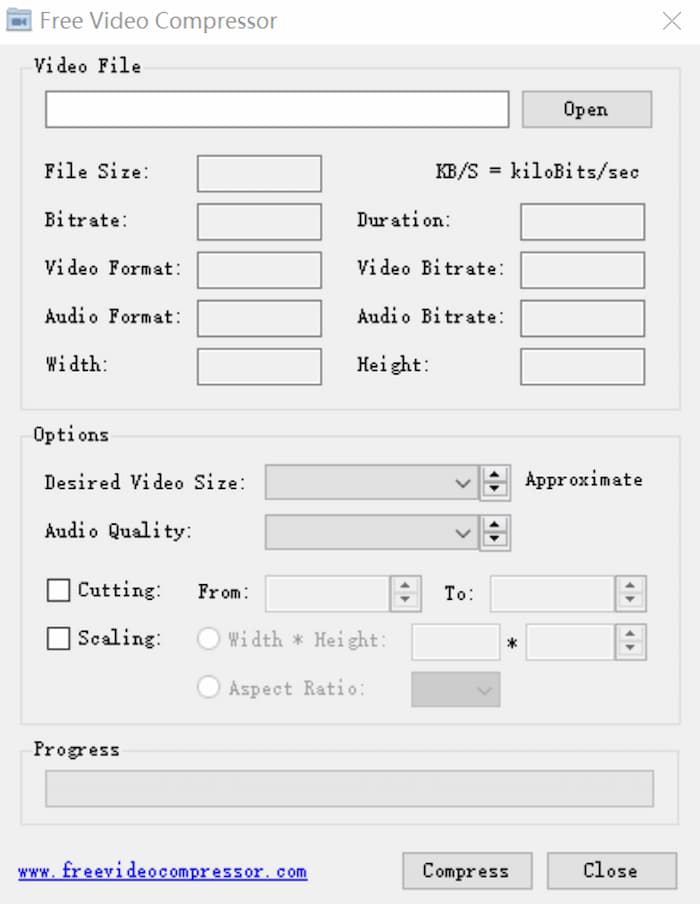
นอกจากตัวบีบอัด ASF ออนไลน์แล้ว คุณยังสามารถใช้ Free Video Compressor เพื่อบีบอัดไฟล์วิดีโอ ASF บนพีซีได้อีกด้วย ผ่านซอฟต์แวร์บีบอัดวิดีโอที่ฟรีและมีขนาดเล็กนี้ คุณสามารถ บีบอัดไฟล์วิดีโอทั่วไปได้มากมาย เช่น ASF, MP4 เป็นต้น นอกจากนี้ซอฟต์แวร์นี้ยังมีฟีเจอร์ Desired Video Size ที่ช่วยคุณคำนวณรูปแบบวิดีโอเอาต์พุตได้ด้วย.
ขั้นตอนที่ 1: ดาวน์โหลด Free Video Compressor
หากคุณต้องการบีบอัด ASF ของคุณให้เล็กลงด้วย Free Video Compressor คุณควรดาวน์โหลดและติดตั้งซอฟต์แวร์นี้บนพีซีของคุณก่อน
ขั้นตอนที่ 2: เปิดไฟล์ ASF เป้าหมายของคุณ
หลังจากเปิดใช้งานเครื่องมือนี้ คุณจะอยู่ที่หน้าอินเทอร์เฟซหลัก เพียงคลิกปุ่ม Open ที่มุมขวาบนเพื่อเพิ่มไฟล์ ASF ของคุณ.
ขั้นตอนที่ 3: ปรับการตั้งค่าบางอย่าง
หากคุณต้องการปรับการตั้งค่าบางอย่างคุณสามารถป้อนพารามิเตอร์ที่เหมาะสมในช่องสี่เหลี่ยมด้านหลังตัวเลือกต่างๆเช่นขนาดไฟล์รูปแบบวิดีโอรูปแบบเสียงและอื่น ๆ นอกจากนี้คุณยังสามารถตัดส่วนที่คุณไม่ต้องการในโปรแกรมบีบอัด ASF นี้
ส่วนที่ 3: คำถามที่พบบ่อยเกี่ยวกับการบีบอัดไฟล์ ASF
1. ASF คืออะไร?
ASF (Advanced System Format) เป็นรูปแบบไฟล์ที่ขยายได้ซึ่งพัฒนาโดย บริษัท Microsoft ได้รับการออกแบบมาโดยเฉพาะสำหรับการจัดเก็บและเล่นสตรีมวิดีโอที่ซิงโครไนซ์และส่งวิดีโอเหล่านี้บนเครือข่าย
2. ฉันสามารถแปลง ASF เป็น MP4 ทางออนไลน์ได้หรือไม่?
ได้ หากคุณต้องการแปลงไฟล์ ASF เป็น MP4 คุณสามารถใช้ตัวแปลงวิดีโอยอดนิยมบางตัว เช่น Free Online Video Converter เครื่องมือนี้ช่วยให้คุณแปลงไฟล์ ASF เป็น MP4 ได้อย่างรวดเร็ว.
3. ฉันสามารถบีบอัด PDF บน Mac ด้วย Free Video Compressor ได้หรือไม่?
ใช่. คุณสามารถใช้ Free Video Compressor เพื่อบีบอัด PDF บน Mac โปรแกรมนี้ไม่เพียง แต่ไม่มีค่าใช้จ่าย แต่ยังสามารถรักษาคุณภาพสูงสุดได้อีกด้วย สิ่งที่คุณต้องทำมีเพียงเพิ่มไฟล์ PDF ของคุณแล้วคลิกปุ่มบีบอัดหลังจากเข้าสู่เว็บไซต์
สรุป
บทความนี้แชร์สองโปรแกรมที่แตกต่างกันเพื่อช่วยให้คุณบีบอัดไฟล์ ASF ได้อย่างมีประสิทธิภาพ คุณสามารถเลือกอย่างใดอย่างหนึ่งเพื่อบีบอัด ASF ของคุณให้เล็กลง อย่างไรก็ตามหากคุณไม่ได้ตั้งใจจะติดตั้งซอฟต์แวร์ แต่ต้องการรักษาคุณภาพคุณควรลองใช้ Free Video Compressor คุณสามารถตรวจสอบตัวเองได้ หากมีคำถามหรือข้อเสนอแนะสามารถฝากข้อความไว้ที่เว็บไซต์
-
 วิธีบีบอัดไฟล์ AVI ขนาดใหญ่บน Windows / Mac / ออนไลน์ฟรี
 อ่านและรับ 3 วิธีฟรีในการบีบอัดไฟล์ AVI บนคอมพิวเตอร์ของคุณ คุณสามารถลดขนาดไฟล์ของวิดีโอ AVI ของคุณได้โดยไม่สูญเสียคุณภาพ ขนาดวิดีโอ AVI ของคุณอาจเล็กอย่างที่คุณคิด
-
 3 วิธีในการบีบอัดและแปลงไฟล์วิดีโอขนาดใหญ่สำหรับ WhatsApp
 จากบทความนี้คุณจะได้รับ 3 วิธีง่ายๆในการบีบอัดวิดีโอออนไลน์สำหรับ WhatsApp ทำไมคุณไม่สามารถส่งวิดีโอบน WhatsApp ได้? คุณสามารถแก้ไขข้อ จำกัด ขนาดวิดีโอ WhatsApp ได้อย่างไร เพียงแค่อ่านและตรวจสอบ
-
 บทแนะนำการบีบอัด GIF และลดขนาดไฟล์ด้วยคุณภาพสูง
 นี่คือ 2 วิธีง่ายๆในการบีบอัด GIF บนคอมพิวเตอร์หรือโทรศัพท์มือถือของคุณ คุณสามารถใช้ FVC Free Online Video Compressor และ Photoshop ลดขนาดไฟล์ GIF ในแง่มุมต่างๆ
