


 Video Converter Ultimate
 บันทึกหน้าจอ
 ซ่อมวิดีโอ
 ดาวน์โหลดอย่างปลอดภัย
วิธีการบีบอัดไฟล์ WebM ออนไลน์ด้วยโปรแกรมบีบอัดวิดีโอฟรี 2 ตัว
WebM เป็นรูปแบบไฟล์สื่อเสียงและวิดีโอที่มักใช้สำหรับสื่อบนหน้าเว็บ รองรับกับเว็บเบราว์เซอร์ยอดนิยมทั้งหมด เช่น Chrome, IE, Safari, Firefox และอื่น ๆ เมื่อคุณต้องการให้วิดีโอสตรีมได้รวดเร็วขึ้น คุณจำเป็นต้องบีบอัดไฟล์ คำถามก็คือ คุณรู้หรือไม่วิธีบีบอัดไฟล์ WebM โดยไม่ทำให้คุณภาพลดลงอย่างเห็นได้ชัด?

คุณกำลังมองหาวิธีบีบอัดไฟล์ WebM เพื่อลดขนาดไฟล์อยู่หรือไม่? ในโพสต์นี้ เราขอแชร์ 2 วิธีฟรีที่จะช่วยคุณบีบอัด WebM ออนไลน์ได้.
ส่วนที่ 1 วิธีการบีบอัดไฟล์ WebM ออนไลน์ฟรี
หากต้องการบีบอัด WebM เพื่อลดขนาดไฟล์ แต่ยังคงคุณภาพของภาพและเสียงดั้งเดิมไว้ คุณสามารถใช้เครื่องมือยอดนิยมอย่าง Free Video Compressor ซึ่งออกแบบมาเป็นพิเศษเพื่อบีบอัดวิดีโอในรูปแบบยอดนิยมทุกชนิด รวมถึง WebM, AVI, MP4, FLV, MKV, MOV และอื่น ๆ.
โปรแกรมบีบอัดไฟล์ WebM ที่ใช้งานง่ายนี้มีความสามารถในการลดขนาดไฟล์วิดีโอโดยไม่สูญเสียคุณภาพ ช่วยให้คุณสามารถบีบอัด 4K UHD และ 1080p, 720p HD และวิดีโอ SD ทั่วไป คุณสามารถไปที่หน้า Free Video Compressor เพื่อบีบอัด WebM โดยตรงได้อย่างง่ายดาย
ขั้นตอนที่ 1. เปิดเบราว์เซอร์บนคอมพิวเตอร์ของคุณ แล้วไปที่เว็บไซต์ทางการของเครื่องมือบีบอัดไฟล์ WebM ออนไลน์ฟรีตัวนี้.

ขั้นตอนที่ 2. เมื่อไปถึงหน้าเว็บแล้ว ให้คลิกปุ่ม Add Files to Compress เพื่อดาวน์โหลดและติดตั้งตัวเรียกใช้งานขนาดเล็กสำหรับการบีบอัด WebM จากนั้นคุณก็สามารถเลือกและเพิ่มไฟล์ WebM ที่ต้องการบีบอัดจากหน้าต่างป๊อปอัปได้.

ขั้นตอนที่ 3. คุณสามารถบีบอัดไฟล์ WebM ของคุณได้อย่างอิสระตามต้องการ นอกจากนี้ ยังสามารถปรับความละเอียดวิดีโอ อัตราเฟรมและบิตเรต ชื่อวิดีโอ และรูปแบบไฟล์เอาต์พุตได้ด้วย หลังจากตั้งค่าทุกอย่างเสร็จแล้ว เพียงคลิกปุ่ม Compress เพื่อเริ่มบีบอัดไฟล์ WebM ออนไลน์.

แตกต่างจากเครื่องมือบีบอัดวิดีโอ WebM ออนไลน์อื่น ๆ โปรแกรมบีบอัดวิดีโอฟรีนี้จะไม่เพิ่มลายน้ำลงในไฟล์ WebM ที่บีบอัดของคุณ
ตอนที่ 2. วิธีการบีบอัด WebM ด้วย WebM Compressor
ในการบีบอัดไฟล์ WebM ออนไลน์ คุณยังสามารถใช้ VEED WebM Compressor ได้ด้วย ไม่ว่าขนาดไฟล์ของคุณจะเกินขีดจำกัดของไฟล์แนบอีเมล ขีดจำกัดของ Facebook Messenger หรือข้อจำกัดการอัปโหลดอื่น ๆ คุณก็สามารถใช้ WebM Compressor ตัวนี้เพื่อลดขนาดไฟล์วิดีโอ WebM ได้.
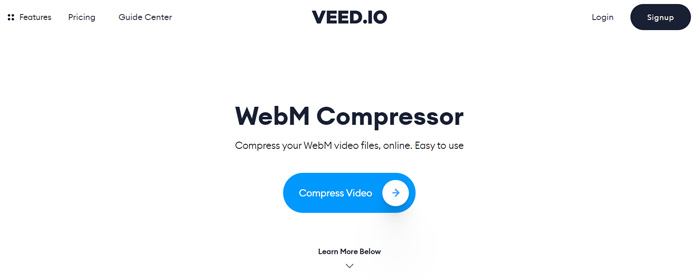
ขั้นตอนที่ 1. เปิดเบราว์เซอร์แล้วไปที่เว็บไซต์ VEED WebM Compressor คลิกปุ่ม Compress Video เพื่อไปยังขั้นตอนการอัปโหลดถัดไป.
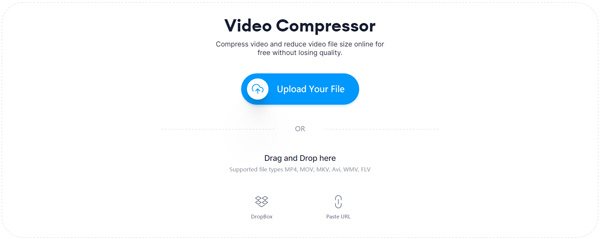
ขั้นตอนที่ 2. คุณสามารถคลิกปุ่ม Upload Your File เพื่ออัปโหลดวิดีโอ WebM ของคุณ ที่นี่คุณยังสามารถลากและวางไฟล์เพื่ออัปโหลด WebM ได้ เครื่องมือบีบอัดวิดีโอ WebM ฟรีตัวนี้ยังรองรับการอัปโหลดวิดีโอจาก Dropbox และ URL อีกด้วย.
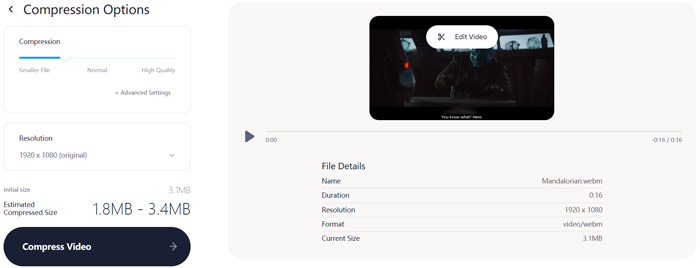
ขั้นตอนที่ 3. คุณสามารถปรับการบีบอัดวิดีโอได้อย่างอิสระตามต้องการ นอกจากนี้ ยังสามารถปรับความละเอียดวิดีโอเองได้อีกด้วย คุณยังสามารถตัดแต่งไฟล์ WebM ของคุณได้โดยคลิก Edit Video เครื่องมือนี้มีเครื่องเล่นสื่อให้คุณดูวิดีโอที่โหลดเข้ามาได้.
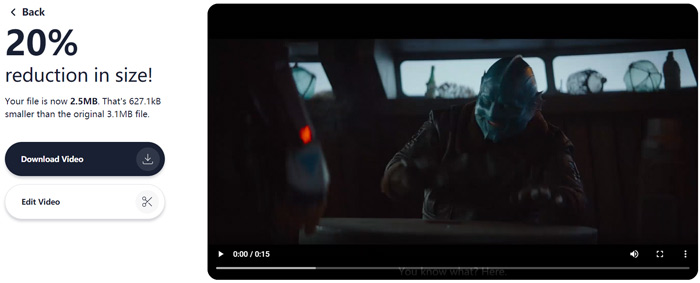
ขั้นตอนที่ 4. คลิกปุ่ม Compress Video ตรงมุมล่างซ้ายเพื่อเริ่มบีบอัดไฟล์ WebM หลังจากนั้น คุณสามารถคลิกปุ่ม Download Video เพื่อบันทึกไฟล์ WebM ที่บีบอัดแล้วลงในคอมพิวเตอร์ของคุณ.
ส่วนที่ 3 คำถามที่พบบ่อยเกี่ยวกับการบีบอัดไฟล์ WebM
คำถาม 1. รูปแบบ WebM คืออะไร?
WebM เป็นรูปแบบโอเพนซอร์สที่มีวิดีโอที่บีบอัดด้วยตัวแปลงสัญญาณ VP8 หรือ VP9 และเสียงที่บีบอัดด้วยตัวแปลงสัญญาณ Vorbis หรือ Opus เดิมที WebM มีวัตถุประสงค์เพื่อเสนอทางเลือกที่ปลอดค่าลิขสิทธิ์สำหรับใช้ในองค์ประกอบเสียงวิดีโอ HTML5 และ HTML5 ไฟล์ WebM ส่วนใหญ่จะใช้สำหรับเนื้อหาสื่อบนหน้าเว็บ
คำถาม 2. จะแปลง WebM เป็น MP4 ออนไลน์ฟรีได้อย่างไร?
หากต้องการแปลงไฟล์ WebM เป็น MP4 ฟรี คุณสามารถใช้โปรแกรมแปลงวิดีโอยอดนิยมอย่าง Free Online Video Converter ได้ เครื่องมือนี้สามารถทำการแปลง WebM เป็น MP4 และการแปลงไฟล์วิดีโอ/เสียงอื่น ๆ ได้อย่างง่ายดาย.
คำถามที่ 3. รูปแบบวิดีโอที่เล็กที่สุดที่มีคุณภาพสูงคืออะไร?
MP4 โดยทั่วไปจะให้คุณภาพวิดีโอที่ดีที่สุดด้วยขนาดไฟล์ที่เล็กที่สุด
สรุป
เมื่อคุณต้องการแชร์วิดีโอ WebM ไปยัง Facebook, Instagram, Twitter หรือโซเชียลมีเดียอื่น ๆ แนะนำให้บีบอัดไฟล์ก่อน ในโพสต์นี้ คุณสามารถเรียนรู้ 2 วิธีง่าย ๆ ในการบีบอัด WebM ออนไลน์ได้ฟรี คุณสามารถใช้เครื่องมือบีบอัดวิดีโอตัวที่คุณชอบเพื่อลดขนาดไฟล์ WebM ได้.
-
 สอนการบีบอัดวิดีโอสำหรับอีเมลบน iPhone / Android / ออนไลน์
 ไม่สามารถส่งวิดีโอผ่านอีเมลที่ใหญ่เกินไปได้หรือไม่? หากคุณมีปัญหานี้คุณสามารถรับวิธีการบีบอัดวิดีโอสำหรับอีเมลได้ที่นี่ บทความนี้จะแสดงวิธีการย่อขนาดไฟล์วิดีโอขนาดใหญ่โดยละเอียดฟรี
-
 MP4 เป็น WebM Converter - 4 วิธีที่ดีที่สุดในการแปลง MP4 เป็น WebM
 เมื่อคุณต้องการแปลง MP4 เป็น WebM ฟรีคุณสามารถเรียนรู้เพิ่มเติมเกี่ยวกับ 4 วิธีที่ใช้บ่อยที่สุดเพื่อรับวิดีโอที่ต้องการได้ฟรีจากบทความ
-
 3 วิธีในการบีบอัดและแปลงไฟล์วิดีโอขนาดใหญ่สำหรับ WhatsApp
 จากบทความนี้คุณจะได้รับ 3 วิธีง่ายๆในการบีบอัดวิดีโอออนไลน์สำหรับ WhatsApp ทำไมคุณไม่สามารถส่งวิดีโอบน WhatsApp ได้? คุณสามารถแก้ไขข้อ จำกัด ขนาดวิดีโอ WhatsApp ได้อย่างไร เพียงแค่อ่านและตรวจสอบ
