


 Video Converter Ultimate
 บันทึกหน้าจอ
 ซ่อมวิดีโอ
ตัวเปลี่ยนวันที่ไฟล์ที่ดีที่สุดเพื่อแก้ไขเวลาและวันที่ของไฟล์ [ไม่ท้าทาย]
วันที่ของไฟล์สามารถช่วยเราได้ โดยเฉพาะถ้าคุณต้องการจัดเรียงไฟล์ตามวันที่สร้าง แต่เมื่อเราแก้ไขไฟล์วิดีโอหรือรูปภาพในโปรแกรมตัดต่อ วันที่สร้างไฟล์จะเปลี่ยนเป็นวันที่คุณแก้ไขไฟล์ ซึ่งไม่ใช่เรื่องที่ทุกคนจะชอบนัก! ดังนั้นหากเรื่องนี้เกิดขึ้นกับคุณ คุณจำเป็นต้องใช้เครื่องมือเปลี่ยนวันที่ไฟล์ที่เชื่อถือได้ เพื่อกู้คืนวันและเวลาชุดเดิมของไฟล์มีเดียที่คุณได้แก้ไขไปแล้ว.

ส่วนที่ 1 2 ของตัวเปลี่ยนข้อมูลไฟล์ที่ดีที่สุดเพื่อเปลี่ยนการสร้างหรือแก้ไขวันที่บน Windows
ตัวเปลี่ยนวันที่ของไฟล์ FMS
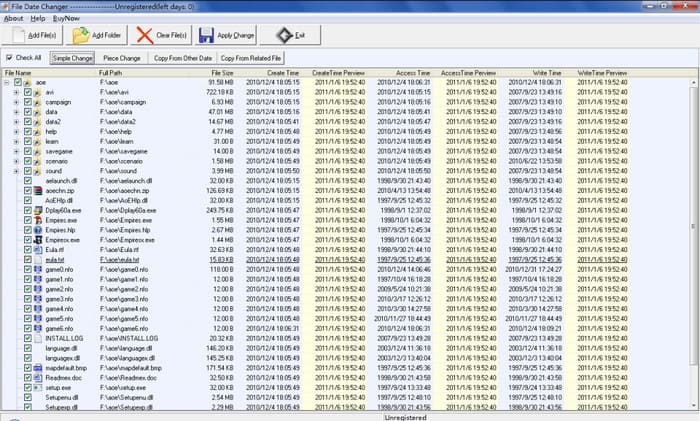
FMS File Date Changer เป็นโปรแกรมแก้ไขแท็กที่ใช้ Windows ซึ่งช่วยให้คุณสามารถเปลี่ยนวันที่สร้างไฟล์ได้ ด้วยเครื่องมือนี้ คุณสามารถตั้งชื่อวันที่สร้างเครื่องมือ เข้าถึงล่าสุด หรือแก้ไขล่าสุดเพื่อประทับตราทีละรายการหรือทั้งหมดหากต้องการ ไม่เหมือนกับซอฟต์แวร์อื่น ๆ ที่ใช้ทรัพยากรสูง เครื่องมือนี้ไม่ต้องการให้คุณมีหน่วยระบบระดับไฮเอนด์ ใช้งานได้ในเวอร์ชันต่ำและใช้ CPU และ RAM น้อยที่สุดในขณะที่ทำงานบนระบบของคุณ ดังนั้น คุณจะไม่พบการหยุดทำงาน หยุดทำงาน หรือเกิดข้อผิดพลาดขณะใช้งาน
นอกจากนี้ GUI ของซอฟต์แวร์มีความตรงไปตรงมามาก ผู้ใช้ที่ไม่มีประสบการณ์ในการแก้ไขข้อมูลเมตา เช่น เวลาและวันที่สามารถจัดการได้ แต่ผู้ใช้บางคนพบว่าไม่ถึงความคาดหวังที่จะเป็นโปรแกรมแก้ไขข้อมูลเมตาระดับมืออาชีพ ด้วยเหตุผลดังกล่าว ผู้ใช้มักจะลบสิ่งนี้หลังจากดาวน์โหลด แต่การลบนั้นไม่ง่ายเหมือนอย่างอื่นๆ คุณจะต้องทำตามขั้นตอนเพื่อลบซอฟต์แวร์ทั้งหมดออกจากระบบของคุณทั้งหมด
BulkFileChanger
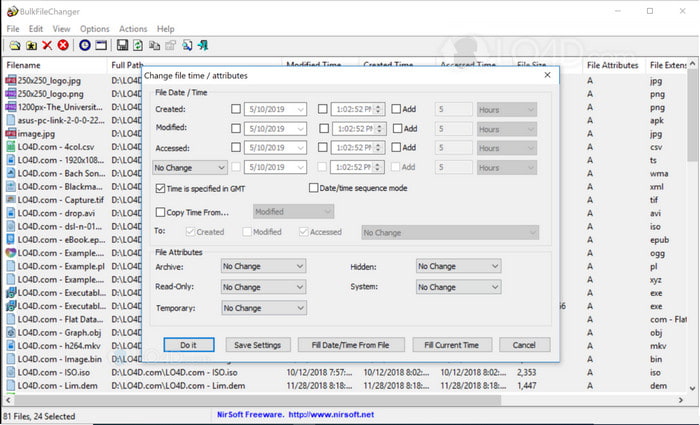
คุณสามารถเรียนรู้วิธีเปลี่ยนวันที่ที่สร้างในไฟล์ได้อย่างรวดเร็วโดยใช้ BulkFireChanger ด้วยซอฟต์แวร์ยูทิลิตี้ขนาดเล็กนี้ คุณสามารถแก้ไข สร้าง และเข้าถึงวันที่ของไฟล์ได้อย่างง่ายดาย หรือแม้แต่แก้ไขแอตทริบิวต์ของไฟล์หากต้องการ คุณไม่จำเป็นต้องติดตั้งตัวแก้ไขและดึงข้อมูลต่างจากซอฟต์แวร์อื่นๆ เพราะมันสามารถทำงานบนธัมบ์ไดรฟ์ของ Windows ทุกเครื่องได้ ดังนั้น หากคุณต้องการดาวน์โหลดเครื่องมือ คุณต้องไปที่เว็บไซต์ทางการ จากนั้นบริจาคให้พวกเขาหากต้องการ
นอกจากนี้ เครื่องมือยังดูเรียบง่ายและมีขนาดเล็ก แม้ว่า GUI จะเล็ก แต่ก็ควรดู ดังที่เราได้กล่าวไว้ก่อนหน้านี้ คุณไม่จำเป็นต้องติดตั้งซอฟต์แวร์เพราะมีขนาดกะทัดรัด ไม่เหมือนกับซอฟต์แวร์อื่น คุณจะต้องรอกระบวนการติดตั้งก่อนดำเนินการ ไม่มีอะไรจะพูดมากเกี่ยวกับข้อได้เปรียบของเครื่องมือนี้ เนื่องจากเครื่องมือนี้มีจุดประสงค์หลักในการเปลี่ยนข้อมูลเมตาของวันที่ หากคุณต้องการทำงานอื่นให้เสร็จ เครื่องมือนี้จะไม่ช่วยคุณเกี่ยวกับงานอื่นที่ไม่เกี่ยวข้อง
ส่วนที่ 2 วิธีอื่นในการเปลี่ยนวันที่ของไฟล์โดยใช้ในตัวบน Windows
หากคุณต้องการเปลี่ยนวันที่ของไฟล์บน Windows 10 หรือ Mac คุณสามารถไปที่ เวลาในระบบ (System Time) บนคอมพิวเตอร์ของคุณ แอปพลิเคชันนี้อนุญาตให้แอปอื่น ๆ เข้าถึงวันและเวลาที่ถูกต้อง โดยอาจอ้างอิงจากระบบเวลาในรายการ UCT วิธีนี้ใช้งานได้บนระบบปฏิบัติการอย่าง Windows, Mac และ Linux เพื่อเปลี่ยนข้อมูลเมตาของวันและเวลาได้อย่างอิสระ.
เครื่องมือนี้ไม่ใช่เครื่องมือแก้ไขวันที่และเวลาโดยเฉพาะ ซึ่งแตกต่างจากเครื่องมือด้านบนนี้ เพราะถ้าคุณต้องการเปลี่ยนไฟล์ คุณต้องเปลี่ยนเวลาของไฟล์ก่อน จากนั้นคลิก บันทึกเป็น เพื่อบันทึกเวลาปัจจุบันในวันที่และเวลาของคุณ แม้ว่าคุณจะไม่ได้ดาวน์โหลดเครื่องมือนี้ แต่ก็ยังเป็นทางเลือกในการแก้ไขวันที่และเวลาของไฟล์สื่อ
ส่วนที่ 3 สุดยอดซอฟต์แวร์เพื่อแก้ไขวันที่ของไฟล์บน Windows & Mac [วิธีที่ง่ายที่สุด]
แตกต่างจากเครื่องมือที่กล่าวถึงก่อนหน้า FVC Video Converter Ultimate เป็นตัวเลือกที่รองรับการปรับเปลี่ยนวันที่ของไฟล์ได้ดีที่สุด ด้วยเครื่องมือนี้ คุณสามารถใส่แท็กได้มากกว่าวันที่และเวลา เช่น ชื่อผู้สร้าง ชื่อเรื่อง แทร็ก ประเภท คอมเมนต์ และยังเพิ่มรูปภาพให้เป็นภาพปกอัลบั้มของไฟล์ได้อีกด้วย ซอฟต์แวร์นี้จึงกลายเป็นโปรแกรมที่มีการแข่งขันสูงในตลาด และคุณสามารถดาวน์โหลดได้ทั้งบน Windows และ Mac.
ด้วยจุดแข็งและความเข้ากันได้ของซอฟต์แวร์ คุณสามารถทำงานวิดีโอและเสียงที่เกี่ยวข้องทั้งหมดให้เสร็จสิ้นได้ หากคุณต้องการเพิ่มความเร็วในการเล่นวิดีโอ นี่เป็นเครื่องมือที่เหมาะสมสำหรับงานนี้ แต่จะสามารถทำ slow-mo แทนได้หรือไม่? ใช่กับซอฟต์แวร์นี้ ไม่เหมือนกับเครื่องมือที่กล่าวถึง พวกเขาไม่สามารถทำได้เนื่องจากไม่สามารถทำสิ่งต่างๆ นอกแก้ไขข้อมูลเมตาได้ และตอนนี้ หากคุณสงสัยว่าจะใช้ซอฟต์แวร์ขั้นสูงสุดเพื่อเปลี่ยนข้อมูลเมตาของวันที่ได้อย่างไร เมื่อทำตามขั้นตอน คุณจะได้เรียนรู้วิธีเปลี่ยนวันที่ที่สร้างในไฟล์บน Mac และ Windows อย่างรวดเร็วด้วยเอาต์พุตแบบมืออาชีพ
ขั้นตอนที่ 1. ดาวน์โหลดโปรแกรมเวอร์ชันสมบูรณ์ลงในเดสก์ท็อป เลือกให้ตรงกับระบบที่คุณใช้ไม่ว่าจะเป็น Windows หรือ Mac จากนั้นติดตั้งโปรแกรม ทำตามขั้นตอนให้เสร็จและเปิดโปรแกรมเพื่อเริ่มใช้งาน.
ดาวน์โหลดฟรีสำหรับ Windows 7 หรือใหม่กว่าดาวน์โหลดอย่างปลอดภัย
ดาวน์โหลดฟรีสำหรับ MacOS 10.7 หรือใหม่กว่าดาวน์โหลดอย่างปลอดภัย
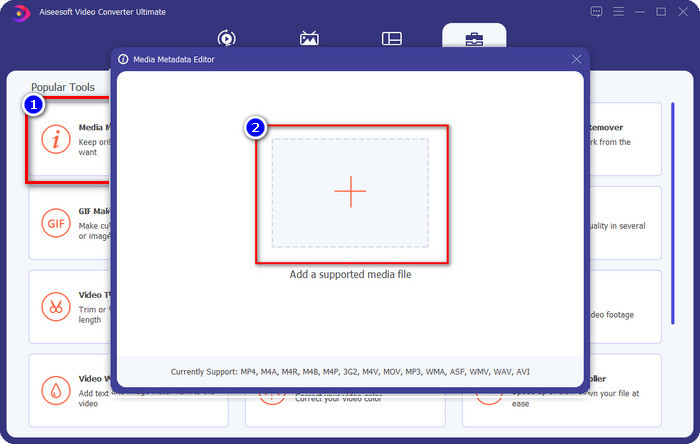
ขั้นตอนที่ 2. เมื่อโปรแกรมเปิดอยู่ ให้คลิกที่ Toolbox จากนั้นเลือก Media Metadata Editor จะมีหน้าต่างเล็ก ๆ เปิดขึ้นมา ให้คลิกปุ่ม + เพื่อเพิ่มไฟล์มีเดียที่คุณต้องการเปลี่ยนข้อมูลเมตาของวันที่และเวลา แล้วคลิก Open เพื่อดำเนินการต่อ.
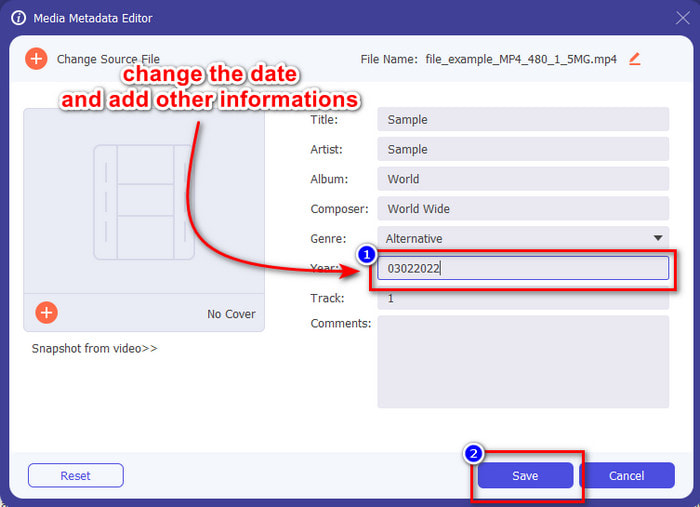
ขั้นตอนที่ 3. ตอนนี้คุณสามารถเปลี่ยนวันที่ของไฟล์มีเดียที่อัปโหลดได้ตามปีที่ต้องการ แล้วคลิก Save เมื่อทำเสร็จแล้ว อย่าลืมว่าคุณยังสามารถเปลี่ยนข้อมูลเมตาอื่น ๆ ก่อนกดปุ่ม Save ได้หากต้องการ ง่ายนิดเดียวใช่ไหม? โปรแกรมตัวนี้มอบประสบการณ์การใช้งานที่ยอดเยี่ยมสำหรับผู้ใช้ที่ต้องการเครื่องมือปรับแต่งข้อมูลเมตาที่ใช้งานได้ดี.
ส่วนที่ 4 คำถามที่พบบ่อยเกี่ยวกับ File Date Changer
จะดูข้อมูลเมตาของวันที่และเวลาได้อย่างไร
การดูแท็กวันที่และเวลาเป็นเรื่องง่าย หากคุณอ่านและทำตามคำแนะนำในบทความนี้ หากคุณต้องการทราบข้อมูลเพิ่มเติมเกี่ยวกับวิธีดูข้อมูลเมตาของไฟล์ คุณสามารถคลิกลิงก์นี้แล้วอ่านรายละเอียดให้ครบถ้วน.
การเพิ่มข้อมูลเมตามีความสำคัญหรือไม่
แน่นอนว่าสำคัญ เพราะด้วยรายละเอียดเล็ก ๆ น้อย ๆ ของไฟล์ เราสามารถช่วยให้คุณรู้คร่าว ๆ ได้ว่าในไฟล์มีอะไรอยู่ก่อนที่จะเปิด หรือคุณจะใช้ข้อมูลเมตาเหล่านี้มาจัดเรียงไฟล์ให้เป็นระบบก็ได้ หากคุณต้องการทำความเข้าใจข้อมูลเมตาอย่างครบถ้วน คุณสามารถกดที่ลิงก์นี้.
ทำไมแท็กเวลาและวันที่ของฉันหายไป?
มีสาเหตุหลายประการที่ทำให้ข้อมูลเมตาของเราหายไปตามเวลาและวันที่ ก่อนอื่น หากดาวน์โหลดไฟล์มีเดียบนเว็บ ข้อมูลเวลาและวันที่อาจถูกลบโดยเจ้าของดั้งเดิมของไฟล์ แต่ถ้าคุณไม่ได้ดาวน์โหลดไฟล์มีเดียและคุณเอาไปเอง ปัญหาอาจเกิดจากกระบวนการบันทึกไฟล์ หากคุณต้องการจำวันที่และเวลาที่แน่นอน คุณต้องอ่านบทความนี้เพื่อทราบว่าแท็กเวลาและวันที่มีความสำคัญเพียงใด
สรุป
การใช้เครื่องมือเปลี่ยนวันที่ไฟล์ที่ถูกต้องเพื่อเปลี่ยนวันและเวลาเป็นเรื่องสำคัญ เราได้คัดสรรตัวเลือกที่ดีที่สุดสำหรับทำงานนี้ไว้ในรีวิวแล้ว ตอนนี้คุณเพียงต้องเลือกวิธีที่คิดว่าเหมาะกับคุณที่สุด แม้ว่าแต่ละวิธีจะทำงานได้ดี แต่ FVC Video Converter Ultimate ก็ยังคงไร้คู่แข่งในงานประเภทนี้ ทำไมถึงไม่มีใครเทียบได้? คุณจะรู้คำตอบก็ต่อเมื่อดาวน์โหลดและลองใช้ซอฟต์แวร์นี้ แล้วจะรออะไรอยู่? ตอนนี้คุณควรทำตามขั้นตอนด้านบนเพื่อใช้เครื่องมือที่ดีที่สุดในการแก้ปัญหานี้.
-
 สุดยอดเครื่องมือแก้ไขแท็ก ID3 บน Windows/Mac/iOS/Android [พิสูจน์แล้ว]
 การแก้ไขแท็ก ID3 เป็นปัญหาสำหรับคุณหรือไม่? ถ้าใช่ บทความนี้เหมาะสำหรับคุณ อ่านรายละเอียดทั้งหมดด้านล่างเกี่ยวกับตัวแก้ไขแท็ก ID3 ที่จะใช้
-
 วิธีเปลี่ยนรายละเอียดไฟล์ใน Windows 10/11 [วิธีที่ง่ายที่สุด]
 ต้องการทราบวิธีการเปลี่ยนรายละเอียดไฟล์ใน Windows 10/11 หรือไม่? ถ้าใช่ นี่คือบทความที่คุณต้องอ่านพร้อมรายละเอียดที่สำคัญและเครื่องมือในการใช้งาน
-
 7 สุดยอดเครื่องมือแก้ไขข้อมูลเมตาสำหรับสื่อ/รูปภาพ/เอกสาร [เว็บ & ออฟไลน์]
 ต้องการทราบตัวแก้ไขข้อมูลเมตาที่ดีที่สุดหรือไม่? โชคดีที่บทความนี้มีตัวแก้ไขข้อมูลเมตาที่ดีที่สุดที่คุณสามารถใช้เพื่อเปลี่ยนแท็กในทุกไฟล์ได้อย่างง่ายดาย
