


 Video Converter Ultimate
 บันทึกหน้าจอ
 ซ่อมวิดีโอ
 ดาวน์โหลดอย่างปลอดภัย
เคล็ดลับและเคล็ดลับในการลบลายน้ำ Powtoon บนวิดีโออย่างมีประสิทธิภาพ
คุณเคยสร้างแอนิเมชันที่สมบูรณ์แบบแล้วพอส่งออกไฟล์ ปรากฏว่า Powtoon ใส่ลายน้ำทับลงไปไหม? กรณีแบบนี้มักเกิดขึ้นเมื่อคุณใช้เวอร์ชันฟรีของแอป ลายน้ำทำให้วิดีโอของคุณเสียอรรถรสไปหรือเปล่า? ไม่ต้องกังวลอีกต่อไป! คุณสามารถเรียนรู้ได้ว่าจะลบลายน้ำของ Powtoon อย่างไรด้วยวิธีการต่าง ๆ ที่เราได้รวบรวมไว้ที่นี่.

ส่วนที่ 1. วิธีลบลายน้ำ Powtoon โดยไม่ต้องสมัครสมาชิก [ตัวเลือกบรรณาธิการ]
FVC Video Converter Ultimate เป็นมากกว่าโซลูชันแบบครบวงจรที่คุณสามารถดาวน์โหลดได้ทั้งบน Windows และ Mac เพื่อใช้ลบลายน้ำของ Powtoon แม้ว่าคุณจะไม่มีประสบการณ์ในการลบลายน้ำออกจากวิดีโอที่สร้างขึ้นเลยก็ตาม คุณก็ยังสามารถทำได้ที่นี่ ทั้งสะดวกและรวดเร็ว ซึ่งเป็นประสบการณ์ที่ FVC ต้องการมอบให้ผู้ใช้ และก็ทำออกมาได้ดีมาก ดังนั้น หากคุณอยากลองลบลายน้ำด้วยตัวเอง ก็ทำตามขั้นตอนที่เราใส่ไว้ให้ได้เลย.
ขั้นตอนการลบลายน้ำ Powtoon ด้วย FVC Video Converter Ultimate:
ขั้นตอนที่ 1 คุณสามารถมีซอฟต์แวร์ตัดต่อวิดีโอที่น่าประทับใจที่สุดบน Windows และ Mac ได้เพียงคลิกปุ่มดาวน์โหลดด้านล่าง จากนั้นติดตั้งซอฟต์แวร์ ตั้งค่าระบบอย่างรวดเร็ว แล้วเปิดโปรแกรมขึ้นมา.
ดาวน์โหลดฟรีสำหรับ Windows 7 หรือใหม่กว่าดาวน์โหลดอย่างปลอดภัย
ดาวน์โหลดฟรีสำหรับ MacOS 10.7 หรือใหม่กว่าดาวน์โหลดอย่างปลอดภัย
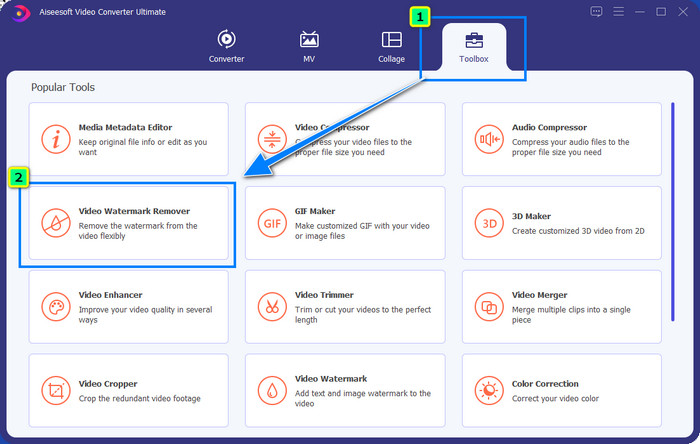
ขั้นตอนที่ 2 ที่เมนู Toolbox ให้คลิก Video Watermark Remover เพื่อลบลายน้ำที่ Powtoon ใส่ไว้บนวิดีโอที่คุณตัดต่อ.
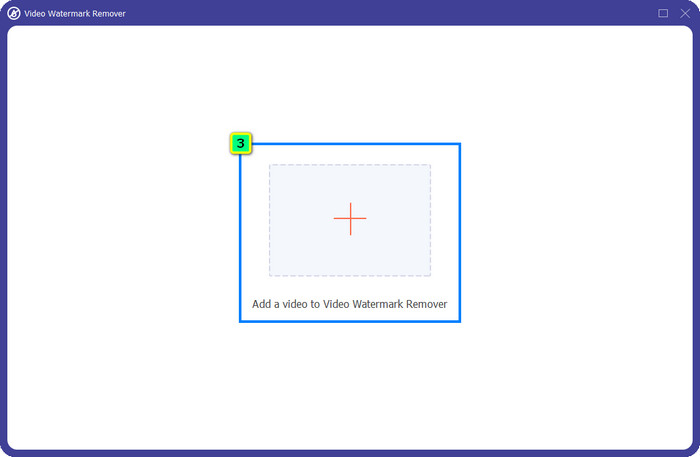
ขั้นตอนที่ 3 จากนั้นกดไอคอน + เพื่ออัปโหลดวิดีโอที่คุณต้องการแก้ไข เลือกไฟล์วิดีโอจากโฟลเดอร์ที่แสดงขึ้นมา แล้วกด Open.
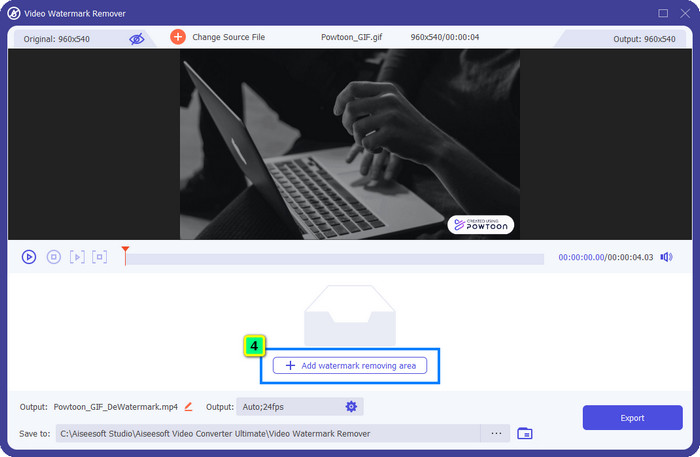
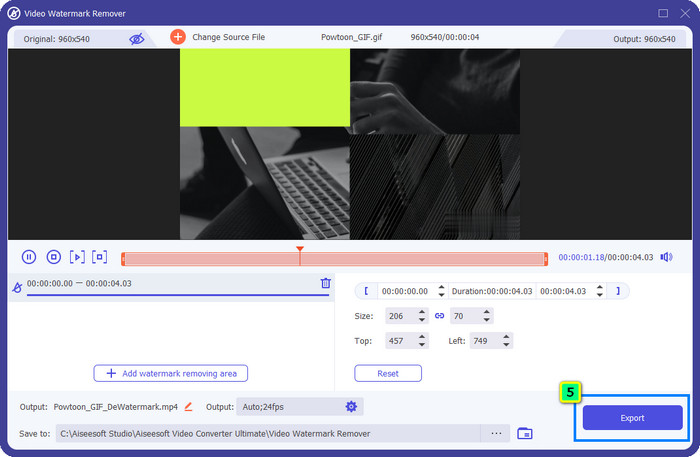
ขั้นตอนที่ 4 กด Add Watermark Removing Area แล้วลากกรอบเลือกไปวางทับบริเวณที่มีลายน้ำ คุณสามารถปรับขนาดและตำแหน่งได้ตามต้องการ
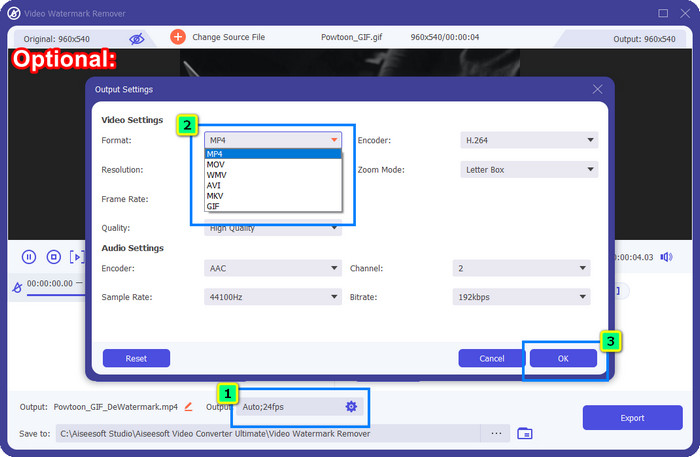
ตัวเลือกเพิ่มเติม: อยากบันทึกวิดีโอที่เสร็จแล้วเป็นรูปแบบไฟล์ใหม่ไหม? คลิกที่ Output ตรง Format แล้วเลือกฟอร์แมตวิดีโอใหม่ที่คุณต้องการ คุณยังสามารถปรับการตั้งค่าวิดีโอและเสียงอื่น ๆ ได้ จากนั้นคลิก OK เพื่อบันทึกการเปลี่ยนแปลง.
ขั้นตอนที่ 5 กดปุ่ม Export เพื่อดาวน์โหลดวิดีโอที่คุณได้ลบลายน้ำออกแล้ว.
ส่วนที่ 2. วิธีการลบ Powtoon Watermark ด้วยการสมัครสมาชิก [ตามแผน]
Powtoon มีลายน้ำไหม? ใช่ มันจะเพิ่มลายน้ำเมื่อคุณใช้เวอร์ชันฟรี แต่ถ้าคุณซื้อ Pro หรือ Pro+ คุณสามารถส่งออกผลลัพธ์สุดท้ายโดยไม่มีลายน้ำ ดังนั้น หากคุณต้องการทราบวิธีการซื้อซอฟต์แวร์เพื่อเพลิดเพลินกับวิดีโอที่คุณแก้ไขโดยไม่มีลายน้ำ ให้ทำตามขั้นตอนต่อไป
ขั้นตอนในการซื้อแผน Powtoon Pro และ Pro+:
ขั้นตอนที่ 1 เปิดเว็บไซต์ทางการของ Powtoon แล้วคลิก Pricing เพื่อดูราคาเวอร์ชันโปร.
ขั้นตอนที่ 2 เลือกแพ็กเกจที่คุณต้องการ จะเป็น Pro หรือ Pro+ แล้วคลิก Get Plan.
ขั้นตอนที่ 3 กรอกรายละเอียดการเรียกเก็บเงินที่จำเป็น จากนั้นไปที่ช่องทางการชำระเงิน (Payment Method) แล้วคลิก Make Secure Payment.
ส่วนที่ 3 วิธีลบ Powtoon Watermark ออนไลน์ฟรี [Web-Service]
1. Media.io - Watermark Remover
Media.io - Watermark Remover สามารถลบลายน้ำของ Powtoon ได้ฟรี ใช้งานผ่านเว็บเบราว์เซอร์ใดก็ได้ หมายความว่าคุณไม่ต้องดาวน์โหลดแอปมาติดตั้ง แม้ตัวลบลายน้ำจะใช้ได้ฟรี แต่คุณจำเป็นต้องมีอินเทอร์เน็ตที่เสถียรเพื่อใช้งาน กระบวนการอัปโหลดและดาวน์โหลดจะใช้เวลามากกว่าซอฟต์แวร์ลบลายน้ำตัวแรกที่เราแนะนำ อย่างไรก็ตาม ซอฟต์แวร์นี้ก็เป็นตัวเลือกที่ดีสำหรับคุณ และหากอยากรู้วิธีใช้งานก็ทำตามขั้นตอนด้านล่างนี้.
ขั้นตอนการลบลายน้ำ Powtoon ด้วย Media.io:
ขั้นตอนที่ 1 เปิดหน้าเว็บ แล้วคลิก Choose File เพื่อเพิ่มวิดีโอที่คุณต้องการลบลายน้ำ รอให้โหลดจนเสร็จ ซึ่งอาจใช้เวลานานหรือน้อยขึ้นอยู่กับความเร็วอินเทอร์เน็ต.
ขั้นตอนที่ 2 กด Add Area แล้ววางพื้นที่ลบลายน้ำให้ครอบคลุมบริเวณที่มีลายน้ำอยู่.
ขั้นตอนที่ 3 กด Export เพื่อบันทึกวิดีโอ Powtoon ที่แก้ไขแล้วลงในไดรฟ์เครื่องของคุณ ง่าย ๆ แค่นั้นเอง.
2. Kapwing
Kapwing เป็นอีกหนึ่งเครื่องมือบนเว็บไซต์ที่เชี่ยวชาญในการลบลายน้ำออกจากวิดีโอด้วยการครอป นอกจากนี้ ยังมีฟีเจอร์ตัดต่อเพิ่มเติมให้ใช้เพื่อสร้างวิดีโอที่โดดเด่น ซึ่งมีความสามารถใกล้เคียงกับ Powtoon ต่างจากตัวแก้ปัญหาลายน้ำอื่น ๆ ที่เราแนะนำไป ซอฟต์แวร์นี้จะเปลี่ยนสัดส่วนของวิดีโอเพราะต้องครอปเอาลายน้ำออก หากคุณไม่ติดเรื่องขนาดวิดีโอที่ถูกตัดออกไป ลองทำตามขั้นตอนด้านล่างเพื่อกำจัดลายน้ำของ Powtoon.
ขั้นตอนการครอปลายน้ำ Powtoon ด้วย Kapwing:
ขั้นตอนที่ 1 ใช้เบราว์เซอร์ของคุณค้นหาโปรแกรมแล้วเปิดขึ้นมา.
ขั้นตอนที่ 2 คลิก Add Media เพื่อเพิ่มวิดีโอที่คุณต้องการครอปเข้ามา.
ขั้นตอนที่ 3 เมื่อนำคลิปเข้ามาแล้ว ให้คลิก Crop เพื่อปรับอัตราส่วนให้ได้ขนาดตามที่คุณต้องการ.
ขั้นตอนที่ 4 หากต้องการบันทึกวิดีโอที่เสร็จสมบูรณ์ ให้คลิก Done Cropping.
ส่วนที่ 4 คำถามที่พบบ่อยเกี่ยวกับวิธีการลบ Powtoon Watermark
แพลตฟอร์มใดที่ดีที่สุดในการเพิ่มความละเอียดวิดีโอบน Powtoon?
มีวิธีมากมายหลายล้านแบบในการเพิ่มความละเอียดวิดีโอที่คุณสร้างด้วย Powtoon อย่างไรก็ตาม บางวิธีอาจไม่ได้ผลอย่างที่คาดหวัง แทนที่คุณจะต้องมาลองผิดลองถูกเอง เราจะทำงานยาก ๆ แทนคุณ และคุณเพียงแค่ใช้เวลาไม่กี่นาทีอ่านบทความนี้ จากนั้นเลือกดูว่าตัวแปลงความละเอียดวิดีโอทั้ง 8 ตัวตัวไหนที่ตรงกับความต้องการของคุณมากที่สุด.
จะเพิ่มลายน้ำให้กับวิดีโอได้อย่างไร?
วิธีที่ดีที่สุดในการเพิ่มลายน้ำให้วิดีโอคือการใช้ซอฟต์แวร์ ไม่ว่าจะเป็นข้อความ โลโก้ ตราประทับ วันที่และเวลา หรืออื่น ๆ หากคุณมีเวลาว่าง ลองอ่านและทำความเข้าใจวิธีการใส่ลายน้ำลงบนวิดีโอบนแพลตฟอร์มต่าง ๆ ได้อย่างง่ายดาย.
ทำไม Powtoon ถึงมีราคาแพง?
Powtoon กลายเป็นราคาแพงเนื่องจากการตัดต่อแอนิเมชั่นที่คุณไม่สามารถมีในโปรแกรมตัดต่อวิดีโออื่นได้เป็นส่วนใหญ่ ไม่ว่าจะออนไลน์หรือออฟไลน์ มันยังใช้ได้ทุกที่ทุกเวลา คุณจึงไม่ต้องติดตั้งตัวเรียกใช้งานเพื่อเริ่มใช้งาน ถึงกระนั้นราคาของมันก็ไม่สามารถเอื้อมถึงได้หลายคน แทนที่จะใช้เวอร์ชันฟรีของ Powtoon และมีลายน้ำ ให้ลองใช้โปรแกรมตัดต่อวิดีโอทางเลือกที่ดีที่สุด นั่นคือ FVC Video Converter Ultimate มันมีคุณสมบัติและฟังก์ชั่นมากมายที่คุณสามารถใช้งานได้อย่างแน่นอน
สรุป
คุณสามารถบันทึกวิดีโอจาก Powtoon แบบไม่มีลายน้ำได้ แต่ต้องซื้อแพ็กเกจจึงจะบันทึกวิดีโอที่ตัดต่อแล้วโดยไม่ติดลายน้ำได้ ไม่ชอบไอเดียการต้องซื้อแพ็กเกจใช่ไหม? ถ้าอย่างนั้นลองใช้ตัวลบลายน้ำออนไลน์ที่เราแนะนำดู อินเทอร์เน็ตช้า? ถ้าเช่นนั้นเราขอแนะนำให้คุณใช้ FVC Video Converter Ultimate เพื่อลบลายน้ำบนวิดีโออย่างรวดเร็วและดูเป็นมืออาชีพ เมื่อเทียบกับซอฟต์แวร์นับล้านตัว FVC Video Editor มอบโซลูชันที่มีประสิทธิภาพสูงสุดในการลบสิ่งไม่ต้องการออกจากวิดีโอของคุณ คุณยังสามารถปรับแต่งเพิ่มเติมได้ด้วยฟีเจอร์และฟังก์ชันที่ซอฟต์แวร์นี้มีให้.
-
 ลบลายน้ำออกจาก PDF อย่างง่ายดายด้วยขั้นตอนง่าย ๆ
 ลบลายน้ำออกจาก PDF โดยทำตามขั้นตอนง่าย ๆ เหล่านี้ เรียนรู้วิธีลบลายน้ำออกจากไฟล์ PDF ของคุณอย่างง่ายดายโดยใช้เครื่องมือที่น่าทึ่งเหล่านี้
-
 วิธีง่ายๆ ในการลบลายน้ำออกจากรูปภาพจบการศึกษา
 ต้องการทราบวิธีที่ดีที่สุดในการลบลายน้ำออกจากรูปภาพจบการศึกษาหรือไม่? โดยการอ่านบทความนี้ คุณจะสามารถรู้วิธีลบลายน้ำบนรูปภาพระดับบัณฑิตได้อย่างง่ายดาย
-
 วิธีลบลายน้ำออกจากวิดีโอโดยใช้ Final Cut Pro [คู่มือฉบับสมบูรณ์]
 มีปัญหากับลายน้ำบนวิดีโอ? ไม่ต้องพูดอีกต่อไป เพราะเราได้จัดเตรียมบทแนะนำเกี่ยวกับวิธีลบลายน้ำออกจากวิดีโอโดยใช้ Final Cut Pro
