


 Video Converter Ultimate
 บันทึกหน้าจอ
 ซ่อมวิดีโอ
 ดาวน์โหลดอย่างปลอดภัย
วิธีและแนวทางแก้ไขยอดนิยมสำหรับการบีบอัดวิดีโอ Twitter
เมื่อต้องการแชร์วิดีโอบน Twitter สิ่งสำคัญคือต้องคำนึงถึงข้อจำกัดของแพลตฟอร์มด้วย Twitter กำหนดขนาดไฟล์วิดีโอไม่เกิน 512 MB ซึ่งอาจเป็นอุปสรรคหากคุณพยายามอัปโหลดวิดีโอคุณภาพสูงหรือวิดีโอที่มีความยาวมาก ตรงนี้เองที่การบีบอัดวิดีโอเข้ามามีบทบาท การบีบอัดวิดีโอคือวิธีการลดขนาดไฟล์วิดีโอโดยยังคงรักษาคุณภาพไว้ในระดับหนึ่ง เมื่อบีบอัดวิดีโอแล้ว คุณสามารถลดขนาดไฟล์และทำให้อัปโหลดและแชร์บน Twitter ได้สะดวกขึ้น วิดีโอที่ถูกบีบอัดยังใช้เวลาโหลดน้อยลง ช่วยให้ผู้ใช้ที่มีอินเทอร์เน็ตช้ากว่าสามารถรับชมและอัปโหลดไฟล์เหล่านี้ได้ง่ายขึ้น โชคดีที่โซลูชันด้านล่างนี้คือเครื่องมือที่เชื่อถือได้ที่สุดในการบีบอัดวิดีโอสำหรับ Twitter.

ส่วนที่ 1 วิธีการบีบอัดวิดีโอสำหรับ Twitter
1. Video Converter Ultimate
Video Converter Ultimate เป็นโปรแกรมจัดการวิดีโอทรงพลังที่ช่วยให้ผู้ใช้บีบอัดวิดีโอให้เหมาะกับแพลตฟอร์มแชร์วิดีโอ รวมถึง Twitter, Instagram, Facebook และอื่น ๆ แอปพลิเคชันนี้สามารถลดขนาดไฟล์วิดีโอความละเอียด 8K และความละเอียดวิดีโอรูปแบบอื่น ๆ ได้ มาพร้อมยูทิลิตี้วิดีโอขั้นสูงหลายประเภทที่สามารถบีบอัดวิดีโอ สร้างวิดีโอ 3D แปลงไฟล์ ทำมิวสิกวิดีโอ และฟังก์ชันอื่น ๆ ที่คุณใช้ปรับแต่งไฟล์ดิจิทัลของคุณได้ จุดเด่นที่ทำให้เครื่องมือนี้โดดเด่นในการบีบอัดวิดีโอคือความสามารถในการปรับแต่งพารามิเตอร์ของวิดีโอเพื่อลดขนาดไฟล์วิดีโอ และยังคงคุณภาพเอาต์พุตที่ยอดเยี่ยมบนอุปกรณ์ของคุณ ดูวิธีการใช้งานอย่างละเอียดด้านล่างเพื่อเรียนรู้วิธีใช้แอปนี้.
ขั้นตอนที่ 1 ดาวน์โหลด Video Converter Ultimate
รับและรับแอปบนอุปกรณ์ของคุณโดยคลิกปุ่มดาวน์โหลดฟรีที่แสดงด้านล่าง โปรดตรวจสอบให้แน่ใจว่าได้ดาวน์โหลดไฟล์ติดตั้งโดยสมบูรณ์แล้ว จากนั้น เข้าถึงโฟลเดอร์ของอุปกรณ์เพื่อเรียกใช้และติดตั้งแอป เรียกใช้เครื่องมือและสำรวจฟีเจอร์ต่างๆ เพื่อขั้นตอนการทำงานที่ดีขึ้น
ดาวน์โหลดฟรีสำหรับ Windows 7 ขึ้นไปดาวน์โหลดอย่างปลอดภัย
ดาวน์โหลดฟรีสำหรับ MacOS 10.7 หรือใหม่กว่าดาวน์โหลดอย่างปลอดภัย
ขั้นตอนที่ 2 นำเข้าไฟล์วิดีโอ
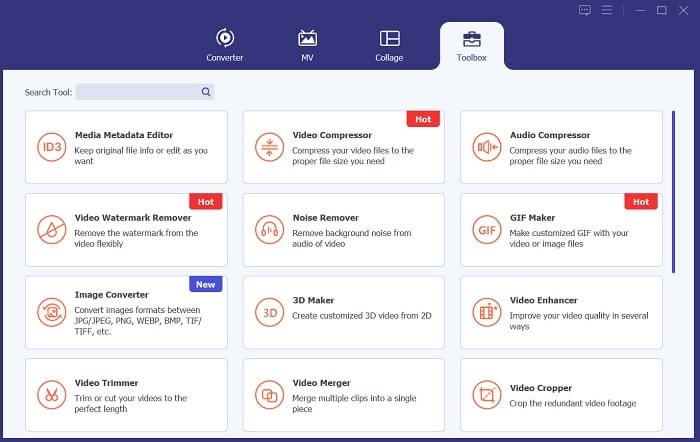
ในขั้นตอนถัดไป ให้เข้าไปที่ตัวเลือก Toolbox ซึ่งมีฟีเจอร์ขั้นสูง จากนั้นเลือก Video Compressor เพื่อเปิดการทำงานของเครื่องมือนี้ จะมีหน้าใหม่ปรากฏขึ้นเพื่อให้คุณนำเข้าไฟล์วิดีโอ กดไอคอน + เพื่อเพิ่มไฟล์ลงในแอป.
ขั้นตอนที่ 3 บีบอัดและส่งออก
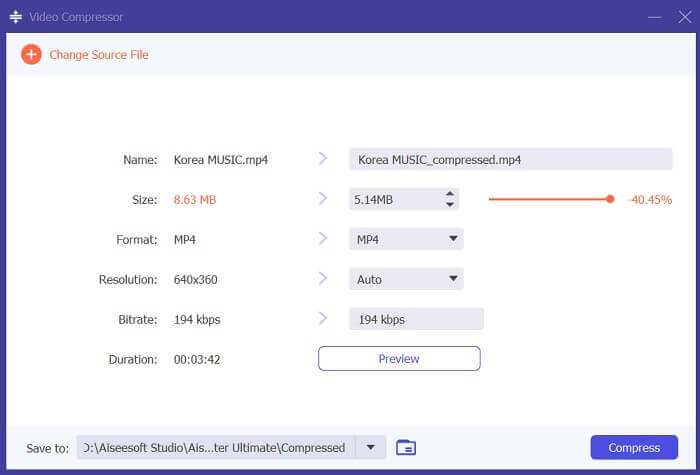
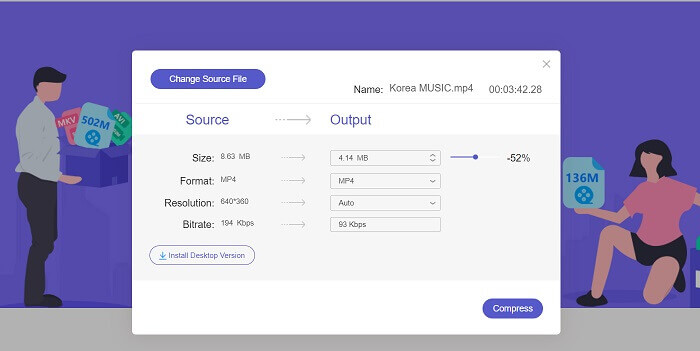
สุดท้าย บีบอัดไฟล์วิดีโอโดยใช้แถบเลื่อนเพื่อกำหนดเปอร์เซ็นต์ที่ต้องการลดขนาดไฟล์วิดีโอ คุณยังสามารถใช้พารามิเตอร์อื่น ๆ ได้ด้วยการเปลี่ยนความละเอียดไฟล์ รูปแบบไฟล์ และบิตเรต จากนั้นกดตัวเลือก Compress เพื่อลดขนาดไฟล์วิดีโอและส่งออกไปยังคอมพิวเตอร์ของคุณ จากนั้นคุณสามารถแชร์บน Twitter ได้โดยลากวิดีโอไปยังตัวเลือก What's Happening?.
2. โปรแกรมบีบอัดวิดีโอฟรี FVC
วิธีถัดไปที่คุณสามารถใช้บีบอัดวิดีโอสำหรับ Twitter คือ FVC Free Video Compressor แอปนี้เป็นเครื่องมือออนไลน์ที่เหมาะสำหรับผู้ใช้ที่ต้องการบีบอัดวิดีโอโดยไม่ยุ่งยาก เพียงเปิดบนเว็บเบราว์เซอร์ของคุณก็สามารถบีบอัดไฟล์วิดีโอได้เร็วกว่าที่เคย ใช้ API ขั้นสูงที่ช่วยให้การทำงานสะดวกขึ้น สามารถบีบอัดวิดีโอหลายไฟล์ได้โดยไม่มีขีดจำกัด นอกจากนี้แอปนี้ยังให้ใช้งานฟรีและปราศจากโฆษณาน่ารำคาญ คุณสามารถดูวิธีใช้งานแบบละเอียดด้านล่างเพื่อใช้งานตัวบีบอัดวิดีโอออนไลน์นี้.
ขั้นตอนที่ 1 เข้าถึงเครื่องมือออนไลน์
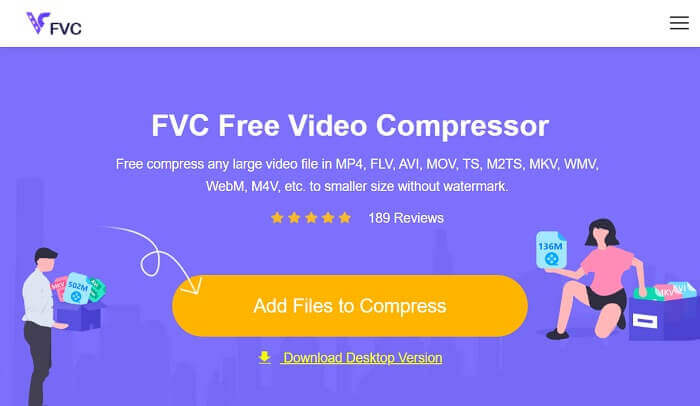
กระตุ้นกระบวนการบีบอัดวิดีโอสำหรับ Twitter โดยการเข้าถึง FVC Free Video Compressor บนเว็บเบราว์เซอร์ของคุณ เปิดอินเทอร์เฟซหลักและนำทางหน้าเว็บหลัก สำหรับผู้ใช้แอปนี้เป็นครั้งแรก คุณต้องดาวน์โหลด Launcher ก่อนจึงจะเข้าถึงฟีเจอร์การบีบอัดได้
ขั้นตอนที่ 2 นำเข้าไฟล์วิดีโอ
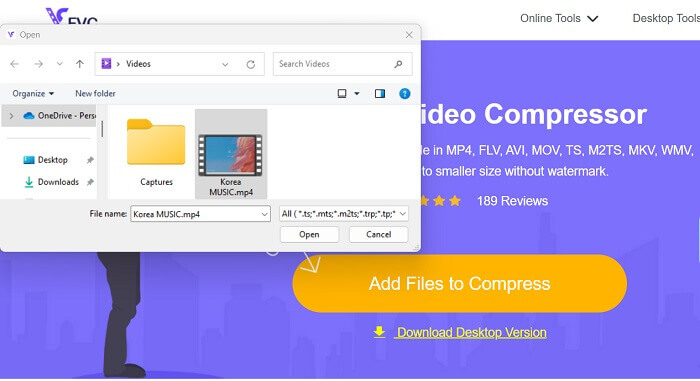
นำเข้าไฟล์วิดีโอมายังอินเทอร์เฟซของเครื่องมือโดยคลิกไอคอน Add Files to Compress เครื่องมือออนไลน์จะเข้าถึงโฟลเดอร์ของคอมพิวเตอร์คุณ จากนั้นค้นหาและเลือกวิดีโอที่ต้องการบีบอัด กดปุ่มหรือไอคอน Open เพื่อนำเข้าไฟล์วิดีโอ.
ขั้นตอนที่ 3 บีบอัดวิดีโอสำหรับ Twitter
สุดท้าย เลื่อนแถบเลื่อนเพื่อลดหรือบีบอัดวิดีโอต้นฉบับ คุณสามารถปรับบิตเรต ความละเอียด และรูปแบบไฟล์เพื่อช่วยลดขนาดวิดีโอได้มากขึ้น จากนั้นให้กดปุ่ม Compress เพื่อส่งออกและบันทึกไฟล์.
3. โปรแกรมบีบอัดวิดีโอและเครื่องตัดวิดีโอ
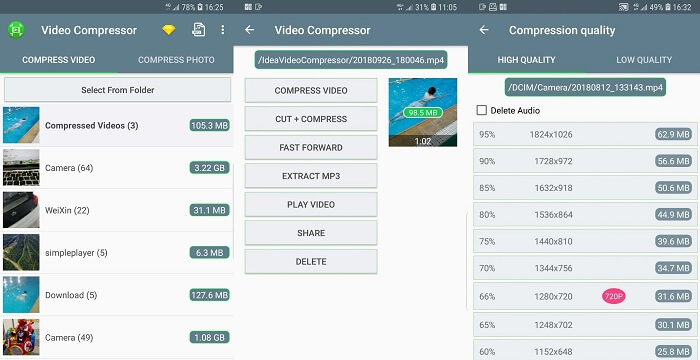
คุณต้องการแอพมือถือที่ตรงไปตรงมาซึ่งสามารถลดขนาดวิดีโอสำหรับวิดีโอ Twitter ของคุณหรือไม่? Video Compressor & Video Cutter เป็นแอปที่สามารถช่วยคุณดำเนินการขั้นตอนนี้ได้ทันที จุดขายหลักคือความสามารถในการบีบอัดวิดีโอพร้อมกันโดยใช้กระบวนการแปลงเป็นชุด คุณลักษณะนี้ดีเมื่อคุณต้องบีบอัดวิดีโอหลายรายการ ซึ่งเป็นงานที่ลำบากและใช้เวลานาน คุณสามารถตรวจสอบคำแนะนำด้านล่างเพื่อเรียนรู้วิธีการทำงานของเครื่องมือนี้ในการบีบอัดวิดีโอสำหรับ Twitter
ขั้นตอนที่ 1 ติดตั้งแอป Video Compress & Video Cutter บนอุปกรณ์มือถือของคุณโดยเข้าไปที่และเปิด Google Play Store จากนั้นค้นหาแอปและเข้าไปยังหน้าดาวน์โหลดเพื่อติดตั้งลงบนอุปกรณ์มือถือ กดตัวเลือก Install เพื่อดาวน์โหลดตัวบีบอัดวิดีโอทันที.
ขั้นตอนที่ 2 เข้าสู่หน้าหลักของแอปและไปที่ตัวเลือก Video Compressor เพื่อดูรายชื่อไฟล์ของคุณ จากนั้นเลือกวิดีโอที่ต้องการบีบอัดและปล่อยให้เครื่องมือทำการวิเคราะห์.
ขั้นตอนที่ 3 สุดท้าย กด Compress Video จากรายการตัวเลือกเพื่อลดขนาดไฟล์มีเดียของคุณ เมื่อวิดีโอถูกส่งออกเรียบร้อยแล้ว คุณก็สามารถแชร์ไฟล์วิดีโอนั้นบนบัญชี Twitter ของคุณได้.
4. บีบอัดวิดีโอและปรับขนาดวิดีโอ
มีโปรแกรมบีบอัดวิดีโอทั่วไปเพื่อลดขนาดไฟล์วิดีโอของสื่อดิจิทัลของคุณ อย่างไรก็ตาม บีบอัดวิดีโอและปรับขนาดวิดีโอเป็นเครื่องมือที่เชื่อถือได้ซึ่งคุณต้องใช้ในการบีบอัดวิดีโอตามข้อจำกัดและข้อบังคับของ Twitter มาพร้อมกับเทคโนโลยีอันทรงพลังที่มีคุณสมบัติในการลดขนาดไฟล์วิดีโอ ไม่มีลายน้ำในไฟล์เอาต์พุตซึ่งคุณสามารถส่งออกรูปลักษณ์ที่สะอาดตาสำหรับวิดีโอของคุณได้ ตรวจสอบขั้นตอนที่ระบุไว้สำหรับแอพนี้
ขั้นตอนที่ 1 ติดตั้งแอป Compress Videos & Resize Videos บนอุปกรณ์มือถือของคุณ เข้าไปที่ App Store และค้นหาชื่อแอป กดไอคอน Install บนหน้าหลักของแอป.
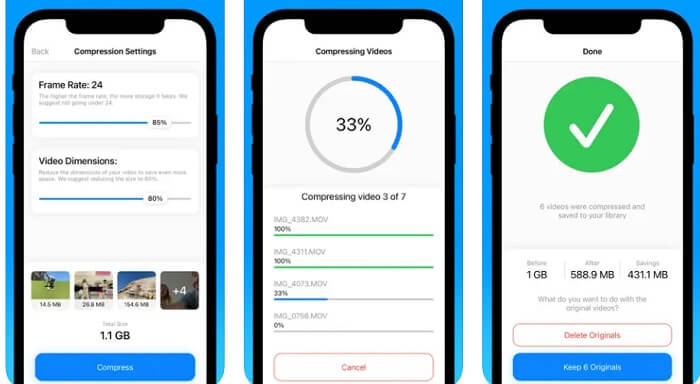
ขั้นตอนที่ 2 เปิดหน้าหลักและนำเข้าไฟล์วิดีโอเข้ามายังแอปโดยเข้าไปที่ Video Albums เลือกวิดีโอที่คุณต้องการบีบอัดและกดปุ่ม/ไอคอน Compress เพื่อลดขนาดไฟล์.
ขั้นตอนที่ 3 รอให้แอปประมวลผลไฟล์ของคุณ จากนั้นคุณสามารถเลือกได้ระหว่าง Keep 6 Originals หรือ Delete Originals เลือกตัวเลือกที่คุณต้องการใช้ แล้วจึงไปที่แอป Photos เพื่อแชร์วิดีโอที่บีบอัดแล้วบน Twitter.
อ่านเพิ่มเติม:
3 วิธีปรับขนาดรูปภาพสำหรับ Twitter โดยไม่ทำให้คุณภาพลดลง
3 วิธีบีบอัดและแปลงไฟล์วิดีโอขนาดใหญ่สำหรับ WhatsApp
ส่วนที่ 2 แผนภูมิเปรียบเทียบ
| คอมเพรสเซอร์วิดีโอ | ข้อได้เปรียบ | ข้อเสีย | แพลตฟอร์ม |
| สุดยอดโปรแกรมบีบอัดวิดีโอ | เครื่องมือนี้มาพร้อมกับตัวเลือกในการสร้างและแก้ไขวิดีโอ 3D ในขณะที่ลดขนาดไฟล์ของวิดีโอเอาต์พุต | เป็นบริการฟรีเมียม และฟีเจอร์ขั้นสูงบางอย่างอยู่ในโหมดทดลองใช้งาน | มีให้บริการบน Mac และ Windows PC |
| FVC Free Video Compressor | มันมาพร้อมกับกระบวนการแปลงเป็นชุด | มันขึ้นอยู่กับความเร็วอินเทอร์เน็ต | สามารถเข้าถึงได้ด้วย Chrome, Firefox, Microsoft Edge และอื่นๆ |
| โปรแกรมบีบอัดวิดีโอและเครื่องตัดวิดีโอ | มันมีคุณสมบัติการบีบอัดภาพและวิดีโอเป็นชุด | ไม่สามารถลดขนาดไฟล์วิดีโอด้วยตนเองได้ | มันเหมาะสำหรับอุปกรณ์ Android |
| บีบอัดวิดีโอและปรับขนาดวิดีโอ | อัลบั้มวิดีโอจะเรียงตามตัวอักษร | ใช้งานได้กับวิดีโอเช่น MP4, MOV และ M4V เท่านั้น | มันเข้ากันได้และเหมาะสมกับ iPhone, iPod touch และ iPad |
ส่วนที่ 3 คำถามที่พบบ่อยเกี่ยวกับการบีบอัดวิดีโอของ Twitter
วิดีโอใดมีขนาดใหญ่เกินไปสำหรับ Twitter
Twitter กำหนดขนาดไฟล์ไว้ที่ 512 MB สำหรับวิดีโอ ดังนั้นวิดีโอใดๆ ที่ใหญ่กว่านั้นจะไม่สามารถอัปโหลดไปยังแพลตฟอร์มได้ สิ่งสำคัญคือต้องจำขนาดวิดีโอของคุณก่อนที่จะพยายามโพสต์บน Twitter เพื่อให้แน่ใจว่าการอัปโหลดจะราบรื่นและประสบความสำเร็จ
ฉันสามารถอัปโหลดวิดีโอ 1080p ไปยัง Twitter ได้หรือไม่
ใช่ คุณสามารถอัปโหลดวิดีโอ 1080p ไปยัง Twitter ได้ อย่างไรก็ตาม Twitter มีการจำกัดขนาดไฟล์วิดีโอสูงสุด นอกจากนี้ โปรดทราบว่าวิดีโอที่ยาวอาจใช้เวลาในการอัปโหลดและประมวลผลนานขึ้น ดังนั้นจึงควรอดทนรอในขณะที่อัปโหลดวิดีโอ
ขนาด MP4 สูงสุดสำหรับ Twitter คือเท่าใด
ขนาด MP4 สูงสุดสำหรับ Twitter คือ 512 MB สิ่งสำคัญคือต้องจำไว้ว่ายิ่งขนาดไฟล์ใหญ่ขึ้นเท่าใด การอัปโหลดก็จะยิ่งนานขึ้นเท่านั้น และผู้ดูก็จะใช้ข้อมูลในการสตรีมมากขึ้นเท่านั้น แนะนำให้บีบอัดวิดีโอเพื่อลดขนาดโดยไม่ลดคุณภาพมากเกินไป
สรุป
โดยสรุป การบีบอัดวิดีโอสำหรับ Twitter เป็นสิ่งจำเป็นเพื่อให้คอนเทนต์ของคุณเข้าถึงผู้ชมได้กว้างขึ้น และหลีกเลี่ยงปัญหาเรื่องข้อจำกัดขนาดไฟล์ เพียงแค่ต้องหาจุดสมดุลที่เหมาะสมระหว่างคุณภาพและขนาดไฟล์ เพื่อมอบประสบการณ์การรับชมที่ดีที่สุดแก่ผู้ชมของคุณ วิธีการที่ระบุไว้ด้านบนคือวิธีที่ดีที่สุดในการบีบอัดวิดีโอสำหรับ Twitter ขอให้คุณลองใช้งานและประเมินว่าเครื่องมือใดเหมาะกับคุณมากที่สุด.
-
 วิธีบีบอัดวิดีโอ GoPro จาก 4K เป็น 1080p (ฟรีและออนไลน์)
 เมื่อคุณใช้กล้อง GoPro ในการถ่ายวิดีโอโดยปกติขนาดไฟล์ของวิดีโอที่ถ่ายจะมีขนาดใหญ่มากซึ่งจะแชร์กับผู้อื่นได้ยาก ดังนั้นโพสต์นี้จะแสดงวิธีการบีบอัดวิดีโอ GoPro
-
 2 วิธีในการบีบอัดวิดีโอสำหรับ YouTube
 วิดีโอ YouTube มีขนาดใหญ่และอัปโหลดช้า? เพียงบีบอัดขนาดไฟล์วิดีโอให้เล็กลงสำหรับ YouTube ได้ 2 วิธีทางออนไลน์และบนคอมพิวเตอร์
-
 วิธีการบีบอัดวิดีโอฟรีสำหรับ Facebook จาก GBs เป็น MBs
 หากคุณถูกห้ามไม่ให้อัปโหลดวิดีโอขนาดใหญ่บน Facebook ไม่ต้องกังวล เพียงบีบอัดวิดีโอขนาดใหญ่จาก GBs เป็น MBs ด้วยโปรแกรมอัดวิดีโอฟรี
