


 Video Converter Ultimate
 บันทึกหน้าจอ
 ซ่อมวิดีโอ
 ดาวน์โหลดอย่างปลอดภัย
ค้นพบวิธีปรับขนาดวิดีโอบน Android ด้วยวิธีการที่มีประสิทธิภาพ
ไม่ว่าคุณจะเป็นอินฟลูเอนเซอร์สายโซเชียลมีเดีย หรือแค่อยากจะแชร์ทริปท่องเที่ยวล่าสุดกับเพื่อนและครอบครัว การปรับขนาดวิดีโอของคุณก็สามารถสร้างความแตกต่างได้อย่างมาก ไม่เพียงช่วยปรับขนาดไฟล์ให้เหมาะสมเพื่อให้แชร์ได้ง่ายขึ้นเท่านั้น แต่ยังช่วยเพิ่มประสบการณ์การรับชมให้กับผู้ชมของคุณด้วย ในบทความนี้ เราจะสอนคุณวิธีปรับขนาดวิดีโอบน Android ตั้งแต่การปรับอัตราส่วนภาพไปจนถึงการเปลี่ยนความละเอียดวิดีโอ ด้วยคู่มือที่เรียบง่ายและทำตามได้ไม่ยาก คุณจะสามารถปรับขนาดวิดีโอได้อย่างมืออาชีพและยกระดับคอนเทนต์ของคุณไปอีกขั้น.

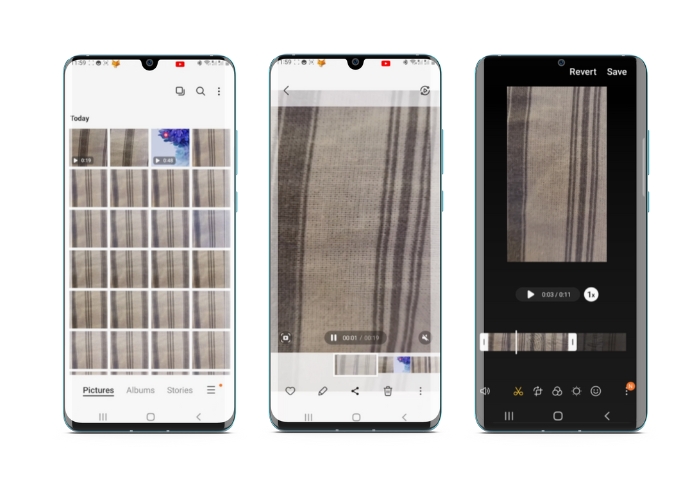
ส่วนที่ 1 บทช่วยสอนวิธีการครอบตัดวิดีโอบน Android ด้วย Samsung Gallery
แอป Samsung Gallery เป็นสิ่งที่ต้องมีในการจัดการและแก้ไขเนื้อหาภาพของคุณ หากคุณเป็นเจ้าของอุปกรณ์ Samsung คุณสมบัติที่มีประโยชน์อย่างหนึ่งของแอปนี้คือความสามารถในการครอบตัดวิดีโอในขณะเดินทาง ช่วยให้ผู้ใช้สามารถลบส่วนที่ไม่ต้องการของวิดีโอหรือปรับอัตราส่วนภาพได้ คุณลักษณะการครอบตัดทำให้ง่ายและสะดวก ด้วย Samsung Gallery คุณสามารถสร้างและแชร์วิดีโอคุณภาพสูงที่เหมาะกับความต้องการของคุณได้อย่างง่ายดาย ดูขั้นตอนด้านล่างเพื่อช่วยคุณใช้เครื่องมือครอบตัดโปรแกรมตัดต่อวิดีโอ Android
ขั้นตอนที่ 1. เปิดแอป Samsung Gallery บนเครื่องของคุณ แล้วค้นหาวิดีโอที่คุณต้องการครอบตัด.
ขั้นตอนที่ 2. แตะที่วิดีโอเพื่อเปิด จากนั้นแตะปุ่ม แก้ไข (ไอคอนดินสอ) ที่ด้านล่างของหน้าจอ จากหน้าจอ แก้ไข ให้เลือกตัวเลือก ครอบตัด.
ขั้นตอนที่ 3. ตอนนี้คุณจะเห็นสี่เหลี่ยมทับอยู่บนวิดีโอ โดยมีจุดจับอยู่ที่มุมทั้งสี่ ลากจุดจับเหล่านั้นเพื่อปรับขนาดสี่เหลี่ยมตามต้องการเพื่อครอบตัดวิดีโอ แตะปุ่ม เล่น เพื่อพรีวิววิดีโอที่ครอบตัดแล้ว.
ขั้นตอนที่ 4. หากคุณพอใจกับผลลัพธ์แล้ว ให้แตะปุ่ม บันทึก เพื่อบันทึกวิดีโอที่ครอบตัดลงในแกลเลอรี.
ส่วนที่ 2 บทสรุป วิธีการครอบตัดวิดีโอบน Android ด้วย Google Photos
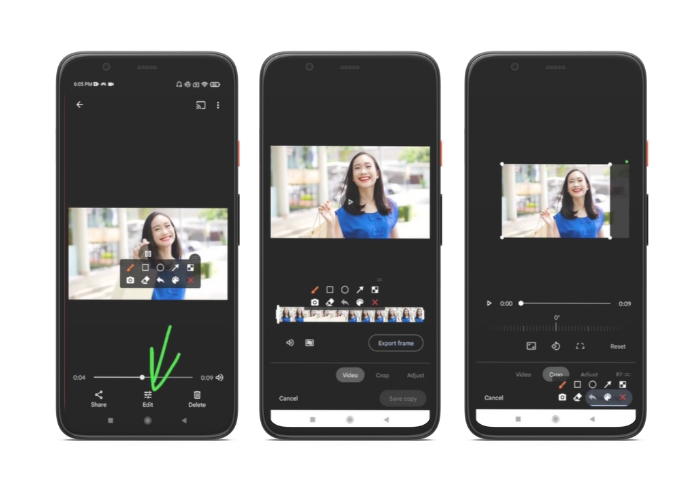
Google Photos เป็นแอปจัดการรูปภาพและวิดีโอยอดนิยมสำหรับผู้ใช้ Android และมาพร้อมกับฟีเจอร์มากมายที่จะช่วยคุณแก้ไขและปรับปรุงเนื้อหาภาพของคุณ ฟีเจอร์ที่ยอดเยี่ยมอย่างหนึ่งของเครื่องมือนี้คือความสามารถในการครอบตัดวิดีโอ ซึ่งช่วยให้คุณลบส่วนที่ไม่ต้องการออกและโฟกัสไปที่ช่วงเวลาที่สำคัญที่สุด คุณสามารถครอบตัดวิดีโอด้วยการแตะเพียงไม่กี่ครั้ง ทำให้การสร้างเนื้อหาวิดีโอที่สวยงามและดูเป็นมืออาชีพบนอุปกรณ์ Android ของคุณเป็นเรื่องง่ายและเป็นธรรมชาติ ที่นี่ เราจะแสดงวิธีการครอบตัดวิดีโอด้วย Google Photos ทีละขั้นตอน
ขั้นตอนที่ 1. เปิดแอป Google Photos บนอุปกรณ์ Android ของคุณ แล้วค้นหาวิดีโอที่ต้องการครอบตัด จากนั้นแตะปุ่ม แก้ไข ที่อยู่ด้านล่างของหน้าจอ.
ขั้นตอนที่ 2. จากหน้าจอแก้ไข ให้เลือกตัวเลือก ครอบตัดและหมุน.
ขั้นตอนที่ 3. ตอนนี้คุณจะเห็นสี่เหลี่ยมทับลงบนวิดีโอ โดยมีจุดจับอยู่ที่มุมทั้งสี่ ใช้จุดจับเหล่านั้นเพื่อปรับขนาดสี่เหลี่ยมตามต้องการเพื่อครอบตัดวิดีโอ.
ขั้นตอนที่ 4. สุดท้ายให้แตะ บันทึก เพื่อบันทึกการเปลี่ยนแปลงที่คุณทำกับวิดีโอ.
ส่วนที่ 3 คำแนะนำวิธีการครอบตัดวิดีโอบน Android ด้วยแอพของบุคคลที่สาม
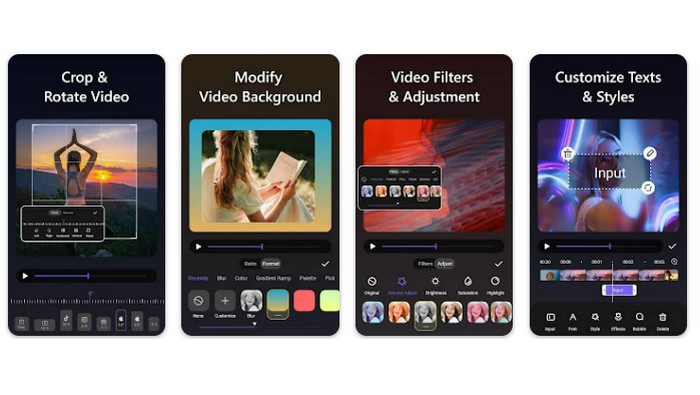
การสร้างและตัดต่อวิดีโออย่างง่ายดายกลายเป็นเรื่องที่ทุกคนที่ใช้มือถือ Android ทำได้แล้ว ด้วยแอป Vid.fun โปรแกรมนี้ให้ผู้ใช้ตัดต่อวิดีโอได้หลายรูปแบบ ทั้งเพิ่มเพลง ข้อความ และเอฟเฟ็กต์ ตัดและเชื่อมวิดีโอหลายคลิปเข้าด้วยกัน และอื่น ๆ อีกมากมาย คุณสามารถเรียนรู้วิธีปรับขนาดวิดีโอบน Android ได้โดยทำตามขั้นตอนการใช้โปรแกรมนี้ด้านล่าง.
ขั้นตอนที่ 1. ดาวน์โหลดแอป Vid.fun จาก Google Play Store จากนั้นเริ่มโปรเจกต์ใหม่.
ขั้นตอนที่ 2. เลือกคลิปที่คุณต้องการครอบตัดจากแกลเลอรีหรือม้วนฟิล์มในอุปกรณ์ของคุณ แล้วลากวางลงในไทม์ไลน์.
ขั้นตอนที่ 3. เลือกช่วงวิดีโอที่ต้องการในไทม์ไลน์โดยแตะที่คลิป จากนั้นใช้ปุ่ม ครอบตัด ที่ด้านล่างของหน้าจอเพื่อปรับแก้ช่วงคลิป.
ขั้นตอนที่ 4. จะมีสี่เหลี่ยมซ้อนทับลงบนวิดีโอ และคุณสามารถลากมุมเพื่อปรับได้ เพื่อครอบตัดวิดีโอ ให้จับที่มุมของสี่เหลี่ยมแล้วลากไปยังตำแหน่งที่ต้องการ เมื่อเสร็จแล้ว คุณสามารถส่งวิดีโอให้คนที่คุณรักหรือโพสต์ออนไลน์ได้.
ส่วนที่ 4 คำแนะนำแอป
แน่นอนว่า นอกจากแอปบนมือถือแล้ว เรายังมีโปรแกรมสำหรับเดสก์ท็อปมาแนะนำด้วย Video Converter Ultimate โดย FVC เป็นซอฟต์แวร์แบบครบวงจรสำหรับแปลงรูปแบบวิดีโอ ซึ่งมาพร้อมด้วยเครื่องมือตัดต่อมากมาย ตัวเลือกในการปรับอัตราส่วนภาพของวิดีโอถือเป็นฟังก์ชันที่โดดเด่น.
ด้วยโปรแกรมนี้ คุณสามารถแก้ไขรูปร่างและขนาดของวิดีโอได้โดยการเปลี่ยนอัตราส่วนภาพ หากคุณต้องการแบ่งปันวิดีโอบนโซเชียลมีเดียด้วยอัตราส่วนภาพเฉพาะ หรือหากคุณต้องการทำให้วิดีโอพอดีกับขนาดหน้าจอเฉพาะ FVC Video Converter Ultimate ช่วยคุณได้ ค้นหาวิธีครอบตัดวิดีโอบน Android ด้วยความช่วยเหลือของโปรแกรมนี้
ขั้นตอนที่ 1. ดาวน์โหลดและติดตั้ง FVC Video Converter Ultimate
คุณสามารถดาวน์โหลดแอปได้โดยคลิกที่ปุ่ม ดาวน์โหลดฟรี ด้านล่าง เมื่อดาวน์โหลดโปรแกรมเสร็จแล้ว ให้ติดตั้งและเปิดใช้งานบนคอมพิวเตอร์ของคุณ.
ดาวน์โหลดฟรีสำหรับ Windows 7 ขึ้นไปดาวน์โหลดอย่างปลอดภัย
ดาวน์โหลดฟรีสำหรับ MacOS 10.7 ขึ้นไปดาวน์โหลดอย่างปลอดภัย
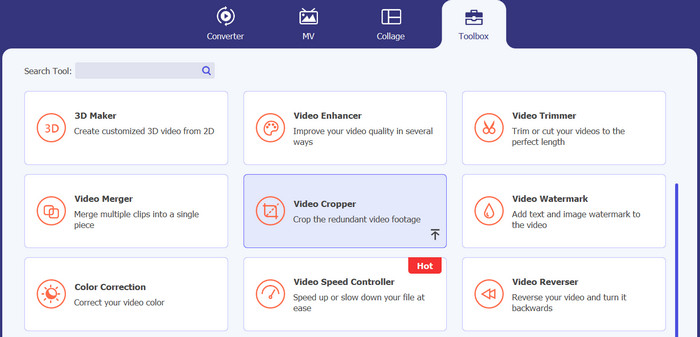
ขั้นตอนที่ 2. นำเข้าวิดีโอที่ต้องการครอบตัด
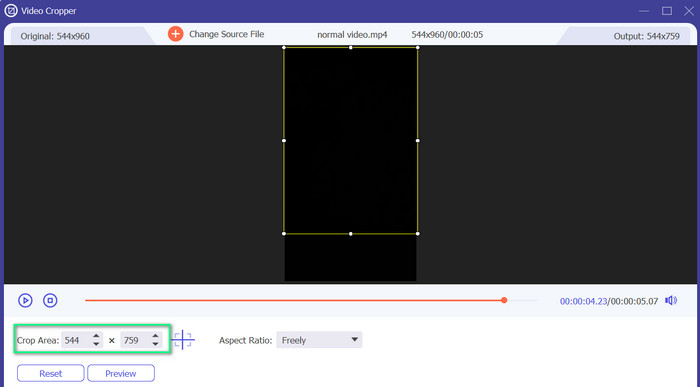
จากนั้นไปที่แท็บ Toolbox ที่อยู่ด้านบนของหน้าอินเทอร์เฟซโปรแกรม แล้วเลือกตัวเลือก Video Cropper และเพิ่มไฟล์โดยคลิกปุ่มสัญลักษณ์ บวก.
ขั้นตอนที่ 3. ครอบตัดไฟล์วิดีโอ
คุณสามารถครอบตัดวิดีโอที่นำเข้าได้แล้ว ใช้แถบเลื่อนพื้นที่ครอบตัด ปรับพื้นที่ที่คุณต้องการครอบตัดจากวิดีโอ คุณยังสามารถเลือกอัตราส่วนเฉพาะจากเมนูแบบเลื่อนลง ดูตัวอย่างวิดีโอที่ครอบตัดเพื่อให้แน่ใจว่าส่วนที่ต้องการของวิดีโอถูกครอบตัดแล้ว
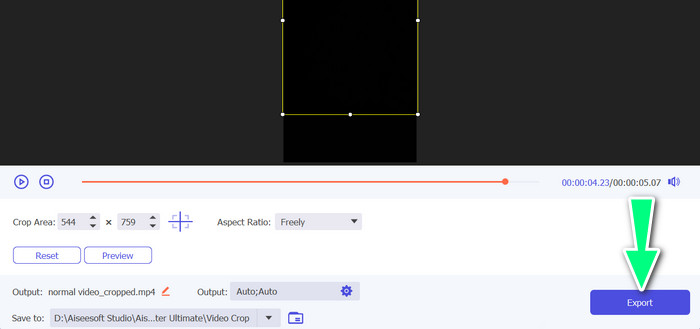
ขั้นตอนที่ 4. ส่งออกวิดีโอที่ครอบตัดแล้ว
สุดท้ายให้คลิกปุ่ม ส่งออก ที่มุมขวาล่างเพื่อจบขั้นตอนการครอบตัดและบันทึกวิดีโอที่ครอบตัดแล้ว.
ส่วนที่ 5 คำถามที่พบบ่อยเกี่ยวกับการครอบตัดวิดีโอบน Android
ฉันจะครอบตัดวิดีโอโดยไม่สูญเสียคุณภาพได้อย่างไร
วิธีหนึ่งในการครอบตัดวิดีโอโดยไม่สูญเสียคุณภาพคือการใช้เครื่องมือแก้ไขวิดีโอที่รองรับการครอบตัดแบบไม่ทำลาย ซึ่งหมายความว่าไฟล์วิดีโอต้นฉบับจะไม่ถูกแก้ไข และเฉพาะส่วนที่ครอบตัดเท่านั้นที่จะถูกบันทึกเป็นไฟล์ใหม่
การครอบตัดวิดีโอบน Android จะส่งผลต่อคุณภาพหรือความละเอียดหรือไม่
ใช่ การครอบตัดวิดีโอบน Android อาจส่งผลต่อคุณภาพหรือความละเอียด เนื่องจากกระบวนการเกี่ยวข้องกับการลบส่วนหนึ่งของวิดีโอต้นฉบับ อย่างไรก็ตาม ขอบเขตที่คุณภาพหรือความละเอียดจะได้รับผลกระทบนั้นขึ้นอยู่กับปัจจัยต่างๆ เช่น ขนาดของการครอบตัด คุณภาพของวิดีโอต้นฉบับ และวิธีการที่ใช้ในการครอบตัดวิดีโอ
เป็นไปได้ไหมที่จะครอบตัดวิดีโอและเพิ่มเอฟเฟกต์หรือฟิลเตอร์พร้อมกันบน Android
ได้ สามารถครอบตัดวิดีโอและใส่เอฟเฟ็กต์หรือฟิล्टरไปพร้อมกันบน Android ได้ มีแอปตัดต่อวิดีโอหลากหลายบน Google Play Store ที่มีทั้งฟังก์ชันครอบตัดและเพิ่มเอฟเฟ็กต์วิดีโอและฟิลเตอร์วิดีโอ ตัวอย่างแอปยอดนิยม เช่น FVC Video Converter Ultimate, Filmora เป็นต้น.
สรุป
การเรียนรู้วิธีครอบตัดวิดีโอบน Android เป็นขั้นตอนง่าย ๆ ที่ทำได้ผ่านหลายแอปและหลายซอฟต์แวร์ Samsung Gallery, Google Photos และ FVC Video Converter Ultimate เป็นเพียงตัวอย่างบางส่วนของเครื่องมือที่ช่วยให้คุณครอบตัดวิดีโอบนอุปกรณ์ Android ได้.
-
 คำแนะนำเกี่ยวกับวิธีการซ่อมแซมวิดีโอที่ไม่เล่นบนโทรศัพท์ Android
 ต้องการทราบว่าเหตุใดจึงไม่สามารถเล่นวิดีโอบนอุปกรณ์ Android ของคุณได้? และถ้าเป็นเช่นนั้น มีวิธีใดบ้างในการแก้ไขปัญหาด้วยตัวคุณเอง? อ่านต่อเพื่อทราบข้อมูลเพิ่มเติม
-
 วิธีที่ง่ายที่สุดในการเร่งความเร็ววิดีโอบนอุปกรณ์ Android ของคุณ [2023]
 คุณรู้หรือไม่ว่าคุณสามารถเพิ่มความเร็ววิดีโอบน Android ของคุณ? ดังนั้น หากคุณต้องการทราบวิธีเพิ่มความเร็ววิดีโอบนโทรศัพท์ Android ของคุณ ให้อ่านบทความนี้
-
 3 วิธีที่ยอดเยี่ยมในการตัดแต่งวิดีโอบน Android
 คุณต้องการใช้อุปกรณ์ Android ของคุณเพื่อตัดวิดีโอหรือไม่? โพสต์นี้เหมาะสำหรับคุณ เราจะหารือถึงวิธีการอันมีค่าเกี่ยวกับวิธีย่อวิดีโอบน Android
