


 Video Converter Ultimate
 บันทึกหน้าจอ
 ซ่อมวิดีโอ
ทบทวนความสำคัญของตัวแก้ไขแท็ก ID3 ในปี 2022
เพลงที่คุณดาวน์โหลดจากเว็บไซต์เพลงมักจะมีเมทาดาทาหรือที่รู้จักกันในชื่อแท็ก ID3 อยู่แล้ว โดยทั่วไป ข้อมูลทั้งหมดที่คุณต้องการเกี่ยวกับเพลงนั้นจะอยู่ในข้อมูลแท็ก แต่บางครั้งไฟล์เพลงอาจไม่มีแท็กหรือมีข้อมูลที่ไม่ถูกต้อง ในสถานการณ์แบบนี้ คุณจำเป็นต้องใช้ซอฟต์แวร์ที่ช่วยจัดการงานนี้ได้อย่างง่ายดาย ดังนั้นเราจึงขอแนะนำ โปรแกรมแก้ไขแท็ก ID3 ที่ดีที่สุดที่คุณสามารถดาวน์โหลดมาใช้บน Windows, Mac, iOS และ Android เพื่อแก้ไขแท็กของเพลงคุณได้.

ส่วนที่ 1. แท็ก ID3 คืออะไร
แท็ก ID3 เป็นสิ่งจำเป็นสำหรับผู้ใช้ทุกคนที่ต้องการทราบข้อมูลเชิงลึกเกี่ยวกับเพลง ตัวอย่างที่เห็นได้ชัดของแท็กที่คุณสามารถมองเห็นได้โดยไม่ต้องเปิดดูแท็กโดยตรงก็คือชื่อศิลปินและชื่อเพลง แม้ว่าเราจะไม่ได้ใส่ข้อมูลเหล่านี้ลงไปเองในไฟล์เสียง ข้อมูลก็ยังถูกฝังอยู่เพื่อช่วยให้เรารู้ว่าเราเปิดเพลงที่ถูกต้องหรือไม่.
อย่างไรก็ตาม หากคุณไม่มีแท็กในเพลงหรือพอดแคสต์ของคุณ ก็มีโอกาสที่ไฟล์จะถูกรบกวนทั่วทั้งไลบรารีหรือโฟลเดอร์ที่จัดเก็บไฟล์เหล่านั้น การเพิ่มแท็กในไฟล์สามารถช่วยให้คุณกำหนดไฟล์และจัดเรียงไฟล์ให้ดูเป็นระเบียบได้ หากไฟล์ของคุณไม่มี คุณต้องเพิ่มข้อมูล หมุนต่อไปเพื่อช่วยคุณค้นหาตัวแก้ไขแท็ก ID3 ที่คุณควรใช้ซึ่งตรงกับความต้องการของคุณ
แต่ก่อนที่เราจะเริ่มต้น โปรดเตรียมข้อมูลเมตาที่คุณต้องการเพิ่มลงในไฟล์เสียงของคุณ ซึ่งรวมถึงชื่อเรื่อง ผู้แต่ง บท หน้า ความคิดเห็น เนื้อเพลง และอื่นๆ หลังจากอ่านแล้ว คุณจะประหลาดใจกับคำวิจารณ์ของเราเกี่ยวกับเครื่องมือแก้ไขแท็กยอดนิยมที่คุณสามารถใช้ได้บนอุปกรณ์ทั้งหมด
ส่วนที่ 2 ตัวแก้ไขแท็ก ID3 ที่ดีที่สุดบน Windows/Mac เพื่อเปลี่ยนข้อมูลเมตาได้อย่างง่ายดาย
FVC Video Converter Ultimate – โปรแกรมแก้ไขแท็ก ID3 ที่ดีที่สุด
หนึ่งในพื้นฐานที่คุณควรรู้ในการเลือกโปรแกรมแก้ไขแท็ก ID3 บน Mac หรือ Windows คือมันควรจะตอบโจทย์ ใช้งานง่าย และเข้าถึงได้ ซึ่งทั้งหมดนี้มีอยู่ใน FVC Video Converter Ultimate โปรแกรมนี้เป็นโปรแกรมแก้ไขเมทาดาทาระดับเฟิร์สคลาสที่ใช้งานได้ง่าย แม้ผู้ใช้จะไม่รู้วิธีปรับค่าต่าง ๆ อย่างถูกต้องก็ตาม แตกต่างจากโปรแกรมแก้ไขแท็กรุ่นอื่น ๆ คุณไม่จำเป็นต้องทำขั้นตอนที่ซับซ้อนมากมายเพื่อเพิ่มหรือแก้ไขแท็กเสียงหรือวิดีโอ ดังนั้นถ้าคุณเป็นมือใหม่ในการแก้ไขหรือซ่อมแซมแท็ก ID3 โปรแกรมนี้ถือเป็นซอฟต์แวร์แบบเบ็ดเสร็จที่คุณควรมี.
นอกจากนี้ เราไม่ได้เรียกว่าเครื่องมือแก้ไขแบบครบวงจรโดยไม่มีเหตุผล บางทีคุณอาจคิดว่าทำไม หากเราสำรวจเพิ่มเติมเกี่ยวกับเครื่องมือนี้ คุณจะเห็นว่าคุณสามารถแก้ไขวิดีโอขั้นสูงและขั้นพื้นฐานได้ที่นี่ เพื่อทำให้วิดีโอของคุณดูโดดเด่นโดยการเพิ่มเอฟเฟกต์และตัวกรอง ยังมีคุณสมบัติที่ไม่ได้กล่าวถึงมากเกินไปที่คุณสามารถเปิดเผยได้หากคุณดาวน์โหลดเครื่องมือนี้ แต่วันนี้ เราจะเน้นที่การใช้ซอฟต์แวร์แก้ไขแท็ก ID3 นี้เพื่อช่วยให้คุณแก้ไขและแก้ไขแท็กเพลงของคุณได้อย่างรวดเร็ว
ขั้นตอนที่ 1. ก่อนอื่นให้ดาวน์โหลดซอฟต์แวร์บนระบบปฏิบัติการที่คุณเลือก มีให้เลือกสองแบบคือ Windows และ Mac จากนั้นติดตั้งโปรแกรมให้ถูกต้อง ทำตามขั้นตอนการติดตั้งให้เสร็จ แล้วจึงเปิดเครื่องมือหลังจากดำเนินการครบทุกขั้นตอนแล้ว.
ดาวน์โหลดฟรีสำหรับ Windows 7 หรือใหม่กว่าดาวน์โหลดอย่างปลอดภัย
ดาวน์โหลดฟรีสำหรับ MacOS 10.7 หรือใหม่กว่าดาวน์โหลดอย่างปลอดภัย
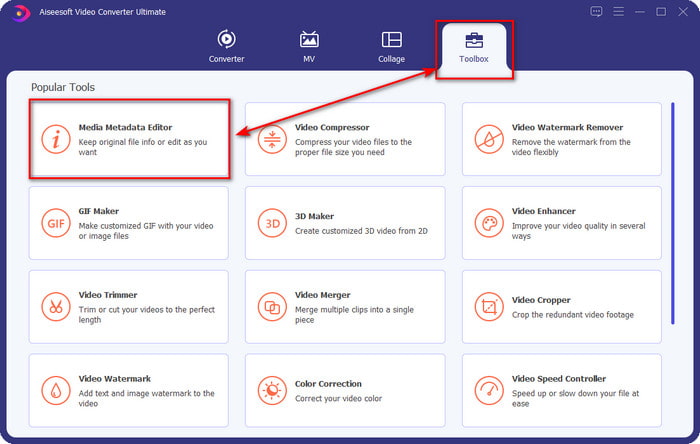
ขั้นตอนที่ 2. เมื่อคุณเปิดโปรแกรมแล้ว ให้ไปที่ส่วน Toolbox และเปิด Media Metadata Editor ด้วยการคลิกที่เมนูนี้.
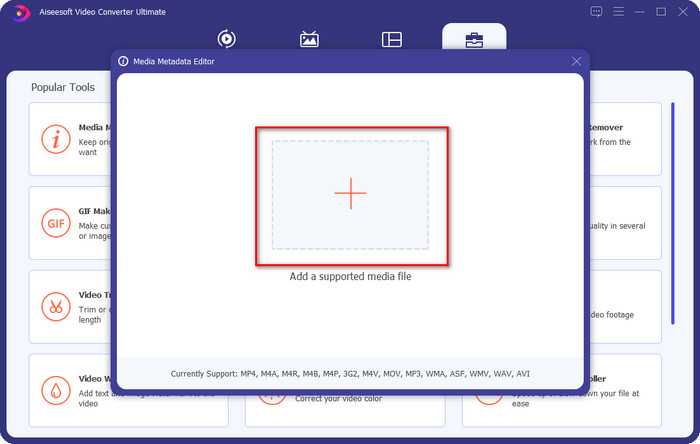
ขั้นตอนที่ 3. กดไอคอน + บนหน้าต่างใหม่ที่ปรากฏบนหน้าจอ เลือกไฟล์เสียงที่คุณต้องการเปลี่ยนแท็ก ID3 แล้วกด Open เพื่ออัปโหลดไฟล์.
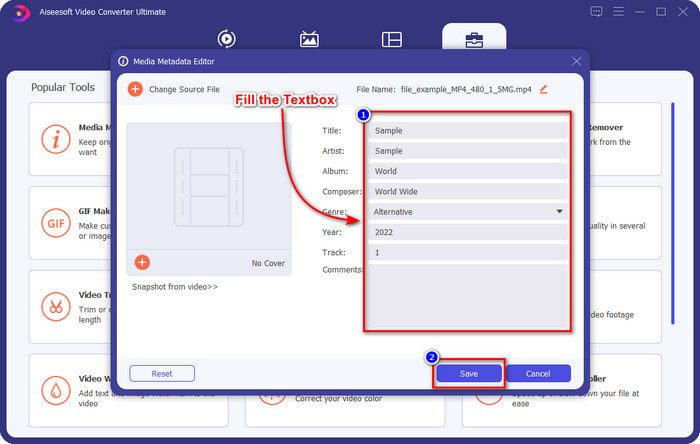
ขั้นตอนที่ 4. ตอนนี้คุณสามารถพิมพ์ข้อมูลที่ต้องการเพิ่มลงในไฟล์เสียงได้แล้ว และคลิก Save เมื่อกรอกข้อมูลในแต่ละ textbox เสร็จ ง่าย ๆ แค่นี้ คุณก็ได้เพิ่มแท็กลงในไฟล์เสียงเรียบร้อยแล้วด้วยความช่วยเหลือของซอฟต์แวร์นี้.
ข้อดี
- รองรับการเปลี่ยนข้อมูลเมตา MP3, WMA, WAV และ 1,000+ อย่างง่ายดาย
- รองรับการแปลงที่รวดเร็วเป็นพิเศษและการเร่งด้วยฮาร์ดแวร์สำหรับกระบวนการความเร็วสูง
- คุณลักษณะการตัดต่อวิดีโอหลักถึงขั้นสูงมีอยู่ใน Toolbox
- เป็นตัวเลือกแรกจากผู้ใช้หลายล้านคนทั่วโลกที่รับงานนี้
จุดด้อย
- จำเป็นต้องซื้อเครื่องมือเพื่อให้มีคุณสมบัติการแก้ไขที่สวยงาม
- ไม่สามารถใช้ได้บน Android และ iOS
VLC Media Player
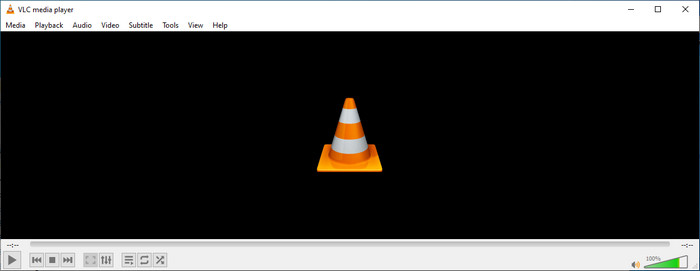
VLC Media Player เป็นโปรแกรมเล่นมีเดียชั้นยอดที่คุณสามารถดาวน์โหลดได้ทั้งบน Windows และ Mac เครื่องมือนี้ช่วยให้คุณเล่นวิดีโอได้โดยไม่ต้องดาวน์โหลดโค้เดกเพิ่มบนระบบ แต่ยังสามารถใช้แก้ไขแท็ก ID3 ของไฟล์เสียงได้ด้วย แม้ว่าโปรแกรมนี้จะไม่ได้เป็นเครื่องมือแก้ไขเมทาดาทาโดยเฉพาะ แต่มันก็ยังสามารถแก้ไขแท็กที่ไม่ถูกต้องได้ ดังนั้นถ้าคุณมีโปรแกรมนี้ คุณก็สามารถปรับเมทาดาทาของเพลงได้ไม่ยาก แต่อย่าคาดหวังสูงเกินไป เพราะมันยังไม่ดีเท่ากับโปรแกรมแก้ไขแท็ก ID3 ระดับเฟิร์สคลาสบนเดสก์ท็อป.
ข้อดี
- เครื่องเล่นสื่อและตัวแก้ไขข้อมูลเมตาที่คุณใช้กับอุปกรณ์ใดก็ได้
- รองรับรูปแบบสื่อเฉลี่ยในการเปลี่ยนแท็ก
- GUI นั้นเรียบง่ายและเรียบง่าย
จุดด้อย
- ไม่ใช่โปรแกรมแก้ไขข้อมูลเมตาระดับมืออาชีพ
- รองรับฟังก์ชันที่จำกัดเกี่ยวกับการแก้ไขแท็ก
ส่วนที่ 3 ตัวแก้ไขแท็ก ID3 3 อันดับแรกบนอุปกรณ์เคลื่อนที่ iOS/Android
ตัวแก้ไขแท็กเพลงสตาร์
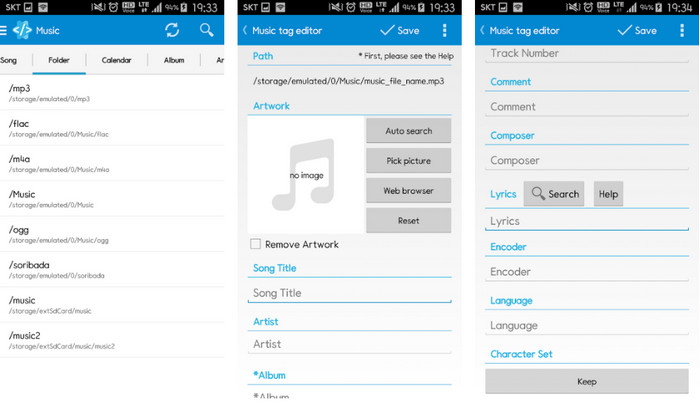
Star Music Tag Editor เป็นหนึ่งในแอปแก้ไขแท็ก ID3 ที่มีผู้ใช้มากที่สุดบน Android แอปนี้จะแสดงข้อมูลต่าง ๆ ของเพลงให้คุณเห็น และคุณสามารถเปลี่ยนแปลงได้ตามต้องการ อินเทอร์เฟซใช้งานง่ายมาก ทำให้เรียนรู้วิธีใช้ได้รวดเร็ว แม้คุณจะไม่คุ้นเคยกับการใช้เครื่องมือแก้ไขแท็กก็ตาม แม้แอปนี้จะยอดเยี่ยม แต่ก็ยังมีข้อบกพร่องบางอย่างในการเพิ่มเมทาดาทา โดยเฉพาะเรื่องปกอัลบั้ม ถึงแม้จะมีปัญหาเกิดขึ้นบ้าง แอปนี้ก็ยังถือเป็นโปรแกรมแก้ไขแท็กที่เชื่อถือได้ที่คุณสามารถดาวน์โหลดมาใช้บนมือถือ Android ของคุณ.
ข้อดี
- ดาวน์โหลดตัวแก้ไขข้อมูลเมตาบน Android ฟรี
- GUI นั้นเรียบง่ายและเข้าใจง่าย
- เพิ่มแท็กในไฟล์เสียงได้อย่างง่ายดาย
จุดด้อย
- มีปัญหาในการเพิ่มภาพหน้าปกในไฟล์เสียง
- บางครั้งข้อบกพร่องยังคงเกิดขึ้น
เครื่องเล่นเพลง Clouds สำหรับ Clouds
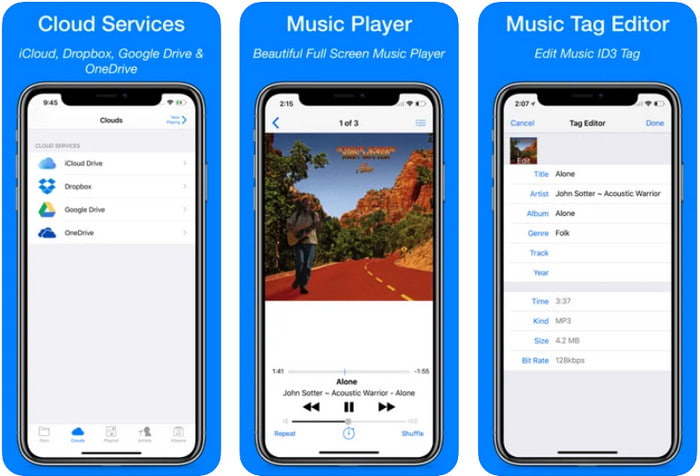
Clouds Music Player for Clouds เป็นแอปสารพัดประโยชน์ที่คุณสามารถดาวน์โหลดมาใช้งานบนอุปกรณ์ iOS ได้ มันสามารถแก้ไขแท็ก ID3 บน iPhone เล่นเพลง และสร้างเสียงเรียกเข้าจากเพลงได้ จากคุณสมบัติเหล่านี้ อินเทอร์เฟซจึงออกแบบมาให้เรียบง่าย และคุณยังสามารถเข้าถึงบริการคลาวด์ผ่านแอปได้ด้วย แม้อินเทอร์เฟซจะใช้งานง่าย แต่ข้อมูลเมทาดาทาบางอย่างที่คุณสามารถเพิ่มลงในไฟล์เสียงนั้นยังไม่เพียงพอ ซึ่งหมายความว่าคุณจะแก้ไขได้เฉพาะแท็กพื้นฐานเท่านั้น อย่างไรก็ตาม แอปนี้ก็ยังเหมาะสำหรับผู้ใช้ iOS ที่ควรดาวน์โหลดมาใช้งาน.
ข้อดี
- ดาวน์โหลดได้บนอุปกรณ์ iOS ใด ๆ
- โปรแกรมแก้ไขเพลงมัลติฟังก์ชั่นและโปรแกรมแก้ไขแท็ก
- ตัวแก้ไขข้อมูลเมตาที่ใช้งานง่ายบน iOS
จุดด้อย
- ไม่รองรับการเพิ่มข้อมูลเมตาเพิ่มเติม
- การเปลี่ยนแปลงจุดบกพร่องและปัญหาของข้อมูลเมตากำลังเกิดขึ้นแต่ไม่บ่อยนัก
Dash- แอปสาระบันเทิง
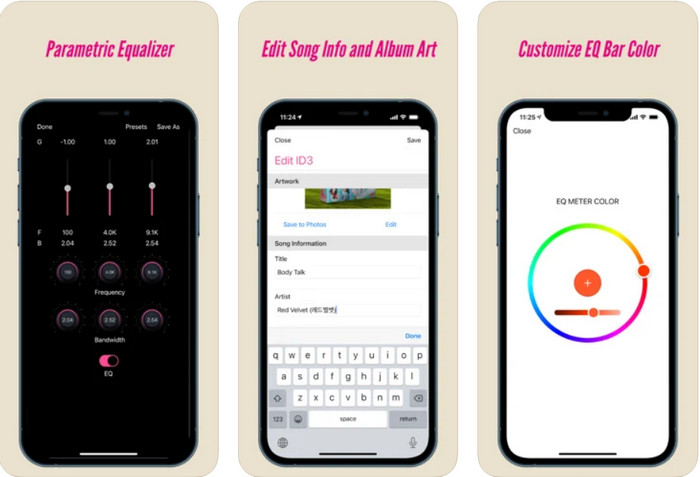
Dash- Infotainment App เป็นอีกหนึ่งเครื่องมือที่คุณสามารถดาวน์โหลดมาใช้เพื่อแก้ไขแท็ก ID3 บน iPhone ได้ตามต้องการ คุณไม่จำเป็นต้องเรียนรู้อะไรมากก่อนใช้งาน เพราะอินเทอร์เฟซเรียบง่ายและเป็นระเบียบ คุณสามารถใช้แอปนี้เปลี่ยนพารามิเตอร์ของไฟล์ FLAC และ ALAC ได้อย่างง่ายดายด้วยอีควอไลเซอร์ที่ใช้งานไม่ซับซ้อน นอกจากนี้ คุณยังสามารถดูความเร็วและเข็มทิศจังหวะของเพลงที่คุณอัปโหลดได้ เช่นเดียวกับแอปแก้ไขแท็กบน iPhone ตัวแรก คุณสามารถเพิ่มได้เพียงชื่อเพลง ศิลปิน และรูปปกอัลบั้มเท่านั้น และต้องจำไว้ว่ารูปแบบไฟล์ต้องเป็น FLAC หรือ ALAC เท่านั้น หากไม่ใช่รูปแบบนี้ คุณจะไม่สามารถอัปโหลดได้.
ข้อดี
- เส้นโค้งการเรียนรู้ไม่แข็งเกินไป
- มีอีควอไลเซอร์เสียงที่หลากหลาย
- GUI ไม่มากและไม่น้อย
จุดด้อย
- รองรับเฉพาะรูปแบบ FLAC และ ALAC
- การแก้ไขข้อมูลเมตาไม่มีอะไรให้มากนัก
ส่วนที่ 4 คำถามที่พบบ่อยเกี่ยวกับ ID3 Tag Editor
ตัวแก้ไขแท็กบรรทัดคำสั่ง ID3 ที่ดีที่สุดที่ฉันสามารถใช้ได้คืออะไร
หากคุณกำลังมองหาโปรแกรมแก้ไขแท็ก ID3 แบบใช้บรรทัดคำสั่ง คุณจำเป็นต้องรู้ว่า FFmpeg เป็นโปรแกรมแก้ไขแบบบรรทัดคำสั่ง ด้วยเครื่องมือนี้คุณสามารถแปลง หมุน ตัด แต่ง และแก้ไขแท็กเมทาดาทาได้ หากคุณต้องการทราบข้อมูลเพิ่มเติมเกี่ยวกับ FFmpeg คุณอาจต้องการอ่านวิธีใช้งานโดยการคลิกที่ลิงก์นี้เพื่อแก้ไขเมทาดาทา FFmpeg ได้อย่างง่ายดาย.
ข้อมูลเมตาประเภทอื่นๆ มีอะไรบ้าง
เมทาดาทามีอยู่ 6 ประเภท ได้แก่ เมทาดาทาเชิงบรรยาย เมทาดาทาทางการจัดการ เมทาดาทาอ้างอิงหรืออธิบาย เมทาดาทาทางสถิติ เมทาดาทาทางกฎหมาย และเมทาดาทาเชิงโครงสร้าง หากคุณต้องการทราบเพิ่มเติมเกี่ยวกับแต่ละประเภทและข้อมูลของมัน คุณสามารถคลิกที่ลิงก์นี้เพื่ออ่านรายละเอียดเพิ่มเติม.
สามารถดูแท็กโดยไม่มีแอพได้หรือไม่?
ได้ คุณสามารถใช้เครื่องมือออนไลน์เพื่อดูแท็กของไฟล์แทนการดาวน์โหลดซอฟต์แวร์ได้ คลิกที่ลิงก์นี้เพื่อดูเมทาดาทาบนเดสก์ท็อปของคุณแบบออนไลน์ แต่เราก็จะมีการแนะนำเครื่องมือบางตัวที่คุณอาจอยากดาวน์โหลดมาใช้ด้วยเช่นกัน.
สรุป
ด้วยข้อมูลที่เราระบุไว้ข้างต้น คุณสามารถแก้ไขแท็ก ID3 โดยใช้ตัวแก้ไขที่เรานำเสนอด้านบน ไม่ว่าคุณจะใช้อุปกรณ์ใดอยู่ก็ตาม นอกจากนี้ แอพและซอฟต์แวร์ยังเหมาะสำหรับผู้ใช้ที่ต้องการแก้ไขข้อมูลเมตา แม้ว่าเครื่องมือจะเปิดโอกาสที่ยอดเยี่ยมสำหรับผู้ใช้ในการแก้ไขข้อมูลเมตา แต่ก็ยังไม่ต้องสงสัยเลยว่าเครื่องมือที่ดีที่สุดนำเสนอวิธีที่มีประสิทธิภาพในการแก้ไขแท็ก ID3 บนไฟล์เพลงใดๆ หากคุณต้องการมีตัวแก้ไขแท็ก ID3 ที่ดีที่สุดบน Windows และ Mac คุณสามารถดาวน์โหลดได้โดยคลิกที่ปุ่มดาวน์โหลดที่แสดงด้านบน จากนั้นเพลิดเพลินไปกับความยิ่งใหญ่ของมัน
-
 2 วิธีที่ดีที่สุดในการแก้ไขข้อมูลเมตา OGG ที่คุณควรลองใช้ฟรี
 ต้องการแก้ไขข้อมูลเมตา OGG หรือไม่ คุณสามารถจัดการแก้ไขแท็กได้อย่างง่ายดายโดยใช้ซอฟต์แวร์ที่ถูกต้อง หากคุณไม่มี'ต้องอ่านบทความนี้
-
 ภาพรวมแบบสัมบูรณ์เกี่ยวกับ Pentaho Metadata Editor [อัปเดต 2022]
 ไม่พบบทความที่เชื่อถือได้เกี่ยวกับ Pentaho Metadata Editor ใช่หรือไม่ โชคดีที่เราได้ตรวจสอบเครื่องมือด้วยตนเองเพื่อให้ข้อเท็จจริงที่คุณจะทราบเกี่ยวกับเครื่องมือนี้
-
 Tips & Tricks เกี่ยวกับ VLC Metadata Editor ที่คุณต้องรู้จักในปี 2022
 คุณต้องการใช้ VLC เป็นตัวแก้ไขข้อมูลเมตาหรือไม่? ในกรณีนี้ คุณสามารถอ่านบทความนี้ในขณะที่เราจัดเตรียมการตรวจทานตัวแก้ไขข้อมูลเมตา VLC อย่างเป็นกลาง
